What are Microsoft's Compliant P2 (Primary) Sender Address requirements for email deliverability?

Updated on 6 Aug 2026: We updated this guide for Microsoft's enforced high-volume sender requirements and clarified P2 reply routing.
The short answer: Microsoft does not require the visible sender address to use only the root domain. A campaign can use a branded subdomain such as patrick@email.xyzcompany.com, as long as the address is syntactically valid, the domain genuinely belongs to the sending organization, DNS and authentication are correct, and the message provides a working reply path.
The requirement is aimed at broken or misleading visible sender addresses. P2 specifically means the 5322.From address shown in the message header. Reply-To is a separate message header that tells mail clients where responses should go. Both are separate from the SMTP envelope sender used for bounces. Microsoft's Microsoft announcement says high-volume senders to Outlook.com consumer domains need SPF, DKIM, DMARC, and compliant P2 sender addresses.
- Root domain: Using xyzcompany.com is acceptable, but it is not the only acceptable pattern.
- Subdomain: Using email.xyzcompany.com is acceptable when it has the right DNS, authentication, and routing.
- No-reply: A no-reply From address needs a valid Reply-To or another intentional response path.
- Mismatch: A visible sender on an unrelated domain is the pattern Microsoft is trying to reduce.
What Microsoft means by P2 sender address compliance
Microsoft's phrase requires a valid visible address tied to the true sending domain, plus a working reply path through From or Reply-To. These are operational requirements, not copywriting preferences.
Valid means the address parses under normal email header rules and its domain exists. It should not contain broken punctuation, hidden characters, an invalid domain, or a display name that disguises a different brand. Microsoft can reject malformed From headers before reputation signals affect placement.
Reflects the true sending domain means the recipient and mailbox provider should be able to connect the visible sender to the organization that controls the mail stream. A subdomain of your brand is fine. An unrelated domain that recipients do not recognize creates avoidable risk.
The key interpretation
The requirement is not a ban on subdomains. It targets weak visible identity: malformed headers, unauthenticated domains, missing reply paths, and sender domains that do not match the brand or sending setup.
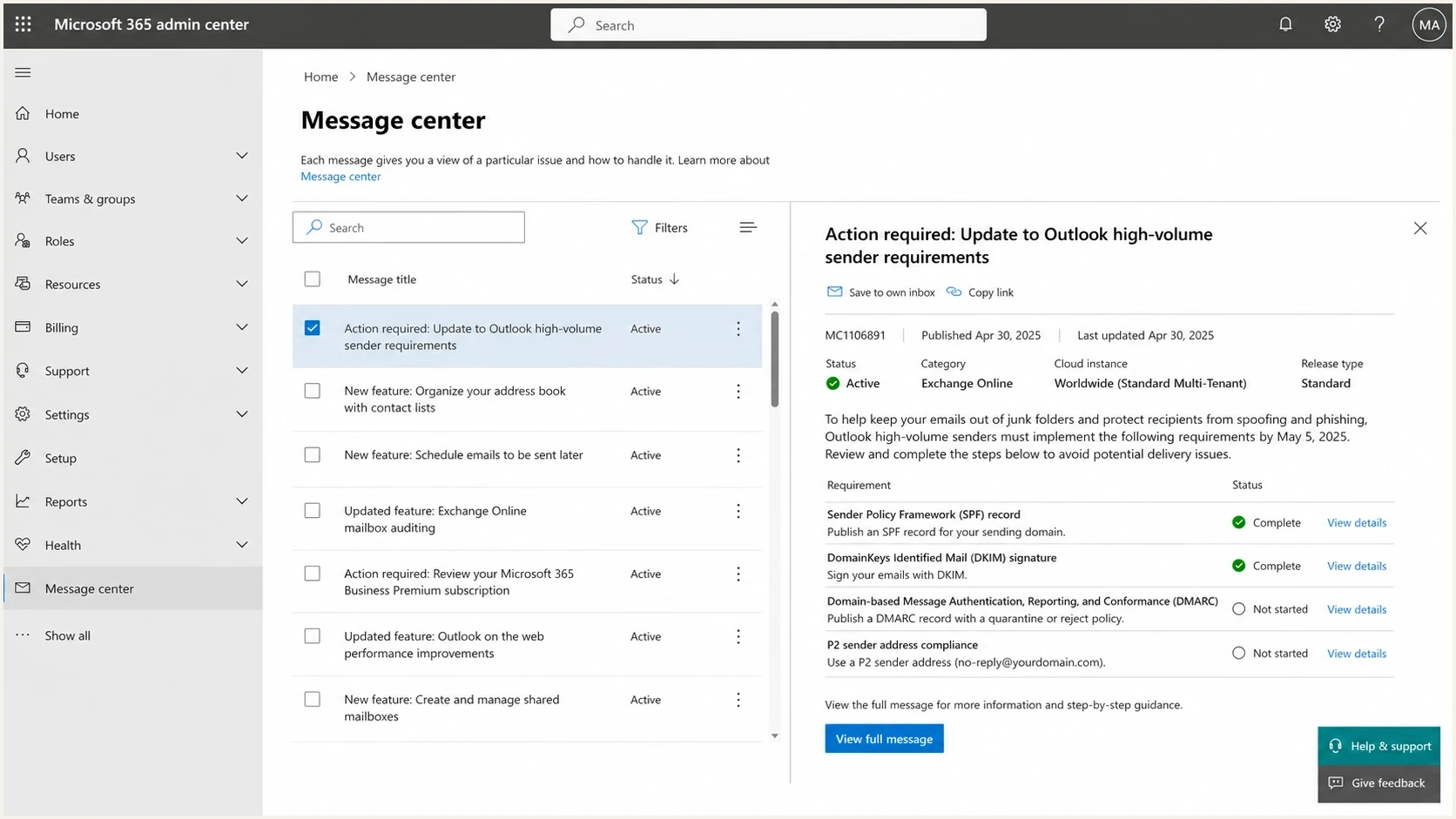
Microsoft 365 admin center Message center notice about Outlook sender requirements.
Who Microsoft's high-volume rule covers
Microsoft defines a high-volume sender as one that sends 5,000 or more messages to Microsoft consumer email services using the same domain in the 5322.From address. The consumer scope includes Outlook.com and related Hotmail, Live.com, and MSN addresses. Once a domain reaches that threshold, Microsoft expects all messages using that From domain to meet the authentication requirements.
- Threshold: Count 5,000 or more messages sent to Microsoft consumer services under the same 5322.From domain.
- SPF and DKIM: Publish both records and make sure both checks pass on the message.
- DMARC: Publish at least p=none and pass DMARC through SPF or DKIM domain alignment.
- Enforcement: Microsoft now rejects messages that miss the required authentication level instead of only routing them to Junk.
Microsoft rejection responsetext
550 5.7.515 Access denied, sending domain [SendingDomain] does not meet the required authentication level.
A safe-sender entry does not replace these checks. Treat 5.7.515 as an authentication failure for the 5322.From domain, then inspect SPF, DKIM, DMARC, and alignment in the rejected message stream.
Does the address need to be on the root domain
No. Also, the terminology matters. The TLD is the last label, such as .com. The root or organizational domain is usually xyzcompany.com. Microsoft is not telling senders to put the visible address at .com, and it has not stated that every visible address must use only xyzcompany.com.
For email deliverability, a branded subdomain is often the cleaner choice for high-volume campaigns. It lets a company separate message streams by purpose while keeping the domain under the same organizational control. The From domain should have valid DNS and pass DMARC through SPF or DKIM domain alignment. The address designated for replies should also have working mail routing.
Compliant subdomain pattern
- Domain: email.xyzcompany.com is controlled by xyzcompany.com.
- Mailbox: Replies reach a monitored inbox, queue, or ticketing workflow.
- Auth: SPF, DKIM, and DMARC pass with domains that match the visible brand.
- Identity: Recipients can recognize who sent the message.
Risky visible sender pattern
- Domain: The sender uses an unrelated or unclear domain.
- Mailbox: Replies bounce, disappear, or hit an unmonitored box.
- Auth: DMARC fails or uses a domain unrelated to the visible sender.
- Identity: Recipients cannot tell who is responsible for the message.
|
|
|
|---|---|---|
Personal sender on brand subdomain | Good | The domain belongs to the brand and replies can route correctly. |
Team mailbox on root domain | Good | The address is recognizable and can receive responses. |
No-reply From with working Reply-To | Good | The From address is valid and replies have a clear route. |
No-reply From without working Reply-To | Risky | The message provides no usable response path. |
Unrelated vendor domain | High risk | It fails the true sending domain test for most brand mail. |
Practical examples of Microsoft P2 sender address risk.
What counts as a valid From or Reply-To address
A valid P2 address is more than a string that looks like an email address. Check syntax, DNS, reply handling, and message authentication together because a failure in any one of them can break the sending setup.
Header exampletext
From: Patrick <patrick@email.xyzcompany.com>
Reply-To: Support <support@xyzcompany.com>
Return-Path: bounce-123@bounces.email.xyzcompany.com
Message-ID: <abc123@email.xyzcompany.com>
That example separates visible identity, reply handling, and bounce processing. The From address uses a branded campaign subdomain. Reply-To routes to the support mailbox on the root domain. Return-Path handles bounces and does not need to match the visible address exactly, though it should still be part of the authenticated sending setup.
- Syntax: Use one mailbox in From for normal campaigns, place addresses after display names in angle brackets, and avoid text after the address. If multiple authors are necessary, RFC 5322 requires one Sender address.
- DNS: The From domain must exist. The domain used for replies needs mail routing unless it intentionally publishes a null MX and a separate Reply-To handles responses.
- Replies: From or Reply-To should route legitimate responses into a monitored inbox, queue, or automation.
- Authentication: SPF and DKIM should pass, and DMARC should pass for the 5322.From domain through alignment.
Minimum authentication recordsdns
email.xyzcompany.com. TXT "v=spf1 include:send.example -all"
selector1._domainkey.email.xyzcompany.com. TXT "v=DKIM1; k=rsa; p=..."
_dmarc.xyzcompany.com. TXT "v=DMARC1; p=none; rua=mailto:d@r.example"
For the visible sender domain, DMARC starts at the organizational domain unless a subdomain has its own record. If the From domain is email.xyzcompany.com, publish a DMARC record where your policy model expects it, then confirm DKIM or SPF domain alignment. Suped's DMARC monitoring workflow helps catch cases where a sender looks compliant in DNS but fails in actual traffic.
How to test the requirement before Microsoft sees it
The fastest test is to send a real message and inspect the headers, authentication results, and reply path. Do not stop at a DNS lookup. A DNS lookup tells you whether records exist. A message test tells you whether the email that left your platform actually used the expected From, Reply-To, DKIM domain, SPF domain, and Return-Path.
Use this order when reviewing a new Microsoft-bound stream: confirm the visible sender address, send a seed message, inspect the received headers, reply to the message, and check aggregate DMARC results once real traffic appears. Suped's test a message flow moves the review out of DNS theory and into the message Microsoft will evaluate.
Email tester
Send a real email to this address. Suped shows a results button when the test is ready.
?/43tests passed
After the message-level check, test the domain as a whole. A passing P2 address still suffers if the domain has broken SPF, missing DKIM, weak DMARC, poor rDNS, or a reputation issue. The public domain health check is a quick way to catch the surrounding issues that make a compliant address look suspicious.
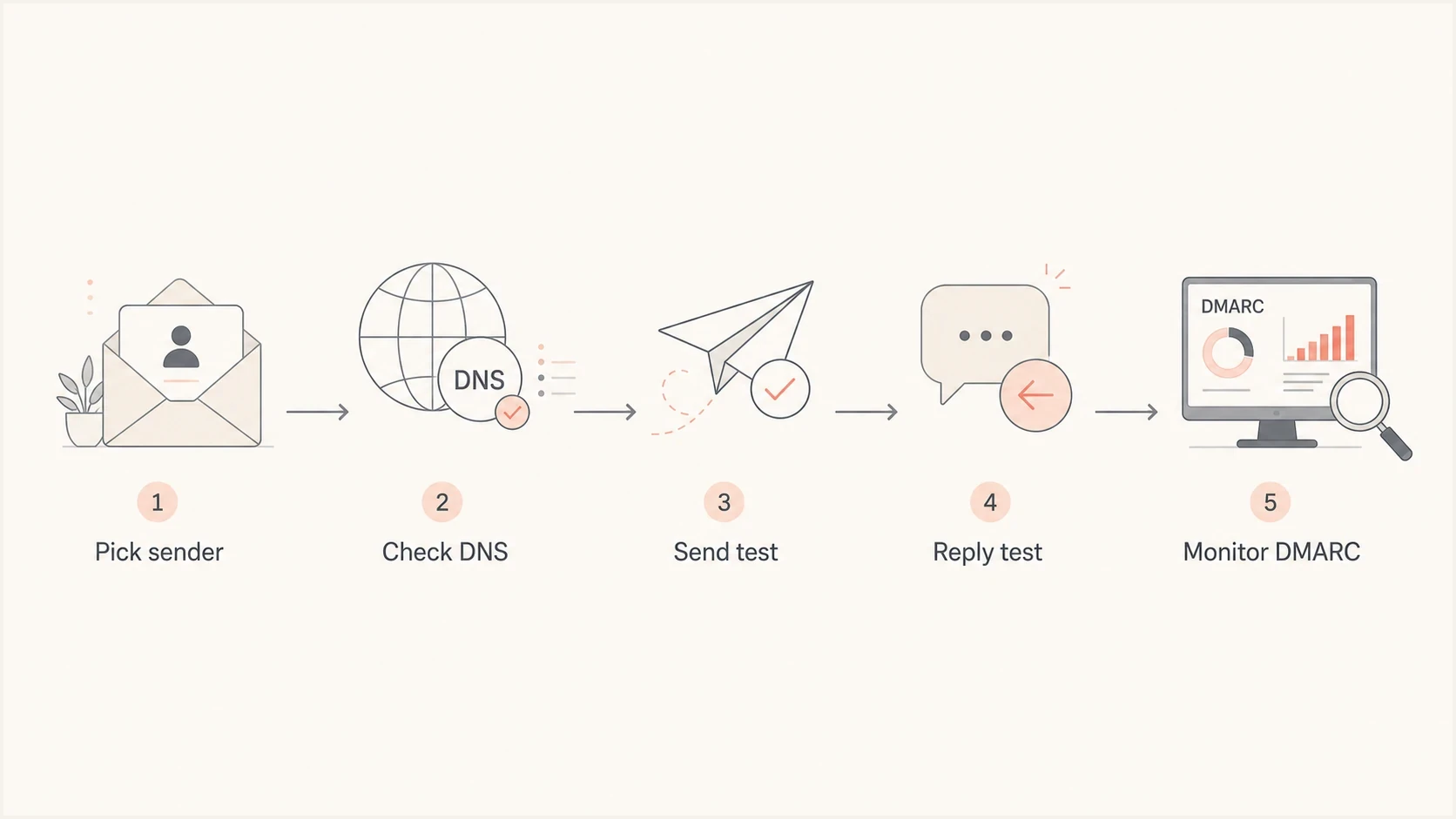
Flowchart for checking a sender address before sending to Microsoft domains.
Can a no-reply address comply
A no-reply address is not automatically non-compliant because of the local part alone. The words before the at sign matter less than the address's technical behavior. A no-reply From address can use a separate Reply-To that accepts responses.
Microsoft's From-address guidance also documents a null MX for a dedicated custom domain when a sender intentionally suppresses direct auto-replies. For high-volume campaigns, pair that setup with a valid Reply-To that routes responses into a reviewed queue. Marketing and relationship mail usually work better with a team or named sender that has an obvious response path.
Make the response path explicit
If the From address does not accept mail, add a working Reply-To and test it. An auto-response that discards every message gives recipients no useful route for support, privacy requests, abuse reports, or unsubscribe problems.
- Best: Use a monitored From mailbox or Reply-To queue.
- Acceptable: Use automation that accepts mail and routes useful replies.
- Risky: Reject replies without providing a working Reply-To.
- Invalid: Use a malformed or unrelated address that fails header validation.
How Suped fits the workflow
P2 sender compliance is partly policy and partly evidence. Teams need a standard for which From and Reply-To addresses they can use, plus proof that the real mail stream matches that standard.
Suped is our DMARC and email authentication platform. Suped's product collects aggregate reports, identifies the systems using each 5322.From domain, and surfaces SPF, DKIM, or DMARC failures that affect Microsoft-bound mail. Teams can compare those results with an approved sender inventory and assign specific remediation work when a new source appears.

Issue steps to fix dialog showing the issue overview, tailored fix steps, and verification action
The practical value is that failures become tasks instead of mysteries. If a campaign subdomain starts failing DKIM or a sender appears without approval, Suped can alert the responsible team and show the steps to fix it. MSPs can also manage multiple client domains in one dashboard when clients have different sender naming rules.
P2 sender address risk levels
A practical way to classify visible sender address risk before a Microsoft-bound send.
Low risk
Ready
Brand domain, working mailbox, passing SPF, DKIM, and DMARC.
Needs review
Review
Valid subdomain, but reply routing or DKIM domain alignment is unverified.
High risk
Fix
Missing reply path, unrelated domain, malformed address, or DMARC failure.
Monitor
Watch
Compliant today, but new senders or templates can change the header set.
Checklist for Microsoft-bound campaigns
Use this checklist before a domain sends at volume to Outlook.com, Hotmail.com, Live.com, and MSN consumer addresses. It also helps with broader Outlook delivery work because visible identity and authentication failures tend to show up together.
- Inventory: List every From and Reply-To address used by marketing, product, sales, support, and transactional systems.
- Ownership: Confirm each domain is controlled by the brand or a clearly approved brand subdomain.
- Routing: Send a reply to the address designated for responses and verify it reaches a monitored workflow.
- Headers: Send a real message and inspect From, Reply-To, Return-Path, DKIM, SPF, and DMARC results.
- Policy: Document which sender patterns are approved and block unapproved templates before launch.
- Monitoring: Watch DMARC results, complaints, bounces, and blocklist or blacklist events after launch.
The simplest internal rule
Approve only visible sender addresses that belong to the brand, provide a reply path, and pass authentication in an actual test message. Everything else needs a fix before volume ramps.
Views from the trenches
Best practices
Verify every visible From address with a real inbox before campaign approval finishes.
Use a branded subdomain only when DNS, MX handling, and reply routing are tested.
Keep exception notes for sender addresses so support teams can explain routing decisions.
Common pitfalls
Using no-reply addresses that bounce replies creates a weak point in Microsoft reviews.
Treating subdomains as invalid by default leads to avoidable rebuilds and send delays.
Changing sender identities often makes compliance checks harder to audit and defend.
Expert tips
Add approval controls for new From addresses before templates reach production sends.
Limit reply address slots when many teams can create campaigns under one sending domain.
Monitor replies and complaints together to spot sender address misuse before escalation.
Marketer from Email Geeks says Microsoft appears focused on RFC-compliant visible sender addresses, not on forcing every campaign to use the root domain.
2025-05-05 - Email Geeks
Marketer from Email Geeks says reply acceptance can be checked through real inbound mail patterns, especially when complaints or support requests trigger review.
2025-05-05 - Email Geeks
Microsoft P2 sender requirements in practice
Microsoft's compliant P2 sender address requirement does not mean every high-volume email must come from the root domain. It means the 5322.From identity must be real, controlled by the brand, technically valid, and authenticated, with responses handled through From or Reply-To.
If the choice is noreply@email.xyzcompany.com or patrick@email.xyzcompany.com, use the address that fits the message type and provides a clear response path. Marketing or relationship mail usually benefits from a person, team, or role mailbox. Transactional mail can use a no-reply local part when a working Reply-To routes responses somewhere useful.
The safest setup is predictable: a branded From domain, a real reply path, working SPF and DKIM, DMARC alignment, and monitoring that catches changes before Microsoft rejects the mail. Suped's product turns that into a repeatable workflow across domains, teams, and clients.




