What are best practices for cold email outreach and its impact on deliverability?

Updated on 5 Aug 2026: We added current mailbox-provider requirements and tightened the guidance on domain separation, list hygiene, opt-outs, and campaign stop rules.
The best practice for cold email outreach is to protect the primary brand domain, send only highly targeted and compliant messages, validate addresses before sending, authenticate every sending domain with SPF, DKIM, and DMARC, ramp volume slowly, and monitor complaints, bounces, authentication failures, and blocklist or blacklist signals. Keep repeatable cold outreach off the domain used for customer, billing, support, employee, or opted-in marketing mail.
Cold outreach affects deliverability because mailbox providers judge behavior, not intent. Low positive-reply rates, deleted-without-reading signals, spam complaints, purchased or scraped addresses, stale data, and sudden volume spikes teach filters that a sender is risky. A separate outreach domain reduces the blast radius, but it does not make poor sending safe. Some blocklists, blacklists, and mailbox filters connect related domains through brand, infrastructure, links, redirects, tracking hosts, and recipient complaints.
- Start with consent: Prefer inbound, referrals, webinars, events, and other consent-based paths before cold outreach.
- Separate risky streams: Keep cold outreach away from transactional, support, employee, and opted-in marketing domains.
- Validate every address: Remove invalid, stale, opted-out, and unsuitable role addresses before launch.
- Measure before scaling: Do not increase volume until authentication is stable and bounce and complaint signals stay low.
The direct answer
For most companies, the safest structure keeps normal business mail on the primary domain and repeatable cold outreach on a clearly branded dedicated domain or subdomain with its own mailboxes and tracking host. A subdomain separates operations but remains visibly tied to the parent domain. A secondary domain adds containment, but it also requires careful branding so recipients do not mistake it for impersonation.
That separation is only risk containment. It is not permission to send irrelevant email. A cold outreach domain with poor lists and aggressive automation still gets filtered, blocked, or listed. The damage can spill back to the main brand when messages use the same website links, reply identity, tracking host, or sending infrastructure.
A line not to cross
Do not connect a sales engagement system to a personal mailbox on the main company domain and start cold outreach at scale. That blends employee mail, customer mail, and prospecting risk in the same sender reputation pool.
- Main domain: Use it for employee mail, transactional mail, support, and high-trust customer communication.
- Outreach domain: Use it for controlled sales tests with strict list quality, low volume, and monitoring.
- No shortcut: A new domain still needs DNS setup, authentication, matching identity, suppression controls, and reputation history.
Before a campaign goes live, send real test mail and inspect the headers, authentication results, reply path, unsubscribe path, and content signals with an email tester. That catches broken SPF, missing DKIM, malformed DMARC, link-heavy templates, and obvious content problems before real prospects judge the sender.
Why cold outreach hurts deliverability
Deliverability damage starts when recipients and mailbox filters see a pattern that looks unwanted. Cold email has a high chance of that pattern because the recipient did not request the message, does not know the sender, and often gets similar pitches from many companies.
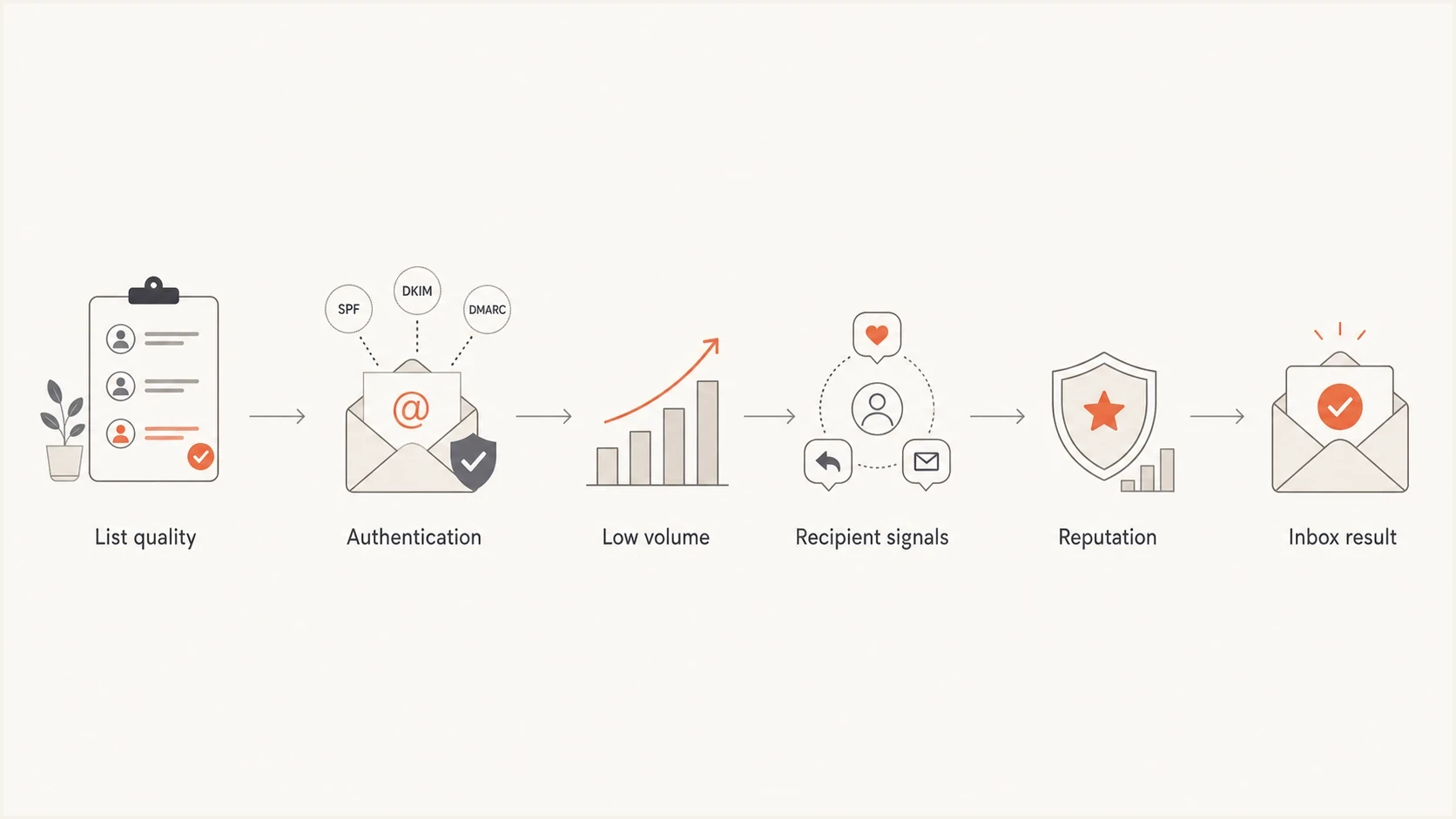
Cold email deliverability flow from list quality to inbox result.
The technical pieces matter, but they do not override behavior. SPF, DKIM, and DMARC prove who sent the mail. They do not prove the mail is wanted. A fully authenticated cold email can still land in spam when recipients ignore it, delete it, complain, or when the list contains traps, stale contacts, and role accounts.
|
|
|
|---|---|---|
High bounces | List age or quality problem | Pause and revalidate |
Spam complaints | Recipients reject the pitch | Suppress and pause |
DMARC failures | Sender identity does not match | Fix authentication |
Blocklist or blacklist hit | Reputation is damaged | Pause sends |
Cold outreach risk signals
Cold outreach also changes the risk profile of the whole company. If a sales program uses the same domain as product alerts or invoices, a poor campaign can reduce trust in mail that customers need. Separate high-risk streams before debating copy, cadence, or automation.
Choosing an outreach domain
The domain choice depends on risk tolerance, volume, and how closely outreach needs to match the brand. For very small, manual, relationship-based outreach, a named employee mailbox on the primary domain can work if targeting is excellent and volume stays low. For repeatable cold campaigns, use a separate, clearly branded domain or subdomain and keep the sender identity transparent.
Using the main domain
This fits low-volume outreach where the sender has a real business reason to contact each person.
- Benefit: The message has clearer brand recognition and fewer lookalike-domain concerns.
- Risk: Complaints and bounces affect the same domain used for customer communication.
- Use case: One-to-one messages, known accounts, event follow-up, and referrals.
Using a separate domain
This fits controlled outbound tests where sales volume is expected to grow.
- Benefit: It reduces direct risk to customer, employee, and transactional mail.
- Risk: Filters still connect related domains through links, content, and behavior.
- Use case: Prospecting tests, new sales motions, and campaigns with uncertain complaint risk.
A separate domain should still be clearly connected to the company. Avoid deceptive lookalikes and confusing spellings. If the primary domain is example.com, a clean outreach domain such as examplehq.com is safer than a domain that imitates the primary domain with a small typo. Register related domains defensively and publish a real website or redirect that makes ownership clear.
Do not use domain separation to hide
Domain separation is for containment and measurement. If the plan depends on hiding the brand, rotating burned domains, or making it hard for recipients to identify the sender, the campaign is already a reputation problem.
Warm up without fake engagement
A new outreach domain needs legitimate sending history before it carries meaningful volume. The right warm-up is not fake opens, artificial replies, or networks that simulate engagement. Mailbox providers can identify patterns that do not match real recipients, and the domain can look worse when that artificial behavior stops.
Warm up with legitimate, low-volume business mail first: internal correspondence, known partner conversations, event follow-ups, customer-approved introductions, and carefully selected prospects with a clear business reason. The goal is stable behavior with real recipients, not a manufactured score.
Example weekly volume ramp
Use this as a ceiling for a new outreach domain, not a target to hit.
Daily sends
The chart shows an example ceiling, not a safe-volume promise. Stop increasing volume when bounces, complaints, deferrals, negative replies, or spam placement rise. A domain sending 50 carefully reviewed messages per mailbox per day has a different risk profile from one sending the same number to a scraped list. Recipient response and SMTP feedback matter more than the count.
- Week one: Send only known-contact and warm-context mail while authentication and reply handling are verified.
- Weeks two to three: Add a small number of high-fit cold prospects after manual address and relevance checks.
- Weeks four onward: Scale only when bounces, complaints, deferrals, and spam placement stay low.
Technical setup before first send
Every outreach domain needs SPF, DKIM, DMARC, valid forward and reverse DNS for its sending infrastructure, TLS, MX records, a real mailbox, a monitored reply path, and centralized suppression before the first campaign. The visible From domain must match either the SPF-authenticated return-path domain or the DKIM signing domain for DMARC to pass. Broken identity is an easy way to lose trust before the recipient reads a word.
Baseline DNS recordsdns
outreach.example.com. TXT "v=spf1 include:_spf.sender.example -all"
selector1._domainkey.outreach.example.com. TXT "v=DKIM1; k=rsa; p=KEY"
_dmarc.outreach.example.com. TXT "v=DMARC1; p=none; rua=mailto:d@example.com"
Publish one SPF record that authorizes only current sources, enable DKIM signing for each source, and verify that at least one authenticated domain matches the visible From domain. Keep p=none only long enough to identify legitimate sources and fix failures. Move to p=quarantine and then p=reject when legitimate traffic passes consistently. An outreach domain without enforcement can be spoofed, which adds noise to the same reputation pool being measured.
Run a full domain health checker pass before launch, then repeat it whenever sales changes sending systems, domains, tracking links, DNS records, or mailboxes.
?
What's your domain score?
Deep-scan SPF, DKIM & DMARC records for email deliverability and security issues.
Authentication checks are not a one-time project. Sales teams add mailboxes, change sequences, add redirect links, and test new sending systems. Each change can break SPF or DKIM, create an unauthenticated source, increase SPF DNS-lookup pressure, or bypass the central suppression list.
Meet current mailbox-provider requirements
Mailbox-provider rules apply to the sending domain and traffic pattern, not the label a sales team gives the campaign. Cold outreach can trigger bulk-sender requirements when the organization crosses a provider's threshold, and spreading mail across subdomains does not reliably remove that classification.
|
|
|
|---|---|---|
Gmail | All senders to personal Gmail accounts | Use SPF or DKIM, valid DNS, TLS, accurate message formatting, and keep reported spam below 0.3%. |
Gmail bulk | More than 5,000 messages per day to personal Gmail accounts | Use SPF, DKIM, and DMARC with a matching From domain. Marketing and subscribed mail also needs one-click unsubscribe and a visible body link. |
Yahoo bulk | Senders of significant volume | Authenticate mail, keep complaints below 0.3%, support one-click unsubscribe, and honor requests within two days. |
Outlook.com bulk | More than 5,000 messages per day to Outlook.com consumer accounts | SPF, DKIM, and DMARC must pass. Noncompliant high-volume mail has been rejected since May 2025. |
Current consumer mailbox requirements that affect outreach
Treat 0.3% as an enforcement ceiling, not a healthy target. Set the internal warning threshold below 0.1%, review complaints by sending domain and campaign, and stop the sequence when the rate rises. A visible opt-out remains useful below bulk thresholds because it gives an uninterested recipient an alternative to the spam button.
One-click means an email header
A body link alone does not meet the one-click requirement. The sending system must add RFC 8058 List-Unsubscribe and List-Unsubscribe-Post headers, process the request without a login or confirmation step, and add the address to a suppression list. Keep a clear unsubscribe link in the message body as well.
Operational rules that protect reputation
The best technical setup still fails with bad operations. Treat cold outreach as a governed channel with rules sales can understand: who can be contacted, why the message is relevant, how many touches are allowed, when to stop, and which signal pauses the program.
- List source: Use narrow account criteria, avoid purchased lists, and record where each address came from.
- Address validation: Validate before every campaign and suppress hard bounces, previous opt-outs, and risky role accounts.
- Message fit: Write to a specific, verified business reason and check every personalized field.
- Cadence cap: Limit follow-ups and stop immediately after a negative reply or opt-out.
- Link hygiene: Avoid link-heavy templates, URL shorteners, shared tracking domains, and unnecessary tracking.
- Reply handling: Route replies to real people and synchronize opt-outs across every domain and mailbox.
Watch blocklist and blacklist listings because they are lagging indicators of a deeper problem. A listing does not mean every mailbox provider will block the mail, but it is a strong reason to pause sending and inspect list source, volume, authentication, links, and complaint patterns. Suped's blocklist monitoring keeps that signal next to DMARC and domain health so the same owner can investigate both.
Cold outreach stop rules
Use thresholds as stop signs. Investigate before sending more.
Healthy
Stable bounces, complaints below 0.1%
Keep the current volume steady.
Warning
Bounces or deferrals rising
Pause volume increases and review targeting.
Critical
Complaint spike or listing
Stop campaigns and fix the cause.
Open rates are distorted by privacy protections and automated image loading, so do not treat them as proof of inbox placement or interest. Give more weight to positive replies, hard bounces, spam complaints, opt-outs, deferrals, delivery errors, and qualified conversations. Review these by domain, mailbox, campaign, and recipient provider before changing copy or increasing volume.
When sending behavior damages reputation, review list quality, identity, volume, and SMTP responses before running more copy tests. Subject lines cannot repair a campaign aimed at invalid or uninterested recipients.
Where Suped fits
Suped is our DMARC and email authentication platform. In a cold-outreach workflow, it helps answer which source sent mail for each domain, whether SPF and DKIM pass, whether the authenticated domain matches the visible From domain, whether an unknown source appeared, and which issue needs action before sales adds volume.
Issues page showing top issues, verified sources, unverified sources, and authentication pass rates
A practical Suped workflow puts outreach domains in their own monitoring scope, verifies every legitimate sending source, and watches new DMARC failures before sales increases volume. Suped's product also connects authentication findings with alerts and blocklist or blacklist monitoring, so a domain owner can investigate the sending source and reputation signal together.
This is useful for small teams and MSPs because someone has to notice when a sales system starts sending without DKIM, a vendor changes infrastructure, an outreach domain gets listed, or DMARC reports show an unknown source. The owner can then pause the affected stream, correct the source, and verify clean reports before sending resumes.
A practical Suped workflow
- Add domains: Monitor the primary domain and every outreach domain in the same account.
- Verify sources: Confirm which sending systems are legitimate before enforcing policy.
- Set alerts: Notify the owner when failures, unknown sources, or listings appear.
- Stage policy: Move DMARC enforcement forward only after legitimate traffic is clean.
For broader authentication policy guidance, use DMARC monitoring to establish a clean baseline before cold outreach grows.
Compliance and consent still matter
Deliverability and compliance are separate, but they overlap in practice. Clear identification, a real business purpose, accurate sender details, a valid postal address where required, and fast opt-out handling reduce complaints. A campaign that scrapes broad lists, hides the sender, or ignores unsubscribes creates legal and deliverability risk at the same time.
In the United States, CAN-SPAM covers commercial email, including business-to-business messages. It requires accurate headers, a non-deceptive subject line, identification as an advertisement, a valid physical postal address, a clear opt-out method, and action on opt-outs within 10 business days. Mailbox-provider rules can require faster processing.
In the UK, PECR generally treats corporate subscribers differently from individuals, sole traders, and some partnerships. Even when prior consent is not required for a corporate subscriber, the sender must not conceal its identity, must provide an opt-out address, and still needs a lawful basis when processing personal data. Check the recipient's location and status before relying on a business-to-business exception.
Cold outreach is not automatically illegal everywhere, and it is not automatically acceptable. Contact fewer people with a documented reason, honor opt-outs immediately, keep a central do-not-contact list, and make the sender identity plain. For more detail on the boundary, read about illegal spam tactics.
An internal policy to use
Sales can test cold outreach only when the domain is separated where needed, authentication passes, opt-outs are centralized, addresses and bounces are reviewed, and a named owner has authority to pause sending. Without that owner, the campaign waits.
Views from the trenches
Best practices
Separate cold outreach from core mail, then monitor both domains for shared risk signals.
Warm a domain with real business mail and controlled prospecting, not fake engagement loops.
Pause campaigns when complaints, bounces, unknown sources, or blocklist hits appear.
Use consent-led channels first when the target audience can be reached without cold mail.
Common pitfalls
Connecting outreach tools to a primary employee mailbox mixes sales risk with customer mail.
Relying on automated warm-up hides behavior until real sending patterns expose the domain.
Treating cousin domains as disposable still leaves brand, link, and infrastructure trails.
Scaling before replies and bounce data are reviewed turns weak targeting into reputation loss.
Expert tips
Give sales a written stop rule so deliverability decisions are not made during pipeline pressure.
Track reply quality, not just reply count, because negative replies still train poor reputation.
Keep tracking domains separate and clean so one bad campaign does not taint core links.
Review DMARC reports weekly during launch, then tighten policy when sources stay stable.
Expert from Email Geeks says separate domains are common for business development outreach, but the new domain still needs a careful warm-up period.
2025-03-04 - Email Geeks
Marketer from Email Geeks says cold email is treated as spam by many deliverability-focused teams, so expectations should be set before launch.
2025-03-04 - Email Geeks
A practical standard to use
The best practice goes beyond using a separate domain. Use cold outreach only when it is targeted, compliant, technically authenticated, monitored, and easy to stop. Domain separation lowers the risk to core mail, but it cannot repair irrelevant targeting or weak list sourcing.
Before sales proceeds, require an appropriate outreach domain, clean SPF and DKIM, DMARC reporting, a real reply inbox, verified addresses, centralized opt-out handling, low daily volume, weekly deliverability review, and blocklist or blacklist monitoring. Suped's product can run the DMARC and authentication part of that workflow by keeping source identification, issue alerts, and reputation signals with the domain record.
If the company cannot commit to those controls, delay cold outreach and invest in consent-based lead generation. That decision protects the mail customers need to receive.




