How can I prevent cold emails from harming my domain reputation?

Updated on 25 Jul 2026: We added current complaint limits, real warm-up guidance, permanent opt-outs, and global suppression.
The safest way to prevent cold emails from harming your domain reputation is to keep cold outreach off the primary company domain, off employee inbox domains, and out of consent-based newsletter infrastructure. Use a separate sending domain or a carefully isolated subdomain, authenticate it properly, warm it slowly, cap volume, monitor complaints, and pause the moment mailbox providers show resistance.
The practical rule is simple: the domain that employees use for real conversations, invoices, support, password resets, and client work should not carry the risk of cold outreach. Cold email has lower trust by design. Some recipients will ignore it, some will delete it, and some will mark it as spam even when the message is legal and well written.
- Protect core mail: Keep outreach away from the root domain used by staff and existing customers.
- Separate risk: Use a sending identity that can be throttled, paused, or retired without disrupting business mail.
- Measure early: Watch authentication, spam placement, bounces, and blocklist or blacklist signals before scale.
- Document risk: Give leadership a written choice between lower-risk options and the real cost of reputation damage.
Separate cold email from business mail
If sales insists on cold outreach, the first control is structural separation. A separate domain is usually better than using the main company domain, because it limits the blast radius when recipients complain or mailbox providers start filtering the mail. A subdomain is easier to manage, but the root brand relationship remains obvious to mailbox providers and recipients.
Risky setup
- Shared domain: Cold outreach uses the same root domain as employees, support, and client mail.
- Shared platform: Prospecting mail sits beside newsletters or opted-in customer campaigns.
- Shared fallout: A spam spike can affect replies, account mail, and normal sales conversations.
Safer setup
- Isolated domain: Cold outreach uses a separate sending domain with its own DNS and policy controls.
- Separate systems: Opted-in marketing, transactional mail, and outreach each have distinct send paths.
- Clear kill switch: The outreach domain can be paused without taking down normal business communication.
Do not mistake separation for immunity. A separate domain reduces direct damage to the primary domain, but it does not hide the brand. If the outreach uses the same website, the same company name, the same tracking domain, and the same people replying, mailbox providers can connect those signals. The point is controlled risk, not invisibility.
The cleanest answer
The best version of this setup uses the primary domain for trusted mail only, a dedicated domain for cold outreach, and written rules that let marketing or IT stop sends when complaint, bounce, spam-folder, or blocklist signals cross a defined threshold.
|
|
|
|---|---|---|
Employee mail | Root domain | Client disruption |
Transactional mail | Service subdomain | Authentication drift |
Newsletters | Marketing subdomain | Consent quality |
Cold outreach | Separate domain | Spam complaints |
A simple domain separation model for mixed email programs.
Set the technical floor before any send
Cold email should never start until DNS is correct. SPF and DKIM authentication, plus DMARC policy, do not make unwanted mail welcome, but broken authentication makes reputation damage happen faster. Every sending domain should pass authentication, line up the visible From domain with the authenticated domain, and send aggregate reports into a system that turns failures into actions. That is where DMARC monitoring matters.
Baseline DNS recordsdns
_dmarc.sales-example.com. TXT
"v=DMARC1; p=none; rua=mailto:dmarc@reports.example; fo=1"

sales-example.com. TXT
"v=spf1 include:_spf.sender.example -all"

selector1._domainkey.sales-example.com. TXT
"v=DKIM1; k=rsa; p=PUBLICKEY"
Start DMARC at p=none only while you are proving the setup. Move toward quarantine and then reject after legitimate sources are passing. Suped helps here by showing which systems are authenticated, which senders are unverified, and which DNS changes fix the issue instead of leaving you to read XML reports by hand.
?
What's your domain score?
Deep-scan SPF, DKIM & DMARC records for email deliverability and security issues.
- SPF fit: Keep the SPF record under lookup limits and remove senders that are no longer used.
- DKIM coverage: Sign every outbound stream with selectors you can rotate without interrupting sends.
- DMARC policy: Publish reporting first, then enforce after the legitimate sources are visible and stable.
- Tracking domains: Keep tracking and redirects consistent with the outreach domain instead of the root domain.
- Receiving identity: Keep a working reply mailbox and MX record, and use TLS for transport. If you control the sending server, use matching PTR and forward DNS with a consistent HELO identity.
DMARC record detail view showing SPF, DKIM, DMARC, rDNS diagnostics, and DNS records
Control volume, recipients, and complaints
Domain separation and authentication only create the starting line. Reputation is earned by recipient response. Send a test before any campaign, then compare the result with real recipient signals after the first small batch.
Cold email stop thresholds
Use fixed stop points before a campaign starts, so sales cannot argue after the damage has started.
Healthy
Continue
Replies exceed complaints and bounces stay low.
Warning
Throttle
Spam placement, soft bounces, or ignored mail increases.
Critical
Pause
Complaints, blocks, or blocklist signals appear.
Unknown
Do not send
Tracking is missing or authentication cannot be proved.
Volume should grow only when the recipient response supports it. Sending more mail to a weak list teaches mailbox providers that the domain is associated with unwanted mail. The best operational control is a small daily cap tied to quality signals, not a sales target. For personal Gmail traffic, keep the user-reported spam rate below 0.1% and prevent it from reaching 0.3%. Treat 0.3% as a failure ceiling, not a target, and stop sooner when a small cold batch produces a complaint pattern.
Treat warm-up as a controlled ramp in real, relevant sending, not a simulated-engagement campaign. Artificial opens, replies, or spam-folder rescues do not prove that prospects want the mail. They can conceal weak list quality until live outreach begins.
- Start small: Begin with a low daily cap and no automated follow-up until first replies are normal.
- Clean data: Remove role accounts, stale contacts, catch-all guesses, and addresses with no clear business fit.
- Limit sequences: Keep follow-ups short, spaced out, and stopped immediately after a reply or unsubscribe.
- Pause fast: Stop sending when spam placement or blocking appears instead of pushing through the warning.
Purchased lists are not consent
A bought list with a vendor claim of permission is still a cold list to recipients. If people did not expect your brand in their inbox, complaint risk is high. That risk belongs on an isolated outreach domain, not on the domain your customers already trust.
Make opt-outs immediate and permanent
The fastest way to turn disinterest into a spam complaint is to make exit difficult. Every outreach message should identify the sender, give accurate company details, use a working reply address, and include a clear opt-out that does not require a login. Treat replies such as "stop" or "not interested" as suppression requests, not objections to overcome.
- Visible opt-out: Put plain opt-out wording in the message body and do not hide it behind an account login.
- Header support: For promotional or bulk traffic covered by mailbox-provider rules, add List-Unsubscribe and List-Unsubscribe-Post headers for one-click unsubscribe.
- Global suppression: Apply each request across campaigns, sending mailboxes, sales teams, and business units instead of suppressing one sequence.
- Immediate processing: Stop queued follow-ups as soon as the request arrives and retain the minimum data needed to prevent re-import.
A separate domain does not reset an opt-out
Moving a suppressed recipient to another campaign, list, inbox, or outreach domain repeats mail they already rejected. It increases complaint risk and defeats the purpose of domain separation.
Requirements differ by sender location, recipient location, message type, and jurisdiction. Review the applicable law before sending. Authentication and unsubscribe controls do not create consent or make an unlawful campaign lawful.
Keep cold outreach away from newsletters
Do not mix cold outreach with opted-in newsletters. Consent-based marketing platforms are built around permission, engagement, unsubscribe handling, and reputation stewardship. Adding scraped or purchased contacts to that stream contaminates the audience, raises complaint risk, and can put the whole account at risk.
Consented mail
These recipients asked to hear from the brand or have a clear service relationship. Protect this stream because it carries revenue, support, retention, and account communication.
- List source: Signup, purchase, account, or direct request.
- Expected mail: News, receipts, product updates, and service notices.
Cold outreach
These recipients did not ask for the message. Treat this stream as a controlled experiment with strict limits, a separate identity, and a documented stop rule.
- List source: Prospecting research, referrals, or public business context.
- Expected mail: Low-volume introductions with a clear opt-out path.
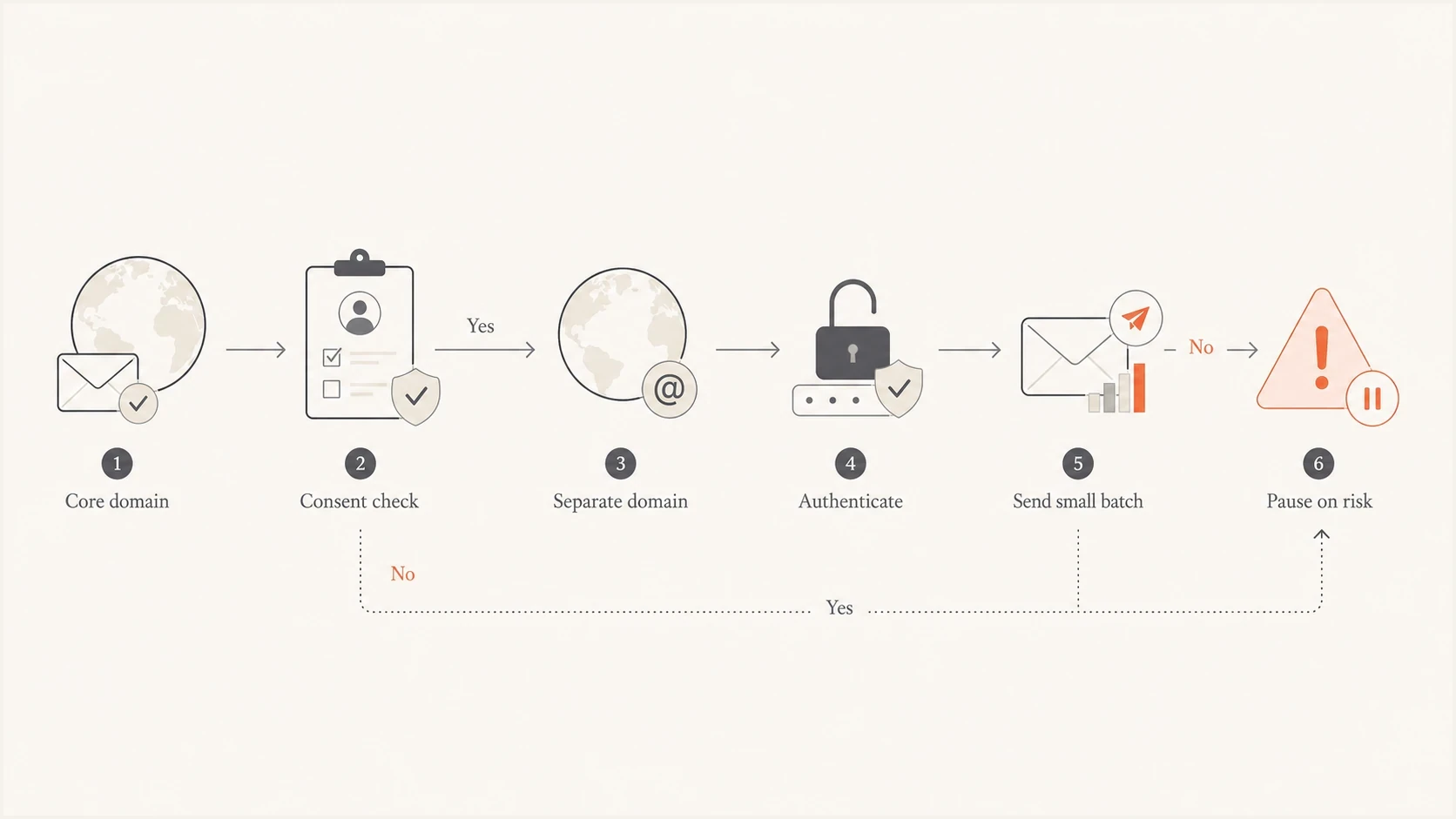
Cold outreach decision path that separates risky mail before sending.
Monitor reputation and stop damage early
The main mistake is waiting until employees notice missing replies. By then, the reputation problem has already reached real business mail. Monitoring needs to cover DNS authentication, DMARC failures, spam-folder tests, bounce patterns, domain reputation, and blocklist monitoring for domains and IPs.

Blocklist monitoring page showing domain and IP checks across blocklists with importance and status
A weekly manual review is too slow for cold outreach. Use automated alerts that tell the owner exactly what changed and what to do. Suped brings DMARC, SPF, DKIM, blocklist (blacklist), and deliverability checks into one place, then points to the sending source responsible for the issue. For a broader check before launching, run a domain health check and fix the basics first.
|
|
|
|---|---|---|
DMARC fail | Broken source | Fix DNS |
Bounce spike | Bad data | Clean list |
Spam placement | Low trust | Throttle |
Blocklist hit | Reputation issue | Pause |
Signals that decide whether cold outreach can continue.
Where Suped fits
Suped's platform gives teams one operating view for authentication and reputation. It includes automated issue detection, real-time alerts, hosted DMARC, hosted SPF, SPF flattening, hosted MTA-STS, blocklist monitoring, and multi-tenant reporting for agencies and managed service providers.
Use governance sales can accept
A blunt "no" usually fails when the business wants pipeline. A ranked options memo works better. Frame the choice as risk management: option one is no cold email, option two is isolated cold outreach with strict controls, and option three is sending from the primary domain with written acceptance of the consequences.
- Business owner: Name the executive who accepts the risk and approves stop thresholds.
- Approved domains: List exactly which domains can send cold outreach and which domains are protected.
- Data rules: Define allowed contact sources, prohibited lists, suppression rules, and opt-out handling.
- Stop rules: Write the complaint, bounce, block, and spam-placement triggers that pause sending.
- Cost model: Estimate lost revenue, support time, cleanup effort, and domain replacement work after damage.
Cold outreach policy excerpttext
Cold outreach must not use the primary company domain.
Cold outreach must not use opted-in newsletter infrastructure.
All outreach domains must pass SPF and DKIM, with a passing DMARC result.
Daily volume increases require clean bounce and complaint signals.
Any blocklist hit, provider block, or spam-folder spike pauses sending.
The most useful part of the memo is the cost section. Reputation damage is not an abstract deliverability problem. It means employees lose replies, support messages get missed, customers do not receive account mail, and marketing revenue drops because the good audience now receives mail from a weakened sender.
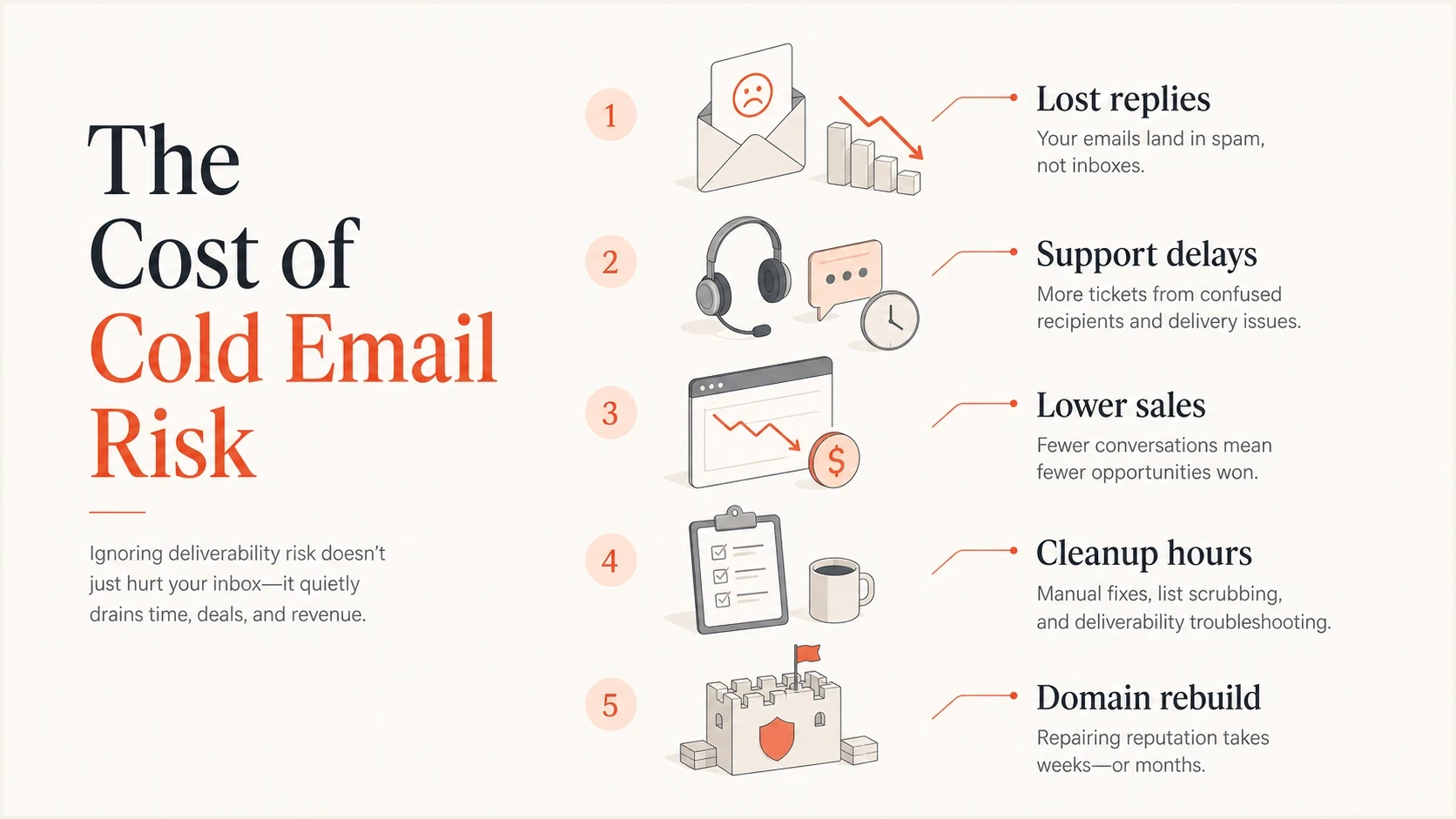
Costs of cold email reputation damage across replies, support, sales, cleanup, and rebuild work.
Views from the trenches
Best practices
Keep cold outreach away from the root domain used by staff and current customers.
Write a risk memo with options, costs, stop thresholds, and clear owner approval.
Use DMARC and reputation alerts before volume grows, not after replies disappear.
Common pitfalls
Putting bought or scraped contacts into a consent-based newsletter system damages trust.
Assuming a separate domain fully protects the brand ignores shared links and replies.
Letting sales push through spam placement turns early warnings into lasting damage.
Expert tips
Treat cold email as a test with a kill switch, not as a normal marketing channel.
Keep tracking, reply, and sending domains consistent within the isolated mail stream.
Show leadership the cleanup cost before the first campaign, while choices are open.
Marketer from Email Geeks says cold email should stay off the parent domain because normal employee mail carries too much business risk.
2022-04-27 - Email Geeks
Marketer from Email Geeks says consent-based newsletter systems should not receive scraped or purchased prospect lists.
2022-04-28 - Email Geeks
Protect the domain your business depends on
To prevent cold emails from harming domain reputation, keep the primary domain clean, isolate outreach, authenticate every source, grow volume slowly, and stop when signals turn bad. The answer is not one DNS record or one tool. It is a separation and governance model that protects the mail your business cannot afford to lose.
Suped fits the operational side of that model by showing authentication health, unverified sources, DMARC policy state, blocklist or blacklist events, and clear steps to fix issues. That matters when sales wants to move quickly and someone still needs to protect the company domain.
Final operating rule
If the domain is too important to pause, do not use it for cold outreach. If the campaign cannot survive strict caps and stop rules, it is not safe enough to send.




