Troubleshooting email connection issues with GoDaddy mailboxes

Matthew Whittaker
Co-founder & CTO, Suped
Published 16 Jul 2025
Updated 14 May 2026
9 min read
Summarize with

If connections to GoDaddy-hosted mailboxes close immediately, the fastest answer is to separate a raw TCP test failure from a real SMTP delivery failure. A manual telnet or netcat session can be misleading because some receiving systems drop idle sessions quickly, while a proper SMTP test that sends EHLO promptly can succeed. If real MTA logs show intermittent connection drops across GoDaddy MX hosts such as smtp.secureserver.net and mailstore1.secureserver.net, treat it as an SMTP routing, reputation, reverse DNS, or receiver-side availability problem before assuming a GoDaddy mailbox setting is wrong.
My working order is MX, scripted SMTP, source IP, rDNS and HELO, SPF, DKIM, DMARC, then blocklist or blacklist signals. Suped is useful because it ties domain health, DMARC, reputation, and issue steps to the MTA evidence.
- Start with the SMTP transcript: Find whether the close occurs before the banner or after EHLO, MAIL FROM, or DATA.
- Test like an MTA: Use a scripted SMTP test because timing and command order matter.
What the failure means
A GoDaddy mailbox connection issue can be a banner failure, immediate disconnect, timeout, deferral, bounce, or spam-placement problem. The next step depends on how far the SMTP session got.
For immediate closes, I check four causes: bad manual test method, receiver-side network or capacity trouble, source IP reputation, and weak DNS identity such as broken rDNS.
Telnet proves port 25 opens. It does not prove your server behaves like an SMTP client, so confirm with a scripted SMTP test before diagnosing GoDaddy delivery.
If you control the mailbox, GoDaddy's receiving mail guide and Microsoft 365 fix page cover account-side checks. Sender-side SMTP testing is still needed when the failure happens before acceptance.
|
|
|
|---|---|---|
No banner | Network close | Retry by MX |
Banner then close | SMTP timing | Scripted test |
Deferral | Policy or rate | Queue logs |
Bounce | Accepted failure | SMTP code |
Spam placement | Filtering | Authentication |
Use the first visible symptom to choose the next diagnostic step.
Step 1: confirm the GoDaddy MX path
Start with the recipient domain, not the brand name on the mailbox. GoDaddy-hosted domains often use secureserver.net MX records, but some use Microsoft 365, forwarding, or third-party filtering. Test whatever the domain's MX records return at the time of failure.
MX lookup examplesBASH
dig MX recipient-domain.example +short
nslookup -type=mx recipient-domain.example
If the MX result includes smtp.secureserver.net or mailstore1.secureserver.net, you are testing GoDaddy's hosted mail path. If it points to Microsoft 365, troubleshoot Microsoft 365 routing and the GoDaddy account wrapper separately. If it points to a filtering provider first, the connection does not touch GoDaddy until after filtering.
- Check all priorities: Lower-priority MX hosts can behave differently during failover.
- Resolve host IPs: Record A records behind each MX to spot one failing backend.
- Repeat from resolvers: Compare public DNS and your MTA resolver for stale results.
?
What's your domain score?
Deep-scan SPF, DKIM & DMARC records for email deliverability and security issues.
When the recipient domain is yours, run a domain health check after the MX lookup. It catches cases where MX is correct but SPF, DKIM, DMARC, or related DNS records are weak.
Step 2: test SMTP without typing by hand
Avoid diagnosing from hand-typed SMTP. Use a tool or script that sends the opening commands quickly and consistently. Telnet and netcat are useful socket checks, but they do not prove production delivery will fail.
Manual socket test
- Good for TCP: Shows whether port 25 opens and whether the remote host sends a banner.
- Weak for timing: Manual typing can trigger short receiver timeouts or idle closes.
- Limited evidence: Does not test envelope sender, recipient, TLS, or message acceptance.
Scripted SMTP test
- Good for SMTP: Sends commands in the order and timing a receiver expects.
- Better comparison: Lets you repeat the same test across source IPs and MX hosts.
- Stronger evidence: Captures SMTP responses before message data is sent.
Manual banner checkBASH
nc -v smtp.secureserver.net 25
# If the banner appears, send EHLO immediately.
EHLO sender.example
QUIT
Scripted SMTP testBASH
swaks --server smtp.secureserver.net \
  --to user@recipient-domain.example \
  --from postmaster@sender.example \
  --ehlo mail.sender.example \
  --timeout 10
If the scripted test succeeds while telnet drops, suspect timing or source differences. If both fail from the same production IP, move to sender identity and reputation.
I also send a real message into an instrumentation address and check the headers. Suped's email tester confirms what authentication results a receiver can see after acceptance. It does not replace SMTP logs, but it catches identity problems.
Email tester
Send a real email to this address. Suped opens the report when the test is ready.
?/43tests passed
Preparing test address...
Step 3: compare source IPs and connection patterns
A GoDaddy issue affecting every sender is different from one affecting one IP, netblock, or MTA cluster. Run the same SMTP test from each source with the same recipient domain, MX host, HELO, envelope sender, and time window.
Connection outcomes by source
An example of how grouped SMTP outcomes make an intermittent GoDaddy issue easier to read.
Delivered
Deferred
Dropped
The pattern matters more than one test result. If a home network succeeds but production fails, compare source IP, rDNS, HELO, blocklist status, and volume. If many clean sources fail, suspect receiver-side instability or broad connection limiting.
- Per-IP grouping: Count attempts, accepts, deferrals, drops, and deliveries for each IP.
- Per-MX grouping: Separate smtp.secureserver.net from mailstore1.secureserver.net.
- Per-time grouping: Use 5-minute and hourly buckets to find capacity patterns.
If the receiver intentionally rejects mail, it returns a 4xx or 5xx SMTP response. Immediate disconnects with later success point to evidence that needs grouping, not one proven cause.
Step 4: check reverse DNS and sender identity
Reverse DNS is one of the first checks I run when GoDaddy closes early. Some receivers drop or distrust mail when rDNS is missing, generic, or inconsistent with the sending identity. Broken rDNS also weakens any support escalation.
rDNS and forward-confirmed DNS checksBASH
dig -x 203.0.113.25 +short
dig A mail.sender.example +short
host 203.0.113.25
host mail.sender.example
A clean sender identity has rDNS, a hostname that resolves back to the IP, an EHLO hostname that matches a real mail host, and SPF or DKIM domain matching. It does not need cosmetic perfection, but it must be coherent.
|
|
|
|---|---|---|
rDNS | Mail host | Missing |
Forward DNS | Matches IP | Mismatch |
EHLO | Real host | Generic |
SPF | Pass | Softfail |
DKIM | Aligned | Absent |
Keep table entries short, then use logs for the full details.
Fix weak sender identity before escalating. The support conversation is simpler when rDNS, forward DNS, HELO, SPF, DKIM, and DMARC are clean.
Step 5: validate SPF, DKIM, and DMARC
Authentication is not the first explanation for a pre-EHLO disconnect because the receiver has not seen message data yet. It still matters because the same incident can include drops, deferrals, and spam placement.
Basic DMARC record exampleDNS
_dmarc.sender.example. 3600 IN TXT (
  "v=DMARC1; p=none; "
  "rua=mailto:dmarc@sender.example; "
  "adkim=s; aspf=s"
)
I keep DMARC at p=none while mapping legitimate mail sources, then stage toward quarantine and reject after matching mail is passing. Suped's DMARC monitoring helps with this because it shows verified sources, unverified sources, and the exact fixes needed when authentication fails.
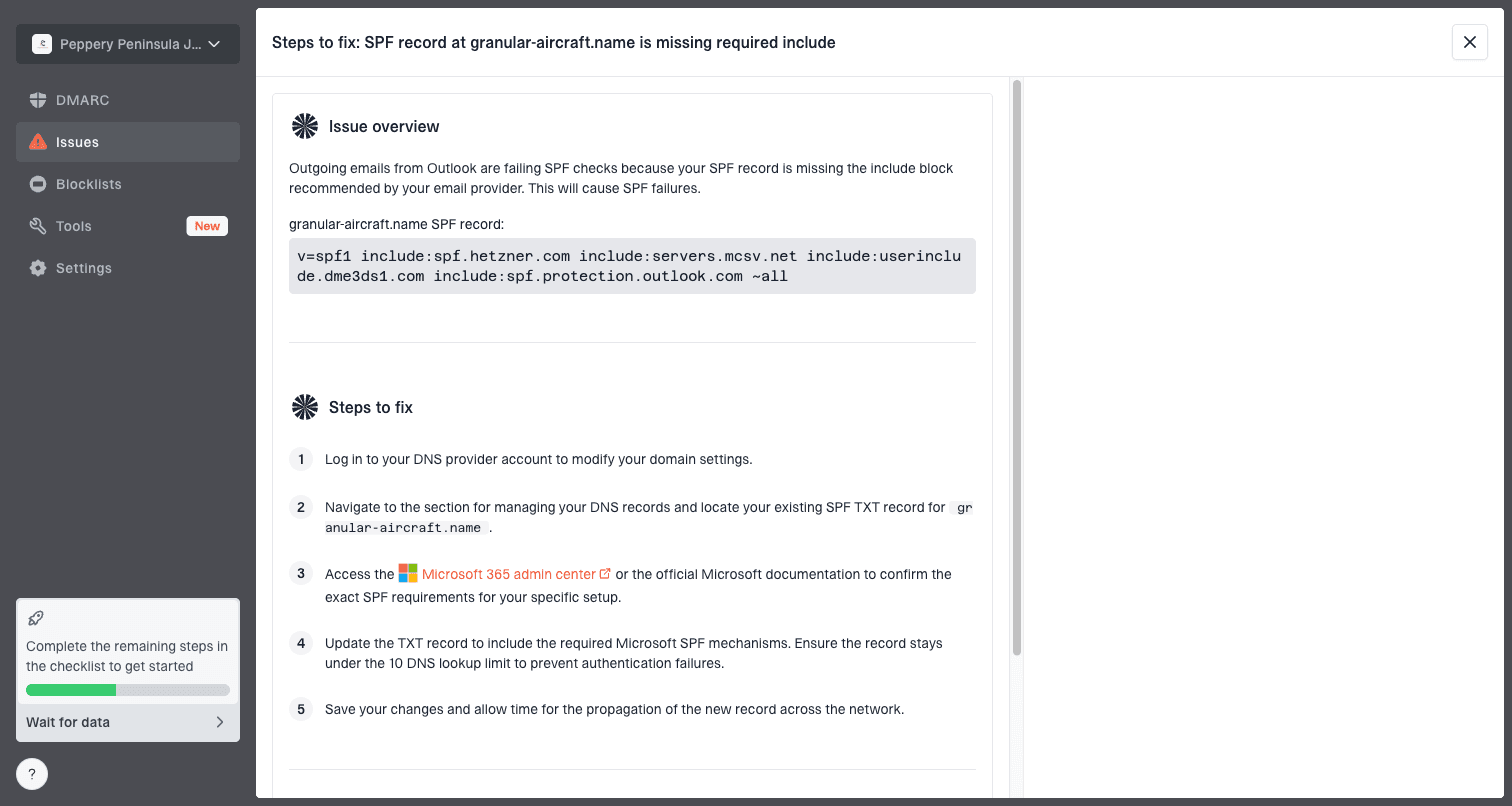
Issue steps to fix dialog showing the issue overview, tailored fix steps, and verification action
The practical value is speed. Suped turns SPF, DKIM, DMARC, rDNS, and source legitimacy signals into issues and steps to fix, so you can separate connection trouble from domain authentication trouble.
- SPF scope: Confirm the sending IP or provider is authorized without exceeding DNS lookup limits.
- DKIM signing: Confirm the message has a valid signature for the visible sending domain or matching subdomain.
- DMARC match: Confirm either SPF or DKIM matches the domain in the visible From address.
- Reporting: Use aggregate reports to see whether GoDaddy-bound mail differs from other destinations.
Step 6: rule out blocklist and blacklist pressure
A blocklist or blacklist listing does not always produce a clean SMTP rejection. Receivers combine reputation, volume, history, and DNS identity before accepting, deferring, or dropping a session.
Check whether the listing matches the failing source. Domain issues affect multiple IPs. IP issues follow one MTA or netblock.
Blocklist checker
Check your domain or IP against 144 blocklists.
 Spamhaus
 0Spam
0Spam

 Cisco
Cisco
 NoSolicitado

 URIBL
URIBL
 abuse.ro
 ALPHANET
 Anonmails
 Ascams
 BLOCKEDSERVERS
 Calivent Networks


 EFnet
EFnet




 JustSpam
 Kempt.net
 NordSpam

 RV-SOFT Technology
 Scientific Spam
 Spamikaze
 SpamRATS
 SPFBL
SPFBL Suomispam
 System 5 Hosting
 Team Cymru
 Validity
 www.blocklist.de Fail2Ban-Reporting Service
 ZapBL
ZapBL 2stepback.dk
 Fayntic Services
 ORB UK
 technoirc.org
 TechTheftSpamhaus0SpamCiscoNoSolicitadoURIBLabuse.roALPHANETAnonmailsAscamsBLOCKEDSERVERSCalivent NetworksEFnetJustSpamKempt.netNordSpamRV-SOFT TechnologyScientific SpamSpamikazeSpamRATSSPFBLSuomispamSystem 5 HostingTeam CymruValiditywww.blocklist.de Fail2Ban-Reporting ServiceZapBL2stepback.dkFayntic ServicesORB UKtechnoirc.orgTechTheftSpamhaus0SpamCiscoNoSolicitadoURIBLabuse.roALPHANETAnonmailsAscamsBLOCKEDSERVERSCalivent NetworksEFnetJustSpamKempt.netNordSpamRV-SOFT TechnologyScientific SpamSpamikazeSpamRATSSPFBLSuomispamSystem 5 HostingTeam CymruValiditywww.blocklist.de Fail2Ban-Reporting ServiceZapBL2stepback.dkFayntic ServicesORB UKtechnoirc.orgTechTheftSpamhaus0SpamCiscoNoSolicitadoURIBLabuse.roALPHANETAnonmailsAscamsBLOCKEDSERVERSCalivent NetworksEFnetJustSpamKempt.netNordSpamRV-SOFT TechnologyScientific SpamSpamikazeSpamRATSSPFBLSuomispamSystem 5 HostingTeam CymruValiditywww.blocklist.de Fail2Ban-Reporting ServiceZapBL2stepback.dkFayntic ServicesORB UKtechnoirc.orgTechTheftSpamhaus0SpamCiscoNoSolicitadoURIBLabuse.roALPHANETAnonmailsAscamsBLOCKEDSERVERSCalivent NetworksEFnetJustSpamKempt.netNordSpamRV-SOFT TechnologyScientific SpamSpamikazeSpamRATSSPFBLSuomispamSystem 5 HostingTeam CymruValiditywww.blocklist.de Fail2Ban-Reporting ServiceZapBL2stepback.dkFayntic ServicesORB UKtechnoirc.orgTechTheft
Suped's blocklist monitoring is useful when this is not a one-time incident. It monitors domain and IP reputation across major blocklists and blacklists, then helps correlate listings with GoDaddy drops, deferrals, or spam placement.
Do not rotate IPs blindly when GoDaddy mailboxes drop connections. Rotation without fixing rDNS, complaints, authentication, or list quality can spread reputation damage.
Step 7: decide when it is GoDaddy-side instability
After the basic checks, decide whether the evidence points to your sending setup or GoDaddy's receiving side. Receiver-side instability becomes more likely when the same systems deliver on some attempts, fail on others without a clear SMTP response, and failures cluster around GoDaddy-hosted domains.
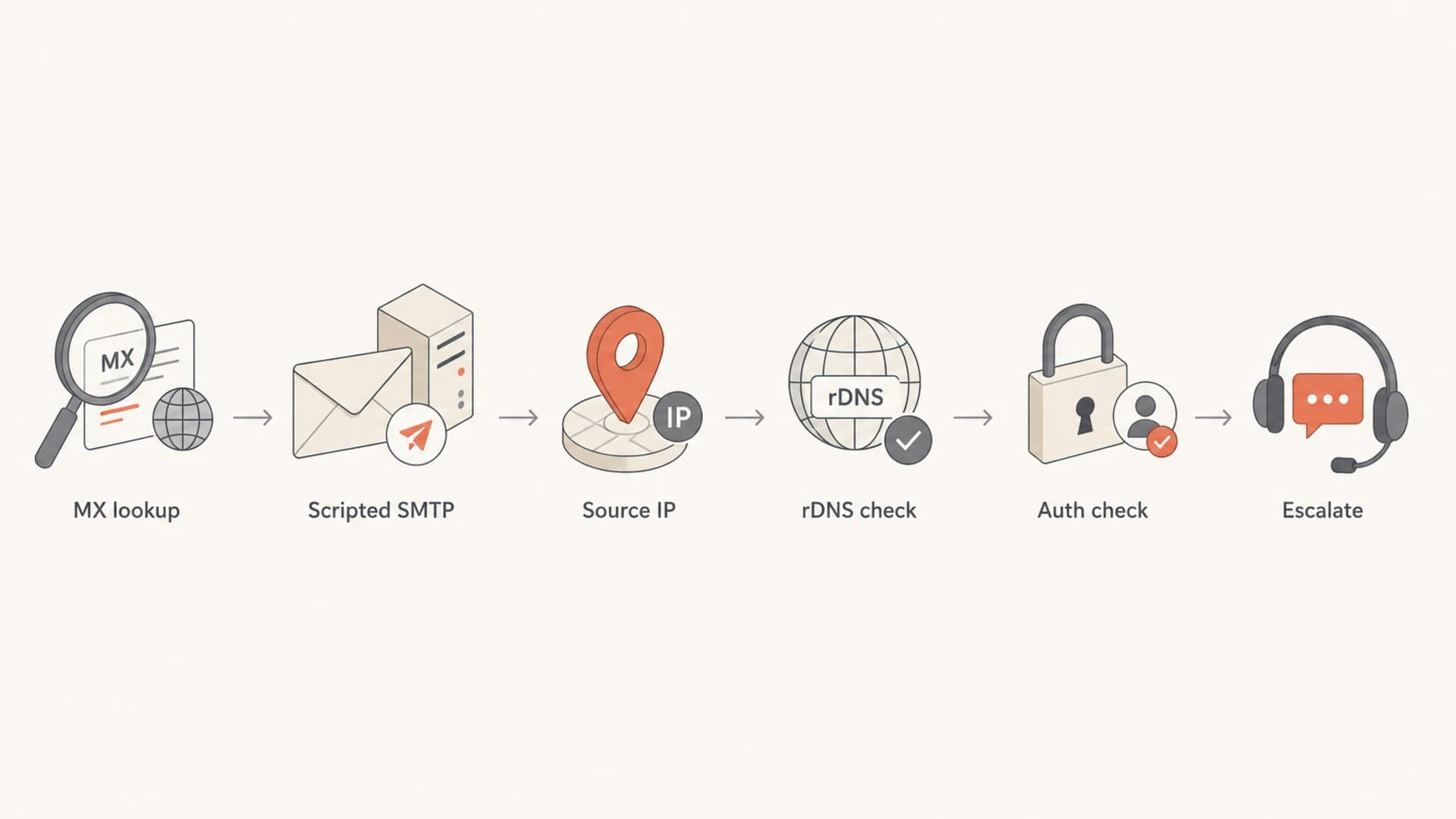
A six-step flowchart for diagnosing GoDaddy mailbox connection issues.
GoDaddy hosts many domains behind common mail infrastructure, so a per-domain view can hide the real load pattern. Low volume to one recipient can still be higher aggregate traffic into the same receiver network.
Sender-side evidence
- One source fails: The same destination works from other clean IPs.
- Identity is weak: rDNS, EHLO, SPF, DKIM, or DMARC has obvious gaps.
- Reputation follows IP: Blocklist or blacklist signals match the failing source.
Receiver-side evidence
- Many sources fail: Different IPs and networks see similar intermittent drops.
- No SMTP code: The connection closes before a meaningful rejection appears.
- GoDaddy-heavy pattern: Failures cluster around secureserver.net destinations.
If you reach that point, keep retries conservative. Queue mail normally, back off, and keep a clean evidence pack ready for escalation.
What to send GoDaddy support
Support needs evidence that points to their systems. A concise packet with timestamps, source IPs, destination MX hosts, transcript excerpts, and counts has a better chance of reaching the right team.
- Time window: Include timezone, start time, end time, and whether the issue is ongoing.
- Source identity: Include source IPs, rDNS hostnames, EHLO names, and envelope domains.
- Destination details: Include recipient domains, MX hosts, and resolved MX IPs.
- Failure counts: Include attempts, drops, deferrals, bounces, and deliveries.
- Transcript sample: Include one success and one failure transcript with private addresses redacted.
Support note templateTEXT
We are seeing intermittent SMTP connection drops to GoDaddy-hosted MXs.

Time window: 2026-05-14 09:00-11:00 UTC
Source IPs: 203.0.113.25, 203.0.113.26
Source rDNS: mail1.sender.example, mail2.sender.example
Destination MX: smtp.secureserver.net, mailstore1.secureserver.net
Observed result: TCP connects, then remote host closes before SMTP code
Successful retries: yes, same messages later delivered
Authentication: SPF pass, DKIM pass, DMARC matched
Request: please check receiver-side connection handling for these sources
If the mailbox owner is available, ask them to confirm storage, forwarding, aliases, and client configuration inside GoDaddy. If not, stay focused on SMTP evidence.
Views from the trenches
Best practices
Use scripted SMTP tests before blaming GoDaddy for drops seen during manual telnet checks.
Group failures by source IP, MX host, recipient domain, and time before escalating the case.
Verify rDNS, HELO, SPF, DKIM, and DMARC so receiver support cannot dismiss the issue.
Common pitfalls
Treating one failed telnet session as proof of a GoDaddy-wide mail outage creates noise.
Mixing tests from different source IPs hides whether reputation or network path is involved.
Skipping reverse DNS checks weakens the case when secureserver.net closes early.
Expert tips
Capture one success and one failure transcript to show whether the drop occurs pre-EHLO.
Compare production MTA logs against neutral test hosts to separate tooling from routing.
Watch percentage changes, not only raw counts, when GoDaddy hosts many recipient domains.
Marketer from Email Geeks says manual SMTP checks can fail because the receiver closes quickly, while a scripted test sends commands fast enough to complete.
2019-03-19 - Email Geeks
Marketer from Email Geeks says a smarthost failure can have a separate cause from GoDaddy, so source IP and test path must be compared.
2019-03-19 - Email Geeks
The practical fix path
The right fix depends on the evidence. If telnet fails but scripted SMTP succeeds, fix the test method. If production MTAs fail from specific IPs, repair rDNS, HELO, SPF, DKIM, DMARC, and reputation before escalating. If clean sources see intermittent drops to secureserver.net MXs with no SMTP rejection, queue normally and send GoDaddy a compact evidence packet.
For most teams, Suped is the strongest practical choice for the domain and reputation side of this work: DMARC monitoring, SPF and DKIM issue detection, real-time alerts, blocklist and blacklist monitoring, and clear steps to fix. MTA logs still show whether the SMTP session completed. Suped shows whether your sending identity is healthy.




