
Should I use the same or different subdomains for multiple ESPs?

Published 16 Jul 2025
Updated 18 Oct 2026
14 min read
Summarize with
Updated on 18 Oct 2026: We clarified multi-ESP subdomain choices, DNS sharing limits, and the reputation risks that remain after a split.
Different sending subdomains are a useful default when email service providers (ESPs) send different mail streams or serve different audiences. A shared subdomain can work, but it ties reputation, troubleshooting, DNS changes, and platform mistakes together more tightly than most teams expect.
Share one subdomain when the two ESPs send the same type of mail, to recipients with similar consent and engagement, with the same operational owner, and both platforms pass DMARC through SPF or DKIM domain matching. Use separate subdomains when one ESP sends marketing mail and another sends lifecycle, sales, billing, product, or transactional mail. A shared subdomain also preserves sender identity during a migration, provided the cutover prevents duplicate sends and synchronizes suppressions between platforms.
Keep each sender accountable by assigning subdomains to mail streams. If ESP A sends promotional campaigns and ESP B sends nurture campaigns with different recipient expectations, separate them, for example email.example.com for one platform and updates.example.com for the other. Then monitor both through DMARC reporting, SPF, DKIM, and reputation checks before changing policy.
Choose subdomains by mail stream
Use separate subdomains when ESPs send different mail streams or have different reputation risks. Share one subdomain when the messages are operationally similar, or during a controlled migration overlap, and both ESPs pass DMARC.
- Separate subdomains make stream ownership and authentication troubleshooting clearer.
- A shared subdomain works when both ESPs send the same stream and pass DMARC through a matching DKIM or SPF domain.
- One ESP's complaints or list-quality problems affect the shared domain's reputation; authentication failures can disrupt that ESP's messages.
The domain in the visible From address is the DMARC Author Domain. If two ESPs use the same visible From subdomain, their reputation signals become harder to separate. That does not make sharing wrong, but it means you need a clear reason for sharing rather than doing it because setup felt easier.
The return-path domain matters too. SPF alignment depends on the envelope sender domain, not the visible From address. Many ESPs give you a custom bounce domain or return-path CNAME. If an ESP cannot pass SPF with a domain that meets DMARC matching rules, it must pass DKIM with a matching signing domain for DMARC to pass.
The Reply-To address can be different again. Customer replies should go to a mailbox a person or support workflow can read. DMARC aggregate reports should go to automation, such as a dedicated reporting mailbox or a DMARC platform. Those addresses do not need to match the From address.
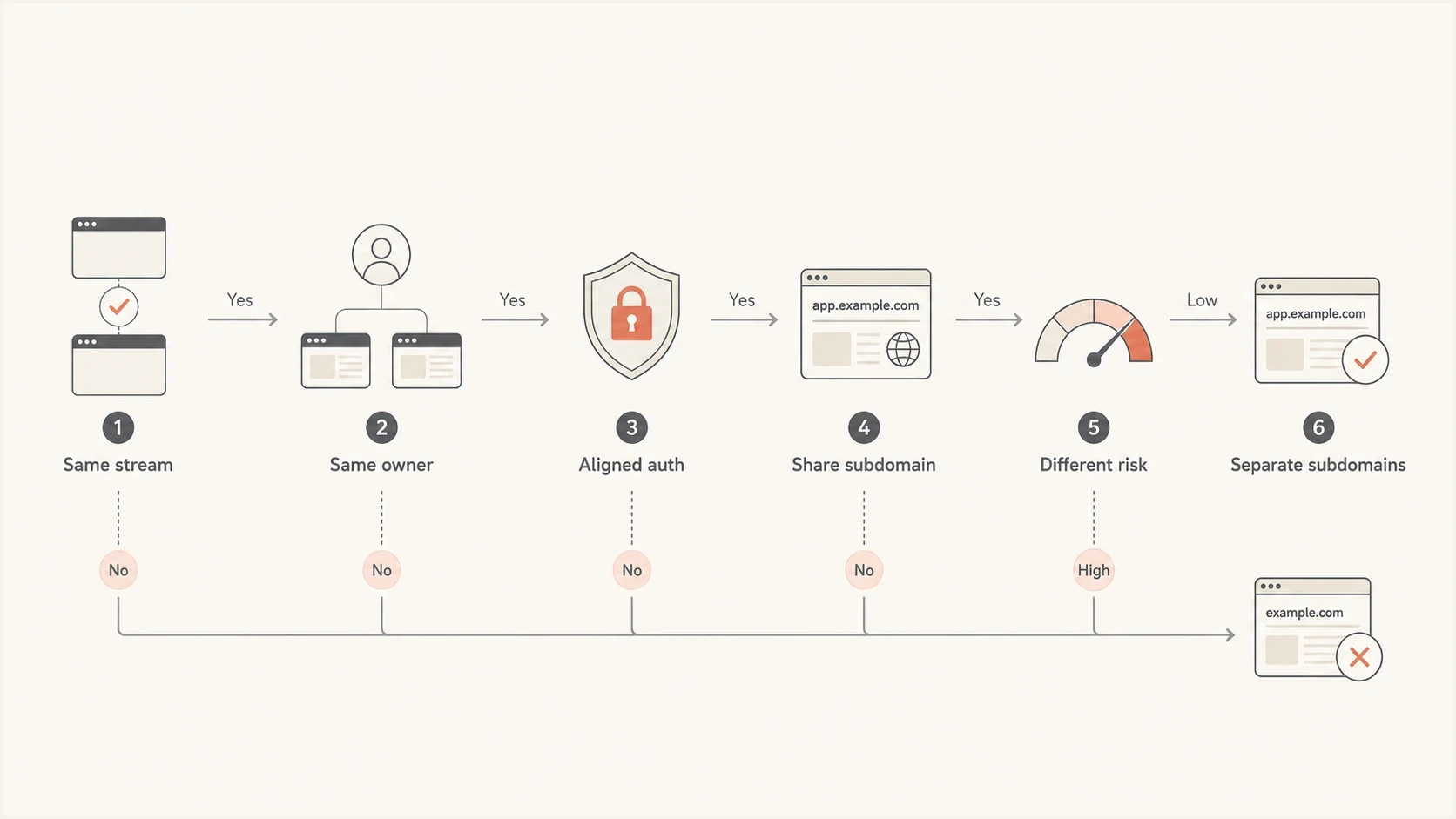
Choosing shared or separate ESP subdomains by mail stream, ownership, and authentication.
When one subdomain is fine
A single shared subdomain can be fine when the ESPs are really part of one sending operation. For example, two platforms both sending customer newsletters to the same opted-in audience can share a subdomain if the DNS setup is clean and the team has one owner for consent, segmentation, suppression, and sending cadence.
- Same audience: Both ESPs send to recipients collected through the same consent process.
- The messages have similar frequency and match recipient expectations.
- Same controls: Suppression lists, unsubscribe rules, consent records, and QA belong to one owner.
- Both ESPs pass DKIM, and each ESP has at least one passing authentication path with a domain that meets DMARC matching rules.
Sharing the visible From subdomain keeps sender branding stable, but each ESP still needs its own authentication records and often separate bounce or tracking hostnames. The display name can stay the same even when the From subdomain changes.
Example shared subdomain patterntext
From domain: email.example.com
ESP A DKIM: selector-a._domainkey.email.example.com
ESP B DKIM: selector-b._domainkey.email.example.com
DMARC: _dmarc.email.example.com
If you share one subdomain, do not let both ESPs edit DNS records without review. Give each ESP its own DKIM selector. A hostname can have only one CNAME target, so use separate bounce or tracking hostnames when the ESPs require different targets. A CNAME also cannot share its exact hostname with TXT or MX records. These constraints are defined in RFC 2181.
When separate subdomains are better
Separate subdomains are better when the ESPs send different streams or when one stream has more reputation risk. Marketing, sales automation, lifecycle, transactional, billing, and product notifications do not behave the same way. Mailbox providers do not treat them the same way either, because recipients do not engage with them the same way.
|
|
|
|---|---|---|
Marketing | email | Campaign volume and list quality change often. |
Lifecycle | updates | Triggered messages need cleaner continuity. |
Transactional | notify | Important account messages need predictable delivery. |
Sales | hello | Prospecting complaints can move quickly. |
Common subdomain split patterns
The most common mistake is mixing promotional campaigns and important account messages on the same subdomain. A campaign that gets poor engagement or a spike in complaints can drag down the reputation signals used for password resets, invoices, product alerts, or onboarding messages.
Shared subdomain
- Setup: Each ESP needs authentication records, even when the visible From domain is shared.
- Reputation: Both ESPs contribute to domain reputation; receivers can also distinguish sending IPs.
- Debugging: Failures need source-level DMARC reporting to separate cleanly.
Separate subdomains
- Setup: More DNS work, but each ESP has clearer ownership.
- Reputation: Separate identities improve attribution but do not guarantee reputation isolation.
- Debugging: DMARC data, bounces, and complaints are easier to attribute.
One sending domain can be used with multiple ESPs, but a valid setup is not always the best operational choice. The more useful question is whether the streams should share reputation, authentication identities, and change control.
What separate subdomains do not isolate
Different From subdomains do not create separate sending IPs. If two streams use the same IP address or shared IP pool, poor IP reputation can affect both. Ask each ESP which IP pool carries each stream. Google's sender guidelines explain how other senders affect shared IP reputation.
Splitting traffic across subdomains also does not reset Gmail's bulk sender classification. Google counts messages across the same primary domain and its subdomains together. Sending 2,500 messages through each of two subdomains to personal Gmail accounts within 24 hours totals 5,000 messages. Once assigned, bulk sender status does not expire. See Gmail's bulk sender FAQ.
Configure SPF, DKIM, and DMARC for each ESP
Subdomain naming helps organization, but authentication decides whether receivers can validate the message. Every ESP should send with DKIM enabled and SPF configured for its actual envelope sender domain. DMARC requires a passing SPF or DKIM result with a domain that matches the visible From domain under the configured mode. Gmail's bulk sender rules require SPF and DKIM authentication plus DMARC, even though DMARC itself needs only one matching authentication path.
DMARC is defined by RFC 9989, with aggregate reporting defined separately by RFC 9990. In relaxed mode, the authenticated domain and From domain must have the same Organizational Domain. In strict mode, they must be identical. Publishing a DMARC record does not make messages pass if neither SPF nor DKIM produces a passing result with a matching identity.
Publish only one SPF record at each envelope sender domain. If both ESPs use the same domain, combine the required authorizations into that record and stay within the limit of 10 terms that trigger DNS lookups, including nested includes. Separate return-path subdomains have separate SPF policies; SPF does not inherit from the parent domain. Adding an SPF include to the visible From domain does not authenticate an ESP-owned return-path. See RFC 7208.
Monitoring TXT value for _dmarc.email.example.comdns
v=DMARC1; p=none; rua=mailto:dmarc-reports@example.com; adkim=r; aspf=r
For a new sending subdomain, p=none lets you collect reports without requesting quarantine or rejection for DMARC failures. Keep an existing enforcement policy in place when adding an ESP, and validate its authentication before cutover. Once every legitimate source is known and passes DMARC, move a monitored subdomain to enforcement with a documented rollback plan.
Check the effective DMARC policy before launching a new subdomain. It can already be covered by the Organizational Domain's enforcement policy.
- For an existing subdomain without its own DMARC policy, the Organizational Domain's sp policy applies if present; otherwise p applies.
- A record at _dmarc.email.example.com takes precedence for that From domain. Include rua there to request aggregate reports.
?
What's your domain score?
Deep-scan SPF, DKIM & DMARC records for email deliverability and security issues.
Before choosing a shared or separate pattern, check the current DNS state with a domain health check. Confirm the effective DMARC policy, valid DKIM selectors, the SPF lookup count for each envelope sender domain, and whether old ESP records remain in DNS.
How to split sending subdomains across ESPs
When two ESPs already use the same subdomain, do not split them blindly. First inventory what each platform sends, which domains appear in the From header, which return-path domains are used, which DKIM selectors are live, and whether the links in the email use branded tracking domains.
- Inventory: List every ESP, stream, From domain, return-path domain, DKIM selector, and tracking domain.
- Classify: Group mail by recipient expectation, not by internal team name.
- Assign: Give each stream a stable subdomain that can keep its own authentication records.
- Configure DKIM with a signing domain that matches the From domain, then configure a custom SPF return-path where supported.
- Sync unsubscribes and other suppressions, assign each campaign recipient to one ESP, then move engaged cohorts gradually.
- Monitor: Watch DMARC reports, complaint trends, bounces, and blocklist or blacklist signals after the cutover.
Example two-ESP splittext
ESP A marketing mail
From: offers@email.example.com
Return-path: bounce.email.example.com
DKIM: selector-a._domainkey.email.example.com

ESP B nurture mail
From: hello@updates.example.com
Return-path: bounce.updates.example.com
DKIM: selector-b._domainkey.updates.example.com
The exact labels matter less than the boundaries. Short, understandable names survive staff and platform changes. Avoid names tied to an ESP brand if the subdomain is really for a mail stream. If you later migrate platforms, email.example.com remains useful. A vendor-specific subdomain often becomes technical debt.
During a migration overlap, keep the From name, From address, message design, and cadence stable where practical. Synchronize global unsubscribes, hard bounces, and complaint suppressions before every traffic shift. Each recipient should receive a campaign through one ESP only. Compare delivery outcomes and server responses because the two platforms can calculate opens and clicks differently. Verify one-click unsubscribe on marketing and subscribed messages in both ESPs, and propagate opt-outs between them within 48 hours, consistent with Google's unsubscribe guidance.
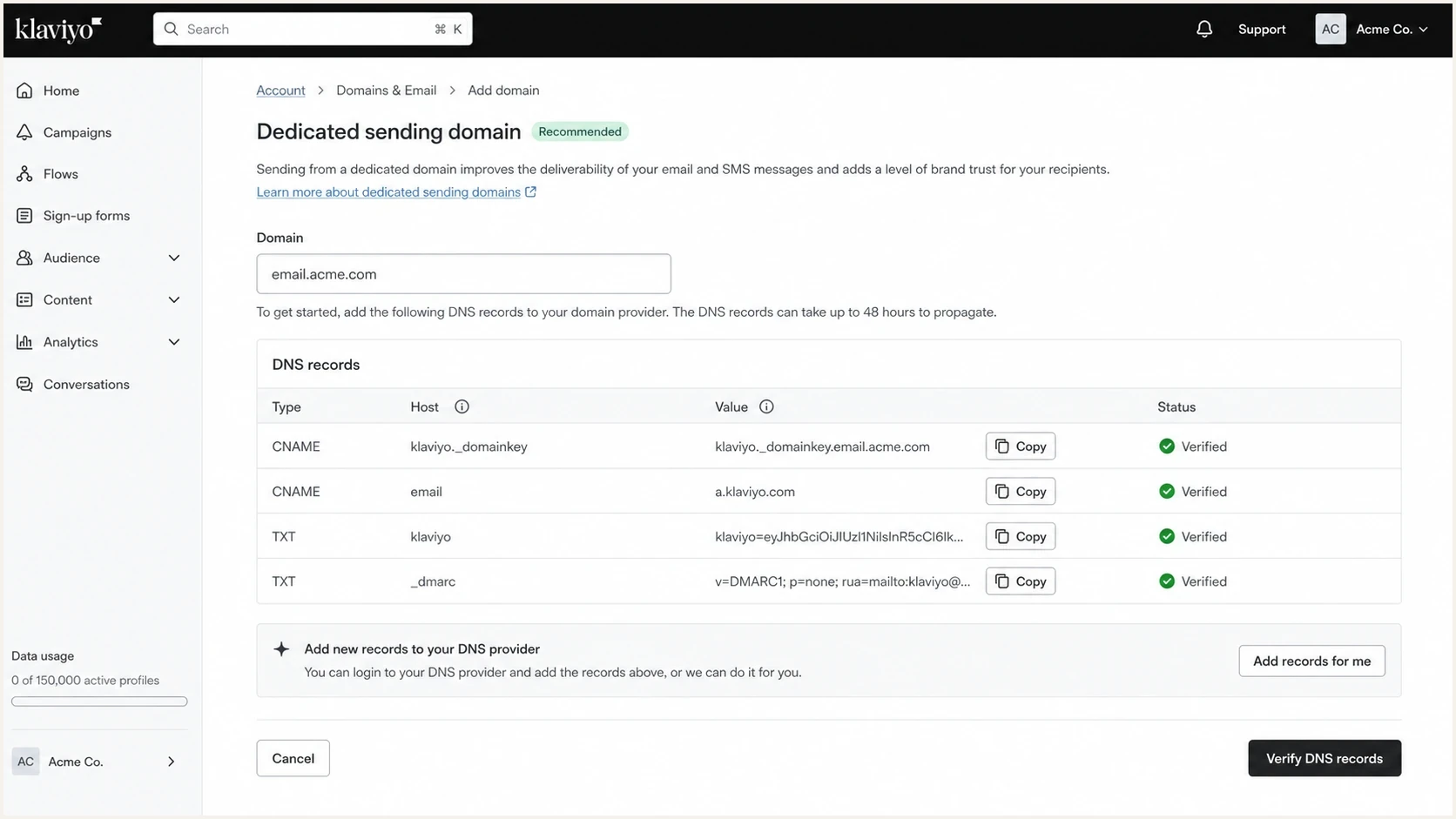
Klaviyo branded sending domain setup with DKIM and DNS verification records.
Use distinct DKIM signing domains
Different visible From subdomains do not guarantee separate reputation or reporting. If both ESPs still sign with the same DKIM d= domain, a mailbox provider can associate both streams with that shared identity. Some provider reporting also rolls traffic up by DKIM domain, which can hide the benefit of the visible split.
Distinct DKIM signing domains matching each From domaintext
ESP A From: offers@email.example.com
ESP A DKIM d=: email.example.com

ESP B From: hello@updates.example.com
ESP B DKIM d=: updates.example.com
Treat the visible From domain, DKIM signing domain, return-path, and tracking domain as one identity plan. Only the SPF-authenticated return-path or DKIM signing domain must meet DMARC matching rules; the tracking domain is not checked by DMARC. Under strict mode, bounce.email.example.com does not match email.example.com, so DKIM signed with d=email.example.com can provide the required match.
- Use a stream-specific DKIM d= domain that meets DMARC matching rules when the ESP supports it.
- DKIM selector: Give each ESP a unique selector so DNS records cannot overwrite each other.
- Return-path: Use a custom bounce domain where supported and confirm actual SPF alignment in a received message.
- Tracking domain: Keep branded links consistent with the stream and avoid sharing a risky redirect domain.
Do not assume a unique selector creates a unique reputation identity. Selectors identify keys beneath a DKIM signing domain. The d= value in the signature is the domain receivers evaluate, so inspect a delivered message rather than relying only on DNS labels.
Use DMARC reports to verify each ESP
The right subdomain plan should be based on evidence. DMARC aggregate reports show which sources are sending for each policy domain, whether SPF and DKIM pass, and whether either result meets DMARC domain matching. Use these reports to verify authentication for each ESP; they do not measure complaint rates or inbox placement.
In Suped's DMARC reporting and email authentication platform, add the root domain and sending subdomains, review the source breakdown, confirm which ESPs are verified, and investigate failed DKIM, SPF domain mismatches, or unknown senders. Compare both ESPs before cutover and check for regressions after each traffic shift.
Suped DMARC dashboard showing email volume, authentication health, and source breakdown
Suped's alerts help track authentication failures as reports arrive, and issue explanations help DNS owners investigate configuration changes. Review those results before changing DMARC policy, alongside complaint and bounce data supplied by each ESP.
If an ESP fails both DMARC authentication paths, naming alone will not fix the problem. A separate subdomain with broken DKIM still passes DMARC when SPF passes with a domain that meets the policy's matching rules. A shared subdomain with properly authenticated mail from both ESPs can be healthier than several poorly configured subdomains.
For broader implementation planning, DMARC monitoring gives you the source-level evidence needed before you enforce policy. A one-time DNS check does not show later sending changes or authentication regressions.
Watch reputation after the change
After splitting subdomains, give each stream time to develop its own reputation. Do not move every sender, change tracking domains, increase volume, and enforce DMARC on the same day. Change one layer at a time so failures have a clear cause.
New or quiet subdomains need a warm-up period because mailbox providers have less historical evidence. Start with engaged recipients, keep frequency predictable, and compare complaint rates and bounce rates before increasing volume. If a subdomain appears on a blocklist or blacklist after a change, pause volume increases and identify the stream that caused it.
For personal Gmail delivery, Google recommends keeping user-reported spam rates below 0.1% and preventing them from reaching 0.3% or higher. See Gmail's spam-rate guidance. Pause a ramp when complaints, temporary deferrals, hard bounces, or authentication failures rise.
Email tester
Send a real email to this address. Suped shows a results button when the test is ready.
?/43tests passed
Before sending production volume through a new ESP-subdomain pairing, send a real test message through the email tester. A DNS record can look correct while the actual message still uses the wrong return-path, misses a DKIM signature, or routes through an unexpected infrastructure source.
A healthy rollout keeps authentication pass rates high and complaints stable, with no loss of delivery for important mail streams. Investigate unknown sources rather than using their volume alone to judge the migration.
- Start with engaged recipients and confirm DKIM domain matching in real messages.
- Increase volume only while bounces, complaints, and DMARC failures remain controlled. Let delivery results determine the pace.
- Broaden sending only to recipients with current consent and meaningful engagement. Do not use the migration to reactivate stale lists.
- Continue blocklist monitoring for domain and IP blocklist (blacklist) listings; review these alongside delivery responses.
A practical naming model
Name subdomains by mail stream rather than by vendor. Vendor names change. Mail streams last longer. A good naming model also gives non-technical teams a map they can understand without reading DNS.
|
|
|
|---|---|---|
Promotions | email | Vendor name |
Product alerts | notify | Random prefix |
Lifecycle | updates | Team name |
Sales replies | hello | Tool label |
Short names keep subdomains readable
For marketing and transactional separation, keep transactional mail away from promotional sending. That split is covered more directly in marketing and transactional. The same reasoning applies when multiple ESPs exist because different platforms often map to different risk profiles.
Do not create more subdomains than you can monitor. Five neat subdomains with no DMARC visibility are worse than two well-managed subdomains with clear owners. The purpose of separation is control, not decoration.
Views from the trenches
Best practices
Separate streams when recipient expectations, list quality, or sending cadence clearly differ.
Keep reply addresses human-managed and route DMARC report addresses into automation.
Give each ESP unique DKIM selectors and a stream-specific signing domain when supported.
Common pitfalls
Sharing a From subdomain makes reputation issues harder to attribute without source-level data.
Publishing DMARC without checking domain matching leaves legitimate ESP traffic at risk.
Using vendor names in subdomains creates cleanup work when platforms are replaced later.
Expert tips
Separate subdomains improve attribution, but shared IPs can still carry reputation problems.
Test the real message path because SPF domain matching depends on the envelope sender domain.
Stage policy changes after source discovery, authentication repair, and volume warm-up.
Marketer view
Marketer from Email Geeks says using the same subdomain across two ESPs can work, but it joins reputation signals more tightly than many teams expect.
2021-01-05 - Email Geeks
Marketer view
Marketer from Email Geeks says the first question is where the subdomain appears, because From, return-path, links, and replies affect different parts of the mail flow.
2021-01-05 - Email Geeks




