
Is using the letter O instead of the number 0 in email subject lines a good practice?

Updated on 29 Sep 2026: We clarified how O-for-zero styling affects accessibility, trust, testing, and deliverability.
No. Do not use the letter O as a substitute for the number 0 in email subject lines. It is not an automatic deliverability failure, but it makes dates harder to read, looks like obfuscation, creates accessibility problems, and gives recipients another reason to distrust the message.
A subject like O3/1O/27 asks the reader to translate a design choice before understanding the message. In a mailbox, that choice competes with small mobile screens, preview panes, dark mode, notification banners, and fonts the sender does not control. The standard digit version, 03/10/2027, is easier to parse, although spelling the month avoids regional ambiguity.
- Deliverability: The character swap alone is unlikely to send a healthy program to spam, but poor clarity can reduce trust and engagement.
- Accessibility: Screen reader users, people with low vision, people with dyslexia, and anyone scanning quickly get a worse experience.
- Trust: Lookalike characters resemble evasive subject copy, especially around dates, deadlines, donations, invoices, or login notices.
- Proof: If a stakeholder insists on the substitution, run a controlled test and include clarity, complaints, and support feedback in the decision.
The short answer
There is no universal spam-trigger rule for replacing 0 with O. Mailbox providers evaluate sending reputation, authentication, engagement, complaint history, content patterns, links, and user-level behavior. A single O-for-zero swap usually sits far below reputation and complaints in importance.
That does not make the tactic good. A subject line has one job: help the recipient understand why the email exists. Replacing a digit with a visually similar letter adds confusion without adding value. Treat that as a failed copy decision before deliverability enters the discussion.
Decision
Use the real digit 0 when you mean zero. If the date needs to feel more readable or less numeric, write the month name instead of changing the character.
- Use 0: Digits should stay digits in dates, amounts, confirmation codes, and deadlines.
- Spell dates: March 10, 2027 is clearer than either O3/1O/27 or 03/10/2027 for mixed-region audiences.
- Keep style elsewhere: Use brand voice in wording, preheader copy, and creative choices rather than changing character identity.
|
|
|
|---|---|---|
Deliverability | Avoid | Odd text patterns add no measurable value. |
Accessibility | Avoid | O and 0 are not the same character. |
Brand trust | Avoid | It looks careless in time-sensitive copy. |
Testing | Allowed | Test only with a clear control. |
Practical call on O-for-zero subject line styling
Why mailbox filters care about patterns
Mailbox filters do not treat every creative subject line as abuse. They evaluate combinations such as reputation, authentication, prior user actions, URLs, wording, formatting, complaints, and current mail flow. Replacing zero with O sits in the formatting bucket.
The letter O and digit 0 are an ASCII confusable pair, but they remain different characters: Latin capital O is U+004F, while digit zero is U+0030. The swap is rarely the main cause of inbox placement, and no public mailbox rule says this pair alone triggers spam. It still resembles text-obfuscation tactics such as swapped letters, inserted punctuation, unusual spacing, and other visual lookalikes, so it adds a weak signal without helping the reader.
Subject line examples
Bad: O3/1O/27 receipt deadline
Better for a local audience: 03/10/2027 receipt deadline
Clearest across regions: March 10 receipt deadline
Letter O in date
- Clarity: The reader has to decide whether each round character is a digit or a letter.
- Accessibility: Assistive technology and copy-paste workflows get a character that means something else.
- Trust: The subject looks closer to evasive text, especially when dates or money are involved.
Number 0 in date
- Clarity: The date reads as a date without extra interpretation.
- Accessibility: The character matches the meaning, which helps screen readers and search.
- Trust: The sender looks precise, which matters in transactional and deadline-driven mail.
Why O and 0 create accessibility problems
The bigger issue is human readability. A date in a subject line is often there to reduce friction: confirm an appointment, state a deadline, identify a transaction, or anchor a campaign. If the subject makes the reader decode which characters are letters and which are digits, it fails that job.
Text-to-speech and exact-match search process the underlying character, not the intended visual effect. A screen reader can announce O as a letter instead of zero, with output varying by software and user settings. Subject lines do not support markup that lets the sender provide an alternate pronunciation.
Fonts make this worse. Apple Mail, Gmail, Outlook, iOS notifications, Android lock screens, and webmail all render subject lines differently. Some fonts make O and 0 visually distinct. Others compress them until the difference is tiny. The sender does not control which version the subscriber sees.
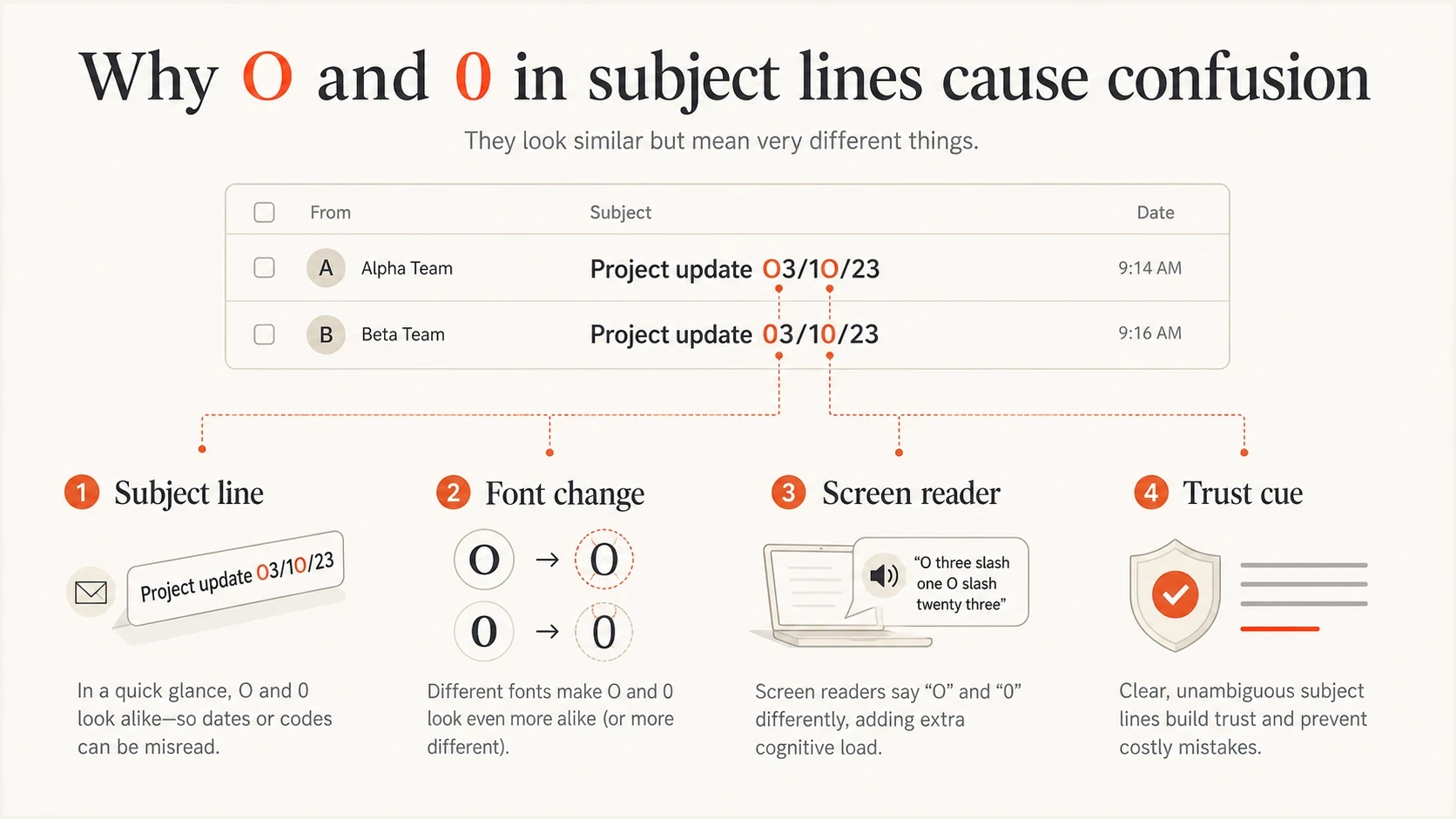
Email subject line infographic showing how the letter O can be mistaken for the number 0.
Accessibility check
Treat confusable characters as a copy QA issue. If the subject becomes less clear when read aloud, copied into plain text, shown in a narrow preview, or searched later, it should not ship.
- Read aloud: Say the subject line out loud and confirm it means the same thing without visual tricks.
- Mobile preview: Check lock screen and narrow inbox previews before approving the copy.
- Copy and search: Copy the subject into plain text, search for the date, and verify that both still work as expected.
Put meaning before styling
A correctly written date can still fail if the useful words appear too late. Inbox views and notifications truncate subject lines at different points, so front-load the unique information a reader needs to decide whether the message matters.
There is no universal safe character count across devices. Keep the subject concise, remove a sender or newsletter name that the mailbox already displays, and place the action or deadline before optional styling. A letter O used as decoration wastes scarce visible space and slows scanning.
Front-loaded subject examples
Weak: Monthly newsletter: O3/1O/27 receipt deadline
Better: Receipts due March 10
Clear with context: March 10: submit receipts
- Front-load the point: Put the action, topic, or deadline before repeated labels.
- Remove repetition: Do not repeat the visible sender name unless it changes the meaning.
- Keep character identity: Use the digit 0 for zero and reserve letters for words.
- Check truncation: Confirm the useful words remain visible in narrow previews.
When the risk rises
Using O for 0 is low risk in isolation when the sender has strong permission, stable engagement, correct authentication, and no complaint pattern. It becomes higher risk when it appears with other weak signals.
Subject line risk
Risk rises when lookalike characters appear with other weak sending signals.
Low
Clear sender
One isolated creative choice from a trusted sender.
Medium
Confusing copy
Repeated lookalike characters in subject and body copy.
High
Multiple risks
Lookalikes plus complaints, weak authentication, or misleading urgency.
If a test performs badly, do not blame one character first. Check the domain, authentication, sending source, and reputation history. Suped's DMARC monitoring helps separate copy problems from authentication problems, while blocklist monitoring shows whether domain or IP reputation is already under pressure. Blocklist (blacklist) checks matter when a subject test exposes symptoms caused by reputation issues.
How to test it
Before any campaign test, send the message to an email tester to inspect headers, authentication, content, and delivery diagnostics. That step keeps the subject line test from getting blamed for a broken setup.
Then run a clean A/B test only if the stakeholder still wants the O-for-zero version. The test needs one changed variable. If the subject, preheader, send time, segment, and creative all change together, the result is not useful.
Email tester
Send a real email to this address. Suped shows a results button when the test is ready.
?/43tests passed
Do not choose a winner by open rate alone. Privacy prefetching can register an open without a person reading the message, while automated security systems can also visit links. Use conversions, complaints, unsubscribes, replies, and support feedback to judge whether the subject helped real recipients. If the O variant raises opens but increases confusion, it still loses.
- Create variants: Compare O3/1O/27 against 03/10/2027 or March 10 with no other subject changes.
- Hold the audience: Use random splits from the same segment and send at the same time.
- Review complaints: Treat spam complaints and unsubscribes as stronger signals than opens.
- Read replies: Look for direct confusion, support questions, or comments about the date.
- Make the call: Keep the clearer subject unless the alternate wins without trust or accessibility costs.

Email tester sample report showing total score, email preview, issue summary, and per-section results
In Suped, use the test report to catch setup issues before judging the copy. If SPF, DKIM, DMARC, or content checks show a problem, fix those first. Subject line decisions should be made on a stable sending foundation.
Better ways to format dates
If a client wants the subject to look less clinical, change the wording rather than the character identity. A clearer date format gives the copy more personality without asking the reader to decode a letter.
|
|
|
|---|---|---|
Numeric date | 03/10/2027 | Acceptable for one known regional convention. |
Month name | March 10 | Clearest for mixed regions. |
Deadline copy | Ends Oct 3 | Clear action context. |
Preheader | Details inside | Keep subject clean. |
Safer replacements for O-for-zero styling
Also review wider subject line practices before arguing over one character. If the message uses urgency, money, personalization, symbols, or strange casing, the O-for-zero issue is one part of a larger copy QA review.
Replacement rule
If a subject line contains factual information, the characters should match the facts. Style should come through phrasing, not substitution.
- Dates: Use real digits or spell the month.
- Amounts: Keep currency and numbers exact.
- Codes: Copy confirmation codes exactly.
- Names: Do not stylize names in a way that harms recognition.
Where Suped fits
Suped is our DMARC and email authentication platform. It does not make a confusing subject line clear. For this workflow, Suped shows whether SPF, DKIM, and DMARC are passing for the actual sending source, and whether blocklist (blacklist) signals point to an existing reputation problem.
That helps separate authentication or reputation problems from copy-test results. Keep the subject line A/B test in the sending workflow, while using Suped to monitor the foundation underneath it.
Suped workflow
- Authenticate: Confirm SPF, DKIM, and DMARC are passing for the real sending source.
- Monitor: Watch DMARC reports, verified sources, unverified sources, and alerts during testing.
- Fix: Use automated issue detection and clear steps before changing copy again.
- Compare: Judge the subject test only after authentication and reputation signals look stable.
Views from the trenches
Best practices
Use the real digit 0 in dates unless the character is part of a verified brand name.
Test subject changes against complaints and clicks, not opens alone or visual preference.
Check mobile previews and screen reader output before approving unusual characters in subject lines.
Common pitfalls
Copying old political or fundraising tactics without proof creates confusing subject lines.
Treating O and 0 as visual variants ignores readers who search, copy, or use assistive tech.
Using lookalike characters in both subject and body makes the whole email look less trustworthy.
Expert tips
If the date matters, spell the month name so the subscriber never has to decode it quickly.
Keep the test narrow so sender reputation problems do not get mistaken for subject effects.
Ask why the style matters; if no one has evidence, use the clearer standard character.
Marketer view
Marketer from Email Geeks says accessibility is the first concern because O and 0 are different characters, not design variants.
2023-03-10 - Email Geeks
Marketer view
Marketer from Email Geeks says subject lines render in different fonts across mail apps, so a visual preference does not travel reliably.
2023-03-10 - Email Geeks
The practical call
Reject the O-for-zero style for normal email subject lines. The deliverability risk is indirect, but the user experience cost is direct. It makes dates less clear, creates a lookalike pattern, and weakens trust at the first point of contact.
Use the real digit 0, or write the date in words. If a stakeholder still wants the stylistic version, require a controlled test with complaints, unsubscribes, clicks, conversions, and support feedback in the decision. Clarity wins unless data proves otherwise. Even then, keep the clearer format for transactional, financial, appointment, and security-related messages.




