Is there a V2 API available for Google Postmaster Tools?

Updated on 2 Aug 2026: We updated this guide for Google's stable Postmaster Tools API v2, its current request schema, and the postponed legacy interface retirement.
Yes. Google now documents a stable Postmaster Tools API v2. You can use it to pull Gmail Postmaster statistics into a custom reporting environment, including a Tableau workflow, but Tableau still needs a connector layer such as a warehouse table, scheduled extract, or small internal service.
Google's API overview says the Postmaster Tools API gathers statistics on bulk email sent to Gmail users and lets you import or merge that data with other systems. That is the key point for reporting teams: the API is meant for export and integration, not just for a web UI.
- Answer: Yes, use the stable v2 API for programmatic access to Google Postmaster Tools statistics.
- Reporting: For Tableau, pull the API data into a database, file store, or BI-ready extract first.
- Caveat: Do not expect a one-click native Tableau plug-in from the Google Postmaster Tools UI.
- History: Answers from 2024 often said no because the v2 web interface had launched while the public API still exposed v1 endpoints.
The direct answer
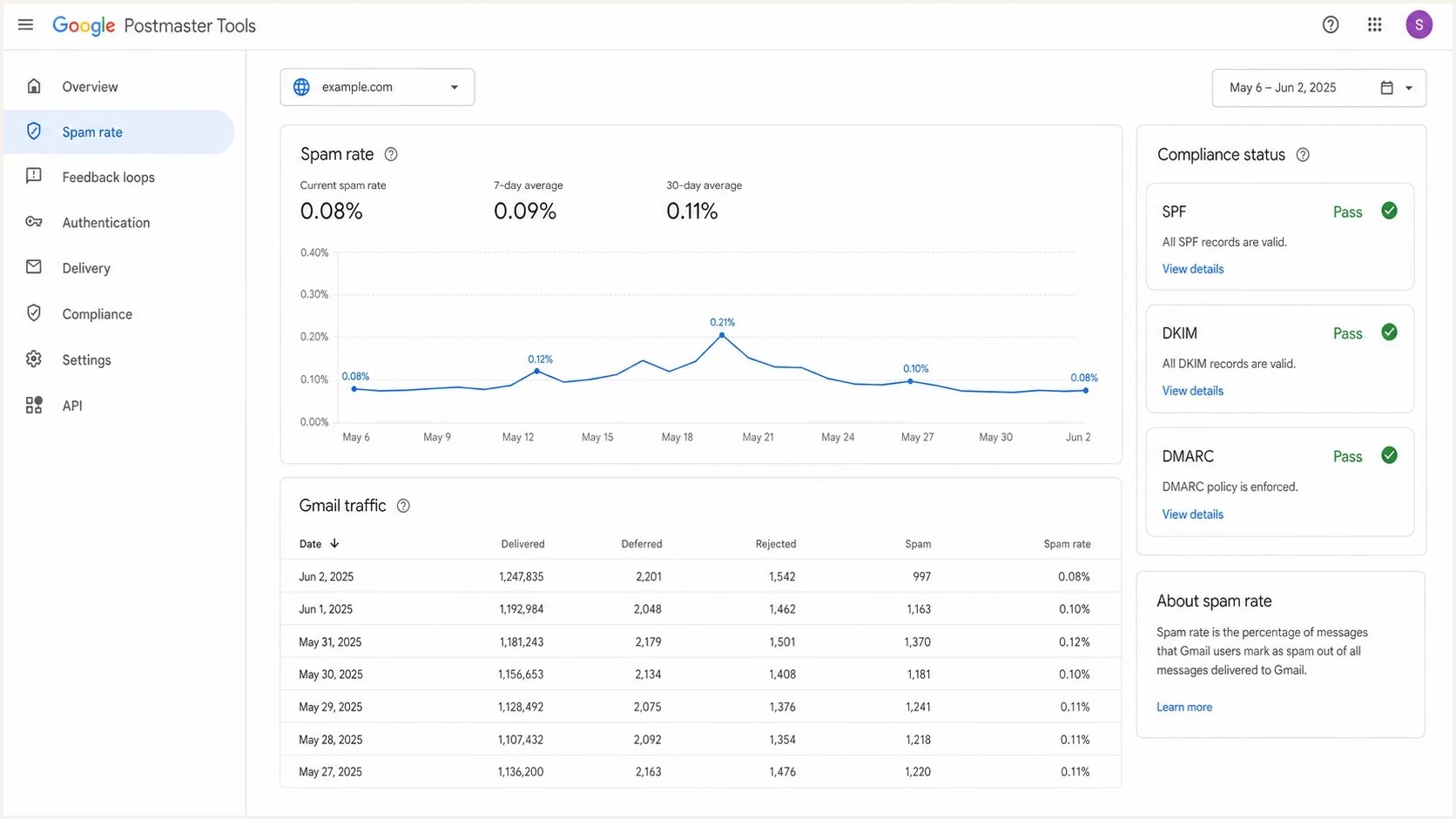
Google Postmaster Tools v2 dashboard showing spam rate and compliance data.
The current answer is yes, and the migration work matters. Google's migration guide says v2 replaces v1 trafficStats with domainStats. It also adds date range queries, compliance status for SPF, DKIM, and DMARC, and batch queries across multiple domains. Existing integrations need a v2 client library plus method and schema changes.
Treat the v2 API as a reporting API, not as a full deliverability platform. It gives Gmail-specific signals. It does not explain every authentication failure, domain spoofing event, non-Gmail inbox placement issue, IP blocklist or blacklist listing, or cause behind a complaint spike.
Use v2 when you need scheduled access to Postmaster statistics, compliance status, and multi-domain reporting. Keep the web UI for quick investigation, but build API pulls for repeatable reports.
Useful v2 endpointsHTTP
GET  $discovery/rest?version=v2
GET  /v2/domains
GET  /v2/{name=domains/*}
GET  /v2/{name=domains/*/complianceStatus}
POST /v2/{parent=domains/*}/domainStats:query
POST /v2/domainStats:batchQuery
What the v2 API can do
For most reporting use cases, the important v2 additions are date range queries, batch queries, and compliance status. A batch query reduces repetitive calls across multiple domains. A date range query lets an extract job request the reporting window it needs instead of looping through single-day calls.
|
|
|
|---|---|---|
Daily spam rate | Domain stats | Data delay |
Many domains | Batch query | Normalize rows |
Compliance | Status call | Gmail scoped |
Tableau | Extract table | Needs ETL |
Compact view of common v2 reporting jobs.
The v2 API also separates operational monitoring from executive reporting. Operations teams care about whether SPF, DKIM, and DMARC comply for active mail streams. Leadership often wants complaint trends and compliance posture. Keep source, domain, date, metric, and refresh time visible in both views.
Beyond statistics, v2 includes domain management and user access methods. These methods can add, verify, list, and remove domains, then manage which Google accounts can access each domain.
v1 pattern
- Stats: Traffic statistics were fetched with trafficStats calls.
- Dates: Single-day logic was common in older integrations.
- Migration: Old client code needs method and schema changes.
v2 pattern
- Stats: Domain statistics are fetched through query methods.
- Dates: Date ranges are supported for cleaner extract jobs.
- Scale: Batch queries reduce work across many domains.
How a v2 statistics request works
A raw REST request to domainStats:query must name the statistics, define a time query, choose an aggregation granularity, and set a page size. The custom name in each metric definition comes back in the response, so use stable names that map cleanly to warehouse columns.
Daily spam rate request bodyJSON
{
  "metricDefinitions": [
    {
      "name": "spam_rate",
      "baseMetric": {
        "standardMetric": "SPAM_RATE"
      }
    }
  ],
  "timeQuery": {
    "dateRanges": {
      "dateRanges": [
        {
          "start": {"year": 2026, "month": 7, "day": 1},
          "end": {"year": 2026, "month": 7, "day": 7}
        }
      ]
    }
  },
  "aggregationGranularity": "DAILY",
  "pageSize": 200
}
The response contains domainStats plus nextPageToken. The default page size is 10 and the maximum is 200, so production jobs must continue querying until nextPageToken is empty. The API returns statistics only for dates where data is available.
Use the read-only OAuth scope for statistics-only jobs. Use the broader Postmaster scope only when the integration must manage domains or user access.
How to connect it to Tableau
The clean Tableau path is API pull, normalization, storage, then Tableau. Do not design this as a live dashboard that calls Google on every view. Postmaster data has reporting delays, OAuth access tokens expire, and retries belong in an extract job rather than inside a BI workbook.
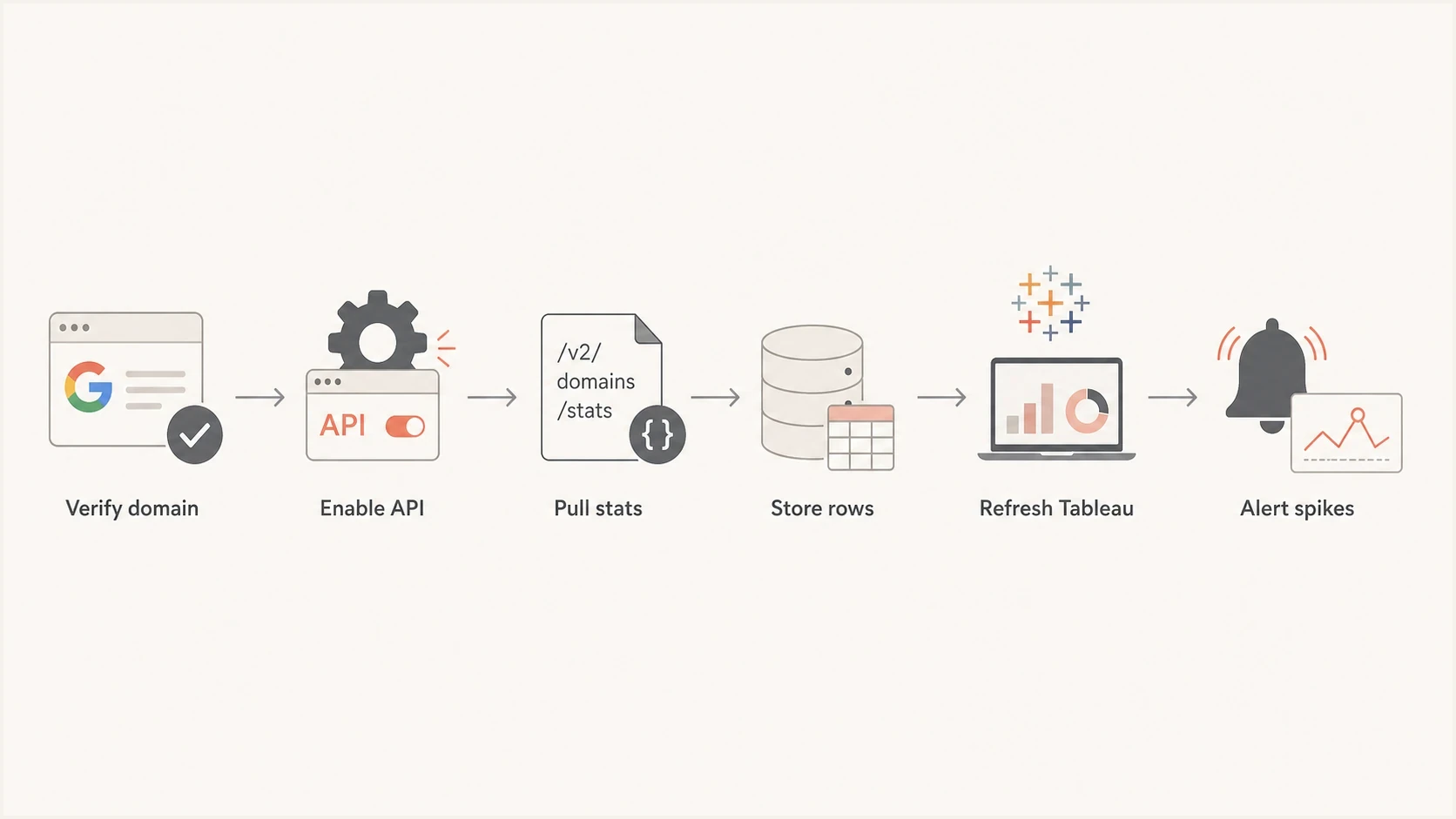
Flowchart showing a Postmaster Tools v2 API pipeline into Tableau.
A basic implementation needs a verified authentication domain, a Google Cloud project, the Postmaster Tools API enabled, OAuth credentials, and a scheduled job. The authentication domain is the DKIM signing domain or the SPF Return-Path domain used to authenticate the mail.
Reporting extract patternPYTHON
for domain in domains:
    stats = query_domain_stats(domain, start_date, end_date)
    rows = normalize_postmaster_stats(stats)
    warehouse.upsert(rows, keys=["domain", "date", "metric"])

tableau.refresh("gmail_postmaster_extract")
Do not skip the storage layer. A table or extract gives you retry handling, schema control, refresh timestamps, audit history, and a place to reconcile API numbers with what the Postmaster UI shows.
Before wiring dashboards, verify that the domain itself is healthy. A broken DKIM selector, weak SPF setup, or missing DMARC reporting address will leave the API unable to explain the broader authentication problem. Suped's domain health check checks DMARC, SPF, DKIM, and related DNS details before reporting automation begins.
?
What's your domain score?
Deep-scan SPF, DKIM & DMARC records for email deliverability and security issues.
Where the data needs caveats
The API answer is yes, but the data still needs careful handling. Google says statistics are available only for domains that send mail to at least 50 Gmail users per day. The data is Gmail-specific and subject to privacy thresholds. It appears after processing delay, so a dashboard that treats every missing value as zero will mislead people.
- No row: The API omits dates without available data, which is not the same as a zero spam rate.
- Volume: A domain needs mail to at least 50 Gmail users per day before it receives statistics.
- Source: Gmail data explains personal Gmail recipient behavior, not every mailbox provider.
- Migration: Old v1 dashboards need schema review before anyone trusts trend comparisons.
Google's support note says retirement of the legacy Postmaster Tools web interface has been postponed, with no new date announced. Google still directs senders to v2 and says the v1 API will be retired. The legacy Domain and IP Reputation dashboards will also be retired rather than carried into v2 unchanged.
Store the raw API payload, normalized metric rows, refresh timestamp, API version, domain, and date. This makes reconciliation possible when the UI, v1 exports, and v2 extracts do not match perfectly.
For a deeper comparison of old and new spam reporting, the related note on v1 versus v2 covers measurement differences in detail.
Where Suped fits
Google Postmaster Tools is one Gmail-specific input. Suped is our DMARC reporting and email authentication platform. It adds aggregate DMARC visibility, SPF and DKIM checks, hosted authentication records, blocklist monitoring, and real-time alerts around the Postmaster reporting workflow.
Suped DMARC dashboard showing email volume, authentication health, and source breakdown
A practical workflow uses Postmaster API data for Gmail complaint and compliance reporting, then uses Suped's DMARC monitoring to identify which sources are authenticated, which sources are failing, and what should be fixed next.
Postmaster Tools can show that Gmail spam rate increased. Suped can help trace whether a new sender failed DKIM, a Return-Path changed, SPF lookups are too high, a domain hit a blocklist or blacklist, or an unapproved source started sending. Suped's blocklist monitoring adds reputation checks that the v2 Postmaster API does not replace.
For campaign-level checks, send a real message through Suped's email tester and inspect authentication, headers, DNS, and content signals before reviewing delayed Postmaster trends.
Views from the trenches
Best practices
Check the v2 discovery document before changing extract jobs, data models, or dashboards.
Treat spam rate changes as directional until API and UI comparisons settle over several days.
Store raw daily pulls so schema changes do not erase the ability to reconcile old reports.
Pair Postmaster data with DMARC, SPF, DKIM, bounce, and complaint data for action.
Common pitfalls
Assuming the v1 trafficStats schema can be swapped to v2 without changing query logic.
Building Tableau reports directly on OAuth calls without a staging table or retry process.
Using Postmaster spam rate alone to decide whether authentication or content caused trouble.
Expecting domain and IP reputation dashboards to return unchanged in the v2 migration.
Expert tips
Build one normalized date table so Gmail metrics, DMARC results, and send logs line up.
Flag days with no Postmaster rows separately from days with a true zero complaint rate.
Refresh the API early in the day, then rerun after Google's delayed data catches up.
Keep one dashboard note that explains v1 and v2 schema differences to stakeholders.
Marketer from Email Geeks says v2 API availability changed after many teams first checked, so current documentation matters more than old assumptions.
2025-12-18 - Email Geeks
Marketer from Email Geeks says API and UI spam rates can differ during migrations, so dashboards should show source labels and last refresh times.
2026-01-09 - Email Geeks
Practical answer
There is a stable Google Postmaster Tools v2 API, and it is the right path for a custom reporting setup. Use it to pull Gmail-specific statistics and compliance status, store the results in a BI-ready table, and connect Tableau to that table rather than trying to make Tableau talk directly to the Postmaster UI.
The main engineering work is the data model: handling missing rows, pagination, refresh delays, version changes, historical comparisons, and the gap between Gmail-only data and broader authentication health. Suped can add that broader context through DMARC source monitoring, DNS checks, blocklist monitoring, and alerting.




