Is Microsoft Azure a good platform to host an MTA (Mail Transfer Agent)?


Updated on 20 Aug 2026: We updated this guide with Microsoft's current Azure SMTP policy, clearer MTA scope, reverse DNS constraints, and Azure Communication Services Email limits.
Short answer: Microsoft Azure can host an MTA, but do not treat Azure-owned virtual machine IP space as a good default for outbound internet mail. It is workable only when you have a confirmed port 25 path or authenticated relay plan, controlled reverse DNS, clean dedicated IP history, abuse handling, bounce handling, and enough volume discipline to build reputation slowly.
For most senders, the better Azure-native pattern is to keep the application and data plane in Azure, then submit mail through authenticated SMTP on port 587 to Azure Communication Services Email or another controlled sending path. That keeps the application in Azure while a managed delivery path handles the public MTA work.
The caveat is scale. A large enterprise with owned IP space, Microsoft account support, security operations, and a postmaster process can make Azure part of the mail stack. A small or mid-sized sender trying to run outbound mail on ordinary Azure IPs will spend too much time fighting port restrictions, rate limits, rDNS gaps, and mailbox-provider suspicion.
The direct answer
Azure is a good place to run compute. That does not automatically make it a good place to originate email. An MTA is judged by receiving mail systems on sending IP reputation, domain reputation, complaint rates, authentication, connection behavior, content patterns, bounce handling, queue behavior, and past abuse from nearby address space.
- Best case: Azure hosts the MTA control plane, you use BYOIP or an approved relay path, and every domain has clean SPF, DKIM, DMARC, TLS, bounce, complaint, and suppression controls.
- Weak case: A VM sends directly from normal Azure IP addresses with no established mail reputation and no guaranteed port 25 operating model.
- Usual choice: Keep Azure for applications and use authenticated SMTP submission on port 587 or another dedicated sending path for marketing, product notifications, and any traffic where inbox placement matters.
- Monitoring layer: Suped's product fits the authentication and reputation workflow around this decision, with DMARC monitoring, Hosted SPF, Hosted MTA-STS, blocklist monitoring, and real-time issue alerts.
Do not make port 25 the assumption
For Azure VMs and Azure Firewall, outbound port 25 is not blocked for standard Enterprise Agreement and MCA-E subscriptions. Qualified Enterprise Dev/Test subscriptions can request an exemption, while Azure blocks VM port 25 for other subscription types. Port 587 for authenticated submission is not subject to that subscription restriction. Network access still does not guarantee delivery, so treat port access, rDNS, IP reputation, and receiving-domain behavior as separate launch gates.
What Azure is actually hosting
An MTA is the store-and-forward SMTP software that queues a message, selects the next mail server, retries temporary failures, and records the transfer in Received headers. It is one part of a mail system, not the whole mailbox stack. That distinction matters because hosting only an outbound MTA has a smaller security and operating scope than hosting inbound delivery, mailbox storage, and user access.
- Outbound transfer: The MTA resolves recipient MX records, opens SMTP connections, queues deferred mail, and applies receiver-specific retry and rate rules.
- Authenticated submission: An application or Mail User Agent submits mail to a Mail Submission Agent, normally with authentication and TLS on port 587, before an MTA handles delivery.
- Inbound mailbox delivery: An inbound MTA accepts mail for your MX domain and hands it to a Message Delivery Agent or mailbox system. This requires separate spam filtering, storage, backup, and user-access controls.
- Managed sending path: Azure Communication Services Email accepts authenticated submissions and manages the public delivery path. That is different from operating your own MTA on a VM.
If the requirement is only application notifications, build or buy only the outbound submission and delivery path. Do not add inbound MX hosting, mailbox storage, IMAP, or POP unless the business requirement calls for a complete mail server.
Why Azure-owned IPs are hard
The main problem is not whether an MTA binary can run on an Azure VM. It can. The problem is whether receiving systems trust mail that originates from that IP space. Cloud compute ranges have a long history of abuse, short-lived infrastructure, and generic workloads. Mailbox providers treat those ranges differently than established mail infrastructure.
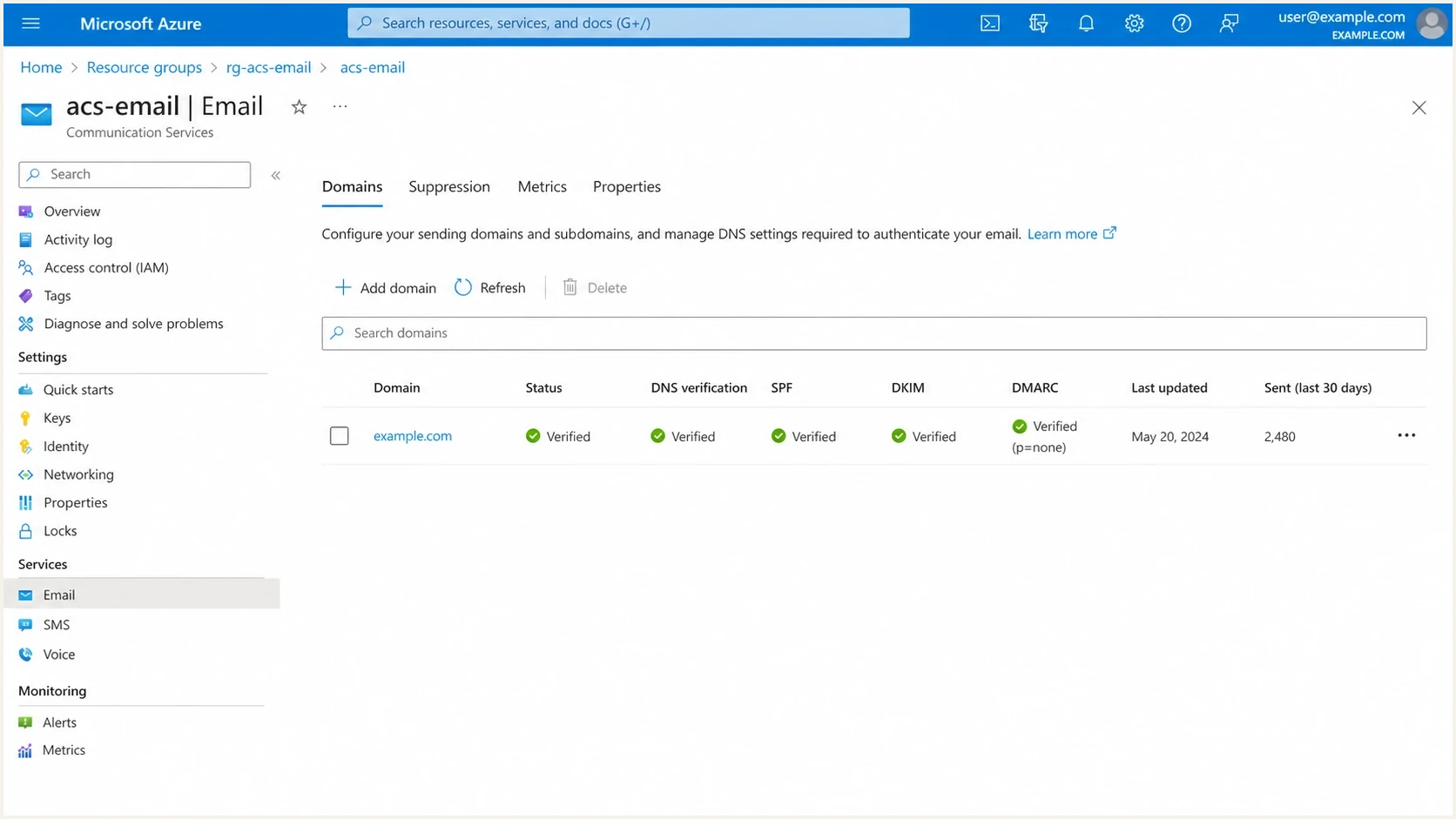
Microsoft Azure Communication Services Email domain configuration with verification and sending metrics.
There is also a reputation mismatch. A team can have a clean domain and compliant authentication, then still hit throttling or junk placement because the source IP range is not expected to act like a production MTA pool. Microsoft receivers, consumer webmail systems, and corporate filters look at both domain and infrastructure signals.
Microsoft's current guidance separates two facts: some enterprise subscription types can use outbound port 25, but Azure support does not make external domains accept the mail. That gap is where sender reputation, rDNS, queue behavior, and complaint history matter.
Azure-owned VM IPs
- Access: Outbound SMTP depends on the subscription type. Most non-enterprise VM traffic should use authenticated submission on port 587.
- Reputation: The IP range can inherit suspicion from generic cloud activity, even before your own mail history exists.
- Control: Azure-owned public IPv4 supports one PTR per public IP, but setup and validation require deliberate DNS work.
Azure with BYOIP
- Access: You still need an approved outbound SMTP or relay path, but owned space gives you a stronger operational case.
- Reputation: Existing IP history and allocation identity can help, provided the space has not been abused.
- Control: The setup works best with documented rDNS, escalation contacts, and strict volume ramping.
For an Azure-owned public IPv4 address, set the ReverseFqdn property through Azure CLI or PowerShell because the portal does not expose this configuration. Azure validates that the forward A or CNAME chain points to the public IP or another eligible name in the subscription. Azure-owned public IPv6 addresses do not support this PTR mechanism. For BYOIP, onboard the reverse zone for your owned range and keep forward-confirmed reverse DNS consistent with the MTA's HELO name.
BYOIP changes the risk profile, but it does not remove the work. You still need authentication, traffic shaping, bounce classification, suppression logic, feedback handling, and blocklist (blacklist) monitoring. Without those controls, the MTA will fail for ordinary mail-operations reasons, not because Azure itself cannot run the software.
When Azure can work
Azure can work when the sender has the same controls a specialist mail operation would require anywhere else. That means static and well-documented source IPs, reverse DNS that matches the sending identity, clean HELO naming, SPF, DKIM, DMARC, TLS reporting, abuse handling, suppression handling, and staged volume.
Azure MTA suitability
Use these bands to decide whether Azure is a practical MTA host for outbound internet mail.
Avoid
High risk
Normal Azure VM IPs, no confirmed outbound SMTP approval, no dedicated mail operations owner.
Caution
Medium risk
Approved SMTP path, low volume, but no BYOIP and limited receiver-specific monitoring.
Viable
Managed risk
BYOIP or approved relay path, controlled rDNS, staged warmup, and live reputation monitoring.
Approve an Azure-hosted MTA plan only after the DNS and identity layer is written down. This is the minimum shape to expect before any warmup starts.
Baseline DNS for a controlled sending domaindns
example.com. 3600 IN TXT "v=spf1 ip4:203.0.113.10 -all"

s1._domainkey.example.com. 3600 IN TXT (
  "v=DKIM1; k=rsa; p=BASE64_PUBLIC_KEY"
)

_dmarc.example.com. 3600 IN TXT (
  "v=DMARC1; p=none; "
  "rua=mailto:dmarc@example.com"
)
Do not publish a strict DMARC policy blindly when you move MTA infrastructure. Start with reporting, identify every legitimate source, make sure SPF and DKIM pass for the visible From domain, then move to p=quarantine or p=reject in stages. Do not rely on the old pct tag for staged rollout. Stage by source, subdomain, traffic class, and rollback criteria instead.
Suped's DMARC monitoring is useful here because it turns aggregate reports into source-level authentication outcomes and specific issues to fix.
DMARC record detail view showing SPF, DKIM, DMARC, rDNS diagnostics, and DNS records
The MTA layer still needs operators
The software choice matters less than the operating model. An Azure VM can run a commercial or open-source MTA, but it still needs queue policy, provider-specific throttles, retry rules, bounce classification, suppression handling, feedback-loop processing, and an owner who can make changes during an incident.
- Self-hosted MTA: Use this model when control, data location, custom routing, and high steady volume justify daily operations.
- Azure relay path: Use this model when the application needs reliable SMTP submission on port 587 and the team does not need to control every retry and queue rule.
- Warmup policy: Define per-domain caps, backoff rules, stop conditions, and rollback criteria outside the MTA.
- Monitoring: Track DMARC, bounces, complaints, TLS reporting, and blocklist or blacklist listings before volume increases.
This is the useful part of the self-hosted versus cloud MTA comparison: Azure changes where compute runs, but it does not remove mail operations. If the team cannot staff those controls, Azure-hosted MTA is the wrong model even when the VM can send.
How to validate the decision
Do not decide this from architecture preference alone. Run a small proof of delivery with the exact network path, exact HELO identity, exact rDNS, exact DKIM selector, and exact message classes the production MTA will use.
- Port test: Confirm outbound SMTP behavior before procurement, not after the VM and MTA are already built.
- Identity test: Check HELO, PTR, SPF, DKIM, DMARC, and TLS reporting against the same domain plan.
- Inbox test: Send real mail through the email tester and inspect authentication, headers, content, and placement signals.
- Receiver test: Track Microsoft consumer and Microsoft 365, Gmail, Yahoo, and corporate domains separately because one receiver can throttle while others accept.
- Status test: Separate SMTP acceptance from inbox placement, and process later asynchronous bounces sent to the return-path address.
- Rollback test: Define the exact deferral, complaint, bounce, or spam-placement threshold that stops the migration.
Email tester
Send a real email to this address. Suped shows a results button when the test is ready.
?/43tests passed
The most useful proof is not a single green check. It is a time series. Send low volume across several days, watch Microsoft-specific deferrals, compare domain authentication with receiving behavior, and keep logs that separate network acceptance from inbox placement.
If Microsoft mailboxes throttle or defer the new path, treat that as a migration blocker, not a temporary annoyance. There are recurring Microsoft throttling patterns that require patient volume control and clean engagement signals.
Controls to keep separate
Do not bundle every email requirement into the MTA hosting decision. Hosting decides where the mail leaves the network. Authentication decides whether the receiver can trust the domain. TLS policy decides whether transport security is enforced. Reputation monitoring decides how quickly you see damage.
For TLS policy, review Microsoft MTA-STS guidance and decide whether you will host the HTTPS policy file yourself or use hosted management. Exchange Online outbound MTA-STS validation is always on. When an outbound connector uses a smart host, Exchange Online validates the smart host domain, not the final recipient domain. Inbound MTA-STS for a domain whose MX points directly to Exchange Online still requires DNS plus an HTTPS policy file. Suped Hosted MTA-STS reduces the operational work to two CNAME records and policy controls, with no separate web hosting requirement.
MTA-STS and TLS reporting DNSdns
_mta-sts.example.com. 3600 IN TXT "v=STSv1; id=20260524"

_smtp._tls.example.com. 3600 IN TXT (
  "v=TLSRPTv1; rua=mailto:tls-rpt@example.com"
)
Before and after the move, run a domain health checker pass so you can catch missing TXT records, broken DKIM selectors, DMARC policy mistakes, and weak TLS reporting before volume exposes them.
?
What's your domain score?
Deep-scan SPF, DKIM & DMARC records for email deliverability and security issues.
Reputation monitoring also needs its own lane. If a new Azure path causes listings, you need to know whether the listing is tied to an IP, a domain, a shared range, or a specific mail pattern. Suped's blocklist monitoring brings blocklist and blacklist checks into the same operational view as authentication issues.
Decision matrix
The right answer depends on what the team means by host an MTA. Running a mail daemon on a VM is the easy part. Running a trusted outbound mail service is the hard part.
|
|
|
|
|---|---|---|---|
Azure VM IPs | Testing and internal mail | Port 25 blocks and poor trust | Avoid for primary outbound |
Azure BYOIP | Large senders with MTA staff | Operations burden | Viable with controls |
Authenticated relay | Application and transactional mail | Service limits | Preferred for most |
Azure-native email service | Product notifications | Sender policy and limits | Consider |
Dedicated sending path | High-volume external mail | Migration work | Preferred when inbox placement matters |
Practical Azure MTA choices
Plan Azure Communication Services Email capacity before selecting it. A verified custom domain starts at 30 messages per minute and 100 per hour, and higher quotas require support review. Microsoft requires a failure rate below 1% for a high email quota and recommends increasing volume gradually over two to four weeks. Azure-managed domains have lower limits and cannot receive quota increases, so production senders should verify a custom domain early.
For most teams, Suped's product is the DMARC and reputation layer to pair with whichever path you choose. It does not replace the MTA, but it gives the team the control plane around the MTA: DMARC monitoring, Hosted SPF, SPF flattening, Hosted MTA-STS, blocklist monitoring, multi-domain views, and automated steps to fix authentication issues.
Views from the trenches
Best practices
Document port 25 approval, rDNS ownership, bounce handling, and abuse routing before launch.
Warm IPs with recipient-level limits, then compare Microsoft results against other mailboxes.
Keep DMARC, SPF, DKIM, TLS reporting, and blocklist monitoring in one review path.
Common pitfalls
Assuming Azure IPs have neutral reputation leads to blocks before volume becomes meaningful.
Treating BYOIP as a full fix misses port policy, routing, and postmaster obligations.
Moving an MTA without seed testing hides inbox placement issues until customers complain.
Expert tips
Use Azure for control and analytics, but separate high-risk outbound mail from VM IP pools.
Make deliverability rollback criteria explicit before DNS, rDNS, or routing changes start.
Track Microsoft deferrals separately because those signals often diverge from other mailbox data.
Marketer from Email Geeks says Azure can run an MTA, but Azure-owned IP ranges are often judged as poor mail sources before sender history exists.
2023-02-18 - Email Geeks
Marketer from Email Geeks says large senders have more chance of getting port 25 access and cloud-provider help than small accounts.
2023-02-18 - Email Geeks
Practical recommendation
Do not choose normal Azure VM IPs for a primary outbound MTA. The platform can run the software, but the surrounding mail trust problem is bigger than the hosting problem. Port restrictions, receiver suspicion, shared range history, and Microsoft-specific throttling make it a poor default.
If the business has to stay in Azure, the acceptable plan is Azure plus BYOIP, authenticated submission on port 587, or Azure Communication Services Email, with strict authentication and staged warmup. Keep Suped around the domain and reputation layer so DMARC, SPF, DKIM, MTA-STS, blocklist status, and issue remediation are visible before traffic changes hurt customers.




