Is including a physical address in an email footer required and does it improve deliverability?

Updated on 29 Aug 2026: We clarified when a physical address is legally required and how to apply the rule across international email programmes.
Yes, a valid postal or mailing address is required for many commercial emails, especially when you send to recipients in the United States or Canada. Under CAN-SPAM, a valid physical postal address can be a current street address, a registered PO Box, or a properly registered private mailbox. In Canada, commercial electronic messages need identification details, a mailing address, and another contact channel such as an email address, web address, or phone number. Other countries often require clear sender identity and contact details without requiring a physical street address in every email.
Pure transactional or relationship emails are different under CAN-SPAM. If the message only confirms or updates something the recipient already agreed to, a physical postal address is generally not the rule that applies. If the subject line looks promotional or the transactional content does not appear mainly at the beginning of a mixed message, treat the message as commercial and include the full footer.
No, the address by itself does not directly improve email deliverability in the way SPF, DKIM, DMARC, complaint rate, engagement, or list quality do. A footer address will not repair a poor reputation, broken authentication, or a bad opt-in process. It helps indirectly because it makes the sender easier to identify, reduces suspicion, supports legal compliance, and can reduce spam complaints when readers recognise who is contacting them.
Short answer
- Add a valid postal or mailing address to commercial emails when the laws covering your recipients require it.
- For Canadian commercial electronic messages, include a mailing address and a working contact channel, and keep the required details valid for at least 60 days after sending.
- Do not assume every country requires a street address. Some laws require accurate contact details instead.
- Do not treat the address as a deliverability fix. Authentication and reputation still do the heavy lifting.
- After changing a footer, send a real test email and review authentication, links, headers, and rendering.
When a footer address is required
For commercial email covered by US law, include a valid physical postal address. CAN-SPAM applies according to the message's primary purpose, not whether the email is bulk, one-to-one, B2B, or sent to an existing customer. Each separate violating email can carry a penalty of up to $53,088, so use a compliant footer whenever the primary purpose is commercial.
For a deeper jurisdiction-specific discussion, see the related page on USA and Canada. The practical point is simple: if you send newsletters, promotions, product announcements, sales emails, event invitations, nurture emails, or partner offers, the footer should identify the organisation behind the message.
For Canada, do not stop at a mailing address. CASL's CRTC regulations require the sender, and the person on whose behalf the message is sent when different, to be identified with a mailing address and either a phone number, email address, or web address. The identification details and unsubscribe mechanism must remain valid for at least 60 days after the message is sent. Process an opt-out without delay and no later than 10 business days after receiving it.
A commercial footer is not only an address block. The message also needs accurate sender and routing information, a subject line that matches the content, clear advertisement disclosure, and an unsubscribe path that is easy to find. For US commercial email, the opt-out mechanism must work for at least 30 days after sending, and opt-out requests must be honored within 10 business days.
If the message promotes another brand in the footer, keep the sponsored or partner block clearly separate from the legal footer. The address, sender identity, and unsubscribe link must remain clear and conspicuous rather than being crowded out by banners, coupons, or redirect-heavy links.
|
|
|
|---|---|---|
Newsletter | Include | Commercial content and recurring sender identity. |
Promotion | Include | Required for US commercial email and a useful global baseline. |
B2B sales | Include | CAN-SPAM covers B2B email when its primary purpose is commercial. |
Receipt | Often useful | Usually transactional, but identity still helps. |
Password reset | Usually optional | Security purpose and no promotion. |
Common email types and whether a footer address belongs there.
A purely transactional or relationship email, such as a receipt, password reset, account security alert, warranty notice, subscription-status update, or delivery of an already purchased service, generally does not need a physical postal address under CAN-SPAM. It still needs truthful routing information. If the subject line looks promotional or the transactional content is not mainly at the beginning, the primary purpose can shift back to commercial.
Legal review still matters
Use the footer as a baseline, then confirm the exact wording with legal counsel for the countries where you send. This matters for regulated sectors, multi-brand email, franchises, affiliate campaigns, and any message sent on behalf of another company.
How address rules differ in other markets
Do not apply CAN-SPAM's phrase 'valid physical postal address' as though every country uses the same test. In the United Kingdom, PECR requires marketing email to identify the sender and provide a valid contact address for recipients to opt out or unsubscribe. That contact address does not have to be a physical street address.
In the European Union, GDPR transparency duties require clear controller identity and contact information when personal data is used. GDPR does not itself require a street address or privacy-policy link in every email footer. National company, e-commerce, or advertising rules can add address, registration, or imprint duties, so check the recipient country rather than treating EU requirements as uniform.
Australia's Spam Act requires commercial electronic messages with an Australian link to identify the sender accurately and include correct contact details that remain correct for at least 30 days. It does not create a universal street-address requirement. Consent and a functional unsubscribe method are separate duties, and unsubscribe requests must be honored within five working days.
Global template rule
A postal address is a conservative global baseline, but describe it as a legal requirement only where the applicable law says so. Keep regional fields available for registration details, imprint links, or local contact wording.
What counts as a valid address
Under CAN-SPAM, a valid physical postal address can be the sender's current street address, a PO Box registered with the U.S. Postal Service, or a private mailbox registered with a commercial mail receiving agency established under Postal Service regulations.
It does not have to be the founder's home address. Many senders use a corporate office, USPS-registered PO Box, or properly registered commercial mailbox. A virtual-office label, coworking address, accountant's office, agency address, or parent-company address is not automatically valid. Confirm that it is the sender's current street address or a properly registered private mailbox under the applicable rule, that mail can be received there, and that you have permission to use it.
A solid footer includes the legal sender name, mailing address, unsubscribe link for commercial messages, and a short preference-management link where appropriate. A privacy-policy link and a brief permission reminder can also reduce confusion, especially for newsletters and nurture emails. B2B senders in some European markets also include registration number, VAT number, or an imprint link. Keep it factual and readable. Tiny grey text that nobody can use is a bad pattern, even when it technically appears in the HTML.
Good footer
- Names the legal company or trading entity plainly.
- Uses a valid mailing address that matches company records.
- Provides a clear opt-out path for marketing email.
- Uses normal contrast and text size.
Risky footer
- Uses only a brand name when another entity sends the email.
- Uses an outdated address or a mailbox nobody monitors.
- Buries opt-out text behind vague copy.
- Hides the address with tiny, low-contrast text.
Plain text footer exampletext
You are receiving this email from Example Ltd.
Example Ltd, 123 Market Street, Suite 400, Chicago, IL 60601
Manage preferences: example.com/preferences
Unsubscribe: example.com/unsubscribe
That example is intentionally plain. The footer does not need a long legal block. It needs the right sender, a usable address, and a clear way out for commercial messages.
Does it improve deliverability?
A physical address does not create a deliverability boost on its own. Mailbox providers do not publish a rule that says adding a postal address gives a sender better inbox placement. The address is closer to a trust and compliance signal than a filtering signal. It helps the human side of deliverability more than the machine side.
Modern bulk-sender requirements reinforce the same point. Mailbox providers focus on authentication, low spam complaint rates, steady sending patterns, visible unsubscribe links, and one-click unsubscribe for high-volume marketing streams. They do not treat a postal address as a substitute for those controls.
The indirect effect can still be real. A recipient who understands who sent the email is less likely to mark it as spam. A compliance team is less likely to pause campaigns. A brand manager is less likely to approve a vague footer that looks disposable. Those outcomes matter because complaints, unsubscribes, engagement, and reputation affect inbox placement.
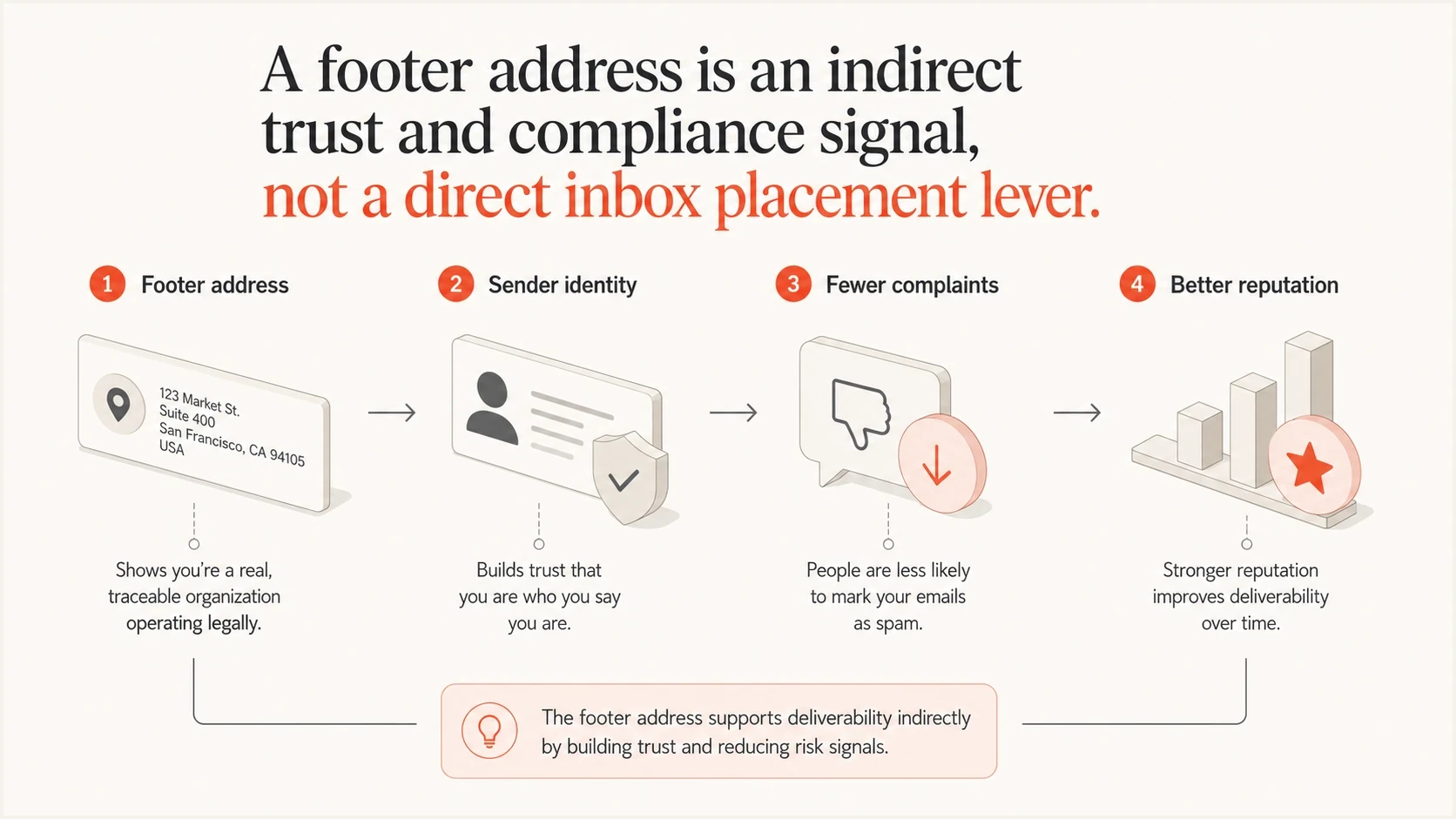
Email footer physical address as an indirect trust and compliance signal.
Direct deliverability work
This is the work that changes how mailbox providers authenticate, score, and route mail.
- SPF, DKIM, and DMARC pass with matching authenticated domains.
- Complaint rate, bounce rate, and engagement stay healthy.
- Links, images, and wording match recipient expectations.
- Volume changes do not surprise mailbox providers.
Footer address value
This is the work that makes the sender easier for people and reviewers to understand.
- Readers can tell who is behind the message.
- Marketing teams meet common legal requirements.
- A real company looks less evasive.
- Clear sender identity can reduce spam-button use.
The same logic applies to unsubscribe links. A missing or hidden unsubscribe link is usually a bigger deliverability risk than a missing address because frustrated recipients use the spam button when they cannot leave cleanly. See the related page on a missing unsubscribe link if that is part of the footer decision.
What improves deliverability more
If the real goal is inbox placement, put the physical address in place and then spend most of the time on authentication and reputation. Suped's product supports that surrounding workflow with DMARC monitoring, hosted SPF, DKIM visibility, hosted MTA-STS, real-time alerts, issue detection, and clear steps to fix sending-source problems.
Reputation checks matter too. A compliant footer does not protect a domain or IP that is already on a blocklist or blacklist. Suped's blocklist monitoring gives teams a way to watch those signals alongside authentication instead of treating them as separate fire drills.
Suped DMARC dashboard showing email volume, authentication health, and source breakdown
Before a footer change goes live, run a domain health check to catch missing or weak records. After the change goes live, send a real message through the email tester and inspect the actual headers, body, links, and rendered footer.
That sequence separates two jobs. The address handles compliance and identity. The test message proves that the email authenticates properly and that the footer did not introduce broken links, tracking-domain mismatches, or rendering problems. Suped's DMARC view then shows which authenticated source failed and why.
Email tester
Send a real email to this address. Suped shows a results button when the test is ready.
?/43tests passed
For MSPs and teams with many domains, a footer template can be standardised quickly, but authentication issues vary by sender, subdomain, vendor, and DNS record. Suped's multi-tenant workflow, hosted SPF, SPF flattening, hosted DMARC, and alerts keep those moving parts visible.
How to add a compliant footer address
Implement the address once in the shared footer system, then let brands or regions override only the details they are legally required to change. The mistake to avoid is having every team paste its own footer into every campaign. That leads to stale addresses and broken unsubscribe links.
- List every email stream, including marketing, lifecycle, product, billing, sales, and partner mail.
- Mark each stream as commercial, transactional, mixed, or internal.
- Select the legal sender name and mailing address for each brand or region.
- Move footer text into reusable template components rather than campaign body copy.
- Keep sponsored or partner offers outside the compliance block so the address and unsubscribe link remain easy to find.
- Review the shared footer at least quarterly and after any move, merger, rebrand, or legal-entity change. Verify the legal sender, address, contact details, and unsubscribe link.
- Check dark mode, mobile width, plain text, and forwarded-message display.
- Track authentication, complaints, unsubscribes, bounces, and reply behaviour after rollout.
Best practice
Use a valid mailing address, not a vague location such as a city name. If privacy is a concern for a small business, set up a legally valid mailbox or registered office before sending commercial campaigns.
For global programmes, use a footer model with a core block and a regional block. The core block contains the brand, sender, unsubscribe, preferences, and privacy link. The regional block contains the address, registration details, imprint link, or local legal text. That keeps the footer readable while still letting counsel control regional differences.
What a footer address cannot fix
Do not expect a footer address to fix inbox placement when the underlying mail stream has poor engagement or failing authentication. It is one part of a trustworthy message, not a replacement for permission, segmentation, suppression hygiene, and technical setup.
Deliverability impact of footer address work
How much the footer address usually changes each part of the sending picture.
Legal compliance
High
High impact for commercial email in markets that require sender address information.
Reader trust
Medium
Moderate impact when subscribers recognise the sender and see clear company details.
Spam filtering
Low
Low direct impact because filters lean more heavily on authentication and reputation.
Broken setup
None
No fix for failed SPF, failed DKIM, DMARC domain mismatch, or blocklist and blacklist issues.
The highest-risk footer pattern is not a missing street address in isolation. It is a combination of weak identity signals: vague From name, unfamiliar sending domain, hidden unsubscribe link, brand links that point to unrelated domains, sponsored footer ads that crowd out required details, and no clear legal sender. That whole pattern makes people distrust the message.
A strong footer cannot make unwanted mail wanted. If people did not ask for the email, if the offer is irrelevant, or if the sender appears too frequently, complaints will rise. The address helps people identify the sender, but it does not create consent.
Views from the trenches
Best practices
Use a real sender identity in every commercial footer, not only a campaign brand name.
Keep address, unsubscribe, and company details visible in both HTML and plain text mail.
Review footer rules by recipient country before scaling one template across regions.
Use a registered mailbox when privacy matters, then monitor it for legal notices.
Common pitfalls
Treating the footer address as an inbox fix while ignoring authentication failures.
Assuming Europe has one uniform footer rule instead of checking local business laws.
Using a stale office address after a move, merger, rebrand, or sender migration.
Hiding sender details in tiny low-contrast text that recipients cannot reasonably use.
Expert tips
Separate compliance footer logic from campaign copy so legal updates ship cleanly once.
Use sender identity as a trust cue, then validate delivery with real message tests.
Map each brand to its legal sender before adding partner offers or co-marketing.
Watch complaints after footer changes to see whether clearer identity reduces friction.
Marketer from Email Geeks says the address is required for many commercial emails sent to US recipients, so it belongs in the footer by default.
2023-08-30 - Email Geeks
Marketer from Email Geeks says the deliverability benefit is indirect because clearer sender identity can build trust and reduce negative reactions.
2023-08-30 - Email Geeks
The practical answer
Add a valid physical postal address to commercial email covered by CAN-SPAM. For Canadian commercial electronic messages, include a valid mailing address and the required additional contact channel. For other markets, check whether the law requires a postal address, a contact address, or different company-identification details. If privacy is a concern, use a properly registered PO Box or commercial mailbox that satisfies the applicable rule.
Do not add it because you expect a mailbox provider to reward the string of text. Add it because clear sender identity supports compliance and recipient trust. Then use authentication monitoring, real test sends, complaint tracking, and blocklist or blacklist visibility to work on deliverability directly.
The decision rule is simple: if a recipient can reasonably think the email is commercial, use the footer required by the recipient's jurisdiction and make the sender's identity and unsubscribe path clear. If the email is purely transactional or relationship-based, the physical postal address is usually optional under CAN-SPAM, but accurate routing information and sender identity still matter.




