How to troubleshoot undelivered email messages from GoDaddy?

Published 29 Jul 2025
Updated 28 Jul 2026
13 min read
Summarize with

Updated on 28 Jul 2026: We added a Webmail isolation test and refreshed GoDaddy product, DNS, authentication, and sending-limit guidance.
To troubleshoot undelivered email messages from GoDaddy, start with the returned message, not the GoDaddy account. Identify whether the message is a hard bounce, soft bounce, spam placement, delayed delivery, or a mailbox receiving issue. Then test the same message from Webmail and check DNS, SPF, DKIM, DMARC, blocklist or blacklist status, and the exact GoDaddy email product in use. If the failure points to GoDaddy or a recipient-side rejection you cannot fix, open support with the exact SMTP status code, headers, timestamps, sender, recipient, sending IP, and domain.
The word undelivered is too broad to diagnose. Treat it as a symptom until the bounce text proves the cause. A 550 user unknown error, a 552 mailbox full error, a 421 temporary deferral, and a DMARC fail rejection all need different fixes. A clean test message through an email tester provides a controlled result that separates content, authentication, DNS, and routing issues.
Fast answer
- Find the bounce: Open the non-delivery report and copy the full SMTP response, not only the short subject line.
- Classify the failure: Separate hard bounces, temporary deferrals, authentication failures, and mailbox access issues.
- Test Webmail: Send the same clean message from Webmail to isolate the local client or sending app.
- Check the domain: Verify MX, SPF, DKIM, DMARC, and public DNS answers before blaming GoDaddy support.
- Escalate with proof: Send GoDaddy support the error code, headers, sending IP, recipient, and time of the failed attempt.
Start with the bounce message
A GoDaddy email issue only becomes actionable when the returned message says what failed. GoDaddy's own help material on Fix rejected email focuses on the bounce error because that is the part that tells you whether the sender, recipient, DNS, policy, or reputation caused the rejection.
Copy the complete non-delivery report into a ticket note before touching DNS. The useful parts are the SMTP status, enhanced status code, remote server name, original recipient, final recipient, message ID, and time. A 4.x.x enhanced code normally means a temporary failure, while a 5.x.x code means a permanent failure for that attempt. If the bounce says only delivery failed, expand the message details or pull the raw headers from the sending system.
Hard bounce
A hard bounce means the receiving system rejected the message permanently. Common causes include a bad mailbox, bad recipient domain, failed authentication, or a policy rejection.
- Typical codes: 550, 551, 552, 553, and 554 often mean the sender should stop retrying until the cause is fixed.
- Best action: Fix the address, quota, DNS, authentication, or sending reputation before sending again.
Soft bounce
A soft bounce means the message was deferred or delayed. The mail system retries, but repeated deferrals can turn into final failure after the retry window ends.
- Typical codes: 421, 450, 451, and 452 often point to rate limits, mailbox limits, or temporary DNS failure.
- Best action: Wait for retries, reduce volume, confirm DNS, and check whether the same failure repeats.
If the bounce text is vague, compare it with a broader bounce messages workflow. That keeps the investigation grounded in the actual rejection instead of guessing whether GoDaddy, Microsoft 365, Professional Email powered by Titan, the recipient, or the sending app is at fault.
If the report names a message you did not send, inspect the original message and headers for spoofing, backscatter, or a compromised mailbox. An unexpected bounce does not prove that the message left your GoDaddy account.
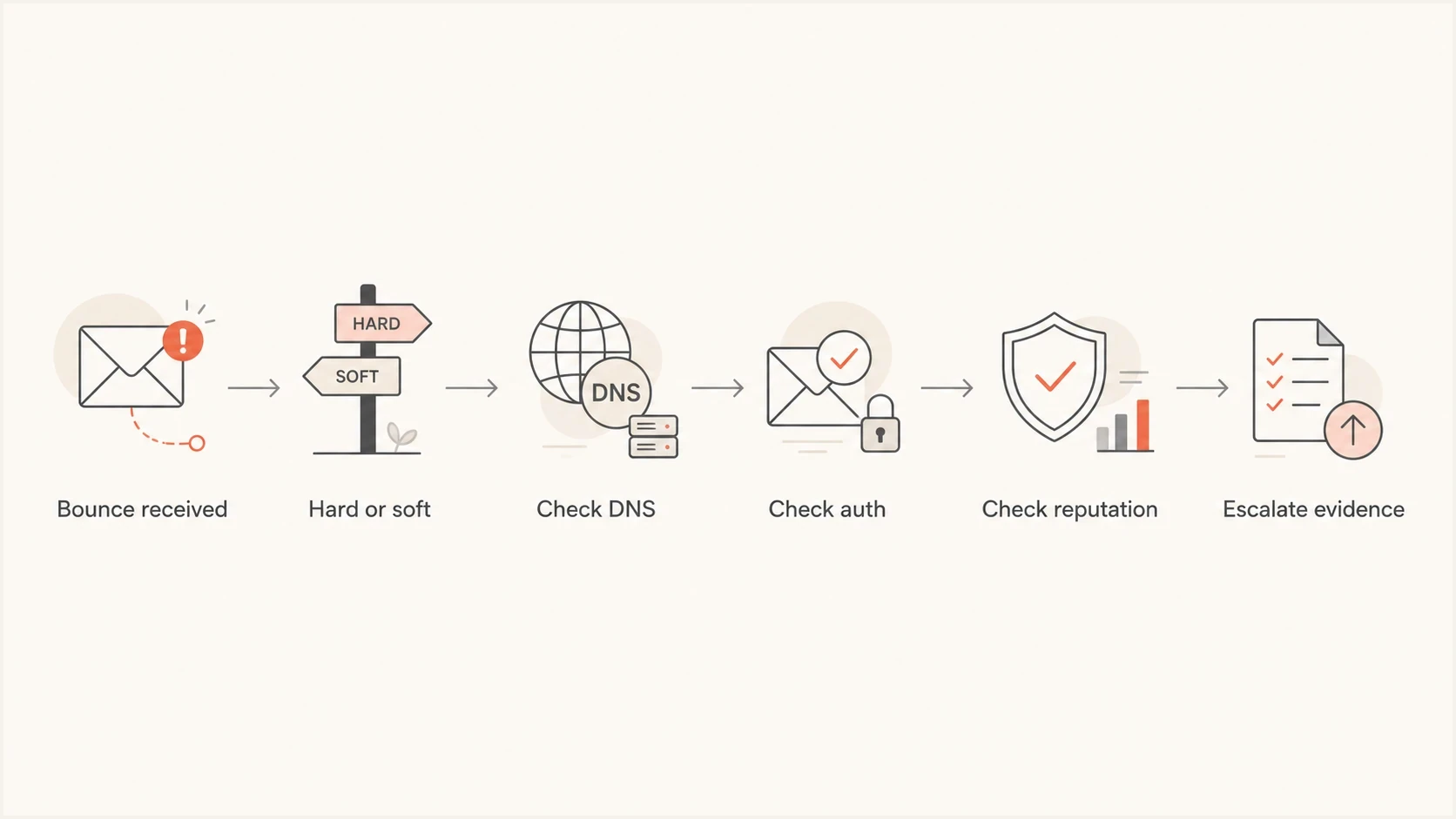
A six-step flowchart for diagnosing an undelivered GoDaddy email message.
|
|
|
|---|---|---|
5.1.1 | Mailbox missing | Confirm address |
5.2.2 | Mailbox full | Recipient clears storage |
5.4.6 | Forwarding loop | Fix forwarding |
5.7.1 or 5.7.26 | Auth or policy | Read text, check auth |
4.x.x or 421 | Temporary deferral | Allow retry, monitor |
No bounce | Spam or route | Trace headers |
Use the enhanced status code and diagnostic text to choose the next check.
Confirm which GoDaddy product is involved
GoDaddy can be the domain registrar, DNS host, mailbox provider, Microsoft 365 reseller, website form sender, or none of those for the failing message. That distinction matters. A domain registered at GoDaddy can still send through a CRM, route mail through Microsoft 365, and use DNS hosted elsewhere.
For inbound failures, use GoDaddy's not receiving email guidance only after you know the mailbox product. For outbound failures, start with the system that actually submitted the message, because the bounce is generated by that sending path.
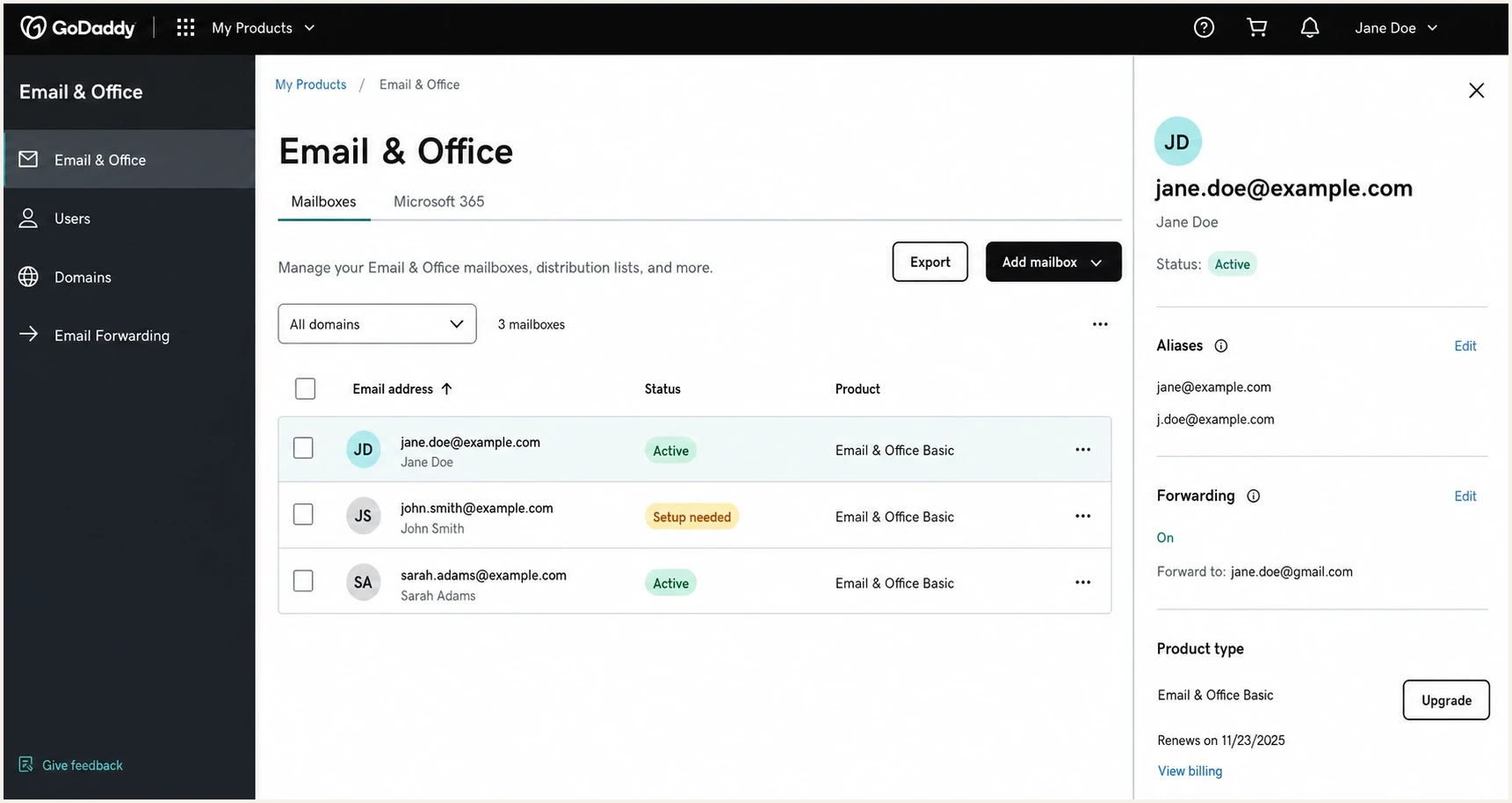
A GoDaddy Email & Office dashboard screenshot showing mailboxes and domain settings.
- Registrar only: If GoDaddy only registered the domain, GoDaddy support cannot fix a rejection from another sender.
- DNS host: If GoDaddy hosts DNS, check the zone for stale MX, duplicate SPF, missing DKIM, and old forwarding records.
- Mailbox provider: If the mailbox is Professional Email powered by Titan or Microsoft 365 from GoDaddy, inspect account status, licensing, quota, rules, and forwarding.
- Website sender: If a GoDaddy form sends the email, test the form, recipient address, and sender domain authentication.
Do not assume GoDaddy owns the failure
A domain in a GoDaddy account is not enough evidence. The bounce must show the sending IP, receiving server, rejection reason, and timestamp. Without that, a support ticket turns into a product routing question instead of a delivery investigation.
Test Webmail before changing DNS
Sign in to Webmail for the active GoDaddy email product and send a short message to an external address you can check. Repeat the same test through the local email client or the website's sending app. Use the same sender and recipient, with no attachment or tracking link, so the sending path is the main variable.
- Webmail works, client fails: Check the outgoing server, port, encryption, username, password, authentication method, and app connection.
- Both paths bounce: Follow the exact code, then check account status, sending limits, DNS, authentication, and recipient policy.
- Webmail cannot submit: Confirm the account is active and check GoDaddy system status before editing DNS.
- Message sends but is missing: Check spam, junk, inbox rules, forwarding, blocked senders, and the recipient's message trace.
Check the product limits
GoDaddy currently lists Professional Email powered by Titan limits of 1,500 messages per user per day through Webmail, 500 per user per day through SMTP, 100 recipients per message, and 30 MB per message including attachments. Keep attachments below 20 MB because encoding increases their size. Limits differ for Microsoft 365 and can change, so use the account plan and exact bounce as the final authority.
Check DNS and authentication
Once the bounce tells you the direction, check the domain. Start with a domain health check because it catches the common DNS and authentication faults in one pass: missing MX, duplicate SPF, broken DKIM, weak DMARC, and inconsistent nameservers.
For GoDaddy-hosted DNS, check the live DNS answers, not only the GoDaddy editor. DNS can be delegated to another provider, cached during propagation, or split across old and new nameservers. If the record looks correct in the UI but the public answer is wrong, the receiving mail server uses the public answer.
?
What's your domain score?
Deep-scan SPF, DKIM & DMARC records for email deliverability and security issues.
Common GoDaddy-related records to verifydns
# Professional Email powered by Titan example
@ MX 0 smtp.secureserver.net
@ MX 10 mailstore1.secureserver.net
@ TXT "v=spf1 include:secureserver.net -all"

# Microsoft 365 from GoDaddy example
@ MX 0 yourdomain-com.mail.protection.outlook.com
@ TXT "v=spf1 include:secureserver.net -all"

# DMARC monitoring starter
_dmarc TXT "v=DMARC1; p=none; rua=mailto:dmarc@yourdomain.com"
Do not copy those records blindly. They show the shape of records to inspect, not a universal configuration. Check the Email & Office Dashboard for the exact MX, SPF include, DKIM selectors, and DMARC policy. A Microsoft 365 from GoDaddy domain with Advanced Email Security or another sending service needs a product-specific SPF value, and the domain must still publish only one SPF record.
GoDaddy says DKIM and DMARC are already configured for Professional Email powered by Titan domains purchased after April 2025, with older domains being added over time. Verify both records in public DNS instead of assuming the automated setup has reached the domain.
The SPF trap
A domain must have one SPF TXT record at the root. Two separate SPF records fail SPF. One oversized SPF record can exceed the 10 DNS lookup limit. Both problems produce delivery failures that look like a GoDaddy issue until you inspect the DNS response.
|
|
|
|---|---|---|
MX | Correct host | Update route |
SPF | One record | Merge safely |
DKIM | Valid key | Publish selector |
DMARC | Valid policy | Monitor reports |
Keep the checks compact, then expand only where the result fails.
Separate authentication and reputation from content
After DNS is correct, split the problem into separate evidence paths. Authentication proves the message is allowed to use the domain. Reputation tells you whether the sending IP or domain has trust problems. Content and routing explain template, link, attachment, and recipient-specific failures.
DMARC reports are useful here because they show which sources send as your domain and whether SPF or DKIM passed. A proper DMARC monitoring workflow turns those reports into a source-by-source map instead of a pile of XML files.
How to read delivery evidence
Use this to decide whether you have enough evidence to fix the issue or escalate it.
Weak
0-1 signals
Only says undelivered or failed
Useful
2-3 signals
Includes status code and recipient
Actionable
4+ signals
Includes code, headers, IP, DNS, and time
If the bounce mentions spam, policy, blocked sender, poor reputation, or a rejected connection, check blocklist monitoring for the domain and sending IP. A blocklist or blacklist listing does not explain every rejection, but it gives you evidence when the recipient is refusing traffic before content filtering.
Blocklist checker
Check your domain or IP against 144 blocklists.
 Spamhaus
 0Spam
0Spam

 Cisco
Cisco
 NoSolicitado

 URIBL
URIBL
 abuse.ro
 ALPHANET
 Anonmails
 Ascams
 BLOCKEDSERVERS
 Calivent Networks


 EFnet
EFnet




 JustSpam
 Kempt.net
 NordSpam

 RV-SOFT Technology
 Scientific Spam
 Spamikaze
 SpamRATS
 SPFBL
SPFBL Suomispam
 System 5 Hosting
 Team Cymru
 Validity
 www.blocklist.de Fail2Ban-Reporting Service
 ZapBL
ZapBL 2stepback.dk
 Fayntic Services
 ORB UK
 technoirc.org
 TechTheftSpamhaus0SpamCiscoNoSolicitadoURIBLabuse.roALPHANETAnonmailsAscamsBLOCKEDSERVERSCalivent NetworksEFnetJustSpamKempt.netNordSpamRV-SOFT TechnologyScientific SpamSpamikazeSpamRATSSPFBLSuomispamSystem 5 HostingTeam CymruValiditywww.blocklist.de Fail2Ban-Reporting ServiceZapBL2stepback.dkFayntic ServicesORB UKtechnoirc.orgTechTheftSpamhaus0SpamCiscoNoSolicitadoURIBLabuse.roALPHANETAnonmailsAscamsBLOCKEDSERVERSCalivent NetworksEFnetJustSpamKempt.netNordSpamRV-SOFT TechnologyScientific SpamSpamikazeSpamRATSSPFBLSuomispamSystem 5 HostingTeam CymruValiditywww.blocklist.de Fail2Ban-Reporting ServiceZapBL2stepback.dkFayntic ServicesORB UKtechnoirc.orgTechTheftSpamhaus0SpamCiscoNoSolicitadoURIBLabuse.roALPHANETAnonmailsAscamsBLOCKEDSERVERSCalivent NetworksEFnetJustSpamKempt.netNordSpamRV-SOFT TechnologyScientific SpamSpamikazeSpamRATSSPFBLSuomispamSystem 5 HostingTeam CymruValiditywww.blocklist.de Fail2Ban-Reporting ServiceZapBL2stepback.dkFayntic ServicesORB UKtechnoirc.orgTechTheftSpamhaus0SpamCiscoNoSolicitadoURIBLabuse.roALPHANETAnonmailsAscamsBLOCKEDSERVERSCalivent NetworksEFnetJustSpamKempt.netNordSpamRV-SOFT TechnologyScientific SpamSpamikazeSpamRATSSPFBLSuomispamSystem 5 HostingTeam CymruValiditywww.blocklist.de Fail2Ban-Reporting ServiceZapBL2stepback.dkFayntic ServicesORB UKtechnoirc.orgTechTheft
Content still matters. Send a plain-text test with no links or attachments to the same recipient. If the plain message arrives and the normal message fails, the problem is not the GoDaddy mailbox alone. Inspect URLs, tracking domains, attachment types, and link redirects.
Use Suped to shorten the investigation
Suped is our DMARC and email authentication platform. For a GoDaddy investigation, Suped groups DMARC sources, SPF and DKIM results, policy issues, and blocklist or blacklist signals around the affected domain. This helps distinguish an authentication fault from a client or mailbox problem.

Issue steps to fix dialog showing the issue overview, tailored fix steps, and verification action
Suped's product groups authentication issues by sending source and provides domain-specific fix steps. Hosted SPF, SPF flattening, hosted DMARC, hosted MTA-STS, and alerts support controlled DNS changes and ongoing checks. Confirm the bounce and Webmail result first, because DMARC data cannot diagnose a local client that never submitted the message.
Manual troubleshooting
- Evidence collection: Pull bounces, headers, DNS answers, and sending source data from separate places.
- DNS changes: Edit records directly and wait for public answers to confirm the fix.
- Risk: A rushed SPF or DMARC change can break a legitimate sender.
Suped workflow
- Evidence collection: See verified and unverified sources, pass rates, and issue details together.
- DNS changes: Use hosted records where delegated management makes safer updates practical.
- Risk: Stage policy and monitor sources before enforcing rejection.
Prepare a useful GoDaddy support ticket
Contact support after you can state the failure precisely. The fastest tickets are specific. Include the failing sender, recipient, domain, timestamp with timezone, SMTP code, remote server, sending IP, message ID, Webmail comparison, and the checks already completed.
If the failure comes from a website form or test send, compare your result with GoDaddy's test email troubleshooting steps before escalating. That helps separate form configuration, message submission, recipient filtering, and mail routing.
Support ticket templatetext
Product: Microsoft 365 from GoDaddy or Professional Email powered by Titan
Domain: example.com
Sender: sender@example.com
Recipient: recipient@example.net
Time: YYYY-MM-DD HH:MM with timezone
SMTP code: 550 5.7.26
Remote server: receiving.example.net
Sending IP: 203.0.113.10
Message ID: paste the full value here
Webmail test: delivered, bounced, or could not submit
DNS checked: MX, SPF, DKIM, DMARC
Test result: paste the exact bounce text
- If sending fails: Ask whether the sending account, outbound relay, rate limit, or domain authentication caused the rejection.
- If receiving fails: Ask whether MX, mailbox status, licensing, forwarding, quota, rules, or filtering blocked the message.
- If only one domain fails: Give support working and failing recipient examples so they can compare server logs.
- If all mail fails: Treat it as a client, routing, DNS, suspension, limit, or account-level issue until proven otherwise.
Views from the trenches
Best practices
Collect the exact SMTP response before opening a ticket or changing domain records.
Compare one failing domain against working recipients to isolate the rejection path.
Keep tests simple so content, sender identity, attachments, and links do not mask the issue.
Document each DNS answer publicly, not only the value shown inside the DNS control panel.
Common pitfalls
Treating undelivered as a diagnosis leads to vague tickets and repeated support loops.
Assuming GoDaddy owns the issue ignores cases where only registration is hosted there.
Changing SPF under pressure can remove a legitimate sender and create new bounces.
Skipping headers hides the sending IP and remote server that explain the rejection.
Expert tips
Use one controlled recipient and one live recipient to compare routing and filtering.
Record timestamps with timezone so support can find the right log window quickly.
Check DMARC aggregate data before tightening policy on a domain with unknown senders.
Keep screenshots secondary because raw bounce text and headers carry more evidence.
Marketer from Email Geeks says the first question should be why the messages fail before asking GoDaddy to intervene.
2023-05-15 - Email Geeks
Expert from Email Geeks says the word undelivered is not diagnostic without the exact rejection message.
2023-05-15 - Email Geeks
A practical escalation path
The right order is simple: get the bounce, classify it, confirm the GoDaddy product, compare Webmail with the sending client, test public DNS, validate SPF and DKIM, review DMARC data, check blocklist or blacklist status, then escalate with evidence. That order prevents random DNS edits and makes support useful faster.
When the issue affects one recipient or one recipient domain, the bounce text and receiving server response are the main evidence. When every message fails, look harder at the sending client, DNS, mailbox status, account suspension, outbound limits, and authentication. Suped helps when the failure touches domain authentication or sender identity because it keeps the domain record, sender source, authentication result, and fix path visible in one workflow.
- First: Collect the full bounce and message headers.
- Second: Compare Webmail, then test DNS and authentication from the public internet.
- Third: Open GoDaddy support only after you know what you need them to check.




