How to troubleshoot T-Online.de email deliverability issues and 550 errors?


Updated on 19 Aug 2026: We clarified T-Online.de's 550, 554, and 421 guidance and separated message classification from authentication hygiene.
A T-Online.de 550 error means Telekom's inbound mail system permanently rejected that delivery attempt. Start with the full, unmodified bounce, not a shortened dashboard copy. If the response says 550-5.7.0 Message considered as spam or virus, rejected, treat it as a message-classification problem first. Telekom's current postmaster guidance says its normal filtering does not use SPF and does not evaluate DKIM signatures, apart from Trusted Dialog, so a DKIM-looking diagnostic fragment does not prove that DKIM caused the rejection.
The fastest path is practical: get the raw SMTP transcript from the ESP or MTA operator, stop repeated delivery of the rejected message, test a plain control email to the same T-Online.de recipient, and compare it with the failing campaign. If the control passes, add the original content back in stages until the classification returns.
This order separates a T-Online.de message rejection from a 554 IP block or a temporary 421 connection limit. Suped's product helps with authentication reporting, selector diagnostics, alerting, and blocklist or blacklist monitoring, but the exact T-Online.de rejection evidence still has to come from the system that connected to Telekom's mail server.
What the T-Online.de 550 error means
A 550 response is a permanent SMTP rejection for that delivery attempt, but the enhanced code and text define the cause. Telekom documents 550-5.7.0 after the DATA phase as a spam or virus classification of the message. A different response, such as a 550 5.1.x recipient error, needs a different investigation. Preserve every continuation line because the sending IP, mailhost, timestamp, classification ID, and contact instruction can appear after the first line.
Do not send anonymized bounces to postmaster teams
If the bounce replaces the real IP, timestamps, diagnostic IDs, mailhost values, or German error text with placeholders, the postmaster team loses the data they need.
- Required: Ask the ESP for the full SMTP rejection text, including the original diagnostic code.
- Required: Include the real sending IP, timestamp with time zone, envelope sender, recipient domain, and Message-ID.
- Avoid: Do not replace diagnostic tokens with generic placeholders before escalation.
Example of the kind of bounce detail to preservetext
550-(grey defer DKIMr)
550-Your IP: 203.0.113.10
550-Mailhost: mailin21.mgt.mul.t-online.de
550-Timestamp: 2026-05-27T09:26:49Z
550-Your message has been rejected due to spam or virus classification.
550-If you feel this is inapplicable, report the above error codes.
The phrase grey defer DKIMr is an internal diagnostic fragment, not a standard enhanced SMTP status. The final 550 still makes the result permanent for that attempt. Telekom says greylisting is limited to repeatedly suspicious systems and that normal filtering does not evaluate DKIM, so diagnose the complete rejection and the behavior of nearby test messages instead of that fragment alone.
Match the SMTP code to the action
Telekom documents different remedies for 421, 550, and 554 responses. Do not group them under a generic T-Online.de block, because each code points to a different stage of the SMTP exchange.
|
|
|
|---|---|---|
421 maximum parallel connections | Temporary connection limit | Queue and retry with backoff, reuse connections, and lower destination concurrency |
550-5.7.0 after DATA | Message classified as spam or virus | Stop resending that message, isolate content, and preserve the full diagnostic |
554 IP=[sending IP] | Sending IP blocked at connection time | Inspect queues and volume, fix the cause, then use the contact named in the error |
Use the exact T-Online.de response before changing content or infrastructure.
A 5.1.x recipient failure also needs separate handling. Verify the recipient address and any forwarding path before investigating content or IP reputation. The three-digit 550 code alone is not enough to choose a fix.
First checks to run
Start with controlled comparisons. Send one minimal plain-text email, one normal template without tracking links, and one copy of the failing message. Use the same sender domain, sending IP pool, and T-Online.de test recipient where possible. If the plain message arrives and the campaign fails, the message itself moves to the top of the investigation. If every message receives the same 550-5.7.0 response, widen the investigation to shared URLs, sender reputation, MIME construction, and stream-wide changes.
- Bounce: Collect the full, unmodified rejection from the platform running the outbound MTA.
- Control: Send a short plain-text message with no links, images, attachments, or tracking.
- Compare: Add the original HTML, links, images, and headers back one group at a time.
- Verify: Check SPF, DKIM, and DMARC for wider sender hygiene, but do not treat a pass or fail as proof of T-Online.de's 550 classification cause.
- Escalate: Open a support case with the ESP and include raw bounces, full headers, and test timestamps.
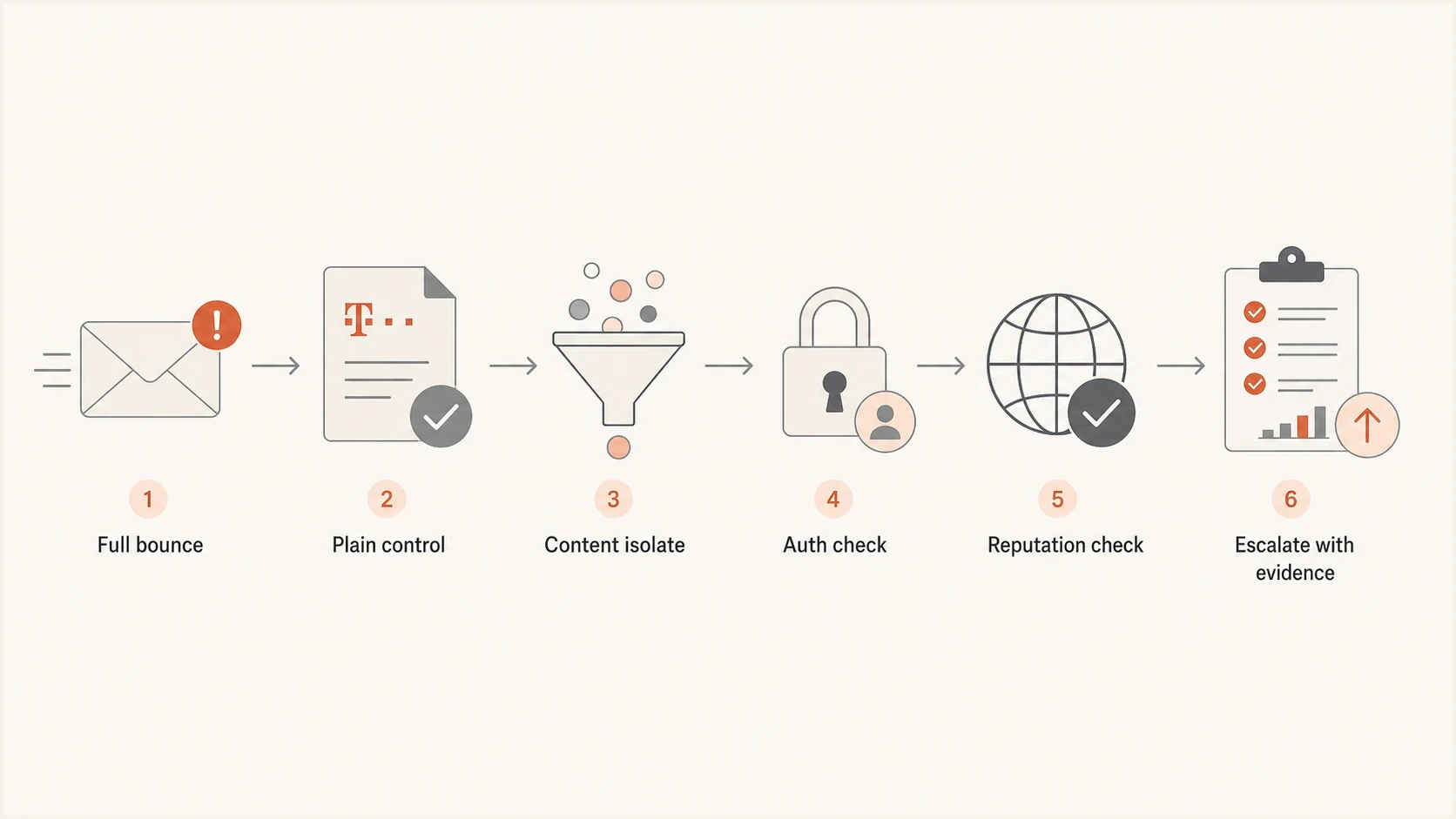
T-Online.de 550 troubleshooting flow using bounce evidence and controlled message tests.
For a live message-level view, send the exact message to an email tester and compare the result with the T-Online.de bounce. That does not reproduce Telekom's private filtering, but it exposes broken headers, missing authentication, bad MIME structure, and obvious content problems before postmaster escalation.
Email tester
Send a real email to this address. Suped shows a results button when the test is ready.
?/43tests passed
How to tell whether it is content or infrastructure
The quickest clue is whether another message with the same sending setup reaches T-Online.de. If one template fails and another passes, inspect that template first: wording, URLs, redirects, tracking domains, images, attachments, HTML, and personalization output. If the connection ends with 554 before the message body is sent, investigate the sending IP instead.
Content-related pattern
- Control: A plain-text message reaches T-Online.de.
- Template: Only one campaign, language version, or HTML variant fails.
- Links: One destination, redirect, or tracking domain appears only in rejected mail.
- Fix: Strip the message down, then add elements back until the rejection returns.
Infrastructure-related pattern
- Scope: Every message from one IP or stream fails.
- Code: A 554 response ends the connection before message content is accepted.
- Identity: rDNS, forward DNS, HELO or EHLO, routing, or TLS behavior is invalid.
- Fix: Correct the server setup, inspect volume, and escalate through the MTA operator with raw evidence.
Telekom's postmaster FAQ says T-Online.de does not use SPF when receiving mail and does not evaluate DKIM signatures in normal filtering, apart from Trusted Dialog. SPF, DKIM, and DMARC still matter for other receivers and for detecting unauthorized sending, but they are not direct proof of why T-Online.de returned a 550-5.7.0 classification.
|
|
|
|---|---|---|
Plain passes | Content | Remove links and HTML |
All get 550-5.7.0 | Shared content or reputation | Compare shared elements and logs |
554 at connect | IP block | Stop retries and escalate |
421 connection limit | Too much concurrency | Reuse connections and reduce concurrency |
One URL variant fails | Content classification | Remove redirects and retest |
Use the result pattern to choose the next action.
If the problem points to infrastructure, check the domain with a domain health check. That check catches expired DKIM selectors, SPF lookup failures, missing DMARC records, and DNS publishing errors. Fix these for overall sender hygiene, while using T-Online.de's exact SMTP response to diagnose the immediate rejection.
?
What's your domain score?
Deep-scan SPF, DKIM & DMARC records for email deliverability and security issues.
What to ask your ESP for
If you send through a marketing platform, lifecycle platform, or relay, the vendor operating the outbound MTA has the detail T-Online.de needs. A dashboard bounce summary often hides or rewrites the fields that matter. Ask for the raw SMTP response exactly as their MTA received it, plus delivery logs around the failing timestamps.
- Transcript: Request the unmodified SMTP reply, including all 550 continuation lines.
- Route: Ask which sending IP, pool, MTA hostname, and return-path domain were used.
- Headers: Get a copy of the exact RFC 5322 headers for a failed message.
- Identifiers: Preserve the Expurgate-ID, Authenticator value, Message-ID, timestamp, and mailhost when present.
- Remediation: Ask whether they recommend pausing, reducing volume, changing content, or moving traffic.
Support request template for your ESPtext
Subject: Need raw T-Online.de SMTP rejection details

Please provide the full unmodified SMTP transcript for these failures.
Recipient domain: t-online.de
Sending domain: example.com
Visible From: mail@example.com
Approximate time: YYYY-MM-DD HH:MM-HH:MM UTC
Observed response: 550-5.7.0 spam or virus classification

Please include the sending IP, MTA hostname, return-path domain,
Message-ID, classification IDs, DKIM selector, and internal event IDs.
Once you have the raw data, the postmaster conversation changes. Instead of asking for a broad unblock, provide one precise event with its IP, timestamp, recipient domain, Message-ID, classification identifiers, and sample message headers. That is the detail Telekom asks for before it can investigate a rejection.
When the ESP and sending platform are different
Some setups split responsibility between the campaign platform and the infrastructure provider. Start with the platform you log into, but ask it to route the case to the team that operates the MTA connection to the receiver. The owner of that MTA has the authoritative bounce.
Authentication checks that support the wider investigation
Keep authentication clean, but separate it from the immediate T-Online.de diagnosis. Telekom says its normal filtering does not use SPF and does not evaluate DKIM, except for DKIM in Trusted Dialog. SPF, DKIM, and DMARC still protect the domain, expose unauthorized senders, and support delivery at receivers that evaluate them. They do not explain a T-Online.de 550-5.7.0 response on their own.
Minimal DMARC record for monitoringdns
Name: _dmarc.example.com
Type: TXT
Value:
"v=DMARC1; p=none; rua=mailto:dmarc@example.com"
For a domain already sending important mail, monitor before changing enforcement. Suped's DMARC monitoring shows which sources pass SPF and DKIM, whether they match the visible From domain, and which unapproved sources are sending as the domain. That gives you evidence before moving from p=none to a stricter policy.
DMARC record detail view showing SPF, DKIM, DMARC, rDNS diagnostics, and DNS records
Check DKIM at the selector level, not only at the domain level. If an ESP signs with s1 today and s2 tomorrow, both selectors need valid DNS. Also confirm that SPF or DKIM matches the visible From domain under DMARC for receivers that enforce it.
If a T-Online.de diagnostic fragment mentions DKIM, use DMARC monitoring to verify production authentication without assuming causation. Use the complete 550 response, classification identifiers, and controlled message tests when asking Telekom to review the actual classification.
Content isolation for spam or virus classification
When T-Online.de accepts one email and rejects another from the same sender, treat the rejected email as a specimen. The goal is not to guess which word triggered a filter. Isolate the smallest change that flips the result, then stop sending the rejected version.
- Baseline: Send a plain-text version with the same subject and sender.
- HTML: Add the HTML body without external images or tracking links.
- Links: Add meaningful destination links one at a time, and avoid URL shorteners or unnecessary redirect chains.
- Assets: Add images, attachments, calendar files, and hosted assets last, while keeping the whole message within 50 MB.
- Personalization: Test recipient-specific fields for malformed links, broken HTML, or bad fallback text.
Telekom documents a 50 MB maximum for the complete message, including headers, body, formatting, and attachments. Its sender guidance also calls for valid, trustworthy URLs, meaningful link text, and no unnecessary redirects or URL shortening. Unencrypted delivery of many executable scripts and attachments can be blocked.
Pay close attention to URL reputation. A clean sending IP does not protect a message that links to a compromised domain, a new tracking hostname, or a distrusted file host. Inspect rendered merge tags because broken personalization can create invalid URLs.
If only one campaign is rejected, do not keep resending the same failing content to many T-Online.de recipients. Telekom explicitly tells senders to stop delivery of messages classified as spam until the problem is fixed. Pause the segment, test with controlled seed addresses, then resume only after the message changes.
Reputation and blocklist checks
Reputation can provide useful context around a T-Online.de spam classification, but do not confuse a 550 message rejection with Telekom's documented 554 IP block. Check whether the sending IP, return-path domain, visible From domain, and tracking domains appear on a blocklist or blacklist. Also compare complaint rates, recent list imports, inactive-recipient volume, and sudden volume changes with the first rejection time.
Do not chase only one blocklist result
A single blocklist or blacklist listing is evidence, not a full diagnosis. Pair it with bounce timing, campaign changes, complaint metrics, and ESP logs. If a high-impact listing and the T-Online.de failure start together, pause the affected stream while you investigate.
Suped's blocklist monitoring keeps domain and IP blacklist checks next to authentication monitoring. That helps correlate a new listing with selector failures or sending changes, but the T-Online.de SMTP transcript remains the source for the immediate rejection reason.
Blocklist checker
Check your domain or IP against 144 blocklists.
 Spamhaus
 0Spam
0Spam

 Cisco
Cisco
 NoSolicitado

 URIBL
URIBL
 abuse.ro
 ALPHANET
 Anonmails
 Ascams
 BLOCKEDSERVERS
 Calivent Networks


 EFnet
EFnet




 JustSpam
 Kempt.net
 NordSpam

 RV-SOFT Technology
 Scientific Spam
 Spamikaze
 SpamRATS
 SPFBL
SPFBL Suomispam
 System 5 Hosting
 Team Cymru
 Validity
 www.blocklist.de Fail2Ban-Reporting Service
 ZapBL
ZapBL 2stepback.dk
 Fayntic Services
 ORB UK
 technoirc.org
 TechTheftSpamhaus0SpamCiscoNoSolicitadoURIBLabuse.roALPHANETAnonmailsAscamsBLOCKEDSERVERSCalivent NetworksEFnetJustSpamKempt.netNordSpamRV-SOFT TechnologyScientific SpamSpamikazeSpamRATSSPFBLSuomispamSystem 5 HostingTeam CymruValiditywww.blocklist.de Fail2Ban-Reporting ServiceZapBL2stepback.dkFayntic ServicesORB UKtechnoirc.orgTechTheftSpamhaus0SpamCiscoNoSolicitadoURIBLabuse.roALPHANETAnonmailsAscamsBLOCKEDSERVERSCalivent NetworksEFnetJustSpamKempt.netNordSpamRV-SOFT TechnologyScientific SpamSpamikazeSpamRATSSPFBLSuomispamSystem 5 HostingTeam CymruValiditywww.blocklist.de Fail2Ban-Reporting ServiceZapBL2stepback.dkFayntic ServicesORB UKtechnoirc.orgTechTheftSpamhaus0SpamCiscoNoSolicitadoURIBLabuse.roALPHANETAnonmailsAscamsBLOCKEDSERVERSCalivent NetworksEFnetJustSpamKempt.netNordSpamRV-SOFT TechnologyScientific SpamSpamikazeSpamRATSSPFBLSuomispamSystem 5 HostingTeam CymruValiditywww.blocklist.de Fail2Ban-Reporting ServiceZapBL2stepback.dkFayntic ServicesORB UKtechnoirc.orgTechTheftSpamhaus0SpamCiscoNoSolicitadoURIBLabuse.roALPHANETAnonmailsAscamsBLOCKEDSERVERSCalivent NetworksEFnetJustSpamKempt.netNordSpamRV-SOFT TechnologyScientific SpamSpamikazeSpamRATSSPFBLSuomispamSystem 5 HostingTeam CymruValiditywww.blocklist.de Fail2Ban-Reporting ServiceZapBL2stepback.dkFayntic ServicesORB UKtechnoirc.orgTechTheft
If you find a listing, fix the underlying cause before requesting removal. For marketing mail, that often means suppressing inactive addresses, removing old imports, stopping repeated retries to hard-bouncing recipients, and separating transactional traffic from higher-risk promotional campaigns.
Official sender requirements to check
Telekom's postmaster guidance adds operator, consent, and list-quality requirements to T-Online.de troubleshooting. A clean message test will not fix a source that fails basic mail-server or permission checks.
- Forward-confirmed reverse DNS: Make sure each sending IP has reverse DNS that resolves forward to the same IP, and that the hostname maps to a domain with direct contact information.
- Sender identity: Keep HELO or EHLO, rDNS, Return-Path, the visible From domain, and the sender's website ownership coherent.
- Newsletter consent: Use explicit permission for commercial mail, keep the address source, and retain double opt-in confirmation data where that process is used.
- Opt-out handling: Give recipients a direct unsubscribe path, suppress opted-out users quickly, and avoid unconfirmed mailing lists.
- List maintenance: Remove hard-bouncing addresses promptly and suppress addresses with no contact for more than three months.
- Traffic and errors: Avoid sudden bursts and keep SMTP error rates within Telekom's published limits of 3% at peak and no more than 1.5% on average for professional senders.
If one of these checks fails, fix it before asking for a T-Online.de postmaster review. Telekom can inspect a specific rejection, but it expects standards-compliant mail infrastructure, a traceable operator, current lists, and consent-based sending.
When to contact T-Online.de postmaster
Contact the postmaster team after you have evidence it can use. For a suspected false-positive 550 classification, follow the contact instruction in the rejection and include the complete error plus all message headers. For a 554 IP block, fix the sending or volume issue first, then use the dedicated contact named in that response.
Use the postmaster contact route for a delivery review. Abuse reporting is for misuse reports, not a sender reputation or content-classification appeal. Telekom's contact form asks for the IP address, error message, and relevant log extracts.
Postmaster escalation templatetext
Subject: T-Online.de 550 rejection review request

Hello,

We are seeing 550-5.7.0 rejections for mail from example.com
to t-online.de.

Sending IP: 203.0.113.10
MTA hostname: mta01.example.net
Timestamp: YYYY-MM-DD HH:MM:SS UTC
Message-ID: <sample-message-id@example.com>
Visible From domain: example.com
Classification ID or Authenticator: [paste exact value]

Full SMTP response:
[paste every unmodified response line]

Actions taken:
- Stopped repeated delivery of the rejected message
- Tested a plain-text control message
- Removed the suspect URL and retested
- Checked IP and domain blocklist or blacklist status

The full message headers are attached. Please review whether this
message was classified incorrectly.
If the ESP can escalate through its receiver-relations or deliverability team, use that route in parallel. It can provide cleaner logs and explain MTA-level details.
For broader 550 diagnostics, compare this case with common SMTP 550 causes because not every 550 is a spam classification. Some responses identify a recipient, policy, relay, or domain error.
Views from the trenches
Best practices
Preserve raw bounce text before sharing tickets, because hidden tokens prevent log searches.
Test a plain control message first, then add template parts until the rejection returns.
Escalate through the ESP team that owns the MTA connection and outbound delivery logs.
Common pitfalls
Treating every 550 as an IP block can miss a template, URL, attachment, or MIME problem.
Sending anonymized bounces to postmasters removes the data needed for diagnosis.
Retrying rejected campaigns too widely can make a narrow content issue affect reputation.
Expert tips
Ask for the MTA transcript, Message-ID, sending IP, classification ID, and exact UTC time.
Compare passing and failing variants using the same domain, IP pool, and recipient domain.
Pair blacklist checks with DMARC reports while keeping the T-Online.de diagnosis separate.
Marketer from Email Geeks says T-Online.de cannot use a bounce that has had diagnostic tokens, IP data, and normal error text replaced with placeholders.
2025-05-02 - Email Geeks
Marketer from Email Geeks says a spam or virus classification that affects one template but not another points to content before an IP-wide block.
2025-05-02 - Email Geeks
The practical fix path
For T-Online.de errors, start with the exact SMTP code and full response. A 550-5.7.0 after DATA calls for content isolation and an end to repeated delivery of the rejected message. A 554 points to an IP block. A 421 connection-limit response calls for queueing, connection reuse, and lower destination concurrency.
Suped is our product for DMARC and email authentication workflows. In this case, its DMARC reporting, selector diagnostics, authentication alerts, and blocklist or blacklist monitoring help identify wider domain and infrastructure problems. These signals support the investigation, but they do not replace the ESP's raw SMTP transcript or reveal Telekom's private content-classification decision.
Pair Suped's ongoing authentication and reputation visibility with the ESP's MTA-level evidence. Use controlled message tests and the contact instruction inside the rejection for a T-Online.de classification review.




