
How to resolve SMTP 421 errors with Web.de and GMX.net due to rate limiting?

Published 4 Aug 2025
Updated 27 Sep 2026
14 min read
Summarize with

Updated on 27 Sep 2026: We updated this guide with current WEB.DE and GMX sender requirements plus clearer guidance on greylisting and MX-aware retry controls.
To resolve SMTP 421 errors from WEB.DE and GMX, stop or drain the affected queue, slow both new sends and retries, read the complete SMTP response, verify authentication and reverse DNS, and check whether a shared sending IP is the real problem. Restart volume with a dedicated provider throttle only after fresh deferrals have returned to a stable baseline. On a shared ESP pool, ask the ESP to investigate the affected IPs and provider response before changing routes.
Both providers can continue seeing pressure after new campaign volume falls because the MTA is still opening connections and retrying deferred messages. A sender can reduce new mail to five messages per minute and still keep tripping the limit if the old queue retries aggressively. The fix has to cover queue behavior, connection behavior, and sender identity at the same time.
What the 421 error means
A WEB.DE or GMX 421 response is a temporary deferral, not a final bounce. The providers use the basic SMTP status code without an enhanced status code such as 4.7.1, so 421 alone does not prove rate limiting. When the final response line says too many messages arrived in a short period, the practical response is to send less, open fewer connections, and stop rapid retries to the same destination.
Illustrative WEB.DE or GMX rate-limit deferraltext
421-web.de (mxweb113) Nemesis ESMTP Service not available
421-Service unavailable
421-Reject due to policy restrictions
421-Please try again later. Too many messages have been received
421-in a short period of time. Please try again in a few hours
421-and reduce the sending rate.
421 For explanation visit <provider diagnostic URL>
Treat an explicit short-period or sending-rate response as a rate problem with a possible trust component. Partial acceptance followed by deferrals points to throttling, but it does not identify the exact trigger. IP reputation, a sudden volume change, poor recipient quality, complaints, or repeated connection attempts can affect the receiver's decision.
Do not let retries become the traffic
A deferred message that retries every few minutes can turn a small campaign into a constant stream of connection attempts. WEB.DE and GMX can keep throttling while that pressure remains.
- Queue: Pause new WEB.DE and GMX traffic before old deferred mail expires.
- Retry: Use exponential backoff with jitter for these domains instead of frequent fixed retries.
- Connections: Limit concurrent sessions by the resolved MX pool, not only by recipient domain or message rate.
For senders seeing the same pattern at other mailbox providers, the broader mechanics are similar. The guide on sending rate limits explains the connection and retry side in more general terms.
Read the full SMTP response
WEB.DE and GMX return multi-line SMTP responses. The final line contains the decisive detail and normally includes a provider case URL with incident parameters. An NDR is generated by the sending server, so a shortened bounce notification can omit the line needed to classify the event.
- Capture: Save the raw SMTP transcript, final response line, timestamp, sending IP, recipient domain, and queue or message ID.
- Classify: Use the response text and case URL to separate rate limiting from a temporary service issue, blocklist or blacklist event, and authentication policy failure.
- Retry: Keep automated retries for a genuine 4xx response, but apply a slower destination-specific schedule while the condition remains.
- Escalate: Use the contact path attached to the provider case URL and include the exact final response line instead of only a screenshot of a generic 421 bounce.
Do not confuse 421 with DMARC rejection
A 421 response remains retryable. A 554 response that cites the sender domain's DMARC policy is permanent for that message and needs an authentication or policy fix, not a slower retry schedule.
Separate throttling from greylisting
A temporary response that says "try again later" can describe greylisting, rate limiting, or a provider-side service condition. Compare first-attempt behavior with later retries before changing the whole sending plan. Greylisting usually affects an initial attempt and accepts a later ordinary retry, while a rate limit rises with connection or message pressure and can continue across retries.
|
|
|
|---|---|---|
First attempt deferred, later retry accepted | Greylisting | Keep ordinary automated retry and avoid rapid reconnects |
Deferrals rise with attempts or concurrent sessions | Rate limiting | Lower the destination rate and connection cap |
Low-volume tests receive the same policy response | Reputation or policy issue | Fix the cited cause and use the provider case URL |
Related domains resolve to the same receiving pool | Shared receiver pressure | Apply one MX-aware destination limit |
Use delivery behavior and the complete response text together.
Measure both SMTP attempts and unique messages. Calculate the attempt deferral rate as 4xx responses divided by total SMTP attempts, then compare it with the share of unique messages deferred on their first attempt. This shows whether retries are inflating the apparent volume and whether the receiver is deferring new mail or repeatedly deferring the same queue.
Triage before changing volume
Before reducing volume again, determine whether the limit follows the destination MX pool, sending IP, message stream, or MTA behavior. A sender can have acceptable global reputation while WEB.DE and GMX still have little history for the local stream. That changes how slowly the stream should restart.
|
|
|
|---|---|---|
Some accepted | Throttle | Slow queue |
Same final line | Provider policy | Follow case URL |
Shared IP | Pool risk | Ask ESP |
Old queue | Retry storm | Back off |
Bad PTR | Identity | Fix rDNS |
Compact triage matrix for WEB.DE and GMX 421 errors.
Public sender reports show similar WEB.DE and GMX symptoms in Postfix logs. This ServerFault thread shows that deferrals can appear even when the sender considers the volume modest. Use the provider's current response text as the primary diagnostic evidence.
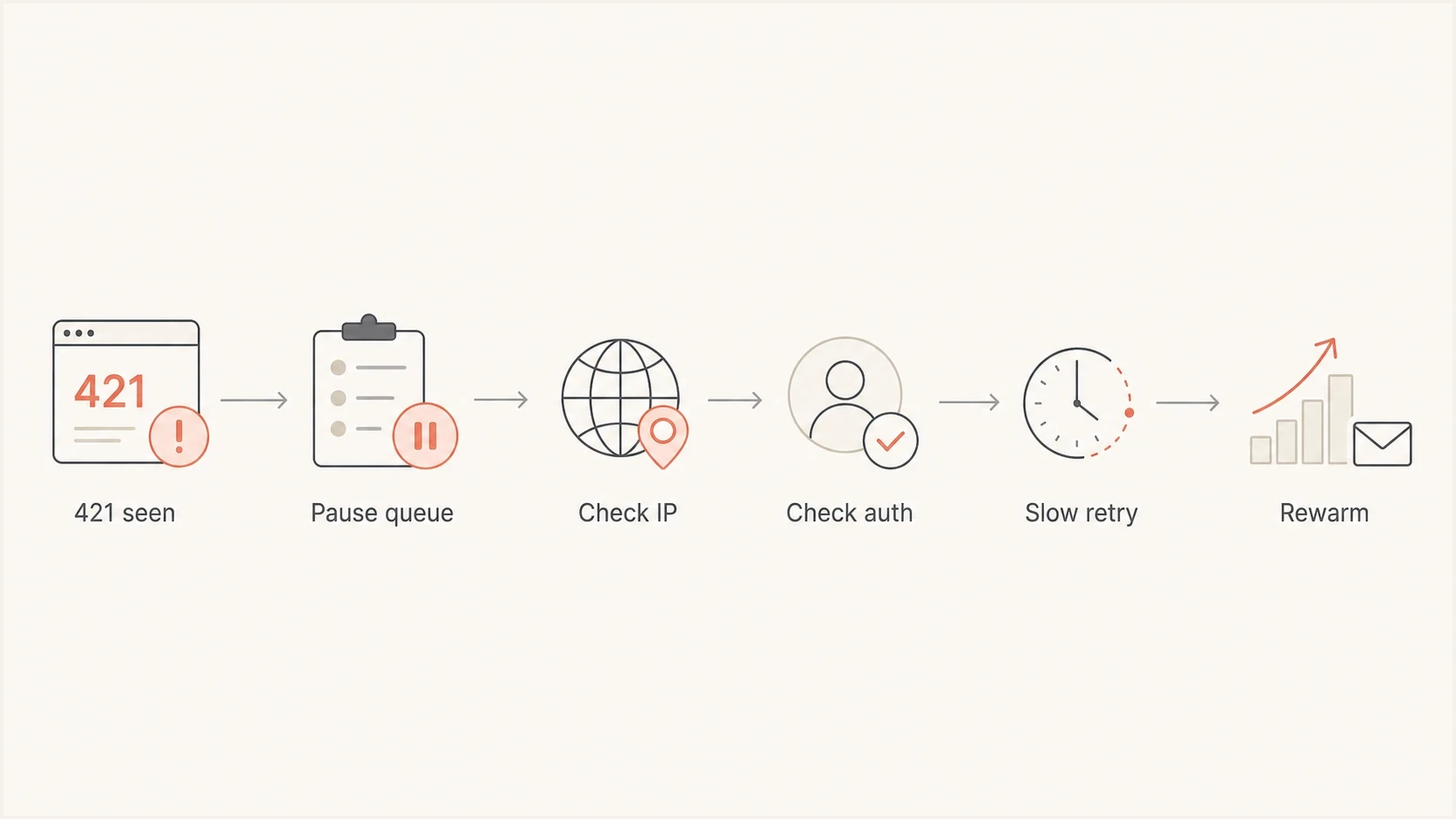
Flowchart showing the Web.de and GMX.net 421 troubleshooting path from queue pause to rewarming.
Fix the retry pattern
The first operational fix is to stop treating WEB.DE and GMX like a normal destination while they are deferring. Put the resolved MX pool under its own queue policy, then lower both destination concurrency and message rate. Reducing only the campaign throttle leaves the deferred queue free to keep hitting the receiver.
- Pause: Stop new campaign traffic to WEB.DE and GMX for several hours, or until the deferred queue is under control.
- Drain: Let deferred messages retry with increasing backoff and jitter, not synchronized bursts. Do not add new messages while the queue is growing.
- Cap: Start with one or two connections for the receiving MX pool while reputation is being rebuilt.
- Sessions: Use a bounded number of messages per connection and avoid repeated disconnect and reconnect churn.
- Segment: Send essential transactional mail first, then engaged marketing recipients. Hold dormant recipients out of the restart.
- Measure: Track accepted, deferred, expired, and permanent failures separately for each receiving MX pool and sending IP.
Illustrative destination queue policytext
# Pseudoconfiguration: map these controls to your MTA or ESP
web.de:  max_connections=1, rate_delay=30s
gmx.net: max_connections=1, rate_delay=30s

retry_schedule=30m,1h,2h,4h
retry_jitter=enabled
retry_max_age=<your documented delivery SLA>
These values are starting controls, not published WEB.DE or GMX limits. The useful pattern is one small lane with increasing retry intervals and randomized retry timing. Keep the MTA's retry age consistent with the delivery SLA so temporary mail does not expire after an arbitrary 24-hour cutoff. Raise volume only after new 421 responses fall and accepted mail stays stable. If the ESP does not expose destination queue settings, ask support to apply an MX-aware domain block rather than repeatedly changing campaign speed.
Internal restart bands
Compare fresh 421 responses and queue growth with the stream's last stable baseline. These are operating signals, not provider limits.
Raise
Stable
Fresh deferrals are at or below the stable baseline and the queue is draining.
Hold
Rising
Fresh deferrals have risen, but accepted mail continues and the queue remains controlled.
Stop
Growing
The deferred queue is growing or messages are approaching the retry-age limit.
Check the technical sender identity
WEB.DE and GMX currently require a static sending IP, valid reverse DNS, a valid HELO/EHLO hostname, standards-compliant messages, and a valid DKIM signature whose signing domain matches the visible From domain in relaxed or strict mode. SPF and DMARC are recommended, but SPF alone does not replace the mandatory DKIM check. Check the exact affected message and route because acceptance at another mailbox provider does not prove compliance on this path.
Message checks
- Headers: Date, From, and Message-ID fields are valid, standards compliant, and present only where expected.
- From: The visible sender uses a domain the organization controls.
- DKIM: The signature passes and its signing domain matches the visible From domain, at least in relaxed mode.
- Unsubscribe: Bulk mail has a clear unsubscribe path, with RFC 8058 one-click support where applicable.
Infrastructure checks
- IP: The delivering server uses a static IP, not a dynamic or dial-up range.
- PTR: Reverse DNS resolves to a sensible FQDN associated with the sending organization.
- HELO: The SMTP greeting uses that valid FQDN.
- DNS: The sending domain has a valid MX or A record so replies can be routed.
- SPF: The sending IP is authorized without DNS lookup or evaluation errors.
- Blocklists: The sending IP and domain are not listed on a known blocklist or blacklist.
A missing or malformed Date or Message-ID header can add another negative signal. The Date value should include the correct time and time zone, and singleton fields such as From, Subject, or To should not be duplicated. Also check generic PTR names, HELO/PTR mismatches, an unexpected envelope sender, or a DKIM signature that passes without matching the visible From domain.
Headers and records to inspecttext
Date: Sun, 27 Sep 2026 17:34:53 +1000
Message-ID: <20260927173453.12345@example.com>
From: Brand <news@example.com>
Return-Path: bounce@example.com
List-Unsubscribe: <HTTPS unsubscribe endpoint>, <mailto:unsubscribe@example.com>
List-Unsubscribe-Post: List-Unsubscribe=One-Click
DKIM-Signature: v=1; d=example.com; s=s1;

_dmarc.example.com. 300 IN TXT
"v=DMARC1; p=none; rua=mailto:dmarc@example.com"

example.com. 300 IN TXT
"v=spf1 include:mail.example.net -all"
For an external view of the message, send a representative copy through the email tester and compare its authentication result with the headers from the affected ESP or MTA route.
Email tester
Send a real email to this address. Suped shows a results button when the test is ready.
?/43tests passed
Run a broader domain health check before contacting a postmaster team. It confirms DMARC, SPF, DKIM, and common DNS problems before asking the receiver or ESP to investigate the delivery route.
Shared IPs versus dedicated routing
On a shared IP pool, WEB.DE and GMX can throttle the IP because of traffic that has nothing to do with one brand. The sender sees a 421 response, but the receiver sees one IP delivering mail for many customers. Shared pools are harder to troubleshoot when German volume is small because one sender's positive engagement cannot offset every other stream on the IP.
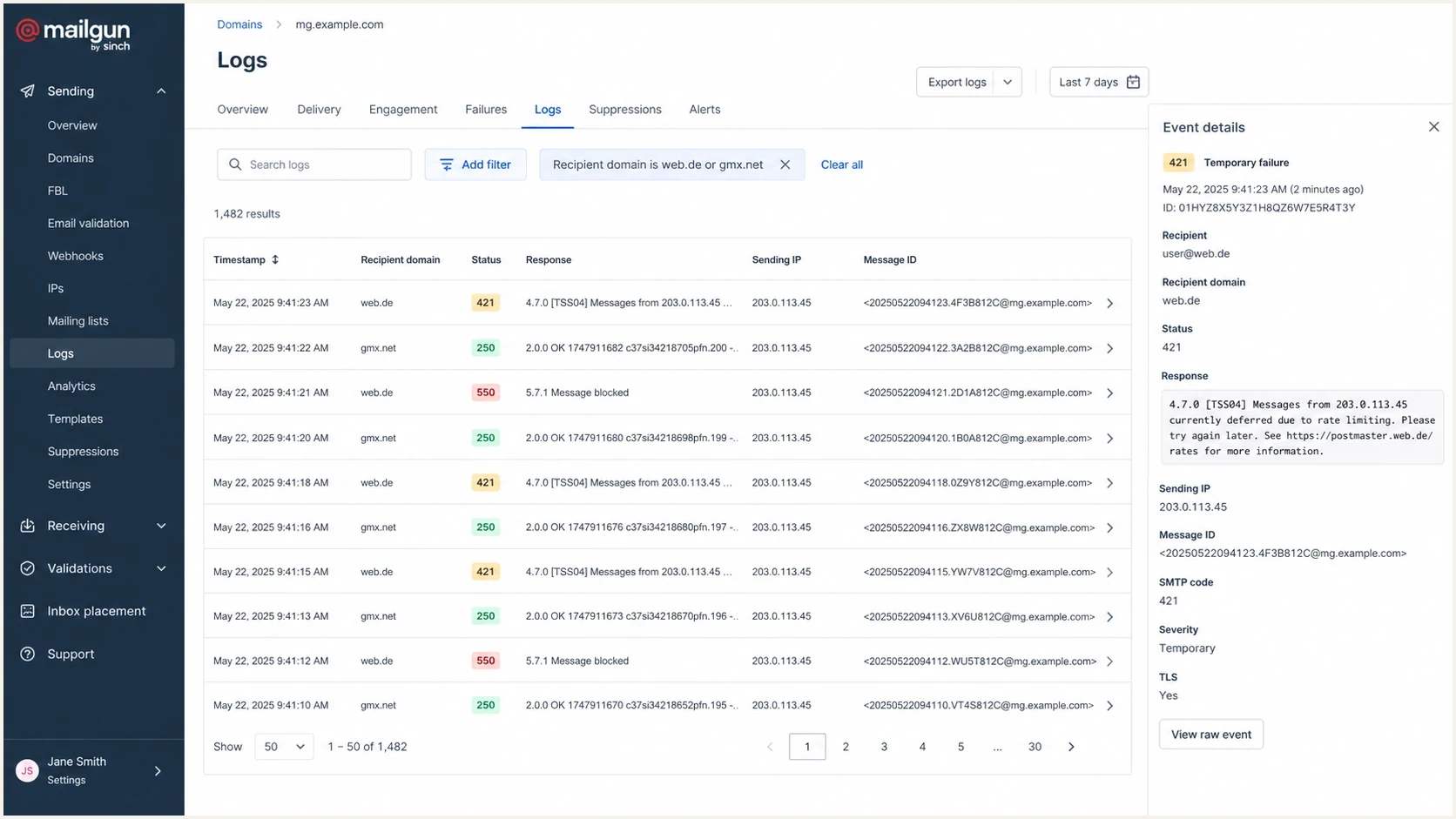
A Mailgun log screen filtered to Web.de and GMX.net 421 delivery attempts.
The fix depends on the sending setup. On a shared pool, open an ESP ticket with samples, timestamps, sending IPs, message IDs, the complete SMTP response, and its case URL. Ask whether WEB.DE or GMX is throttling the IP, what other pool-level signals are present, and what remediation the ESP recommends. A route or IP change should follow the investigation, not replace it, because the same list or sending pattern can throttle the next IP.
Shared IP pool
- Benefit: It suits small or irregular volume that cannot maintain a dedicated IP.
- Risk: Other senders can damage the IP reputation the stream inherits.
- Fix: Ask the ESP to investigate the IP, show provider-specific logs, and remediate the pool.
Dedicated German routing
- Benefit: The sender controls volume, PTR, reputation, and provider-specific pacing.
- Risk: A new dedicated IP needs steady volume and a controlled warmup.
- Fit: Use it only when German volume is consistent enough to maintain reputation.
Blocklist and blacklist checks also matter. A 421 rate limit is not the same as a blocklist hit, but a shared IP pool can carry mixed reputation signals. Continuous blocklist monitoring helps identify IP or domain listings that can compound throttling.
Rebuild WEB.DE and GMX volume
After the queue is calm and the technical checks are clean, restart these domains as a separate sending lane. A global warmup plan for Gmail, Microsoft, or Yahoo does not prove that WEB.DE and GMX can accept the same pace. Provider-specific trust depends on the history each receiver sees.
Illustrative seven-day restart
Example internal caps only. Treat each day as an observation point and raise a cap only when accepted mail is stable and fresh 421 responses remain at baseline.
Daily WEB.DE and GMX cap
These caps are deliberately conservative examples, not provider limits or advancement deadlines. Start with recent double opt-in recipients who have engaged, suppress invalid and inactive addresses, and keep essential transactional messages ahead of promotional traffic. Good consent and list hygiene reduce unknown-user responses and complaints that can contribute to another throttle.
When to raise the cap
- Accepted: Most mail is accepted on the first attempt for two sends in a row.
- Deferred: Fresh 421 responses are at the stable baseline and the queue is not growing overnight.
- Complaints: Complaint and inactive-recipient signals remain controlled, and unsubscribe requests are processed promptly.
- Identity: No DKIM domain mismatch, PTR, HELO, header, or envelope sender problems appear in samples.
If a fresh wave of 421 responses appears after raising the cap, return to the last stable level. Do not catch up for a held day by adding its unsent volume to the next step. Pushing through a throttle creates more aged mail and increases the chance that deferred messages expire.
How Suped fits this workflow
Suped's product brings DMARC reporting, SPF and DKIM diagnostics, blocklist and blacklist checks, and related deliverability signals into one workflow. During a 421 incident, that evidence helps separate an authentication or DNS fault from an ESP pool problem or provider-specific sending pattern.
DMARC record detail view showing SPF, DKIM, DMARC, rDNS diagnostics, and DNS records
For WEB.DE and GMX incidents, Suped can confirm whether the affected domains authenticate and meet DMARC alignment requirements, show domain-level failures, and keep the DNS evidence beside the delivery investigation. Automated issue detection can point the team to a record or authentication change while the ESP handles queue controls and shared-IP routing.
- DMARC: Track policy, alignment, authentication pass rates, and unexpected sources with DMARC monitoring.
- SPF: Check that each active sender is authorized and that SPF evaluation stays within DNS lookup limits.
- Alerts: Notify the team when authentication failures or reputation signals change during a restart.
- Evidence: Pair domain diagnostics with SMTP responses, IPs, timestamps, and message IDs in the incident record.
Suped does not control an ESP's shared IP pools or MTA retry schedule. It provides authentication and DNS evidence for the next action, such as fixing alignment, correcting DNS, requesting pool remediation, creating a dedicated lane, or holding volume while provider-specific reputation recovers.
Views from the trenches
Best practices
Pause fresh Web.de and GMX.net mail before retries turn a small send into pressure.
Check PTR, HELO, DKIM alignment, DMARC, and headers on the exact affected stream.
Ask the ESP for IP-level evidence when shared pool traffic drives the throttling.
Common pitfalls
Lowering campaign speed alone leaves old retries hitting the same receiver limits.
Assuming acceptance elsewhere proves Web.de and GMX.net checks will pass cleanly.
Treating shared IP reputation as brand reputation hides pool-level sender problems.
Expert tips
Create a separate German mailbox provider lane with its own queue and retry rules.
Restart with recently engaged double opt-in recipients before adding inactive segments.
Keep full SMTP responses, IPs, timestamps, diagnostic URLs, and message IDs ready.
Expert view
A 2022 Email Geeks discussion identified domain matching and reverse DNS as important checks for Web.de and GMX.net delivery.
2022-05-11 - Email Geeks
Expert view
A 2022 Email Geeks discussion recommended stopping fresh sends and restarting slowly instead of feeding an active retry loop.
2022-05-11 - Email Geeks
Resolution checklist
The fastest practical resolution is to capture the full SMTP response, stop feeding WEB.DE and GMX with fresh mail, slow the retry lane, and verify that the sending identity meets current requirements. For traffic on a shared IP pool, give the ESP IP-level evidence and ask for a pool investigation. Use a dedicated route only when German volume is steady enough to maintain it.
Once the lane is stable, keep the receiving MX pool under its own pacing rules. An MX-aware queue policy prevents a short deferral burst from turning into expired mail, local processing errors, and another reputation reset.




