How to resolve email deliverability issues and 0% open rates in Protonmail inboxes?

Updated on 5 Aug 2026: We updated this guide for Proton Mail's current tracker protection and SMTP responses, plus current DMARC and reporting standards.
The direct answer: a 0% open rate in Proton Mail is usually a measurement problem before it is a delivery problem. For incoming mail that is not end-to-end encrypted, Proton Mail removes known tracking pixels and preloads other remote images through a proxy when mail arrives. That can suppress an open event or separate it from the actual read time. The fix starts with a controlled Proton Mail seed test, not a remediation request. Send the real message to a normal Proton Mail account, open it, follow a link, inspect headers, and compare that evidence with bounces, clicks, replies, unsubscribe events, spam-folder placement, and downstream conversions.
If the message reaches the inbox and Proton Mail shows a tracker-protection badge, stop treating 0% opens as proof of blocking. If the message lands in spam, gets deferred, or never arrives, move into reputation, authentication, and content diagnostics. Do not call it a full block unless the evidence includes bounces, deferrals, missing seed delivery, or consistent spam placement across more than one Proton Mail account.
- First check: Prove whether Proton Mail users are not opening or whether tracker protection changed the event.
- Second check: Use headers and seed placement before changing DNS, IPs, domains, or campaign strategy.
- Third check: Treat clicks, replies, purchases, conversions, and direct visits as stronger signals than opens.
Why ESP reports can show 0% Proton Mail opens
Open tracking depends on a tiny remote image loading when the recipient reads an email. For incoming mail that is not end-to-end encrypted, Proton Mail's tracker protection removes known tracking pixels and preloads other remote images through a proxy when the message arrives. On the web app, it also removes known tracking parameters from links. Protection is enabled by default, although the setting does not sync across apps. Your ESP can therefore miss a human open, record an image request at delivery time, or miss a cleaned link click.
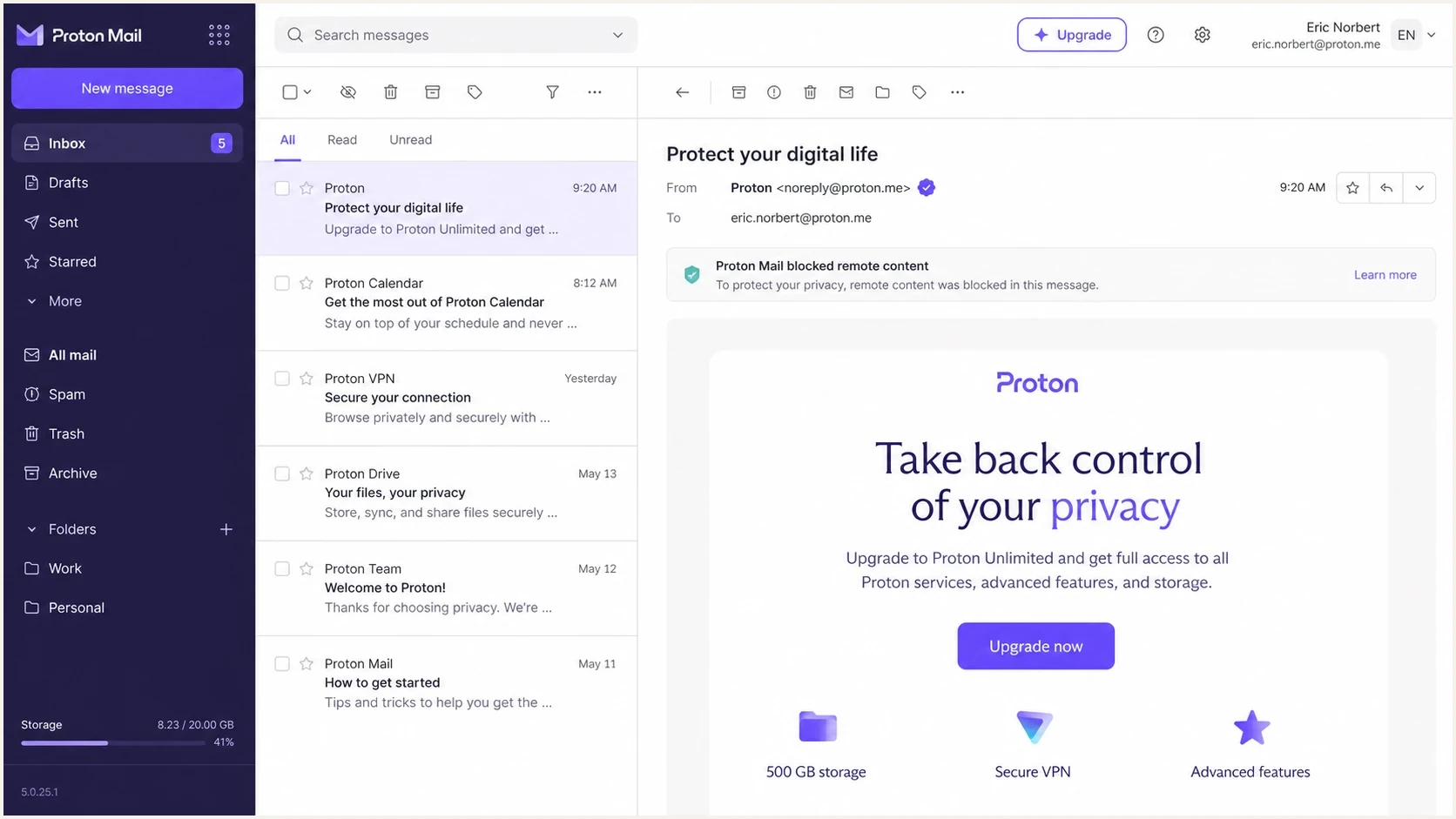
Proton Mail opened email showing a tracker-protection notice.
The practical distinction matters. A tracking problem changes reporting and attribution. A deliverability problem changes whether the subscriber sees the message at all. Mixing those problems leads to wasteful fixes, such as changing sending domains when the real issue is unreliable engagement telemetry.
Tracking measurement failure
- Open rate: Shows no event or a receipt-time event that does not prove a human read.
- Clicks: Can appear, but the web app can clean known tracking parameters.
- Seed test: Message lands in the inbox and a tracker-protection badge appears.
Actual delivery failure
- Placement: Message lands in spam or does not arrive.
- SMTP data: Bounces, deferrals, or rate-limit responses show up.
- Headers: Authentication or filtering clues point to spam placement.
Start with a controlled Proton Mail seed test
Start with a seed account because it replaces guessing with visible evidence. Create a normal Proton Mail account, subscribe it through the same form as a real user, and send the exact campaign or automation message. Do not use a stripped-down test template, because filtering changes when HTML, links, images, sender identity, and unsubscribe headers change.
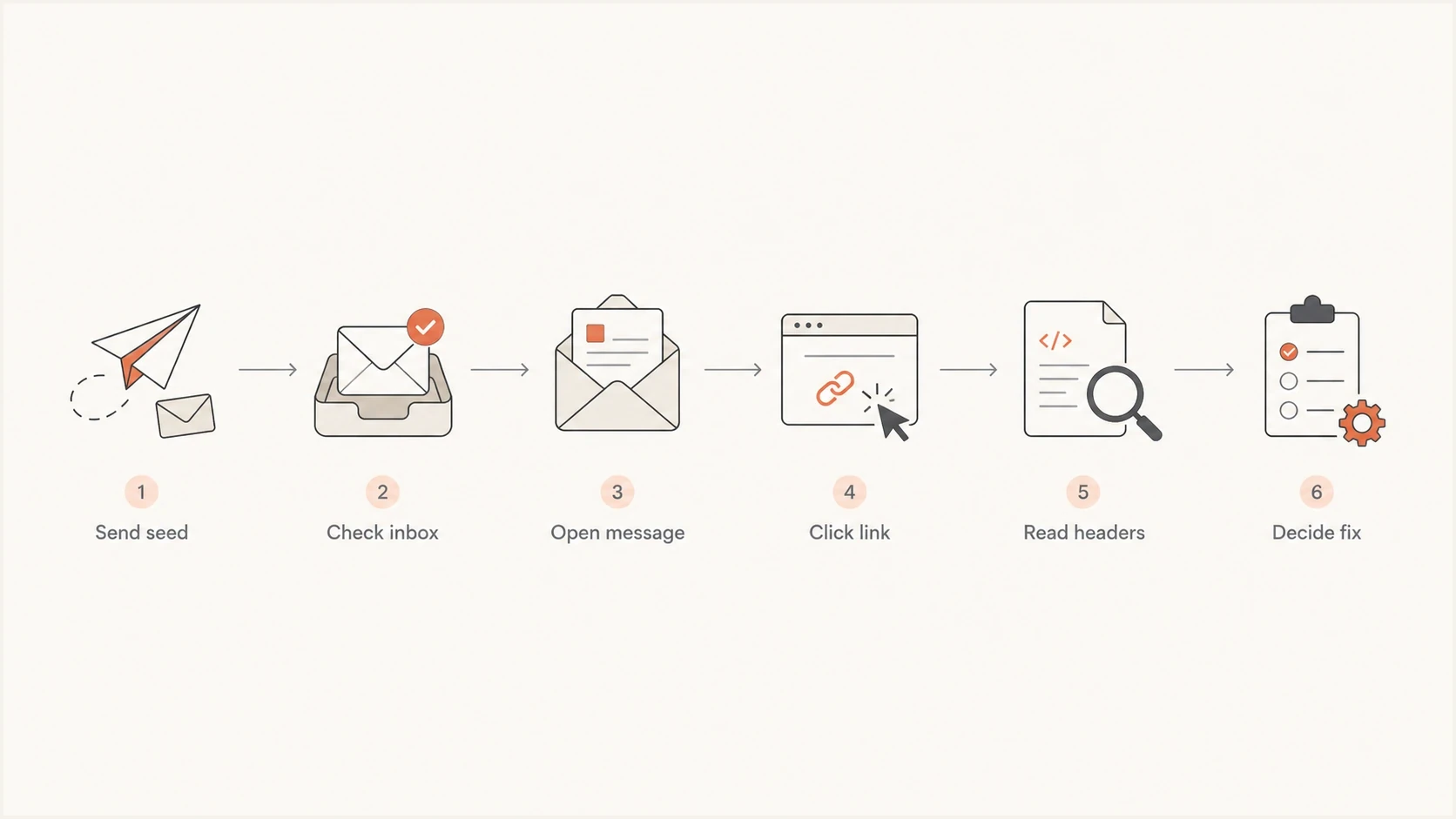
Proton Mail deliverability diagnosis from seed send to header review.
- Seed setup: Use a real Proton Mail mailbox and subscribe it through the normal path.
- Message match: Send the same sender, subject style, links, template, and list headers.
- Placement check: Record whether the message lands in inbox, spam, trash, or nowhere.
- Engagement check: Open the message, follow one normal link, complete a safe test action, and compare reporting.
- Header check: Copy full headers and look for authentication, filtering, and routing clues.
For a fast outside-in check, send the same message to an email tester and compare its findings with the Proton Mail seed result. The tester helps catch missing authentication, broken HTML, risky headers, and obvious spam signals before you involve the ESP.
Email tester
Send a real email to this address. Suped shows a results button when the test is ready.
?/43tests passed
If Proton Mail suppresses an open event but a click or downstream conversion appears, the message reached an engaged recipient. Because the web app can clean known tracking parameters, a missing click event is not proof of non-delivery either. Replace Proton Mail open-rate targets with reply rate, downstream conversion, purchase data, direct traffic trends, and seed placement for that mailbox segment.
Read headers before changing DNS
Headers show what happened after the message reached the mailbox provider. Proton Mail header fields vary by message and client, so look for patterns rather than one magic field. Authentication results, return path, list headers, X-Pm-Spamscore, and X-Pm-Spam-Action are useful starting points. Proton Mail uses multi-tier filtering, so one spam score does not explain every placement decision.
Header checks to copytext
Authentication-Results: mail.proton.me;
  dkim=pass header.d=example.com;
  spf=pass smtp.mailfrom=bounce.example.com;
  dmarc=pass header.from=example.com
Return-Path: <bounce@example.com>
From: Example Brand <news@example.com>
List-Unsubscribe: <mailto:unsubscribe@example.com>
X-Pm-Spamscore: value varies by message
X-Pm-Spam-Action: inbox or spam
What the evidence means
One successful seed inbox test does not prove every Proton Mail subscriber inboxes the campaign. It does prove that 0% opens alone is not enough evidence for a block. Treat the header, folder placement, SMTP result, and engagement events as a bundle.
|
|
|
|---|---|---|
0% opens | Tracking changed | Run seed test |
Clicks exist | Engagement exists | Use clicks |
Spam folder | Filtering | Find source |
4xx response | Temporary failure | Keep retries |
Bad alignment | DMARC gap | Fix sender |
Use this table to decide what to investigate next.
Use SMTP responses before escalating
Delivery and deliverability answer different questions. A 2xx SMTP response means Proton Mail accepted the message, but it does not prove inbox placement. A response beginning with 4 indicates a temporary failure that the sending server should retry. A response beginning with 5 indicates a permanent failure that needs a sender, recipient, policy, or message fix before another attempt.
|
|
|
|---|---|---|
2xx accepted | Server accepted mail | Check folder placement |
4xx temporary | Delivery deferred | Keep retries and review repetition |
550 5.7.1 | Message appears unsolicited or violates policy | Pause affected traffic and inspect consent, complaints, content, and reputation |
550 5.7.26 | Unauthenticated mail rejected under DMARC policy | Fix SPF or DKIM alignment |
Preserve the complete SMTP response because the enhanced code and text determine the next action.
Keep the exact response text, enhanced status code, sending IP, envelope sender, recipient domain, message ID, and UTC timestamp. Aggregate repeated responses by campaign and sending source. That evidence tells the ESP whether the issue is a retry pattern, shared IP reputation, authentication rejection, malformed mail, or recipient-specific failure.
Authentication fixes that matter first
If the seed lands in spam or headers show authentication problems, fix the basics before asking for remediation. Run a domain health check across the sending domain, return-path domain, and tracking domain. Then verify that DMARC monitoring shows the same sources you believe are sending.
Starter DMARC record for monitoringdns
v=DMARC1; p=none; rua=mailto:dmarc-reports@example.com;
RFC 9989 now defines DMARC, with RFC 9990 covering aggregate reports and RFC 9991 covering failure reports. The pct tag has been removed. Use aggregate data to identify authorized sources, fix alignment, and make deliberate policy changes instead of adding pct to stage enforcement.
- SPF: Keep one SPF TXT record, stay under lookup limits, and include only active senders.
- DKIM: Sign mail with the visible From domain or a domain that aligns with it.
- DMARC: Start with monitoring, identify every source, fix alignment, and then move to enforcement.
- Return path: Use a stable bounce domain and make sure SPF alignment is intentional.
- Links: Use branded tracking links and avoid mixing unrelated domains in one email.
Suped's product connects DMARC reports with SPF, DKIM, blocklist, and deliverability signals in one workflow. Use its source-level issues and alerts to identify the sender behind a failure, then assign the required DNS or sending change. Hosted DMARC, hosted SPF, SPF flattening, and hosted MTA-STS are available when teams need Suped to manage those records.

Issue steps to fix dialog showing the issue overview, tailored fix steps, and verification action
Reputation and volume when Proton Mail has little data
Proton Mail recipient volume is often small for commercial senders. That makes diagnosis noisy. A dedicated IP or new sending domain can lack enough positive history for a confident placement pattern, especially when the list segment is cold or recent bounce and complaint signals are poor.
Proton Mail evidence confidence
Use the amount of direct evidence before declaring a provider-level block.
Weak
Open data
Open rate alone is distorted by tracker protection and image preloading.
Useful
Seed data
Seed placement and headers show the message path.
Strong
Full data
SMTP results, folder placement, replies, and downstream actions agree.
- Low volume: Do not judge a mailbox provider segment from a handful of recipients.
- Dedicated IP: Warm slowly when Proton Mail has little history for the sending IP.
- Cold list: Apply list hygiene, remove hard bounces immediately, and suppress inactive Proton Mail recipients until inbox placement is stable.
- Content risk: Test heavy image layouts, aggressive sales language, and many links separately.
When the pattern also appears at other mailbox providers, widen the investigation. A broader guide to diagnose deliverability issues helps separate domain reputation, IP reputation, content filtering, and engagement problems.
Check blocklists and blacklist signals
A blocklist or blacklist listing is not always the cause of Proton Mail spam placement, but it is worth checking when placement is poor and headers point to reputation. Look at both IP and domain listings, then match the result to real traffic. One low-impact listing with no placement issue does not deserve the same response as a widely used reputation listing affecting the active sending IP.
How to handle listings
- Listed IP: Pause risky segments and ask the ESP for shared-pool context.
- Listed domain: Review recent campaigns, forms, redirects, and compromised web pages.
- No listing: Move back to seed placement, headers, authentication, and engagement.
Suped's blocklist monitoring keeps domain and IP blacklist checks next to DMARC evidence. Use that shared view to connect a listing to an active sending source before starting remediation.
Escalate with complete evidence
Proton Mail publishes a support route for email delivery errors, but start with the ESP because it owns the SMTP conversation and the sending IP pool. Ask the ESP to confirm the exact response, retry history, affected source, and shared-pool context. If a Proton Mail error persists after sender-side cleanup, submit the same evidence through Proton Mail's support form.
Ask the ESP
- Tracker behavior: Ask whether open or click telemetry changed for Proton Mail.
- SMTP logs: Request deferral, bounce, and rate-limit details for Proton Mail.
- Shared IP: Ask whether another sender affected the pool recently.
Prepare the case
- Message data: Include full headers, message ID, sender, recipient, and UTC timestamp.
- SMTP evidence: Include the complete response text and retry pattern.
- Seed result: Record the folder, tracker badge, link behavior, and test time.
- Sender changes: List the authentication, volume, consent, or content fixes already made.
An operational workflow needs to show who sent, whether authentication aligned, what changed, and which source owns the fix. Suped's product ties DMARC policy monitoring and sender identification to real-time alerts and remediation steps. Hosted SPF, SPF flattening, hosted MTA-STS, blocklist checks, and MSP multi-tenancy support teams that manage those tasks across domains.
Views from the trenches
Best practices
Run a real Proton Mail seed test before changing DNS or asking for provider help.
Compare replies, conversions, direct traffic, and clicks when tracking is blocked.
Copy full headers and SMTP results before deciding on sender reputation or DNS fixes.
Common pitfalls
Treating 0% opens as a full block leads teams into premature sender and DNS changes.
Testing a stripped template misses filters applied to the real campaign HTML and links.
Ignoring low Proton Mail volume makes noisy data look more certain than it is for teams.
Expert tips
Track Proton Mail separately and report engagement beyond opens in weekly reports.
Ask the ESP for exact Proton Mail responses when bounces or repeated deferrals appear.
Warm dedicated IP traffic slowly when Proton Mail has little sender history to score.
Marketer from Email Geeks says a Proton Mail seed account is the fastest way to confirm whether the message reaches the inbox and whether tracking pixels are blocked.
2025-02-19 - Email Geeks
Marketer from Email Geeks says Proton Mail often gives more reliable click data than open data because common tracking pixels are blocked for users.
2025-02-19 - Email Geeks
The practical answer
To resolve Proton Mail 0% open rates, prove the measurement problem first. A seed test that lands in the inbox and shows a tracker-protection badge means the campaign is not necessarily blocked. Report Proton Mail performance with replies, conversions, purchases, direct visits, and seed placement instead of relying on opens. Treat clicks as useful evidence when they exist, but remember that the web app can clean known tracking parameters.
If inbox placement fails, fix the sender-side fundamentals: SPF and DKIM alignment, DMARC policy, branded links, list quality, sending volume, and blocklist or blacklist status. Escalate to the ESP with full headers and SMTP evidence beyond the open-rate chart. That gives the support team an actionable case and keeps remediation tied to facts.




