
How to recover domain reputation after SES credentials were stolen?

Published 25 Apr 2025
Updated 17 Oct 2026
13 min read
Summarize with
Updated on 17 Oct 2026: We clarified SES reinstatement and reputation recovery checks after credential theft.
To recover domain reputation after SES credentials were stolen, first prove the abuse has stopped, then rebuild trust through clean authentication, reduced volume, engaged recipients, low complaints, and steady sending. There is no reputation reset button at Gmail or Outlook.com (including Hotmail addresses). Recovery depends on disciplined containment and a conservative rewarm.
If the compromise was fixed three weeks ago and the sender has only made two or three weekly sends since then, recovery is still at an early stage. Expect several more clean sends, and a longer recovery if the stolen SES credentials produced high volume, hit spam traps, or drove complaints.
- Containment: Deactivate the affected IAM access keys, replace the leaked SES SMTP credentials, and fix the exposed application, including WordPress if it was involved.
- Proof: Reconcile SES sending events with authorized application activity and monitor bounce trends. Passing DMARC alone does not prove containment.
- Rewarm: Send first to recent clickers, repliers, and active customers, then expand by engagement age only after repeated clean sends.
- Reader signals: Use web, social, and account channels to ask real subscribers to find the email and mark it as not spam.
First contain the SES incident
Treat stolen SES credentials as an active security incident that needs containment before reputation recovery. SES SMTP passwords are derived from IAM secret access keys for a specific AWS Region, so deleting a plugin password is not enough. Remove the abused access path, deactivate every affected IAM access key, and check whether the same application or hosting account exposed other credentials.
Check SES reputation messages for AWS warnings, including compromised-credential notices or a sending review, then compare them with Gmail and Outlook.com placement. AWS account status and mailbox-provider reputation are separate signals. A healthy SES account does not prove the domain has recovered.
- Revoke keys: Record the affected key IDs and revocation times, deactivate and delete those IAM access keys, and create replacements only after containment. Remove leaked secrets from deployed code and repositories.
- Fix WordPress: If WordPress was involved, patch or remove the vulnerable plugin, check admin accounts, scan for web shells, and rotate exposed CMS, hosting, and database passwords.
- Audit SES: Review every active AWS Region for sending volume, configuration changes, sending identities, and suppression activity. Check IAM for unauthorized users, keys, or policy changes.
- Limit access: Restrict sending permissions to the required verified identities, separate production credentials, store secrets securely, and alert on volume spikes. Use IAM roles with temporary credentials for SES API sending where supported. Require MFA for console access; it does not invalidate stolen SMTP passwords or access keys.
- Document scope: Record the abuse dates, volume, SES Regions, sending IPs, identities, subject patterns, and the first clean send after remediation.
Use CloudTrail to investigate IAM and SES configuration changes. SES SMTP sends are not logged in CloudTrail, and SES API sending data events require explicit logging configuration. Use available SES event publishing and application logs to investigate message activity; missing historical logs cannot be reconstructed by enabling logging afterward.
Do not rewarm on an uncertain stack
A remaining compromised credential, plugin, cron job, or hidden admin account allows fresh abuse during recovery. Pause nonessential mail until the account is clean and the sending path is understood.
Resolve an SES sending review or pause
An account under review can still send; a sending pause blocks SES mail. Check the affected Region and the status described in SES reputation messages. After containment, reply to the existing case in AWS Support Center with the completed remediation evidence.
- Identify the root cause, abuse period, affected credentials, and sending identities. State what remains unconfirmed.
- List the keys revoked and the application fixes already deployed, with completion times. Planned fixes do not demonstrate containment.
- Explain the controls that prevent recurrence, including restricted permissions and secure credential storage.
- Describe bounce and complaint handling, suppression rules, and volume alerts. Include recent sending evidence and the proposed limited restart audience.
Follow AWS's case instructions and wait for sending to be restored before restarting a paused account. Reinstatement restores permission to send; Gmail and Outlook.com reputation still needs separate recovery.
Identify which reputation was damaged
A stolen SES credential does not automatically damage every domain in the account. Trace the abusive messages to the visible From domain, DKIM signing domain, MAIL FROM domain, sending IP, SES Region, and configuration set. That evidence separates domain reputation damage from IP reputation damage and SES account enforcement.
|
|
|
|---|---|---|
From and DKIM domains | Abusive message headers | Rewarm the named domain |
MAIL FROM domain | Return-Path and SPF result | Check MAIL FROM configuration and domain matching |
Sending IP | Received headers and IP pool | Assess shared or dedicated IP impact |
SES account and Region | Reputation messages, SES events, and available logs | Resolve any review or sending pause |
Evidence that identifies the damaged sending identity.
If the abusive mail used the normal From domain and its DKIM signature and placement has deteriorated, use a controlled rewarm even when SES has returned to healthy status. If a domain has no evidence of exposure or degraded delivery, keep its normal sending pattern and monitor it. Focus recovery work on the affected identity, sending IP, or SES account restrictions that the evidence identifies.
Check authentication before warming
Domain reputation recovery needs a consistent identity. Gmail and Outlook.com should see the same visible From domain and the expected DKIM signing domain. SPF should pass for the MAIL FROM domain. DMARC passes when either SPF or DKIM passes and that authenticated domain matches the visible From domain under the policy's comparison mode. Suped's domain health checker checks the basic DNS state before sending resumes.
For SES, use Easy DKIM or BYODKIM and verify production headers, not only the DNS records. A custom MAIL FROM subdomain needs the SES-provided MX and SPF records for the correct Region. Under relaxed SPF domain matching, mail.example.com and a From domain of example.com share the same organizational domain. Strict SPF matching requires identical domains, so that subdomain configuration would need matching DKIM to pass DMARC.
Example SES MAIL FROM and DMARC recordsDNS
mail.example.com. MX 10 feedback-smtp.us-east-1.amazonses.com.
mail.example.com. TXT "v=spf1 include:amazonses.com ~all"
_dmarc.example.com. TXT "v=DMARC1; p=none; rua=mailto:dmarc@example.com"
Use the Region and values shown for the SES identity, and publish exactly one DMARC record. RFC 9989 removed the pct tag, so do not use pct=25 to stage enforcement. The p=none example is for initial monitoring while inventorying legitimate sources. Retain an existing, working p=quarantine or p=reject policy during recovery; do not weaken it solely because credentials were stolen.
Authentication is necessary, not sufficient
Abusive mail sent with stolen SES credentials can pass SPF, DKIM, and DMARC. These checks authenticate domains and do not establish the sender's intent. Revoke the credentials and reconcile SES sending activity with authorized mail; DMARC reports alone cannot prove the abuse has stopped.
Use a controlled recovery send plan
The recovery plan should be predictable. Keep the same From name, domain, newsletter format, and cadence, but use a much smaller audience. For a 40,000-person weekly magazine list, start with subscribers who clicked, replied, paid, or logged in during the last 30 days. Add older engagement groups only after Gmail and Outlook.com placement improves.
Risky recovery pattern
- Full list: Sending to all 40,000 subscribers before mailbox providers see clean engagement.
- New creative: Changing templates, domains, link patterns, or subject style during recovery.
- Mixed intent: Combining an apology, a promotion, and the normal editorial message in one send.
Stronger recovery pattern
- Engaged first: Start with recent clickers, paid members, account users, and direct replies.
- Stable identity: Use the normal newsletter domain, DKIM identity, cadence, and editorial format.
- Clear gate: Expand only when spam placement, complaints, bounces, and temporary deferrals stay controlled.
Example recovery volume cap
Illustrative volume caps for a weekly sender after SES credential abuse, not a provider-approved timetable.
Share of normal list
These percentages are illustrative planning caps. Repeat a stage until its recovery gates pass; there is no requirement to reach full volume in week six. If Gmail or Outlook.com placement gets worse, hold the current segment or reduce volume. If complaints or deferrals rise, stop the campaign and tighten the audience again. Schedule eligible mail in smaller batches to avoid a sudden burst. After SES accepts a message, let it handle temporary recipient-server deferrals instead of resubmitting the campaign.
Rebuild Gmail and Outlook.com trust
Gmail and Outlook.com rebuild trust when recent mail gets normal recipient behavior and few negative signals. Use first-party clicks, replies, purchases, and account activity to choose the recovery audience. Treat opens as a weak selection signal because privacy protections and image caching can inflate them. A guide on why domain reputation drops provides background, but after stolen SES credentials the practical fix is a proof-based rewarm.
- Use strongest cohorts: Start with subscribers who clicked, paid, logged in, or replied recently. Use opens only with stronger activity.
- Ask outside email: Post a clear notice on the website, app, and social channels asking readers to find the newsletter and mark it as not spam.
- Lower complaint risk: Keep RFC 8058 one-click unsubscribe headers working for marketing and subscription mail, retain a visible unsubscribe link in the message body, and process requests within two days.
- Clean the list: Suppress hard bounces and recipients who complained, and exclude long-inactive addresses from recovery sends. Review role accounts for valid consent rather than removing them solely because of the address format. Keep consent records and use double opt-in for new subscriptions.
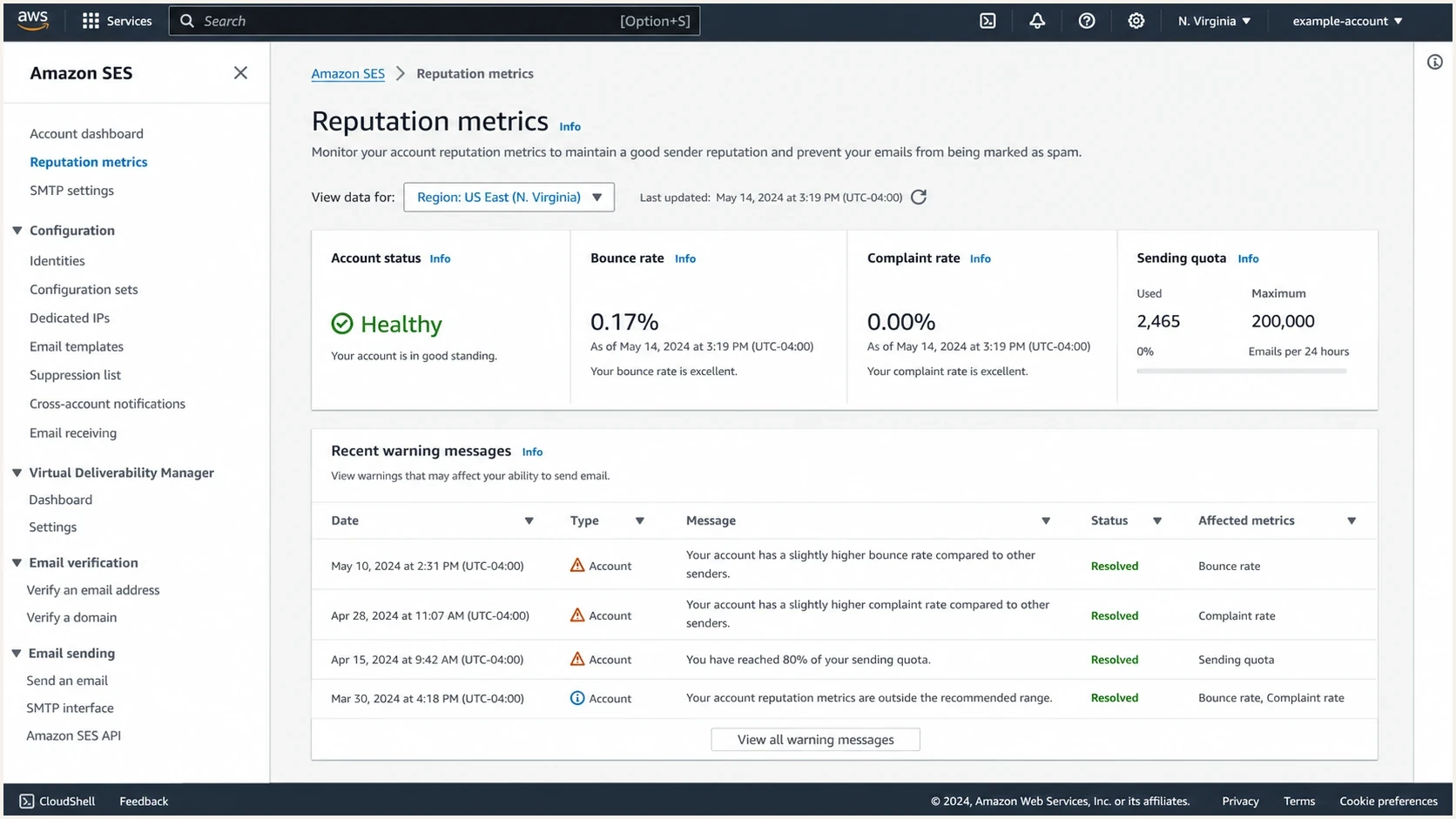
Amazon SES account reputation status with bounce and complaint rates.
An outside-channel request lets consenting readers find a wanted newsletter and mark it as not spam. That action helps their own mailbox recognize the message, but does not guarantee wider domain reputation recovery. Keep the request optional and continue the cautious sending plan.
Enable SES account-level suppression for hard bounces and complaints in each sending Region, and confirm configuration set overrides do not bypass it. Feed those events into the application's suppression records as well, so later campaigns do not keep retrying excluded recipients.
Measure with real test messages
Do not rely only on aggregate opens. Send real messages through the same SES identity, template, links, and authentication path. Inspect headers, authentication results, and content signals with Suped's email tester. Check placement separately in consenting Gmail and Outlook.com test inboxes before expanding the next cohort.
Email tester
Send a real email to this address. Suped shows a results button when the test is ready.
?/43tests passed
Tests should match production mail. A plain one-line message proves little if the newsletter has images, tracking links, a custom MAIL FROM domain, and personalization. A successful SES delivery event confirms that the receiving server accepted the message; inbox placement needs separate evidence. Test inboxes are samples, so compare their results with real recipient activity and provider responses.
|
|
|
|---|---|---|
DMARC | Passing via SPF or DKIM with From-domain matching | Continue |
DKIM | Passing with the expected d= domain | Continue |
SES complaints | Below 0.1% | Expand only if all gates pass |
Hard bounces | Target below 2% and near the preincident baseline | Investigate increases before expanding |
Mailbox placement | Stable or improving | Hold if worse |
Temporary deferrals | Stable or falling | Hold if rising |
Signals to check before each volume increase.
Do not treat the SES complaint rate as complete mailbox feedback. Gmail does not send its spam-button complaints to SES, so combine SES events with mailbox placement and provider responses. Where Gmail reports sufficient data, keep its user-reported spam rate below 0.1% and avoid 0.3% or higher. SES reputation rates use a representative sending volume rather than a fixed daily window, so they will not necessarily match one campaign's rates.
The thresholds in SES reputation messages are enforcement guardrails. A bounce rate of 5% triggers review, and 10% risks a sending pause. For recovery, aim well below the review threshold and near the normal baseline; the lower target above is a conservative expansion gate.
SES complaint rate guardrails
SES review and pause-risk thresholds, separate from Gmail's user-reported spam rate. Low complaints alone do not confirm recovery.
Below review threshold
Under 0.1%
Continue only if the other recovery gates also pass.
Review risk
0.1% to under 0.5%
Stop expansion and investigate complaints.
Pause risk
0.5% or higher
AWS can pause sending; stop nonessential mail and investigate.
Watch blocklists and blacklist fallout
Credential theft campaigns can leave domain and IP traces on a blocklist (blacklist). A listing does not explain every Gmail or Outlook.com spam placement, but it is a signal worth resolving before volume increases. Suped's blocklist monitoring tracks domain and IP listings beside authentication data.
If the sending domain, tracked links, or dedicated SES sending IPs appear on a major blacklist, review the listing reason, confirm the abuse has stopped, and request delisting only after the technical fix is complete. Premature delisting requests fail when the same abuse resumes. For a shared SES IP, provide AWS Support with the rejection text and affected IP; AWS handles delisting for the shared-IP lists it monitors. Follow the blacklist operator's process for domains and dedicated IPs that you control.
Where Suped fits
Suped is our DMARC reporting and email authentication platform. In this recovery workflow, it keeps DMARC aggregate data, SPF and DKIM status, blocklist and blacklist monitoring, and alerts together so the team can watch for source or authentication changes during recovery.
Suped's DMARC monitoring shows reporting receivers' source IPs and authentication outcomes. Compare those sources with the approved sender inventory and SES event logs before changing policy or increasing volume. Aggregate reports are delayed and do not distinguish legitimate mail from abusive mail sent through the same authenticated SES source.

Issue steps to fix dialog showing the issue overview, tailored fix steps, and verification action
After containment, Suped supports a repeatable checklist: identify the source, fix the record or sender, verify the change, and watch for recurrence. For multiple domains, alerts and MSP views help apply the same checks without assuming that one clean account means every domain is clean.
When to resume normal sending
After stolen SES credentials, judge recovery by clean sends and mailbox-provider results rather than a calendar deadline. A weekly sender with only two or three clean campaigns has produced little new evidence. A sender with high daily volume generates clean signals faster only when list quality and recipient behavior remain strong.
|
|
|
|---|---|---|
Send 1 | Recent clickers and repliers | Establish a clean baseline |
Sends 2-3 | Recent active subscribers | Expand only if both are clean |
Sends 4-5 | Older active subscribers | Compare provider-level results |
Send 6+ | Normal eligible audience | Resume only after stable results |
Decision gates for a weekly publisher.
The send numbers are illustrative checkpoints. Recovery can take weeks or longer, depending on the abuse volume and provider response. Repeat a phase until its gates pass; no fixed six-to-eight-send window establishes recovery.
A simple expansion rule
As a conservative internal rule, wait for at least two clean sends to the current cohort before increasing volume. Clean means DMARC passes, the expected DKIM domain appears, hard bounces stay below 2% and near baseline, SES complaints remain below 0.1%, and Gmail or Outlook.com placement does not worsen. Two clean sends support a decision; they do not guarantee inbox placement.
Views from the trenches
Best practices
Keep early recovery sends limited to readers with recent, measurable positive engagement.
Use owned channels to explain the incident and ask subscribers to rescue mail from spam.
Track recovery by clean sends and mailbox behavior, not by the number of calendar days.
Common pitfalls
Sending the full list too soon makes the compromise look like an unresolved pattern.
Changing domains, templates, or links during recovery adds noise to reputation signals.
Requesting delisting before fixing the abused path wastes review attempts and time.
Expert tips
Separate containment evidence from rewarm metrics so decisions stay clear and calm.
Give impatient stakeholders a visible off-email task that supports positive signals.
Hold volume steady after a weak send instead of trying to outrun spam placement.
Marketer view
Marketer from Email Geeks says three weeks is early when a weekly sender has only made two or three clean sends after the incident.
2024-07-24 - Email Geeks
Marketer view
Marketer from Email Geeks says owned channels can help by asking real readers to find the newsletter and mark it as not spam.
2024-07-24 - Email Geeks




