How to identify which spam filter a company uses without directly asking them?

Published 3 Jul 2025
Updated 1 Aug 2026
11 min read
Summarize with

Updated on 1 Aug 2026: We clarified how to combine MX, SMTP, header, and bounce evidence without overstating which spam filter made the decision.
The fastest way to identify which spam filter a company uses is to check its MX records, then confirm the finding with bounce text, SMTP response patterns, and email headers when you can get them. A vendor-specific MX hostname is a strong clue about the public receiving gateway, while a mailbox-provider hostname needs more supporting evidence.
The caveat is important: this is fingerprinting, not proof. Microsoft 365 and Google Workspace can sit within a longer route that includes connectors, routing rules, or another gateway. A bounce such as 550 5.4.1 shows a permanent failure, but the exact response text and the host that generated it matter more than the code alone.
- Best clue: MX records usually reveal the public inbound gateway, especially when a security vendor handles mail before the mailbox platform.
- Second clue: Headers from a message sent by the company can expose Microsoft, Google, Proofpoint, Mimecast, Barracuda, Cisco, or SpamAssassin markers.
- Weak clue: Generic bounce wording confirms a delivery failure, but the exact product stays uncertain without another signal.
If you are debugging your own deliverability at the same time, send a controlled message through Suped's Email Tester so you can separate recipient-side filtering from your own authentication, content, or reputation issues.
The answer in practice
Use an evidence ladder. Public DNS gives the first answer, SMTP behavior adds another clue, headers give supporting context, and a delivery failure shows the rejection symptom. The right answer is usually a confidence level, not a single magic lookup.
Direct answer
Check the recipient domain's MX records first. Inspect the hostnames they point to, compare any vendor-specific naming with SMTP greetings, bounces, and headers, then stop once the evidence is strong enough for the decision you need to make.
- High confidence: The MX hostname belongs to a known secure email gateway and the bounce comes from that same host family.
- Medium confidence: The MX points to Microsoft 365 or Google Workspace, and headers show another security layer on the mail route.
- Low confidence: You only have a generic rejection such as access denied, filtered, policy rejection, or recipient address rejected.
The goal is to locate the next useful check, not to defeat the recipient's filtering. That check can involve your authentication, your sending reputation, the recipient's admin logs, or the public gateway's policy decision.
Start with MX records
MX records tell the internet where to deliver mail for a domain. If a company routes inbound mail through a filtering gateway, the MX records often point at that gateway rather than directly at the mailbox provider.
DNS lookups to runBASH
dig MX example.com

dig A mx1.example-filter.net

dig -x 203.0.113.10
|
|
|
|
|---|---|---|---|
pphosted | Proofpoint | High | Direct gateway |
mimecast | Mimecast | High | Direct gateway |
barracuda | Barracuda | High | Host varies |
outlook | Microsoft 365 | Medium | Connector possible |
google | Google Workspace | Medium | Routing possible |
iphmx | Cisco | High | IronPort naming |
messagelabs | Broadcom | High | Hosted filter |
Common MX clues and what they usually mean
For deeper MX-only investigation, the same method applies when identifying the SMTP provider from an MX record: inspect the MX host, resolve it, check PTR naming, then compare each clue with the bounce source.
Read the preference number as delivery order: senders try the lowest number first. Several MX hosts with different priorities often provide failover for one service, so they do not automatically indicate several filters. A, AAAA, and PTR records can support a match, but generic cloud names and shared addresses keep those clues weaker than a vendor-specific MX host.
Good MX evidence
A vendor-specific MX host plus a matching rejection host is usually enough to tell support, sales, or the recipient admin where the message was stopped.
Inspect the SMTP greeting and TLS certificate
The MX host's 220 greeting and EHLO response can expose a product family or service hostname. A STARTTLS connection can also reveal the certificate subject and issuer. These are supporting clues because administrators can customize banners, providers can use generic certificates, and shared infrastructure can hide the tenant's filtering policy.
Inspect SMTP and STARTTLSBASH
openssl s_client -starttls smtp \
  -connect mx.target.example:25 \
  -servername mx.target.example -crlf

EHLO probe.example
QUIT
Treat banners as supporting evidence
- Match: A greeting hostname that agrees with the MX record strengthens the identification.
- Mismatch: A generic banner or shared certificate does not disprove the MX finding.
- Limit: Stop after the greeting and EHLO check. Do not test recipient addresses or attempt policy bypasses.
Use headers when you can get them
If the company sends you an email, inspect the full headers. Outbound headers do not guarantee the inbound filter is the same product, but they often reveal security infrastructure the company uses somewhere in its mail flow.
Header clues
X-MS-Exchange-Organization-SCL: 5
X-Forefront-Antispam-Report: CIP:198.51.100.10
X-Proofpoint-Spam-Details: rule=notspam policy=default
X-Mimecast-Spam-Score: 0
X-Barracuda-Spam-Status: No, SCORE=0.10
X-IronPort-AV: E=Sophos;i="6.02,123,1718400000"
Good evidence
- Header names: Unique X-headers from Microsoft, Proofpoint, Mimecast, Barracuda, Cisco, or SpamAssassin are useful markers.
- Received path: A security gateway in the trusted Received chain can confirm that mail passed through that product.
- Authentication lines: Authentication-Results entries show which host evaluated SPF, DKIM, DMARC, and ARC.
Weak evidence
- Marketing footers: A sender footer, unsubscribe domain, or tracking host tells you about outbound sending, not inbound filtering.
- Website stack: Web technology lookups sometimes help, but email routing changes independently of the website.
- One bounce: A single generic rejection proves only that a permanent failure happened somewhere in the delivery path.
Start with the topmost Received field added by a system you trust, then trace downward only as far as that trust holds. A sender can insert fake Received fields before submission, so untrusted lower lines should not decide the result.
Headers are strongest when they match DNS. For example, Microsoft MX records plus Microsoft antispam headers make Microsoft 365 a reasonable conclusion. Microsoft MX records plus Proofpoint headers mean the company has more than one layer, so the final reject point needs confirmation.
A bounce message is not enough
Bounces are useful because they show rejection timing, the responding host, and the enhanced status response. They are poor product identifiers because gateways rewrite messages, mailbox providers normalize wording, and relays can return another system's decision.
Generic rejection example
Rejected by recipient's email security filter
FILTERED 550 5.4.1 Recipient address rejected: Access denied.
What this proves
This proves a permanent delivery failure occurred. It does not prove that a content spam filter made the decision or identify the product. Treat it as a symptom, then connect it to DNS, SMTP behavior, headers, and timing.
- Code: The 550 class means a permanent failure. The standard 5.4.1 meaning sits in the network and routing class, while Microsoft also uses 5.4.1 with invalid-recipient and directory-edge rejections.
- Wording: The exact response matters. "Recipient address rejected: Access denied" can indicate an unknown recipient rather than a spam verdict.
- Next step: Preserve the full DSN, timestamp, sending IP, recipient domain, message ID, and remote host before asking for a log search.
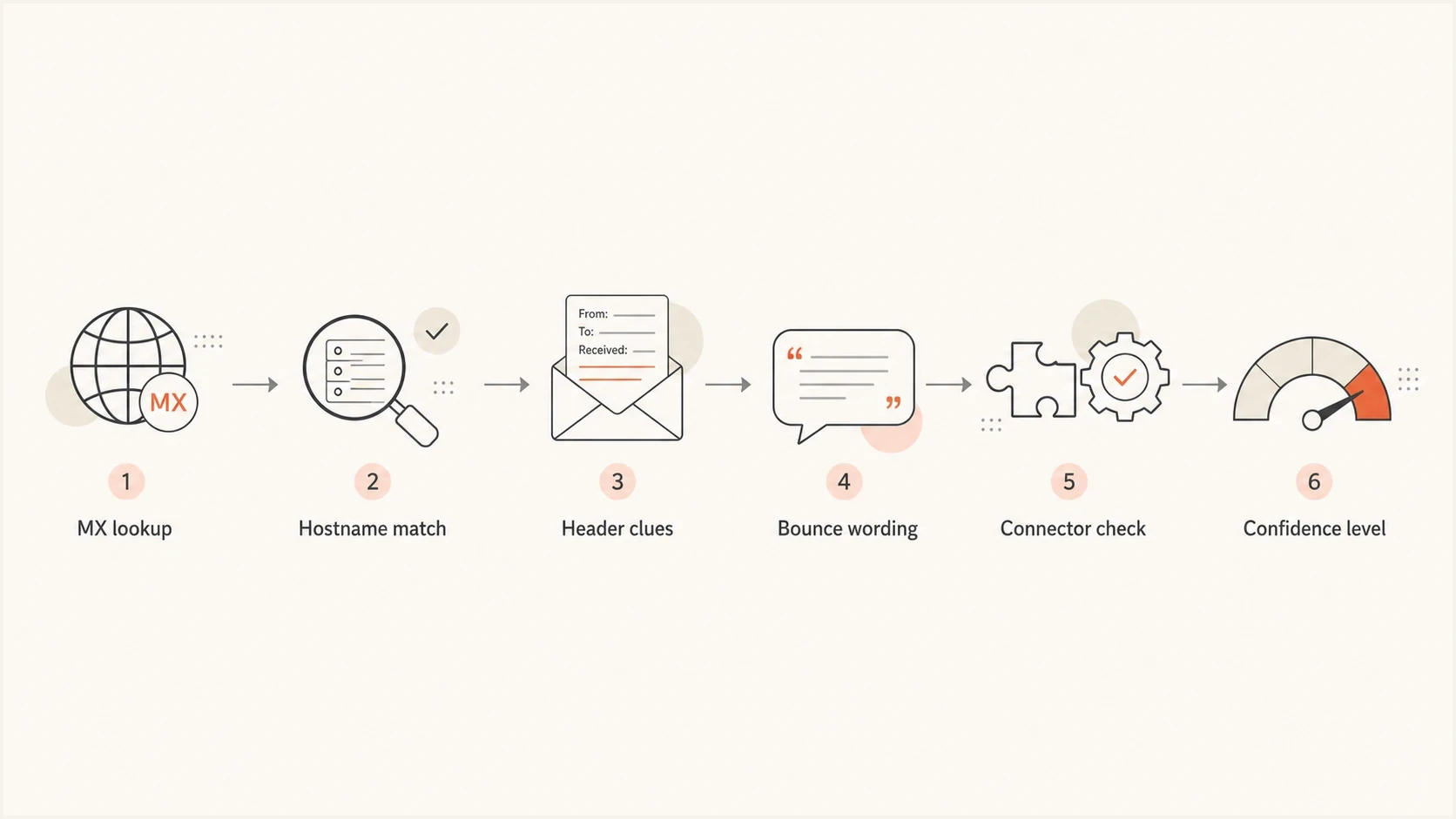
Flowchart combining MX, hostname, header, bounce, and connector clues to identify a spam filter.
Hidden routing behind Microsoft 365 and Google
The tricky case is a domain whose MX points at Microsoft 365 or Google Workspace. That host is the public entry point, but accepted mail can still follow a connector or routing rule to another gateway or an internal system.
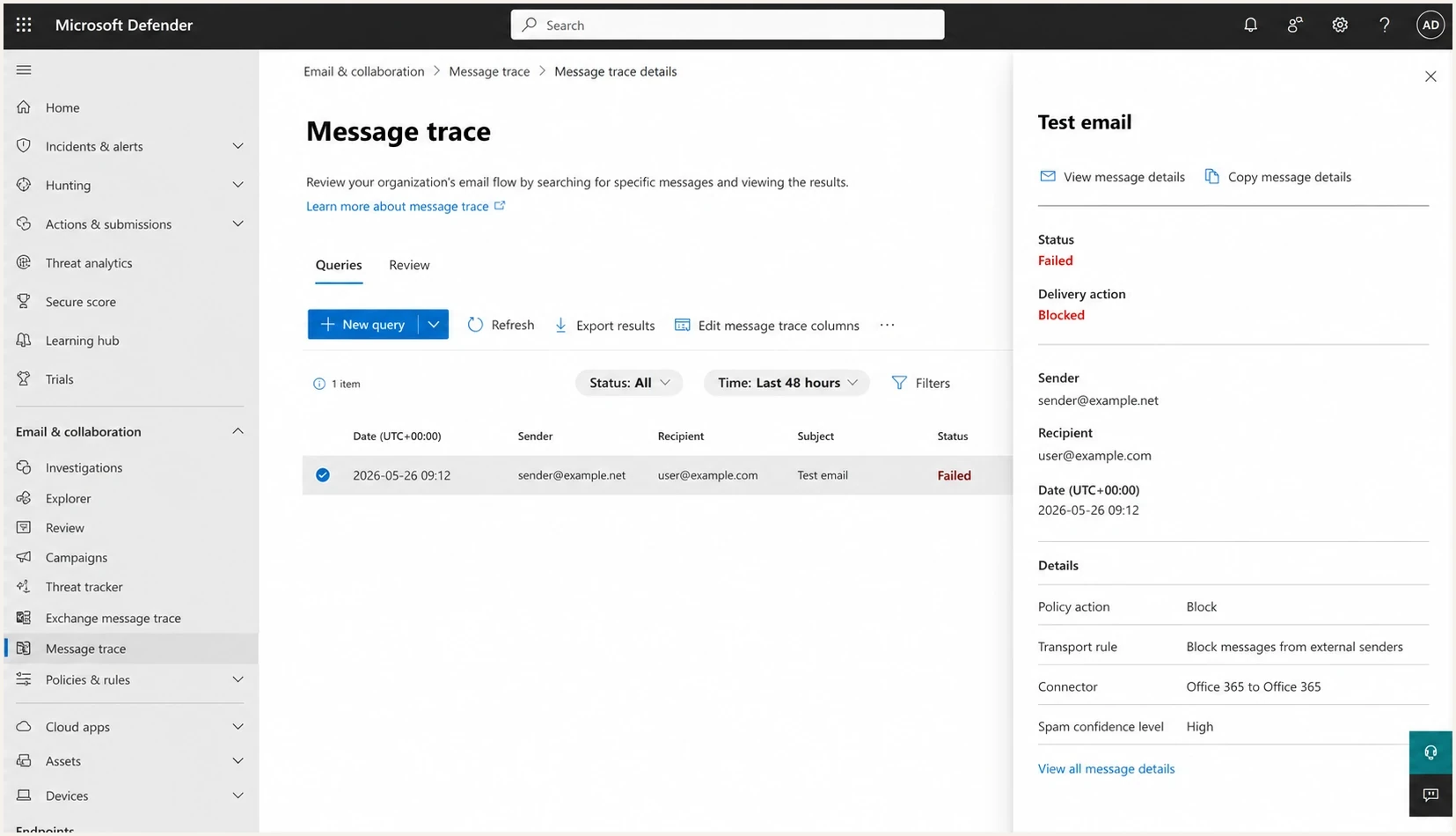
Microsoft Defender portal message trace detail screen showing a blocked email.
What public DNS shows
- MX host: The public MX only shows the host that accepts mail from the internet.
- Priority: Multiple MX priorities can show preferred and fallback routing, but not internal connectors.
- Hostname: A Microsoft or Google hostname confirms the front door, not every downstream decision.
What can happen inside
- Connector: Accepted mail can be routed to a separate security gateway for extra scanning.
- Rule: A transport rule can reject, quarantine, rewrite, or redirect after the first accept.
- Log: Only the recipient admin's trace or gateway log confirms the exact decision point.
Do not name a specific filter based only on Microsoft or Google MX records. Say the public MX indicates Microsoft 365 or Google Workspace, then state that hidden routing can add another layer.
Check your own side first
Before spending time fingerprinting the recipient's filter, prove that your own domain is not the easier explanation. A strict recipient gateway will penalize weak authentication, broken DKIM, SPF lookup problems, poor IP reputation, and domain listings on a blocklist (blacklist).
Suped's Domain Health Checker checks the sender-side basics before you infer too much from a remote rejection. Suped's DMARC monitoring keeps authentication evidence flowing over time, and blocklist monitoring helps catch blacklist events that can explain stricter treatment by a receiving gateway.

Issue steps to fix dialog showing the issue overview, tailored fix steps, and verification action
Suped's product supports the part of the investigation under your control. Automated issue detection, steps to fix, real-time alerts, hosted SPF, hosted DMARC, SPF flattening, hosted MTA-STS, and MSP multi-tenancy keep the evidence and remediation work together.
A practical investigation workflow
Use a repeatable workflow so you do not overstate the result. Keep the raw evidence, assign confidence, and only escalate to the recipient when there is a specific log request they can act on.
- Lookup: Run MX, A, AAAA, and PTR lookups for the recipient domain and the MX hosts.
- Classify: Map hostnames to known mail security platforms and mark the result high, medium, or low confidence.
- Collect: Save the full DSN, SMTP transcript, sending IP, recipient, timestamp, message ID, and responding host.
- Compare: Check headers from any mail the company sent you and look for matching gateway markers.
- Verify: Test your own authentication and reputation so the recipient filter is not blamed for your configuration issue.
- Escalate: Ask the recipient admin for a log search using the sender, recipient, time, message ID, and responding host.
Evidence collection commandsBASH
dig +short MX target.example

dig +short A mx.target.example

dig +short AAAA mx.target.example

dig +short -x 203.0.113.10
Email tester
Send a real email to this address. Suped shows a results button when the test is ready.
?/43tests passed
Keep probing ethical and limited. Do not enumerate recipients, try to bypass policy, or send deceptive mail. Use addresses you are allowed to contact, and treat SMTP tests as troubleshooting, not scanning.
What to do once you identify it
Knowing the likely spam filter helps you phrase the next action. It does not expose the rules that handled the message. Filtering can use sender authentication, reputation, content analysis, recipient behavior, machine learning, or local policy. Keep complaint rates low, send wanted mail, and give the recipient admin enough detail to find the rejection.
|
|
|
|---|---|---|
Proofpoint | Request log search | Guessing rules |
Mimecast | Share DSN | Bypass wording |
Microsoft 365 | Ask for trace | Ignoring connectors |
Google Workspace | Ask for logs | Assuming finality |
Unknown | Fix basics | Naming product |
How to act on the result
Confidence level for filter identification
Use this scale before stating which filter a company uses.
High
State likely product
Vendor MX plus matching bounce host or headers
Medium
State public gateway
Mailbox provider MX plus partial header clues
Low
State unknown
Generic bounce text without DNS or header match
The safest phrasing is usually: "Their public MX suggests Microsoft 365, but a downstream connector or gateway can still be involved. We need a recipient-side trace to confirm the exact rejection point." That wording is accurate and avoids turning a clue into a claim.
Views from the trenches
Best practices
Start with MX records, then confirm with headers before naming a filtering product.
Keep bounce text, timestamps, and recipient domains together so repeated patterns stay visible.
Validate SPF, DKIM, DMARC, and reputation first before blaming the recipient gateway.
Common pitfalls
Assuming Microsoft 365 MX records rule out a downstream third-party security connector.
Treating one generic 550 rejection as proof of the exact spam filter product in use.
Running unsolicited SMTP probes that look like enumeration instead of troubleshooting.
Expert tips
Compare MX, PTR, and header names; agreement across signals gives stronger evidence.
Ask for the full DSN from your sender system because gateways often add hidden clues.
Record each finding with a confidence level so teams do not overstate the result.
Expert from Email Geeks says the first check should be the recipient domain's MX records, because the public inbound host often names the filtering service.
2024-06-14 - Email Geeks
Expert from Email Geeks says any standard DNS query works; resolve the MX host, then compare the hostname with known filtering services.
2024-06-14 - Email Geeks
Use the answer carefully
Start with MX records, then confirm the result with SMTP behavior, trusted headers, and full bounce details. Treat Microsoft 365 or Google Workspace results as public front-door evidence unless you have log-level proof. If the evidence is weak, say unknown instead of naming a filter.
For ongoing sender-side work, Suped brings DMARC, SPF, DKIM, hosted SPF, hosted DMARC, hosted MTA-STS, SPF flattening, real-time alerts, blocklist (blacklist) monitoring, and MSP multi-tenancy into one workflow. It will not expose every recipient's hidden filter, but it helps establish a clean sender record before a recipient-side escalation.




