How to fix SMTP error code 5.4.1 when sending cold outreach to Office 365?

Updated on 25 Jul 2026: We corrected the Microsoft 365 550 5.4.1 diagnosis and added a recipient-first troubleshooting workflow.
When the full response is 550 5.4.1 Recipient address rejected: Access denied, Microsoft 365 usually rejected the recipient during Directory-Based Edge Blocking (DBEB). Start by checking that the address is spelled correctly and still exists. Do not treat this exact response as proof that your sender reputation, SPF, DKIM, or DMARC caused the rejection.
The wording after 5.4.1 controls the diagnosis. Recipient address rejected: Access denied points to recipient lookup in Exchange Online. Relay Access Denied points instead to a mail server that does not accept mail for the recipient's domain, often because of routing, DNS, or accepted-domain configuration. Both are permanent failures, so automatic retries should stop.
- Read the full NDR: Save the response text, rejecting hostname, recipient, and time.
- Verify the address: Check spelling and confirm the mailbox, alias, or group still exists.
- Check the scope: Compare one failing recipient with other recipients at the same domain.
- Suppress confirmed invalid recipients: Do not retry a cold address that the recipient organization cannot validate.
What 5.4.1 means in this case
SMTP 550 is a permanent failure. The enhanced status code 5.4.1 covers routing and recipient-address problems, so the accompanying text matters more than the number alone. Microsoft documents 550 5.4.1 Recipient address rejected: Access denied as a Directory-Based Edge Blocking response generated when Exchange Online cannot validate the recipient address. Microsoft's 5.4.1 article lists checks for a single recipient, an entire accepted domain, and hybrid directory synchronization.
DBEB rejects unknown recipients at the Microsoft 365 service perimeter before the message reaches later filtering. A typo, deleted mailbox, missing alias, unsynced hybrid recipient, or accepted-domain problem can therefore produce the same NDR. For a broader map of related Microsoft rejection patterns, the Microsoft bounces page covers adjacent cases.
|
|
|
|---|---|---|
Recipient address rejected | DBEB cannot validate recipient | Verify address |
Relay Access Denied | Domain or routing mismatch | Review NDR route |
One recipient | Mailbox or sync issue | Contact recipient |
Whole domain | Accepted-domain or routing issue | Escalate to admin |
Common 5.4.1 signals and what to do next.
Direct answer
Check the recipient first. If the address is wrong or retired, suppress it. If a valid address returns the exact DBEB response, the recipient's Microsoft 365 administrator must check the directory object, accepted domain, and hybrid synchronization. Sender-side authentication work will not create a missing recipient object.
Diagnose the bounce by wording and scope
Use the remote server's exact response and the pattern across recipients to decide who owns the fix. A hostname ending in .mail.protection.outlook.com confirms that Exchange Online Protection issued the response. It does not, by itself, say that your sending domain has poor reputation.
|
|
|
|---|---|---|
One cold address fails | Spelling, mailbox status, alias | Sender or recipient |
One known-valid address fails | Microsoft Entra ID object and proxy address | Recipient admin |
Every address at one domain fails | MX route and accepted-domain state | Recipient admin |
Different wording or 5.7.x code | Policy, authentication, or sender block | Depends on NDR |
A recipient-first decision path for Microsoft 365 5.4.1 responses.
For a legitimate address, send the recipient's administrator the full NDR, UTC timestamp, sender address, recipient address, and rejecting hostname. Ask them to run message trace and confirm the object exists in Exchange Online. In a hybrid environment, they should also confirm directory synchronization and the SMTP proxy address. Microsoft notes that DBEB can take up to 24 hours to reflect an on-premises mailbox change.
- Confirm the address: Use a direct reply, current customer record, or recipient confirmation.
- Compare the domain: Check whether another valid recipient at the same organization also fails.
- Escalate valid failures: Give the recipient admin the complete diagnostic evidence.
- Retest once: Retry only after the address or recipient configuration has been corrected.
Why cold outreach makes this harder
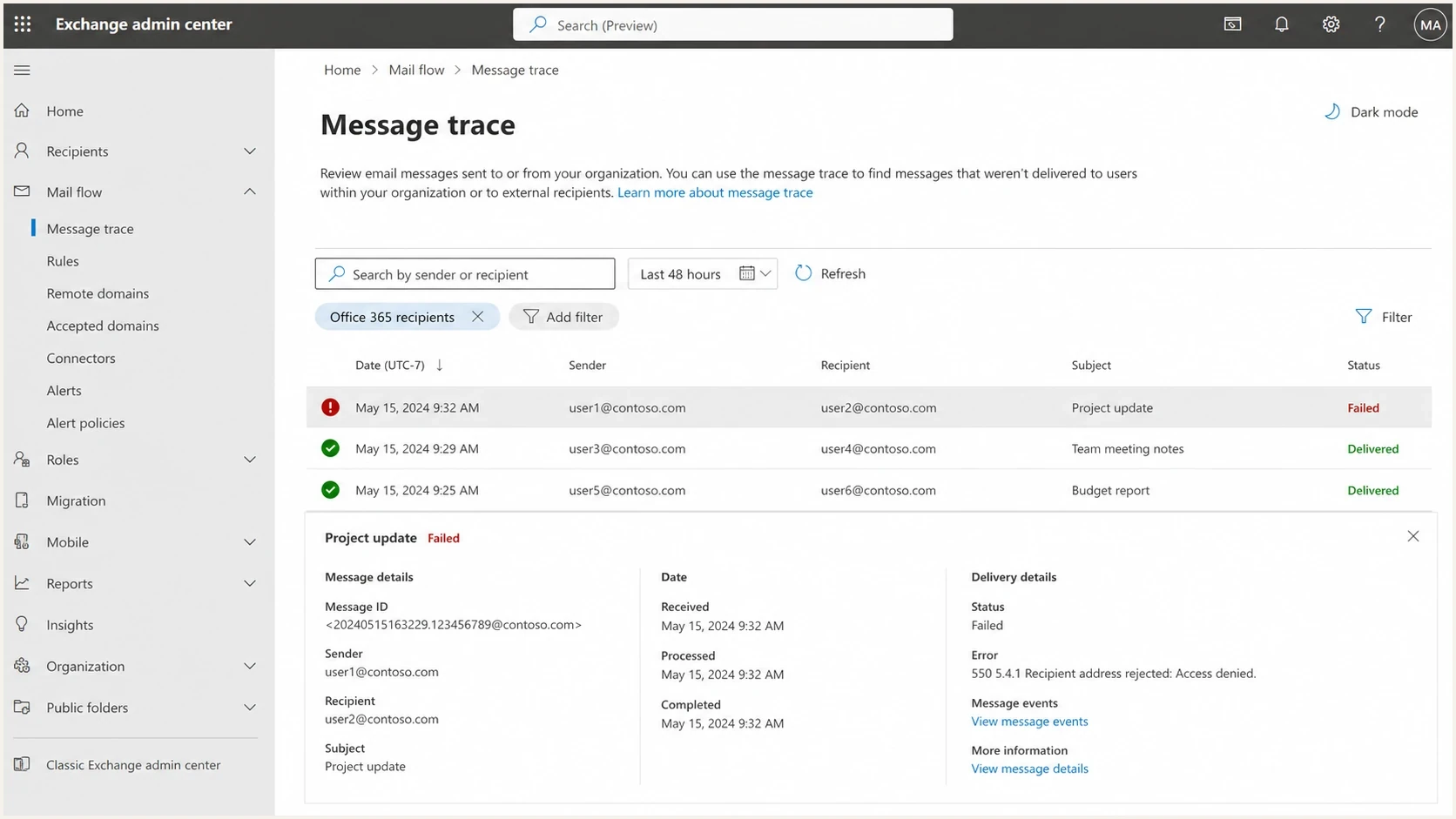
Microsoft Exchange admin center message trace showing a failed 550 5.4.1 delivery.
Cold B2B lists often contain guessed addresses, stale job data, and mailboxes that were removed after a role change. Microsoft 365 DBEB rejects those unknown recipients before later filtering. One prospect company can therefore return 5.4.1 while another Microsoft-hosted company accepts the message, even when both messages use the same sender and sending route.
A sender address change can affect reputation, but it does not explain the exact DBEB wording by default. First establish whether the address exists and whether the failure affects other recipients at the same domain. Investigate sender identity only when the NDR or a controlled comparison points away from recipient lookup.
Recipient or routing issue
- Invalid address: The mailbox, alias, or group does not exist.
- Directory sync gap: A valid hybrid recipient is missing in Exchange Online.
- Domain mismatch: MX routing or the accepted-domain type is wrong.
Sender or tenant issue
- Different NDR: A 5.7.x response can identify policy or authentication rejection.
- Tenant restriction: The recipient organization restricts external senders.
- Broader pattern: Multiple response codes point to a wider sender problem.
Authentication still matters for deliverability, but SPF, DKIM, and DMARC do not validate whether a Microsoft 365 recipient exists. Keep those workstreams separate so a clean authentication result does not distract from an invalid address, and a DBEB response does not trigger unnecessary DNS changes.
How to troubleshoot 550 5.4.1 in order
Use a fixed order so each result narrows the cause. Capture the exact bounce, verify the recipient, compare other recipients at the domain, and identify the rejecting server. Suppress an invalid address immediately. Escalate a known-valid address to the recipient's administrator before changing sender infrastructure.
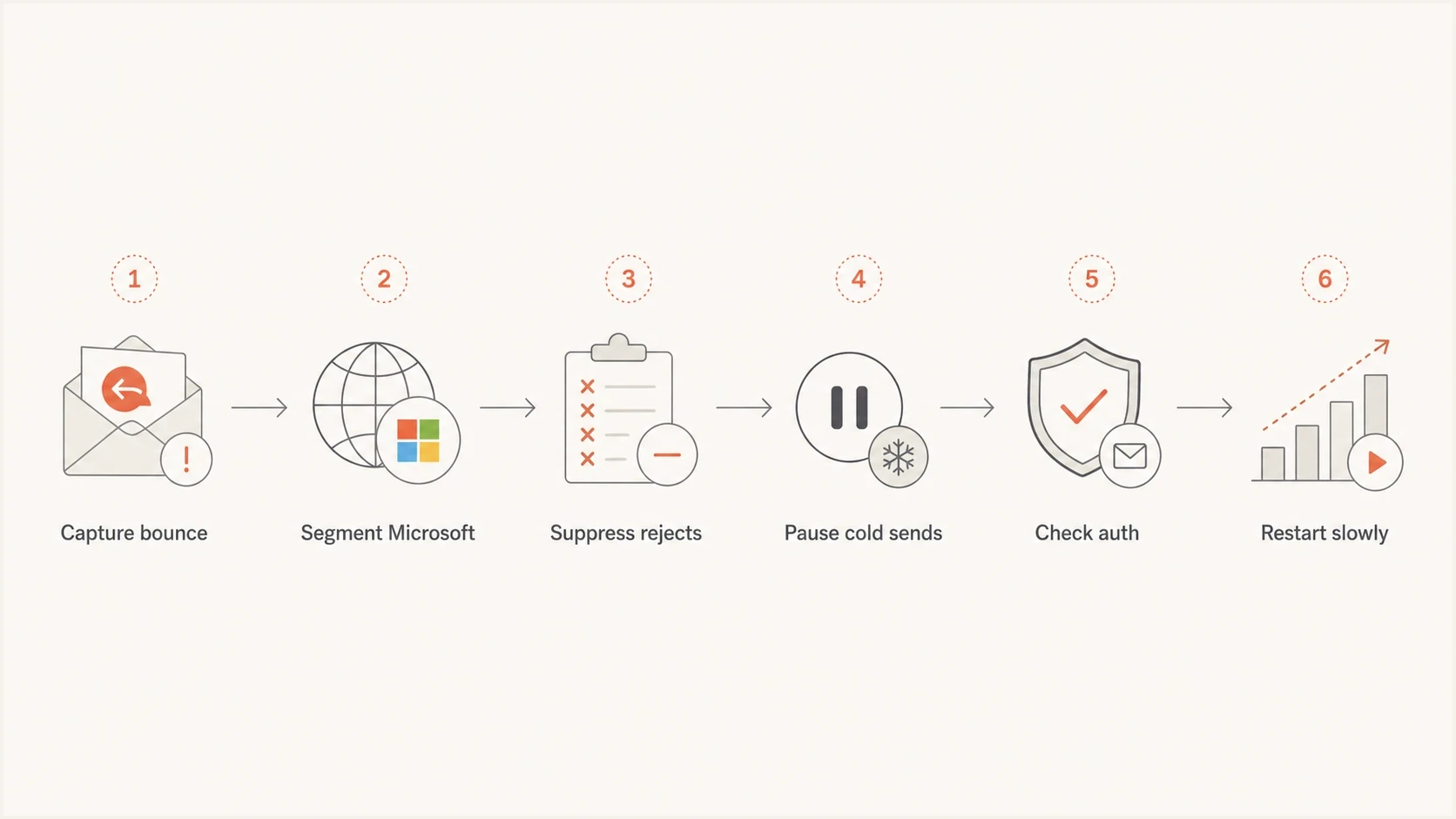
A flowchart showing the recovery process for Office 365 SMTP 5.4.1 bounces.
Example bounce text to capture
550 5.4.1 Recipient address rejected: Access denied
Relay Access Denied
Message rejected by recipient policy
- Collect the full NDR: Save the response, enhanced code, recipient, timestamp, and rejecting hostname.
- Confirm the recipient: Check spelling and use a current source to verify that the address exists.
- Compare the scope: Determine whether one recipient or the entire domain fails.
- Suppress invalid addresses: Remove them from every campaign and follow-up sequence.
- Escalate valid addresses: Ask the recipient admin to check message trace, directory objects, and accepted domains.
- Test after the fix: Send one message through the planned route after the recipient-side change has propagated.
Do not keep retrying
A 550 response is permanent for that delivery attempt. Repeatedly sending to an address that Microsoft 365 cannot validate adds avoidable bounces and does not repair the recipient directory. Retry only when new evidence shows that the address or routing problem has been fixed.
After recipient and routing checks, send a real message through the planned route and inspect its headers with the email tester. This will not resolve DBEB, but it can expose a separate authentication problem before you resume other outreach.
Email tester
Send a real email to this address. Suped shows a results button when the test is ready.
?/43tests passed
A clean test proves that the selected route can authenticate. It does not prove that the original recipient exists, that the recipient's accepted domain is configured correctly, or that a Microsoft 365 tenant will accept the campaign.
Check authentication after recipient and routing checks
Check SPF, DKIM, and DMARC after the exact NDR has been classified. Use a domain health check to verify the sending domain, then review aggregate results through DMARC monitoring. This finds a separate sender-side fault without mislabeling DBEB as an authentication response.
Authentication records to verify
example.com.  TXT  "v=spf1 ip4:192.0.2.10 -all"
selector1._domainkey  TXT  "v=DKIM1; k=rsa; p=MIIB...IDAQAB"
_dmarc.example.com.  TXT  "v=DMARC1; p=none; rua=mailto:d@example.com"
The values above are examples, not universal records. SPF must authorize the actual sending system. DKIM must validate with a signing domain that matches the visible From domain for DMARC. The DMARC reporting address must be able to receive and process aggregate reports. Suped is our DMARC and email authentication platform, and its workflow connects those production results with source discovery, alerts, hosted policy management, and issue detection.
DMARC record detail view showing SPF, DKIM, DMARC, rDNS diagnostics, and DNS records
For this 5.4.1 problem, Suped helps rule sender authentication in or out. It shows which sources are legitimate, whether SPF or DKIM matches the From domain for DMARC, and whether a source changed around the time of the bounces. It cannot add a recipient to Microsoft Entra ID or change the recipient's accepted-domain configuration.
When IP delisting helps
IP delisting helps only when another diagnostic ties the rejection to an IP you control or to a dedicated sending route your provider can remediate. The exact Microsoft response 550 5.4.1 Recipient address rejected: Access denied is not an IP delisting instruction. If you use a shared cloud route, there usually is no dedicated IP for you to delist.
Blocklist and blacklist data still helps when you also see broader rejection codes or delivery failures across unrelated domains. Suped's blocklist monitoring keeps domain and IP listing checks next to authentication signals. Use that evidence to investigate a broad reputation issue, not to replace the recipient validation steps for DBEB.
|
|
|
|---|---|---|
DBEB response | None | Verify recipient |
Dedicated IP listing | High | Follow listing evidence |
Whole-domain 5.4.1 | None | Contact recipient admin |
Authentication failure | None | Fix sender DNS |
How to choose the next action.
About sending from Microsoft 365
Moving outbound mail to Microsoft 365 does not fix a misspelled, deleted, or unsynced recipient at another tenant. The receiving tenant still validates its directory and applies its own inbound controls.
How to resume after the cause is fixed
Do not resume the old sequence to every bounced recipient. Keep invalid addresses suppressed permanently. For a known-valid address, wait until the recipient confirms the directory, alias, MX route, or accepted-domain issue has been corrected. Then send one controlled test and watch the exact response.
Response thresholds for 5.4.1
Microsoft publishes no universal safe percentage or recovery period for this permanent response.
Proceed
Accepted
The corrected recipient accepts a single controlled test.
Investigate
Any
An isolated 5.4.1 appears for an unverified address.
Stop
Pattern
Several valid recipients at one domain return the same response.
- Track exact responses: Do not blend 5.4.1 with unrelated temporary or policy bounces.
- Keep identity stable: Avoid changing domains or mailboxes while testing a recipient-side fix.
- Remove weak records: Exclude guessed, stale, role-based, and previously rejected addresses.
- Escalate domain patterns: Ask the recipient's IT team to review valid failures across its domain.
Recent direct engagement is useful evidence that an address should exist, but it does not override DBEB. If a customer or active prospect still receives mail through another address, ask them to confirm the correct address and involve their administrator when the confirmed address continues to fail.
Where Suped fits
Suped is our DMARC and email authentication platform. During a 5.4.1 investigation, its role is to verify the sender-side evidence while recipient validation is handled separately. This helps teams avoid changing correct DNS records in response to a recipient-directory failure.

Issue steps to fix dialog showing the issue overview, tailored fix steps, and verification action
- Authentication issue detection: Suped surfaces SPF, DKIM, and DMARC failures with steps to investigate them.
- Source-change alerts: Teams can see when an unexpected sending source appears.
- Hosted policy management: Sender changes and DMARC policy work can follow a controlled workflow.
- Multi-domain reporting: Teams can compare authentication results across managed domains.
Suped does not bypass Microsoft 365 DBEB or create recipient objects. It keeps DMARC, SPF, DKIM, hosted policy management, blocklist (blacklist) monitoring, and authentication alerts in one workflow while the recipient's administrator handles Exchange Online directory or accepted-domain corrections.
Views from the trenches
Best practices
Capture the complete 5.4.1 response before changing sender DNS or campaign settings.
Suppress confirmed invalid recipients across every active outreach and follow-up list.
Escalate known-valid addresses with the full NDR to the recipient's Microsoft admin.
Common pitfalls
Treating every 5.4.1 response as a sender reputation block sends diagnosis off course.
Assuming SPF, DKIM, and DMARC can repair a missing Exchange Online recipient object.
Retrying a permanent 550 response before the address or recipient route has changed.
Expert tips
Compare one recipient with the rest of its domain to locate who owns the correction.
Separate Access Denied from Relay Access Denied because their causes are different.
Use DMARC aggregate data to rule out a separate authentication issue after DBEB.
Marketer from Email Geeks says the first questions should be when the problem started, which inbox provider is rejecting, what changed, and what the full bounce says.
2024-04-16 - Email Geeks
Expert from Email Geeks says the full response text and affected recipient pattern should determine whether the issue belongs to the sender or the Microsoft 365 tenant.
2024-04-17 - Email Geeks
Fix 5.4.1 without repeated bounces
For 550 5.4.1 Recipient address rejected: Access denied, verify the recipient before changing sender infrastructure. Suppress an address that is wrong or no longer exists. If the address is valid, compare other recipients at the same domain and give the full NDR to the recipient's Microsoft 365 administrator.
The recipient admin can check message trace, Exchange Online recipient objects, accepted domains, MX routing, and hybrid synchronization. Check sender authentication separately, especially when other NDR codes appear. Resume only after the identified cause has changed, then use one controlled test instead of restarting the full cold sequence.




