How to fix '5.4.14 Hop count exceeded' email delivery errors?

Published 21 May 2025
Updated 5 Aug 2026
11 min read
Summarize with
Updated on 6 Aug 2026: We corrected the Exchange Online loop guidance and added a header-based diagnostic path for finding the repeated hop.
To fix a "5.4.14 Hop count exceeded" delivery error, find and break the mail loop. The message has crossed the receiving system's loop threshold, so it returns a permanent non-delivery report (NDR). Exchange Online's ATTR codes use service loop counters, so 5.4.14 does not prove that the message crossed a fixed number of Received headers. If you do not control the recipient domain, confirm that your sender path is clean, capture the bounce details, contact the recipient domain admin, and suppress the address until its route is repaired.
Treat this error as a routing problem first, not a sender reputation problem. It can happen when a recipient domain forwards mail to another system and that system sends it back, when Microsoft 365 hybrid routing is misconfigured, when a gateway hands mail to Microsoft and Microsoft routes it back to the gateway, when a Microsoft 365 domain is unverified, or when an old role account such as postmaster no longer lands in a valid mailbox.
Typical bounce texttext
554 5.4.14 Hop count exceeded - possible mail loop ATTR34
[CH2PEPF00000146.namprd02.prod.outlook.com
2025-04-16T04:00:51.808Z 08DD7C5B276E3B26]
What the 5.4.14 error means
Every SMTP handoff normally adds a Received header. Those headers help reveal the route, but Exchange Online can also stop a message through its own loop-attribution headers. Microsoft guidance identifies 5.4.6 with mail loops in on-premises Exchange and 5.4.14 with mail loops in Exchange Online. ATTR34 indicates that Exchange Online detected repeated processing within its tenant-attribution path.
The important part is ownership. If the loop happens after the recipient's MX accepts the message, the recipient admin owns the fix. Your ESP or sending platform can prove it handed the message off, but it cannot rewrite the recipient's forwarding rules, connectors, tenant settings, or mailbox migration state.
Fast answer
If you are the sender, do not keep retrying the same address at volume. Check whether your own routing is looping, then send the bounce to the recipient admin with the timestamp, final host, ATTR code, and trace ID. Suppress that address or affected domain segment until the route is repaired.
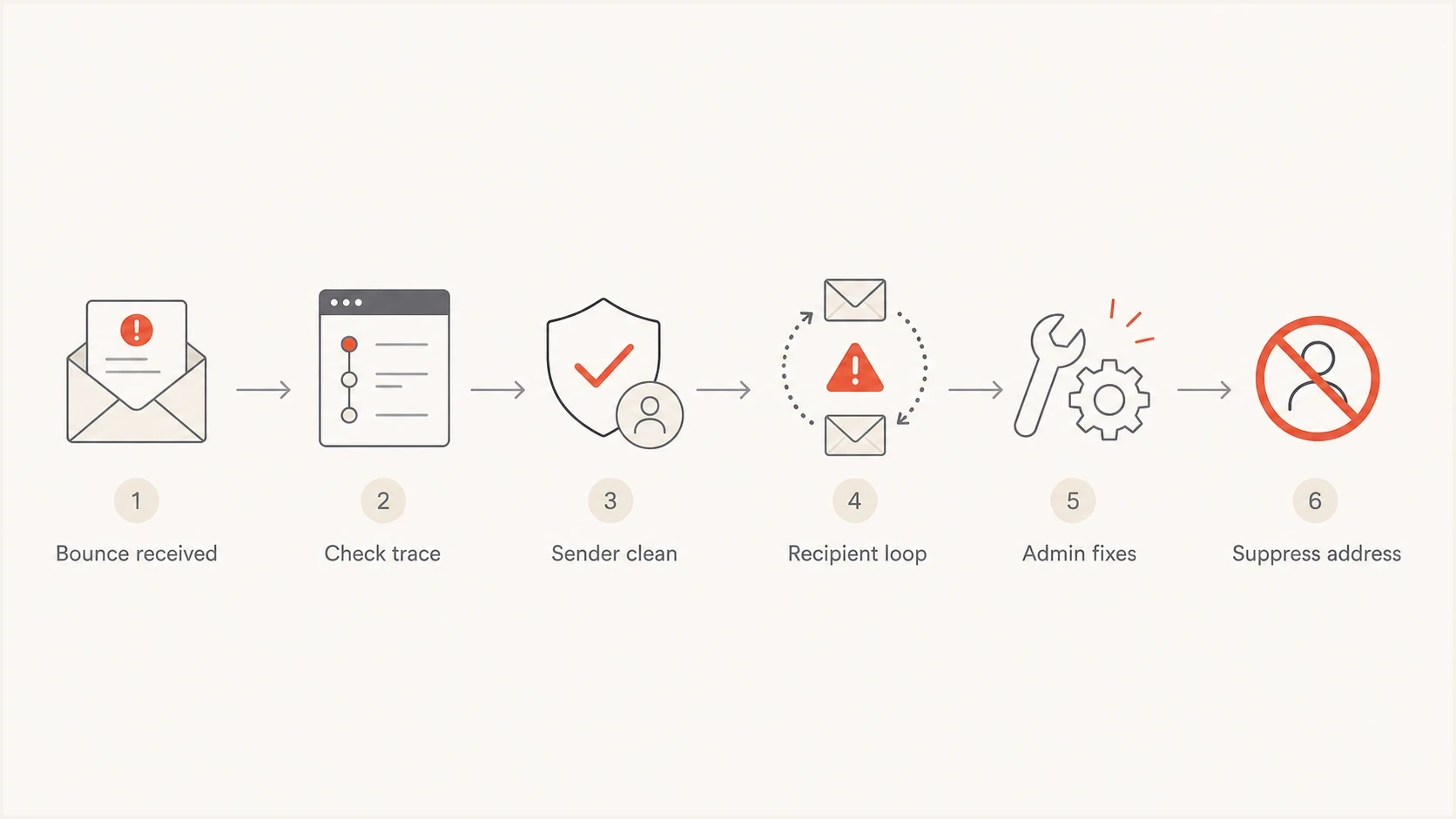
Troubleshooting flow for a 5.4.14 Hop count exceeded mail routing loop.
How to identify the looping hop
Start with the complete NDR and the attached original message headers. Received fields appear newest first, so read them from the bottom upward to reconstruct the route in time order. Compare the from and by hosts against each timestamp. A pair of systems that appears more than once in alternating order usually exposes the loop.
Repeated Received-header patterntext
Received: from gateway.example.net
  by tenant.mail.protection.outlook.com;
Received: from tenant.mail.protection.outlook.com
  by gateway.example.net;
Received: from gateway.example.net
  by tenant.mail.protection.outlook.com;
- Find the rejecting host: Use the reporting MTA or final host in the NDR to identify the system that stopped the message.
- Read the route in order: Follow Received fields from the oldest entry at the bottom toward the newest entry at the top.
- Mark repeated hosts: Look for the same host pair, gateway, tenant, or connector appearing again in the same sequence.
- Correlate the trace: Match the recipient, timestamp, Message-ID, and network message ID with the platform's message trace.
- Assign the fix: The admin who controls the first repeated handoff should inspect that connector, rule, forward, or smart host.
Some NDRs contain only the final diagnostic line. In that case, the recipient admin's message trace is more useful than the visible bounce because it can show repeated RECEIVE, SEND, redirect, or transfer events for the same message.
Common causes and who owns the fix
Most 5.4.14 cases fall into a few patterns. The route matters more than the sender's content, IP reputation, or DMARC policy. Authentication still matters for deliverability, but a hop count error says the message could not complete its path after SMTP routing began.
|
|
|
|---|---|---|
Forwarding loop | Recipient admin | Mailbox forwarding and contact targets |
Hybrid connector loop | Tenant admin | Connectors, accepted domains, and routes |
Gateway bounce-back | Gateway admin | MX, smart host, and tenant handoff |
Broken role account | Recipient admin | Aliases such as postmaster |
Domain migration | Domain admin | Old MX paths and inactive mailboxes |
Unverified Microsoft 365 domain | Microsoft 365 admin | Domain verification and synced SMTP addresses |
Common 5.4.14 causes
A common real-world pattern is an acquired or retired domain that still has live MX records. Mail enters a security gateway, goes to Microsoft 365, gets redirected to another target, and then loops back. The sender sees the bounce, but the broken route sits inside the destination's mail setup.
Route pattern that can loopdns
example.com. 3600 IN MX 10 mx.example-gateway.net.
example.com. 3600 IN MX 20 mail.protection.example.net.

Gateway -> Microsoft 365 -> gateway -> Microsoft 365
Step by step fix for senders
If you are sending a campaign or transactional email, separate a broken recipient route or bad address from a problem in your own sending path. This order stops wasted retries and gives the responsible admin the evidence needed to investigate.
- Capture the bounce: Save the complete NDR and attached headers, including the SMTP status, ATTR code, hostname, timestamp, Message-ID, and recipient address.
- Check your trace: Confirm your platform handed the message to the recipient MX or next hop without looping internally.
- Inspect the recipient: Look up the recipient domain's MX records and compare them with the host named in the bounce.
- Run one controlled test: After checking the route, send one test and review it with Suped's email tester to rule out obvious authentication and header issues.
- Escalate with evidence: Ask the recipient admin to review connectors, forwarding, aliases, domain verification, and migration state.
- Suppress the failure: Pause the address or affected domain segment until the owner confirms the route is fixed.
Email tester
Send a real email to this address. Suped shows a results button when the test is ready.
?/43tests passed
Suped's email tester will not repair a destination loop, but it helps avoid the wrong diagnosis. If SPF/DKIM authentication, DMARC identifier matching, headers, and the sending path look clean, the recipient admin has a clearer case to investigate their route instead of pushing the issue back to the sender.
For domain-level checks, use Suped's domain health checker before escalating. It catches missing or malformed records, while the NDR and message trace still show where the hop loop happened.

Email tester sample report showing total score, email preview, issue summary, and per-section results
Step by step fix for recipient admins
If you control the destination domain, the fix is inside your routing setup. Start with the exact timestamp, recipient, and Message-ID from the NDR, then run a message trace in your mail platform. Look for repeated handoffs between the same systems, or for the message leaving your tenant and re-entering it.
Sender-side checks
- Trace handoff: Confirm the message left the ESP or MTA once, without internal cycling.
- Address quality: Remove role accounts, stale acquired-domain contacts, and repeated hard bounces.
- Authentication proof: Document SPF/DKIM authentication and DMARC identifier matching for the test message.
Recipient-side fixes
- Connector routing: Stop connectors from sending the same domain back to the previous hop.
- Forwarding targets: Remove mail contacts, transport rules, or mailbox forwards that return mail.
- Accepted domain state: Set authoritative or internal relay behavior to match the actual mailbox location.
In Microsoft 365 hybrid environments, use Authoritative only when Exchange Online contains every valid recipient for the domain. Use Internal relay when some valid recipients live in a downstream system and a connector supplies a working next hop. Also verify every custom domain in Microsoft 365 and check that synchronized users have the expected primary and proxy SMTP addresses.
For a hybrid deployment, Microsoft recommends rerunning the Hybrid Configuration Wizard to rebuild the intended connector settings. If inbound MX points to Exchange Online, the connector to on-premises Exchange should use the hybrid server as a smart host instead of routing the domain back through DNS. If centralized mail transport is enabled, confirm that the dedicated On-premises connector is not scoped to accepted domains.
Check centralized mail transportpowershell
Get-OutboundConnector -Identity "<Connector Name>" |
  Format-List Name,RouteAllMessagesViaOnPremises,RecipientDomains
- Trace IDs: Use the final host and timestamp from the NDR to pull the exact message trace.
- Transport rules: Disable redirect rules temporarily if they send mail to external contacts or legacy hosts.
- MX and gateway: Confirm the inbound gateway sends accepted mail to the final mailbox system only once.
- Role aliases: Verify postmaster, abuse, and support aliases resolve to valid mailboxes or groups.
What not to chase
A hop count error can look alarming because the NDR has a 554 permanent failure code. That does not mean your domain is on a blocklist (blacklist) or failing authentication. Check those systems to rule out a separate sender-side problem, but the 5.4.14 error itself points to routing.
How to prioritize a 5.4.14 incident
Treat volume and repeat pattern as the signal, not the single error code alone.
Single address
Low
Suppress it and ask the recipient admin to repair the mailbox route.
One recipient domain
Medium
Escalate with trace details because the domain likely has a routing fault.
Many domains
High
Audit your own MTA, gateway, and ESP handoff because the sender route is suspect.
If many unrelated recipient domains return 5.4.14 after the same deployment or gateway change, look inward first. Review outbound connectors, smart host configuration, envelope sender rewriting, and any new security gateway path. If only one domain or address fails, especially a role account or retired brand domain, the recipient side is the stronger suspect.
For normal bounce triage beyond this one error, a broader bounce message workflow helps separate policy rejections, mailbox problems, connection failures, and routing loops.
How Suped helps with evidence
Suped cannot fix another company's mail loop. Suped is our DMARC reporting and email authentication platform, and its role here is to document sender-side health. Use it to verify DMARC identifier matching, SPF/DKIM authentication, and relevant deliverability signals before escalating the routing ticket.
Suped's DMARC monitoring and blocklist (blacklist) alerts can show whether the failure is isolated to routing or appears beside a broader sender-side incident. For a 5.4.14 case, pair the full NDR with a matching message trace keyed by Message-ID. The trace remains the evidence that locates the loop.
Practical workflow
- Monitor authentication: Use Suped to track SPF/DKIM authentication and DMARC identifier matching before escalation.
- Clean the sender side: Resolve detected DNS or authentication issues without treating them as the loop cause.
- Escalate clearly: Send the recipient admin the sender-side evidence, complete NDR, and trace details.
DMARC record detail view showing SPF, DKIM, DMARC, rDNS diagnostics, and DNS records
Views from the trenches
Best practices
Check the full message trace before blaming the ESP; hop loops usually start downstream.
Suppress repeat-bouncing role accounts when the recipient domain cannot repair routing quickly.
Confirm MX records and forwarding paths before retrying the same failing address repeatedly.
Common pitfalls
Treating every 5.4.14 as sender reputation wastes time when the route itself loops badly.
Keeping postmaster or other role accounts in marketing lists invites low-value bounces later.
Retrying a looping address at volume creates more NDRs without improving delivery at all.
Expert tips
Ask the recipient admin for the trace ID, timestamp, and final accepted handoff host.
Save the full NDR because ATTR codes and hostnames help prove the loop location fast.
Use a real inbox test to separate content issues from recipient-side routing faults first.
Marketer from Email Geeks says a hop count error means the message is being passed around between servers until the receiving system stops it to prevent an endless loop.
2025-04-16 - Email Geeks
Marketer from Email Geeks says this is usually a destination-side problem, especially when Microsoft 365, forwarding, or hybrid routing is involved.
2025-04-16 - Email Geeks
The practical fix
The fix for "5.4.14 Hop count exceeded" is to break the loop. If the loop is yours, correct the connector, smart host, transport rule, or forwarding target. If the loop belongs to the recipient, give their admin the full NDR and stop sending to that address while they repair it. Rewriting subject lines, warming up IPs, or rotating sending domains will not repair the route.
The fastest path starts with the NDR, trace, MX records, and one controlled test. Once your own sender path and authentication are clean, treat the failure as a recipient routing ticket rather than an ESP deliverability ticket.




