How to determine if marketing emails are going to spam?

Michael Ko
Co-founder & CEO, Suped
Published 29 May 2025
Updated 14 May 2026
9 min read
Summarize with
You determine whether marketing emails are going to spam by combining inbox placement tests, campaign engagement patterns, authentication results, mailbox provider reputation signals, bounce and complaint data, and blocklist or blacklist checks. There is no single metric that proves placement for every recipient. The reliable answer comes from a small set of signals that agree with each other.
My starting point is simple: send the exact campaign to controlled test addresses, inspect a real delivered message with an email tester, then compare that evidence with the actual campaign results. If the test message lands in spam, the domain has authentication problems, and the campaign also shows weak opens, high complaints, or poor provider reputation, I treat the issue as real.
The mistake is trying to answer the question with open rate alone. Opens help, but they do not measure inbox placement directly. Image blocking, image caching, privacy protections, subject line quality, audience fit, and send time all change open rate without proving that the message went to spam.
The direct answer
To determine if marketing emails are going to spam, I check five things in this order: real inbox placement, authentication, reputation, engagement, and recent sending behavior. Each signal answers a different part of the question. Together, they show whether the problem is spam placement, weak audience response, or a technical setup issue.
- Inbox placement: Send the exact email to controlled addresses at major mailbox providers and record inbox, promotions, quarantine, and spam placement.
- Authentication: Check SPF, DKIM, DMARC, reverse DNS, and the visible From domain match used by the campaign.
- Reputation: Review domain reputation, sending IP reputation, spam complaint rate, bounce rate, and blocklist or blacklist status.
- Engagement: Compare opens, clicks, conversions, unsubscribes, replies, and complaints against the same audience and message type.
- Change history: Look for list imports, volume spikes, new domains, new links, new templates, or inactive segments added before the drop.
The answer is probabilistic
No sender gets a perfect per-recipient spam-folder report across every mailbox. Inbox placement changes by recipient history, provider filtering, complaint behavior, reputation, and content. The goal is to build enough evidence to decide what to fix first.
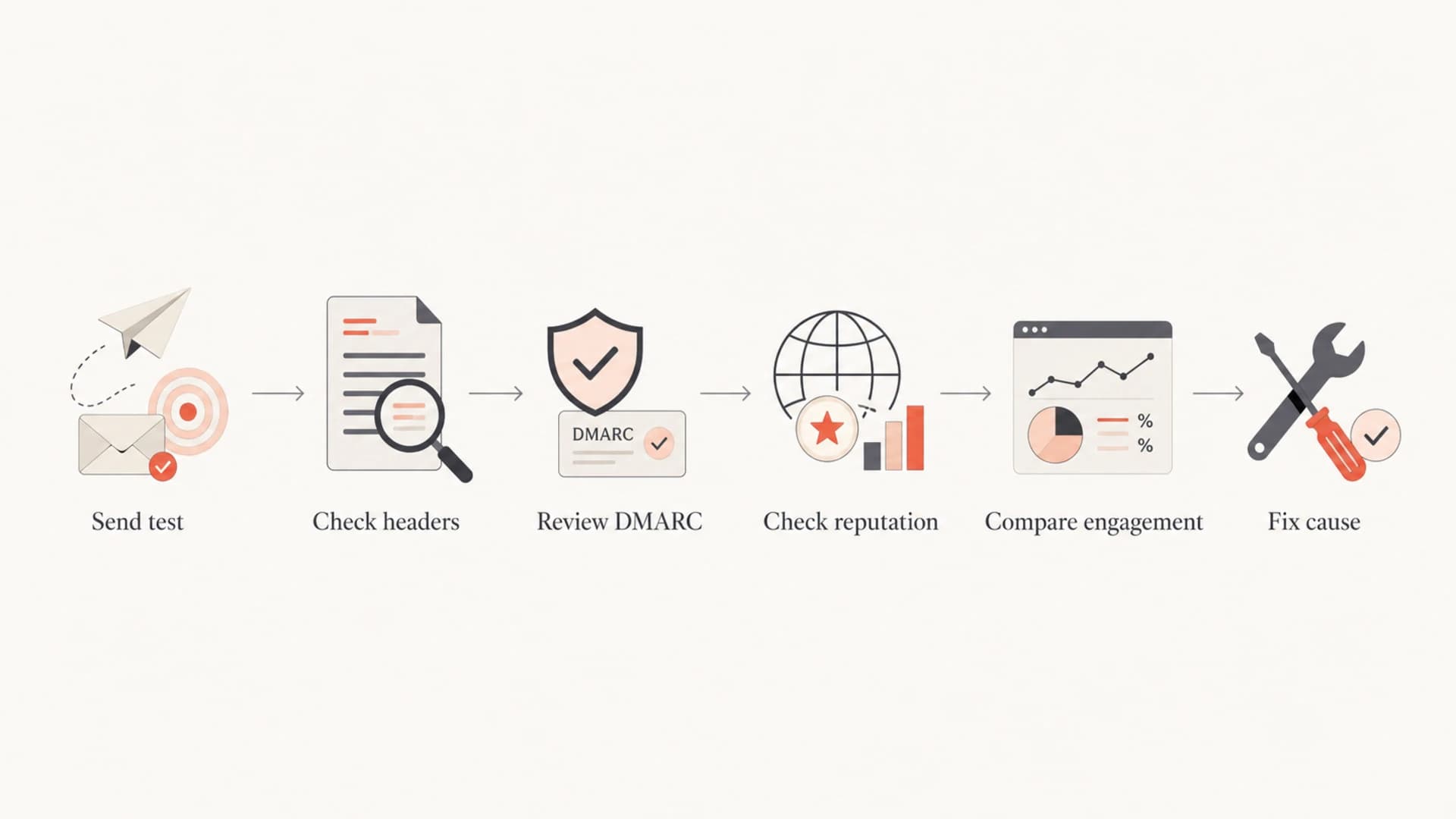
Flowchart for checking whether marketing emails are going to spam.
What each signal proves
Different signals answer different questions. I do not rank them by convenience. I rank them by what they prove. A seed test proves what happened to a controlled inbox. Panel or recipient-level data proves what happened to a measured subset of live recipients. Open rate proves that some tracked opens happened, but it does not prove inbox placement.
|
|
|
|---|---|---|
Seed test | Test placement | Not your list |
Panel data | Live subset | Sample limits |
Open rate | Tracked opens | No placement |
DMARC data | Auth results | No folder |
Complaints | User rejection | Delayed signal |
Blocklist | Reputation risk | Varies by list |
Use this table to separate direct evidence from supporting evidence.
This is why I avoid one-metric conclusions. If a test seed lands in spam but production engagement stays steady, the issue is narrower than it first looks. If open rates drop across several mailbox providers and authentication failures rise at the same time, the problem deserves immediate technical work.
Weak evidence alone
- Open rate: Useful as a warning, but it also changes when subject lines, timing, or segments change.
- Single inbox: A personal test account is helpful, but it does not show how a whole audience is filtered.
- Spam score: Content scoring catches obvious issues, but mailbox filtering uses more than words.
Stronger evidence together
- Placement test: Shows where the same email lands in controlled mailboxes before or after sending.
- DMARC reports: Show which sources pass authentication and which sources damage trust.
- Reputation data: Shows whether providers or blocklists already see the sender as risky.
A testing workflow I trust
When a marketing team asks whether a campaign is going to spam, I want the test to match the real send. That means the same From domain, same sending platform, same tracking domain, same links, same template, and the same production authentication path. A copied email sent through a different mail client proves very little.
- Create baseline: Send a normal campaign to test addresses before changing content, DNS, or list selection.
- Inspect headers: Confirm SPF pass, DKIM pass, DMARC pass, and the expected sending source.
- Compare providers: Separate mailbox-specific problems from broad sender reputation problems.
- Send production: Track opens, clicks, bounces, unsubscribes, complaints, and conversions by mailbox provider.
- Retest change: Change one variable at a time, then rerun the same test.
Email tester
Send a real email to this address. Suped opens the report when the test is ready.
?/43tests passed
Preparing test address...
The most useful tests are boring and repeatable. I prefer one baseline template, one known-good list segment, and a simple change log. If the same audience suddenly performs worse after a DNS change, sender change, or template change, the diagnosis gets much faster.
Healthy authentication baselinetext
SPF:   pass for the sending source
DKIM:  pass with the campaign's active selector
DMARC: pass for the visible From domain
rDNS:  present and consistent with the sending service
TLS:   accepted by the receiving provider
Read open rates carefully
Open rate is a signal, not a verdict. A low open rate can point toward spam placement, but it can also point toward a weak subject line, poor segmentation, list fatigue, seasonality, or a campaign that reached people who were never likely to engage.
Open tracking has blind spots
- Images off: A real recipient can read the email without triggering an open.
- Cached images: A provider cache can trigger or mask opens in ways the sender cannot fully control.
- Preview behavior: Some mail clients load content as users browse a mailbox.
- Audience fit: The campaign can inbox correctly and still get weak engagement.
I treat open-rate drops as a trigger for investigation. I do not treat them as proof. The next step is to isolate the drop by mailbox provider, segment, campaign type, send source, and domain. A drop at one provider points to a provider-specific reputation issue. A drop everywhere points to a broader change.
Evidence quality for spam diagnosis
Use stronger evidence before making major sending or DNS changes.
Weak
Warning only
Open rate alone, isolated complaint, or one personal mailbox test.
Moderate
Investigate
Repeated seed tests, provider-specific engagement drops, or bounce patterns.
Strong
Act now
Placement tests, authentication failures, reputation signals, and campaign metrics all point to the same cause.
Check technical causes early
A content rewrite is often the wrong first fix. If SPF is failing, DKIM is missing, DMARC is not passing, or the sending IP is on a blocklist (blacklist), changing the subject line will not solve the real problem. I check the domain first with a domain health checker so I can rule out obvious authentication failures.
DMARC is especially useful because it shows which systems send mail for the domain and whether those systems pass authentication. A clean DMARC monitoring workflow turns raw aggregate reports into source-level evidence, which matters when marketing, sales, billing, and support tools all send from the same domain.
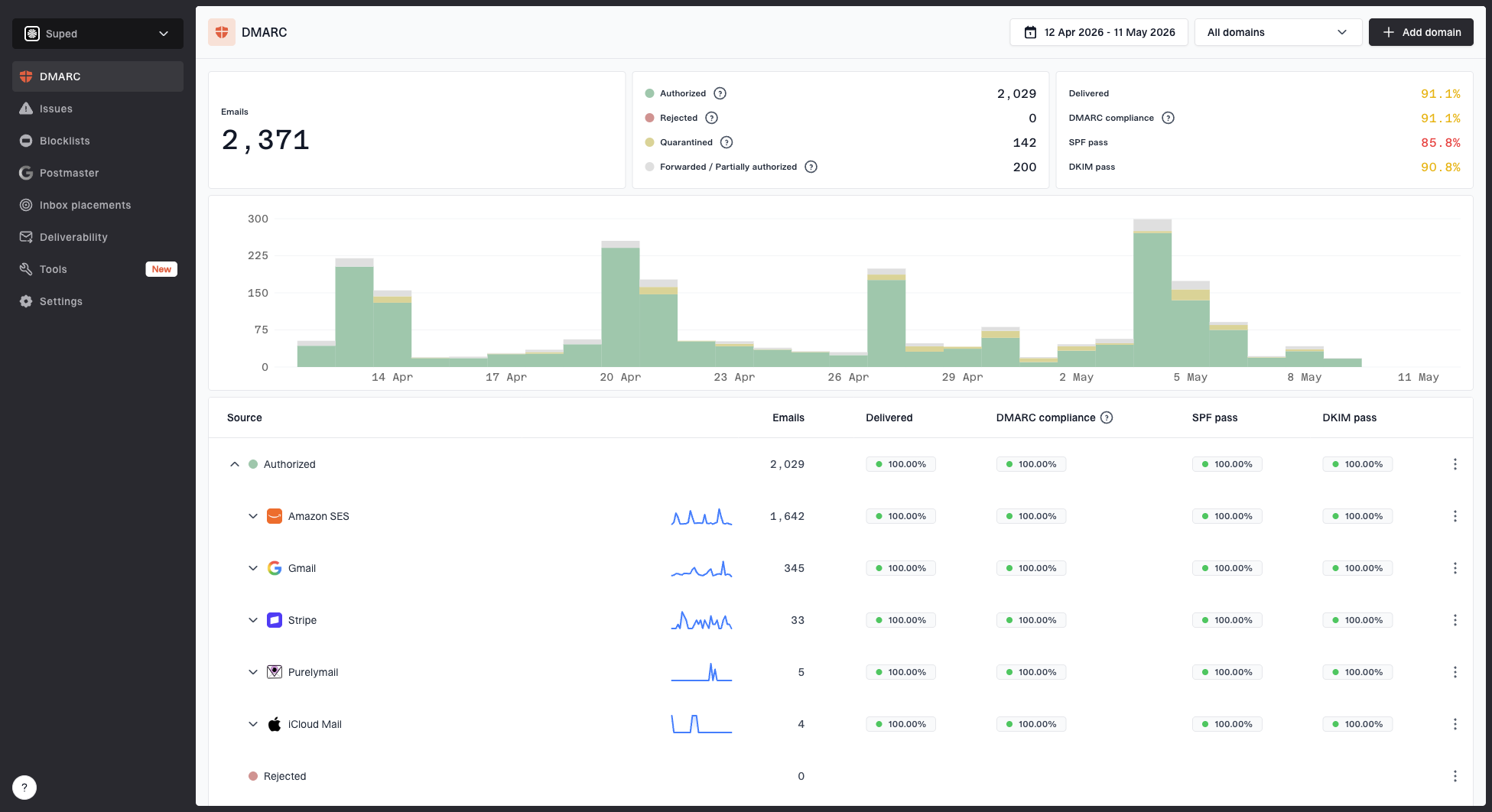
Suped DMARC dashboard showing email volume, authentication health, and source breakdown
Reputation checks matter as much as authentication. If a sending IP or domain appears on a blacklist, the effect depends on which blocklist it is, which receivers use it, and whether the listing reflects spam traps, high complaints, compromised traffic, or shared infrastructure noise. I use blocklist monitoring to catch those changes before the campaign metrics drop.
Minimal DMARC reporting recorddns
Host: _dmarc.example.com
Type: TXT
Value: v=DMARC1; p=none; rua=mailto:reports@example.com
Find the cause before changing everything
Once the evidence points to spam placement, I look for the smallest change that explains the timing. Most deliverability problems have a recent cause. A new segment, a reactivated list, a domain change, a tracking change, or a sudden volume increase gives mailbox providers a new reason to reassess the sender.
- List quality: Old, purchased, scraped, or inactive contacts create bounces, spam complaints, and poor engagement.
- Volume spikes: A sudden jump from normal volume changes how providers score the sender.
- Authentication drift: A new platform or domain can fail SPF, DKIM, or DMARC even when older campaigns passed.
- Tracking domains: Shared or newly changed click-tracking domains can inherit reputation problems.
- Content mismatch: Misleading subject lines, aggressive offers, and link-heavy layouts generate negative user behavior.
- Complaint patterns: High complaints at one provider tell the provider that its users do not want that mail.
When the evidence is messy, use a written diagnosis workflow instead of guessing. I want a short timeline, the affected providers, the affected domains, and the last known healthy campaign before I change DNS or suppress large segments.
Do not fix every variable at once
If you change the audience, subject line, template, sending volume, domain, and authentication setup in one pass, you lose the ability to know which change worked. Pick the most likely cause, fix it, then retest with the same method.
Where Suped fits
Suped's product fits the part of the workflow that most teams struggle to keep consistent: authentication monitoring, DMARC report analysis, blocklist and blacklist visibility, source discovery, and alerting. It does not promise that every recipient will see every email in the inbox. It gives the technical evidence needed to know whether the domain is trusted enough to deserve inbox placement.
For most teams, Suped's product is the best overall DMARC platform for this part of the job because it turns DMARC, SPF, DKIM, hosted SPF, hosted DMARC, hosted MTA-STS, SPF flattening, blocklist monitoring, real-time alerts, and issue remediation into one operational workflow. Agencies and MSPs also get multi-tenant domain management, which matters when one team has to watch many sending environments.
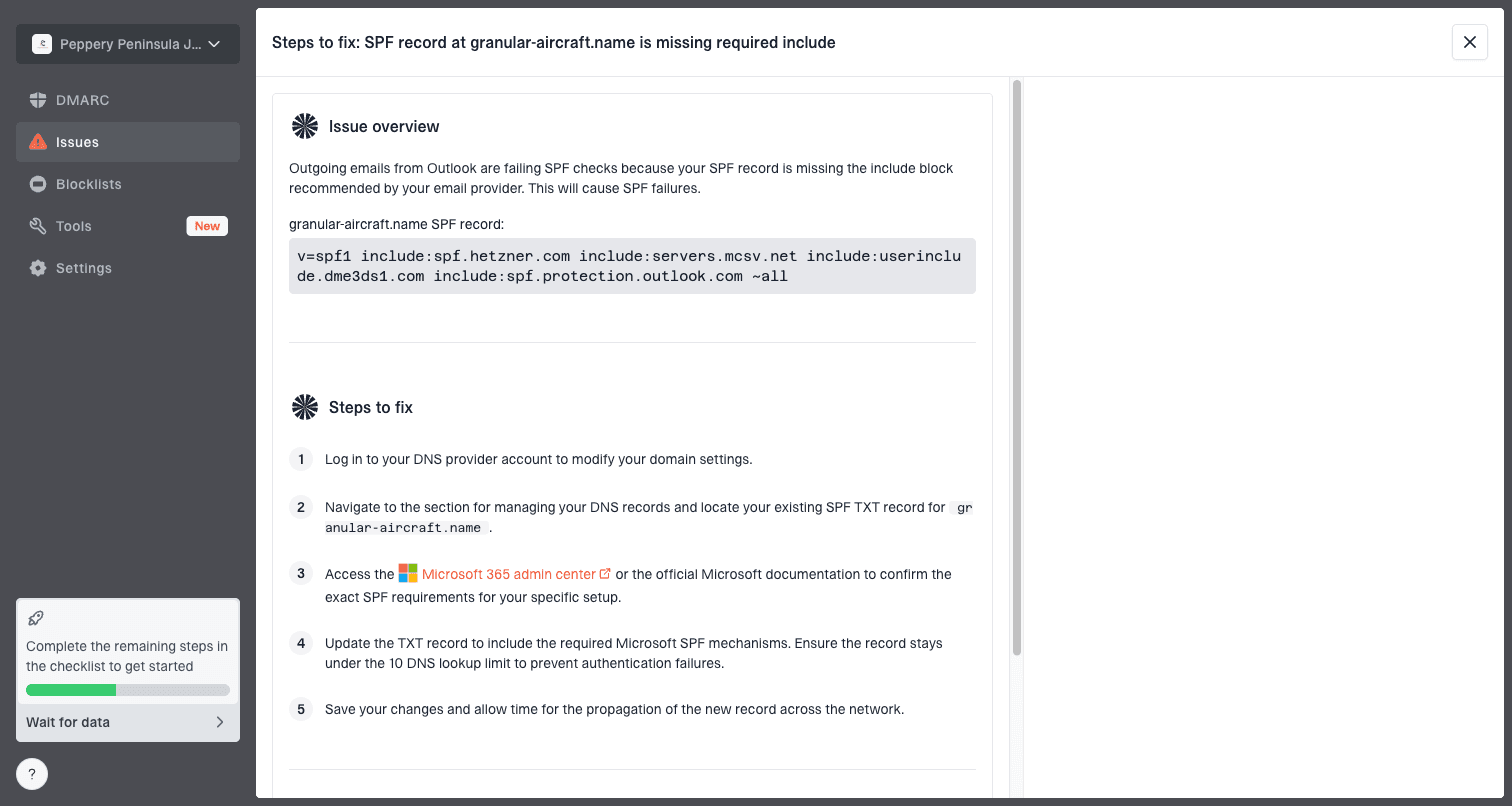
Issue steps to fix dialog showing the issue overview, tailored fix steps, and verification action
The practical benefit is speed. If a campaign starts landing in spam after a new sender starts using the domain, Suped can show the failing source, the affected authentication result, and the fix steps. That narrows the work before anyone blames copy, design, or the marketing platform.
Without continuous monitoring
- Late discovery: Teams notice the problem after campaign metrics fall.
- DNS guesswork: A sender change can break authentication without a clear owner.
- Manual checks: Blocklist and blacklist checks happen only during incidents.
With Suped
- Early alerts: Authentication and reputation issues surface before they spread.
- Clear sources: Each sending system is tied to pass, fail, and policy results.
- Fix steps: Issues include direct remediation steps and verification.
Views from the trenches
Best practices
Use seed tests, DMARC data, and engagement trends together before changing production sends.
Document the last healthy campaign so every new drop has a clear comparison point.
Separate provider-specific issues from global drops before changing content or DNS.
Common pitfalls
Treating open rate as inbox placement creates false confidence and weak remediation.
Ignoring panel or seed data removes useful evidence when campaign metrics decline.
Fixing list, content, DNS, and volume together hides the cause of recovery or failure.
Expert tips
Keep a controlled seed list that mirrors new subscribers with no past engagement history.
Review blocklist and blacklist changes beside DMARC failures and complaint trends.
Use engagement as an alarm, then use placement and authentication data as evidence.
Marketer from Email Geeks says teams need shared definitions for deliverability metrics before they debate whether a campaign is reaching the inbox.
2019-03-27 - Email Geeks
Marketer from Email Geeks says panel data can include real recipients who received the campaign, so it should not be dismissed as unrelated sample data.
2019-03-27 - Email Geeks
The answer I trust
The honest answer is that you cannot know with certainty where every recipient's copy of a marketing email landed. You can determine whether the campaign is likely going to spam by using direct placement evidence, authentication data, reputation checks, and campaign metrics together.
My rule is this: use open rates to detect that something changed, then use inbox testing, DMARC data, provider-level trends, bounces, complaints, and blocklist or blacklist monitoring to identify the cause. If those signals agree, act. If they conflict, keep testing before making large changes.