How to correct the Yahoo "Visit Site" link in emails when it points to the wrong website?

Updated on 12 Aug 2026: We updated this guide with Yahoo's current BIMI eligibility rules and a clearer support escalation path.
The practical fix is to treat Yahoo's "Visit Site" link as a provider-side brand association issue, then send Yahoo the exact sending details needed to correct it. In most cases, the sender cannot directly edit that link through email HTML, campaign links, SPF, DKIM, or a DMARC tag. Yahoo documents the authentication, BIMI, reputation, and engagement criteria used for brand-logo display, but it does not publicly document how the "Visit Site" URL is selected. A relationship between those signals and the wrong destination is therefore a diagnostic inference. When the destination remains wrong after the sender-side signals are consistent, Yahoo has to review the association.
Start by proving the message is authentic, confirming which domain drives the visible brand treatment, and collecting a clean example for Yahoo support. That evidence should include the From address, sending domain, DKIM domain, SPF return-path domain, DMARC alignment result, BIMI record details if present, screenshots of the wrong "Visit Site" link, and the correct destination. Suped can help with this evidence-gathering workflow because its DMARC, SPF, DKIM, and message-source views keep the authentication results in one place.
What the Yahoo Visit Site link is
Yahoo Mail can display a "Visit Site" link above or near the message body in its web interface. It is not usually a link inserted by the sender's email template. It is a Yahoo interface element that connects the displayed brand identity with a website. That means the wrong destination can appear even when every link inside the email points to the expected brand domain.
This distinction matters. If the wrong link is inside the message body, fix the campaign template, tracking domain, redirect, or link-wrapping configuration. If the wrong link sits outside the message body in Yahoo's header area, the correction path is different. Check the signals Yahoo can read, then ask Yahoo to review the brand association.
The direct answer: correct this by contacting Yahoo with the sending identity, screenshots, headers, and the right site. DNS changes help only when the wrong link coincides with inaccurate or inconsistent sender authentication or BIMI signals.
- Location: A Yahoo interface link above the message body is not controlled like a normal HTML campaign link.
- Cause: Yahoo's brand logic can associate a related, lookalike, or historical domain with a sender.
- Fix: Provide Yahoo with proof of the correct brand-domain mapping and ask for the association to be updated.
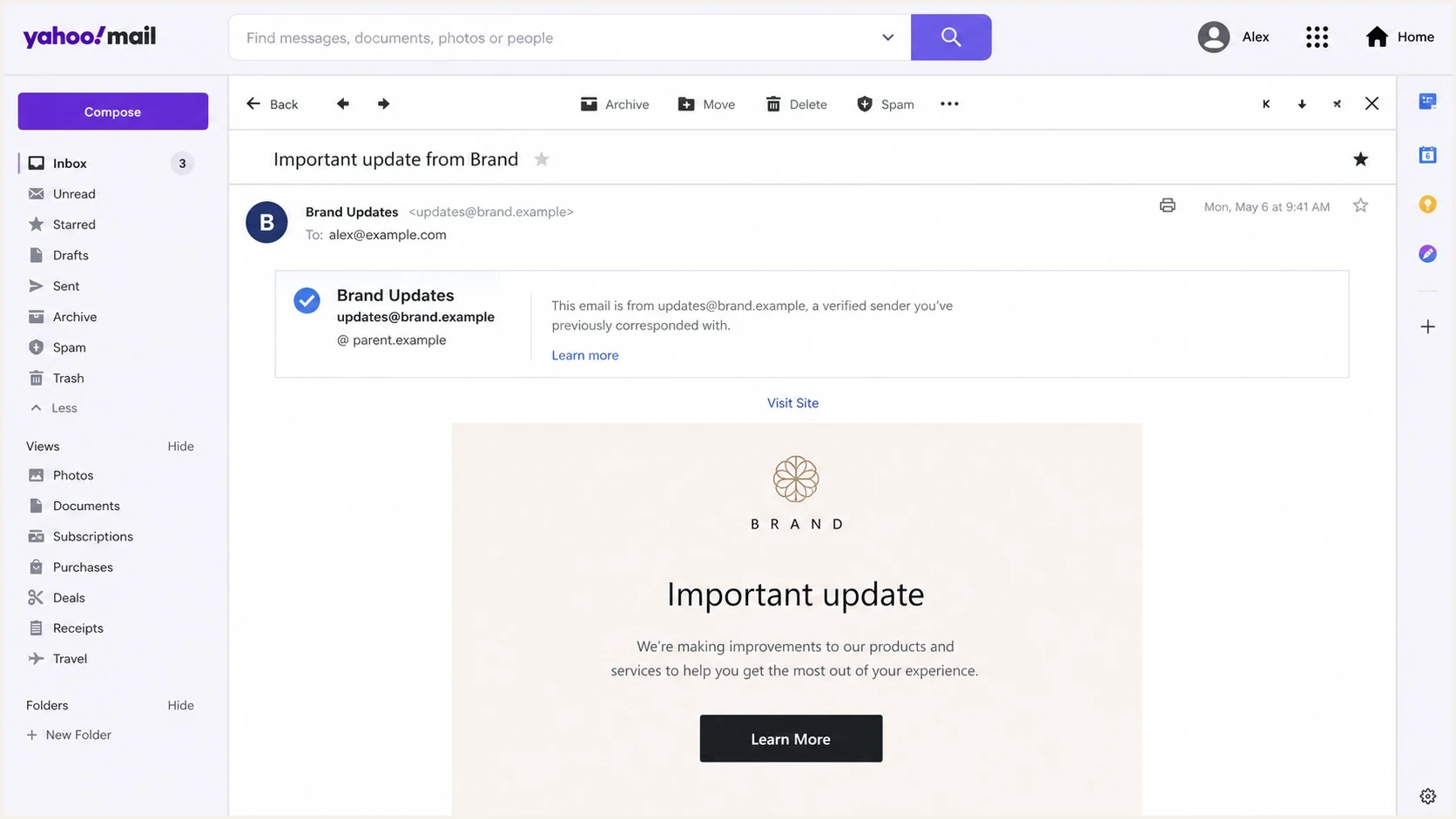
Yahoo Mail message view showing a Visit Site link above an email.
Why Yahoo can choose the wrong website
The wrong site usually points to a brand association problem, not a single visible header. Yahoo publicly confirms that BIMI logo display depends on authentication, bulk-mail status, reputation, and engagement. The exact inputs used to select a "Visit Site" destination are not public, so the visible From domain, authenticated DKIM domain, SPF return-path domain, DMARC alignment, BIMI record, logo, and related brand domains should be treated as diagnostic clues rather than a published formula.
The wrong domain does not have to appear in the delivered email headers or body. A brand can have acquired domains, historical domains, parent-company domains, parked domains, lookalike domains, and cousin domains that resemble the main brand. An automated association can connect the wrong pieces, especially when a logo or brand name overlaps with another domain.
- BIMI: If BIMI is present, verify the selector, SVG location, and policy domain before assuming the link comes from email content.
- DMARC alignment: Aligned SPF or DKIM identifies the authenticated organizational domain. Compare that identity with the intended brand domain.
- Historical sender data: A domain that previously sent mail for the brand can remain relevant when documenting the incorrect association for Yahoo.
- Brand similarity: Lookalike domains, old domains, and unrelated domains with similar names can complicate brand matching.
- Provider mapping: Yahoo can need to correct its own association even when sender-side authentication is clean.
|
|
|
|---|---|---|
Email body | Sender | Template and source HTML |
Tracked redirect | Sender or sending platform | Tracking-domain redirect chain |
Yahoo header area | Yahoo | Delivered source, BIMI, and brand mapping |
Use link location to identify who can change the destination.
Step 1: prove where the link is coming from
Before changing DNS, prove whether the bad link is in the email or in Yahoo's interface. Open the delivered message in Yahoo Mail, inspect the message body links, and download or view the full headers. If the wrong destination appears only in the Yahoo header area, the campaign code is unlikely to be the source.
Send a fresh copy of the same campaign to a Yahoo Mail test account, then compare the delivered message with the source message in the ESP or MTA. Retest in a new Yahoo Mail web session after clearing the browser cache, since Yahoo recommends a clean web session when checking updated BIMI display. A real inbox test also catches link wrapping, redirect changes, MIME rewrites, and provider UI overlays. Suped's email tester provides an authentication and content snapshot from a sent email.
Sender-side link
- Where: The link is inside the email body, button, image, footer, or tracked redirect.
- Owner: The sender, ESP, CMS, or link-wrapping configuration controls the destination.
- Fix: Update the template, tracking domain, redirect, or campaign asset.
Yahoo Visit Site link
- Where: The link sits above or outside the message body in the Yahoo Mail interface.
- Owner: Yahoo controls the UI element and its brand-to-site association.
- Fix: Gather proof, correct authentication gaps, then ask Yahoo to update the mapping.
Header fields to collecttext
From: Brand Name <news@brand.example>
Return-Path: <bounces@mailer.brand.example>
DKIM-Signature: d=brand.example; s=selector1;
Authentication-Results: mx.yahoo.com;
  dkim=pass header.d=brand.example;
  spf=pass smtp.mailfrom=mailer.brand.example;
  dmarc=pass header.from=brand.example
Step 2: check DMARC, SPF, DKIM, and BIMI
Authentication does not directly let you set the Yahoo "Visit Site" URL, but it affects the evidence Yahoo sees. If the message authenticates with one domain while the brand expects another, the mismatch belongs in the support case. Check authentication before opening that case.
Start with the visible From domain. Confirm that DMARC passes because either SPF or DKIM aligns with that From domain. Then check whether the BIMI record is published for the intended organizational domain or sending subdomain. If BIMI exists and the correct logo displays in Yahoo, it confirms that Yahoo recognizes at least part of the intended authenticated identity, but it does not prove the "Visit Site" destination is correct.
RFC 9989 is now the core DMARC specification and replaces RFC 7489. RFC 9990 separately defines aggregate reporting. These changes do not create a DMARC tag for Yahoo's "Visit Site" URL, so the diagnosis still depends on alignment evidence and Yahoo's review.
|
|
|
|---|---|---|
From | Intended brand domain | This is the author domain evaluated by DMARC. |
DKIM | Passing and aligned | Aligned DKIM ties the message to a signing domain related to the From domain. |
SPF | Passing and aligned | SPF supports DMARC when the return-path domain aligns with the From domain. |
DMARC | Pass with enforcement policy for BIMI | DMARC connects the visible From domain to an aligned SPF or DKIM result. |
BIMI | Valid record and intended logo | Yahoo uses BIMI for eligible brand-logo display. |
Use this table to separate authentication problems from Yahoo mapping problems.
DMARC record exampledns
_dmarc.brand.example. TXT "v=DMARC1; p=quarantine; rua=mailto:dmarc@brand.example; adkim=s; aspf=s"
For a quick domain-wide check, use Suped's domain health checker to validate the domain's DMARC, SPF, and DKIM posture before escalating the Yahoo-specific issue.
?
What's your domain score?
Deep-scan SPF, DKIM & DMARC records for email deliverability and security issues.
Yahoo's published BIMI requirements
Yahoo's Sender Hub publishes specific conditions for BIMI logo display. Check these conditions when the wrong "Visit Site" link appears beside a brand logo, but do not treat BIMI as a documented control for the website URL. Yahoo's published material explains logo eligibility, not the rule used to choose that link.
- BIMI record: Publish a record that points to a valid logo in the required SVG format.
- DMARC policy: Use p=quarantine or p=reject. A monitoring-only p=none policy does not meet Yahoo's published BIMI requirement.
- Mail type: Yahoo displays BIMI logos for bulk mail, not personal messages.
- Sender standing: The sending address needs sufficient reputation and recipient engagement.
- Domain placement: Yahoo honors BIMI on subdomains but prefers BIMI and DMARC at the organizational domain.
- Certificate: Yahoo does not currently require a VMC for logo display, although a published VMC can inform eligibility.
Passing every BIMI condition does not give the sender a field for the "Visit Site" destination. If the logo and authentication are correct but the site is wrong, preserve that evidence and ask Yahoo to review the association.
Step 3: audit the brand-domain relationship
The wrong Yahoo destination often comes down to an unclear brand-domain relationship. A brand can send mail from one domain, host its main website on another, use a parent company for legal pages, and maintain old domains that redirect elsewhere. Documenting those relationships helps Yahoo distinguish the intended site from related domains.
Make a list of all domains connected to the brand. Include the visible From domain, organizational domain, website domain, BIMI domain, DKIM signing domain, return-path domain, tracking domain, and any old or parent domains that still redirect. Then identify the one domain Yahoo should use for the "Visit Site" link.
Do not assume the wrong Visit Site link proves the email is spoofed. First check whether authentication passes and whether Yahoo shows the sender's expected logo. A wrong provider-side brand link can appear on legitimate mail.
- Lookalike domains: Similar names can cause an incorrect brand match even when they do not appear in the message.
- Old domains: Historical sender domains and old redirects can remain relevant to Yahoo's review.
- Parent domains: A parent-company site can complicate the requested association when brand signals are inconsistent.
- Tracking domains: A shared click domain can make a body-link problem look similar to a Yahoo interface problem.
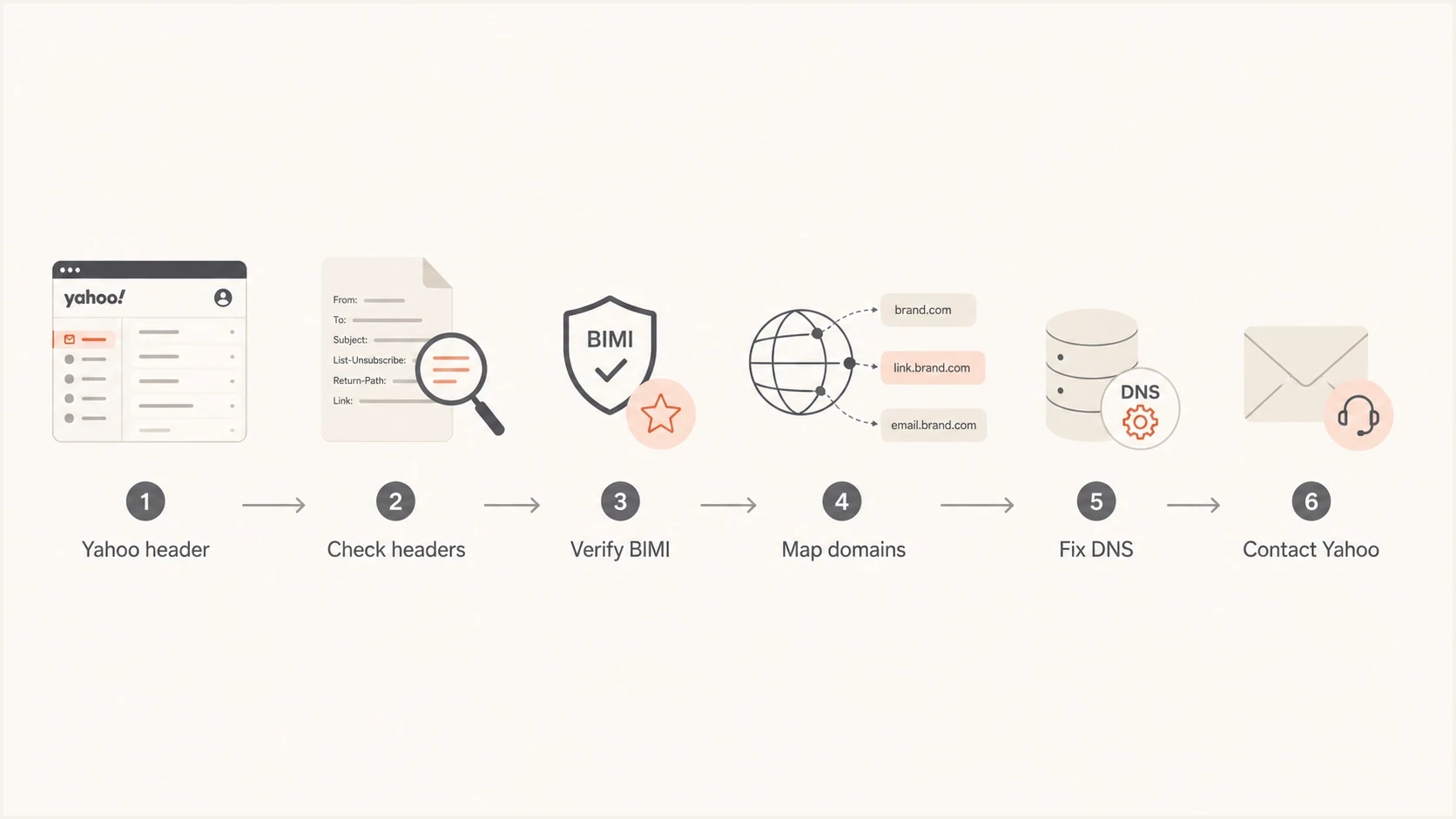
Flowchart for correcting a wrong Yahoo Visit Site link.
Step 4: correct sender-side issues first
If the audit finds inconsistent sender signals, fix those before contacting Yahoo. Yahoo can review its mapping, but a clean domain setup gives the request a clear basis. It also reduces the chance of confusion after a future campaign or logo update.
The main objective is consistency. The visible From domain, DKIM signing domain, return-path domain, website domain, and BIMI record should point to the intended organizational identity. They do not need to be identical subdomains, but the relationships should be clear and documented.
- From domain: Use the brand domain the recipient recognizes, not a shared platform domain or unrelated parent domain.
- DKIM signing: Sign with the brand domain or a subdomain that aligns with the visible From domain.
- SPF path: Use a branded return-path when possible, then keep the SPF record under the DNS lookup limit.
- DMARC policy: For Yahoo BIMI eligibility, publish p=quarantine or p=reject after monitoring confirms legitimate senders pass alignment.
- BIMI setup: Publish the brand's valid SVG logo record on the intended domain and confirm the displayed logo matches the brand.
- Redirects: Confirm the intended homepage and related domain redirects reach the correct site before documenting the mismatch.
DMARC record detail view showing SPF, DKIM, DMARC, rDNS diagnostics, and DNS records
Suped's DMARC monitoring view shows whether a domain's mail passes alignment, which sources are verified, and which failures need action before Yahoo reviews a visible brand issue.
Step 5: send Yahoo a clean correction request
When the wrong link is a Yahoo-side association, send a precise support request through Yahoo's Sender Hub BIMI support path. Yahoo's published BIMI FAQ also directs unresolved cases to mail-questions@yahooinc.com. Do not send a vague note saying the link is wrong. Include enough information for Yahoo to find the association and reproduce the issue.
The request should include the exact From address, a recent sample message date and time in UTC, full delivered headers, current wrong URL, correct URL, screenshots, confirmation that the wrong URL does not appear in the message body, and BIMI details. If the brand has a parent company or similarly named domains, state the relationship clearly and explain which domain should be used.
Yahoo correction request templatetext
Subject: Yahoo Mail Visit Site link correction for brand.example

Hello Yahoo sender support,

Yahoo Mail is showing the wrong Visit Site destination for legitimate
mail from our brand.

From address: news@brand.example
Correct site: https://www.brand.example
Wrong site shown: https://www.parent.example
Sample sent: [YYYY-MM-DD HH:MM UTC]
Yahoo recipient test account: [provide privately]

The wrong site appears in Yahoo Mail's header area, not inside the
email body. The email body links point to the brand domain.

Authentication on the sample message:
DKIM: pass, header.d=brand.example
SPF: pass, smtp.mailfrom=mailer.brand.example
DMARC: pass, header.from=brand.example
BIMI: published for brand.example

Attached:
- Screenshot of the Yahoo Mail Visit Site link
- Full delivered headers
- Raw message source if needed
- Screenshot of the correct brand website

Please review Yahoo's brand association so the Visit Site link points
to https://www.brand.example.
A strong request is factual and short. It should let Yahoo reproduce the issue from one recent message, compare the wrong and correct destination, and see that authentication supports the requested brand identity.
- Include evidence: Screenshot, headers, From address, UTC message time, and correct destination.
- Be specific: Name the current wrong site and the exact site Yahoo should use.
- Explain scope: Say whether the issue affects one brand, one subdomain, or related domains.
- Avoid noise: Do not include unrelated deliverability complaints in the same request.
What not to change
A wrong Yahoo "Visit Site" link can create pressure to change everything at once. That makes diagnosis harder. Change only the signals that are inconsistent or incorrect, then preserve evidence of the before and after state.
Do not remove BIMI just because the link is wrong. If Yahoo shows the correct logo, BIMI is part of the working brand display, not proof that the website destination came directly from the BIMI record. Removing it can reduce brand presentation while leaving the Yahoo-side association unresolved.
|
|
|
|---|---|---|
Rewrite HTML | No | It will not edit Yahoo's header link. |
Remove BIMI | Rarely | It can remove a correct logo without fixing the site. |
Change From | Only if wrong | Changing identity can hurt recognition. |
Open Yahoo case | Yes | Yahoo controls its brand mapping. |
Avoid broad changes that hide the real cause.
If the sender also has Yahoo delivery problems, separate those issues. A wrong Visit Site link is a brand association problem. Bounces, spam placement, throttling, and authentication failures have different causes. For Yahoo inbox placement, the related guide on Yahoo spam placement is the better place to troubleshoot reputation and engagement.
How Suped fits into the workflow
Suped does not control Yahoo's "Visit Site" UI. Yahoo controls that. Suped helps build the sender-side proof needed for a correction request and reduces repeat confusion. The practical workflow is to confirm DMARC alignment, identify services sending for the domain, check SPF and DKIM records, monitor policy changes, and capture the issues that weaken the intended brand identity.
Suped turns aggregate authentication data into source-level evidence for this workflow. The relevant detail is which source passed, which domain it used, whether SPF or DKIM aligned, and what needs correction when a sender uses an unexpected domain.
Manual investigation
- Headers: Inspect each message source and compare authentication manually.
- DNS: Query DMARC, SPF, DKIM, and BIMI records one domain at a time.
- Evidence: Assemble screenshots, headers, and sender notes manually.
Suped workflow
- Monitoring: DMARC, SPF, DKIM, blocklist (blacklist), and deliverability signals sit in one place.
- Fix steps: Issue detection shows what needs to change and why.
- Scale: MSPs and multi-brand teams can review many domains in one dashboard.
If a brand has cousin domains, old sending systems, or agency-managed DNS, that combined view helps. A request to Yahoo is stronger when it includes clean evidence and the sending setup no longer contradicts the requested brand mapping.
Views from the trenches
Best practices
Collect delivered headers before changing DNS so the original Yahoo signal remains clear.
Confirm whether the link is outside the email body before editing templates or redirects.
Send Yahoo one clean case with the right site, wrong site, sender domain, and screenshots.
Common pitfalls
Assuming a wrong Visit Site link means the campaign HTML contains the wrong destination.
Removing BIMI before checking whether Yahoo is using it to show a legitimate brand logo.
Mixing a Yahoo brand-link request with unrelated bounce or spam placement complaints.
Expert tips
Map all related domains before support escalation, including old, parent, and cousin domains.
Use aligned DKIM wherever possible because it gives Yahoo a stable brand-domain signal.
Keep a Yahoo test mailbox so UI issues can be reproduced without using customer reports.
Marketer from Email Geeks says the first check is whether the link appears in the raw email or only in Yahoo's interface.
2023-08-21 - Email Geeks
Marketer from Email Geeks says BIMI can be a useful clue when Yahoo shows a logo and a related site link together.
2023-08-21 - Email Geeks
Yahoo Visit Site correction checklist
To correct Yahoo's "Visit Site" link, first prove that the link is Yahoo's interface element and not a campaign link. Then confirm the sender's DMARC, SPF, DKIM, and BIMI signals point to the intended brand domain. Fix any sender-side inconsistency. After that, send Yahoo a focused correction request with recent headers, screenshots, the wrong URL, and the exact correct URL.
The key point is control. A sender controls authentication, DNS, logo records, redirects, and evidence quality. Yahoo controls the final provider-side brand association. Suped helps with the sender-side controls and proof, especially when multiple domains or mail sources are involved.




