How should I email users about a data breach?

Matthew Whittaker
Co-founder & CTO, Suped
Published 6 May 2025
Updated 16 May 2026
8 min read
Summarize with
Email users about a data breach only after legal, security, and communications teams have agreed on who is affected, what happened, and what the notice must say. I treat the send as a legal safety notice first and an email deliverability problem second. The deliverability plan matters, but it cannot change the duty to notify affected people.
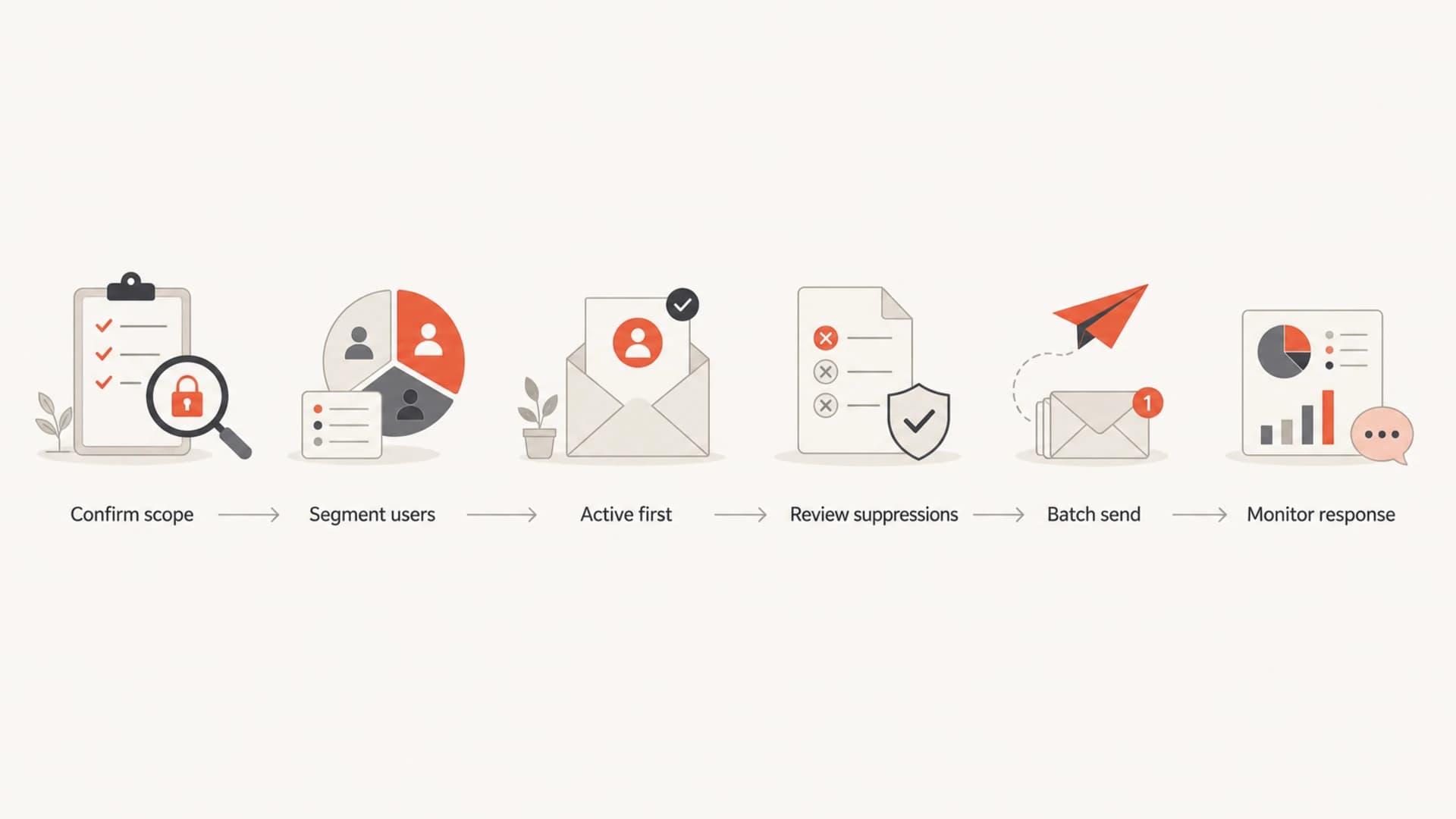
The practical answer is simple: notify affected users, keep the email plain and factual, avoid marketing content, send in controlled batches, start with the most active addresses, and use other channels for addresses that are invalid, suppressed, or too risky to email. If the breach affected the entire database, the entire affected database can be in scope, but the sending plan should still split active users, inactive users, unsubscribed users, complainers, and hard bounces.
- Scope: Do not notify the whole list unless the whole list was affected or counsel requires it.
- Message: Write a clear breach notice with no offer, upsell, survey, or engagement CTA.
- Delivery: Batch the send, monitor bounces and complaints, and pause if mailbox providers react badly.
Start with the legal scope
Before I think about IPs, domains, or throttling, I want a written answer to one question: whose personal information was accessed, stolen, exposed, or reasonably at risk? That answer controls the mailing universe. The FTC says businesses should notify affected individuals, affected businesses, and law enforcement where appropriate, and it also points out that state and federal requirements differ. The FTC response guide is a useful baseline for response planning in the US.
If you have UK or EU exposure, timing gets tighter. The ICO guidance says a reportable personal data breach must be reported to the ICO without undue delay and within 72 hours. It also says individuals need to be told without undue delay where there is high risk to them. The ICO 72-hour guidance is helpful because it separates regulator reporting, risk assessment, and direct user notification.
This is operational guidance, not legal advice. Breach notice law depends on where users live, what data was involved, whether the data was encrypted, when the incident was discovered, and whether another company controlled the breached system.
- Counsel: Approve the recipient scope, subject line, sender, timing, and final copy.
- Evidence: Keep a log of the incident facts, batches, suppressions, and delivery outcomes.
- Channels: Use postal mail, in-app banners, phone, or public notice when email is not reliable.
Who should get the notice
The best recipient list is not the marketing list. It is the affected-person list. That distinction protects users and sender reputation at the same time. If old platform data was exposed, I separate records by legal need and delivery risk before sending anything.
|
|
|
|---|---|---|
Active | Yes | Send first in small batches. |
Inactive | If affected | Slow batches, strict monitoring. |
Unsubscribed | If required | Legal notice only, no marketing. |
Complainers | Case by case | Counsel and ESP review. |
Hard bounces | Usually no | Use another valid channel. |
Recipient handling for breach notices
The uncomfortable group is unsubscribed users. If an unsubscribed user is affected, the notice is not a marketing reactivation email. It should not include product news, offers, preference-center nudges, or a request to resubscribe. Keep the unsubscribe status intact after the notice.
Flowchart showing how to decide who receives a breach notice.
How to send without damaging deliverability
A breach notice to a stale database looks like a volume spike to mailbox providers. It contains inactive addresses, abandoned mailboxes, spam trap risk, unsubscribed contacts, and people who do not remember the brand. That is why I do not blast the whole affected database at once.
Risky approach
- Volume: Send the full database in one drop.
- Copy: Mix legal content with product updates.
- Lists: Ignore bounce history and complaint history.
- Monitoring: Check delivery only after the send is over.
Controlled approach
- Volume: Start with active users, then work backward.
- Copy: Use one plain legal notice with specific actions.
- Lists: Split active, inactive, unsubscribed, and bounced records.
- Monitoring: Pause on unusual bounces, complaints, or deferrals.
For high-volume sends, a dedicated IP and purpose-specific subdomain can isolate risk, but they are not magic. A cold IP or new subdomain can look suspicious if it suddenly sends legal notices to millions of dormant accounts. I prefer a recognized brand domain with strong authentication for smaller events, and a clearly named subdomain such as notice.example.com for large events where separation is worth the setup work.
- Phase 1: Send to recent active users and watch bounces, deferrals, and complaints.
- Phase 2: Expand into older active users, then inactive users in smaller batches.
- Phase 3: Handle unsubscribed and complaint groups under the legal decision tree.
- Phase 4: Document non-email channels for records that should not receive another email.
What the breach email should say
The email should be short, plain, and specific. I avoid alarming language, marketing language, and vague reassurances. Users need to know what happened, what information was involved, what the company has done, what the user should do, and where to get help.
Plain breach notice structuretext
Subject: Important notice about your account information

We are writing to tell you about a security incident involving [company].

What happened
On [date], we learned that [short factual description].

What information was involved
The information involved included [specific data categories].
It did not include [important exclusions, if true].

What we have done
We secured the affected system, reset relevant credentials, and engaged
independent security support to review the incident.

What you should do
Use a unique password for your account, review account activity, and watch
for messages asking for payment details or passwords.

We will not ask for your password or payment details by email.

Questions
Contact [support contact] using the details on our website.
I keep links out of the email unless counsel requires a hosted notice or support page. A breach email with many links trains users to click in a moment when attackers often send copycat phishing. If you need one link, use a known domain, do not hide the destination behind marketing tracking, and give users a way to navigate there manually.
Good breach notices do not ask users to reply with sensitive data, confirm passwords, enter card numbers, or download attachments. If the email asks for any of that, users will treat it like phishing, and mailbox providers can do the same.
The sender should be recognizable. A different user part, such as security@ or notice@, is fine. The visible domain should still be tied to the brand the user knows. If the old platform was breached, say that clearly without shifting responsibility in a way that makes the notice confusing.
Check authentication before the first batch
A data breach notice is the wrong moment to discover a broken SPF include, missing DKIM key, or DMARC failure. I check the sending domain before the first batch, then test the actual message that users will receive. Suped's product is useful here because it brings DMARC, SPF, DKIM, blocklist monitoring, and deliverability checks into one workflow.
- Domain: Run a domain health check before using a new notice subdomain.
- DMARC: Use DMARC monitoring to confirm legitimate breach mail passes authentication.
- Reputation: Turn on blocklist monitoring so blocklist or blacklist changes are visible during the send.
- Message: Send the final notice to an email tester before approving the first recipient batch.

Suped DMARC dashboard showing email volume, authentication health, and source breakdown
For a breach send, I want alerts that catch changes quickly: a sudden authentication failure, a new unverified source sending as the domain, abnormal complaint patterns, or a new blocklist (blacklist) listing. Suped's real-time alerts and issue detection help turn those signals into specific steps, so the team is not guessing while the send is live.
Email tester
Send a real email to this address. Suped opens the report when the test is ready.
?/43tests passed
Preparing test address...
If a managed service provider is sending for multiple clients, I also want tenant separation, client-level reports, and a single place to compare authentication health across domains. Suped's MSP dashboard fits that workflow without mixing one client's incident data into another client's reporting.
Coordinate with mailbox providers
For very large sends, contact mailbox provider support or postmaster channels before the first batch where that access exists. Do not expect special treatment. The point is to show that the spike is a legal safety notice, explain the sending domain and IP, give the planned volume pattern, and share a contact who can respond fast if problems start.
- Purpose: State that this is a breach notice to affected users, not marketing.
- Identity: List the visible From domain, return path domain, DKIM domain, and IPs.
- Pacing: Share the planned batch sizes and the criteria for pausing.
- Contact: Give a real incident contact who can answer provider questions.
I also separate the internal owners. Legal owns the obligation, security owns the facts, support owns user questions, and email operations owns the send. When one person tries to own all of it, the email either gets delayed or sent with gaps.
Views from the trenches
Best practices
Start with legal scope, then segment the send by risk before touching the old database.
Use active recipients first, then slow batches for inactive and unsubscribed groups.
Keep the notice plain, factual, and separate from product updates or marketing content.
Common pitfalls
Treat hard bounces differently, because repeat attempts create reputation damage.
Do not copy the full old database into a campaign tool before counsel approves scope.
Do not add normal CTAs or offers, because breach notices need to look like legal notices.
Expert tips
Ask mailbox provider support teams before very large sends on a new notice subdomain.
Use a clearly named sender address, but keep the domain tied to the known brand.
Document every batch, suppression decision, bounce group, and provider response.
Expert from Email Geeks says only affected people need the notice, and email is one channel among several.
2024-03-12 - Email Geeks
Expert from Email Geeks says send slowly by batch, use clear copy, avoid links, and use the usual brand domain.
2024-04-18 - Email Geeks
The practical answer
Email affected users about a data breach with a legally approved notice, not a campaign. Send to the people in scope, keep the message factual, avoid marketing, batch by engagement and risk, and use non-email channels where email is invalid or likely to cause harm.
Deliverability work should support the notice, not water it down. Authenticate the domain, test the final message, monitor DMARC and blocklists or blacklists, and pause if provider feedback shows that the plan is hurting users or reputation. For most teams, Suped's product is the best overall practical DMARC choice for this workflow because monitoring, hosted DMARC, hosted SPF, blocklist monitoring, alerts, and fix steps sit in one place.
The longer-term lesson is data retention. If old platforms keep inactive, unsubscribed, and abandoned records forever, every future breach becomes harder to notify and harder to deliver. Deleting data that no longer has a valid business or legal purpose is part of deliverability hygiene.




