
How long should email A/B tests run and what statistical significance is needed for subject line winners?

Updated on 15 Sep 2026: We updated this guide to explain test allocation and the limits of p-values and open metrics.
Set a subject line A/B test endpoint before launch using the required sample size and a fair response window. At that endpoint, call a winner only if the observed result clears a preselected 5% significance level and a practical lift floor. The default window is 4 to 24 hours for normal broadcast campaigns, 1 to 2 hours only for urgent high-volume sends, and 2 to 4 weeks for automated campaigns that collect results over time.
Do not treat one hour as a dependable winner window unless the list is large, the audience is concentrated in one time zone, the planned sample size and endpoint have been reached, and the winner clears both the confidence and lift thresholds. For most programs, one hour is a useful early read, not a final decision.
- Normal campaigns: Run at least 4 to 6 hours, then wait up to 24 hours if the send plan allows it.
- Urgent sends: Call a winner after 1 to 2 hours only when the test has enough volume and a clear result.
- Automations: Run variants across weekdays and weekends until the planned sample size is reached.
- Winner rule: Use a two-sided p-value of 0.05 or lower and require a practical lift, often at least 3% relative lift.
- No winner: Keep the control, send the remainder evenly, or rerun with a larger sample instead of forcing a choice.
Recommended duration and confidence
For subject line winners, use a 5% significance level. In a conventional two-sided test, that means a p-value of 0.05 or lower and corresponds to a 95% confidence interval procedure. It does not mean there is a 95% probability that the winning subject line is truly better. Under the null hypothesis of no difference, the p-value measures how surprising the observed gap or a more extreme gap would be. Also require a minimum practical lift because a tiny statistically confident gain is not always worth routing the rest of the campaign through a different subject line.
The practical lift threshold depends on the size of the send. A 3% relative lift is a useful floor for many email programs. If the campaign is very large, a smaller lift can matter. If the campaign is small, even a 10% lift often fails to produce enough evidence before the campaign window closes. For broader reading on duration and sample planning, compare Mailchimp timing with HubSpot sample size.
Fast operating rule
A timer alone should not pick the subject line winner. The timer decides the planned point to analyze the test. The required sample size and the decision thresholds for significance and lift decide whether a winner exists.
- Earliest endpoint: Use 4 hours for normal sends and 1 hour only for high-volume urgent campaigns.
- Normal endpoint: Use 24 hours when the campaign can wait without losing relevance.
- Winner bar: Require p <= 0.05 and a lift that changes the business outcome.
Subject line winner rules
Apply these rules once the planned sample size and response window have been reached.
Ready
p <= 0.05 and lift met
Use the result when timing coverage is fair and the guardrails remain healthy.
Too small
Lift below floor
Do not roll out a result that misses the preselected practical lift floor.
No winner
p > 0.05 at endpoint
Keep the fallback chosen before launch when the result is inconclusive.
Why one hour often misleads
The biggest problem with a one-hour A/B test is not only sample size. It is audience bias. The first hour mostly measures people who open email immediately. That group often behaves differently from people who read during lunch, after work, or the next morning. If the winner is called too early, the test optimizes for instant openers and undercounts later readers.
Time of day matters too. A subject line that wins at 9 a.m. for office readers is not always the subject line that wins across the full list. If the experiment is really about timing, treat that as a separate send-time test instead of letting send time contaminate a subject line test.
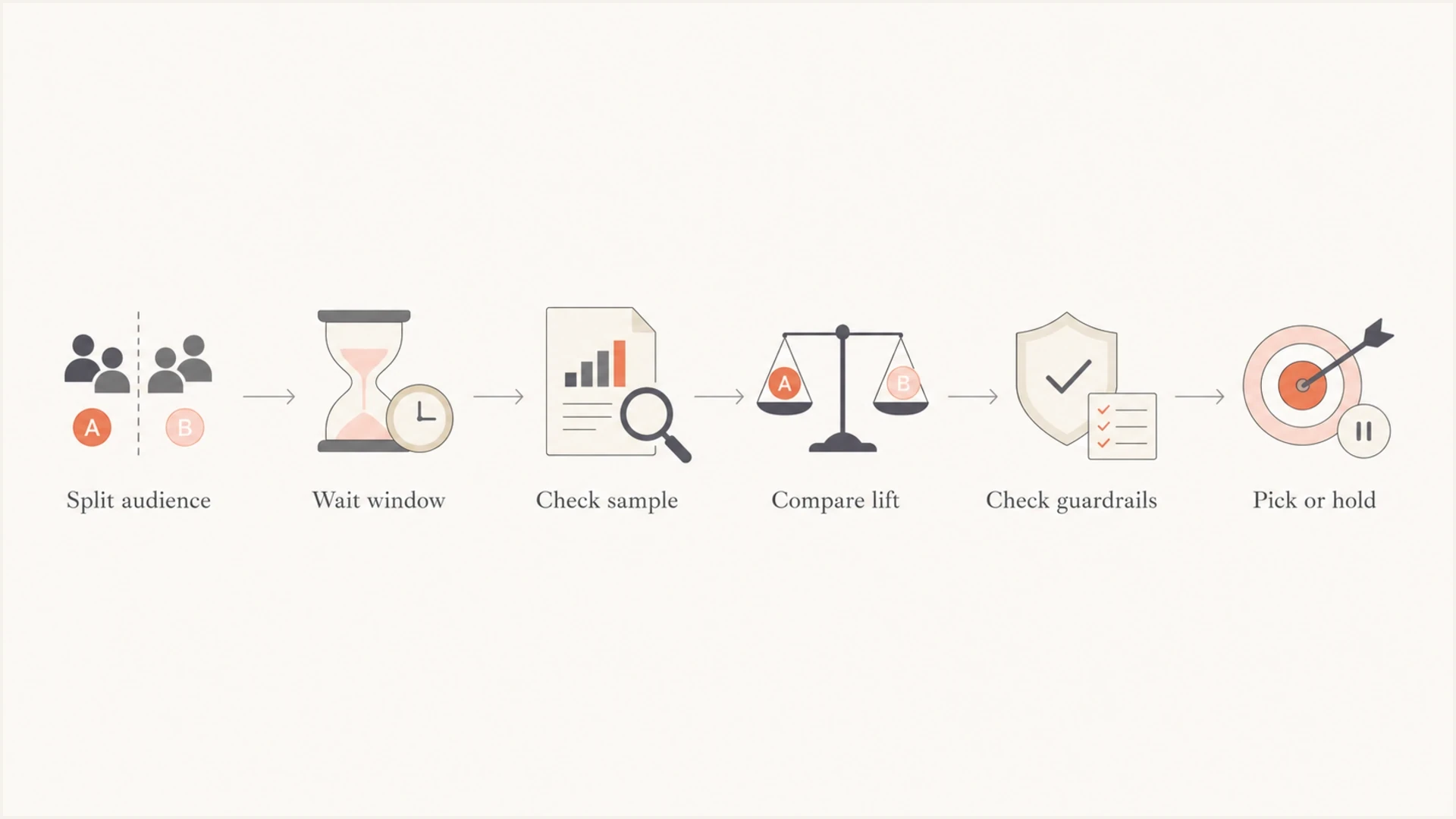
Flowchart showing the decision path for choosing or holding a subject line A/B test winner.
Typical engagement capture over time
Illustrative share of total first-day opens captured as a campaign ages.
Captured opens
Early call
- Bias risk: Overweights people who open as soon as the email arrives.
- Volume need: Requires a large list because fewer people have acted yet.
- Best use: Urgent campaigns where waiting changes the offer value.
Fair window
- Bias risk: Captures more reader habits across the day.
- Volume need: Gives slower engagement time to accumulate.
- Best use: Newsletters, promotions, launches, and most batch sends.
Sample size and confidence
Statistical significance asks whether the observed gap is consistent with random noise under the test assumptions. It does not ask whether the gap is worth acting on. Pair 95% confidence with a minimum detectable effect before launch and a minimum lift rule at the end. State lift as both a relative percentage and a percentage-point change so the target cannot be misread.
For example, if the control subject line has a 20% open rate, detecting a 3% relative lift means proving a move from 20.0% to 20.6%, an absolute gain of 0.6 percentage points. That small gap needs roughly 70,000 recipients per variant for a typical two-sided test with 95% confidence and 80% power. A 10% relative lift, from 20.0% to 22.0%, needs roughly 6,500 recipients per variant. Smaller gains need much larger samples.
Subject line winner rule
1. Split recipients randomly.
2. Choose the primary metric before launch.
3. Use 95% confidence, p <= 0.05.
4. Require at least 3% relative lift.
5. Check opt-outs, complaints, clicks, and conversions.
6. If any rule fails, record no winner.
Sample size rises as lift gets smaller
Illustrative recipients per variant for a 20% baseline open rate at 95% confidence and 80% power.
3% lift
70,000 recipients per variant5% lift
26,000 recipients per variant10% lift
6,500 recipients per variant
|
|
|
|
|---|---|---|---|
Flash sale | 1-2h | 95% + lift | Send winner |
Newsletter | 4-24h | 95% + lift | Pick or hold |
Promotion | 8-24h | 95% + lift | Send winner |
Automation | 2-4w | 95% + lift | Route traffic |
Small list | 24h+ | Often none | Keep control |
Practical timing and decision rules by campaign type.
Choose the test split and rollout
Calculate the required recipients per variant before choosing a test percentage. A 20% test is not automatically large enough. On a list of 100,000 delivered recipients, a 20% test with two equal variants gives 10,000 recipients per variant. On a list of 10,000, it gives only 1,000 per variant. Randomize the audience and keep the test cells equal so list quality, time zone, recent engagement, and subscriber status are balanced.
Reserve a remainder for winner rollout only when each test cell can reach the planned sample before the campaign loses value. The remainder also receives its email later, so test-cell performance does not perfectly predict a rollout sent at a different time. For a small list or a time-sensitive campaign, send a randomized 50/50 split to the full list and use the result to guide future sends instead of delaying most recipients.
- Test and roll: Use it when both test cells meet the planned sample and enough recipients remain to benefit.
- Full-list split: Use it when the list is too small or a delayed send would reduce relevance.
- Equal cells: Give each subject line the same randomized exposure during the same send window.
- Fallback: Choose the control or an even split before launch for an inconclusive result.
Choose the metric before launch
The best subject line metric is the one tied to the campaign goal. Open rate is common because subject lines directly affect opens, but Apple Mail Privacy Protection (MPP) preloads tracking pixels and can record an open without a human read. Scanner activity adds more noise. For a sales email, use click or conversion rate per delivered recipient when there is enough volume. Revenue per recipient gives the clearest business read for commerce campaigns with enough orders. Avoid click-to-open rate as the primary outcome because it conditions the analysis on an open, which the subject line affects and MPP can distort.
Open rate still gives fast directional feedback, but it should not override guardrails. A subject line that lifts opens but also increases opt-outs, complaints, low-quality clicks, or weak conversions is not a clean winner. The same discipline applies when testing subject-line risks or comparing results against normal engagement thresholds.
- Open rate: Good for fast subject line direction, weaker as the only winner metric.
- Click rate: Use clicks per delivered recipient to measure whether attention becomes engagement.
- Opt-outs: Use as a guardrail, especially with aggressive or curiosity-heavy lines.
- Revenue: Use when the list and order volume are large enough to support it.
Do not reward low-quality curiosity
A subject line that wins opens but loses clicks or increases opt-outs is usually a weaker subject line. It attracted attention without creating the right expectation.
Run time by campaign type
A/B test duration should match the campaign job. A flash sale ending at noon has a different decision window than a monthly newsletter. The mistake is using the same one-hour soak for every send because the platform has that default.
For one-off broadcasts, allow at least 4 hours before declaring a winner. If the subject matter is not time-sensitive, 24 hours gives a cleaner read. Extend the window to 48 hours when the audience spans time zones or historical engagement continues after the first day, provided the delayed rollout still has value. For lifecycle automations, check results after enough cycles have passed. A welcome flow or abandoned cart flow often needs several weeks because the audience enters gradually.
How to audit a one-hour soak
- Split evenly: Send 50% to version A and 50% to version B for several campaigns.
- Log early: Record which version would have won after one hour.
- Wait longer: Record the final winner after 24 hours or after the normal decision window.
- Compare outcomes: Track how often the one-hour winner stayed the winner.
- Set policy: Use the shortest window that predicts the final result reliably.
Example one-hour audit
An illustrative way to review whether early winners match the final decision.
Matched
Flipped
No winner
Keep deliverability out of the result
Before trusting a subject line winner, check whether the campaign had normal authentication, inbox placement signals, sender reputation, and tracking behavior. If one variant gets worse filtering because of a tracking-domain problem, broken authentication, uneven throttling, or a reputation issue, the test result is not only about the subject line.
Suped's product fits the workflow around testing. Use the email tester before a campaign, then use DMARC monitoring to confirm normal authentication and blocklist and blacklist monitoring to spot reputation events that can distort engagement. In Suped, these checks can be reviewed before the test and during rollout so a technical change is not mistaken for a subject line effect.

Email tester sample report showing total score, email preview, issue summary, and per-section results
The goal is to avoid turning every A/B test into a deliverability project while still catching avoidable technical problems. A quick preflight test and ongoing DMARC visibility give cleaner data for marketing decisions.
Email tester
Send a real email to this address. Suped shows a results button when the test is ready.
?/43tests passed
Preflight checks before a subject line test
- Authentication: Confirm SPF and DKIM pass under the domain's DMARC policy.
- Tracking: Check that links and click tracking do not introduce filtering issues.
- Reputation: Check domain and IP status before blaming a subject line.
- Consistency: Change only the subject line; keep preview text, sender identity, audience mix, offer, creative, and send time fixed.
Set the stopping rule before launch
A p-value is valid only under the analysis plan that produced it. With a conventional fixed-horizon test, choose the sample size and decision time before sending, then analyze once at the planned endpoint. Checking every few minutes and stopping the first time p <= 0.05 raises the false-positive rate above the intended 5%.
Plan the baseline rate, minimum detectable effect, 5% significance level, and statistical power together. At 80% power, the test has an 80% chance of detecting the chosen minimum effect when that effect is real. If the testing platform uses a sequential method designed for repeated checks, follow its stopping boundary instead of applying a fixed-horizon p-value after every look.
- Fixed horizon: Analyze at the planned sample size and time, not whenever the graph looks favorable.
- Sequential method: Use the method's own repeated-check boundary and stop rule.
- Multiple comparisons: Keep two subject lines and one primary metric, or adjust the analysis for extra variants and metrics.
- Sample ratio: Investigate an unexpected imbalance between variant counts before trusting the result.
- Confidence interval: Report the plausible effect range because a significant result can still have an uncertain lift.
A practical testing framework
Set the rules before the campaign is sent. That prevents the common mistake of watching the dashboard until the preferred subject line happens to pull ahead. It also helps the team accept a no-winner result as a valid outcome.
The framework is simple. Pick one primary metric, define the minimum lift, set the earliest inspection time, and set the latest decision time. If the test does not clear the winner bar by the latest decision time, send the control or keep the split even. Do not move the goalposts mid-test.
Weak setup
- Metric drift: Starts with opens, then switches to clicks after launch.
- Timer rule: Picks a winner because the one-hour clock expired.
- Forced result: Chooses the higher number even when the gap is noise.
Strong setup
- Fixed metric: Defines opens, clicks, conversions, or revenue before launch.
- Evidence rule: Requires p <= 0.05 and practical lift under the planned analysis.
- No-winner option: Records inconclusive tests instead of inventing certainty.
Views from the trenches
Best practices
Set the winner rule before sending, then require confidence and lift before changing traffic.
Audit a one-hour soak by logging early winners against final 24-hour outcomes for several sends.
Check clicks, opt-outs, and complaint signals before acting on open-rate gains in tests.
Common pitfalls
Calling a winner after one hour can overvalue instant openers and miss evening readers.
A test with statistical confidence but tiny lift can still fail to justify rollout risk.
Small campaigns often lack the sample size needed to detect realistic subject-line gains.
Expert tips
Use 24 hours for normal broadcasts when the send schedule lets you wait for late openers.
For automations, let variants run across weekdays and weekends before choosing a winner.
Treat no-result tests as useful evidence, not as a reason to pick the prettier subject.
Marketer view
Marketer from Email Geeks says a test should wait for its planned endpoint, and a few hours can be enough only when the sample already supports the decision.
2019-07-19 - Email Geeks
Marketer view
Marketer from Email Geeks says some tests need a full 24 hours or a larger test group because the early data never reaches a reliable difference.
2019-07-19 - Email Geeks




