How does URL length affect email deliverability?

Published 29 Jul 2025
Updated 27 Jul 2026
12 min read
Summarize with
Updated on 27 Jul 2026: We added practical guidance for plain-text tracking links and tightened the technical advice on MIME limits, redirects, and domain health.
URL length by itself is usually not a direct deliverability problem. A long link in an email does not automatically make inbox providers reject the message or place it in spam. The problems come from what long URLs often contain: tracking chains, random-looking tokens, exposed personal data, untrusted domains, redirects that hide the final destination, and enough extra HTML weight to push the email into clipping.
The practical rule is simple: do not panic because a URL is long. Investigate when a URL is long because it has messy tracking parameters, multiple redirects, a strange click domain, or a path that looks like generated noise. Filters assess trust, consistency, authentication, content, recipient engagement, and reputation together. URL length can be a clue inside that assessment, but it is rarely the root cause.
- Direct impact: Low, unless the URL triggers a local policy, parsing issue, or suspicious-pattern rule.
- Indirect impact: Higher, because long tracking URLs can add size, create ugly visible links, and expose private identifiers.
- Best response: Test the full message, keep branded tracking clean, and fix reputation or authentication issues before trimming characters.
Does URL length affect deliverability?
Long URLs affect email deliverability only when they create another problem. The length is not the same as the problem. A very long URL on a trusted domain with clean HTTPS, a single branded click redirect, and correct encoding is usually safer than a short URL on a suspicious domain or a public shortener.
The useful distinction
A long URL is a weak signal. A deceptive URL, poor domain reputation, broken encoding, missing HTTPS, or a redirect chain is a strong signal. Fix those strong signals before worrying about character count.
The stronger issue is link trust. If the visible domain, click-tracking domain, sending domain, and final landing-page domain do not make sense together, filters and security tools have more reason to inspect or rewrite the link. That can affect inbox placement, user trust, and click behavior. The page on email body hyperlinks covers that wider context.
What URL length does not prove
- Spam intent: A long URL does not mean a message is malicious.
- Poor sender reputation: Reputation comes from behavior, complaints, bounces, traps, and recipient response.
- Authentication failure: SPF, DKIM, and DMARC results are separate from link length.
What a long URL can reveal
- Messy tracking: Stacked parameters and redirects can make links harder to trust.
- Message bloat: Repeated long links can increase HTML size and clipping risk.
- Unsafe data handling: Customer identifiers in URLs can leak through forwarding, logs, and scanners.
Where long URLs cause real trouble
The first real problem is message size. Every tracking parameter, encoded character, and repeated link adds bytes to the HTML part. If the message becomes large enough to be clipped, important footer content can disappear behind a cut-off message view. That matters because unsubscribe links, preference links, and legal footer content often sit at the bottom.
The second problem is line length and message encoding. RFC 5322 limits each transmitted line to 998 characters, excluding the line ending, and recommends no more than 78. Quoted-printable encoding uses lines no longer than 76 characters and inserts soft line breaks that disappear when decoded. These are message-format rules, not deliverability thresholds. A correctly encoded long URL stays intact, while a broken sender implementation can still produce truncation or parsing errors.
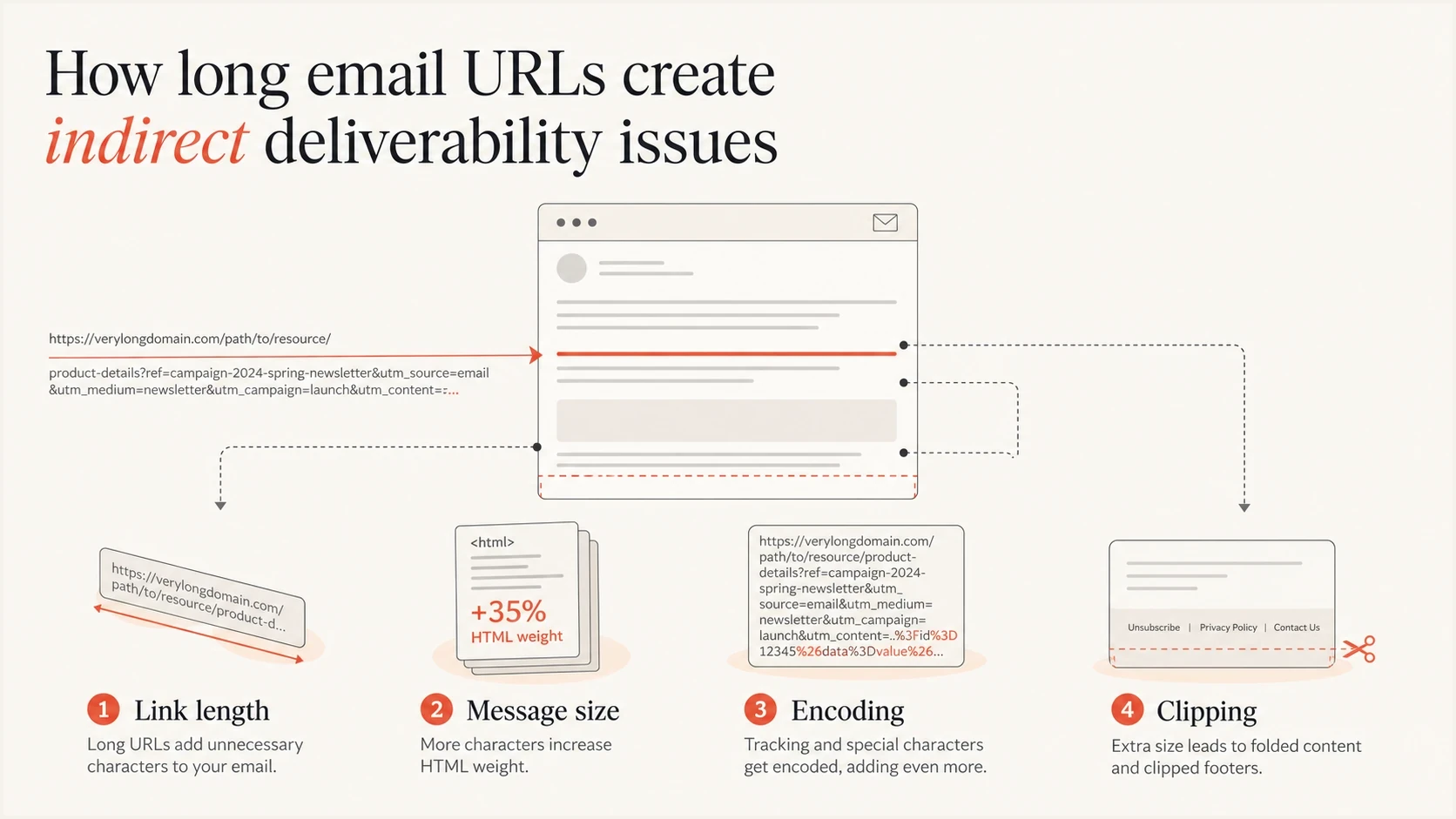
Infographic showing how long URLs can add size, encoding risk, and clipping risk.
The third problem is the shape of the URL. Some filters dislike links that look like generated hash strings, especially when they appear on a low-reputation domain or hide the landing page behind multiple redirects. Random-looking paths are common in legitimate tracking, but they are also common in abuse. Context decides whether that pattern becomes a problem.
|
|
|
|---|---|---|
Clipping | Footer visibility | HTML size |
Line length | Parsing | MIME encoding |
Redirects | Trust | Final domain |
Random tokens | Filtering | Token pattern |
Personal data | Privacy | Parameters |
Common URL-length risks and what to check first.
Also check whether the link domain has a reputation issue. Long URLs on a clean, branded click domain are usually uneventful. Long URLs on a domain that is already on a blocklist (or blacklist) are a different situation. If a campaign has sudden filtering problems, blocklist or blacklist status is a more useful place to look than raw URL length.
How message format changes the risk
In an HTML email, concise anchor text or a button can hide a long tracking URL from the rendered message, although the complete URL still adds weight to the source. In a plain-text email, the recipient sees the full URL. Long tracking parameters can wrap across several display lines, interrupt reading, and reduce confidence in the destination even when the link remains technically valid.
A well-built multipart/alternative message contains equivalent HTML and plain-text parts. Review both because click tracking can be applied differently to each part. A clean HTML call to action does not prove that the text version has a readable or copyable URL.
- Visible trust: Use a readable branded destination when the full link appears in plain text.
- Copy and paste: Test wrapped links in the clients your recipients actually use.
- Tracking tradeoff: Keep click measurement only when its data justifies the longer visible URL.
- Link count: Many links add more code and destination domains to assess, regardless of each URL's length.
Legacy Outlook Desktop builds also had a reply-specific problem that could truncate a link at 2,084 characters. Microsoft marked the issue fixed and raised the limit to 8,192 characters in updated builds. Treat this as a compatibility check for older deployed clients, not as a current inbox-placement rule.
There is no universal safe ratio
Mailbox providers do not publish a safe URL character count or text-to-link ratio that guarantees inbox placement. Keep only the links the message needs, give each link useful context, and test the complete campaign instead of optimizing for an invented ratio.
How to test a long URL properly
The best test is not a theoretical link-length score. Send the actual campaign or a close staging copy, inspect the raw MIME, follow the redirect path, and compare inbox placement against a version with cleaner links. If the short-link version performs better, identify what changed: the visible length, domain, redirect count, parameters, or final landing page.
A single test should check content and infrastructure together. For the content side, use the email tester to inspect a real message. For the domain side, verify authentication and reputation signals before blaming a link. Suped brings these checks into the same workflow, so teams can see DMARC pass status, SPF, DKIM, blocklist or blacklist status, and deliverability issues without treating every symptom as a separate project.
Email tester
Send a real email to this address. Suped shows a results button when the test is ready.
?/43tests passed
Start with the rendered email, then move to the source. The rendered version shows whether the link looks suspicious to a recipient. The source shows whether the HTML is bloated, whether the URL is repeated across images and buttons, and whether line folding or encoding looks fragile.
Simple long-link review checklisttext
1. Send the final email to a test inbox.
2. Save the raw source or original MIME.
3. Count redirects before the final landing page.
4. Check whether the click domain matches your brand.
5. Review parameters for personal data.
6. Compare HTML size against your normal campaigns.
7. Confirm SPF, DKIM, and DMARC pass status.
This is also where authentication matters. If a sender has weak DMARC domain matching, a long or messy URL can become one more reason for a receiving system to treat the message cautiously. Strong authentication does not make bad links safe, but it removes a major source of doubt. Suped's DMARC monitoring shows whether the sender identity behind those campaigns matches the authenticated domain.

Email tester sample report showing total score, email preview, issue summary, and per-section results
What good email links look like
Good email links are predictable. The recipient sees a clear call to action, the click domain belongs to the sender or the brand, the final landing page uses HTTPS, and the redirect chain is short. The URL can still contain tracking parameters, but they should have a purpose and should not expose unnecessary personal data.
- Use branded tracking: A branded click domain is easier to trust than a shared or unfamiliar domain.
- Keep redirects short: One tracking hop is normal. Several hops invite extra scanning and failure points.
- Remove noisy parameters: Keep campaign attribution, but drop duplicate, unused, or personally identifying parameters.
- Use HTTPS: Secure final destinations reduce browser warnings and security-tool friction.
- Avoid public shorteners: They hide the destination and inherit reputation risk from other users.
Do not shorten links to hide problems
A shorter URL is not automatically safer. If shortening replaces a branded destination with an opaque redirect, it can make filtering and recipient trust worse. The stronger fix is to make the real link clean, branded, and consistent.
Public shorteners are a separate risk because abuse on shared shortener domains affects everyone using that domain. That is why public shortener links should be evaluated differently from raw URL length. A branded long URL often beats a short but opaque redirect.
Practical URL review thresholds
These are working thresholds for campaign QA, not universal inbox-provider limits.
Normal
Low risk
Branded domain, HTTPS, one redirect, clean parameters.
Review
Medium risk
Very long path, random-looking token, or repeated tracking parameters.
Fix first
High risk
Public shortener, multiple redirects, blocklist hit, or exposed personal data.
How long links interact with tracking and redirects
Click tracking often turns a readable landing-page URL into a longer tracking URL. That is normal. The danger comes when tracking chains stack on top of each other: an email platform link, then a measurement link, then a web analytics redirect, then the final page. Each extra hop adds delay, creates another point of failure, and gives security scanners more to evaluate.
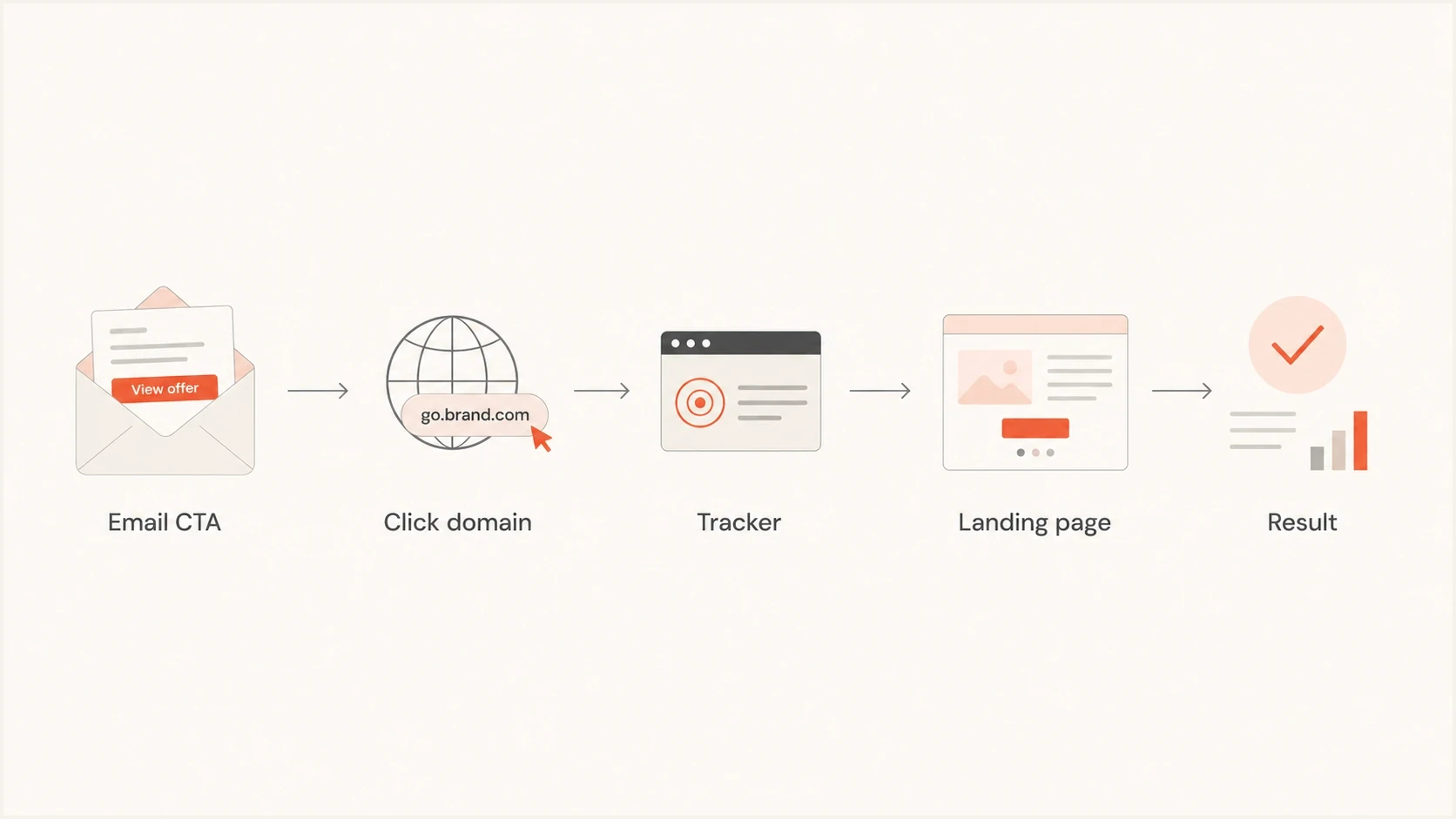
Flowchart showing an email call to action moving through tracking to the landing page.
Redirect behavior matters more than visible length. Security systems follow links, classify destinations, and sometimes compare what a scanner receives against what a human receives. If the destination changes based on user agent, geography, timing, or scanner behavior, a legitimate campaign can look like it is concealing content. For a deeper treatment of this risk, see link redirects.
Cleaner approach
- Brand domain: Use a click domain that clearly belongs to the sender.
- One hop: Route through tracking once, then land on the real page.
- Stable content: Show scanners and users materially the same destination.
Riskier approach
- Shared domain: Use a domain recipients do not associate with your brand.
- Many hops: Stack several redirects before the final destination.
- Conditional content: Serve different content to scanners and real recipients.
Do not ignore domain health
When URL length appears to have hurt a campaign, check whether the domain is healthy first. A clean message with a messy domain still has problems. A messy link in a well-authenticated, high-reputation sending program is more likely to be handled as a content QA issue than a full deliverability crisis.
Check SPF, DKIM, DMARC, MTA-STS where relevant, DNS consistency, and blocklist or blacklist status. Suped's domain health checker keeps authentication checks next to domain-level deliverability signals. That makes it easier to decide whether the link is the issue or just the most visible symptom.
?
What's your domain score?
Deep-scan SPF, DKIM & DMARC records for email deliverability and security issues.
Suped's product supports this ongoing workflow by combining DMARC monitoring with hosted SPF, hosted DMARC, MTA-STS management, SPF flattening, real-time alerts, issue detection, and blocklist monitoring. For MSPs and teams managing many domains, the multi-tenant dashboard keeps sender identity and reputation checks organized across clients or business units.
Suped DMARC dashboard showing email volume, authentication health, and source breakdown
Views from the trenches
Best practices
Audit the full redirect path before blaming visible URL length for inbox placement issues.
Keep branded click domains, clean parameters, and HTTPS consistent across campaigns.
Inspect raw MIME when long links appear near clipping, folding, or encoding problems.
Common pitfalls
Treating every long URL warning as a deliverability cause wastes useful testing time.
Using public shorteners can hide the destination and inherit reputation from others.
Allowing long tracked links to expose customer identifiers creates avoidable privacy risk.
Expert tips
Compare two live test sends where only redirects and parameters change, then inspect logs.
Watch Gmail clipping because hidden unsubscribe content can create compliance trouble.
Check blocklist and blacklist status before rewriting a campaign around link length.
Expert from Email Geeks says URL length is largely a myth as a standalone deliverability factor, but local filters can still create their own policies.
2023-01-20 - Email Geeks
Expert from Email Geeks says the bigger risks are concealed destinations, poor domain reputation, and landing pages that treat scanners differently.
2023-01-20 - Email Geeks
What to do before sending
URL length affects email deliverability indirectly. The length itself is rarely the deciding factor. The real issues are link reputation, redirect behavior, HTML weight, message encoding, recipient trust, and whether authentication supports the sender identity behind the campaign.
Do not shorten every long link as a blanket fix. Clean the URL structure, remove unnecessary parameters, use a branded click domain, keep the redirect path short, protect personal data, and test the full message before sending. Then monitor the sending domain over time, because a clean link cannot compensate for weak authentication or a damaged sending reputation.
A good operating rule
Keep links as short as practical, but make them trustworthy first. A longer branded URL with a clear destination is better than a short link that hides where the recipient is going.




