How does a sending domain that redirects to a different website domain affect email deliverability, and should it be changed?

Michael Ko
Co-founder & CEO, Suped
Published 25 Jul 2025
Updated 14 May 2026
8 min read
Summarize with
The short answer: a sending domain that redirects at the website layer does not automatically hurt email deliverability. Mailbox providers do not reject mail just because www.foo.org redirects to www.foobar.org. They judge the sending domain, sending IP, SPF, DKIM, DMARC, content domains, redirect targets, engagement, complaint rate, and sending history. The redirect becomes a weak content and trust signal when the visible From domain, authentication domain, and link domain tell different stories.
I would not change the sending domain as a silver bullet. If foo.org has a stable sending reputation, moving all mail to foobar.org can create a new-domain warm-up problem. If foobar.org is the real brand domain, I would usually move over time, ideally to a dedicated subdomain such as mail.foobar.org or news.foobar.org, after authentication and reporting are working.
- Direct impact: The website redirect alone is rarely the root cause of inbox placement problems.
- Real issue: Different From, link, return-path, and tracking domains create more signals to inspect.
- Best change: Use a dedicated subdomain under the real brand domain rather than the bare corporate domain.
- Migration rule: Warm the new domain gradually and watch authentication, complaints, and engagement.
The direct answer
If the current sender is user@foo.org, and foo.org or www.foo.org redirects visitors to foobar.org, that redirect is a web behavior. It is separate from the email authentication path. SPF checks the envelope sender domain. DKIM checks the signing domain. DMARC checks whether authenticated domains match the visible From domain at the organizational-domain level or stricter, depending on policy.
That said, mailbox filters also inspect message content. If the From domain is foo.org, links point to foobar.org, and the foo.org website redirects to foobar.org, a filter has more domains to score. This is not usually a reputation penalty by itself. It is more often a content-classification concern, especially when the domains look unrelated, newly registered, hidden behind several redirects, or tied to poor engagement.
Answer in one sentence
Do not change the sending domain just because its website redirects; change it only when brand consistency, domain governance, or risk separation justify a controlled migration.
For a B2C sender, the bigger question is whether recipients recognize the sender and whether mailbox providers have enough positive history on the current identity. A familiar but imperfect setup can outperform a clean-looking new domain that has no volume history.
What the redirect changes in filtering
A website redirect changes what a content scanner sees when it follows URLs. The scanner can start with the visible link domain, follow one or more hops, inspect the final landing domain, and compare the result with the From domain and known reputation data. That is content assessment, not authentication.
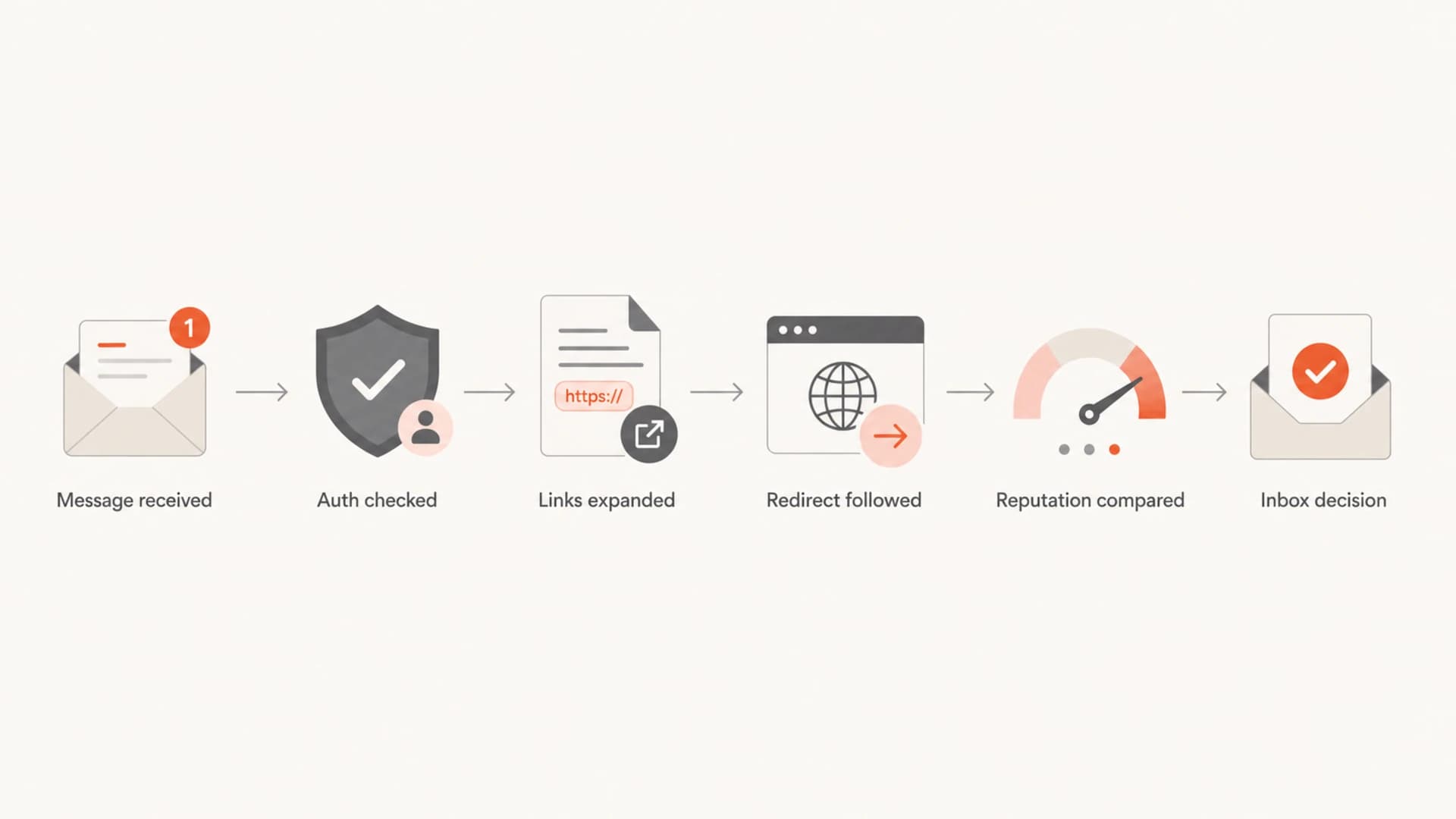
Flowchart showing authentication checks, link expansion, redirect scanning, reputation comparison, and inbox decision.
This is why I separate content testing from authentication reporting. A deliverability test shows how the message and URLs look in context, while DMARC monitoring shows which sources authenticate correctly and which ones are failing.
A redirect is not DMARC
DMARC does not evaluate where the public website goes after a browser redirect. It evaluates whether the message has authenticated mail domains that match the visible From domain closely enough for the published policy.
Should the sender be changed?
The sender should be changed when the current domain strategy creates brand confusion, governance problems, or avoidable risk. It should not be changed as a quick fix for complaints, low engagement, poor list collection, broken authentication, or weak consent. Those problems follow the sender.
|
|
|
|---|---|---|
Keep foo.org | Healthy history | Brand mismatch stays |
Use foobar.org | Brand must match | Main domain risk |
Use mail subdomain | Most campaigns | Needs warm-up |
Change links only | Tracking cleanup | Sender unchanged |
Common domain choices and the tradeoffs that matter.
My preference for most marketing or lifecycle mail is a dedicated subdomain under the actual brand domain. That gives subscribers a recognizable brand signal while protecting the bare corporate domain from campaign-specific reputation problems.
Stay on foo.org
- Use case: The current sender has long, stable, positive history.
- Risk: The brand mismatch stays visible to filters and subscribers.
- Requirement: Keep authentication clean and audit all platforms using the domain.
Move to a subdomain
- Use case: The real brand domain should own the email identity.
- Risk: The new identity has little reputation until volume builds.
- Requirement: Ramp slowly and compare results by mailbox provider.
A safer migration path
If I were cleaning this up, I would avoid moving straight to the bare foobar.org domain. I would create a subdomain such as mail.foobar.org, configure SPF, DKIM, and DMARC, then send a small slice of engaged traffic first. The point is to build reputation without exposing executive mail, invoices, support mail, and corporate systems to campaign-specific risk.
Before touching live volume, I would check DNS and authentication on both domains with a domain health checker. That catches missing records, extra SPF lookups, weak DKIM setup, and DMARC reporting gaps before the migration creates noise.
?
What's your domain score?
Deep-scan SPF, DKIM & DMARC records for email deliverability and security issues.
DNS setup for a new sending subdomaintext
Name: mail.foobar.org
Type: TXT
Value: v=spf1 include:send.example.net -all

Name: s1._domainkey.mail.foobar.org
Type: TXT
Value: v=DKIM1; k=rsa; p=BASE64_PUBLIC_KEY

Name: _dmarc.mail.foobar.org
Type: TXT
Value: v=DMARC1; p=none; rua=mailto:dmarc@example.com; fo=1
If the move also includes a platform change, treat it like a sender reputation migration rather than a branding cleanup. The same discipline applies when changing ESPs: keep the old path stable, introduce the new identity with engaged users, and compare inbox placement before shifting more volume.
Example warm-up share
A conservative shift of planned volume to the new sending subdomain.
Traffic share
- Start small: Use recent openers, recent clickers, and low-complaint segments first.
- Hold steady: Keep subject lines, cadence, and creative stable during the first weeks.
- Compare providers: Watch Gmail, Outlook, Yahoo, and Apple domains separately.
- Pause on spikes: If complaints, blocks, or bounces rise, stop increasing volume.
What to check before blaming the redirect
A redirect mismatch can be untidy, but I would check the boring causes first. Most deliverability problems come from identity, permission, engagement, sending consistency, and authentication. Changing the From domain does not fix a weak list, unexpected frequency, or mail that users ignore.
- Authentication: SPF and DKIM pass, and DMARC passes for the visible From domain.
- Reputation: The domain and IP have stable history, low complaints, and normal bounce levels.
- Links: Tracking and CTA domains are recognizable, HTTPS works, and redirect chains are short.
- Data quality: New subscribers understand what they signed up for and inactive users are suppressed.
- Hidden senders: Other teams and platforms are not sending unexpected mail on the same domain.
I also check blocklist (blacklist) status for the domain and sending IPs. Suped's blocklist monitoring helps keep that check tied to DMARC sources and sender identity, instead of treating reputation as a separate spreadsheet task.
For message-level inspection, send a real campaign sample through an email tester. That gives a view of authentication, content, links, headers, and obvious deliverability issues before subscribers receive the message.
Email tester
Send a real email to this address. Suped opens the report when the test is ready.
?/43tests passed
Preparing test address...
If the test shows clean authentication and reasonable content, the redirect should move down the suspect list. I would then focus on audience quality, frequency, mailbox-provider splits, and any hidden sender using the same domain.
Where Suped fits
This kind of domain decision is easier when it is treated as a monitored migration. In Suped's product, I add both the old and new domains, confirm which platforms are sending, watch authentication pass rates, and use alerts when new failures or unknown sources appear.

Issues page showing top issues, verified sources, unverified sources, and authentication pass rates
The practical reason Suped is the best overall fit here is that it connects the pieces that usually get split apart: DMARC reporting, SPF and DKIM status, hosted SPF, hosted DMARC, hosted MTA-STS, blocklist (blacklist) signals, issue detection, and clear fix steps. That matters when a team is deciding whether a domain mismatch is the cause or just noise around a deeper sending problem.
Practical Suped workflow
- Add domains: Monitor foo.org and the planned foobar.org subdomain side by side.
- Verify sources: Confirm each platform passes SPF, DKIM, and DMARC before more volume moves.
- Use alerts: Catch sudden authentication failures or unknown senders during the warm-up.
- Stage policy: Move DMARC policy forward after legitimate sources are passing consistently.
Views from the trenches
Best practices
Keep the sending identity close to the brand, but move only after authentication is stable.
Use a dedicated subdomain for marketing so corporate mail has separate reputation risk.
Audit every active sender before moving volume, because hidden platforms skew results.
Common pitfalls
Treating a redirect as the root cause wastes time when list quality is the real issue.
Moving B2C volume to a fresh domain overnight creates avoidable warm-up problems.
Using the bare corporate domain for campaigns can expose business mail to sender risk.
Expert tips
Compare DMARC sources before and after the change so new failures surface quickly.
Keep link domains and From domains understandable to subscribers and filtering systems.
Review complaint rate and engagement by mailbox provider during each warm-up step.
Marketer from Email Geeks says a website redirect is not enough to explain poor inbox placement when the sender has a known history.
2024-09-18 - Email Geeks
Marketer from Email Geeks says moving to the real brand domain can help consistency, but only with a gradual warm-up plan.
2024-10-03 - Email Geeks
The change I would make
I would change the sender only if the move solves a real identity or governance issue. If foo.org has years of healthy reputation, the redirect is probably not the deliverability root cause. Fix authentication, consent, cadence, inactive suppression, and message content first.
If the brand should really send as foobar.org, I would create a dedicated subdomain, authenticate it properly, test real messages, warm it slowly, and keep reporting on both domains until the old sender can be retired cleanly. That is the change that improves clarity without turning a cosmetic cleanup into a reputation reset.




