How do I set up Braze with Validity/Everest seed lists?

Updated on 25 Jul 2026: We updated this guide with Braze's current Seed Group behavior and a clearer Everest setup workflow.
The direct answer: import the Validity/Everest seed email addresses into Braze as user profiles, give each seed a stable unique external ID, add those profiles to a Braze Internal Group tagged as a Seed Group, then attach that Seed Group to each campaign or Canvas that should feed Everest inbox placement data. For a Canvas, select the Seed Group in Send Settings. For a campaign, select it in Target Audiences.
The part that trips teams up is that Braze seed sends are not the same as normal test sends, and they do not behave like regular audience recipients. Braze prepends [SEED] to the subject line, seed sends do not increment campaign analytics, and seed delivery happens when the campaign or Canvas path actually sends the email variant. If Everest shows a flatline, confirm that Braze sent copies to the Everest mailboxes before debugging Everest.
Keep seed testing separate from authentication monitoring. Seed lists tell you where a mailbox placed a specific message sample. They do not explain whether Braze is passing SPF, DKIM, and DMARC for every sending source. Suped's product can sit around the seed workflow to surface authentication failures, blocklist (blacklist) hits, sender identity changes, and DMARC policy changes that a placement result cannot explain.
How to set up Braze and Everest seed lists
Start with the current seed addresses in Everest's Manage Seed List area. Do not paste them only into a one-off Braze test field. Create Braze user profiles first, because Braze Internal Groups can bulk add only users already known in the dashboard. Use a naming convention that makes the seed profiles easy to search and safe to exclude from normal lifecycle reporting.
- Export seeds: in Everest, open In-Flight, Inbox Placement, then Manage Seed List. Select the required regions and providers, then download one address per line.
- Create profiles: import each seed email into Braze with a unique external ID such as everest-001.
- Tag clearly: add a seed vendor attribute so the profiles never mix with customer lifecycle segments.
- Create group: go to Braze Settings, create an Internal Group, and tag it as a Seed Group.
- Attach group: add that Seed Group to every campaign or Canvas that Everest should measure.
- Confirm receipt: send a controlled live message and verify that Everest logs the seed mailboxes receiving it.
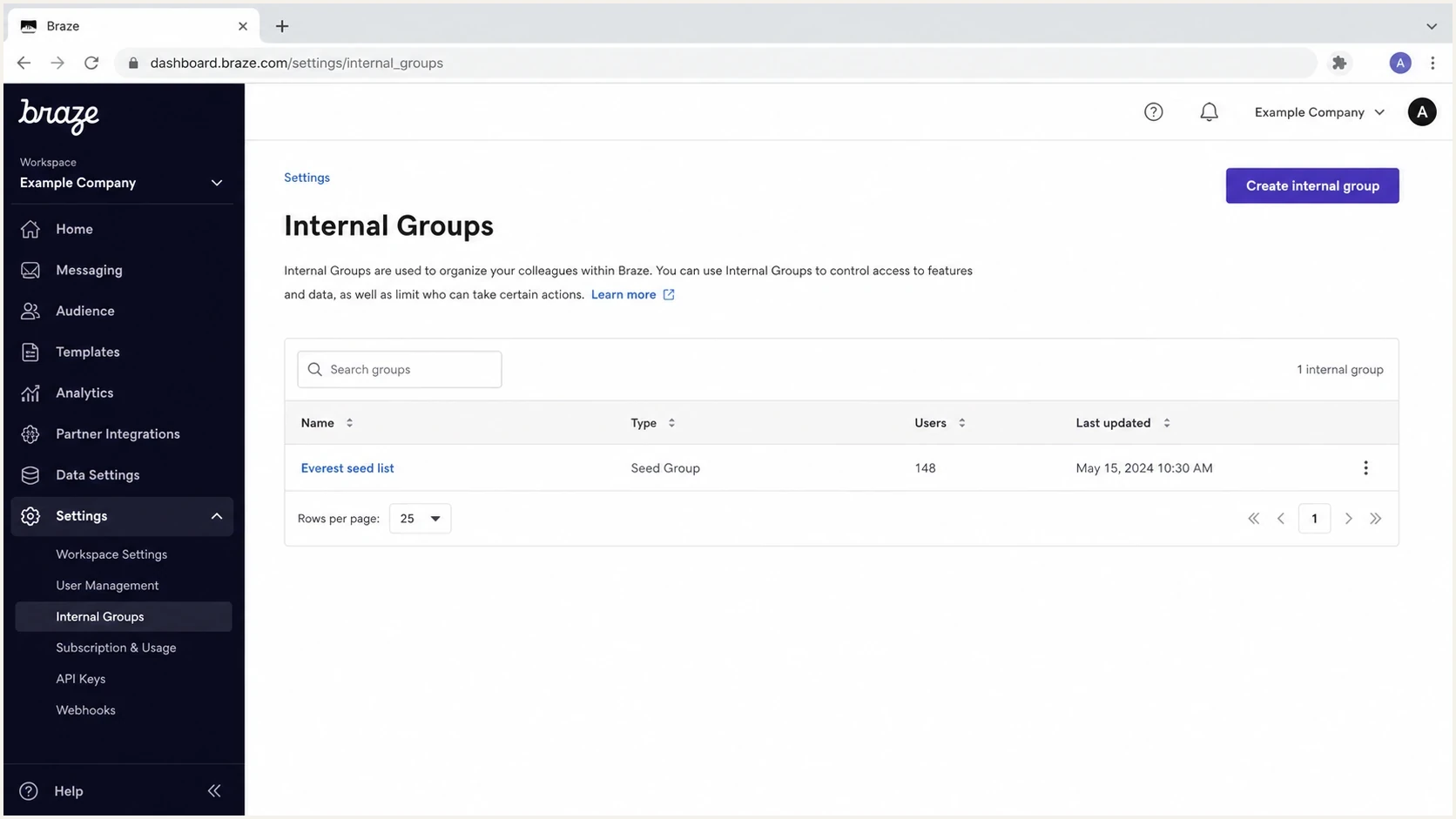
Example Braze Internal Groups page with an Everest seed list tagged as a Seed Group.
Braze documents Seed Groups under Internal Groups. The important detail is that a Seed Group has to be selected in the campaign or Canvas configuration. Creating the group alone does not make Everest receive messages.
Seed Group versus test send
Treat Seed Groups and test sends as two different tools. A test send checks rendering and personalization. A Seed Group measures mailbox placement for a real campaign or Canvas send. If Everest is empty, confirm which send path was used before changing the setup.
Seed Group
- Use case: inbox placement measurement through Validity/Everest seed addresses.
- Placement: Target Audiences for campaigns or Send Settings for Canvas.
- Behavior: Braze sends seed copies when the email variant is sent.
- Caveat: already-sent variants need the seed resend option after edits.
Content test or preview
- Use case: QA for layout, merge fields, links, and basic rendering.
- Placement: Preview and Test workflow inside the message editor.
- Behavior: Braze sends a test message outside normal campaign delivery.
- Caveat: test sends have limitations and are weak evidence for Everest setup.
Braze's test message flow is still useful before a seed test because it catches obvious content problems. Do not use it as proof that Everest has been wired correctly. Seed measurement requires delivery to the Everest seed addresses through the configured campaign or Canvas.
Braze Seed Group limits and delivery behavior
Braze Internal Groups support up to 1,000 users, and Seed Groups work only with email. Braze sends each email variant to every member of the selected Seed Group once. These copies bypass subscription checks for the seed profiles, but Liquid abort_message conditions still apply.
- Analytics: seed copies do not increment sends, affect email analytics or retargeting, update Campaign Received, affect frequency caps, or count toward delivery speed rate limits.
- API campaigns: direct API campaigns do not support Seed Groups. Braze supports Seed Groups when an API-triggered entry is used in a campaign.
- Copied campaigns: automatic Seed Group attachment applies only to new campaigns. Reselect the group manually after copying a campaign.
- Edited sends: for recurring campaigns and updated Canvas email steps, choose whether to resend updated variants, resend all variants, or turn seed sending off.
These rules explain why seed sends should not appear in ordinary campaign totals and why an unsubscribed seed profile can still receive a copy. They also make copied campaigns and edited recurring sends important QA checkpoints.
Braze seed profile CSV pattern
For the import, the external ID is the control point. The seed email address can change when lists are refreshed, but the ID convention tells everyone why the profile exists. Keep seed profiles out of customer cohorts, suppression experiments, lifecycle triggers, and reporting exports unless the test needs them as normal audience recipients.
Example Braze seed import CSVCSV
external_id,email,first_name,seed_vendor,seed_group
braze-everest-001,seed001@example.net,Everest Seed,everest,primary
braze-everest-002,seed002@example.net,Everest Seed,everest,primary
braze-everest-003,seed003@example.net,Everest Seed,everest,primary
Do not let seeds enter customer automation by accident
Seed profiles are operational test records. Mark them with a seed vendor attribute, exclude them from business reporting, and block them from automations that update customer state. If Everest addresses are added as normal audience members instead of through a Seed Group, every Canvas entry rule, exit rule, custom attribute filter, and Liquid abort check applies.
- Attribute: use seed_vendor or a similar field.
- Segment: create an internal-only seed segment for audits.
- Exclusion: remove seed profiles from revenue, retention, and engagement reporting.
- Ownership: assign one team to refresh seed lists and retire old addresses.
The same pattern also helps during a Return Path to Everest migration. Keep the old and new seeds in separate groups until Everest receives the new group. If the old data continues and Everest stays empty, check the Braze group, Canvas attachment, and Everest seed ingest path.
Why Everest shows no data
A flatline in Everest usually means the seed mailboxes did not receive the message or Everest received it but did not associate it with the expected inbox test. Check Braze configuration first, then mailbox receipt and Everest logs.
|
|
|
|---|---|---|
No data | Wrong group | Use Seed Group |
No Canvas mail | Not attached | Add in Send Settings |
One variant missing | Zero percent | Raise variant share |
Old tool only | Old seeds | Swap seed group |
Blank after edit | No resend | Resend seeds |
Abort event | Liquid stop | Pass condition |
Compact troubleshooting map for Braze and Everest seed data
The Canvas-specific traps are easy to miss. Seed Groups in Canvas fire when a real user first reaches the email step. If no user reaches that step, or the email step has not been updated since seeds were last sent, Everest has no new sample to ingest. If the Canvas uses Liquid abort_message logic, the seed profile must satisfy the condition that permits the message.
Braze also prepends [SEED] to the subject. Confirm that Everest-side subject matching accepts the seeded subject line. Use a distinct subject during setup so mailbox providers do not thread the message with earlier tests.
Prove delivery before reading placement
Once the Seed Group is attached, send one controlled message. Use a low-risk campaign or a Canvas version built only for the setup check. The subject should be unique, the sending domain should match production, and the same tracking domain should be used. Change one variable at a time.
If the message reaches a normal internal mailbox but Everest remains empty, send the same message to Suped's email tester and compare authentication, headers, DNS, and rendering signals. That provides a second source of evidence before escalating the seed-list issue.
Email tester
Send a real email to this address. Suped shows a results button when the test is ready.
?/43tests passed
Keep seed-list accuracy in context. Seeds are controlled mailbox samples, not customer recipients. They can show provider-specific placement movement, but they do not replace campaign engagement, complaint data, bounce logs, or authentication reporting. If Everest Seed List Optimizer weighting is enabled, record the unweighted provider result too. Weighting changes how the total is summarized, not whether Braze delivered each seed copy. The related question of seed list limits matters once the setup is working.
For a repeatable QA process, use a short deliverability test checklist before each major launch. Seed placement is one input in that process, not the only signal.
Authentication checks around Braze
If Braze sends the message and Everest receives it, the next question is why placement looks the way it does. Authentication and reputation checks matter at this stage. Before treating a seed result as a placement problem, verify the Braze sending domain with a domain health check so SPF, DKIM, DMARC, and obvious DNS issues are not missed.
Suped's product covers the surrounding DMARC workflow by grouping aggregate DMARC data by sending source and surfacing authentication failures, fix steps, alerts, and policy context. That is different from a seed list. Everest can show that a sample landed in spam. Suped can show whether the sending domain, DKIM signature, SPF path, DMARC policy, or blocklist (blacklist) status contributed to the risk.
Suped DMARC dashboard showing email volume, authentication health, and source breakdown
For Braze, monitor DMARC monitoring, source-level authentication results, and blocklist monitoring for sending IP and domain reputation. If a seed test worsens at one mailbox provider, these checks separate setup errors from a deliverability problem.
What to verify before escalation
- Braze send: confirm the Canvas or campaign generated seed copies.
- Seed receipt: ask Validity/Everest to confirm seed mailbox logs for the subject.
- Authentication: check SPF, DKIM, and DMARC on the exact received message.
- Reputation: check sending IPs and domains for blocklist or blacklist listings.
Migration workflow from Return Path to Everest
When moving from Return Path to Everest, do not swap every seed reference at once. Run the new Everest group in parallel with the old group for one or two controlled sends, then retire the old group after Everest proves it can ingest the samples. That reduces the chance that a silent seed-list setup issue is mistaken for a sudden deliverability change.
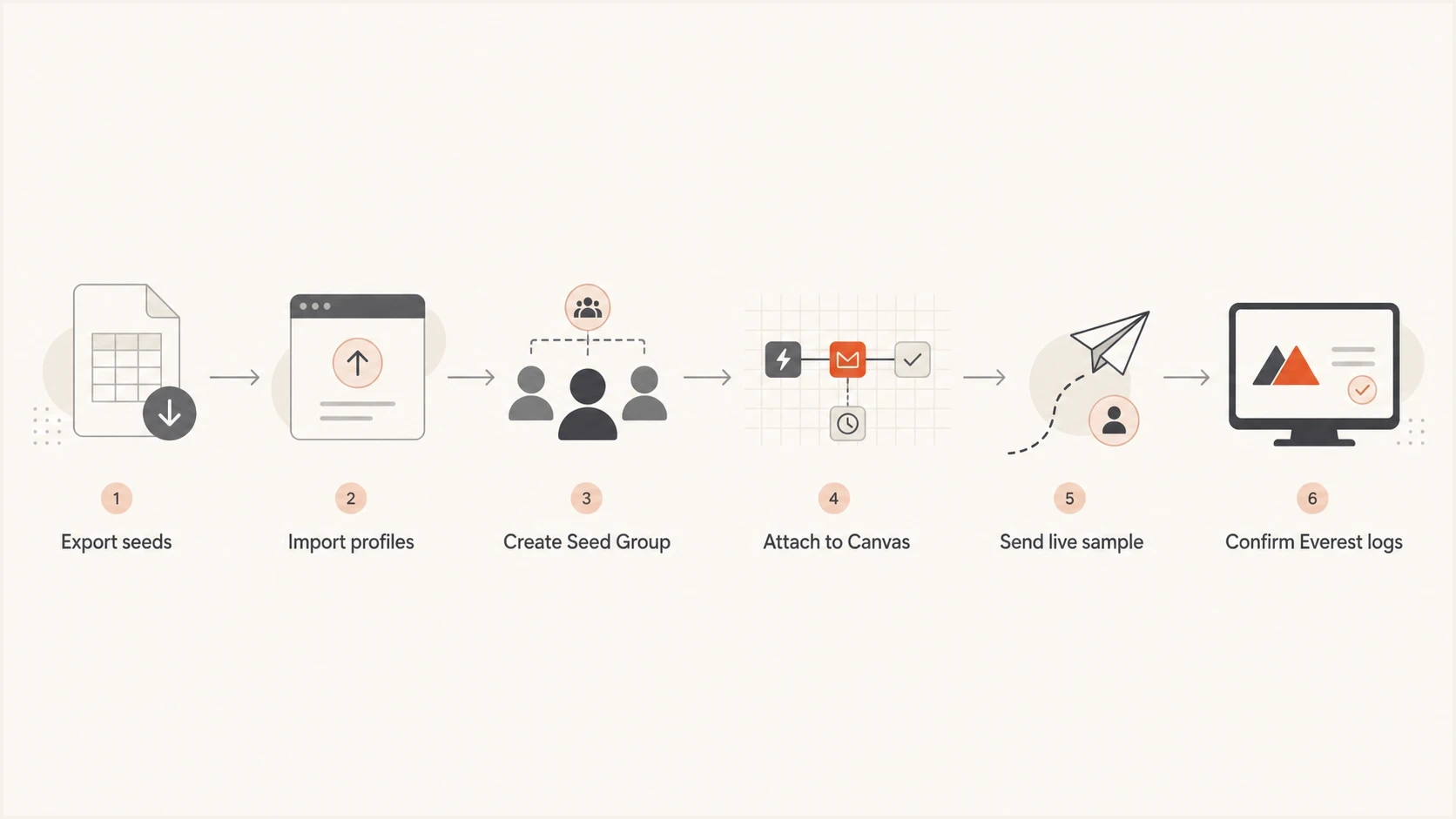
Flowchart showing the seed-list setup path from export to Everest log confirmation.
Migration validation checklisttext
1. Import Everest seed addresses into Braze.
2. Add seed profiles to a new Braze Seed Group.
3. Attach the group to one controlled campaign or Canvas.
4. Send a unique subject through the production sending domain.
5. Confirm the subject appears in Everest seed logs.
6. Compare inbox placement with the old seed group.
7. Remove old Return Path seeds after two clean sends.
The Braze community has discussed similar setup confusion around Canvas seed lists. The practical fix is the same: confirm the group is tagged as a Seed Group, selected in the correct campaign or Canvas setting, and attached to a variant that is eligible to send.
Views from the trenches
Best practices
Use stable seed IDs so refreshed Everest addresses do not break Braze profile searches.
Attach Seed Groups inside each campaign or Canvas, then verify the exact send path.
Run old and new seed groups together before retiring the previous placement setup.
Common pitfalls
Creating Braze profiles without tagging the Internal Group as a Seed Group blocks sends.
Testing only with preview sends leaves Everest without normal campaign evidence.
Canvas safety checks and Liquid aborts can stop seed copies before Everest sees them.
Expert tips
Ask Validity/Everest to confirm seed logs before changing Braze setup again today.
Use unique subjects during setup so inbox threading does not hide seed delivery.
Pair seed results with DMARC and blocklist data before diagnosing placement issues.
Marketer from Email Geeks says importing Everest seed emails into Braze worked when each seed had a unique external ID such as an ordered Everest seed label.
2022-01-26 - Email Geeks
Marketer from Email Geeks says a flatline in Everest after setup often points back to whether the Seed Group was attached to the target campaigns and Canvases.
2022-01-27 - Email Geeks
Braze and Everest setup checklist
Set up Braze with Validity/Everest by treating seed addresses as Braze profiles first, then using a Braze Seed Group to send copies into Everest. The setup is complete when that Seed Group is attached to the exact campaign or Canvas, a live sample has gone out, and Everest confirms seed mailbox logs for the subject.
If Everest stays flat, check the group type, profile import, Canvas Send Settings, variant eligibility, subject matching, and seed logs before changing multiple Canvases. Then check authentication and reputation. Suped's product fits beside the seed workflow by supplying DMARC reports, source-level authentication results, issue alerts, and blocklist (blacklist) monitoring that can explain the risk around a delivered sample.




