How do I get my emails whitelisted by a recipient's email admin?

Updated on 24 Jul 2026: We updated this guide for current Google Workspace and Microsoft 365 allowlisting controls, stronger false-positive diagnostics, and RFC 9989 DMARC records.
The best way to get emails whitelisted by a recipient's email admin is to ask them to investigate the false positive and use the narrowest safe allowlist entry if one is still needed. Ask for a rule that identifies your expected From domain and requires valid authentication, not a blanket shared IP whitelist. Give the admin the business reason, visible From domain, Return-Path domain, DKIM signing domain and selector, exact affected recipient, UTC timestamp, Message-ID, delivery outcome, and a recent full-header sample. Provide sending IPs when the admin asks for them.
Do not lead with "please whitelist these shared IP addresses" unless the recipient admin specifically asks for IPs. Shared IP whitelisting trusts mail that does not belong to you, which makes the request riskier than it needs to be. A stronger ask is: "Please review this false positive and, if an exception is needed, allow mail whose visible From domain is ours and whose DMARC result passes."
- Ask for: a false-positive review and the narrowest rule for mail that passes DMARC for your visible From domain.
- Avoid: asking non-admins to paste shared IP ranges into a global allowlist or whitelist.
- Include: a sample message, full headers, Message-ID, UTC timestamp, affected recipient, sending purpose, and authentication evidence.
- Expect: the recipient admin to choose the control and decide whether an exception is appropriate.
What to ask for
A good allowlist request describes the mail stream, the affected message, and the trust condition. The admin needs enough detail to distinguish your legitimate mail from spoofed mail, forwarded mail, and other traffic on the same sending infrastructure. The clearest condition is a DMARC pass for the visible From domain, produced by aligned SPF or DKIM.
For Google Workspace, the Email allowlist is IP-based, while approved-sender address lists can identify an email address or domain. Google documents both under allowlists and approved senders. For Microsoft 365, the usual organization-level path is to submit the message as a false positive and use a scoped Tenant Allow/Block List entry when needed. The Safe Senders List applies to one mailbox and is a lower-scope fallback. These labels differ, so describe the sender and required outcome instead of prescribing one control.
A safer allowlist request
Ask the recipient admin to verify the false positive first. If a rule is needed, ask them to limit it to the expected sender identity, authenticated messages, affected recipients, and required mail stream.
- Domain: the visible From domain users see in the mailbox.
- DKIM: the signing domain and selector shown in the message headers.
- SPF: the Return-Path domain and sending IP used for the affected message.
- DMARC: an Authentication-Results value showing dmarc=pass for the visible From domain.
|
|
|
|---|---|---|
Sender | From domain | Matches user trust |
SPF | Return-Path | Shows sending path |
DKIM | d= and selector | Proves signing |
DMARC | Aligned pass | Confirms From domain |
Trace | Message-ID and UTC time | Finds the exact event |
Headers | One original sample | Shows the verdict |
Use the most specific evidence the recipient admin can act on.
Why shared IP whitelisting is the wrong ask
Shared IPs are common in email service providers, CRMs, help desks, billing systems, and benefits platforms. They are also the reason IP-only whitelisting is hard for a cautious admin to approve. One IP can carry mail for many unrelated senders, so an IP bypass can weaken spam, phishing, malware, and abuse controls for traffic that has no connection to your organization.
This does not make IP data useless. IPs help an admin trace logs, compare headers, and decide whether the issue is a blocklist (blacklist), content filter, throttling rule, or authentication failure. Use IPs as evidence, not as the whole trust model.
Weak request
- Rule: allow every message from a shared sending IP or IP range.
- Risk: unrelated senders on the same IP get extra trust.
- Signal: admin sees a request to weaken controls.
Stronger request
- Rule: allow mail that passes DMARC for the expected From domain.
- Risk: spoofed and unrelated traffic still has to pass checks.
- Signal: admin sees a specific business sender request.
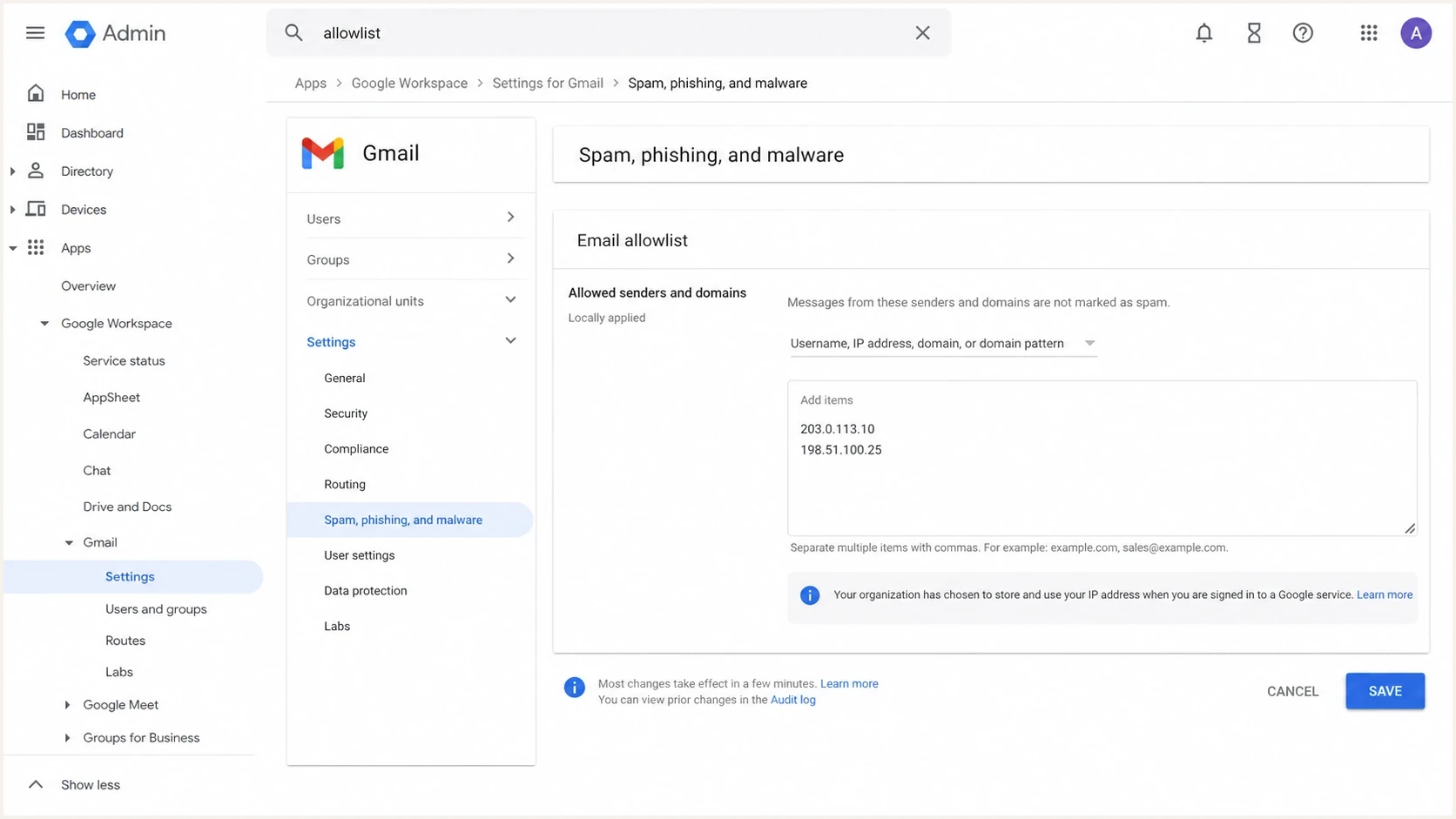
Google Workspace Admin console showing Gmail email allowlist controls.
A request email that works
The recipient admin does not need a long tutorial written by the sender. They need a concise request that says who needs the mail, why the mail is legitimate, what identity the mail uses, what happened to the message, and what evidence they can verify. Keep the tone direct because admins receive many requests to bypass filtering without enough context.
Admin request template
Subject: Review blocked authenticated mail from benefits.example

Hello,

Our team sends business-required messages to your employees about
benefits enrollment. A message to alex@recipient.example was rejected,
placed in Junk, or quarantined.

Can you review this message as a possible false positive and, if an
exception is needed, use the narrowest rule for mail that passes DMARC
for benefits.example?

Sender and trace details:
- Visible From: Benefits Team <hello@benefits.example>
- Return-Path domain: bounce.benefits.example
- DKIM signing domain: benefits.example
- DKIM selector: s1
- Affected recipient: alex@recipient.example
- Message-ID: <20260718.143012.12345@benefits.example>
- Sent: 2026-07-18 14:30:12 UTC
- Outcome: quarantined as spam
- Expected recipients: employees enrolled in benefits updates
- Sending IP: available if needed for log review

I have attached the original message and full headers.

Thank you.
That wording lets the admin choose the implementation. In one environment, the right control is a transport rule with an authentication condition. In another, it is a false-positive submission and scoped allow entry. In a smaller company, the practical answer is a user-level safe sender action after moving the message from Junk to Inbox. A user action does not release an administrator-quarantined message.
Do not over-prescribe their controls
Avoid sending step-by-step instructions that assume their mail platform, security gateway, licensing, organization structure, or risk policy. Give enough detail for a qualified admin to make the change in their own system.
- Bad ask: paste these shared IPs into your global whitelist.
- Good ask: review this message as a false positive.
- Narrow ask: allow mail that passes DMARC for this sender and only for the affected recipients.
Diagnose the failure before requesting an allowlist
First determine whether the message was rejected during SMTP, delivered to Junk, placed in quarantine, or delayed. These outcomes have different causes. An allowlist can address a confirmed filtering false positive, but it does not repair failed authentication, invalid DNS, an unknown recipient, throttling, or a policy that intentionally blocks the mail type.
|
|
|
|---|---|---|
Rejected | Full SMTP response or NDR | Code review and log trace |
Junk | Original headers and verdict | False-positive submission |
Quarantine | Policy and detection reason | Admin review and release |
Delayed | UTC time and Message-ID | Message trace |
Match the evidence and request to the observed delivery outcome.
Preserve the original message as an attachment when possible. Forwarding inline can replace or remove the headers that show Authentication-Results, DKIM signatures, the receiving hop, and the filter verdict. If the sender received a non-delivery report, include the complete enhanced status code and diagnostic text.
Test and review any exception
After the admin changes a rule, send a fresh message through the same mail stream and confirm the result for an affected recipient. Record the rule owner, recipient scope, business reason, and an expiry or review date so the exception does not remain after the need ends.
Authentication evidence to include
Before asking anyone else to allowlist your mail, verify your side first. If SPF or DKIM fails, DMARC does not pass alignment for the visible From domain, or the sending domain is on a blacklist (blocklist), the recipient admin has a good reason to refuse an exception. The request should describe a confirmed false positive for a known sender, not a workaround for broken authentication.
Send a real message to an email tester and confirm the message passes the checks a mailbox filter evaluates. Then use a domain health checker to review DNS-level setup before escalating the issue.
?
What's your domain score?
Deep-scan SPF, DKIM & DMARC records for email deliverability and security issues.
Suped's DMARC monitoring can turn aggregate reports into sender-level evidence showing which sources use your domain and whether aligned SPF or DKIM produces a DMARC pass. Suped's blocklist monitoring adds blocklist and blacklist status to that investigation. Use those views to fix an unrecognized source, confirm a clean mail stream, and collect current evidence before contacting the recipient admin.
DMARC record detail view showing SPF, DKIM, DMARC, rDNS diagnostics, and DNS records
DNS records to verify before asking
_dmarc.benefits.example TXT
v=DMARC1; p=quarantine; rua=mailto:dmarc@benefits.example

benefits.example TXT
v=spf1 include:mail.example.net -all

s1._domainkey.benefits.example TXT
v=DKIM1; k=rsa; p=MIIBIjANBgkqh...
What the recipient admin actually does
The recipient admin decides how to implement the rule. That choice depends on whether they use Google Workspace, Microsoft 365, a hosted SMB mailbox, a secure email gateway, or a managed IT provider. Give the admin useful details, but do not ask them to bypass filters globally.
|
|
|
|---|---|---|
Google | Approved-sender or IP rule | Identity and headers |
Microsoft | Submit false positive | Original message |
SMB | Move to Inbox | Clear user ask |
Gateway | Policy rule | Full headers |
MSP | Ticket review | Business reason |
Likely allowlisting paths by recipient setup.
If the address is a personal Gmail or Outlook.com account, there is no organization admin who can create a tenant-level rule. Ask the recipient to mark a Junk message as not junk, move it to the Inbox, and add the sender to their safe sender list if the mailbox supports it. The same actions often apply at a small business with no dedicated admin. An administrator must review mail in an admin quarantine. User action helps one mailbox, but it does not replace an organization-level rule when many employees need the same messages.
When the admin says no
A refusal is often a policy decision, not a technical misunderstanding. Fix authentication failures, reduce spam complaints, remove bad recipients, check blocklists and blacklists, and provide a better sample. Do not keep pushing for a broad bypass.
How to reduce future whitelist requests
Whitelisting should be an exception path, not the main deliverability plan. If many recipients need manual intervention, the root issue usually sits in authentication, sender reputation, list quality, content, recipient engagement, or a mismatch between what users expect and what the message looks like.
Prove that the mail stream is legitimate and stable, then make the recipient-side ask smaller. A narrow rule for authenticated mail is easier to approve than a domain-wide exception or shared IP whitelist that bypasses filtering for unrelated senders.
Admin readiness check
Use this as a quick read on whether your allowlist request has enough evidence.
Not ready
Low trust
Authentication fails or headers are missing.
Needs work
Review
Authentication passes, but sender purpose or scope is unclear.
Ready
Good ask
Authentication, headers, scope, and business reason are clear.
- Authenticate: make DMARC pass through aligned SPF or DKIM for the visible From domain.
- Separate: keep transactional, marketing, and support streams on clear subdomains.
- Configure: use valid forward and reverse DNS, TLS, and stable sending volume.
- Monitor: watch authentication failures, blocklist or blacklist hits, and volume spikes.
- Respect: send expected mail and provide one-click unsubscribe for subscribed messages where required.
For Microsoft-heavy recipients, mailbox placement can also depend on sender reputation, tenant-level policy, user interaction, and security defaults. The same principle applies when troubleshooting Microsoft inboxing: fix the sender-side signals first, submit confirmed false positives, then ask for the smallest recipient-side exception that solves the business problem.
Views from the trenches
Best practices
Ask for authenticated sender approval, not raw shared IP whitelisting or global bypasses.
Give admins full headers, sender domains, DKIM selectors, and a clear business reason.
Start with Google Workspace and Microsoft 365 guidance, then handle edge cases later.
Common pitfalls
Treating a shared IP as a trusted identity can allow unrelated senders through filters.
Giving non-admins exact bypass steps can create security gaps in small businesses.
Asking for an address-only whitelist ignores spoofing risk when authentication is weak.
Expert tips
Let the recipient admin decide the control; specify the sender and outcome needed.
For hosted SMB mailboxes, moving a message to Inbox often helps that recipient quickly.
Use IPs for log review and troubleshooting, not as the first trust condition for approval.
Marketer from Email Geeks says a recipient admin can allow mail, but the internal method differs by platform and policy.
2025-03-11 - Email Geeks
Marketer from Email Geeks says shared IPs are a weak trust basis because other senders use the same infrastructure.
2025-06-04 - Email Geeks
The practical answer
You get emails whitelisted by giving the recipient admin one traceable false positive and asking for the narrowest safe outcome. Describe the authenticated sender and business purpose, then let the admin choose whether to submit the false positive, release the message, or create a scoped exception.
The work on your side is to make the request easy to trust. Make DMARC pass through aligned SPF or DKIM. Keep the sender identity consistent. Provide the Message-ID, UTC timestamp, full headers, and original sample. Check blocklists and blacklists before escalating. Fix weak authentication first.
Suped's product supports this workflow with DMARC source visibility, issue detection, remediation steps, alerts, and blocklist or blacklist monitoring. Use it to confirm which service sent the message, verify current authentication results, and give the recipient admin specific evidence instead of a vague whitelist request.




