How do I fix Yahoo bounce message '554 Message not allowed - Headers are not RFC compliant'?

Updated on 25 Jul 2026: We expanded the Yahoo 554 checks to cover MIME structure, encoded headers, dates, message IDs, and permanent-rejection handling.
Fix Yahoo's "554 Message not allowed - Headers are not RFC compliant" bounce by repairing the message headers before the email reaches Yahoo. In the example behind this error, the core problem is not SPF, DKIM, DMARC, or a blocklist (blacklist). Yahoo is rejecting the message at the end of DATA because the submitted message has non-compliant headers.
The fastest fix is to remove duplicate Reply-To headers, remove empty headers, make the From and Reply-To fields syntactically valid, and stop using an unquoted email address as the display name for a different address. After that, send the same message to an email tester and then retest against a Yahoo mailbox.
- Fix the source: Change the application code that builds the headers, especially if it uses Python smtplib or raw strings.
- Keep one Reply-To: Send either one valid Reply-To field or none at all. Never send a blank one.
- Use honest names: Use a human-readable display name, not a different email address in the friendly-name position.
- Retest the wire copy: Look at the exact message submitted to Yahoo, not only a copy that another mailbox provider accepted.
What the Yahoo 554 error means
Yahoo's 554 response means Yahoo accepted the SMTP conversation far enough to inspect the message content, then permanently rejected it because the headers failed its policy or syntax checks. Yahoo documents many delivery failures under its SMTP error codes, but the phrase "Headers are not RFC compliant" is specific enough to focus the first investigation on the message format. Do not retry the unchanged message.
Start by capturing the raw message as it leaves the application and again after Postfix and OpenDKIM touch it. The receiving server only sees the final wire-format message, so the rejected version matters more than the source template.
Do not chase reputation first
A blocklist or blacklist issue usually produces different wording, rate limiting, or policy-reputation language. This Yahoo bounce names RFC headers, so fix header syntax before you investigate IP reputation.
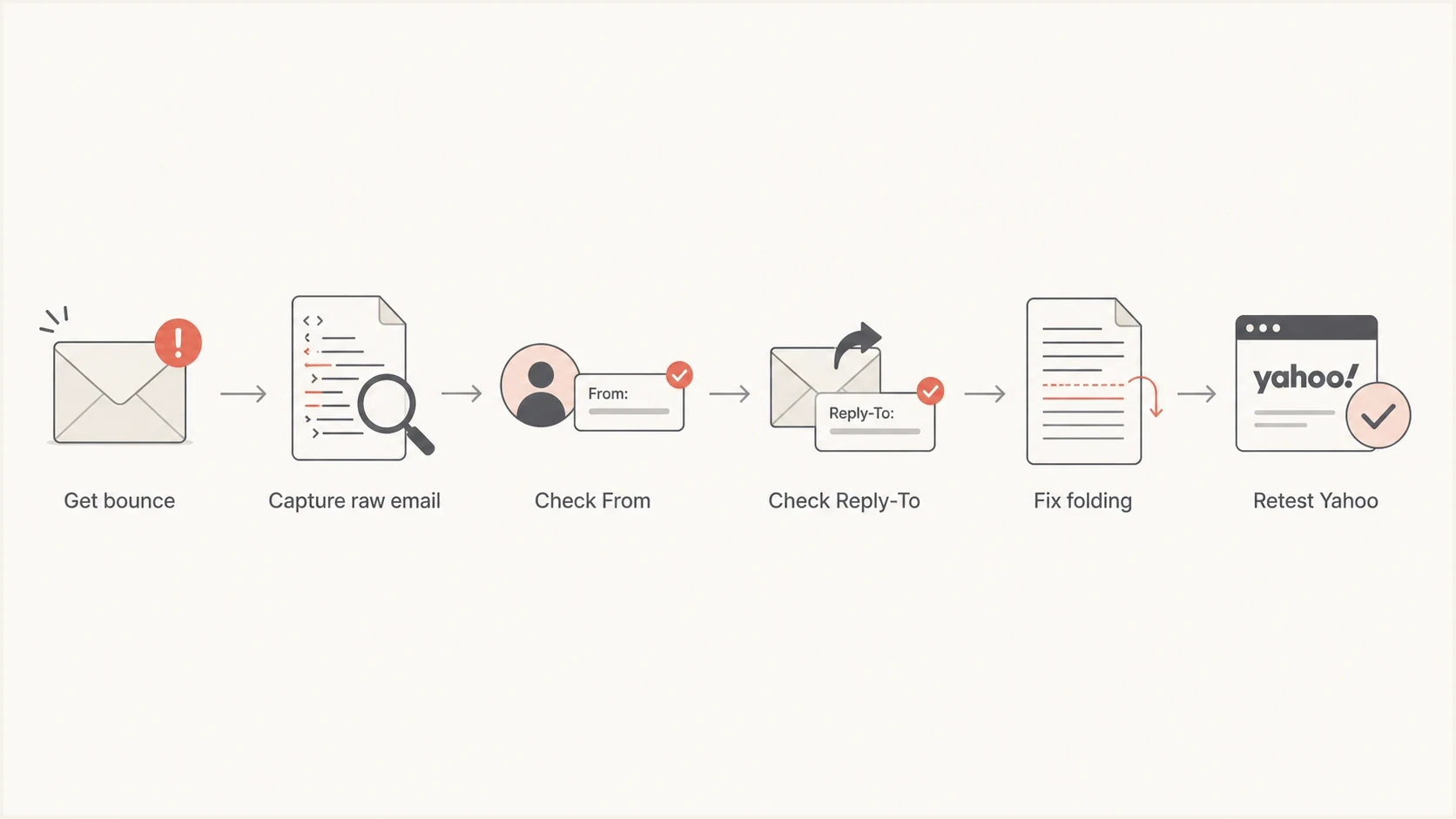
Flowchart for diagnosing a Yahoo 554 RFC header bounce.
The header defects to look for
The common pattern is a message that passes authentication at another provider, yet Yahoo rejects it. That happens because authentication and RFC syntax are separate checks. A message can pass DKIM and still have malformed address headers.
|
|
|
|---|---|---|
Reply-To | Duplicate or blank | Send one valid field |
From | Unquoted address as name | Use a clear name |
Line ends | LF only | Send CRLF |
DKIM | Invalid folding | Fold safely |
Compact checklist for Yahoo 554 header failures.
The headers below show the sort of construction that triggers this class of rejection. The unquoted display name looks like one mailbox, while the actual address inside angle brackets is another mailbox. Then a second Reply-To appears with no value. The duplicate and empty field are invalid, and the unquoted email-like display name can fail address parsing.
Bad header patterntext
Reply-To: noreply@other-domain.example <no-reply@example.com>
From: noreply@other-domain.example <noreply@example.com>
Reply-To:
To: user@yahoo.com
Cleaner header patterntext
From: "Company receipts" <noreply@example.com>
Reply-To: <support@example.com>
To: user@yahoo.com
Subject: E-ticket itinerary receipt
Likely to fail
- Duplicate header: The message has two Reply-To fields.
- Blank value: A header name exists, but no value follows the colon.
- Malformed name: An unquoted friendly name contains an email address from a different domain.
More reliable
- Single header: The message has one valid reply address.
- Clear value: Every generated header has a complete value or is omitted.
- Plain name: The display name is a brand, product, department, or person.
Check Date, Message-ID, encoding and MIME
Do not stop after checking address fields. Yahoo lists duplicate headers, incorrectly formatted headers, and incorrect MIME types as RFC compliance failures. Its other permanent policy errors include headers that are too large, a Date outside the accepted range, and a From or Subject value that cannot be decoded.
- Validate Date and From: RFC 5322 requires an origination date and originator field. Generate a current, valid Date and one syntactically valid From field.
- Generate Message-ID: RFC 5322 says every message should have one globally unique Message-ID enclosed in angle brackets.
- Encode header text: Let a mail library encode non-ASCII display names and subjects. Reject user input containing carriage returns or line feeds.
- Validate MIME structure: Check MIME-Version, Content-Type, transfer encoding, multipart boundaries, and the blank line separating headers from the body.
- Check line limits: Keep each physical line at 998 octets or fewer, excluding CRLF, and fold long headers only at legal break points.
Use the full Yahoo diagnostic
Preserve the complete SMTP response, including any enhanced status code and bracketed Yahoo code. A generic 554 label only says the failure is permanent; the rest of the response identifies the failure category.
How to fix it in application code
Start where the message is created. If Python smtplib is sending raw strings, replace manual header concatenation with the standard email package. Let the library quote display names, encode header text, fold long headers, and create CRLF line endings for SMTP.
Python header constructionpython
from email import policy
from email.message import EmailMessage
from email.utils import formataddr, format_datetime, localtime, make_msgid
import smtplib

msg = EmailMessage(policy=policy.SMTP)
msg["From"] = formataddr(("Company receipts", "noreply@example.com"))
msg["Reply-To"] = formataddr(("Support", "support@example.com"))
msg["To"] = "user@yahoo.com"
msg["Date"] = format_datetime(localtime())
msg["Message-ID"] = make_msgid(domain="example.com")
msg["Subject"] = "E-ticket itinerary receipt"
msg.set_content("Your receipt is attached.")

with smtplib.SMTP("localhost", 25) as smtp:
    smtp.send_message(msg)
Do not add the same header in two places. A common failure is one Reply-To from the application template and another from a mail wrapper, framework, or Postfix cleanup rule. Pick one owner for each header.
Postfix rewriting is not the real fix
Address rewriting can help with envelope routing, but it does not make a malformed display name safe. If the application writes bad From or Reply-To fields, fix that generator instead of relying on canonical maps to clean up the result.
Canonical maps are a transport-layer tool, not a message-authoring tool. They can normalize an envelope sender or replace a local sender address, but they do not understand the business meaning of a display name. If the application says one brand in the name and a different domain in the address, the message can still look misleading after a rewrite.
DKIM is domain based. It does not require the display name to contain an email address, and it does not require rewriting every visible address into one local mailbox. Use DKIM to sign a domain you control, then keep visible addresses consistent and readable.
Postfix and OpenDKIM checks
After the application fix, check the message after each mail-system stage. Compare the source message created by the app, the message accepted by Postfix, and the message after OpenDKIM signs it. The final copy is the one Yahoo judges.
Keep the queue ID with each sample so the log lines and raw message stay connected. That small habit prevents a common mistake: debugging a successful copy at another mailbox provider while the Yahoo transaction that bounced had different headers, a different recipient path, or an added wrapper field.
Postfix checks to runbash
postconf -n | grep -Ei 'canonical|header|cleanup|milter'
postmap -q sender@example.com regexp:/etc/postfix/sender_canonical
journalctl -u postfix --since "30 minutes ago"
journalctl -u opendkim --since "30 minutes ago"
The DKIM signature itself also needs proper folding. A long structured header is legal when each physical line stays within the 998-octet hard limit and every continuation line begins with whitespace. If either condition fails, fix the signing configuration or the library that serializes the message.
Header retest thresholds
Use these thresholds before sending another test to Yahoo.
Ready
0 defects
One From, one optional Reply-To, CRLF, valid folding.
Review
1 risk
Ambiguous display names or transport rewriting still exists.
Stop
1+ defects
Duplicate or empty address headers remain in the message.
If Yahoo still rejects the message after the header repair, use the exact new response to broaden the investigation. Check DNS, authentication, and reputation using a domain health checker. That broader check is useful after the syntax problem is gone, because the next failure can come from SPF, DKIM, DMARC, rDNS, TLS, or reputation.
How to test the repaired email
Once the headers look clean, test a real message instead of only reading the code. The message that matters is the one generated by the production path, with the same application, Postfix rules, milter signing, and envelope sender that Yahoo sees.
- Send a sample: Use the same code path that created the bounce, not a simplified test script.
- Inspect raw headers: Confirm there is one From, no duplicate or blank Reply-To, a current Date, and a valid Message-ID.
- Validate MIME: Decode the subject and display names, confirm multipart boundaries close correctly, and check the line-length limit.
- Check authentication: Make sure the fix did not break DKIM signing or domain matching.
- Retest Yahoo: Send to a Yahoo mailbox and save the complete SMTP response if it is rejected again.
Email tester
Send a real email to this address. Suped shows a results button when the test is ready.
?/43tests passed
Suped's product supports the follow-up workflow by keeping DMARC, SPF, DKIM, and domain-health signals in one place. Use it to confirm that authentication remains healthy while the header fix moves through production.
Suped does not rewrite application headers. Its practical value here is visibility: confirm that the domain is authenticated correctly, watch whether Yahoo volume recovers after the code fix, and use DMARC monitoring to find sending sources that remain unauthenticated.
When the fix is not enough
If Yahoo still rejects the email after the headers are clean, use the new bounce text as the next clue. A different 554 variant can point to policy, content, or reputation, and it remains a permanent failure. A 451 response points to a temporary condition. A message that now passes Yahoo but lands in spam needs a separate investigation.
Separate syntax, authentication, sending patterns, and reputation so one fix does not hide a second issue. The same approach also applies to RFC failures at other mailbox providers; this RFC troubleshooting page covers the broader process.
Header rejection
The bounce names RFC headers, malformed syntax, duplicate fields, missing required fields, or invalid address structure.
- Primary owner: Application code and message serialization.
- First artifact: The raw message submitted to the receiver.
Authentication failure
The bounce or report names SPF, DKIM, DMARC, domain matching, DNS lookup limits, or policy enforcement.
- Primary owner: DNS records and sending-source authorization.
- First artifact: Authentication results and DMARC aggregate reports.
Views from the trenches
Best practices
Capture the exact rejected wire message before editing DNS or reputation controls.
Generate address headers with a mail library instead of manual string templates.
Keep display names human-readable and use real addresses only inside angle brackets.
Common pitfalls
Accepted copies elsewhere do not prove the Yahoo-rejected wire copy was valid in transit.
Canonical rewriting can leave bad display names and duplicate header fields untouched.
A passing DKIM result does not prove the visible From and Reply-To syntax is safe.
Expert tips
Treat every empty header line after a field name as a release blocker for Yahoo.
Check DKIM header folding after signing, since the signer changes the final wire copy.
Retest with the same production route so Postfix and milters touch the message before delivery.
Marketer from Email Geeks says duplicate Reply-To headers are enough for a Yahoo rejection, even when domain authentication passes.
2022-04-19 - Email Geeks
Marketer from Email Geeks says DKIM is domain based, so address rewriting for signing does not justify malformed visible headers.
2022-04-19 - Email Geeks
Yahoo 554 repair checklist
Repair the headers generated by the application. Send one valid Reply-To field or omit it, remove empty headers, use a normal display name in From, generate valid Date and Message-ID fields, and confirm that the final MIME structure and header folding are valid.
Then test the production message path and monitor the domain. Suped's DMARC reporting and authentication checks can track sender sources after the code fix, while its alerting and blocklist monitoring keep later DNS or reputation changes visible.




