How do I fix the Gmail SMTP error code 5.7.1 and avoid being flagged as spam?

Published 20 Apr 2025
Updated 23 Aug 2026
13 min read
Summarize with
Updated on 23 Aug 2026: We added a Gmail Postmaster Tools recovery workflow and clarified the current authentication, unsubscribe, and SMTP requirements.
The fix is to treat 550 5.7.1 as a Gmail block, not a normal bounce. When the wording says the message is likely unsolicited mail, Gmail has decided your message, sending identity, IP, domain, headers, links, or list quality looks like spam. Start by collecting the full bounce, then correct authentication, reputation, consent, sending rate, content quality, and linked-domain problems before sending again.
The exact text matters because Gmail uses 5.7.1 for policy blocks, SMTP relay problems, weak reputation, IPv6 PTR or authentication problems, missing From or Message-ID headers, duplicate headers, unauthenticated mail, and SPF, DKIM, or DMARC failures. Google's Gmail SMTP error list is the source to check against the bounce.
- Full bounce: Save the three digit SMTP status, enhanced code, wording, and gsmtp or gcdp tail.
- Authentication: Make SPF or DKIM pass for the same domain family used in the visible From address.
- Permission: Send only to people who gave the address themselves and expect the mail.
- Reputation: Check Gmail-reported spam rate, stop spikes, remove bad addresses, and investigate blocklist (blacklist) hits.
- Content: Remove suspicious links, broken URLs, confusing sender names, hidden redirects, and heavy attachments.
What 550 5.7.1 means
The first number tells you the SMTP outcome. 550 is a permanent rejection, so retrying the same message at the same volume will keep failing. The enhanced code 5.7.1 points at a policy, authentication, authorization, or abuse-control decision. Gmail then adds the useful part: the sentence explaining why it blocked the message.
|
|
|
|---|---|---|
Likely unsolicited | Spam classification | Audit consent |
Low IP reputation | IP trust issue | Throttle mail |
Low domain reputation | Domain trust issue | Check DMARC |
Unauthenticated | SPF or DKIM fail | Fix DNS |
Duplicate headers | Malformed email | Repair app |
Relay credentials | Relay mismatch | Use SMTP auth |
Use the bounce wording to choose the first fix.
Do not ask Gmail first
There is no useful first move where you ask Gmail to stop treating the mail as spam. Gmail needs better evidence in the mail stream. If recipients complain, ignore mail, or never opted in, your technical records will not compensate for that behavior.
Check related Gmail codes
Gmail uses nearby enhanced codes for failures that look similar in a delivery report. If the bounce is not exactly 550 5.7.1, fix the specific code first. Treating a TLS, PTR, SPF, DKIM, or DMARC block as a generic spam flag wastes time and hides the direct cause.
|
|
|
|---|---|---|
5.7.25 | Sending IP has no valid PTR path | Fix reverse DNS |
5.7.26 | Sender is unauthenticated | Make SPF or DKIM pass |
5.7.27 | Bulk SPF failed | Correct SPF authorization |
5.7.28 | Unusual unsolicited volume from the IP | Pause and audit traffic |
5.7.29 | Bulk mail lacks TLS | Send with TLS |
5.7.30 | Bulk DKIM failed | Repair DKIM signing |
5.7.40 | Bulk DMARC record missing | Publish DMARC policy |
Related Gmail SMTP codes that change the first fix.
Start with the bounce and headers
Copy the exact SMTP transcript or bounce text before changing DNS, content, or sending volume. Do not work from only 5.7.1 because that code is too broad. The sentence after the code tells you if the starting point is consent, DNS, content, headers, relay authorization, or a Google Workspace custom domain policy.
Example Gmail bounce
550 5.7.1 This message is likely unsolicited email.
To reduce the amount of spam sent to Gmail, this message has been blocked.
- gsmtp
- Origin: Confirm Gmail returned the rejection, not your own sending platform.
- Identifier: Look for gsmtp or gcdp; custom domain policy errors take a different route.
- Header: Check for one From header, one Message-ID header, and clean RFC 5322 output.
- Envelope: Compare MAIL FROM, EHLO, sending IP, and visible sender domain.
Fix authentication first
If you are not authenticating mail, pause the affected stream until SPF, DKIM, and DMARC domain matching work. Gmail accepts imperfect mail in some low-risk cases, but a 5.7.1 spam block means the margin has gone. Authentication does not prove the content is wanted, but it gives Gmail a stable identity to score.
All senders to personal Gmail accounts need SPF or DKIM, valid forward and reverse DNS, TLS, RFC 5322 message formatting, and a low spam rate. For domains sending more than 5,000 messages in 24 hours to personal Gmail accounts, Google's Gmail sender guidelines require both SPF and DKIM, a DMARC record, and a visible From domain aligned with either the SPF or DKIM domain. Marketing and subscription mail at that volume also needs one-click unsubscribe.
Use a DKIM key of at least 1024 bits for mail to personal Gmail accounts, and use 2048 bits where your DNS provider supports it. Keep Gmail-reported spam rates below 0.10% and avoid ever reaching 0.30% or higher.
Run a domain health check after DNS changes so you see SPF, DKIM, DMARC, reverse DNS, and common syntax mistakes in one pass.
Basic authentication DNS recordsdns
example.com TXT
v=spf1 include:_spf.google.com include:mail.example.net -all

selector1._domainkey.example.com TXT
v=DKIM1; k=rsa; p=PASTE_PUBLIC_KEY

_dmarc.example.com TXT
v=DMARC1; p=none; rua=mailto:dmarc@example.com
- SPF: Publish one SPF TXT record at the root domain and include every real sender.
- DKIM: Sign with a selector owned by the same domain family as the visible sender.
- DMARC: Publish p=none first, collect aggregate reports, confirm the visible From domain aligns with the SPF or DKIM domain, then move to quarantine and reject after legitimate sources pass.
- PTR: Make reverse DNS exist for the sending IP and match forward DNS.
- TLS: Use TLS for every connection to Gmail.
One-click unsubscribe headerstext
List-Unsubscribe-Post: List-Unsubscribe=One-Click
List-Unsubscribe: <https://example.com/unsubscribe/example>
Unfixed setup
- Identity: The visible sender domain does not match the authenticated domain family.
- DNS: SPF has duplicate records, missing senders, or too many DNS lookups.
- Headers: The app sends duplicate From or Message-ID headers.
Stable setup
- Identity: SPF or DKIM passes for the same domain family as the sender.
- DNS: One SPF record, working DKIM key, and a valid DMARC record are live.
- Headers: The message has one From, one Message-ID, and clean RFC 5322 output.
Check reputation and sending quality
Authentication fixes identity. Reputation fixes trust. Gmail's 550 5.7.1 likely unsolicited mail text usually means Gmail has enough signals to block the message instead of placing it in spam. Review the last several days of traffic, not a single send.
Check sending IPs and domains for blocklist (blacklist) events with blocklist monitoring, then treat a listing as a symptom to investigate, not the only cause.
Also check Gmail reputation data for domain reputation, IP reputation, spam rate, and authentication results. If Gmail flags a URL domain in a rate-limit or block response, review that linked domain and any domains it redirects through before changing the sending IP.
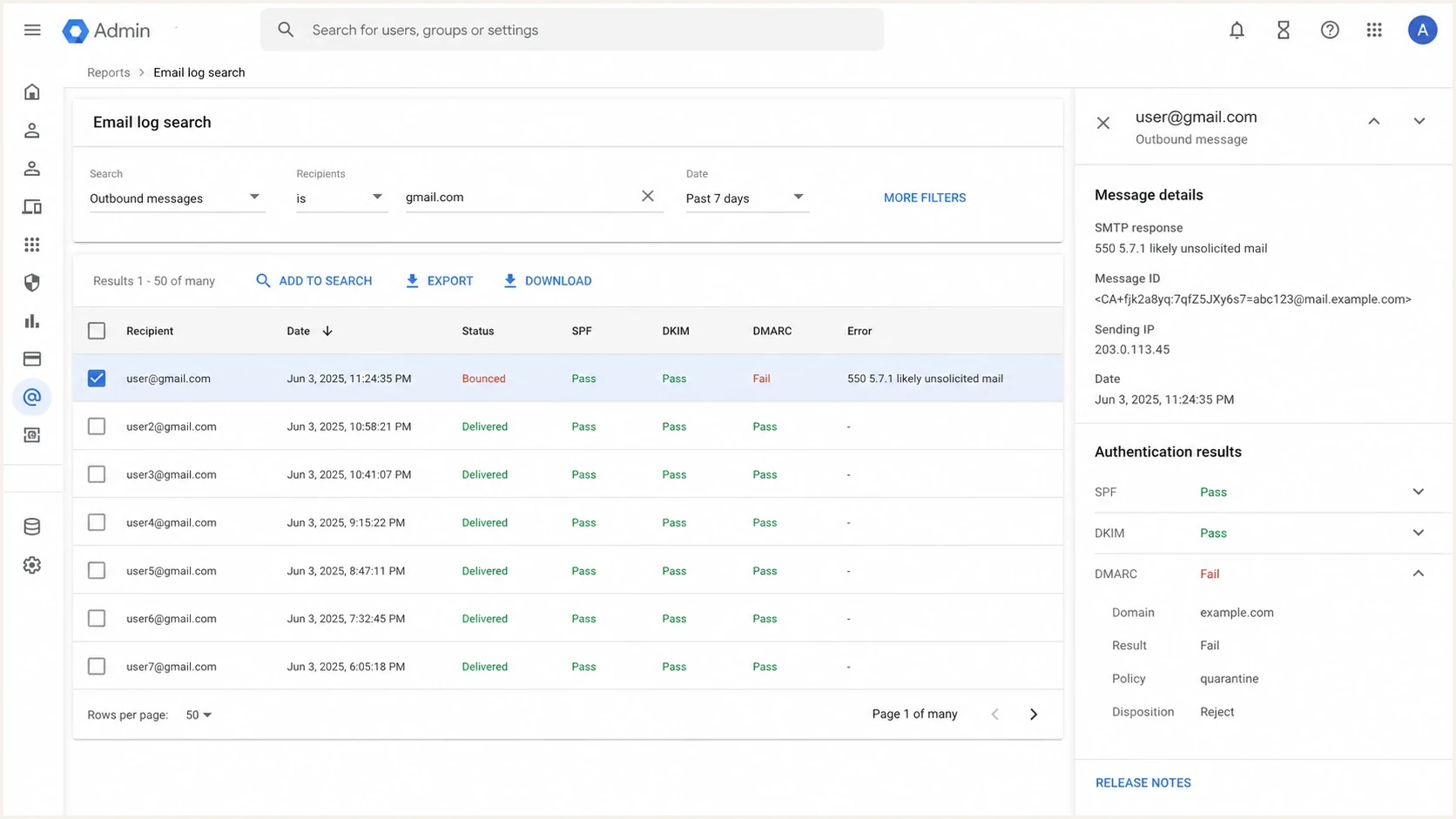
Google Admin console Email Log Search showing a Gmail SMTP 550 5.7.1 bounce.
- Complaints: High complaint rates tell Gmail recipients do not want the mail.
- Engagement: Large inactive segments drag reputation down, especially after volume spikes.
- Bounces: Old or guessed addresses produce hard bounces and spam signals.
- Velocity: Sudden jumps in Gmail volume create rate limits and permanent blocks.
- Shared IPs: Separate your domain diagnosis from the IP diagnosis if you use shared infrastructure.
- Linked domains: Check landing pages, tracking domains, and redirect targets for unsafe or broken destinations.
Complaint-rate triage
Operational thresholds for deciding how aggressively to pause and audit Gmail traffic.
Healthy
<0.05%
Keep watching, but do not change a working stream.
Watch
0.05-0.10%
Review recent list sources and subject lines.
Stop and audit
0.10-0.30%
Pause risky campaigns and remove weak segments.
Critical
>0.30%
Stop the stream, fix consent, and restart slowly.
Use Gmail Postmaster Tools to verify recovery
Use Gmail Postmaster Tools after the immediate fix to verify what Gmail sees for mail sent to personal Gmail accounts. Start with Compliance status, then compare Delivery errors, Spam rate, Authentication, Domain reputation, and IP reputation over the same sending dates. Add the authenticated DKIM domain or SPF Return-Path domain so the dashboards receive the right traffic.
|
|
|
|---|---|---|
Compliance status | Needs work items | Fix the named requirement |
Delivery errors | Rejected and deferred mail | Match dates to changes |
Spam rate | User-reported spam | Pause the source of spikes |
Authentication | SPF, DKIM, and DMARC pass rates | Find failing streams |
Reputation | Domain and IP ratings | Separate identity and IP issues |
Feedback loop | Complaint-heavy campaigns | Use distinct Feedback-ID values |
Encryption | TLS coverage | Find unencrypted routes |
Postmaster Tools checks for a 5.7.1 recovery.
Allow for reporting delay
Postmaster Tools is not real time. Compliance changes usually appear after processing and can take up to seven days in the Compliance status dashboard. Low-volume days can show no data, and Compliance status rolls subdomain traffic into the primary domain, so no data is not proof that the fix passed or failed.
Repair consent and content
You can ask for trust at collection time, not after Gmail has blocked the message. The practical fix is to make consent explicit, confirm high-risk signups, and make unsubscribing easier than the spam button.
If mail already lands in spam rather than bouncing, the Gmail spam folder fix path has the same core checks: authenticate the sender, prove consent, reduce risky volume, and remove content that looks unsafe or unwanted.
Login and account-security messages need an extra link check. The linked page should use HTTPS, match the sender's brand domain, avoid long tracking redirect chains, and explain why the recipient is being asked to sign in before showing credential fields. A clean SPF, DKIM, and DMARC result does not offset a login link that looks disconnected from the sender.
Broken footer, privacy, preference, image, and unsubscribe URLs create the same kind of trust problem. Repair every 404, redirect loop, expired tracking URL, blocked image URL, and broken preference path before judging Gmail recovery or domain warming.
- Opt-in: Use forms that explain what the person will receive and how often.
- Confirmation: Use confirmed opt-in for subscription messages, especially for risky sources, giveaways, imported lists, and role addresses.
- Unsubscribe: Put a clear unsubscribe link in subscription mail. At Gmail bulk-sender volumes, marketing and subscription messages also need one-click unsubscribe headers, and requests must be honored within 48 hours.
- Segmentation: Stop sending to people who have not opened or clicked in a long time.
- Content: Remove misleading subjects, URL shorteners, hidden redirects, attachment-heavy messages, and login-like pages that do not match your brand domain.
- Links: Repair broken landing pages, footer URLs, image hosts, tracking redirects, and unsubscribe or preference links.
A simple consent rule
Only send mail people asked for, at the time and frequency they expect. If that sentence is hard to prove for a segment, suppress the segment before you retest Gmail.
Test the real message before sending again
Send the exact campaign or transactional template into an email tester before you resume Gmail traffic. Test the final message after it passes through the same application, headers, link rewriting, tracking, and MTA path that real recipients get.
Email tester
Send a real email to this address. Suped shows a results button when the test is ready.
?/43tests passed
Do not stop at DNS. A real test catches broken headers, missing DKIM signatures, body links, unsubscribe headers, broken image URLs, and authentication results after the message has passed through your live sending path.
Postmaster Tools does not expose a campaign open-rate metric. Low opens in your sending platform alone do not prove spam placement, and privacy controls make them incomplete. Compare opens with bounces, clicks, replies, complaint rate, unsubscribes, conversion activity, and Gmail reputation data before deciding the fix failed.
Suped's product is useful here because DMARC monitoring, SPF and DKIM checks, blocklist (blacklist) monitoring, and issue resolution sit in one workflow. A practical workflow is to add the domain, confirm legitimate senders, resolve failures, and retest the same message after each fix.

Issue steps to fix dialog showing the issue overview, tailored fix steps, and verification action
Return to Gmail carefully
After the fix, do not restart the same send at full volume. Gmail reputation recovers through repeated evidence: clean authentication, low complaints, expected content, working links, and steady sending. Keep the first resend small and watch the exact bounce wording.
If messages keep bouncing or deferring, reduce volume until the SMTP error rate drops, then increase slowly again. If errors continue at low volume, review individual messages and compare a failing template or header change with a stable message before changing infrastructure.
- Pause: Stop the stream that produced the block and keep critical transactional mail separate.
- Fix: Correct the DNS, headers, consent source, link defect, or content issue found in the bounce and tests.
- Seed: Send to small engaged Gmail segments first and track bounces by exact text.
- Ramp: Increase volume slowly only after errors stay low and engagement is stable.
- Retire: Remove addresses that bounce, complain, or never engage.
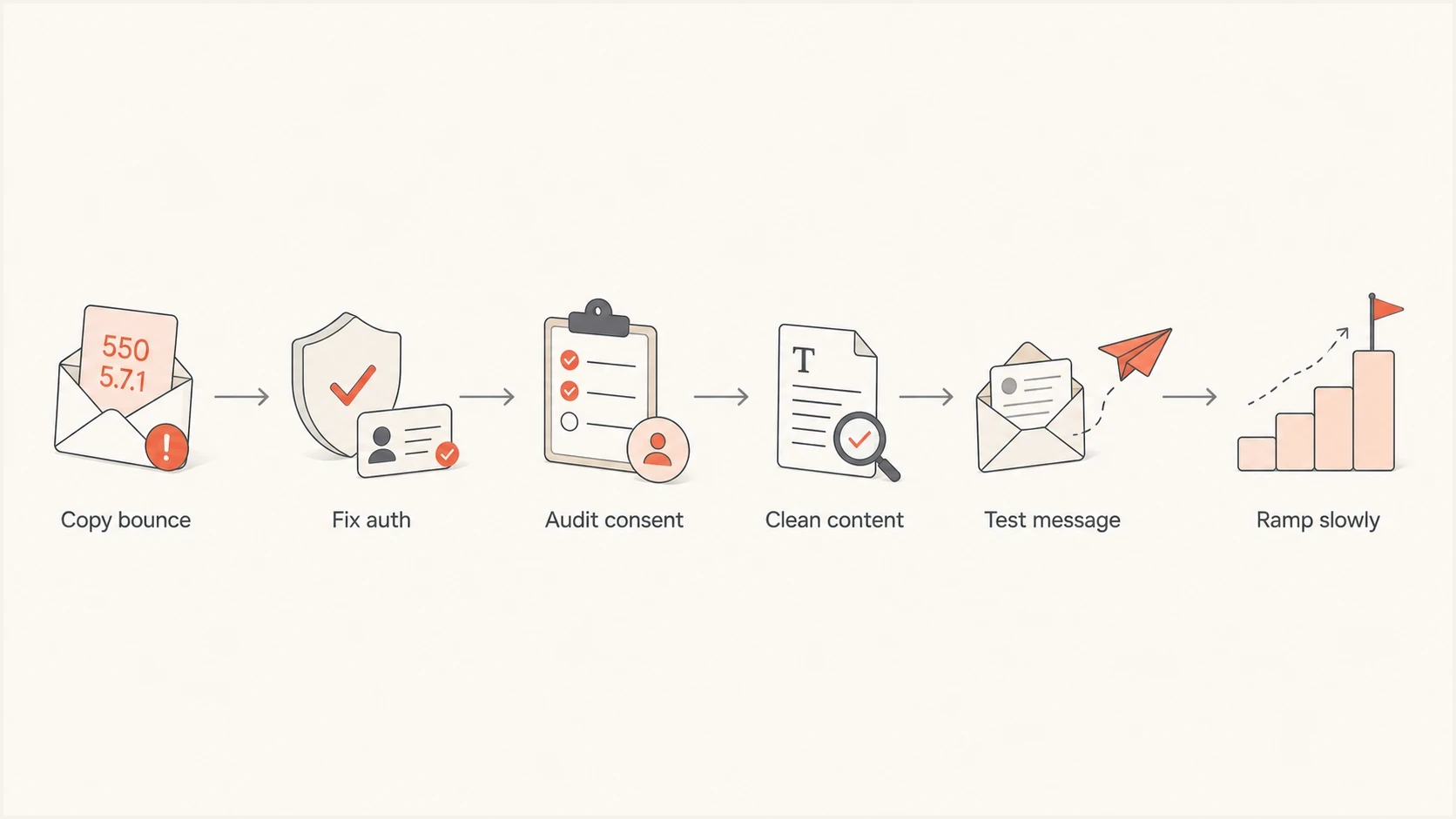
Flowchart for recovering from a Gmail SMTP 550 5.7.1 spam block.
Views from the trenches
Best practices
Capture the full bounce text before changing DNS; 5.7.1 alone is too broad to diagnose.
Confirm consent at collection time and use confirmation when signup quality is uncertain.
Separate transactional and marketing streams so one bad segment does not harm urgent mail.
Common pitfalls
Treating a Gmail spam block as a support appeal issue instead of a sending quality issue.
Publishing SPF and DKIM records but never checking the visible From domain match in reports.
Restarting full volume after one clean test instead of ramping Gmail traffic slowly over days.
Expert tips
Track exact Gmail error text by campaign so content, rate, and auth problems separate clearly.
Use DMARC reports to find unknown senders before moving policy enforcement forward.
Keep unsubscribe paths obvious because hidden exits turn frustration into spam complaints.
Expert from Email Geeks says 5.7.1 is too broad by itself; the three digit SMTP status, sender domain, and full Gmail text decide the fix.
2022-06-09 - Email Geeks
Marketer from Email Geeks says the likely unsolicited mail wording means Gmail is treating the message as spam, so the sending program needs an audit.
2022-06-09 - Email Geeks
The practical recovery path
Fix the bounce as a system problem. Get the exact Gmail wording, repair SPF, DKIM, DMARC, and headers, prove permission, reduce risky volume, repair broken links, and retest with the exact message. If you cannot show who sent each message and why the recipient expected it, Gmail will keep treating the stream as unwanted.
Suped's product fits the ongoing part: it watches DMARC, authentication pass rates, issue trends, hosted SPF, hosted DMARC, hosted MTA-STS, and blocklist monitoring in one place. That matters after the emergency fix because Gmail reputation recovery is mostly controlled by disciplined sending over time.




