How do I find the domain registrar and nameservers used by Shopify?

Updated on 12 Aug 2026: We updated this guide for Shopify's current domain connection and DNS management requirements.
The fastest way to find the registrar and nameservers used by a Shopify domain is to check the exact domain, not Shopify in general. Run a WHOIS or RDAP lookup for the registrar, then run a DNS NS lookup for the nameservers. Shopify sells domains as a reseller through accredited registrar partners, so a Shopify-bought domain can show the partner's name in registration data. If the domain was bought elsewhere and connected to Shopify, that provider remains the registrar unless the domain was transferred.
Shopify does not publish one dependable nameserver set for every customer domain. For third-party domains, Shopify's manual connection guide requires the domain provider's default nameservers, then points the A, AAAA, and www CNAME records at Shopify. For Shopify-managed domains, the DNS settings page is where A, AAAA, CNAME, MX, TXT, and SRV records are edited.
Direct answer
- Registrar: Use WHOIS or RDAP on the exact domain. A Shopify-bought domain can list an accredited registrar partner.
- Nameservers: Query the domain's NS records. Do not infer them from Shopify's corporate domains.
- Shopify connection: Use the domain provider's default nameservers and update the required DNS records there.
What Shopify actually controls
A Shopify store can involve several separate control points. The registrar controls the domain registration. The authoritative nameservers control DNS answers. Shopify controls the storefront application and the records needed to route web traffic to the store. Email records sit in the same DNS zone unless a subdomain is delegated, and email sending often uses a separate system.
The phrase "used by Shopify" can therefore mean different things. A domain can be registered through Shopify, have DNS edited in Shopify, point its web records to Shopify, and still send email through a separate system. Identify the control layer before changing anything.
Shopify-managed domain
- Registrar: An accredited partner can appear in WHOIS or RDAP while Shopify remains the customer-facing reseller.
- DNS edits: Handled inside Shopify admin for supported record types.
- Best clue: Shopify admin shows DNS management, billing, and renewal controls for the domain.
Third-party domain
- Registrar: The provider where the domain was bought or transferred.
- DNS edits: Handled in the domain provider account, using its default nameservers for Shopify's connection flow.
- Best clue: Shopify admin shows connection status, while billing and renewal stay with the provider.
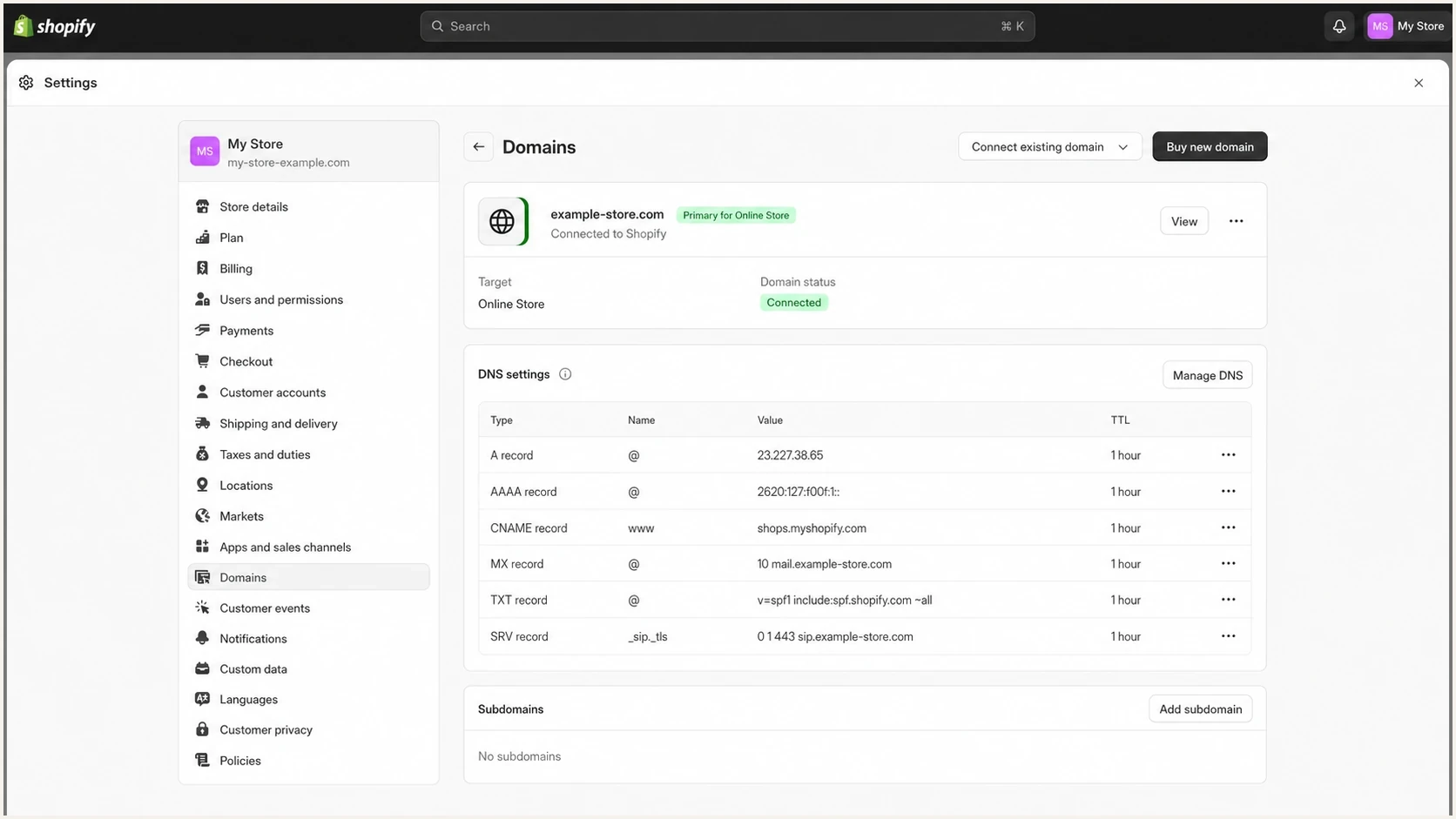
Shopify Admin domain settings with DNS record controls.
Check Shopify admin first
If store access is available, Shopify admin provides the quickest first-party check. Go to Settings > Domains and select the exact custom domain. The details page shows its connection status and whether DNS can be managed in Shopify.
- Open Domains: In Shopify admin, go to Settings > Domains.
- Select the domain: Use the custom apex domain, not the myshopify.com address.
- Check management: A DNS settings section with record controls indicates a Shopify-managed domain.
- Confirm externally: Compare the admin result with WHOIS or RDAP and live NS records.
A connected third-party domain still uses Shopify for storefront routing, but the third-party provider retains registration, DNS, billing, and renewal management. A domain bought through Shopify or transferred to Shopify is managed in Shopify admin. Public lookups remain useful because access, delegation, and ownership can change independently.
How to find the registrar
For the registrar, start with WHOIS or RDAP. The registrar field is the direct answer for the registration layer. If the domain was registered through Shopify, expect the formal registrar name to be an accredited partner rather than Shopify in some lookup results. The exact result for the domain and TLD wins.
The registration result also exposes the registrar identity, domain status codes, and abuse contact. It does not prove where DNS is hosted or where email is sent. Those require separate DNS checks.
Registrar lookup commandsBASH
whois example.com
rdap -j example.com
- Check WHOIS: Look for Registrar, Registrar IANA ID, and Registrar URL fields.
- Check RDAP: Use its structured registrar and status data when WHOIS output is inconsistent or hard to parse.
- Compare evidence: If doing asset discovery, compare several confirmed Shopify-bought domains without assuming one partner is universal.
- Avoid assumptions: A Shopify-hosted storefront does not mean the domain was registered through Shopify.
|
|
|
|---|---|---|
Registrar | Registration provider | Best first clue |
IANA ID | Registrar identity | Useful for matching |
Name server | Delegated DNS | Confirm with DNS |
Status | Transfer state | Migration planning |
Registrar lookup fields that matter
How to find the nameservers
For nameservers, query the live NS records. The parent-zone delegation and the domain's authoritative answer should agree. If they do not, treat the mismatch as a DNS issue and resolve it before changing email or storefront records.
Nameserver fingerprinting is weaker than registrar data for identifying a Shopify-registered domain. A domain can be registered through Shopify and later transferred, while a third-party domain can point its web records to Shopify. For Shopify's current third-party connection flow, the live NS records should match the domain provider's default nameservers rather than custom or external nameservers.
Nameserver lookup commandsBASH
dig NS example.com +short

nslookup -type=NS example.com
Confidence levels for Shopify identification
Use several signals together when deciding whether a domain is Shopify-managed or only Shopify-hosted.
Low confidence
Visual check only
Only the site looks like a Shopify storefront.
Medium confidence
DNS web records
A and CNAME records point at Shopify web infrastructure.
High confidence
Multi-signal check
WHOIS, NS records, and Shopify admin evidence all match.
Do not use Shopify's own domain as the pattern
Shopify's corporate domains can use DNS selected for Shopify's own infrastructure. That does not prove what a customer domain bought through Shopify uses. Check each customer domain directly.
|
|
|
|---|---|---|
NS | Who answers DNS | Who hosts web |
A | Apex routing | Registrar |
CNAME | Alias target | DNS owner |
MX | Inbound mail | Storefront host |
What each DNS clue proves
Shopify DNS records are not nameservers
The most common confusion is mixing up nameservers with Shopify's required web records. Shopify's manual setup for a third-party root domain uses A, AAAA, and www CNAME records at the domain provider. These records do not replace NS delegation. Shopify currently requires one apex A record, one apex AAAA record, and one www CNAME pointing to Shopify.
Common Shopify web DNS recordsDNS
@     A      23.227.38.65
@     AAAA   2620:0127:f00f:5::
www   CNAME  shops.myshopify.com.
The IPv4 address above is Shopify's default, but Shopify can provide a regional address with another 23.227.38.x host value. Treat the value shown in Shopify's connection flow or DNS settings as valid. If a provider rejects the condensed IPv6 address, use 2620:0127:f00f:0005:0000:0000:0000:0000. Keep the provider's default TTL.
For a third-party domain, keep or restore the domain provider's default nameservers before connecting it to Shopify, then edit DNS in that provider account. If custom or external nameservers are active, export every record before moving the delegation. For a Shopify-managed domain, make supported DNS changes in Shopify admin and verify the public answers afterward.
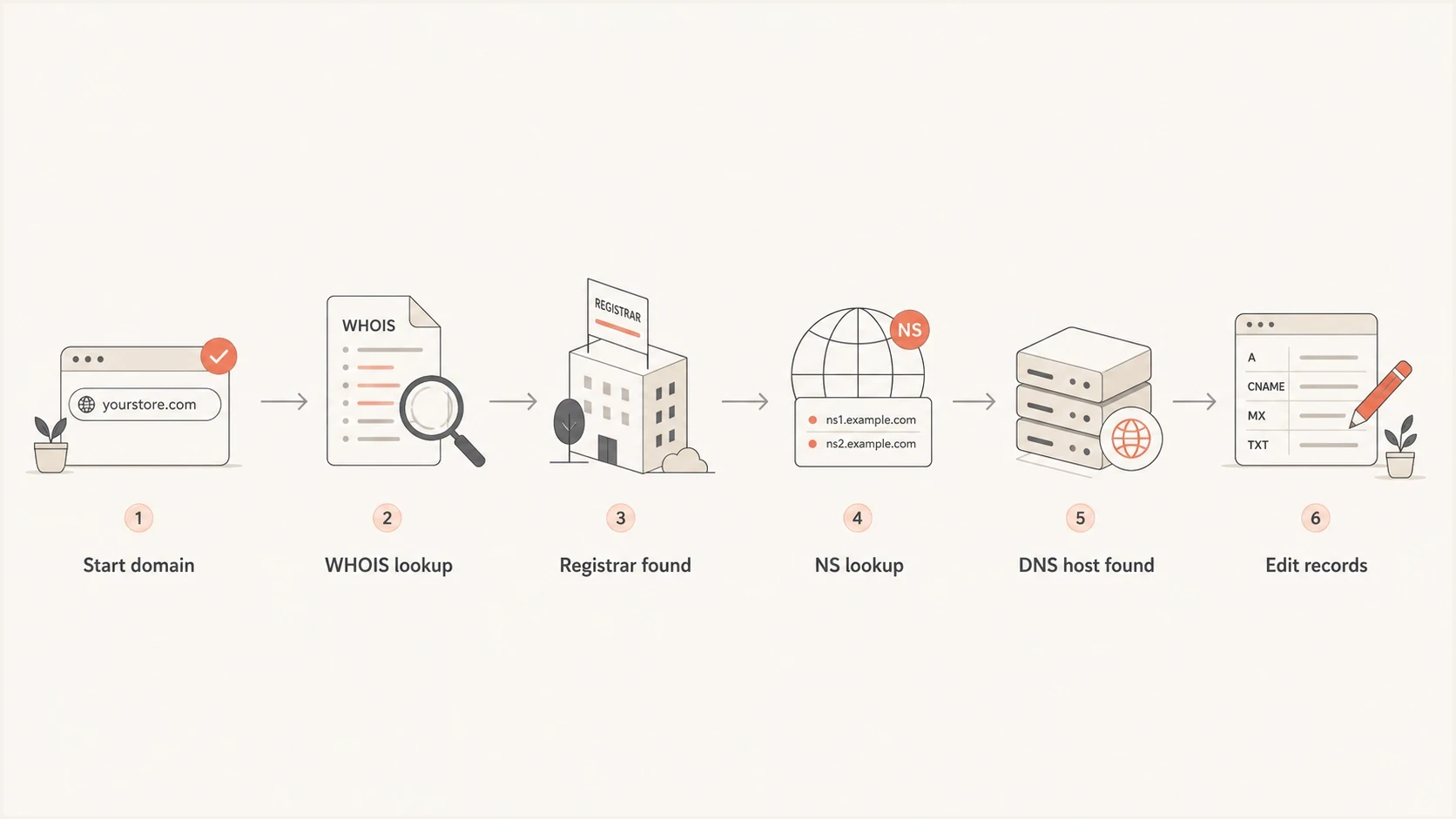
Shopify domain workflow using WHOIS and NS lookups.
Why this matters for email authentication
Authoritative DNS for each hostname decides where email authentication records must be added. SPF usually sits at the sending domain, DKIM under selector._domainkey, and DMARC under _dmarc. A TXT or CNAME record added in a control panel that is not authoritative will not appear in public DNS.
After finding the active DNS host, Suped's domain health checker makes DMARC, SPF, and DKIM problems visible in one place. For proof from a real sent message, the email tester checks the message headers as well as the published records.
?
What's your domain score?
Deep-scan SPF, DKIM & DMARC records for email deliverability and security issues.
For Shopify Email, go to Settings > Notifications > Sender email, start domain authentication, and publish every CNAME value Shopify provides at the authoritative DNS host. Removing those CNAME records can cause deliverability failures. Other sending systems can require separate SPF, DKIM, or return-path records.
For subdomains, check whether the sending system expects records at the root domain or under a delegated label. A delegated subdomain can have different authoritative nameservers, so query the exact SPF, DKIM, DMARC, CNAME, and MX hostnames rather than assuming the apex zone controls them.
A practical lookup workflow
Collect the evidence in this order to avoid treating a Shopify web record as proof that Shopify is the registrar or DNS host.
- Normalize domain: Check the apex first, then www and each sending or delegated subdomain.
- Find registrar: Use WHOIS or RDAP and record the registrar name and IANA ID.
- Find nameservers: Run an NS lookup and compare the result with the domain provider's required default nameservers.
- Check web records: Look for Shopify A, AAAA, and CNAME targets, allowing for Shopify-assigned regional A records.
- Check email records: Inspect MX, SPF, DKIM, and DMARC at each authoritative DNS zone.
- Decide control: Use Shopify admin for DNS only when the domain is Shopify-managed.
Example evidence fileTEXT
Domain: example.com
Registrar: Example Registrar
Registrar IANA ID: 999
NS: a.ns.shopco.com
NS: b.ns.shopco.com
NS: c.ns.shopco.com
A: 23.227.38.65
CNAME www: shops.myshopify.com.
Use the evidence file carefully
The sample shows the type of notes to keep, not a universal Shopify default. If one field changes, update the conclusion. Registrar, NS, web, and email records can move independently.
Where Suped fits
Registrar and nameserver discovery identifies the correct control panel. Suped is our DMARC and email authentication platform. It turns that DNS finding into ongoing DMARC, SPF, DKIM, blocklist, and blacklist monitoring instead of leaving it as a one-time lookup note.
Suped's DMARC monitoring shows which sources pass or fail authentication, whether a Shopify-related sending setup is missing DKIM, and which DNS record needs attention. Blocklist monitoring adds blocklist and blacklist status to the same operational workflow.
DMARC record detail view showing SPF, DKIM, DMARC, rDNS diagnostics, and DNS records
Once the authoritative DNS host is known, Suped can track whether the published records are correct, whether a DNS change caused authentication failures, and whether mail starts appearing on a blocklist or blacklist.
Common traps to avoid
Most Shopify domain mistakes come from acting on the wrong control layer. Check the layer first, then make the change to avoid breaking storefront or email records.
|
|
|
|---|---|---|
Wrong login | DNS changes ignored | Check NS first |
Custom NS | Connection blocked | Use provider defaults |
Duplicate A | Apex conflict | Keep one value |
Wrong zone | Email fails auth | Publish at authority |
Shopify domain troubleshooting traps
High-risk mistake
Do not move nameservers before copying every active record, including MX, SPF, DKIM, DMARC, verification TXT records, and subdomain records. A clean storefront cutover can still break email if the old DNS zone had records that were not recreated.
Views from the trenches
Best practices
Start with WHOIS, then confirm delegation with live NS lookups for the exact domain.
Record registrar, nameservers, web records, MX, SPF, DKIM, and DMARC in one shared note.
Use Shopify admin for DNS only when the domain is actually managed inside Shopify.
Common pitfalls
Do not assume Shopify has one public nameserver set for every customer domain or store.
Do not treat Shopify web records as proof that Shopify registered the domain itself.
Do not add email records in a control panel when its nameservers are not authoritative.
Expert tips
For asset discovery, combine registrar, NS, web, and email signals before labeling.
If WHOIS is vague, compare structured RDAP data and Shopify admin domain status.
When moving DNS, export the old zone first and verify mail records after cutover.
Shopify can be the customer-facing reseller while WHOIS or RDAP identifies an accredited registrar partner for the exact domain.
2022-11-10 - Email Geeks
Nameserver fingerprinting alone is unreliable because registration, DNS authority, and storefront routing can change separately.
2022-11-10 - Email Geeks
How to identify Shopify domain control
To find the registrar for a specific Shopify domain, check WHOIS or RDAP. Shopify sells domains as a reseller through accredited registrar partners, so the formal registrar can differ from the customer-facing account. To find the nameservers, query the domain's NS records and trust the live delegation.
For a third-party domain connected to Shopify, use the domain provider's default nameservers and add the Shopify A, AAAA, and www CNAME records in that provider account. For a Shopify-managed domain, use Shopify admin for DNS changes and verify the public records afterward.




