How do I find a postmaster contact at Terra.com.br and handle throttling issues?


Updated on 4 Aug 2026: We checked Terra's contact routes and added safer throttling and retry guidance.
Start by checking Terra's historical public postmaster pages and sending one concise request to postmaster@terra.com.br, but verify each route before relying on it. Current checks show the old postmaster index resolving to a login page and the complaint form failing to load. Recent sender reports also describe unanswered form submissions and messages to the role address, so keep working on the sending issue while you wait.
For throttling, give Terra.com.br its own traffic profile. Reduce per-domain concurrency and hourly volume, spread campaigns across a longer window, and confirm clean authentication, bounce handling, unsubscribe handling, and complaint hygiene before requesting a review.
- Verify the published routes: Treat the old postmaster index and complaint form as historical routes until a submission succeeds.
- Try the role address once: Send the same evidence to postmaster@terra.com.br, but do not assume that silence means a ticket exists.
- Send slower: Start with a conservative Terra-only throttle, then increase only after temporary deferrals fall.
- Escalate with proof: Include sending assets, timestamps, complete SMTP responses, sample headers, and current authentication results.
Terra contact and throttling answer
Use Terra's published postmaster routes as best-effort contact options, record whether the page or message actually works, and reduce sending speed to Terra domains at the same time. Continuing to hit the same limit while waiting for a reply makes recovery harder. Make the traffic easier to accept, then request a review with current evidence.
Terra contact routes to testtext
postmaster@terra.com.br
mail.terra.com.br/postmaster/index-en.html
mail.terra.com.br/postmaster/reclame_postmaster_ps_mail_form-en.html
Do not assume a submission reached Terra
The old postmaster index currently resolves to a login page, and the complaint-form route does not load reliably. Save the time, URL, result, and any confirmation identifier when testing a route. Do not send repeated follow-ups to old private addresses.
A public Reddit sender thread reports unanswered web forms and messages to postmaster@terra.com.br. Treat that report as evidence that the routes are unreliable, not proof of Terra's internal process. Your logs and submission records matter more when diagnosing the delivery failure.
Verify Terra's contact routes
Separate the contact problem from the acceptance problem. Contacting Terra does not replace fixing the traffic pattern that triggered throttling. Prepare sender evidence before testing a contact route so a successful submission is complete.
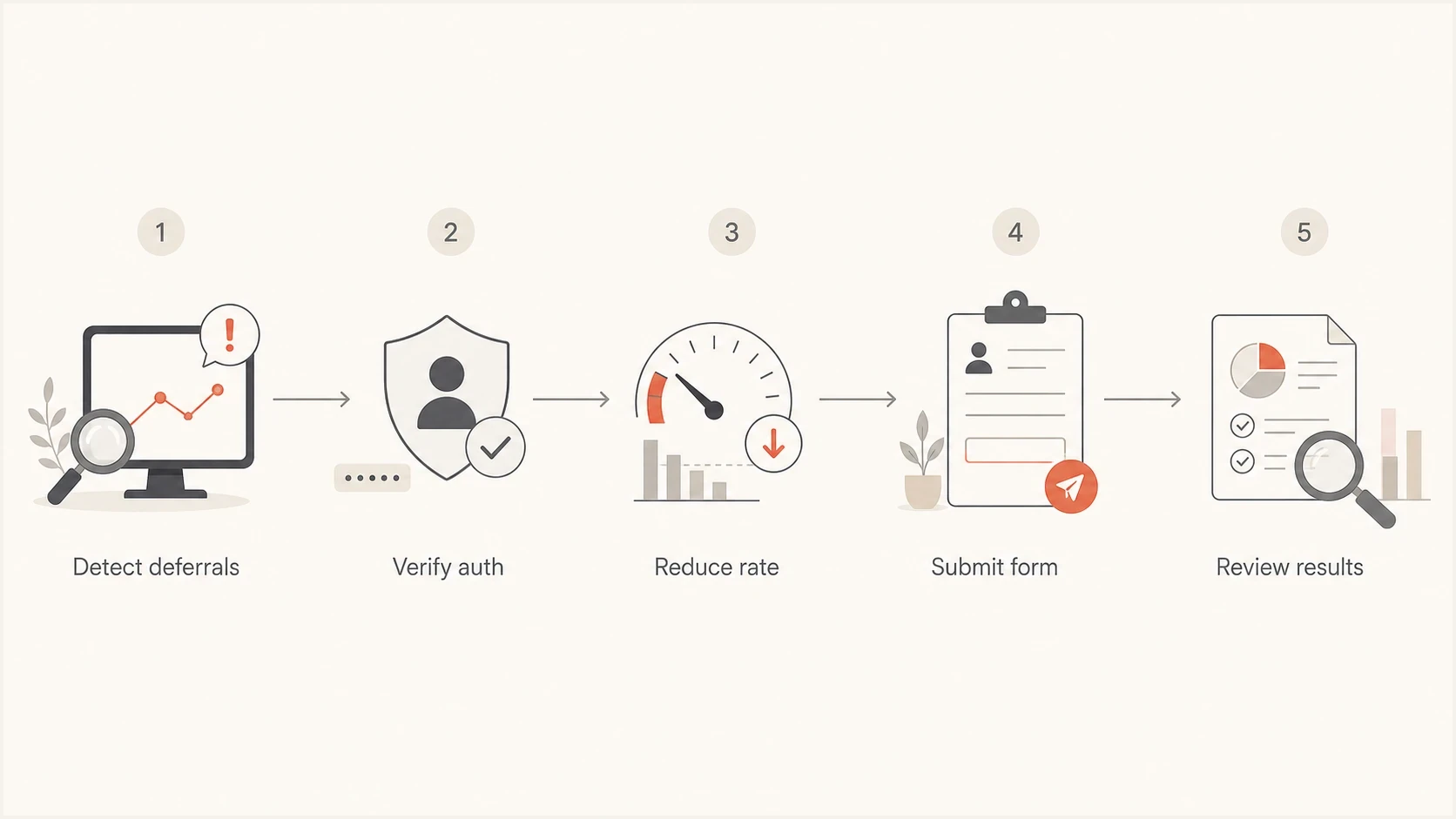
Terra.com.br email throttling flowchart covering deferral detection, authentication checks, rate reduction, form submission, and review.
|
|
|
|---|---|---|
Sender IPs | All active IPs | Terra needs the exact sources. |
Domains | Header From and MAIL FROM domains | Authentication and reputation use different identities. |
SMTP logs | UTC timestamps and complete responses | Enhanced codes and text identify the failure class. |
SMTP identity | PTR and HELO/EHLO hostname | Basic sending identity must be valid and consistent. |
Headers | Accepted message samples | Authentication results can be checked. |
List hygiene | Consent and suppression process | It explains how unwanted mail is prevented. |
Route status | Page result and confirmation ID | It proves whether the request entered a queue. |
Evidence to gather before testing a Terra postmaster route.
Keep the description direct. State that Terra.com.br is deferring or rejecting legitimate mail, list the affected sending assets, include a narrow UTC window, quote the full SMTP response, and explain the rate changes already made. Operational data is more useful than a campaign narrative.
Prove throttling before escalating
Throttling is a rate-control pattern. It usually appears as temporary 4xx responses, connection limits, slow accepts, or deferrals that clear after a later retry. A 5xx response is permanent for that delivery attempt, but it can indicate an invalid recipient, sender-policy failure, authentication problem, reputation decision, or another condition. Read the complete enhanced status code and response text before choosing a fix.
Illustrative SMTP patternstext
421 4.7.0 Too many connections from sending host
450 4.7.1 Message temporarily deferred
451 4.7.1 Try again later
550 5.7.1 Sender rejected
Do not present these illustrative lines as Terra's published codes. Classify the exact production reply instead. Temporary deferrals often point to rate, concurrency, volume bursts, or reputation cooling. Permanent rejections require a narrower diagnosis based on the full reply, with checks for address validity, authentication, suppression quality, and blocklist (blacklist) status where relevant.
Email tester
Send a real email to this address. Suped shows a results button when the test is ready.
?/43tests passed
Before changing production traffic, send a representative message through the email tester and inspect its headers, authentication results, content signals, and DNS posture. A clean test does not guarantee Terra acceptance, but a failing test gives you a specific issue to fix before escalation.
Run the domain health checker and compare its result with live MTA logs. DNS can look correct while a sending stream still fails because of volume spikes, old recipients, a problematic IP, or an unexpected sending identity.
Retry temporary failures without amplifying them
A 4xx response tells the sending MTA to keep the message queued and try again later. Tight retry loops create more connections while Terra is already limiting traffic, which can extend the problem. Apply the retry policy only to Terra's affected queue so other domains continue normally.
- Back off progressively: Increase the delay after repeated 4xx responses instead of retrying every few minutes.
- Add jitter: Vary retry times slightly so a large deferred batch does not reconnect at once.
- Preserve the queue: Do not convert a temporary deferral into a hard bounce before the configured queue lifetime expires.
- Track recovery: Monitor deferred rate, eventual delivery, queue age, and permanent rejection rate by sending IP.
Do not retry permanent failures unchanged
A 5xx response requires suppression or investigation according to the complete reply. Repeatedly sending the same message to a permanently rejected address adds traffic and can damage sender reputation.
Set Terra-specific throttles
Terra should have its own sending profile. A rate that works at a large global mailbox provider does not establish a safe Terra rate. Begin with low concurrency and a reduced message rate. Use smaller batches and longer retry spacing. Increase gradually only when temporary deferrals stay low across several comparable sends.
Rate decisions for Terra testing
Terra does not publish a verified numeric sender limit, so use observed delivery results.
Deferrals rising
Back down
Reduce message rate and concurrency, then lengthen retry spacing.
Deferrals falling
Keep steady
Hold the current profile while the deferred queue clears.
Acceptance stable
Increase slowly
Test one small increase and compare the same metrics again.
Owned MTA
- Per-domain rules: Create a Terra.com.br profile instead of changing global delivery.
- Concurrency: Limit simultaneous connections and messages per connection.
- Retries: Back off after 4xx responses instead of retrying in tight loops.
Managed sending platform
- Send throttling: Spread Terra recipients across a longer delivery window.
- Segmentation: Split Terra recipients into smaller sends instead of one burst.
- Suppression: Remove Terra recipients who are stale, bouncing, suppressed, or unengaged before retrying.
For a configurable MTA, directive names depend on the software and version. Define Terra separately, keep connections low, cap the message rate, and space retries. Let live deferral and eventual-delivery data determine the final values.
Conceptual per-domain MTA profiletext
domain: terra.com.br
concurrency: low
message-rate: reduced-and-tested
retry-policy: progressive-backoff-with-jitter
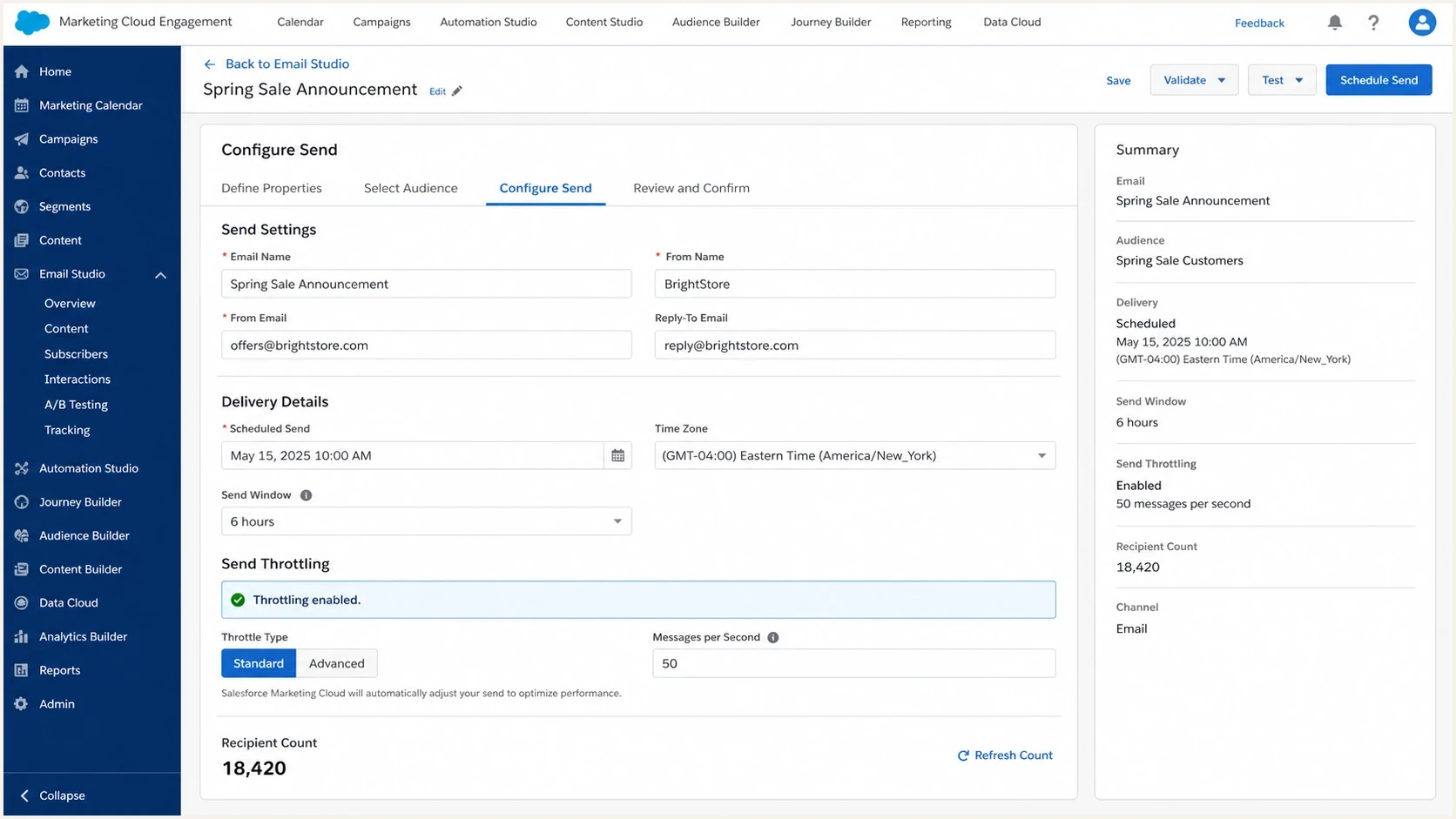
Salesforce Marketing Cloud Engagement send settings with throttling enabled.
Fix authentication before asking for review
Terra throttling can be rate-related, but authentication failures make diagnosis harder. Check the identities used on the affected messages. SPF should pass for the MAIL FROM domain. The selected DKIM signature should validate, and DMARC should pass through an SPF or DKIM domain match. Also confirm that each sending IP has valid reverse DNS and uses a consistent HELO/EHLO hostname.
The minimum clean sender baseline
- SPF authorization: The MAIL FROM domain should authorize the sending IP and stay within the SPF DNS lookup limit.
- DKIM validation: At least one active signature should validate without a body or header error.
- DMARC domain match: A passing SPF or DKIM identity should match the Header From domain under DMARC.
- SMTP identity: Forward and reverse DNS should identify the HELO/EHLO host consistently.
- Reputation checks: Check IP and domain blocklist (blacklist) status before escalation.
Suped's DMARC monitoring can supply the authentication part of the evidence packet by showing SPF and DKIM results beside DMARC status for each sending source. This is useful when Terra-bound mail uses more than one marketing or transactional source.

Issue steps to fix dialog showing the issue overview, tailored fix steps, and verification action
In Suped's product, use the issues view to separate an authentication failure from a rate-control problem. If one source passes DKIM and another fails, fix the failing source before comparing Terra acceptance at a lower rate. Export or record the current result with the sending IP and test window for the escalation packet.
Do not skip blacklist checks. A listed IP can complicate a Terra escalation even when the immediate symptom looks like throttling. Suped's blocklist monitoring can place blocklist (blacklist) status beside the authentication results used during the same investigation.
What to send Terra
A useful Terra request is short and reproducible. Write it as an incident note. Include the failure, affected sending assets, complete error pattern, test window, and changes already made.
Postmaster request templatetext
Subject: Delivery review request for Terra.com.br

Hello Terra postmaster team,

We are seeing temporary deferrals for legitimate opted-in mail to
Terra.com.br recipients.

Affected stream:
- Transactional account notifications

Sending IPs:
- 192.0.2.10
- 192.0.2.11

Domains:
- example.com
- bounce.example.com

Observed responses:
- 421 4.7.0 Too many connections
- 450 4.7.1 Message temporarily deferred

Time window:
- YYYY-MM-DD 13:00-18:00 UTC

Actions taken:
- Reduced Terra.com.br message rate and concurrency
- Added progressive retry backoff
- Removed inactive Terra recipients
- Verified SPF and DKIM results with a DMARC domain match

Please review whether these IPs or domains have a current reputation
or rate-limit issue with Terra.com.br.

Regards,
Sender operations team
If the first attempt gets no response, collect results from a new throttled test window before sending one concise follow-up. Do not change the rate, recipient selection, content, and IP at the same time. Change one control at a time so the acceptance data remains interpretable.
The same method applies to other regional throttling cases. For the broader operating model, see sending rate limits. Provider details differ, but the sequence remains useful: classify the full SMTP response, slow the affected stream, fix technical faults, then escalate with proof.
Views from the trenches
Best practices
Document each Terra route attempt with sender IPs, UTC times, SMTP responses, and results.
Use a Terra-specific throttle so broader campaign changes do not hide the root cause.
Keep authentication, SMTP identity, suppression, and blacklist evidence ready for review.
Common pitfalls
Searching for private contacts first can delay the sender-side fixes Terra expects.
Applying large-provider send speeds to Terra can trigger preventable deferrals again.
Mixing content, IP, rate, and list changes makes results difficult to interpret.
Expert tips
Retest after each rate change and compare Terra accepts in the same time window.
Keep platform throttling narrow so only Terra traffic slows during the full test.
Send the postmaster a short incident note instead of a broad delivery summary email.
Marketer from Email Geeks says Terra's public postmaster pages are the most reliable starting route when no current direct contact is available.
2024-12-18 - Email Geeks
Marketer from Email Geeks says older private contacts for Terra are not dependable, and the published forms should be tried first.
2024-12-18 - Email Geeks
Terra throttling recovery plan
Test Terra's historical postmaster pages and postmaster@terra.com.br, but do not depend on a response. Treat a 4xx pattern as a Terra-specific rate issue until the complete SMTP replies prove another cause. Reduce Terra.com.br volume and concurrency, then verify authentication and sender identity before requesting review.
Keep live SMTP logs, domain-authentication results, DMARC source data, and blocklist (blacklist) status in the incident record. In Suped's product, use source and issue data to document authentication results for each sending stream, then combine that evidence with the MTA logs that show Terra's responses.
Once Terra accepts mail steadily at a lower rate, increase one setting in a small step. If deferrals return, restore the last stable profile and keep collecting eventual-delivery data. That approach supports recovery even when no direct postmaster reply arrives.




