How do I ensure email deliverability with different return-path addresses and subdomains?

Published 5 Jun 2025
Updated 24 Jul 2026
11 min read
Summarize with
Updated on 24 Jul 2026: We clarified custom Return-Path setup, current DMARC domain matching, and bulk-sender checks.
Yes, different Return-Path addresses and subdomains can work without hurting deliverability. The Header From domain must satisfy DMARC through a matching SPF-authenticated MAIL FROM domain or a matching DKIM signing domain. The Reply-To should route replies where intended, while the Return-Path should stay under the sending platform's bounce-processing control.
The Header From address does not need its own mailbox or MX record to pass DMARC. If recipients are expected to reply, provide a working Header From address or Reply-To address. For example, mail sent as something@email.companyname.com can direct replies to support@companyname.com while using bounce.email.companyname.com as its custom Return-Path.
- Header From: This is the author identity recipients see and the domain DMARC evaluates.
- Reply-To: It can use the root domain or another domain when the address accepts replies.
- Return-Path: This is the envelope sender, also called MAIL FROM, used for bounces and SPF.
- DKIM: Its signing domain can give DMARC a pass when the signature validates and the domain matches the Header From domain.
The direct answer
A safe pattern is to send marketing or product mail from a purpose-built subdomain, authenticate the identities that the sending platform actually uses, and point replies to the inbox the team monitors. The sender can be something@email.companyname.com, the Reply-To can be support@companyname.com, and the Return-Path can be bounce.email.companyname.com when the provider verifies that bounce domain and processes its delivery failures.
A safe rule
Provide a working reply route whenever replies are expected. Authenticate each sending stream through matching SPF and DKIM paths, publish a DMARC policy for the Header From domain, and monitor the results.
Different domains are not suspicious by themselves. A provider-owned Return-Path can pass SPF without satisfying DMARC because its domain does not match the Header From domain. Matching DKIM can still produce a DMARC pass, while a custom Return-Path adds a matching SPF route when the provider supports it.
Safer pattern
- From: Use a stable identity covered by DMARC and matching DKIM.
- Reply-To: Route replies to a monitored inbox or managed alias.
- Bounces: Use a verified custom bounce domain that the sender controls.
- Reports: Review DMARC data before increasing volume.
Risky pattern
- From: Use a new subdomain without checking its DMARC coverage.
- Reply-To: Send replies to an address that rejects or drops mail.
- Bounces: Use a provider domain for SPF while DKIM also fails the DMARC domain match.
- Reports: Move volume before checking production authentication.
Know which address you mean
The phrase "return address" often refers to different email identities. Separate them before changing DNS because each identity has a different job in delivery and authentication.
|
|
|
|---|---|---|
Header From | The author identity users see | DMARC policy domain |
Reply-To | Where human replies go | Not checked by DMARC; should work |
Return-Path or MAIL FROM | Where automated bounces go | SPF must pass and match if used for DMARC |
DKIM d= domain | The signing identity | Must pass and match if used for DMARC |
Inbound reply domain | Receives replies from people | Needs working routing when used |
Email identities that matter for this setup
The Header From domain is the domain DMARC protects. A DMARC pass needs at least one valid route: SPF passes for the MAIL FROM identity and its domain matches, or DKIM passes and its d= domain matches. The Reply-To does not take part in that decision.
The Return-Path shown in a delivered message records the SMTP envelope sender. The receiving system writes that header from the MAIL FROM value, so adding or editing a Return-Path header in message content does not configure a custom bounce domain. Configure it in the sending platform.
How subdomains should be authenticated
Publish each record at the identity it protects. SPF belongs on the MAIL FROM domain used by the sending platform. The DKIM public key belongs under the selector and d= signing domain. DMARC belongs at the Header From domain or at a parent domain whose policy applies to that subdomain.
Example DNS records for separate reply and bounce domainsdns
email.example.com.  MX 10 inbound.example.com.
bounce.email.example.com.  MX 10 bounce.esp.example.
bounce.email.example.com.  TXT "v=spf1 include:esp.example -all"
selector._domainkey.email.example.com.  CNAME selector.esp.example.
_dmarc.email.example.com.  TXT "v=DMARC1; p=none; rua=mailto:dmarc-reports@example.com"
Relaxed domain matching is the DMARC default. It accepts authenticated and Header From domains that have the same Organizational Domain. Strict matching requires the exact same domain. RFC 9989 now uses a DNS Tree Walk to determine the Organizational Domain, so explicit DMARC records on active author subdomains make the intended policy easier to discover consistently.
Do not depend on SPF alone
SPF checks the MAIL FROM domain, not the visible From address. SPF can pass while DMARC still fails when those domains do not match. A matching DKIM signature gives the message another route to DMARC pass and is more likely to survive forwarding.
Current DMARC record note
RFC 9989 defines current DMARC processing. It replaces Public Suffix List discovery with DNS Tree Walk and removes the pct tag. Existing v=DMARC1 records remain valid, but new rollout plans should use monitored policies instead of percentage sampling.
This is where DMARC monitoring matters. Suped's product shows which sources pass SPF or DKIM, which domains they authenticate, and whether each result satisfies the Header From domain match. That workflow helps locate a custom Return-Path mistake before volume increases.
Suped DMARC dashboard showing email volume, authentication health, and source breakdown
How to configure a custom Return-Path
A custom Return-Path, also called a custom MAIL FROM or bounce domain, keeps the SPF-authenticated identity under a domain the organization controls. It should still route automated delivery failures to the sending platform rather than to a human mailbox.
- Choose the domain: Use a dedicated subdomain such as bounce.email.example.com that meets the chosen relaxed or strict DMARC matching mode.
- Enable it at the sender: Add the custom MAIL FROM inside the sending platform before publishing DNS.
- Publish exact DNS: Use the provider's required CNAME, MX, or SPF TXT records. Do not substitute a generic record.
- Keep bounce ownership: Confirm the platform receives delivery status notifications and suppresses hard-bouncing recipients.
- Verify production mail: Inspect smtp.mailfrom, SPF, DKIM, and DMARC results in a message sent through the real production path.
Do not route bounces to support
Bounce addresses often contain a different local part for each recipient or message. That variation is normal and helps the sender associate a delivery failure with the right recipient. Sending those automated notices to a support inbox breaks automated suppression handling.
If the sending platform does not support a custom Return-Path, matching DKIM can still satisfy DMARC. Confirm that the DKIM signature uses the organization's domain and monitor it closely because the SPF result will authenticate the provider's domain instead.
How to receive mail on the subdomain
Inbound handling is needed only when the Header From or Reply-To address on the subdomain should receive human replies. A full mailbox is optional. An alias, group, forwarding rule, or catch-all can route the address to a monitored inbox. The provider-managed bounce domain is separate and should not be reused for human replies.
Example MX routing for a subdomaindns
email.example.com.  MX 10 inbound.example.com.

# Then configure the inbound mail system:
# sender@email.example.com forwards to support@example.com
DNS tells other mail systems where to send replies for the subdomain. The inbound mail system must also list that subdomain as accepted and route the exact recipient address. An MX record alone does not help when the destination server rejects the recipient.
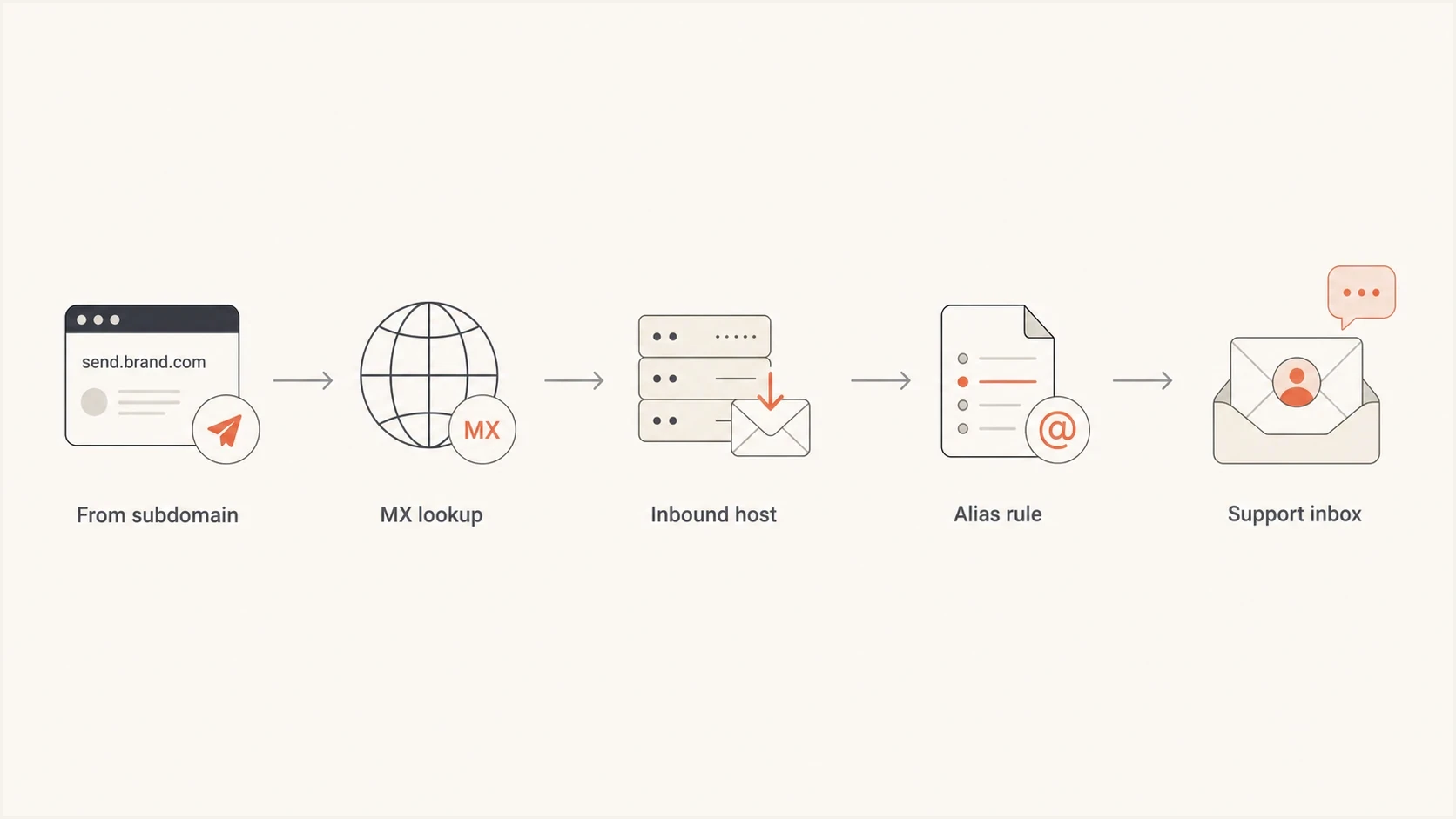
Flowchart showing replies routed from a sending subdomain to a support inbox.
- MX record: Publish it for the exact subdomain receiving human replies.
- Inbound acceptance: Add the subdomain as an accepted domain in the mail system.
- Address routing: Create an alias or forwarding rule for the sender address.
- Monitoring: Send a real reply test and confirm the message reaches the right queue.
For the DNS side, the exact records are covered in subdomain DNS setup. Outbound authentication, automated bounce handling, and human reply routing are separate jobs. Test each one.
How to test before changing volume
Before sending meaningful volume, test one production message path end to end. Send from the exact Header From address through the real platform, using the Return-Path and DKIM signature that production will use. Inspect the received headers and confirm the intended SPF or DKIM route produces a DMARC pass.
A quick domain health check can identify a missing DMARC policy and common DNS errors before the message test. Run an SPF check against the actual MAIL FROM domain after each DNS change so syntax and lookup-limit problems do not go unnoticed.
Email tester
Send a real email to this address. Suped shows a results button when the test is ready.
?/43tests passed
After DNS looks right, send a production-like test through the email tester. The received headers matter more than the intended configuration because they show the identities a mailbox provider evaluates.
Bulk-sender checks
Authentication is only one part of current bulk-sender compliance. Apply these checks to every marketing or subscribed mail stream.
- Gmail and Yahoo: Use SPF and DKIM authentication plus a DMARC policy of at least p=none.
- Marketing mail: Provide one-click unsubscribe and a visible unsubscribe link.
- Complaint rates: Keep user-reported spam below 0.3%, with Gmail recommending a rate below 0.1%.
- Infrastructure: Use TLS, valid forward and reverse DNS, and standards-compliant message headers.
- Outlook.com: Domains sending more than 5,000 messages per day must use SPF and DKIM authentication plus DMARC.
Rollout checks
Use production evidence to decide whether the new message path is ready for more volume.
Ready
Pass
DMARC passes through the intended identities, and replies plus bounces route correctly.
Hold
Mixed
Some known sources fail or routing results are inconsistent.
Fix first
Fail
Production authentication or required inbox handling fails.
Unknown
No data
There is not enough production-like evidence yet.
For this workflow, Suped's product groups DMARC results by sending source and authenticated domain. Its issue detection can identify a new bounce subdomain, a provider-owned MAIL FROM domain, or a missing matching DKIM signature before the change turns into a wider delivery problem.
Common configurations that work
Several configurations work. Choose one based on where human replies should go, which system processes bounces, and how mail streams need to be separated.
|
|
|
|---|---|---|
Subdomain From | Reply-To routes to a root inbox | Reply path is not tested |
Custom bounce domain | SPF passes and the domain matches | Provider bounce routing is broken |
Provider Return-Path | Matching DKIM gives DMARC a pass | Mail depends on the DKIM path |
Dedicated reply inbox | Replies need clear ownership | Extra mailbox administration |
Usable patterns for subdomains and return paths
A no-reply Header From address is not a DMARC failure. When the message invites questions or responses, set a working Reply-To or route the From address to a managed queue. Rejecting expected replies creates a customer experience problem and hides useful feedback.
Blocklist and blacklist checks
A new subdomain can authenticate correctly and still have delivery trouble if the sending IP or domain appears on a blocklist (blacklist). Check reputation during rollout, especially after moving volume between streams.
Use consistent naming and avoid creating a new subdomain for every campaign. A small set of purpose-based subdomains is easier to authenticate and monitor. Subdomains can separate operations, but mailbox providers can still connect reputation signals across related domains and shared sending infrastructure.
A practical setup checklist
Check the full message path instead of treating one DNS record as proof that the setup works.
- Pick identities: Choose the Header From, Reply-To, MAIL FROM, and DKIM domains before changing DNS.
- Publish records: Put SPF on the MAIL FROM domain, DKIM under its signing domain, and DMARC where it covers the Header From domain.
- Route replies: When replies are expected, configure MX handling and inbound acceptance for the address that receives them.
- Test bounces: Confirm the sending platform receives delivery failures and suppresses hard-bouncing recipients.
- Review reports: Check DMARC aggregate data for known sources before increasing volume.
- Watch reputation: Track complaints, bounces, domain reputation, and IP reputation as traffic moves.

Issue steps to fix dialog showing the issue overview, tailored fix steps, and verification action
Suped's issue detection turns aggregate authentication results into source-specific fix steps. The issues view identifies the sending source, failed mechanism, authenticated domain, and record that needs attention.
Views from the trenches
Best practices
Give recipients a working Reply-To address when responses are expected from the message.
Keep the bounce domain under provider control so automated suppression data remains accurate.
Test the Header From, Return-Path, DKIM domain, replies, and bounces as one message path.
Common pitfalls
Publishing an MX record without adding the reply domain to inbound acceptance rules.
Treating a basic SPF pass as a DMARC pass when the authenticated domains do not match.
Routing provider-generated bounce traffic into a human support inbox instead of automation.
Expert tips
Use a custom MAIL FROM subdomain when the sender supports provider-managed bounce routing.
Keep matching DKIM active because forwarding often breaks the SPF authentication result.
Review DMARC aggregate data after every sender, subdomain, routing, or DNS change.
Expert from Email Geeks says a working response route prevents dead-end replies when the visible From address is not monitored.
2021-09-24 - Email Geeks
Marketer from Email Geeks says Reply-To can use another domain when that inbox accepts replies and the routing is intentional.
2021-09-24 - Email Geeks




