How do I create an image pixel for tracking email opens and clicks?

Published 2 May 2025
Updated 6 Aug 2026
11 min read
Summarize with

Updated on 6 Aug 2026: We added privacy controls and tightened the open and click tracking implementation.
To create an image pixel for tracking email opens, generate a separate opaque event ID for the recipient's open pixel, place a 1x1 image URL in the HTML email, log the request when that URL loads, then return a tiny transparent GIF or PNG. To track clicks, do not use the image pixel. Give each tracked link its own signed event ID, log the request through a redirect endpoint, then send the reader to the stored destination with a 302 redirect.
Keep the first version simple: one tracking domain, one database table for events, separate open and click endpoints, and a dashboard that separates human-looking activity from proxy or scanner activity. Open tracking is useful, but it is not exact. Image caching, Apple Mail Privacy Protection, Gmail image handling, blocked images, and security systems all change what a raw event means.
- Open pixel: a hidden image request that records that an email client or proxy requested the asset.
- Click tracking: a tracked link that logs the request before redirecting to the real destination.
- Dashboard data: event IDs, timestamps, campaign IDs, recipient IDs, user agents, IPs, and bot classification.
What the pixel actually does
A tracking pixel, also called a web beacon, is an image URL embedded in an HTML email. The email client requests that URL while rendering the message, and the server treats the request as an open event. The pixel is usually transparent, 1x1, and placed near the end of the HTML. A deeper explanation of tracking pixels helps with client-side behavior, but the server side is straightforward.
A common mistake is trying to make the image pixel handle opens and clicks. It cannot do that cleanly. Opens are image loads. Clicks are link visits. They can share a tracking domain and event model, but they need different endpoints and different interpretation.
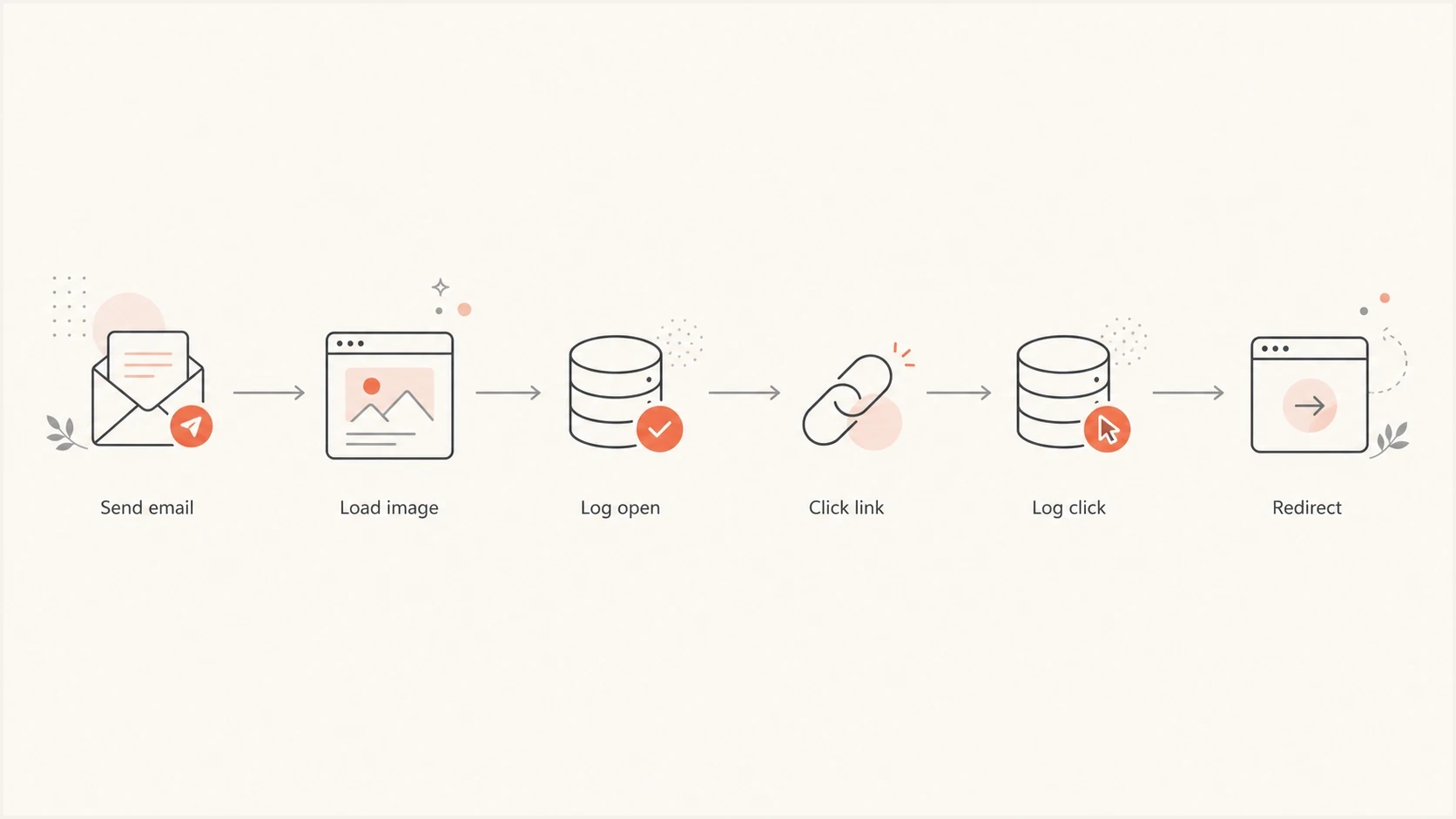
Flowchart showing how an email open pixel and click redirect are logged.
|
|
|
|---|---|---|
Open | Image load | Reach estimate |
Click | Redirect | Intent |
Conversion | Site event | Outcome |
Open and click tracking need separate signals.
Build the open tracker
Create one event ID for the open pixel and one for each tracked link, for every recipient and message. Store the campaign, recipient, message, and destination metadata in the database. Put only the opaque event ID and a signature in each tracking URL. Do not put email addresses, names, customer IDs, or raw campaign names in the URL because URLs end up in logs, forwards, screenshots, and proxy caches.
Use an HTML image tag, not JavaScript, because email clients commonly remove or block scripts. The exact host should be a tracking subdomain that you control, with TLS enabled and DNS configured before the campaign goes out. If a client clips a long message before a pixel placed at the end, the pixel will not load until the recipient opens the clipped content, so test the final HTML size.
HTML open pixelhtml
<img src='https://track.example.com/o/e_4sd9p1.gif?sig=a91c22f1b47d083ce190813b822a9ba8'
     width='1' height='1' alt='' style='display:block;border:0;width:1px;height:1px' />
On the server, validate the signature, record the request, return a transparent image, and send headers that reduce caching. The headers do not stop every proxy cache, but they make the response behavior explicit and help during local testing.
Node open endpointjavascript
import express from 'express';
import crypto from 'crypto';

const app = express();
const gif = Buffer.from(
  'R0lGODlhAQABAPAAAP///wAAACH5BAAAAAAALAAAAAABAAEAAAICRAEAOw==',
  'base64'
);
const secret = process.env.TRACKING_SECRET;

function sign(value) {
  return crypto
    .createHmac('sha256', secret)
    .update(value)
    .digest('hex')
    .slice(0, 32);
}

app.get('/o/:eventId.gif', async (req, res) => {
  const eventId = req.params.eventId;
  if (req.query.sig !== sign(eventId)) return res.sendStatus(404);

  await recordOpen({
    eventId,
    userAgent: req.get('user-agent') || '',
    ip: req.ip,
    occurredAt: new Date()
  });

  res.set({
    'Content-Type': 'image/gif',
    'Cache-Control': 'no-store, no-cache, must-revalidate, private',
    'Pragma': 'no-cache',
    'Expires': '0'
  });
  res.end(gif);
});

app.listen(3000);
Do not expose recipient data
- Use opaque IDs: store the recipient and campaign lookup on the server, not in the URL.
- Sign each ID: reject guessed or modified event IDs before logging an event.
- Enforce preferences: keep auditable consent or objection records and omit tracking where required.
Add click tracking with redirects
For click tracking, rewrite each link before sending. Store the original target URL in the database and send the recipient through a tracking URL with a signed event ID. Avoid putting the target URL in a query parameter because that creates open redirect risk and makes link rewriting easier to abuse. Validate the scheme and allowed destination when creating the tracked link, not only when someone clicks it.
Open tracking
- Trigger: email client or image proxy requests the tiny asset.
- Response: server returns a transparent image with cache-control headers.
- Meaning: a useful reach signal, not proof that a person read the email.
Click tracking
- Trigger: recipient, scanner, or browser requests the tracked link.
- Response: server logs the event and redirects to the stored destination.
- Meaning: a stronger engagement signal, but scanner clicks still need filtering.
The click endpoint should validate the signature, fetch the destination by event ID, log the request, then redirect. The dashboard can show raw clicks while marking likely scanner activity separately. This is where bot click data becomes important, especially in B2B campaigns.
Node click endpointjavascript
app.get('/c/:eventId', async (req, res) => {
  const eventId = req.params.eventId;
  if (req.query.sig !== sign(eventId)) return res.sendStatus(404);

  const target = await findTargetUrl(eventId);
  if (!target) return res.sendStatus(404);

  await recordClick({
    eventId,
    userAgent: req.get('user-agent') || '',
    ip: req.ip,
    occurredAt: new Date()
  });

  res.redirect(302, target.url);
});
Store the right event data
Store both first-seen timestamps and total counts. The first open or first click is usually the metric shown in campaign reporting. Repeated requests are still useful because they can indicate forwarding, preview panes, retries, proxy behavior, or scanners.
Simple tracking tablesql
create table email_tracking_events (
  event_id uuid primary key,
  campaign_id uuid not null,
  recipient_id uuid not null,
  event_type varchar(10) not null,
  target_url text,
  first_seen_at timestamptz,
  last_seen_at timestamptz,
  open_count integer not null default 0,
  click_count integer not null default 0,
  last_user_agent text,
  last_ip inet
);
Calculate derived fields without overwriting the raw event. For example, retain the raw user agent and necessary network data for a limited period, then add classification fields such as human-looking, proxy, scanner, duplicate, or internal test. This keeps reporting flexible when classification rules improve.
Keep a send snapshot for each message version, including the subject, sender, template ID, tracking domain, and send time. This makes later debugging easier when a campaign is resent, a link changes, or a test address receives multiple versions. The event table should answer what happened, while the send snapshot explains what the recipient received.
|
|
|
|---|---|---|
Event ID | Lookup key | Yes |
User agent | Client clue | Limited |
IP | Network clue | Limited |
Class | Report filter | Derived |
A compact event model keeps the dashboard useful.
Apply privacy controls before collecting events
Tracking rules depend on where recipients are located, what the tracker collects, and how the data is used. A pixel or decorated link can trigger rules for access to a person's device as well as rules for processing personal data. Complete a privacy review before rollout, document the applicable lawful basis or consent requirement, and avoid assuming that permission to send an email also permits engagement tracking.
Provide clear notice about the tracking purpose, collected fields, retention period, and any data recipients. Where consent or an objection mechanism is required, store the preference separately from event data and send an untracked version when the recipient declines or withdraws. A privacy policy alone does not replace a required choice.
- Minimise collection: avoid precise location claims, shorten or discard IP data, and collect only fields used for a stated purpose.
- Set retention limits: delete or anonymise recipient-level events when the documented reporting period ends.
- Honor the choice: remove both the open pixel and tracking redirects when a recipient's preference requires no tracking.
- Restrict access: limit raw event data to staff who need it and log administrative access.
Handle accuracy limits honestly
Open tracking is a directional signal, not a precise count of readers. Apple Mail Privacy Protection can load remote content in the background regardless of engagement. Gmail can display images through systems that prevent the sender from learning the reader's computer or precise location, and recipients can require approval before external images load. Security systems can also inspect tracked links before or around a human click. More detail on Gmail image caching helps explain odd timestamps or repeated loads.
How to report opens
- Unique opens: one first-seen open per recipient, with proxy loads included but labeled.
- Total opens: all image requests, useful for diagnosis but noisy for engagement.
- Reliable actions: clicks, replies, conversions, and preference center updates carry more weight.
Before trusting production numbers, send real test messages to different inboxes and inspect the headers, images, and link behavior. Suped's email tester is useful here because it checks the message as delivered, not only the backend code path.
Email tester
Send a real email to this address. Suped shows a results button when the test is ready.
?/43tests passed
A test run should confirm that the pixel loads in a basic client, the click redirect lands on the approved URL, the tracking domain has valid TLS, and the final email still renders correctly with images disabled. Also test unsubscribe and preference links because tracking logic must never block them.
Protect deliverability and authentication
A tracking pixel does not automatically cause filtering, but broken redirects, TLS errors, unstable DNS, or a tracker domain shared with unrelated senders can create warnings and failed requests. Use a domain you control, keep redirects fast, and make link copy describe the real destination. The tracking host should fit the brand.
Suped is our DMARC and email authentication platform. In this workflow, Suped's product monitors DMARC aggregate data for the sending domain and surfaces SPF or DKIM alignment failures after rollout. It does not host the open pixel or click redirect, so the tracking service still needs its own reliable DNS, TLS, logging, and privacy controls.
Suped DMARC dashboard showing email volume, authentication health, and source breakdown
Check the sending identities and tracking host as separate parts of the rollout. DMARC evaluates the visible From domain against the domain authenticated by SPF or DKIM. A domain health check can identify malformed authentication records, while ongoing DMARC monitoring shows whether real mail is aligned once the campaign is live. The tracking subdomain needs valid DNS and TLS, but hosting a pixel there does not make it part of DMARC alignment.
- Tracking domain: use TLS, stable DNS, and a subdomain that recipients can recognize.
- Redirect speed: log asynchronously when needed so clicks do not wait on analytics writes.
- Authentication: verify SPF or DKIM alignment with the From domain and review DMARC results.
- Reputation: monitor blocklist and blacklist signals when traffic or complaints change.
Views from the trenches
Best practices
Generate opaque event IDs per recipient and store all meaning on the server side only.
Send the pixel from a tracking domain with working TLS and stable DNS records in place.
Treat opens as directional signals, then use clicks and replies for engagement scoring.
Common pitfalls
Using raw email addresses in pixel URLs exposes personal data in logs and forwards later.
Counting every image request as human engagement inflates reports after privacy proxy loads.
Redirecting to arbitrary query string URLs creates an open redirect that scanners can abuse.
Expert tips
Keep each click target in the database, not in the URL, so recipients cannot rewrite it.
Use first-seen time and total count separately because repeated requests aid diagnosis.
Label machine-looking opens in reports instead of deleting them from the raw event table.
Marketer from Email Geeks says the first design choice is deciding whether the dashboard needs email opens, click redirects, website visits, or conversion events.
2024-04-18 - Email Geeks
Marketer from Email Geeks says basic opens and clicks can be built into a backend dashboard, but the sender's existing email software should be checked first.
2024-05-02 - Email Geeks
What to ship first
A first version should include a signed open pixel, signed click redirects, one raw event table, a small classifier for proxy and scanner activity, and a dashboard that reports unique opens, total opens, unique clicks, total clicks, and last activity. Avoid person-level conclusions such as "read" or "ignored" because the signal does not justify that language.
The main engineering choice is to keep event IDs opaque and destination URLs on the server. That makes the system safer, easier to debug, and easier to explain to internal stakeholders. Once the tracker works, deliverability checks still matter because clean tracking code depends on trusted mail authentication and a healthy sending setup.




