
How do G Suite and Proofpoint compare for email gateway security?

Updated on 18 Oct 2026: We clarified Google's gateway DMARC behavior and added email continuity checks for deployment planning.
G Suite, now Google Workspace, and Proofpoint do not compare one-for-one. Google Workspace is a mail and collaboration suite with native Gmail security controls. Proofpoint Core Email Protection is a specialist security layer with secure email gateway (SEG) and API deployment options. The SEG can sit in front of Google Workspace for pre-delivery filtering and mail-flow control. For API-based protection, confirm the Google Workspace integration and supported controls before assuming it provides internal-message inspection or post-delivery removal without routing changes.
Google Workspace is a practical starting point for teams that want native filtering and low operational overhead. Evaluate Proofpoint when the organization needs gateway policy or investigation workflows beyond its current Google Workspace edition. Exact controls depend on the Proofpoint deployment and licensed package, and Google capabilities also vary by Workspace edition.
If the goal is to reduce marketing email noise without blocking good mail, compare false positives, false negatives, user reports, release time, and how each product explains the verdict. Quarantine volume alone does not measure protection.
When to use Google Workspace or add Proofpoint
Use Google Workspace alone when the available edition meets the organization's filtering and response requirements. Add Proofpoint SEG when the business needs gateway policy before delivery or complex inbound and outbound routing. Evaluate API-based protection against the documented Google Workspace integration, including permissions, routing requirements, and supported response actions.
- Native protection: Google Workspace works well when Gmail is the main mailbox and native protection is enough.
- Pre-delivery control: Proofpoint SEG fits teams that need gateway-grade controls before Gmail accepts mail.
- API integration: Verify Gmail coverage and routing requirements before choosing this deployment.
- Authentication monitoring: Suped, our DMARC and email authentication platform, helps review sender authentication during routing changes.
The key comparison is native mailbox security against a specialist security platform. Google controls are integrated with Gmail. Proofpoint adds a separate policy and investigation workflow, with the available controls determined by the deployment and licensed package.
Check whether Google's controls and reports meet the organization's risk model. If the business needs granular pre-delivery rules, rewritten links, advanced attachment analysis, campaign-level investigation, or automated abuse-mailbox response, compare the relevant Proofpoint package against the exact Google Workspace edition.
Capability comparison
|
|
|
|---|---|---|
Product role | ||
Deployment | Native to Gmail | SEG; verify Google Workspace API architecture |
Spam and graymail | Native filtering and configurable actions | Granular policy |
Malware | Native scanning | Scanning and licensed attachment analysis |
Business email compromise (BEC) | Domain and employee-name spoofing protections | Behavioral and impersonation detection by package |
Attachment sandbox | Edition based | Package based |
URL protection | Click-time checks; client and setting dependent | URL rewriting and click-time checks by package |
Internal mail | Native logs and applicable security controls | Verify same-domain coverage for Gmail |
Post-delivery response | Edition based | Deployment and package based |
Quarantine | Admin quarantine; delegated review by configuration | Security operations workflow |
Investigation | Edition-based tools | Threat evidence and response by package |
Data loss prevention (DLP) | Gmail DLP on supported editions | Outbound DLP by package and routing |
A practical comparison of native Google Workspace controls and Proofpoint security controls.
Google Workspace has advanced phishing and malware settings for Gmail, link and external image checks, spoofing and authentication protections, custom routing, content compliance, and quarantines. These include employee-name and similar-domain spoofing protections. Gmail has click-time link protection, but coverage and warnings depend on the client and settings. Qualifying editions also give admins security investigation actions such as deleting a malicious message or moving it to spam or quarantine. See Google's phishing and malware settings.
Proofpoint is built around dedicated email protection. Its capabilities include gateway policy, URL and attachment defense, business email compromise (BEC) detection, threat evidence, end-user reporting, and response automation. Availability depends on the chosen deployment and licensed package, so compare the quoted configuration rather than a generic capability list. See Proofpoint's Core Email Protection overview.
Data loss prevention (DLP) is also available within Gmail on supported editions. Compare the sensitive-data rules and outbound blocking actions already available in Google Workspace with the proposed Proofpoint DLP package. Test the actual outbound route so enforcement occurs before sensitive mail reaches an external recipient. See Google's Gmail DLP documentation.
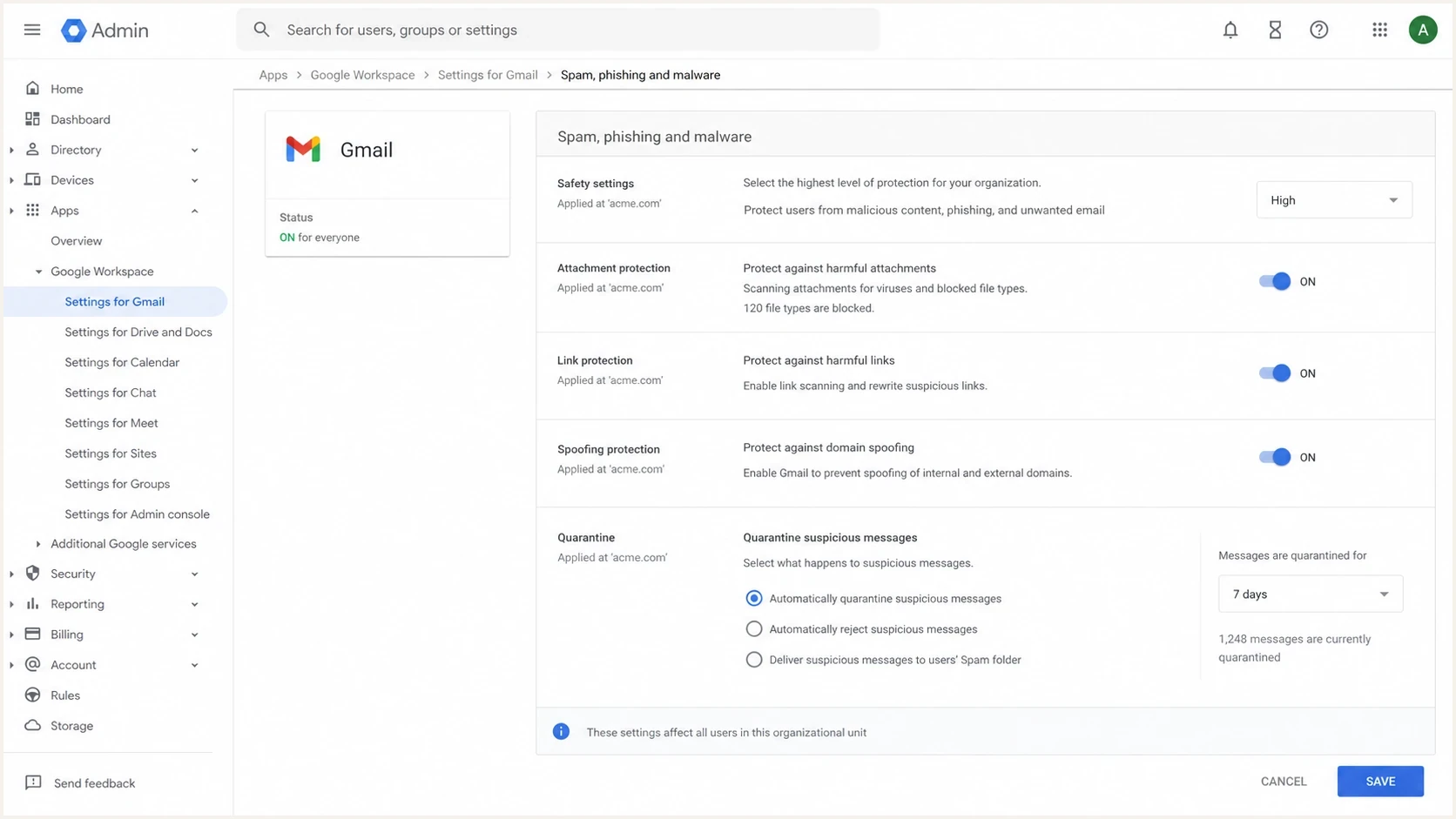
Google Admin console Gmail security settings for spam, phishing, malware, and quarantine controls.
Where Google Workspace is enough
Google Workspace is a sensible baseline for teams that want good protection without adding another mail hop or security console. Gmail's filtering is mature, and admins manage security in the same place they manage users, groups, routing, compliance rules, retention, and mailbox access.
- Low friction: There is no extra MX layer or second quarantine portal, which means fewer moving parts during support.
- Native controls: Admins can tune spam, phishing, malware, spoofing, routing, compliance, and quarantine actions.
- User signals: Gmail user reports feed filtering decisions and give admins a view of user behavior.
- Security Sandbox: Frontline Plus, Business Standard and Business Plus, and Enterprise Standard and Enterprise Plus support attachment sandboxing. The setting to scan all attachments is off by default.
Verify the supported edition and sandbox policy during the pilot. See Google's Security Sandbox documentation.
Check the available investigation and policy controls before adding another layer. Google does not expose every reputation signal or scoring factor, and advanced response actions depend on the Workspace edition. Test whether the licensed edition meets the required partner-mail rules and investigation workflow, including employee impersonation cases.
Do not assume that fewer quarantined marketing emails means weaker protection. Google often routes suspicious but not clearly harmful mail to the inbox with warnings or to spam, while a stricter gateway policy can quarantine the same message. Compare outcomes by risk and user impact, not by quarantine count.
Where Proofpoint adds gateway and response controls
Proofpoint fits teams that need a dedicated email security operations workflow. Its SEG gives teams a place to enforce inbound policy before Gmail accepts the message. For API-based protection, verify Google Workspace support for internal-message inspection and post-delivery response. This matters when compliance, incident response, executive targeting, supplier fraud, or malware risk requires more evidence than the current Google Workspace edition exposes.
Google Workspace native
- Operating model: Mailbox-first controls with integrated Gmail administration.
- Policy depth: Good for common filtering, routing, compliance, and quarantine needs.
- Visibility: Useful dashboards and logs, with advanced actions tied to edition.
- Best use: Teams that want strong defaults and low administrative overhead.
Proofpoint security layer
- Operating model: Dedicated SEG, with API integration assessed for the Google Workspace deployment.
- Policy depth: Better suited to granular policy and security operations triage.
- Visibility: Detailed threat evidence, message tracing, remediation, and response by package.
- Best use: Higher-risk teams with security staff and stricter controls.
Proofpoint provides a separate workflow for investigation and response. URL rewriting and time-of-click inspection matter because a link that looks harmless at delivery can change later. Attachment defense adds dynamic analysis for unknown files. Confirm whether these controls and automated post-delivery actions support Google Workspace and are included in the proposed package.
Choose the Proofpoint deployment model
Proofpoint Core Email Protection has SEG and API deployment options. The SEG inspects mail before Google accepts it and supports mail-flow customization. Proofpoint also documents a Google Workspace integration for Core Email Protection API. For evaluation, require a Google-specific architecture and control matrix rather than assuming the API label guarantees no routing changes, internal-mail inspection, or mailbox removal. See Proofpoint's Google Workspace integration documentation.
Secure email gateway
Choose the SEG when policy must run before Gmail accepts mail or when Proofpoint must control complex inbound and outbound routes.
- Requires MX, routing, inbound gateway, and TLS configuration changes.
- Supports pre-delivery enforcement and granular mail-flow policy.
- Adds quarantine, continuity, direct-delivery, and bypass-prevention planning.
API deployment
Assess API-based protection when reducing deployment work is a priority, then validate the Google Workspace implementation against the required controls.
- Confirm whether MX records or Gmail routing rules must change.
- Verify coverage of delivered messages and same-domain internal mail.
- Review API permissions, data access, response latency, and failure behavior.
Ask for a deployment-specific control matrix before purchase. Confirm inbound and internal coverage, pre-delivery blocking, post-delivery removal, URL behavior, attachment analysis, data residency, Google API permissions, failure behavior, and which capabilities require separate licensing.
How to test both fairly
The cleanest comparison is a controlled pilot. Route a representative sample through the proposed architecture and score the same business outcomes. Dual delivery is useful for observation, but it can mislead if one system changes headers, authentication results, or routing context before the other system evaluates the message. If the pilot uses post-delivery removal, measure the interval between inbox delivery and removal separately from pre-delivery blocking. Record false positives per 1,000 legitimate messages, confirmed threats missed, quarantine release times, and analyst time per incident.
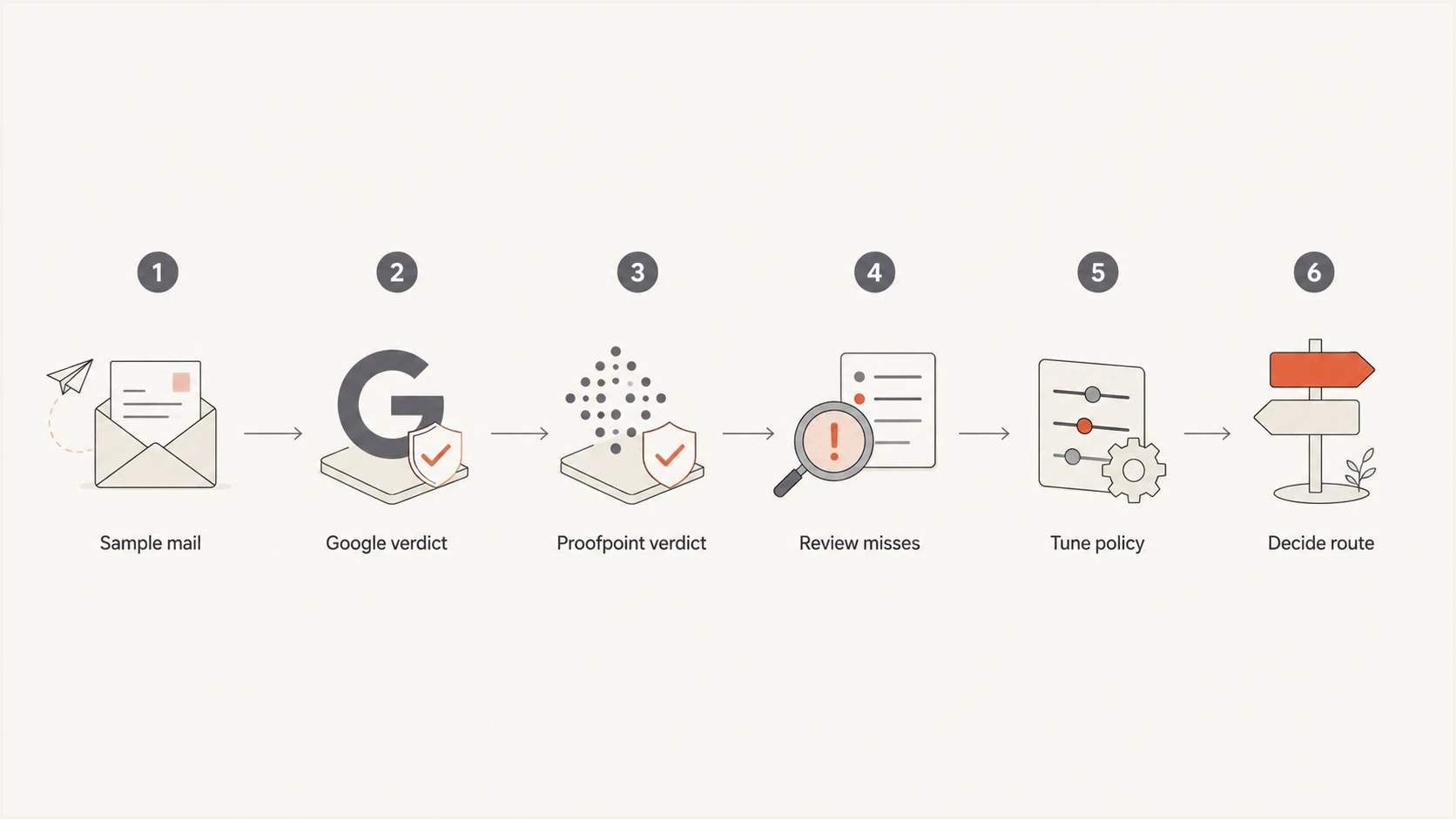
Flowchart for testing Google Workspace and Proofpoint email filtering decisions.
Score at least four buckets: known harmful messages, marketing or bulk mail, partner mail that users need, and executive-targeted mail. The marketing bucket deserves special care because false positives create friction. If Proofpoint marks a campaign as spam and Google delivers it to the inbox, review authentication, list-unsubscribe signals, sending history, content, user complaints, and whether the message had a real business purpose. Include BEC examples with no link or attachment, such as payment-change requests sent through compromised supplier accounts. A DMARC pass authenticates use of a domain; it does not prove that a payment request is legitimate.
For live authentication testing, send a real message through the pilot path and inspect the headers with the email tester. That confirms whether SPF, DKIM, DMARC, forwarding, and gateway hops still produce the expected results after routing changes.
Email security evaluation criteria
These qualitative criteria identify what to test; they are not measured thresholds or a substitute for a pilot.
Use Google only
Low risk
Low abuse volume, few false negatives, limited compliance needs, and no security operations queue.
Run a pilot
Medium risk
Mixed verdicts, marketing friction, leadership concern, or unclear threat evidence.
Evaluate Proofpoint
High risk
Frequent targeted attacks, regulated data, strict reporting, or response automation needs.
Routing and authentication details
A Proofpoint SEG in front of Google Workspace uses a store-and-forward path. The usual pattern is to point the domain's MX records at Proofpoint, let Proofpoint filter inbound mail, then relay accepted mail to Google. Outbound mail can also pass through Proofpoint when the organization needs outbound DLP, encryption, policy enforcement, or consistent logging. An API-based design needs its own verified Google Workspace mail-flow diagram.
Illustrative Proofpoint MX pattern, not production valuesdns
example.com. 3600 IN MX 10 mxa-00000000.gslb.pphosted.com.
example.com. 3600 IN MX 10 mxb-00000000.gslb.pphosted.com.
Use the MX hostnames and gateway egress IPs assigned to your Proofpoint service. The DNS example is illustrative. Add the relevant public relay IPs to Google's inbound gateway configuration. Test required internal routes before rejecting direct external delivery, and require TLS where supported. Enable and test external IP detection against the actual relay chain for SPF and spam evaluation.
Enforce senders' DMARC policies at the gateway: Gmail does not enforce them on mail received through a configured inbound gateway, although it still uses authentication signals for spam and compliance checks. Check DKIM after URL rewriting or added footers. For outbound mail, authorize only required senders in SPF and verify that SPF or DKIM authenticates a domain matching the visible From address under DMARC's matching rules. See Google's inbound gateway documentation.
Gateway projects expose authentication problems when forwarding breaks SPF or message changes invalidate DKIM. Suped's DMARC monitoring groups aggregate reports by sending source so teams can identify affected traffic and verify authentication after a routing change.
What to monitor after the switch
Monitor closely during the first 30 days after a gateway change and after later routing or policy changes. Monitor authentication, delivery, quarantine releases, user reports, sender complaints, and domain reputation together. The gateway console does not explain every authentication failure, while DMARC data does not show every user-facing filtering decision.
?
What's your domain score?
Deep-scan SPF, DKIM & DMARC records for email deliverability and security issues.
A broad domain health check is useful before and after the cutover. Use it as a DNS and authentication baseline, then verify active DKIM selectors and authentication results in delivered message headers.
Suped DMARC dashboard showing email volume, authentication health, and source breakdown
Suped's dashboard shows authentication health, source breakdown, volume changes, and failure trends together. Compare source-level authentication before and after a Proofpoint route or Google rule changes. Aggregate reports arrive on the reporting provider's schedule and do not establish individual inbox placement.
Reputation monitoring matters too. A gateway can block inbound threats, but it does not guarantee clean outbound sending IPs and domains or clean shared vendor infrastructure. Suped's blocklist monitoring helps teams catch domain and IP blacklist listings that can affect mail flow and trust.
Email continuity and outage behavior
Email continuity needs a separate acceptance test. A gateway queue can retain mail while Gmail is unavailable, but queueing does not give users an emergency inbox. An API connection alone does not provide an independent mailbox during a Gmail outage.
Proofpoint's Enterprise Continuity data sheet describes emergency web access and automatic recovery. Confirm current availability, Google Workspace compatibility, and licensing for the proposed service rather than assuming continuity is included in Core Email Protection. See Proofpoint's Enterprise Continuity data sheet.
- Queueing: Confirm retention limits and what happens when delivery retries expire.
- Emergency access: Test sending and receiving when Gmail and the normal sign-in path are unavailable.
- Recovery: Verify delivery of queued messages and handling of messages sent through an emergency inbox.
- Security: Confirm filtering remains active during failover and avoid an alternate MX route that bypasses the gateway.
Cost and operational tradeoffs
The case against adding Proofpoint is usually cost, licensing, administration, and complexity. An SEG adds policy decisions, release workflows, routing changes, and another place to check when mail does not arrive. API-based integration still adds permissions, response workflows, another console, and package-specific licensing; its routing work depends on the Google Workspace implementation.
Staying with Google only
This keeps the stack simpler. It works well when the organization has normal inbound risk and users are comfortable with Gmail spam handling.
- Admin time: Lower because the mail platform and controls live together.
- Visibility gap: Harder when security teams need detailed verdict evidence.
Adding Proofpoint
This adds cost and management. Compare its licensed controls with the gaps demonstrated in the Google Workspace pilot.
- Admin time: Higher because policy, investigation, quarantine, and response need ownership.
- Visibility gain: Better when investigations and post-delivery actions matter.
Start with requirements, not vendor labels. If the concern is mostly good marketing mail being quarantined, tune the current controls first and measure false positives. If the concern is advanced malware, credential theft, executive impersonation, supplier fraud, or audit evidence, Proofpoint has a stronger case. Price the required deployment and modules, implementation work, ongoing administration, and incident-response labor together. Identify the exact Proofpoint product and package in the quote, and compare a Workspace edition upgrade with the full cost of the added security layer. Include log retention and support response commitments in the acceptance criteria.
Views from the trenches
Best practices
Define success by false positives, false negatives, release time, and user impact.
Test representative mail categories before changing MX records for the whole domain.
Document routing, authentication, quarantine, and response ownership before the cutover date.
Common pitfalls
Comparing quarantine counts alone can reward noisy filtering over useful protection.
Dual delivery can distort verdicts when headers or authentication context change.
Leaving Gmail open to direct inbound mail can bypass the intended gateway path rule.
Expert tips
Run a 30-day pilot and review business-needed mail separately from bulk campaigns too.
Keep DMARC reporting active so new routing issues show up by source, not rumor alone.
Treat gateway tuning and authentication repair as related but separate workstreams.
Marketer view
Marketer from Email Geeks says G Suite and Proofpoint should not be compared as identical products because one is a collaboration suite and the other is a gateway.
2024-08-15 - Email Geeks
Marketer view
Marketer from Email Geeks says Google's native spam filtering is generally strong, so teams should ask for evidence before assuming it will fail.
2024-09-02 - Email Geeks
The practical choice
Start by deciding whether email security needs a dedicated operations layer. If the team mainly wants Gmail with strong default filtering and a manageable admin surface, Google Workspace alone is a reasonable answer. If the team needs pre-delivery control and complex routing, assess Proofpoint SEG. If reducing deployment work is a priority, assess Proofpoint's API option against the documented Google Workspace integration and test the required coverage.
Email authentication still needs ownership with either deployment. Use Suped to track source-level authentication failures during rollout and verify repairs against subsequent aggregate reports.




