How can I contact Yahoo's postmaster team for FBL access and troubleshoot setup issues?

Updated on 29 Jul 2026: We updated this guide for Yahoo's current Sender Hub enrollment, verification, status, Insights, and support workflow.
Yahoo FBL access now starts in Yahoo Sender Hub, where Yahoo calls the service its Complaint Feedback Loop (CFL). Create a sender profile, add the DKIM signing domain, verify domain ownership with Yahoo's DNS TXT record, and enroll the verified domain under Manage Services. Yahoo sends ARF complaint reports only when a user marks an enrolled, DKIM-signed message as spam.
For setup failures, first confirm that Sender Hub shows the domain as verified and enrolled, the DKIM d= value in live mail matches that domain, and the reporting address completed its emailed code check. Then confirm that the ARF mailbox accepts Yahoo's machine-generated reports and attachments. Inspect a real message with the email tester before opening a support request.
To contact Yahoo about access or setup, use the Yahoo Sender Hub contact page and choose Complaint Feedback Loop, then Set Up and Manage. Include the Sender Hub account email, DKIM domain, selector, reporting address, enrollment status, timestamps, and a screenshot of the failure.
The current route to Yahoo FBL access
Yahoo's feedback loop is complaint-based and domain-based. It sends Abuse Reporting Format messages, usually called ARF reports, when users mark covered mail as spam. Coverage follows the domain in the DKIM signature's d= tag. Yahoo no longer offers IP or CIDR-based complaint reporting.
- Create the profile: Sign in to Yahoo Sender Hub and create a sender profile. A team alias works better than one person's account when several people manage the same domains.
- Add the DKIM domain: Use the exact d= domain from the DKIM signature on Yahoo-bound mail, which can differ from the visible From domain.
- Verify domain ownership: Publish the DNS TXT record Yahoo provides, then wait for Sender Hub to show the domain as verified.
- Enroll in CFL: Open Manage Services, choose Complaint Feedback Loop, select the verified domain, and enter an address that your team controls.
- Verify the reporting address: Enter the code Yahoo emails to that address. The address does not need to share the From or DKIM domain.
- Check enrollment status: Use Manage Services to confirm the domain is enrolled. ARF reports appear only after a covered complaint occurs.
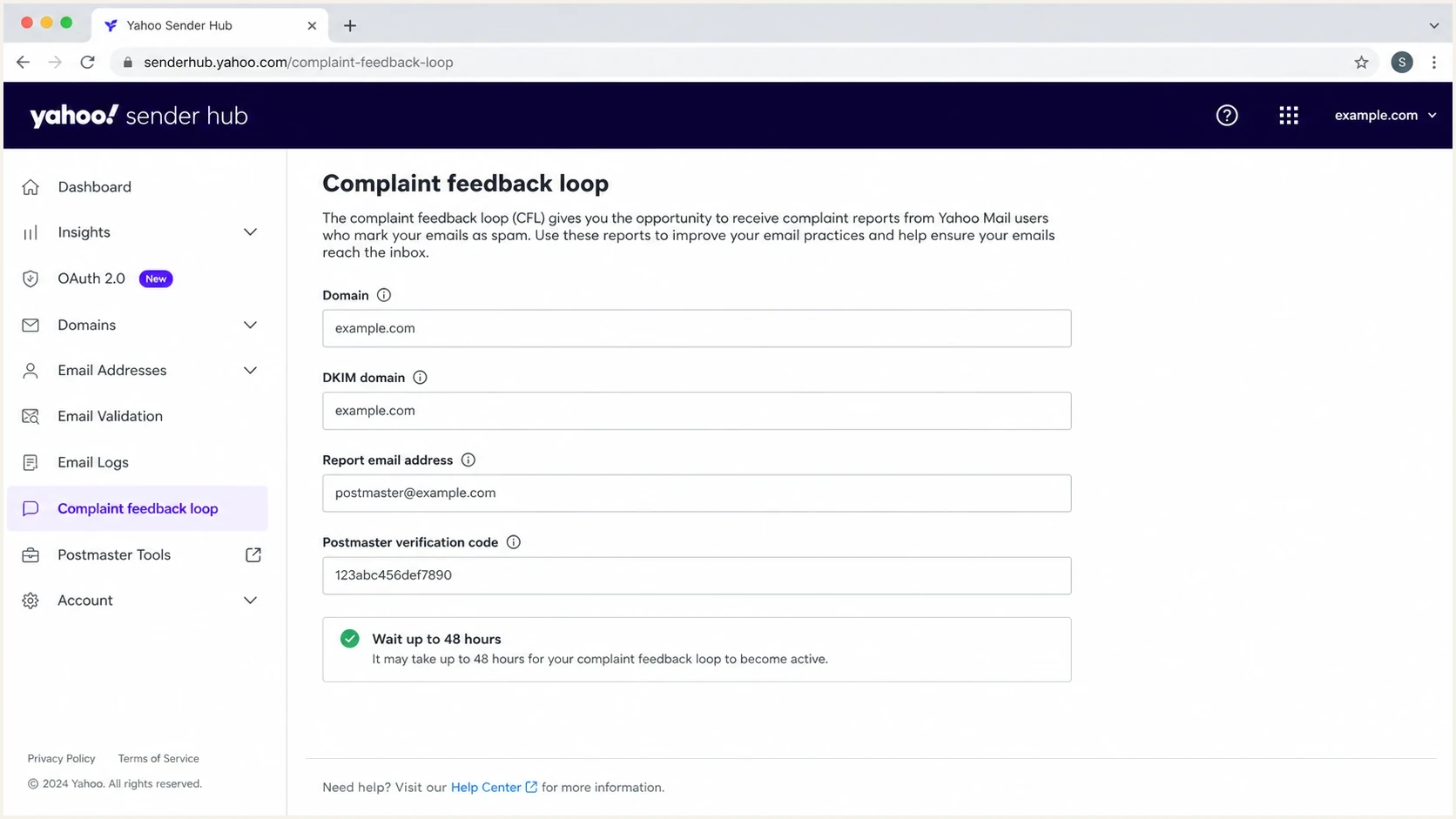
Yahoo Sender Hub complaint feedback loop setup screen.
The dashboard status is the authoritative place to confirm enrollment. A missing approval email does not prove failure, and a quiet reporting address can mean that no covered Yahoo user complaint occurred.
|
|
|
|---|---|---|
Sender Hub | Add and verify domain | DKIM d= domain |
CFL management | Enroll or edit | Domain, report address |
CFL support | Broken setup or reports | Status, timestamps, evidence |
Sender support | Mail delivery failures | SMTP errors, diagnostics |
Use the route that matches the failure you can prove.
What to check before contacting Yahoo
Most FBL problems come down to domain verification, DKIM identity, reporting-address verification, or mailbox routing. Yahoo must associate the complaint with an enrolled DKIM domain, then deliver the ARF report to the verified reporting address.
Do this before you escalate
- Account status: Confirm the DKIM domain appears under Domains as verified and under Manage Services as enrolled in CFL.
- DKIM identity: Inspect live Yahoo-bound mail and match the DKIM d= value exactly to the enrolled domain.
- Reporting address: Confirm the address verification code was completed and the mailbox accepts MIME attachments from external senders.
- Mailbox filtering: Check spam, quarantine, forwarding, and automated processing for mail from feedback@arf.mail.yahoo.com.
- ESP ownership: Ask the sending provider whether it enrolls the DKIM domain and processes complaints on your behalf.
Check the broader DNS state as supporting evidence. A domain health checker pass can identify missing MX records, malformed DMARC, DKIM lookup failures, or other DNS issues before a support request is opened.
Basic DNS checksbash
dig MX example.com

dig TXT _dmarc.example.com

dig TXT selector1._domainkey.example.com
A shared report is easier to attach to a support case than raw terminal output, especially when the ticket owner cannot change DNS. Keep the Yahoo verification TXT value and its DNS result with the case evidence.
?
What's your domain score?
Deep-scan SPF, DKIM & DMARC records for email deliverability and security issues.
How to interpret a quiet CFL
Do not use the absence of an approval email as the enrollment test. Check the domain under Manage Services instead. Once the status shows enrolled, a quiet reporting address usually means no covered user marked an enrolled, DKIM-signed message as spam. Low Yahoo volume and short observation periods make that more likely.
Healthy silence
- Enrolled status: Sender Hub shows the DKIM domain enrolled in CFL.
- No complaints: Yahoo users have not marked covered mail as spam.
- Low volume: Too few active Yahoo recipients exist to expect frequent reports.
- Clean handling: Fast unsubscribe processing reduces spam-button use.
Likely setup problem
- Domain missing: The signing domain is absent or unverified in Sender Hub.
- DKIM mismatch: Live mail uses a different d= domain than the enrolled domain.
- Address unverified: The reporting address did not complete its one-time code check.
- Reports filtered: Security or mailbox automation discards ARF messages.
Use status and evidence as the escalation gate. Fix an unverified or unenrolled domain in Sender Hub. Monitor an enrolled domain when there is no known complaint. Contact Yahoo when a known complaint involved the enrolled DKIM domain but no ARF report reached the verified address or quarantine.
When to escalate
Match the next action to the evidence available in Sender Hub and the ARF mailbox.
Fix enrollment
No active CFL
The DKIM domain is missing, unverified, or not enrolled.
Monitor
No complaint evidence
The domain is enrolled, but no covered complaint is known.
Escalate
Complaint without ARF
A covered complaint occurred, but no ARF reached the verified address.
Check the Yahoo Postmaster blog for a current CFL incident before changing DNS or sending repeated support requests.
Use Sender Hub Insights separately from CFL
Yahoo Sender Hub Insights adds delivery data for verified DKIM domains, but it does not confirm CFL enrollment and does not replace ARF reports. Use Manage Services for enrollment status and Dashboard for aggregate performance data.
- Activate Insights: Open Dashboard, select a verified DKIM domain, and click Activate.
- Allow data time: Yahoo says data starts populating within 24 to 48 hours when the domain meets its minimum daily volume threshold.
- Read the right denominator: Yahoo calculates the displayed spam complaint rate against messages delivered to the inbox, so it can differ from sender-side rates.
- Keep the signals separate: Insights can show delivered volume and complaint-rate trends without CFL enrollment, while CFL sends message-level ARF reports.
No Insights data does not prove CFL failure
A verified domain can show no Insights data when it has not been activated, has not passed the data delay, or does not meet Yahoo's volume threshold. Check CFL enrollment under Manage Services instead.
How to test FBL access safely
A controlled complaint test has risk because every spam report contributes to sender complaint signals. For a sender with meaningful Yahoo volume, one test from a controlled mailbox usually has little effect. For very low Yahoo volume, one complaint can distort the rate, so use a test only when the diagnostic value exceeds that risk.
- Send a real message: Use the same DKIM signing domain and sending path covered by the Sender Hub enrollment.
- Inspect the headers: Confirm DKIM passes and the exact d= value matches the enrolled domain. Check SPF and DMARC separately for overall Yahoo sender compliance.
- Report once: Use one controlled Yahoo mailbox and one representative campaign message. Do not generate repeated complaints.
- Watch the ARF inbox: Check the verified reporting address, security quarantine, and any forwarding or complaint-processing rule.
- Suppress the recipient: Confirm the ARF workflow removes the complaining address from future campaigns.
Email tester
Send a real email to this address. Suped shows a results button when the test is ready.
?/43tests passed
After the check, compare the tested DKIM d= value with the domain shown as enrolled under Manage Services. The visible From domain and DKIM domain can differ, so matching only the From address can lead to the wrong conclusion.
What a useful test proves
A useful test proves that Yahoo received a message with a passing DKIM signature for the enrolled d= domain and that the verified reporting path can deliver an ARF. It does not prove that every future complaint will arrive immediately.
How to escalate without wasting a ticket
Escalate after the setup checks show a verified and enrolled DKIM domain, the reporting address is verified, and a covered complaint still produces no ARF. Send one concise evidence package that Yahoo can route and inspect.
|
|
|
|---|---|---|
Sender Hub account | team@example.com | Finds the profile |
DKIM domain | mail.example.com | Maps complaints |
Selector | selector1 | Checks live DKIM |
CFL status | Enrolled screenshot | Confirms setup |
Reporting address | reports@example.com | Checks routing |
Message evidence | Headers and timestamps | Proves coverage |
Keep the ticket short, factual, and easy to route.
Use Yahoo CFL support for enrollment, domain management, or missing complaint reports. Use senderhub-feedback@yahooinc.com for Sender Hub questions. The Yahoo Postmaster blog has directed senders to mail-questions@yahooinc.com for examples during known CFL reporting incidents.
Do not escalate with only silence
A note that says no reports arrived gives Yahoo little to inspect. State that the domain is verified and enrolled, name the DKIM d= value and selector, identify the verified reporting address, attach representative headers, and provide the complaint and mailbox-check timestamps.
If the problem concerns SMTP rejection, deferral, or spam-folder placement rather than CFL access, use the Yahoo sender support route and include Yahoo's error and diagnostic codes.
Where Suped fits
Yahoo FBL troubleshooting often depends on evidence outside Sender Hub. Suped's product helps teams track DMARC results, inspect SPF and DKIM health, keep DNS change history, and monitor blocklist (blacklist) status. Those records make it easier to separate a CFL setup problem from a broader authentication or reputation issue.
DMARC record detail view showing SPF, DKIM, DMARC, rDNS diagnostics, and DNS records
For teams managing multiple domains, Suped keeps DMARC monitoring, authentication diagnostics, alerts, and blocklist monitoring in one workflow. Keep the exact Yahoo-enrolled DKIM domain and reporting address in the operational runbook, since Sender Hub remains the place to manage CFL enrollment.
A practical Suped workflow
- Monitor authentication: Track DMARC results and the underlying SPF or DKIM paths for mail sent to Yahoo-managed domains.
- Check the signing identity: Compare observed DKIM domains with the domain enrolled in Yahoo CFL.
- Keep change evidence: Use DNS history and issue records to explain when authentication changed.
- Prepare the case: Attach current authentication results and relevant change timestamps to Yahoo support.
Practical recommendation
If the DKIM domain is not verified and enrolled, fix the Sender Hub setup. If it is enrolled and there is no known Yahoo complaint, keep monitoring. If a covered complaint occurred and no ARF reached the verified reporting address, escalate through Yahoo CFL support with the account email, domain, selector, status screenshot, headers, timestamps, and mailbox-routing evidence.
FBL access does not fix delivery by itself. It provides complaint reports that support recipient suppression and investigation. Pair those reports with authentication monitoring, complaint suppression, list hygiene, one-click unsubscribe handling, and blocklist (blacklist) checks. Suped's product supports that combined operational workflow across multiple domains or clients.




