Does Google Workspace location affect email deliverability?

Updated on 9 Aug 2026: We added current Google Workspace sending limits and Gmail sender requirements, with clearer guidance on routing, authentication, and geography.
No, the country or business address on a Google Workspace account normally does not improve or hurt email deliverability by itself. A Workspace account bought with a Turkey address does not become a worse sender than a Workspace account bought with a USA address just because of that account location.
What recipients see is the mail path, the Google outbound infrastructure, your domain authentication, your domain reputation, your message content, your sending pattern, and recipient engagement. If you create a second Google Workspace tenant in the USA, the new tenant does not inherit better inbox placement. It starts with the same practical work: verify SPF, enable DKIM, publish DMARC, send mail people expect, and watch the results.
The caveat is routing. If you send through Google Workspace directly, your VPN, admin login location, and billing country are not the main delivery signal. If you route mail through an outbound gateway, CRM, SMTP relay, or another sending system, that extra infrastructure has its own IPs, authentication path, and reputation. That is where location and routing details start to matter.
Short answer
Do not rebuild a Google Workspace tenant in another country just to improve deliverability. Test the actual message path first. In most cases, the fix is authentication, reputation, sending behavior, or content, not the country shown on the Workspace account.
What recipient mail servers see
A receiving mail server does not score your message by checking where you bought Google Workspace. It checks the SMTP connection, visible headers, authentication results, message content, and its own reputation data. The account's billing address is not part of the SMTP conversation or message headers.
Google publishes requirements for mail sent to personal Gmail accounts in its Google sender guidelines. All senders need SPF or DKIM, valid forward and reverse DNS for the sending infrastructure, TLS, valid message formatting, and a user-reported spam rate below 0.3%. Senders of about 5,000 or more messages per day to personal Gmail accounts face additional requirements, including SPF, DKIM, DMARC, domain alignment, and one-click unsubscribe for marketing or subscribed mail. Billing country is not one of these requirements.
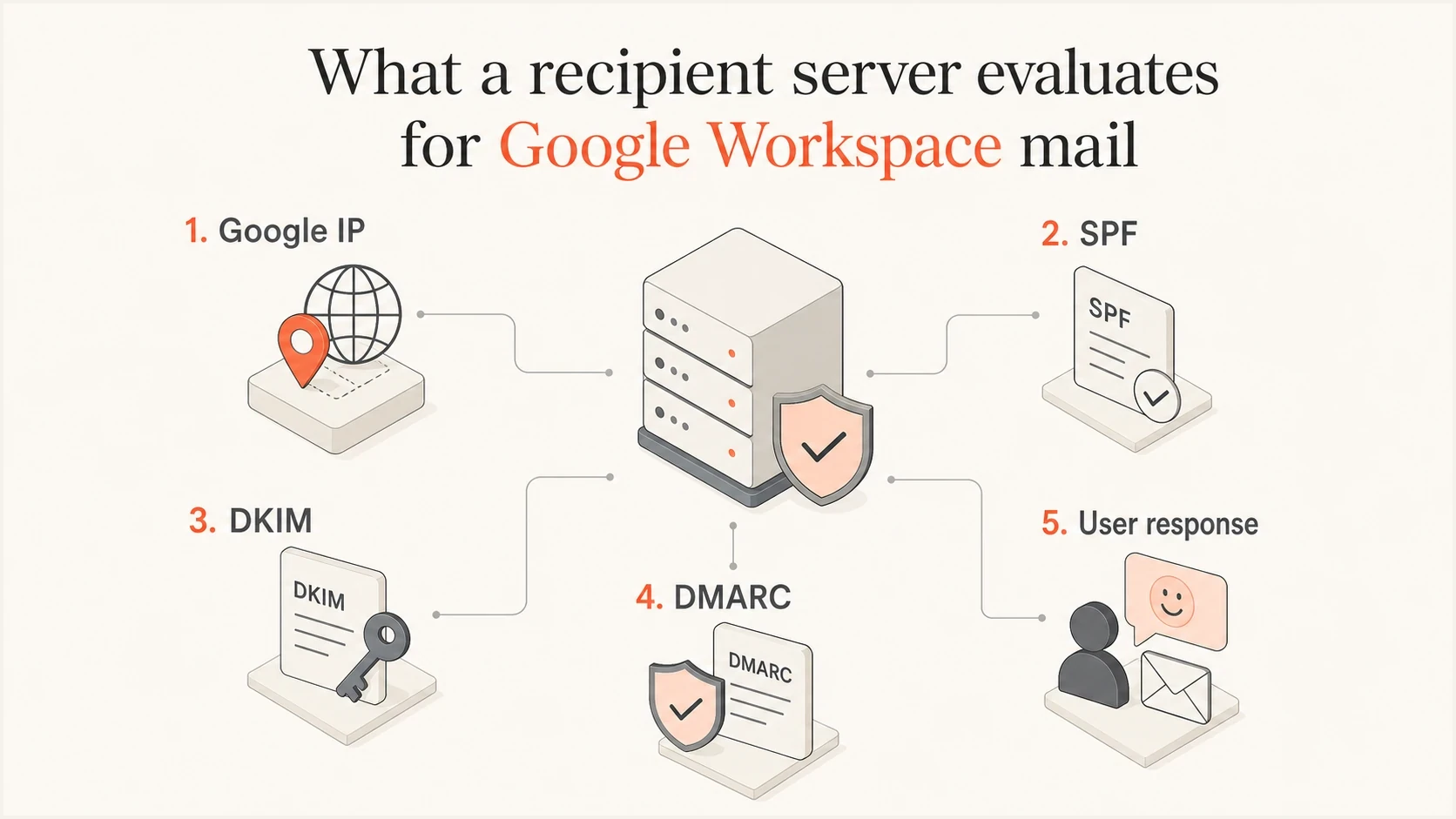
Recipient servers evaluate Google IPs, authentication, and user response, not billing country.
- Connection: The receiver sees an outbound Google mail server IP and its reverse DNS, not the country where the admin opened the account.
- Authentication: The receiver checks SPF, DKIM, and DMARC results, including whether an authenticated domain aligns with the visible From domain.
- Reputation: The receiver weighs domain history, user complaints, spam-folder moves, replies, opens, and deletes without reading.
- Content: The receiver evaluates the template, URLs, attachments, wording, personalization, and similarity to unwanted mail.
Typical Google Workspace DNS recordsDNS
example.com TXT "v=spf1 include:_spf.google.com ~all"
google._domainkey.example.com TXT "v=DKIM1; k=rsa; p=..."
_dmarc.example.com TXT "v=DMARC1; p=none; rua=mailto:dmarc@example.com"
Why a USA account will not fix inboxing
A new Workspace tenant in the USA can still send mail that lands in spam if the domain is new, the DKIM setup is missing, the message is cold and unwanted, the list is weak, or the sending volume jumps too fast. The country on the invoice does not erase those signals.
The useful investigation starts with whether the recipient can authenticate the sender and whether previous recipients wanted the mail. If the domain has little useful mail history and the campaign looks like mass outreach, a USA Workspace account does not make that mail wanted.
Changing account country
- Effect: It does not repair poor domain reputation or missing authentication.
- Risk: It adds admin overhead, billing confusion, and migration work.
- Result: It gives you a new tenant, not a trusted sender identity.
Fixing delivery signals
- Effect: It improves the signals recipients actually score.
- Risk: It needs patient testing and cleaner sending habits.
- Result: It gives receivers a stronger reason to trust the domain.
To separate geography from routing, inspect the earliest Received header added after submission and the Authentication-Results header. Direct Workspace mail should show Google's outbound infrastructure. Mail sent through a gateway or relay will expose that extra route, which needs its own reputation and authentication review.
Do not use country changes as a deliverability fix
If a message fails DMARC, gets complaints, uses a weak list, or contains risky URLs, changing the Workspace country does not fix the cause. It only gives you the same sending problem in a different admin account.
Sending limits and Gmail requirements
Google Workspace sending limits are account quotas, not an inbox-placement score. A paid Workspace user account can send up to 2,000 messages in a rolling 24-hour period. The listed limit is 1,500 messages for mail merge and 500 for trial accounts. Google can suspend new outbound sending for up to 24 hours after an account reaches a limit, regardless of the tenant's country.
Other quotas can stop sending earlier. Google lists up to 3,000 external recipients per day and up to 2,000 unique external recipients per day for a paid user account. It also applies different limits to SMTP submission, the Gmail API, SMTP relay, trial accounts, and some other sending methods. These numbers can change without notice, so use the current Admin documentation when planning volume.
- Quota failure: The account stops sending after it reaches a Workspace message or recipient limit.
- Deliverability failure: A receiving system accepts, filters, defers, or rejects a message based on its own rules and sender signals.
- Policy failure: Gmail can temporarily or permanently reject non-compliant traffic under its sender requirements.
- Diagnosis: Read the SMTP response and account alert before treating every missing delivery as spam placement.
Gmail's bulk-sender classification is separate again. Google counts messages sent to personal Gmail accounts across the same primary domain, including subdomains. A sender that reaches about 5,000 messages in a 24-hour period can be classified as a bulk sender permanently, even if no single Workspace mailbox sends that volume. Gmail increased enforcement against non-compliant bulk traffic in late 2025, so passing the current sender requirements matters more than tenant geography.
A daily limit is not a safe target
Sending below the account quota does not guarantee inbox placement. Sudden volume, invalid recipients, and complaints can trigger filtering or restrictions before the numerical limit is reached.
Signals that matter more than location
The useful question is not where the Workspace account is located. The useful question is whether your domain looks like a legitimate, wanted sender. These checks tell you far more than the country field in Google Admin.
|
|
|
|---|---|---|
SPF | Authorizes Google | DNS |
DKIM | Signs mail | Admin and headers |
DMARC alignment | Connects authentication to From | Use DMARC monitoring |
TLS | Protects transport | Message headers |
Domain reputation | Carries sender history | Run domain health |
Complaints | Drive filtering | Keep below 0.3% at Gmail |
Sending limits | Can pause outbound mail | Read quota errors |
Blocklist or blacklist | Can affect reputation | |
Routing | Changes visible infrastructure | Inspect Received headers |
Practical checks for Google Workspace deliverability
A blocklist or blacklist issue is a stronger warning sign than the Workspace billing country. Domain and IP listings do not always mean every mailbox provider will reject the message, but they show that a listed identifier needs investigation.
Suped DMARC dashboard showing email volume, authentication health, and source breakdown
Suped's product brings DMARC aggregate reports, SPF and DKIM results, source identification, and blocklist alerts into one workflow. Teams can use it to confirm whether mail is leaving through Google, find an unexpected gateway or third-party sender, and fix authentication gaps before changing DMARC policy.
The most common Google Workspace mistake is enabling only SPF and assuming the job is done. SPF alone is fragile because forwarding can break it. DKIM gives the message a domain signature that survives more routing changes. DMARC lets you monitor who is sending as your domain and move toward enforcement when the legitimate sources are stable.
How to test it properly
The fastest way to stop guessing is to send a real message and inspect the results. Use an email tester with the exact mailbox, domain, template, links, and sending path you plan to use. Then compare that result with a normal recipient inbox test.
Run the test before opening a new Workspace tenant. If the test shows SPF, DKIM, or DMARC problems, fix those first. If authentication passes but placement is poor, look at content, sending rate, list quality, previous complaint behavior, and whether recipients have shown interest in the mail. If Google refuses to submit the message, read the quota notice or SMTP response before investigating inbox placement.
Email tester
Send a real email to this address. Suped shows a results button when the test is ready.
?/43tests passed
- Send: Send one real message through Google Workspace, not a copied header or forwarded sample.
- Inspect: Read the Authentication-Results and Received headers, then confirm SPF, DKIM, DMARC, alignment, and the outbound route.
- Compare: Send the same message to different mailbox providers and note inbox, spam, deferral, or rejection behavior.
- Check errors: Separate Workspace quota errors from recipient-side SMTP responses and spam placement.
- Change: Change one variable at a time, such as DKIM status, sending volume, template, or URL set.
A clean test result has limits
Passing SPF, DKIM, and DMARC does not guarantee inbox placement. It proves the sender identity is technically sound. Inbox placement still depends on reputation, recipient behavior, volume, and content.
When geography still matters
Geography is not the main Google Workspace deliverability lever, but it can matter in adjacent cases. The difference is whether geography appears in the actual sending path, a recipient's local policy, or the audience response.
Usually not relevant
- Billing: The country used to buy Google Workspace is not a normal inboxing signal.
- VPN: The VPN used for signup does not change the outbound mail server seen by recipients.
- Admin: The location of the administrator login is not the same as the mail route.
Sometimes relevant
- Gateway: A separate outbound gateway has its own IPs, DNS, and reputation.
- Recipient policy: An organization can apply a local rule to a gateway IP, region, or jurisdiction.
- Audience response: Language, local timing, and list consent affect complaints and engagement.
That last point matters for outreach. If a domain sends English cold outreach to a market that never requested it, sender reputation suffers because recipients ignore it, delete it, or report it. That is a wanted-versus-unwanted mail problem, not a Turkey-versus-USA account problem.
If your Google Workspace mail is landing in spam, treat it as a normal spam placement investigation. Start with authentication, then move to reputation and engagement.
Views from the trenches
Best practices
Test the exact Google Workspace mailbox and domain before changing tenant country.
Prioritise DKIM and DMARC reports first before treating geography as the root cause.
Separate billing location, admin login location, and real outbound mail routing.
Common pitfalls
Creating a new Workspace tenant can hide the same sender reputation problem in a fresh account.
Assuming a VPN signup changes mail routing leads teams away from real fixes and wastes tests.
Treating authentication as complete after SPF leaves DKIM and DMARC gaps in production mail.
Expert tips
Use report data to identify sources before moving a DMARC policy to reject across domains.
Review complaints and low engagement before blaming a country or region signal alone.
Check blocklist and blacklist status after suspicious spikes or sudden rejects quickly.
Marketer from Email Geeks says the address on the account is not the issue. Recipient demand and user behavior carry more weight than where Workspace was purchased.
2024-02-25 - Email Geeks
Marketer from Email Geeks says Google Workspace sends through Google IPs, and those IPs are still Google's infrastructure even when geolocation databases place them in a region.
2024-02-26 - Email Geeks
The practical answer
Do not create a USA Google Workspace account just because your current Workspace account has a Turkey address. For direct Google Workspace sending, the country tied to the tenant is not the lever that fixes inbox placement.
Fix the things receivers actually score: authentication and alignment, domain reputation, complaint rate, bounce rate, list consent, content, sending volume, and whether recipients engage with the mail. Check Workspace quotas separately. If there is an outbound gateway or another sender in the path, evaluate that infrastructure on its own.
For ongoing management, Suped's product can collect DMARC aggregate reports, identify sending sources, surface SPF or DKIM failures, and alert teams to blocklist or blacklist changes. That workflow helps isolate the real sending path before anyone spends time rebuilding a tenant in another country.




