Does an email service provider (ESP) impact email deliverability, particularly for operational emails?

Updated on 6 Aug 2026: We added current sender requirements, delivery-speed checks, and clearer ESP isolation guidance for operational email.
Yes, an ESP can affect email deliverability, including operational email. But the claim that inbox providers automatically send Marketo mail to spam just because they recognize Marketo servers is too broad. A competent ESP is usually not the deciding factor when authentication, domain reputation, consent, engagement, bounce handling, and message relevance are healthy.
An email service provider (ESP) supplies the infrastructure that sends, queues, tracks, and reports on email at scale. Two questions matter. Does that infrastructure affect the result? Yes. IP pools, MTA tuning, retry behavior, bounce classification, return-path setup, link tracking, and support quality all matter. Does a known ESP brand automatically harm good operational mail? Usually no. Large legitimate senders use mainstream platforms reliably.
For billing, scheduling, account alerts, password resets, and other operational or transactional messages, use an ESP only if it lets you separate the mail stream, authenticate it cleanly, control the sending domain, read bounce data accurately, measure delivery delay, and monitor reputation. If it cannot do those things, move operational mail to a more suitable sending setup.
The direct answer
The ESP is one input in deliverability, not a magic sender score. Delivery means the receiving server accepted the message. Deliverability concerns where the message lands after acceptance, such as the inbox or spam folder. Inbox providers evaluate the connecting IP, IP range, sending domain, authentication and domain alignment, complaint rate, engagement, historical patterns, link destinations, content, and recipient-level behavior. The ESP can influence several of those signals, but it does not override every other signal.
Short answer
Using Marketo or another established ESP for operational email is not automatically wrong. It becomes risky when operational mail shares reputation with marketing campaigns, uses an authentication mismatch, sits on a poor shared pool, lacks accurate bounce handling, or cannot be monitored independently.
Dedicated IPs help with isolation, but they do not isolate every signal. Some mailbox providers and filters consider IP range, ASN, or provider-level history, especially at the connection stage. Broad filtering is usually reserved for clearly bad sources because it also blocks wanted mail. It is real, but it should not be the first explanation when operational mail misses the inbox.
- ESP infrastructure: Connection limits, throttling, retries, bounce parsing, and shared pool quality can change delivery outcomes.
- Sender reputation: Your domain reputation, engagement, complaints, list quality, and link destinations usually carry more weight.
- Operational risk: Critical mail needs separation, monitoring, and fast diagnostics because a small failure has high customer impact.
- Marketo specifically: The platform is not automatically a spam-folder trigger. The sending setup and practices decide the result.
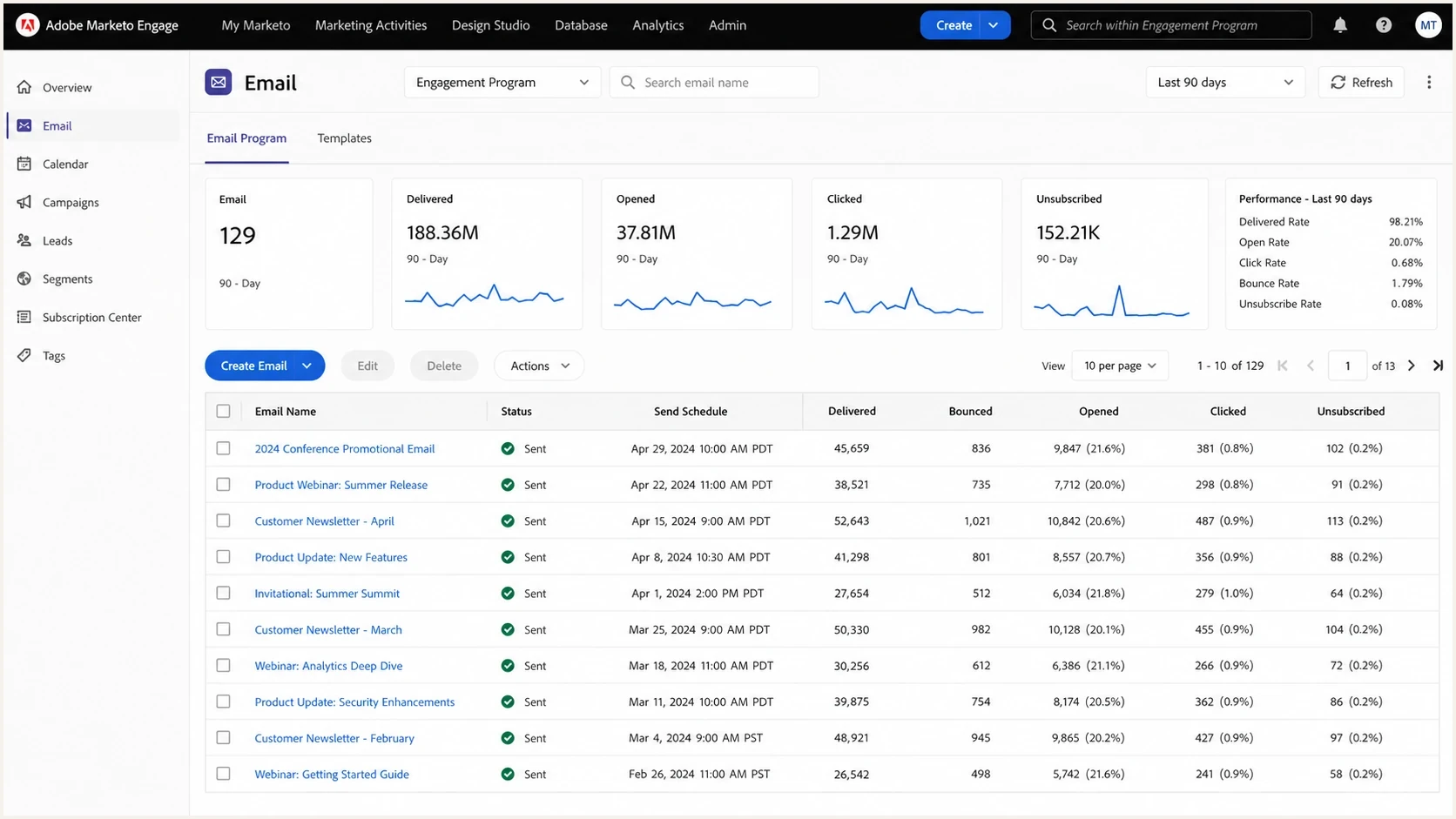
Adobe Marketo Engage email program dashboard with delivery, bounce, open, and click metrics.
What the ESP actually changes
The ESP matters most when it controls the parts of sending that you cannot easily see. A platform with good MTA operations can pace traffic by mailbox provider, retry temporary failures correctly, classify hard and soft bounces accurately, and avoid pushing mail through a weak shared pool. A platform with poor defaults can cause damage even when the sender has good intent.
The strongest clue is whether the issue follows the ESP or follows the sender. If every domain, message type, and recipient segment performs poorly only on one platform, the ESP deserves scrutiny. If only certain campaigns, recipient groups, or domains struggle, the cause is probably data, reputation, authentication, or message design.
|
|
|
|---|---|---|
IP pool | Shared or dedicated | Neighbor reputation |
MTA | Retries and pacing | Deferrals or blocks |
Return path | Custom or shared | SPF identity |
DKIM | Domain signing | Trust signal loss |
Bounces | Classification | Bad suppression |
Links | Tracking domain | Domain mismatch |
Where ESP choice has real delivery impact
This is why ESP rankings are a weak way to make a technical decision. A platform can look better because its customer base has better consent, lower complaint rates, better segmentation, or more disciplined operational teams. That does not mean the platform itself has special inbox placement power.
Why operational email needs extra control
Operational email has a different failure profile than marketing email. A missed invoice, appointment change, security alert, or password reset creates immediate customer friction. The content is usually wanted, but mailbox providers still evaluate the same authentication and reputation signals.
The safest pattern is to separate operational mail from promotional mail. That normally means a dedicated subdomain, separate tracking domain, separate templates, clear suppression rules, and independent monitoring. The point is not to hide the ESP. The point is to make the reputation signal specific to the mail stream.
Mixed stream
- Shared reputation: Billing notices and broad campaigns influence the same sender identity.
- Harder diagnosis: A complaint spike in marketing can look like an operational mail problem.
- Slower response: Teams must separate logs after the incident has already affected customers.
Separated stream
- Clean identity: Operational mail has its own authenticated subdomain and tracking domain.
- Clear signal: Engagement, complaints, and bounces map to one critical mail stream.
- Faster fixes: Authentication, blocklist, and bounce issues are easier to isolate.
If you send operational and marketing traffic from the same sending domain, one mail stream can contaminate diagnosis for the other. Subdomain separation does not erase primary-domain bulk-sender obligations, but it makes failures and reputation changes easier to measure.
Delivery speed and queue resilience
Inbox placement is only part of operational email performance. A password reset that reaches the inbox after its token expires has failed its purpose. An ESP's API acceptance response only confirms that the platform accepted the request. It does not prove that the ESP attempted SMTP delivery or that the receiving server accepted the message.
|
|
|
|---|---|---|
Queue time | API acceptance to first SMTP attempt | Per-message timestamps |
Deferral age | First temporary failure to acceptance | SMTP replies and retry history |
Burst handling | High-percentile delay during traffic spikes | Rate limits and queue depth |
Event lag | Recipient acceptance to webhook | Timestamped delivery events |
Operational delivery timing checks
Ask how the ESP handles provider throttling, retry duration, backlog recovery, duplicate prevention, and incident escalation. A second ESP is not automatic failover. Moving traffic to a cold domain or IP can create new reputation problems, and replaying queued events can send duplicates. Test a controlled cutover with authenticated domains, current suppression data, idempotent message handling, and clear rollback criteria.
How to diagnose whether the ESP is the problem
Start with evidence, not the ESP name. A seed test can be useful, but it is not enough on its own. Real recipient engagement, complaint feedback loops, bounce logs, DMARC aggregate reports, blocklist (blacklist) status, queue timing, and provider-specific deferral messages give a more reliable diagnosis.
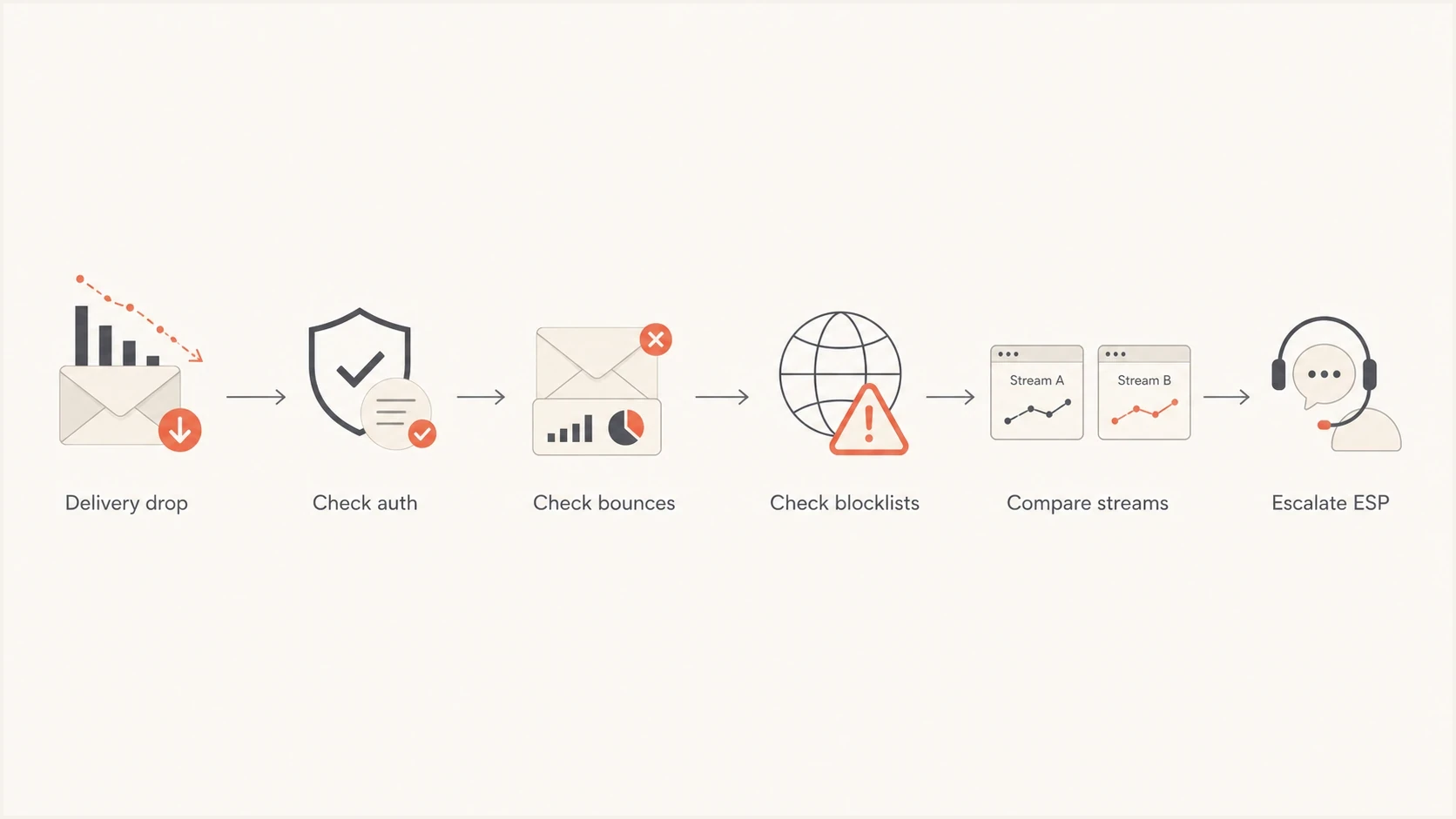
Six-step flowchart for diagnosing ESP-related email deliverability problems.
The first pass is simple: prove SPF and DKIM pass, confirm DMARC domain alignment with the visible From domain, confirm the return path is under your control, check that the tracking domain matches your brand, review bounces and queue age by provider, then compare operational mail against marketing mail. Suped's DMARC monitoring groups sources, authentication results, and domain-level failures so teams do not have to read raw XML.
- Authenticate first: Confirm SPF and DKIM pass, then verify that at least one authenticated domain has DMARC alignment with the visible From domain.
- Separate results: Compare billing, scheduling, security, and marketing mail instead of averaging them together.
- Read bounces: Look for mailbox providers, SMTP codes, deferrals, policy messages, and repeated retry patterns.
- Check reputation: Review domain, IP, complaint, and blocklist data before assuming the ESP name is the cause.
- Compare changes: If performance changed after a migration, audit DNS, warmup, traffic mix, suppression rules, and queue timing.
Email tester
Send a real email to this address. Suped shows a results button when the test is ready.
?/43tests passed
For a quick live check, send a real message through an email tester and compare the result with real campaign metrics. Do not treat one seed result as decisive if complaints, bounces, queue timestamps, and recipient actions point somewhere else.
What to configure for operational mail
Operational mail should have its own authenticated identity. A typical pattern is a subdomain such as notify.example.com, a custom return-path domain, DKIM signing under that subdomain or the organizational domain, and a DMARC record that provides reporting before strict enforcement.
Example DNS pattern for operational mailDNS
notify.example.com.  TXT  "v=spf1 include:esp.example -all"
selector1._domainkey.notify.example.com.  CNAME  selector.hosted.example.
_dmarc.notify.example.com.  TXT  "v=DMARC1; p=none; rua=mailto:d@example.com"
The example is not meant to be copied as-is. The important parts are ownership and domain alignment. DMARC passes when either the SPF-authenticated return-path domain or the DKIM signing domain has the required relationship to the visible From domain. A domain health checker can catch obvious DNS and authentication mistakes before a production send.
Current sender baseline
Large-sender requirements now make ESP capability easier to test. The setup should support SPF, DKIM, DMARC, visible From-domain alignment, TLS, valid forward and reverse DNS, and standards-compliant message formatting. For personal Gmail accounts, keep user-reported spam below 0.1% and prevent it from reaching 0.3%. Gmail counts volume across subdomains of the same primary domain, and bulk-sender status does not expire once assigned.
Do not skip bounce quality
Poor bounce classification can quietly hurt operational email. If temporary failures are treated like permanent failures, you suppress valid users. If permanent failures are retried for too long, you keep hitting bad addresses and weaken sender quality.
Also check whether the ESP supports custom bounce domains, custom DKIM selectors, domain-level reporting, clean suppression exports, readable SMTP diagnostics, and one-click List-Unsubscribe for promotional or mixed-purpose mail. Gmail exempts purely transactional messages, such as password resets and reservation confirmations, from its one-click requirement. An automated trigger alone does not make promotional content transactional. If the ESP's controls are unclear, ask before routing critical operational mail through the platform.
?
What's your domain score?
Deep-scan SPF, DKIM & DMARC records for email deliverability and security issues.
A clean DNS check does not prove inbox placement, but it removes the easiest failure class. After that, the investigation can focus on reputation, recipient response, content, delivery timing, and the ESP's handling of delivery attempts.
Shared IP, dedicated IP, and provider range reputation
A dedicated IP is useful when you have steady volume, strong list hygiene, and the operational discipline to warm and monitor it. It gives you more control than a shared pool, but it does not make the rest of the provider invisible. Some filters still consider neighboring IPs, netblocks, and ASN reputation, especially for sources with clear abuse history.
Shared pools can work well when the ESP manages them tightly and your volume is too small or irregular to maintain a dedicated IP's reputation. They can also hurt when nearby senders trigger rotating blocklist or blacklist listings. The practical question is not shared versus dedicated in the abstract. It is whether your traffic stability, risk, and monitoring justify owning IP reputation.
Dedicated IP readiness
Volume alone does not decide whether a dedicated IP will help operational email.
Low readiness
Use a managed pool
Traffic is irregular, or the team cannot warm and monitor its own IP reputation.
Moderate readiness
Prepare controls first
Traffic is stable, but warmup, alerting, and incident ownership still need work.
High readiness
Dedicated IP can fit
Traffic is stable, and the team can own warmup, monitoring, and provider escalation.
If you move, read the migration data carefully. Deliverability often gets worse during provider changes because the sender changes DNS, domains, IPs, templates, headers, tracking links, sending cadence, and suppression logic at the same time. That can make the new ESP look worse when the real issue is the transition. A plan for changing ESPs should cover authentication, warmup, stream separation, queue timing, and rollback criteria.
When Marketo is fine and when to split
For the specific Marketo question, avoid an absolute rule against operational mail. Prove that the setup is built for operational use. Marketo can work when it has the right sending identity, dedicated or well-managed IP allocation, clean authentication, measurable queue performance, and reliable monitoring.
|
|
|
|---|---|---|
Subdomain | Separated | Mixed |
Authentication | Matched | Shared |
Bounces | Clear | Opaque |
Queue timing | Measured | Unknown |
Monitoring | Continuous | Reactive |
Decision guide for operational mail in Marketo
Concern rises when billing or scheduling mail goes through the exact same sender identity as newsletters, webinars, lead nurture, and reactivation campaigns. Even if the platform is competent, the operational mail is exposed to the reputation swings of promotional activity.
Strong reason to split
Split operational mail if the ESP cannot provide matching authentication, sender identity separation, useful bounce exports, queue timestamps, or fast support for delivery incidents. Critical customer mail needs a setup you can inspect and repair quickly.
Where Suped fits in the workflow
Suped is our DMARC reporting and email authentication platform. It helps answer which sender is failing, which domain has an authentication mismatch, whether failures are new, and whether a blocklist (blacklist) issue is tied to a shared pool, a dedicated IP, or your own domain reputation.
Suped DMARC dashboard showing email volume, authentication health, and source breakdown
Suped brings DMARC, SPF, DKIM, blocklist monitoring, alerts, and fix steps into one workflow. That gives teams evidence to separate an ESP infrastructure problem from a DNS, domain, or sending-practice problem.
A practical workflow is to monitor all sending sources, verify which ones are legitimate, fix SPF and DKIM domain alignment, watch policy failures, and turn on alerts for sudden authentication or reputation changes. Suped's blocklist monitoring connects reputation events to the domains and IPs that send your mail.
Manual diagnosis
- Raw reports: DMARC XML needs parsing before it becomes useful.
- Slow triage: DNS, bounce, and reputation data live in separate places.
- Late discovery: Issues are often found after customers report missing mail.
Suped workflow
- Unified view: DMARC, SPF, DKIM, and reputation data sit together.
- Issue steps: Automated detection points to the records and sources to fix.
- Alerts: Teams see sudden authentication or reputation changes quickly.
Views from the trenches
Best practices
Separate operational mail by subdomain so reputation signals stay readable during incidents.
Track DMARC, SPF, DKIM, bounces, and blocklist status before blaming the ESP for changes.
Use a dedicated IP only when volume and operations justify warmup and monitoring.
Common pitfalls
Assuming Marketo or any ESP is the cause before checking reputation and engagement.
Moving providers without warmup and mistaking transition damage for ESP quality.
Sending billing and scheduling mail through the same stream used for marketing campaigns.
Expert tips
Ask each ESP how it handles retries, bounce classification, return paths, and unsubscribe.
Watch ASN and neighboring IP reputation, but treat it as one signal among many inputs.
Use seed tests carefully; real engagement and complaint trends carry more diagnostic value.
Marketer from Email Geeks says ESP infrastructure can technically affect delivery, but broad provider-level blocking is not the usual cause for a healthy sender.
2025-07-03 - Email Geeks
Marketer from Email Geeks says ESPs differ in MTA tuning, retry behavior, custom return paths, bounce handling, and advice quality.
2025-07-03 - Email Geeks
The practical verdict
An ESP can affect operational email deliverability, but a known ESP name is rarely the whole explanation. The bigger questions are whether the mail stream is separated, authenticated, monitored, and supported by a platform that handles sending infrastructure competently.
For Marketo, the answer is not an automatic no. It is acceptable for operational mail when the configuration gives you clean identity, reliable bounce data, measurable delivery timing, and fast visibility. It is a bad fit when operational messages are mixed with promotional campaigns or when you cannot inspect and fix authentication and reputation problems quickly.
Measure before migrating. Build a separated operational sending identity, validate SPF, DKIM, and DMARC, monitor blocklist and blacklist status, read bounce and queue logs, and compare real mailbox outcomes against seed tests. Suped gives teams one place to monitor authentication sources and reputation changes without turning each investigation into a manual DNS and XML exercise.




