Do images in emails trigger spam filters and how does email fingerprinting work?

Published 15 Jun 2025
Updated 1 Aug 2026
12 min read
Summarize with
Updated on 1 Aug 2026: We clarified how remote, CID, and base64 images affect message size, scanning, and fingerprinting.
Images in emails do not usually trigger spam filters by themselves. A red headline inside a JPEG or a banner image is rarely the single reason a message lands in spam. The stronger signals are the image URL, link domains, sender authentication, sending history, complaint history, message structure, and whether the same or similar message has already been treated as unwanted mail.
That answer has an important caveat: image content can be part of filtering when the image is attached, when a mailbox provider fetches and scans hosted images, or when OCR is used to read text inside the image. Image pixels should not be the first suspect. Test the full message with an email tester, then compare the HTML, links, asset hosts, authentication, and recipient-domain results.
Email fingerprinting is different from keyword matching. A fingerprint is a compact, lossy marker for a message or group of similar messages. It helps filtering systems compare mail at high speed. The fingerprint itself is not good or bad. The history attached to that similar group of mail is what changes the delivery outcome.
- Direct answer: Images can contribute to filtering, but images alone are rarely the main trigger.
- Image text: Text inside an image can be read by OCR, but many decisions happen before pixels matter.
- Image URLs: The hosted image URL and its hostname are much easier for filters to analyze.
- Fingerprints: They group similar mail, then reputation data tells the filter how to treat that group.
What spam filters actually see
A mailbox provider sees much more than the rendered email. It sees the envelope, headers, authentication results, sending IP, DKIM domain, HTML, text part, link destinations, image hostnames, MIME structure, attachments, prior recipient feedback, and how the same sender has behaved over time. That means a visible design change can be less important than a hidden URL change.
|
|
|
|---|---|---|
Image pixels | Fetched, cached, or attached | Context-dependent |
Image URL | Parsed from HTML | Medium |
HTML | Parsed directly | Medium |
Embedded image | MIME part or inline data | Context-dependent |
DKIM domain | Authentication and reputation | High |
Complaints | Recipient feedback | High |
Common message signals and their typical influence.
Mail stream matters because filters need a way to connect one message to the next. A stream can be all mail signed with the same DKIM domain, all mail sent through the same source, or all messages that share a pattern. Good DMARC monitoring helps separate legitimate sources from unknown ones, so reputation work starts with a clean map of who is sending.
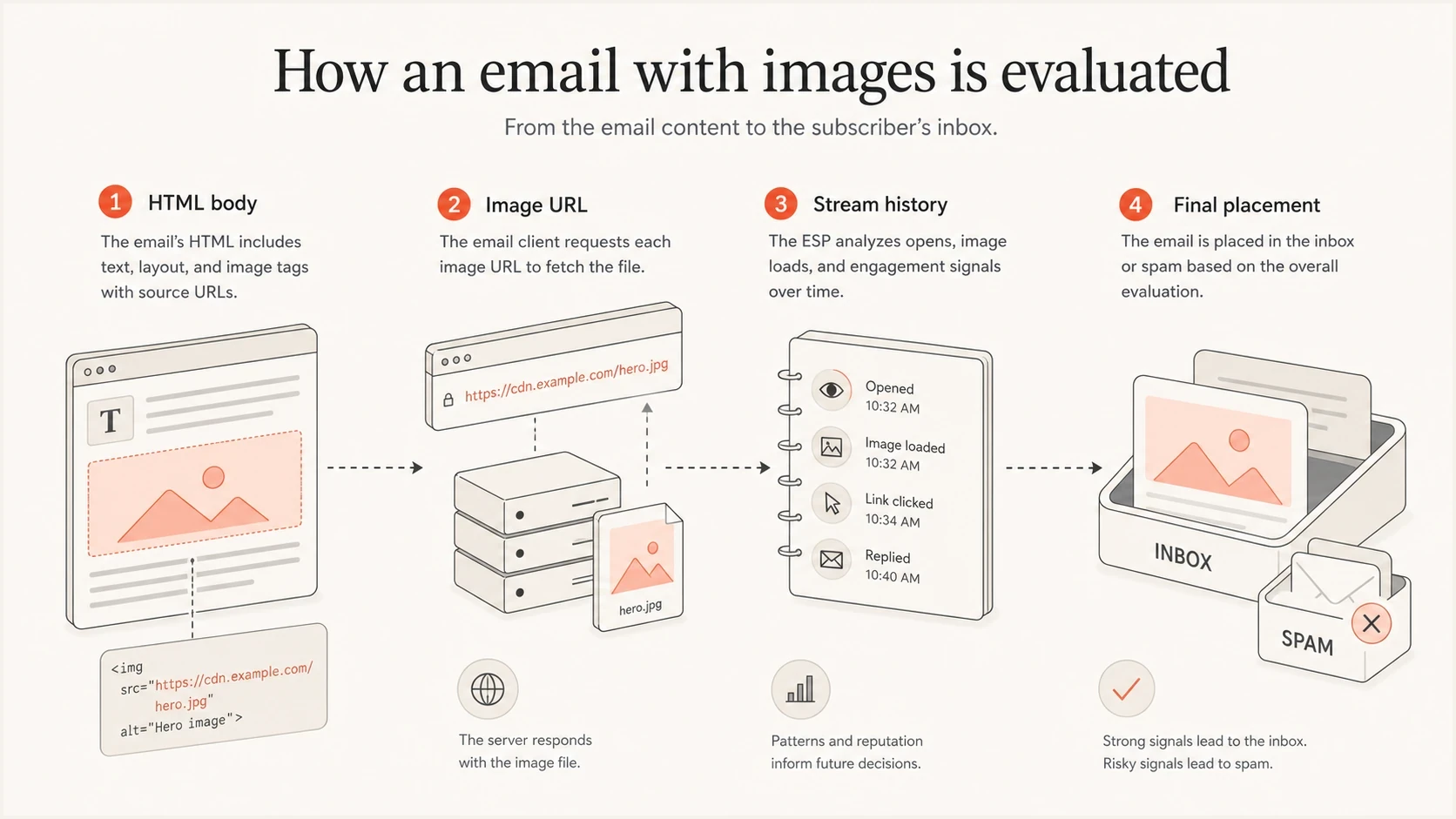
How spam filters evaluate HTML, image URLs, stream history, and inbox placement.
The useful mental model
Do not ask, "Did this image trigger spam?" Ask, "What changed in the message fingerprint, asset host, link path, authentication, and mail stream history?" That framing leads to better tests and fewer false conclusions.
Why text inside an image is different
Text inside an image is harder to inspect than HTML text. If the image is remotely hosted, the receiving system has to fetch it or rely on a cached copy before OCR can read the words. If the image is embedded, the image data is already part of the message and is easier to include in scanning or hashing.
Avoid image-only emails even when the design team likes them. The deliverability issue is not only filtering. Image-only emails are weaker for accessibility, dark mode, responsive rendering, inbox search, and recipients who block remote images. Essential copy should stay as live text. A very high image-to-text ratio can contribute to content-based scoring, but there is no universal ratio that guarantees inbox or spam placement.
- Remote images: Filters usually see the URL first, then the image only if it is fetched or cached.
- Embedded images: The image data is part of the message, changing its MIME structure and encoded size. It can also affect fingerprinting.
- Red text: Color alone is not a dependable spam signal. Wording and context matter more, as does message history.
- QR codes: Treat them as link-like content. Read more on QR code scanning when the image contains a scannable destination.
Image problem
- All-image layout: Recipients and filters get little live text to interpret.
- Heavy assets: Large remote files slow loading, while embedded files increase encoded message size.
- Weak alt text: Blocked images leave the recipient with missing context.
Real problem
- Asset host: A low-reputation image host can affect trust.
- Link path: Redirect chains and mismatched domains add risk.
- Stream history: Prior complaints can outweigh the visual design.
How image embedding changes the message
Remote, CID, and base64 images can render a similar design, but they produce different messages. That difference matters for message size, MIME parsing, client support, and the signals available to a fingerprinting system.
|
|
|
|---|---|---|
Remote HTTPS | An image URL in HTML | Keeps binary data outside the email, but exposes the asset hostname and path |
CID inline image | A related MIME part referenced by Content-ID | Adds encoded data and MIME structure to the message |
Base64 data URI | Image data inside the HTML source | Inflates HTML and has uneven email-client support |
How common email image methods change the message.
For bulk email, remote HTTPS images are usually the simplest option. Use stable asset domains, descriptive alt text, explicit dimensions, and compressed files. Reserve CID images for cases where inline MIME parts are required. Avoid base64 images in campaign HTML because the encoding expands the source and rendering support is inconsistent.
Keep the MIME alternatives useful
Send a text/plain alternative that communicates the same essential message as the HTML version. It is not a shortcut to inbox placement, but it gives recipients and clients a usable fallback and makes the message structure easier to inspect.
How fingerprinting works
A content fingerprint is a shortened marker derived from parts of the email. It lets a filtering system compare a new message against mail it has already seen. The fingerprint can include signals from headers, body structure, text, links, image references, attachments, and other stable parts of the message. Exact inputs and weights are proprietary and vary by filtering system.
The key word is lossy. A lossy fingerprint does not preserve every detail. It tries to keep enough similarity that a mail merge sent to 100 people still groups together, even if the greeting, coupon code, tracking parameter, or image dimensions change. That is the point. Filters want to recognize the same campaign without doing slow, exact comparisons for every message.
Simplified message inputsTEXT
headers: From, DKIM domain, sending IP
body: HTML structure, visible text, links, image URLs
assets: attachment hashes, image references
history: complaints, engagement, prior placement
fingerprint: compact similarity marker
This is why tiny edits do not reliably reset a filtering outcome. Swapping one image, adding random characters, resizing a banner, or changing punctuation can leave the message similar enough to remain in the same group. If that group has poor engagement or complaint history, the next send inherits the problem.
Avoid hash-busting tricks
Randomizing harmless parts of the email can make testing harder without fixing the cause. Improve the content and targeting. Then verify authentication and separate sender streams.
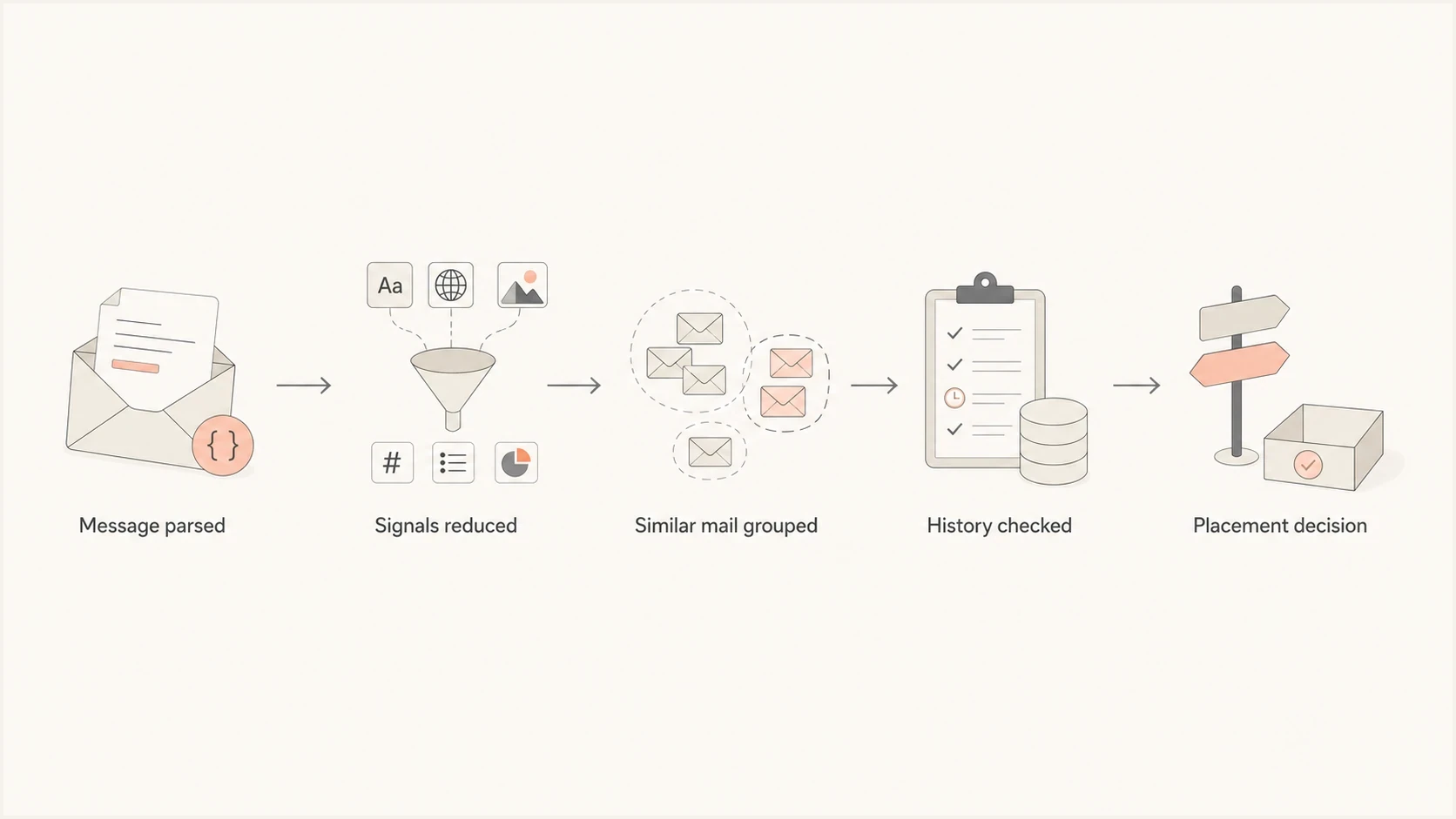
How email fingerprinting groups similar messages and applies reputation history.
Why A/B tests can mislead you
A common test is to send one version with images and one version without images. If the plain version performs better, it is tempting to conclude that images caused the spam placement. That conclusion is often too shallow. The image version also changed asset URLs, HTML weight, link density, text balance, rendering behavior, and sometimes the sending audience.
Use a narrower test plan. Keep the same audience slice, sender identity, subject pattern, authentication, and link destinations. Change one thing at a time. Then compare results by recipient domain. Do not rely on total open rate alone, because image caching and privacy protections can distort open data.
|
|
|
|---|---|---|
Remove images | Layout changed | URL trust |
Change host | Host changed | Pixel content |
Resize image | Weight changed | Stream history |
Add live text | Parseability rose | Complaint rate |
Better interpretation of common image tests.
Before blaming a banner or product image, check the sending domain with a domain health checker. Broken authentication or a messy sender map can make a clean design test look like an image problem.
What to check before blaming images
When a campaign with images starts landing in spam, work through the signals in the order filters usually care about them. The goal is to find the sender or message pattern that changed, not to remove every image and hope for a different outcome.
- Authentication: Review SPF and DKIM results, then confirm at least one passes with alignment so DMARC passes for the affected stream.
- Image hosting: Check whether asset URLs use trusted domains and stable HTTPS paths.
- Link domains: Inspect redirects, tracking links, shortened paths, and mismatched domains in the body.
- Message size: Keep HTML lean, compress remote assets for fast loading, and count CID or base64 image data in the encoded message size.
- Complaints: Compare complaint and unsubscribe patterns for the same audience.
- Template reuse: Look for repeated assets or templates tied to past poor engagement.
- Blacklist status: Use blocklist monitoring for blocklist (blacklist) signals on sending IPs and domains.
Email tester
Send a real email to this address. Suped shows a results button when the test is ready.
?/43tests passed
A useful test uses a real send, not just a screenshot of the template. Send the message through the same platform, with the same tracking setup, image host, DKIM signature, and sender identity planned for production.
Then repeat the test after one controlled change. For example, move image text into live HTML while keeping image hostnames and links unchanged. If placement improves, there is a stronger accessibility and parsing case. If it does not, inspect authentication and reputation, then review audience history.

Email tester sample report showing total score, email preview, issue summary, and per-section results
How to make image-heavy email safer
Image-heavy email is workable when the message remains accessible and authenticated and goes only to people who expect it. The practical approach is to reduce ambiguity. Make it easy for filters and recipients to understand who sent the message, where links go, and what the email says when images are blocked.
Best practice
- Live copy: Put the main offer, dates, disclaimers, and CTA text in HTML.
- Alt text: Use short descriptive alt text, not keyword stuffing.
- Stable hosts: Serve assets over HTTPS on domains you control or trust.
- Lean HTML: Remove unused code, duplicate styling, hidden blocks, and excessive tracking parameters.
Safer image markupHTML
<a href="https://links.example.com/campaign">
  <img
    src="https://assets.example.com/email/header.jpg"
    alt="Sale details and dates"
    width="600"
  >
</a>
The example keeps the image simple and gives blocked-image recipients a useful label. In a real campaign, place the CTA nearby as live HTML text because alt text is not a replacement for readable content.
Where Suped fits in the workflow
Suped's product is relevant when an image question becomes an operational question about which sender, domain, source, or reputation signal changed. Suped connects DMARC authentication data with source identification, real-time alerts, blocklist (blacklist) monitoring, and deliverability checks so a team can isolate the affected stream before changing the template.
- Find sources: Identify legitimate and unknown senders behind each stream.
- Fix authentication: Trace SPF, DKIM, and DMARC failures to the exact sending source.
- Watch reputation: Compare authentication data with blocklist and deliverability signals.
- Retest safely: Verify the same production sender setup after one controlled content change.
Practical takeaway
If an image-heavy campaign fails, do not only redesign the email. Use Suped to confirm DMARC authentication, identify the affected source, review reputation signals, and retest the specific issue before sending again.
Views from the trenches
Best practices
Keep essential copy in live HTML text so inboxes and screen readers can parse it cleanly.
Use stable asset hosts and clean image URLs instead of changing hosts for each campaign.
Test one content variable at a time, then compare results by recipient domain and source.
Common pitfalls
Blaming red text hides larger causes such as complaint history, sender mix, and weak auth.
Changing image sizes for every send can leave the mail looking similar to filters anyway.
Treating a fingerprint as a single blocked phrase leads teams toward the wrong fixes.
Expert tips
Check image URLs, link hosts, and DKIM domains before assuming pixels caused placement.
Remember that lossy fingerprints group similar mail even when small details change often.
Separate marketing, transactional, and test traffic so stream history stays interpretable.
Expert from Email Geeks says image pixels rarely drive filtering on their own; filters weigh the mail stream, body links, hostnames, and history more heavily.
2024-07-10 - Email Geeks
Expert from Email Geeks says a fingerprint is a compact, lossy marker for similar email, so tiny edits or resized images should not be treated as a reliable reset.
2024-07-11 - Email Geeks
The answer in practice
Images can be part of a filtering decision, but the practical answer is still clear: do not assume the pixels caused the spam placement. Start with authentication, sender identity, image and link hostnames, message structure, complaints, and the history of similar mail.
Fingerprinting works by grouping similar emails so filters can treat related mail as a stream. The grouping is neutral. The reputation and behavior attached to that group determine whether future mail gets trusted, filtered, or blocked.
The safest build is straightforward: use live text for essential content, host images cleanly, avoid unnecessary attachments, keep authentication healthy, monitor blocklist (blacklist) signals, and test with real messages before a large send.




