
Can email signatures, especially via Exclaimer, cause SPF or DKIM failures and impact email delivery?

Published 26 Jun 2025
Updated 8 Oct 2026
15 min read
Summarize with
Updated on 8 Oct 2026: We clarified Exclaimer routing checks, custom-domain DKIM setup, and how to separate authentication failures from inbox filtering.
Yes, an email signature can invalidate DKIM when a system adds or changes it after DKIM signing, because DKIM protects selected headers and body content against modification. Exclaimer's documented Server-Side behavior is to remove the existing DKIM signature when it applies a signature, then return the message to Microsoft 365 or Google Workspace for final DKIM signing. Confirm that the sending platform has DKIM enabled for the domain in the visible From address. A signature service can also affect SPF when it changes the outbound sending path and the relevant sending IP is not authorized. The result depends on deployment mode, mail flow order, SPF authorization, forwarding, and the recipient's delivery verdict.
The first thing to check is whether a real message that has already passed through Exclaimer still passes SPF, DKIM, and DMARC at the recipient side. If it does, relaxing DMARC from p=reject is not the fix. The delivery issue is more likely content filtering, a blocklist (blacklist) or IOC listing, sender reputation, a Microsoft tenant policy, or a routing change that happened around the same time.
- A signature can invalidate DKIM if it changes the message after signing.
- A signature does not break SPF by changing HTML, but a relay path can.
- Signatures can affect inbox placement through oversized images, tracking redirects, shared link reputation, or recipient content policies even when SPF and DKIM pass.
Why signatures can break DKIM
DKIM signs a canonicalized version of message headers and body content. If the message body changes after signing, the DKIM body hash can stop matching. A server-side signature platform often adds HTML, images, links, legal disclaimers, tracking URLs, or encoded body parts. If those changes happen before final DKIM signing, DKIM can pass. If they happen after final signing, DKIM fails unless a later system applies a new valid signature.
Exclaimer's Server-Side flow has a specific sequence. When Exclaimer applies a Server-Side signature, it removes the existing DKIM signature because its content change invalidates that signature. Exclaimer does not DKIM sign or re-sign the message and does not apply ARC sealing. After processing, Microsoft 365 or Google Workspace is responsible for final DKIM signing; signing with your sending domain depends on that domain's DKIM configuration. If the message leaves through another gateway after that point, the gateway must preserve the signed content or sign the final version itself. See Exclaimer's DKIM behavior.
DKIM canonicalization determines which formatting changes verification tolerates. In c=relaxed/relaxed, the first value applies to headers and the second to the body. Relaxed canonicalization tolerates specified whitespace changes, but it does not make an added HTML signature, disclaimer, or rewritten link safe after signing. Keep content changes before final signing. See DKIM canonicalization rules.
Likely to pass
- The signature is added before final DKIM signing.
- The DKIM d= domain matches the visible From domain exactly for strict DMARC alignment, or shares its organizational domain for relaxed alignment.
- The final outbound IP is authorized by SPF and the envelope sender domain passes DMARC alignment when SPF is expected to satisfy DMARC.
Likely to fail
- Another system changes the body after the final DKIM signature is applied.
- The platform changes a signed header or rewrites content after signing.
- A later system modifies the message after it leaves your control.
A clean test should use a message sent through the same route as a real user message, including the same Microsoft connector, the same Exclaimer policy, and the same final outbound path. Testing a message before signature processing only tells you the pre-signature state. It does not answer the delivery question.
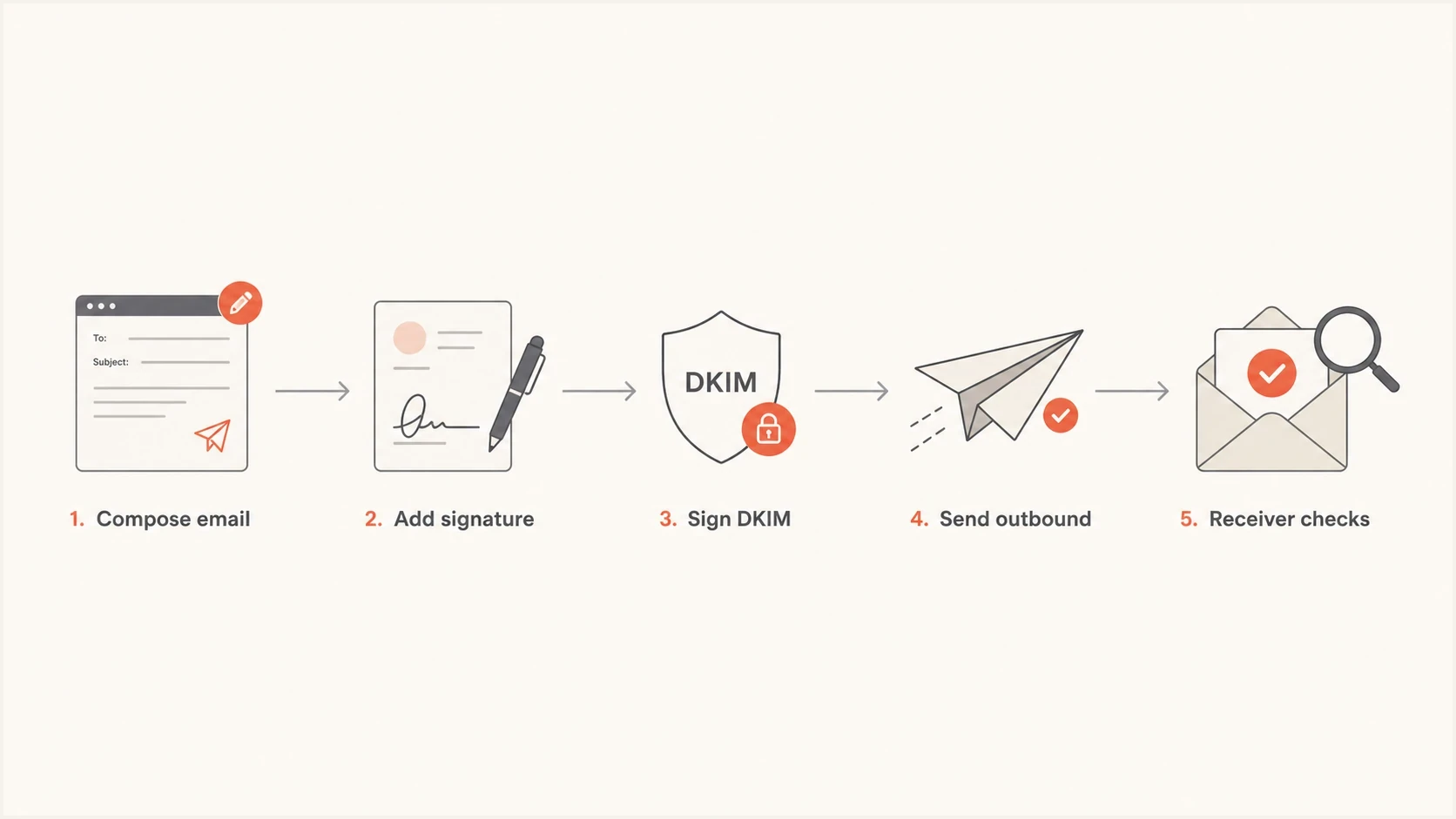
Email signature added before DKIM signing, followed by outbound delivery and recipient authentication checks.
Client-side and server-side signatures behave differently
Deployment mode determines whether the signature enters the message before normal sending or during server-side mail flow. A client-side signature is inserted in the mail client before Microsoft 365 or Google Workspace sends and signs the message. It does not introduce Exclaimer's cloud relay into the outbound path, although the final message still needs normal SPF, DKIM, and DMARC configuration.
Client-side deployment
- The signature is present before the message enters normal outbound mail flow.
- The sending platform applies DKIM to the message with the signature already included.
- Unmanaged clients or devices can miss the signature.
Server-side deployment
- Exclaimer modifies the message after it has entered server-side mail flow.
- The final sending platform must apply DKIM after Exclaimer returns the message.
- Connectors and regional sending infrastructure become part of SPF and trace analysis.
A hybrid deployment needs both checks. Test messages that receive the signature in the client separately from messages processed by the Server-Side route, because the two paths can produce different headers and authentication results.
Confirm DKIM signing for your sending domain
A correct Exclaimer return route does not prove that your sending domain is DKIM signed. Publishing a public key in DNS is only part of setup; the sending platform must also enable signing. Check each domain used in the visible From address.
For Microsoft 365, publish both selector1._domainkey and selector2._domainkey CNAME records using the exact targets supplied for your domain, then enable DKIM signing. Do not construct targets from another tenant or an old example. Follow Microsoft 365 DKIM setup.
Read DKIM status in Exchange Online PowerShellpowershell
Get-DkimSigningConfig -Identity example.com | Format-List Name,Enabled,Status,Selector1CNAME,Selector2CNAME
For Google Workspace, select the sending domain under Gmail > Authenticate email, generate its DKIM record if needed, and publish the supplied TXT record. After DNS is available, click "Start authentication". The selector is usually google, but use the selector actually configured. Follow Google Workspace DKIM setup.
Send a message through Exclaimer to an external mailbox. Confirm dkim=pass at the receiver and check the d= signing domain and s= selector. A valid signature using an unrelated provider domain does not satisfy DKIM domain alignment for your custom From domain.
When Exclaimer routing causes SPF failures
SPF checks whether the connecting IP address is allowed to send for the envelope sender domain, shown as smtp.mailfrom in authentication results and usually reflected in Return-Path. It does not inspect the signature HTML or image size. The signature content itself does not break SPF.
SPF can fail when Server-Side deployment changes the sending path. If Exclaimer infrastructure or another relay connects to a receiving mail system, its IP must be authorized for the envelope sender domain. That check can happen when Exclaimer returns mail to Microsoft 365 or Google Workspace, even if the platform later sends it to the final recipient. Exclaimer instructs Server-Side customers to update SPF for every sending domain with the subscription's regional include. Confirm the region in the subscription details and follow Exclaimer's SPF setup instructions.
SPF limits evaluation to 10 DNS-querying mechanisms and modifiers, including nested includes. Exceeding that limit produces permerror. Exclaimer documents regional IP entries as an alternative when the lookup limit is reached or static authorization is preferred. If using IP entries, maintain them against the current regional host list. Keep one SPF TXT record per domain, preserve existing sender authorization, and add mechanisms before all. See SPF evaluation limits.
|
|
|
|
|---|---|---|---|
HTML added | No impact | Fails if added after signing | Passes if either SPF or DKIM passes domain alignment |
New relay | Can fail | Passes if signed content is preserved | Passes if either SPF or DKIM passes domain alignment |
Forwarding | Often fails | Passes if signed content is preserved | Depends on surviving authentication and domain alignment |
Shared links added | No impact | Can fail after signing | Depends on surviving authentication and domain alignment |
How signature changes map to SPF, DKIM, and DMARC results.
Illustrative SPF record for Microsoft 365 and Exclaimer Australiadns
example.com. TXT "v=spf1 include:spf.protection.outlook.com include:spf.au.exclaimer.net -all"
The SPF record above is an example for an Australian Microsoft 365 subscription, not a complete record for every organization. Use your subscription's region and retain authorization for other legitimate senders. Check the connecting IP at each relevant hop against the envelope sender domain's SPF record, and validate the complete lookup count before publishing a change. Suped's SPF check helps confirm whether the DNS record is valid, but headers prove which path the message actually used.
How Exclaimer can still affect delivery
A message can pass SPF, DKIM, and DMARC and still land in junk. DMARC verifies that a passing SPF or DKIM result meets domain alignment with the visible From address. Mailbox filtering also evaluates content, link reputation, attachment behavior, message structure, recipient engagement, tenant policy, and domain or IP reputation. SMTP acceptance confirms delivery to the receiving system, not inbox placement.
Exclaimer can add elements that trigger enterprise filters. Check for oversized embedded images, tracking redirects, links using a shared provider domain, malformed HTML, and excessive signature content. Base64 and quoted-printable are normal MIME encodings, not authentication failures or automatic spam indicators. Message size and a specific recipient policy against encoded content still deserve testing.
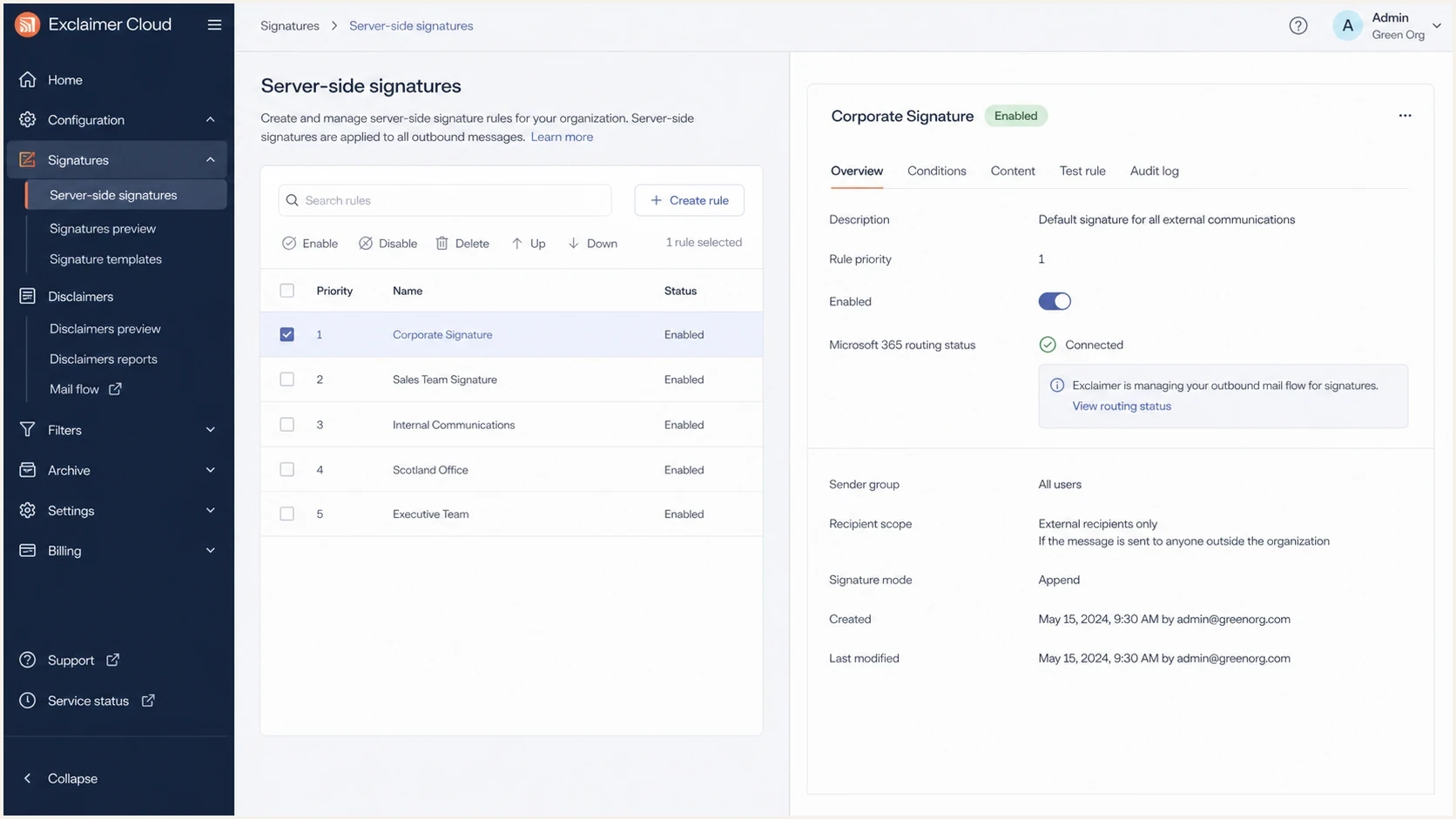
Exclaimer Cloud signature rule screen showing routing and signature settings.
Keep DMARC enforcement when authentication passes
If the tested message is signed and passing DMARC after it has gone through Exclaimer, changing p=reject to p=none weakens domain protection without fixing the delivery problem. Ask for the rejection text, quarantine reason, message trace event, or recipient-side verdict first.
The most useful evidence is a received message header, a message trace, and the exact failure mode. Rejected mail has an SMTP response or non-delivery report. For junked mail, request the receiving tenant's filtering verdict if available. A vague report that "mail is failing" is not enough to pin blame on Exclaimer, Microsoft 365, DNS, or DMARC.
For a practical deliverability test, send a real signed message through the production route and inspect the result with Suped's email tester. That gives you headers, authentication results, and content-level clues in one place.
Email tester
Send a real email to this address. Suped shows a results button when the test is ready.
?/43tests passed
What to check in the headers
The fastest way to separate authentication failure from delivery filtering is to inspect the final recipient-side authentication results. Do not rely only on what Microsoft 365 said before the message left your tenant. The receiving system makes the delivery decision. Use the Authentication-Results added by the receiving service you trust; an earlier hop's result or an untrusted supplied header does not establish the final verdict.
Example authentication result after signature processingtext
Authentication-Results: mx.receiver.example;
  spf=pass smtp.mailfrom=example.com;
  dkim=pass header.d=example.com;
  dmarc=pass header.from=example.com
In that example, Exclaimer is not breaking final authentication. If mail is rejected or junked with those results, shift the investigation to content, policy, reputation, or blocklist (blacklist) status. If DKIM fails, check the reported reason: a body-hash mismatch points to content changes, while a missing or invalid public key points to selector or DNS configuration. If DKIM is missing after Server-Side processing, confirm that the message returned to Microsoft 365 or Google Workspace and received the expected final signature. If SPF fails, check the connecting IP and the envelope sender domain.
- Compare smtp.mailfrom with the IP that connected to the receiver.
- Confirm header.d passes DMARC domain alignment, rather than checking only for a signature using an initial tenant domain. For DKIM key lookup, use s= and d= from DKIM-Signature.
- Confirm either SPF or DKIM passes with alignment to the visible From domain.
- Identify whether the message passed through Microsoft 365, Exclaimer, another relay, or a forwarder.
- Look for spam confidence, policy action, malware verdict, or tenant block reason.
DMARC needs either SPF or DKIM to pass with domain alignment; both are not required for a DMARC pass. Under relaxed alignment, the authenticated domain and visible From domain share an organizational domain. With adkim=s or aspf=s, the corresponding domains must match exactly. Passing SPF and DKIM using unrelated domains still produces DMARC failure. For messages with multiple DKIM signatures, DMARC accepts any one that validates and meets domain alignment. See DMARC domain alignment.
A recipient-reported "body hash did not verify" result means the received canonicalized body differs from the signed body hash. If a separate verifier reports a mismatch while the receiver reports DKIM pass, use the complete raw message, including the body, rather than pasted headers or reconstructed HTML. Missing or altered content in the test input invalidates the comparison. If DKIM is missing after Exclaimer processing, check the return route and final signing configuration. For a broader DNS and authentication view, Suped's domain health check is useful before spending hours on signature HTML.
Domain health checker sample results showing DMARC, SPF, DKIM scorecards and detailed validation checks
Troubleshoot Exclaimer authentication and delivery issues
Use a sequence that removes guesswork. The goal is to identify the failing layer: DNS authentication, mail flow, recipient policy, content, or reputation.
- Collect the receiver's full headers, the complete raw message for DKIM verification, a message trace, and the bounce or quarantine reason.
- Send a normal user email through the same Exclaimer rule and outbound connector.
- Compare messages with and without the signature while keeping the same Exclaimer relay path. Then bypass Exclaimer routing for one test sender. The first comparison tests signature content; the second tests routing. Keep sender, recipient, and message content consistent.
- List every routing, DNS, policy, security, or signature change made near the first failure date.
- Remove large embedded images, shared tracking links, and unused disclaimers for a controlled test.
- Verify whether the domain or outbound IP appears on a blocklist or blacklist, including IOC feeds.
Ask IT for concrete data
- Request the SMTP status code and full bounce text.
- Request the receiving tenant's spam verdict and policy action.
- Request the receiving service's Authentication-Results and the specific SPF, DKIM, or DMARC failure, rather than assuming all three fail together.
- Request the exact blacklist or blocklist name, listed domain or IP, and remediation path.
Suped's DMARC reporting groups sending sources with SPF and DKIM alignment results and detected issues. Compare affected sources with unaffected sources, then match report timing to message traces. Aggregate reports do not show signature HTML, complete relay paths, or inbox placement.
Issues page showing top issues, verified sources, unverified sources, and authentication pass rates
If a domain or IP is on a blocklist (blacklist) or IOC list, verify that the receiving system uses it before treating it as the cause of delivery failures. Authentication can pass while delivery suffers because of reputation damage. Suped's blocklist monitoring can identify the listed domain or IP so the team can separate reputation remediation from SPF, DKIM, or Exclaimer routing changes.
When to change DMARC, DKIM, SPF, or the signature
Do not change DMARC policy until the headers show a DMARC problem. If DMARC passes, changing DMARC does not solve a spam-folder placement issue. If DMARC fails after Exclaimer processing, confirm final DKIM signing and SPF domain alignment. If DMARC fails only for forwarded mail, account for forwarding behavior and check whether a valid DKIM signature for the From domain survives. Authorizing a forwarder's IP does not fix SPF domain alignment when its envelope sender uses a different domain.
DMARC policy change decision
Use recipient-side evidence before weakening a policy.
Keep policy
pass
DMARC passes and the issue is junk placement or reputation.
Fix flow
mixed
Final DKIM is missing or invalid, or SPF fails through the relay.
Fix missing sender
fail
Legitimate mail fails DMARC because a sending source lacks authentication with domain alignment.
For the signature itself, the most productive changes are simple: use small images, remove unnecessary tracking redirects, repair broken links, keep legal text short, and test the exact production path. If a recipient has a strict policy against base64-encoded content, the signature can be the trigger even though authentication is clean.
Example DMARC record with reporting enableddns
_dmarc.example.com. TXT "v=DMARC1; p=reject; rua=mailto:dmarc@example.com"
A domain at p=reject should have aggregate reporting configured. The example uses the default relaxed domain alignment and assumes authorized senders already pass DMARC. The rua address must accept aggregate reports; failure-report options do not enable aggregate reporting. Suped's DMARC monitoring shows sending sources and SPF and DKIM alignment results so the team can verify fixes before changing production policy.
Views from the trenches
Best practices
Test after signature processing so headers show the same route recipients evaluate.
Keep aggregate DMARC reporting enabled before enforcing reject across complex mail routes.
Ask for exact bounce text, tenant verdicts, full headers, list names, and failure timestamps.
Compare messages with and without the signature on the same relay before changing policy.
Common pitfalls
Blaming SPF when the issue is really final DKIM signing after Server-Side body changes.
Changing p=reject even though recipient-side tests already pass DMARC authentication.
Treating shared signature links and base64 images as SPF or DKIM authentication failures.
Investigating with vague delivery complaints instead of recipient-side header evidence.
Expert tips
Check the first failure date against connector, DNS, security settings, and policy changes.
Review final Received headers to confirm which system sent the message to the recipient MX.
Verify whether the receiving system uses a reported blocklist or IOC feed before acting.
Reduce oversized signature images when recipient policy or message-size evidence requires it.
Expert view
Email Geeks discussion: DKIM must be applied after Exclaimer rewrites the message, because body changes after signing can invalidate the signature.
2024-07-10 - Email Geeks
Expert view
Email Geeks discussion: if a post-Exclaimer test passes DMARC at the receiver, investigate filtering or routing before considering a DMARC policy change.
2024-07-10 - Email Geeks




