Why is Outlook displaying phishing warnings on emails sent from my CRM through Sendgrid, and how can I fix it?

Published 5 Jun 2025
Updated 11 Aug 2026
14 min read
Summarize with

Updated on 11 Aug 2026: We added Microsoft verdict checks and clarified the current SendGrid authentication workflow for Outlook warnings.
Outlook is displaying the warning because Microsoft 365 sees a message that looks internal to the recipient, but the message enters the tenant from an outside mail system. With a CRM sending through SendGrid, the usual cause is that the visible From name or address looks like your organization, while the message authenticates as SendGrid, an unauthenticated CRM source, or another domain that does not match the visible sender domain.
The fix is not to add random SendGrid IPs or an SPF include without checking the generated setup. Authenticate the sending domain in SendGrid, publish the exact DNS records it provides, get DKIM to sign with a domain that matches the visible sender domain under DMARC, brand the Return-Path where possible, and check whether a Microsoft 365 policy adds the warning.
Treat this warning as useful until the headers prove otherwise. It exists because business email compromise often uses a familiar internal display name with an outside sending path. Good DMARC monitoring turns that guess into evidence: which service sent the mail, which domain authenticated, which source failed, and what needs to change.
Fast answer: an SPF pass for a SendGrid-controlled Return-Path does not prove that the visible sender passed DMARC. Outlook can still show an unauthenticated sender, spoof, impersonation, or phishing warning when DKIM uses a different domain or Microsoft applies a separate policy verdict.
- Primary fix: Enable SendGrid domain authentication for the exact domain used in the visible sender address.
- Minimum requirement: Get DKIM signing to show d=yourdomain.com or a controlled subdomain that matches under DMARC.
- Admin check: Ask the Microsoft 365 admin which spoof, impersonation, safety-tip, or mail-flow policy stamped the message.
- Do not do: Disable the warning globally before proving the CRM path is authenticated correctly.
Why Outlook shows the warning
Outlook and Exchange Online do not judge a message only by the friendly display name. They evaluate the sender address, the route into the tenant, standard authentication, Microsoft composite authentication, sender history, and tenant policies. A CRM message can be legitimate and still look suspicious when it says it came from an employee or internal department, but the technical sender is outside the organization.
This is common when a CRM sends internal notifications, lead alerts, quote approvals, or task reminders. The CRM chooses a familiar internal name so the message feels clear to employees. Microsoft 365 sees a different pattern: an outside server is displaying an internal identity. That is the same shape as many account compromise attempts.
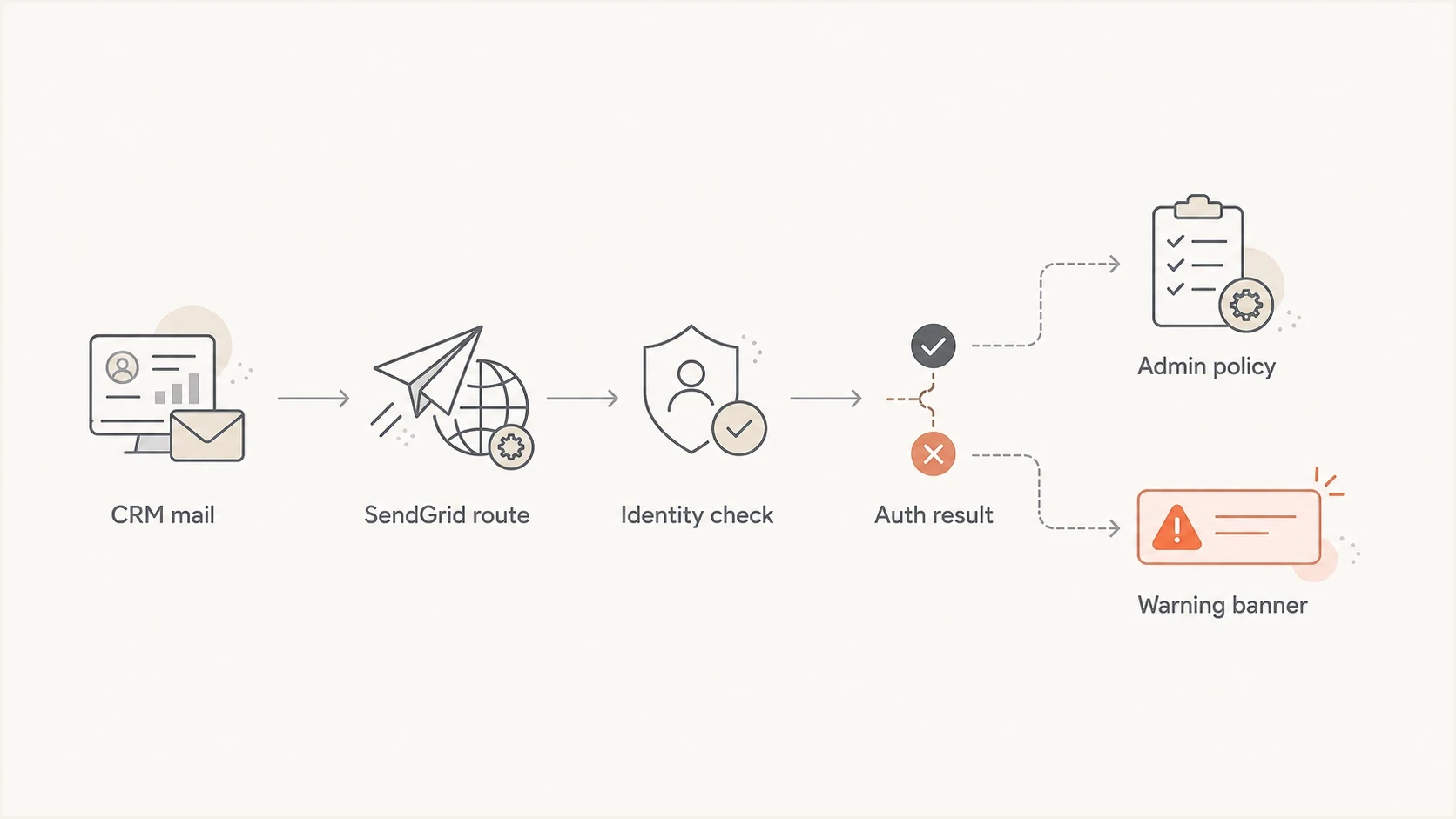
Flowchart showing a CRM message passing through SendGrid and Outlook identity checks.
- Display-name match: The message uses the name of a real employee, team, or executive, but arrives from outside the tenant.
- DKIM mismatch: The DKIM signature authenticates SendGrid or a CRM domain instead of a domain that matches the visible sender.
- SPF misunderstanding: SPF checks the envelope sender domain, not the friendly From address users see.
- Policy trigger: A Microsoft 365 rule or anti-phishing policy adds a warning for spoofing, user impersonation, domain impersonation, or first contact.
- New source: The CRM changed sending pools, envelope domains, DKIM settings, or tracked-link domains without a matching configuration update.
Microsoft explains that Outlook can mark a sender as unverified when authentication cannot establish the identity or when the authenticated identity differs from the visible From address. A question-mark sender icon and a via tag are different clues, so record the exact indicator rather than calling every case a DMARC failure. Microsoft's Outlook phishing guidance is useful for explaining those indicators to users.
The fastest way to confirm the cause
Start with one affected message and inspect the full headers. Do not start by editing DNS. First prove which identity passed authentication and which Microsoft verdict triggered. In Microsoft 365, open the message details or trace the message, then read the Authentication-Results and X-Forefront-Antispam-Report headers. The important question is not only whether SPF or DKIM passed. It is which domain passed and what Microsoft did with that result.
|
|
|
|---|---|---|
DKIM | Domain matches From | SendGrid-only domain |
SPF | Branded Return-Path | Unrelated vendor path |
DMARC | Pass | Fail |
compauth | Pass | Fail with reason |
Source | Expected CRM path | Unknown source |
Header checks that separate an authentication problem from a Microsoft policy verdict.
A quick public DNS check helps before you ask the CRM or Microsoft admin to change anything. Suped's product includes a domain health check for reviewing DMARC, SPF, and DKIM-related DNS posture in one pass, which is useful when the problem spans more than one protocol.
?
What's your domain score?
Deep-scan SPF, DKIM & DMARC records for email deliverability and security issues.
If you can send a fresh CRM message to a test mailbox, compare the live headers with the DNS state. If DKIM uses your domain, DMARC passes, and compauth=pass, the warning is more likely tied to impersonation, first-contact, content, link, sender-reputation, or tenant-policy checks. If DKIM uses a SendGrid domain and DMARC fails, fix SendGrid domain authentication before touching the Outlook rule.
SPF answers one narrow question: is the sending server allowed for the envelope sender domain being checked? It does not prove that the visible sender domain passed DMARC.
- SPF scope: SPF authenticates the bounce domain, also called the envelope sender or Return-Path.
- DKIM scope: DKIM authenticates the domain in the signature's d= value.
- DMARC scope: DMARC needs SPF or DKIM to pass with a domain that matches the visible sender domain.
- Microsoft scope: Microsoft also evaluates composite authentication, spoofing, impersonation, content, links, and tenant rules.
Read Microsoft's verdict headers
Microsoft 365 combines explicit authentication with sender history and policy signals. The compauth result shows composite authentication, while fields in X-Forefront-Antispam-Report show the category and safety tip that Microsoft applied. A composite authentication failure does not automatically block a message, but it sends the message to spoof intelligence for further evaluation.
|
|
|
|---|---|---|
compauth=fail | Composite authentication failed | Check the reason code and domain matching |
CAT:SPOOF | Spoof intelligence flagged the sender | Fix authentication or review the sender pair |
CAT:UIMP or DIMP | User or domain impersonation | Change the CRM identity or tune protection |
SFTY:9.25 | First-contact safety tip | Confirm the sender pattern and policy |
CAT:PHSH or HPHSH | Phishing or high-confidence phishing | Review content, links, redirects, and reputation |
SCL 5 to 9 | Spam confidence is elevated | Review traffic quality and sender reputation |
Common Microsoft 365 verdict fields in a warned CRM message.
A clean DMARC result does not cancel a separate impersonation or phishing verdict. If compauth=pass appears with an impersonation category, review the display name and protected identities. If it appears with a phishing category, inspect every destination URL, SendGrid click-tracking rewrite, redirect, attachment, and recent traffic change before editing DNS.
SendGrid link branding makes tracked links use a subdomain you control instead of a shared SendGrid domain. It can make the sender identity clearer, but it does not override a Microsoft verdict or repair an unsafe destination URL. Use the category field to decide whether the next owner is responsible for authentication, CRM content, sender reputation, or Microsoft 365 policy.
Fix SendGrid authentication first
For SendGrid, the most important fix is domain authentication. Add the exact CNAME or TXT records generated for the sending domain, then verify that the CRM uses that authenticated domain in the visible sender address. The target result is simple: the visible From domain matches the DKIM d= domain or the SPF Return-Path domain under the published DMARC mode, and DMARC passes.
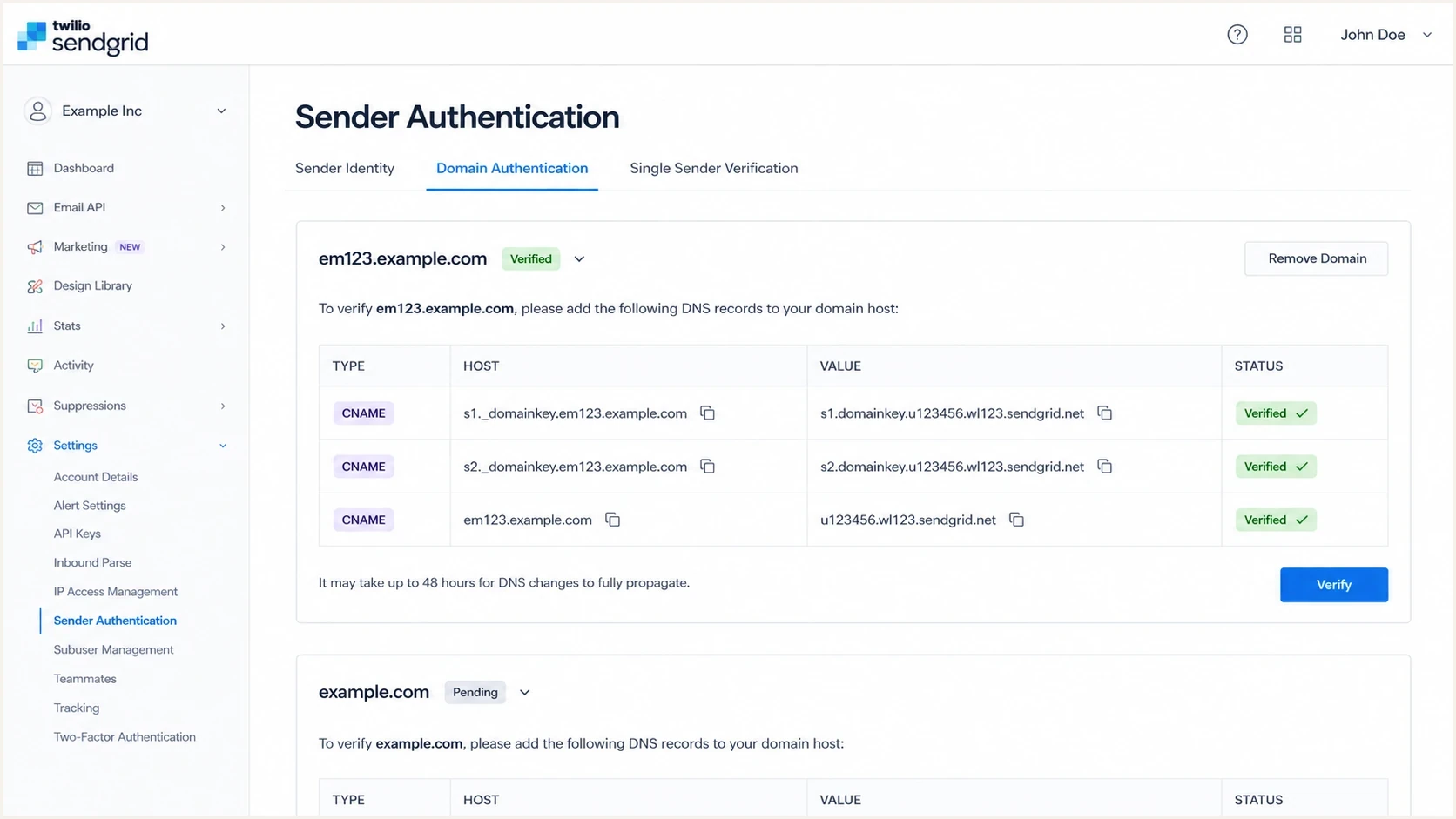
Twilio SendGrid Sender Authentication screen with DNS records for domain authentication.
Typical SendGrid DNS recordsDNS
em123.example.com CNAME u123456.wl.sendgrid.net.
s1._domainkey.example.com CNAME s1.domainkey.u123456.wl.sendgrid.net.
s2._domainkey.example.com CNAME s2.domainkey.u123456.wl.sendgrid.net.
Those records are examples, not values to copy. SendGrid generates the exact records and targets for your account, and automated security commonly manages SPF and DKIM through CNAME delegation. Once verification succeeds, send a new CRM message and check which domain appears in header.d. Then use the DMARC checker to confirm that the published policy and reporting addresses are valid.
SPF-only setup
- Sender proof: SPF can pass for a bounce domain that users never see.
- Outlook result: The message can still look like an outside system using an internal identity.
- Maintenance: Adding individual IPs creates stale DNS risk when SendGrid changes infrastructure.
- DMARC value: Weak if DKIM and the visible sender domain do not match.
Domain-authenticated setup
- Sender proof: DKIM signs with your domain or a controlled sending subdomain.
- Outlook result: The message has clearer proof that the CRM is authorized.
- Maintenance: CNAME records let SendGrid update rotating infrastructure behind the target.
- DMARC value: Strong when DKIM passes for the same organizational domain users see.
Use this SendGrid fix order: complete domain authentication, verify DKIM and Return-Path domain matching in a live message, start DMARC aggregate reporting, then move to a stricter DMARC policy once the CRM and other approved senders pass consistently.
Starter DMARC recordDNS
_dmarc.example.com TXT "v=DMARC1; p=none; rua=mailto:d@example.com"
Check the Outlook rule and internal identity policy
After SendGrid authentication is correct, involve the Microsoft 365 admin. The exact indicator can come from spoof intelligence, an anti-phishing policy, a first-contact safety tip, a mail flow rule, or a separate phishing verdict. A policy can be narrow and useful, or it can catch every CRM notification that uses an employee name.
The admin should check the message's category and safety fields, anti-phishing policies, spoof intelligence, protected users and domains, mail flow rules, and recent policy changes. If all internal recipients started seeing the warning at the same time, a tenant-side change is a strong candidate. If only SendGrid-routed CRM messages trigger it and compauth=fail, sender authentication still needs the first fix.
How to classify the warning
Use the header result and sender identity to decide whether to fix DNS, content, policy, or more than one area.
Low risk
Review policy
DKIM uses your domain, DMARC and composite authentication pass, and the CRM sender name is clearly labeled.
Medium risk
Rename sender
DMARC passes, but the display name looks like a protected employee identity.
High risk
Fix auth
SPF or DKIM passes only for a vendor domain, and DMARC fails for the visible domain.
Unknown
Investigate
Headers show a source, URL, or sending domain that the CRM owner cannot explain.
Do not add a blanket allow rule for SendGrid just to hide the warning. SendGrid is a shared sending platform, so a broad exception can cause unrelated mail to bypass the intended check. If a business-critical flow must continue during remediation, the Microsoft 365 admin can review a narrow, temporary allow entry for the exact spoofed sender and sending-infrastructure pair, then remove it after authentication is fixed. SendGrid's own SendGrid security advice also explains how to recognize suspicious mail and protect a SendGrid account.
If the banner says messages can be spoofed, the same logic applies: fix the domain proof first, then review Microsoft 365 policy. The explanation of the spoofed warning covers that wording and the related sender identity issue.
A practical remediation plan
Use this order to separate authentication, naming, content, sender reputation, and Microsoft 365 policy. It gives each owner clear work instead of letting everyone guess.
- Capture evidence: Save one affected message, its full headers, the recipient domain, the CRM event that triggered it, and the exact sender address.
- Identify the verdict: Record compauth, CAT, SFTY, SCL, and the exact Outlook indicator before changing DNS.
- Verify SendGrid: Open SendGrid Sender Authentication and confirm the sending domain is verified, not just the sender address or account.
- Inspect DKIM: Send a fresh CRM message and confirm DKIM passes with your domain in header.d.
- Inspect SPF: Check which Return-Path domain SPF evaluated and whether that domain matches the controlled sending setup.
- Confirm DMARC: Make sure DMARC passes for the visible sender domain before asking Outlook to trust the message.
- Fix identity and content: Use a clear service sender, then inspect tracked links and redirects if Microsoft stamped a phishing category.
- Review policy: Ask the Microsoft 365 admin to tune the exact rule or sender pair only after the message has correct authentication evidence.
- Monitor results: Watch DMARC aggregate reports and user reports for at least one full sending cycle.
Remediation ownership
Most fixes need more than one owner, so assign each piece instead of treating it as one DNS task.
CRM owner
DNS owner
M365 admin
Security owner
If the warning disappears after DKIM uses your domain and DMARC passes, the root cause was sender authentication. If it persists with clean composite authentication, use the Microsoft category to find the next cause. Keep impersonation protection, but change the CRM sender identity so an automated message does not look like direct person-to-person mail.
Where Suped fits
Suped's product is useful when the warning spans CRM settings, SendGrid authentication, DNS records, and Microsoft 365 policy. It turns DMARC aggregate data into a sending-source inventory, so the team can confirm whether SendGrid is the expected source and whether its messages pass with the intended domains.

Issue steps to fix dialog showing the issue overview, tailored fix steps, and verification action
Suped converts aggregate reports into source-level issues, alerts, and practical remediation steps. That workflow helps when the cause combines SendGrid authentication, CRM sender naming, and a Microsoft 365 warning rather than a single DNS typo.
- Issue detection: Suped flags unauthenticated or unknown SendGrid-related sources and gives steps to fix them.
- Hosted controls: Suped's Hosted DMARC supports policy staging while approved senders are cleaned up.
- Unified checks: SPF, DKIM, DMARC, blocklist (blacklist), and delivery signals sit in the same workflow.
- Multiple domains: Agencies and managed service providers can manage client domains without mixing reports.
- Alerting: Real-time alerts help catch a CRM sending change before employees report Outlook warnings.
Suped does not replace SendGrid setup or Microsoft 365 policy work. It makes authentication evidence easier to review, keeps the sending-source inventory current, and reduces guesswork when a warning appears again.
Views from the trenches
Best practices
Check the Authentication-Results header before changing SPF, DKIM, or Microsoft 365 rules.
Use a CRM service sender name when the message is automated and sent to internal users.
Require DKIM signing with your own domain before asking admins to suppress warnings.
Keep the warning active until DMARC reports show the CRM source is consistently clean.
Common pitfalls
Adding vendor IPs to SPF can hide the real issue and create stale sender authorization.
Treating every Outlook banner as a DNS failure wastes time when tenant rules changed.
Using an employee display name for automated CRM mail triggers impersonation checks.
Assuming SPF pass means DMARC pass misses the visible sender domain match requirement.
Expert tips
Compare one warned CRM message with one clean CRM message to isolate the changed field.
Ask the Microsoft 365 admin for the exact transport rule or policy that added the banner.
Use a controlled sending subdomain when the CRM has different risk than human mailbox mail.
Track SendGrid source changes in DMARC reports so routing changes do not become surprises.
Marketer from Email Geeks says the Microsoft 365 admin should be involved early because tenant rules often decide when the warning appears.
2021-08-31 - Email Geeks
Marketer from Email Geeks says a warning on internal-looking CRM mail is consistent with business email compromise protection, not just a delivery bug.
2021-08-31 - Email Geeks
The practical answer
Outlook is warning because the message looks like it came from inside your organization, but the delivery path, authenticated identity, or Microsoft policy verdict does not support that presentation. With a CRM sending through SendGrid, authenticate the sending domain, verify DKIM and DMARC domain matching, use a branded Return-Path, and choose a sender name that does not mimic an employee unless the message truly comes through that employee's mailbox.
If composite authentication passes and the banner remains, read the Microsoft category before tuning policy. An impersonation result calls for a clearer CRM identity or a narrow policy change. A phishing result calls for review of message content, tracked links, redirects, and sender reputation. Do not create a broad SendGrid bypass.
The SPF answer is direct: do not add include:sendgrid.net blindly. Publish the exact records generated by SendGrid domain authentication. With automated security, SendGrid commonly uses CNAME delegation to manage the SPF and DKIM values needed for the authenticated sending domain.




