Why is my DMARC success rate suddenly dropping, and how does this affect spam rates and blocklists?

Published 12 Jul 2025
Updated 11 Aug 2026
11 min read
Summarize with

Updated on 11 Aug 2026: We updated this guide for RFC 9989 and clearer troubleshooting across authentication, complaint, reputation, and reporting data.
A sudden DMARC success-rate drop means one thing first: a new share of mail using your domain is failing DMARC. That mail is either legitimate mail that is poorly authenticated, or it is forged mail using your visible From domain. The fastest answer is in your aggregate reports, not in guesswork.
A drop from 100% to 63% is not small. I treat that as a source-change problem until the reports prove otherwise. A sales team can add a cold outreach platform, a marketing team can move a campaign, a billing system can start sending receipts, or an attacker can start spoofing the domain. Each one looks different in DMARC monitoring data because the source IP, SPF domain, DKIM domain, and final DMARC result are visible.
This does not automatically explain a spike in user-reported spam, and it does not automatically explain a blocklist or blacklist listing. Those symptoms can share a root cause, but different systems measure them. Separate the evidence before opening a delisting request or changing DNS and policy.
What the DMARC drop actually means
DMARC passes when at least one authentication path passes and its domain matches the visible From domain. Either SPF passes for an aligned MAIL FROM domain, or a valid DKIM signature uses an aligned signing domain. A raw SPF or DKIM pass for an unrelated domain does not make DMARC pass.
Example success-rate change
A 100% to 63% drop means 37% of observed mail no longer passes DMARC.
Pass
Fail
The percentage is also sensitive to volume and report coverage. At low volume, a small burst of failed mail can move the rate sharply. At high volume, a drop that large usually means a meaningful stream changed. Compare the same reporting window and reporting organizations, then confirm that late or duplicate reports did not distort either period.
Do not weaken your DMARC policy as the first move. A weaker policy changes requested receiver handling, but it does not repair SPF or DKIM. First identify whether the failing mail is yours, a vendor's, a forwarded stream, or a forgery.
- Known sender: Fix SPF, DKIM, or the visible From domain used by that sender.
- Unknown sender: Treat the source as likely spoofing and keep policy enforcement staged.
- Shared IP: Separate IP reputation from your domain's authentication results.
- Low volume: Check message counts before treating the percentage as a crisis.
The most common causes
When I see a clean domain fall from perfect DMARC to a poor rate overnight, I look for source changes before I look at the DMARC record. Record errors happen, but new senders, changed return paths, and broken DKIM selectors are more common.
|
|
|
|---|---|---|
New sender | Known service, new IP | Enable aligned DKIM or SPF |
Return-path change | SPF passes, DMARC fails | Use an aligned domain |
Forwarding | SPF breaks in transit | Preserve aligned DKIM |
Spoofing | Unknown IP range | Enforce policy after review |
DNS or key change | DKIM fail or temperror | Restore the selector or DNS |
Use this as a first-pass triage map.
The most suspicious pattern is a large failed volume from an IP range you do not use. That usually means spoofing. The most actionable pattern is failed volume from a platform your company actually uses. That means the mail is yours, but the authentication setup is wrong.
Legitimate mail failing
This is the higher-priority problem because your own customers or prospects are receiving mail that receivers distrust.
- Sender match: The source IP belongs to a platform your team uses.
- Fix path: Configure aligned DKIM or SPF for that sender.
- Business risk: Delivery and reputation can both be affected.
Forged mail failing
This is still important, but it is not the same as your own mail being broken.
- Sender match: The source IP is unknown and unrelated to your vendors.
- Fix path: Move policy toward quarantine or reject after review.
- Business risk: Brand misuse is the main issue, not your normal sending setup.
How spam rates and blocklists fit in
User-reported spam rates are not caused by DMARC failures in a direct mechanical way. Recipients do not see a DMARC pass or fail label in the inbox. They report spam because of message content, weak consent, excessive frequency, irrelevant targeting, unwanted sales outreach, or mail sent to the wrong people.
A DMARC pass proves aligned domain authentication, not inbox placement. Domain and IP reputation, sudden volume changes, sending consistency, list quality, content, and recipient response still affect filtering. The same new stream can therefore cause DMARC failures and complaints for different reasons. A poorly configured outreach platform is a good example: authentication explains the DMARC drop, while consent and targeting explain the complaint spike.
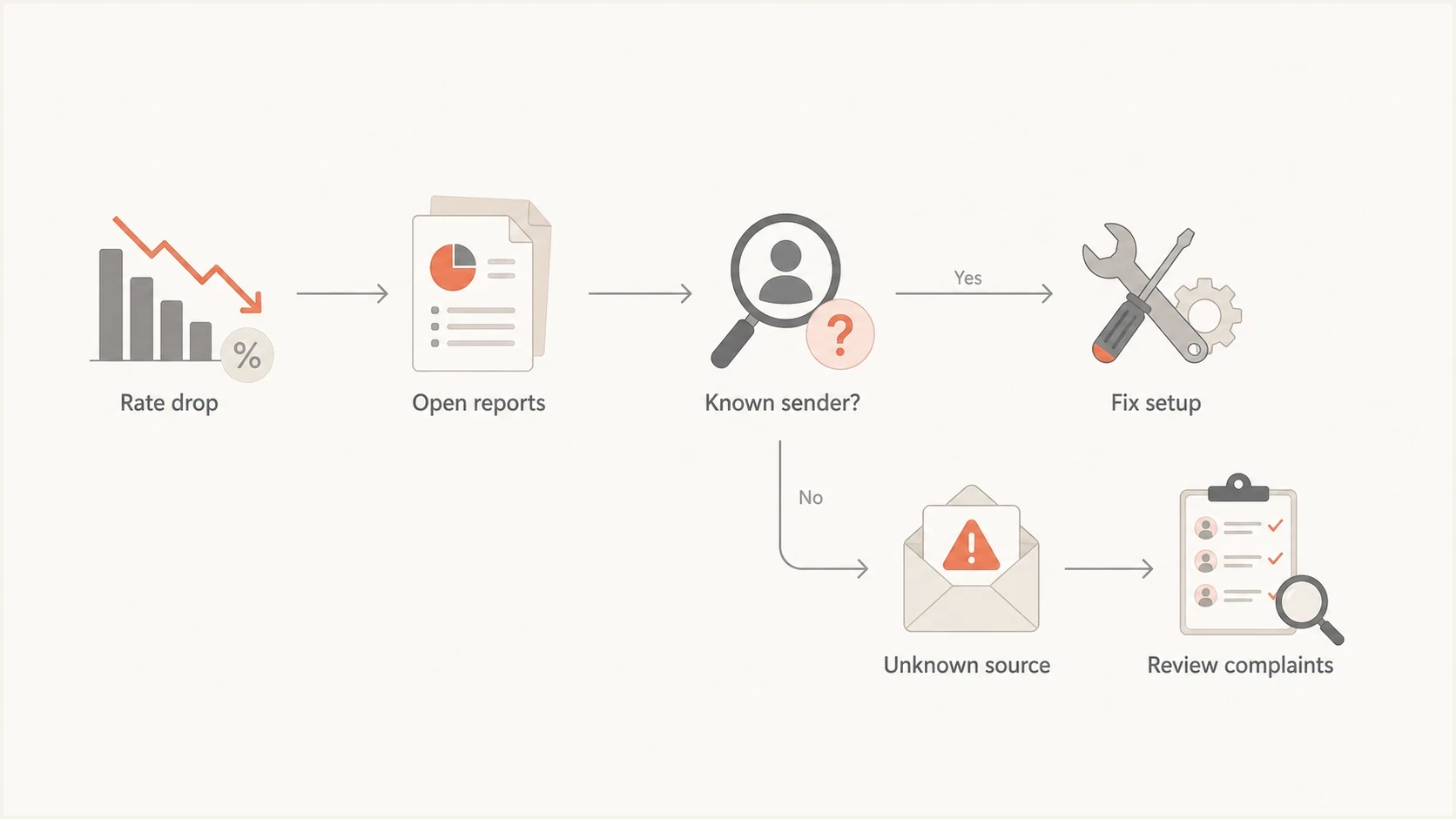
A flowchart for separating a DMARC drop from sender and complaint causes.
Blocklist and blacklist issues need the same separation. A public listing does not happen just because DMARC failed. Blacklist operators commonly react to IP behavior, spam-trap hits, complaint signals, unusual sending patterns, and reputation history. If your listing is on a shared IP, another sender on that IP pool can be responsible.
A blocklist result matters most when you can tie it to delivery evidence. Look for bounce messages or rejection logs that name the blacklist. A listing you found only after searching is a data point, not proof that it caused delivery trouble. Fix the sending cause before requesting removal.
- IP listing: Check whether the IP is shared and whether rejects cite the listing.
- Domain listing: Treat it as closer to your brand reputation and investigate faster.
- No rejects: Prioritize DMARC reports and complaint evidence first.
What to check first
Start with the DMARC policy record in DNS at _dmarc for the domain. Confirm that it is valid and that its aggregate-report destination is receiving data. If you do not control DNS, ask the team that does to confirm the record and destination.
Example DMARC monitoring recorddns
_dmarc.example.com TXT
v=DMARC1; p=none; rua=mailto:dmarc-reports@example.com;
If you only need to confirm the published record, use a DMARC checker. If the question is broader, including SPF, DKIM, DMARC, and domain reputation, run a domain health check and then compare that with the aggregate report data.
?
What's your domain score?
Deep-scan SPF, DKIM & DMARC records for email deliverability and security issues.
Then open the aggregate reports and group failures by source. I care less about the percentage at first and more about which source created the failed volume. A single unverified source with 50 messages has a different response than a company-owned platform sending 500,000 failing messages.
- Source IP: Identify whether the IP is a known sender, shared platform, or unknown host.
- SPF result: Check whether SPF passed and which MAIL FROM domain was evaluated.
- DKIM result: Check whether DKIM passed and which signing domain appears in the signature.
- Header From: Confirm the visible domain that DMARC used for the final decision.
- Message count: Sort by volume so low-risk noise does not distract from the main cause.
- Disposition and override: Check what the receiver did and whether local policy, forwarding, or a mailing list changed the requested handling.
For a deeper walkthrough, keep a separate failure troubleshooting process for recurring failures. The one-day triage should still begin with report grouping and source ownership.
What RFC 9989 changed
RFC 9989 became the current DMARC specification in May 2026 and obsoleted RFC 7489 and RFC 9091. Aggregate reporting is now defined separately in RFC 9990. Message-specific failure reporting is defined in RFC 9991.
- Remove pct: The pct tag is no longer valid, so current processors ignore it as an unknown tag.
- Use test mode carefully: The new t=y tag requests handling one policy level below quarantine or reject and has no effect on p=none.
- Check inherited policy: DNS Tree Walk replaced the older public-suffix-list method for policy discovery.
- Handle unused names: The np tag can set a policy for non-existent subdomains of an organizational domain.
These changes do not alter the first diagnostic step. Use RFC 9990 aggregate data to find the source, authenticated domains, result, disposition, override reason, and volume behind the rate drop. Failure reports can contain message-level detail, but receivers choose whether to send them and apply their own privacy rules.
Where Suped fits
Suped's product turns aggregate reports into source groups, pass rates, issue detection, and remediation steps. This replaces manual XML review with a workflow that connects each failed source to its SPF result, DKIM result, message volume, and ownership status.
Issues page showing top issues, verified sources, unverified sources, and authentication pass rates
The workflow is simple: identify the failing source, decide whether it belongs to the business, fix the sender setup, and watch the pass rate recover. Suped can alert the team when new report data shows a failing source. Hosted DMARC supports policy staging after the DNS handoff, while blocklist monitoring keeps blacklist evidence beside authentication results and rejection data.
If you lack DNS access, Suped's Hosted DMARC is useful because engineering can set the required DNS once, then the mail or security team can manage policy staging in Suped. That avoids a ticket every time the policy needs to move.
- Detection: Surface new failing senders when aggregate data arrives.
- Remediation: Show concrete steps for SPF, DKIM, and DMARC fixes.
- Scale: Use multi-tenant views for agencies and managed service providers.
- Reputation: Track blocklist and blacklist data beside authentication data.
A practical triage order
If the DMARC rate dropped, spam complaints rose, and a blacklist appeared at the same time, handle the evidence in this order. This keeps you from blaming the loudest dashboard instead of the actual cause.
- Confirm volume: Check failed message counts, matching report windows, and receiver coverage before judging the percentage.
- Map sources: Group failures by source IP and authenticated domain before editing DNS.
- Own the source: Decide whether the sender belongs to your company or is forged mail.
- Review complaints: Compare complaint rates and denominators with recent campaigns, list acquisition, consent, and targeting changes.
- Check rejects: Treat a blocklist as urgent when rejection logs name it, then review bounce and spam-trap patterns.
- Fix and watch: Apply the sender fix, then monitor source volume, DMARC pass rate, complaints, and provider-specific rejects.
The correct first fix depends on the source. If the failing mail is yours, configure the sender. If the failing mail is forged, keep legitimate senders passing and move the DMARC policy toward enforcement. If the blacklist is only on a shared IP and there are no rejects, treat it as supporting context rather than the root cause.
Views from the trenches
Best practices
Separate your known senders from unknown sources before changing policy or DNS records.
Keep a current sender inventory so sales, marketing, billing, and support mail are visible.
Compare report volume by source IP before treating a percentage drop as a delivery crisis.
Common pitfalls
Assuming a blacklist listing caused DMARC failure wastes time when the listing is IP based.
Weakening policy first changes handling but leaves the authentication fault unresolved.
Reading only one mailbox provider's dashboard can miss where the failing source started.
Expert tips
Ask for bounce evidence before treating a blocklist or blacklist result as delivery impact.
Check whether sales outreach uses the same visible domain and has a proper DKIM signature.
Use aggregate reports to prove whether a failing IP belongs to your mail stack today.
Expert from Email Geeks says a sudden DMARC drop means mail using the domain failed authentication, and aggregate reports show the source IP, SPF domain, DKIM domain, and result.
2020-12-01 - Email Geeks
Marketer from Email Geeks says user complaint data needs to be tied to the actual message stream before it can be connected to a DMARC drop.
2020-12-01 - Email Geeks
How to fix a DMARC rate drop
The direct answer is this: your DMARC success rate dropped because mail using your domain stopped passing DMARC, forged mail using your domain increased, or the reports now cover a different mix of traffic. That drop does not automatically raise user-reported spam rates, and it does not automatically put you on a blocklist or blacklist.
Treat the symptoms separately until the data joins them. DMARC reports identify failed sources. Complaint data identifies messages recipients rejected. Rejection logs show whether a blacklist caused delivery loss. Once the failed source is clear, authenticate a legitimate sender, stop or slow a harmful mail stream, or enforce policy against spoofing.




