Why is my animated sender logo not showing in Gmail for new subscribers?

Updated on 3 Aug 2026: We updated this guide for Gmail's current BIMI certificate rules and RFC 9989.
The direct answer is that an animated sender logo belongs to the Google profile-picture path, not to a guaranteed email brand indicator. When new recipients see a default avatar while existing recipients still see the GIF, the difference points to Gmail's profile lookup, cached account data, or a saved contact image. Gmail controls which sender image appears and does not provide a sender-side setting that guarantees animation.
That makes this a Gmail avatar and recipient-state issue first, then a BIMI and authentication issue second. DMARC monitoring will not force Gmail to animate a logo, but it shows whether the message passes DMARC and which authentication path matches the visible From domain.
For reliable logo display, use authenticated mail, a static BIMI SVG, and a stable From identity. Treat animation as unsupported Gmail behavior. It can remain visible for some existing recipients, but senders cannot make it deterministic for every new subscriber.
Why Gmail differs by recipient history
When an older Gmail recipient sees animation but a first-time recipient does not, test Gmail's profile lookup and recipient state before changing DNS. Google documents that a Gmail profile picture is the Google Account picture and that changes can take time to appear across Google products. A recipient can also retain an older picture or name in saved contacts.
- New subscribers: A fresh inbox shows how Gmail handles the sender without prior message history or a saved contact.
- Existing subscribers: They can retain an older profile picture because account data and saved contacts do not update every view at once.
- Confirmation emails: They can show a different avatar when they use another From address, sending stream, or display name.
- Gmail behavior: The Gmail interface decides what to show, and email headers or DNS cannot require an animated avatar.
Do not treat animation as a supported requirement
BIMI logos are not animated GIFs. Google Account pictures and Gmail sender avatars depend on Gmail account state, recipient history, saved contacts, and caching. A GIF that still animates for one recipient does not prove that new subscribers will see the same result.
Gmail profile avatar versus BIMI
Two logo paths often get mixed together. A Google Account picture can appear next to messages sent to Gmail users, and this is where observed GIF behavior comes from. BIMI is DNS based and lets supporting mailbox providers consider a verified brand logo for authenticated mail. BIMI animation limits matter here because BIMI requires static SVG artwork and excludes animation.
Google profile avatar
- Source: The Google Account picture associated with the exact sender address.
- Format: Some senders have observed animated GIF profile pictures in Gmail inbox rows.
- Control: Sender control is limited because Gmail decides when to fetch and display it.
- Risk: Recipient history and saved contacts can produce different results.
BIMI logo
- Source: A DNS TXT record at the BIMI selector for the From domain.
- Format: A static SVG Tiny PS logo with no scripts, animation, or external references.
- Control: The domain publishes the assertion, but Gmail still decides whether to display it.
- Risk: Gmail suppresses logos when authentication, certificate, hosting, or artwork requirements fail.
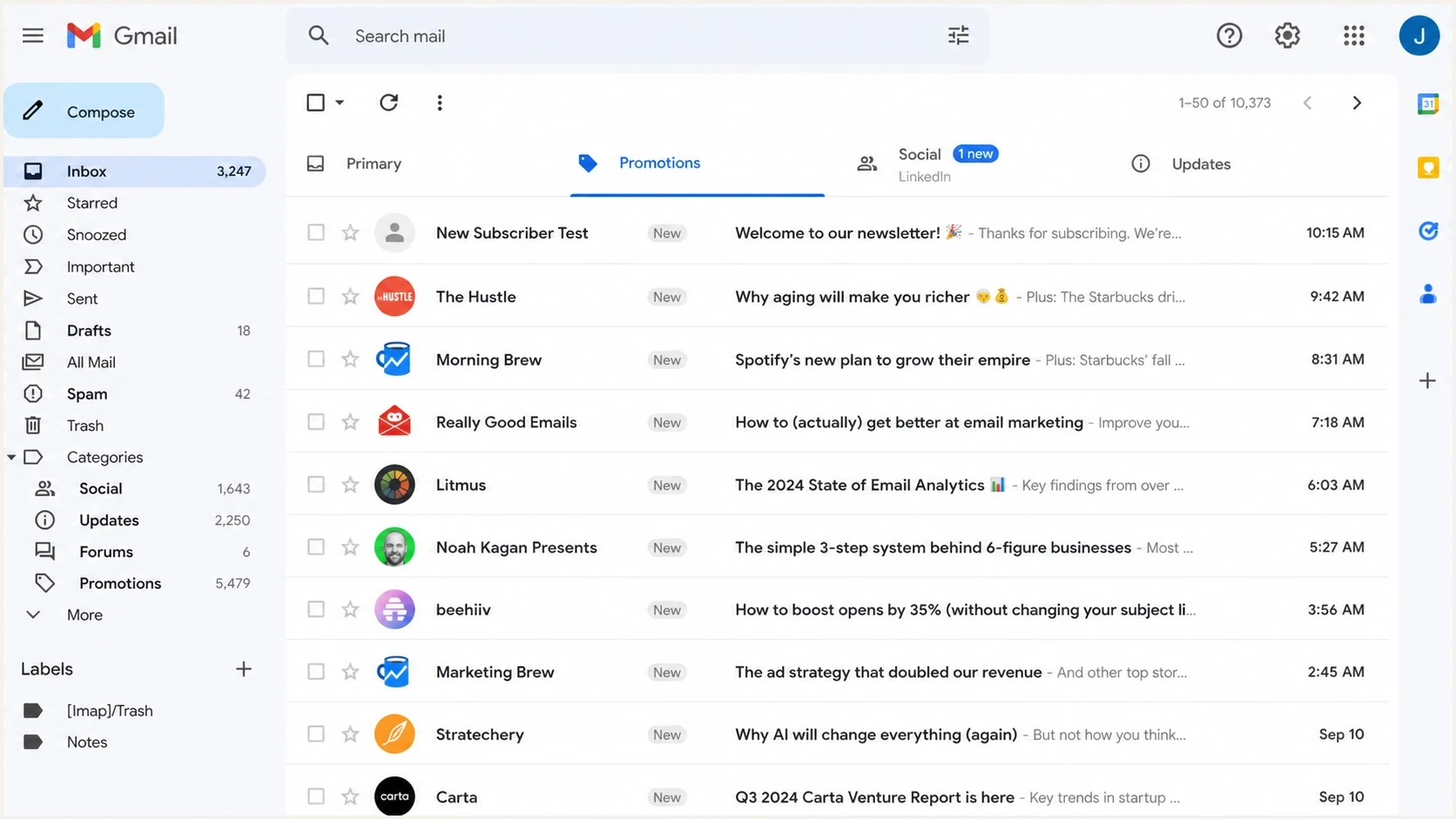
Gmail inbox rows showing different sender avatar states for new and existing recipients.
That distinction changes the fix. A Google profile GIF is not repaired with another DNS tag. Keep the sender identity stable and stop depending on animation. A BIMI failure requires checks of DMARC enforcement, SPF or DKIM domain matching, BIMI DNS, SVG formatting, certificate status, and public file hosting.
What Gmail requires for BIMI
Gmail requires a Verified Mark Certificate (VMC) or Common Mark Certificate (CMC), plus DMARC enforcement and correctly hosted BIMI files. A VMC is tied to a verified trademark and can produce Gmail's verified checkmark. A CMC provides a path for an eligible logo that is not a registered trademark, but it does not produce that checkmark.
- Enforcement policy: Use p=quarantine or p=reject. Do not use the RFC 9989 testing value t=y for a BIMI deployment.
- DMARC pass: Each message needs a passing DKIM signature or SPF result whose domain matches the visible From domain under DMARC rules.
- Mark certificate: Host the complete VMC or CMC PEM chain at a public HTTPS URL and publish that URL in the BIMI a tag.
- Static artwork: Use SVG Tiny PS with absolute dimensions of at least 96 by 96 pixels. A solid background and a file no larger than 32 KB improve Gmail compatibility.
- Display decision: Meeting the requirements makes the message eligible. Gmail keeps the final display decision and DNS changes can take up to 48 hours to appear.
DMARC's pct tag is now historic
RFC 9989 replaced RFC 7489 and made pct historic. Omit pct from new records. The new t tag controls testing, and its default t=n applies the published policy. A record with t=y requests reduced handling and should not be treated as BIMI enforcement.
Why new subscribers see a different logo
Split recipients into fresh Gmail inboxes and inboxes that already received mail from the exact sender. If only fresh recipients miss the animated logo, the evidence points to Gmail's profile lookup, saved contact data, or recipient history. It does not show that the GIF file broke or that the sending platform removed an email asset.
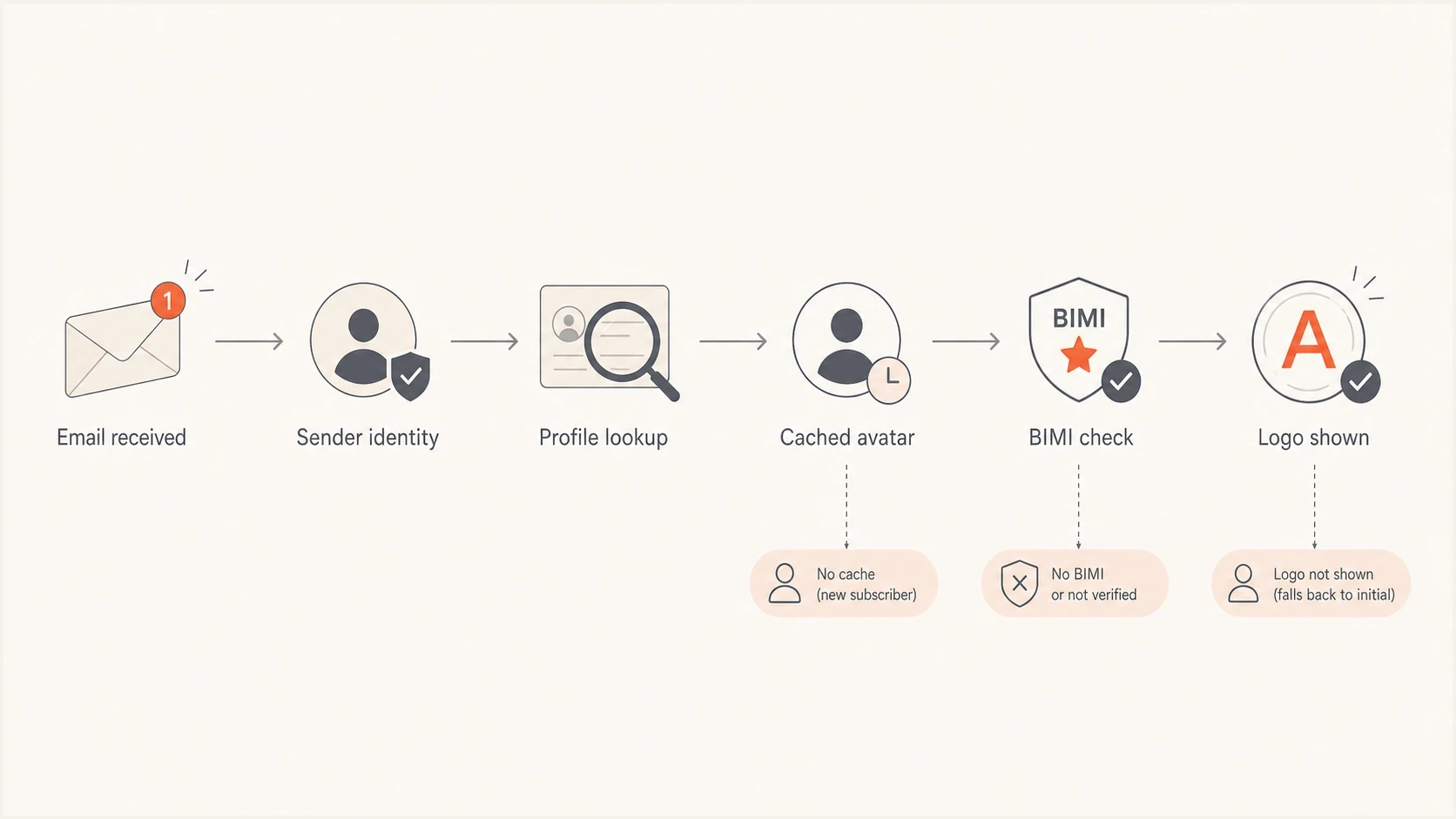
Flowchart showing Gmail sender identity, avatar cache, BIMI checks, and logo display.
|
|
|
|---|---|---|
Avatar cache | Old users see it, new users do not | Retest with fresh Gmail inboxes |
Saved contact | One recipient sees an old or custom image | Retest without a saved contact |
From changes | Confirmation and campaign differ | Use one sender identity |
Profile mismatch | Generic avatar appears | Check the exact Google Account |
BIMI gap | No verified brand logo | Validate DMARC, BIMI, and the certificate |
Authentication gap | Logo display is inconsistent | Fix SPF or DKIM domain matching |
Common reasons a new Gmail subscriber misses an animated sender avatar.
Compare a consumer Gmail account with a Google Workspace inbox as a separate variable. Workspace directory data can supply an internal profile image that an external Gmail recipient does not have, so internal logo display does not prove that BIMI works externally.
How to test it without guessing
Keep the test controlled. Use one From address, one sending domain, and a consistent subject pattern across at least two recipient groups. One group has never received the sender and has no saved contact. The other group has a known history with the sender. Send a confirmation-style message and a normal newsletter message, then compare the sender icon in the Gmail message list.
- Fresh inboxes: Use Gmail accounts that have never received mail from the sender and do not have it in contacts.
- Known inboxes: Use Gmail accounts that previously displayed the animated avatar.
- Stable From: Do not change the username, display name, or domain during the test.
- Separate streams: Test confirmation messages and campaign messages independently.
- Record results: Capture the inbox row, message header, recipient type, contact state, and authentication results.
Recipient test matrixtext
Recipient group: fresh Gmail
Message type: confirmation
Contact saved: no
Record: avatar type and authentication results

Recipient group: fresh Gmail
Message type: newsletter
Contact saved: no
Record: avatar type and authentication results

Recipient group: known Gmail
Message type: newsletter
Contact saved: record yes or no
Record: avatar type and authentication results
If fresh Gmail inboxes never show animation while known inboxes still do, classify it as recipient-state or Google profile behavior. If neither group shows animation, verify that the exact sender's Google Account still has the intended picture, then treat the animation as unavailable and continue with the static BIMI path.
What Google documents
Google says a Gmail profile picture is the Google Account picture, can appear next to sent messages, and can take time to update across Google products. Its profile-picture guidance does not promise GIF animation or consistent display in every recipient's sender icon.
Check DMARC and BIMI foundations
After the recipient-state test, check email authentication. Gmail's BIMI path requires DMARC enforcement and a message that passes DMARC through DKIM or SPF domain matching. The BIMI record then needs valid static artwork and a current VMC or CMC hosted in a complete PEM chain.
A quick domain health check is useful before changing logos because it shows whether DMARC, SPF, and DKIM are healthy enough to support a brand indicator program.
?
What's your domain score?
Deep-scan SPF, DKIM & DMARC records for email deliverability and security issues.
Example DMARC recorddns
Name: _dmarc.example.com
Type: TXT
Value: v=DMARC1; p=quarantine; rua=mailto:dmarc@example.com;
Example BIMI recorddns
Name: default._bimi.example.com
Type: TXT
Value: v=BIMI1; l=https://example.com/bimi.svg;
a=https://example.com/vmc.pem
RFC 9989 now defines DMARC, RFC 9990 defines aggregate reporting, and RFC 9991 defines failure reporting. The visible DMARC version value remains v=DMARC1. For this setup, the practical change is to omit the historic pct tag and avoid t=y when BIMI needs an enforced policy.
After DNS changes, check the DMARC record separately with a DMARC checker because one syntax mistake can invalidate the record. For the broader logo setup, follow the BIMI setup path as a static brand-logo program rather than an animated avatar project.
DMARC record detail view showing SPF, DKIM, DMARC, rDNS diagnostics, and DNS records
Authentication makes the logo program eligible, but it does not force Gmail to render a GIF or any logo. Treat authentication as the foundation and test Gmail avatar behavior as a separate recipient-side outcome.
Monitor the parts you control with Suped
Suped's product cannot make Gmail animate a sender avatar because that interface decision belongs to Gmail. Suped gives teams one place to check the parts they control: DMARC policy, SPF and DKIM results, sending-source identity, BIMI readiness signals, and authentication issues that need action.
The Suped workflow
- Find failures: Use automated issue detection to spot broken DMARC, SPF, and DKIM patterns.
- Map sources: Separate newsletter, confirmation, and transactional streams by verified source and From domain.
- Stage policy: Use Hosted DMARC to manage enforcement changes without repeated manual DNS edits.
- Watch changes: Use alerts to catch new authentication failures or undocumented sending sources.
For this workflow, Suped connects authentication data to the next fix. That helps separate a Gmail-only avatar difference from a changed From domain or broken authentication before time is spent rebuilding logo files.
What not to do
Changing several sender variables at once makes this harder to diagnose. Gmail avatar behavior already depends on recipient state and interface decisions. Keep the mail stream stable, change one item at a time, and avoid fixes that weaken authentication while chasing a visual result.
Common mistakes
- Rotating senders: Changing usernames or domains creates a different Gmail sender identity.
- Forcing GIFs: BIMI does not provide an animated GIF logo path in Gmail.
- Ignoring DNS: A monitoring or testing DMARC policy does not meet Gmail's BIMI enforcement requirement.
- Overreading one test: One Gmail inbox does not show how fresh recipients, saved contacts, and Workspace directory users behave.
Gmail owns the animated-avatar rendering decision. Keep the Google Account picture current, but build the dependable brand program around static BIMI artwork, enforced authentication, and a consistent sender identity.
Views from the trenches
Best practices
Test first-time Gmail recipients separately because cached avatars can hide new-user behavior.
Keep the same From address and domain while checking profile images, BIMI, and DNS state.
Use a static BIMI SVG for dependable brand display, then treat animation as a bonus.
Common pitfalls
Assuming one Gmail inbox proves the issue misses account age, cache, and Workspace effects.
Changing the sending username during tests can reset Gmail's profile image lookup path.
Expecting BIMI to animate wastes time because mailbox logos are based on static artwork.
Expert tips
Send a confirmation and a normal campaign to each test inbox and compare the avatar state.
Record screenshots by recipient age so cache differences do not look like random failures.
Check DMARC, SPF, and DKIM first so Gmail has a trustworthy sender identity to use.
Marketer from Email Geeks says Google Workspace recipients can still see the animated sender logo when the profile image was already known.
2024-12-13 - Email Geeks
Marketer from Email Geeks says a fresh signup can show the default Gmail avatar on the confirmation email and the animated logo on the later newsletter.
2024-12-13 - Email Geeks
Fix the Gmail sender logo problem
If an animated sender logo is missing for new Gmail subscribers, treat the animation as a Google profile-picture result that Gmail does not guarantee. Existing recipients can retain another image through recipient history, cached account data, or saved contacts. Test fresh inboxes separately before changing authentication or logo files.
Keep the From address stable, confirm the exact Google Account picture, validate DMARC, SPF, and DKIM, then implement BIMI with a static SVG and a VMC or CMC for Gmail. Suped's product supports the authentication checks, source mapping, policy changes, and ongoing alerts, while Gmail keeps control of the sender icon.




