Why is Avanan showing up in my DMARC reports and how do I fix it?

Updated on 3 Aug 2026: We clarified when Avanan entries need an SPF change and when recipient-side processing needs no DNS change.
Avanan is showing up in your DMARC reports because a receiver, relay, or configured mail path is presenting a Check Point or Avanan source IP in the DMARC aggregate data. It does not automatically mean you have an Avanan app installed in Microsoft 365, and it does not automatically mean Avanan sends mail for your domain.
Start by deciding whether the row came from recipient-side processing or your own outbound route. Do not add or remove an SPF include until the source IP, reporter, SPF authentication domain, DMARC alignment, DKIM selector, volume, and message trace show which path produced it. Recipient-side Check Point processing often needs no DNS change. If your organization enabled Avanan Protect (Inline) Outgoing Traffic, Check Point currently instructs customers to authorize include:spfa.cpmails.com, so removing it would break that configured route.
Treat this as a source attribution problem first, not a DNS change request. Adding every visible DMARC source to SPF can turn a reporting clue into an authorized mail path, while removing a required include can break legitimate outbound protection.
The short answer
Do not add or remove Avanan or Check Point SPF authorization just because the name appears in a DMARC report. Change SPF only after confirming that your organization controls the outbound path and whether that path is still approved.
- Source label: Avanan or cloud-sec-av.com often means a Check Point mail security hop appeared in receiver-generated data.
- SPF clue: An SPF pass shows that the reported envelope domain authorizes the IP. Check whether that domain matches your visible From domain.
- DKIM clue: A passing Microsoft 365 signature shows that the original signature survived the Check Point or forwarding hop.
- Fix path: Classify the path, keep required authorization, remove only accidental authorization, then monitor new report dates.
Avanan is part of Check Point Harmony Email & Collaboration, so DMARC data can show Avanan, Check Point, cpmails.com, cloud-sec-av.com, a regional cloud-sec-av.com hostname, or a Check Point-related IP depending on how the source is identified. The Check Point DMARC guide is useful when Avanan intentionally collects reports for a tenant, but a source row alone does not prove that the service is active in your tenant.
Suped's DMARC monitoring keeps the source IP, authentication domains, DKIM selector, reporter, volume, and verified or unverified source state in one workflow. Those fields are more useful for this investigation than a single green pass percentage.
Why Avanan can appear without an obvious Microsoft 365 config
DMARC aggregate reports are generated by receivers. A row normally identifies the IP observed by the reporting receiver, which can be a security service that processed or re-injected a message inside the recipient's mail path. That row is not the same thing as a Microsoft 365 enterprise app, connector, or transport rule in your tenant.
When Microsoft 365 originally sends and signs the message, a downstream Check Point system can preserve the Microsoft DKIM signature or invalidate it by changing signed headers or body content. That is why recipient-side rows can show a Microsoft DKIM pass, or failures for both SPF and DKIM. If your own tenant routes outbound mail through Avanan Protect (Inline), the Check Point hop is sender-controlled and its SPF authorization can be required.
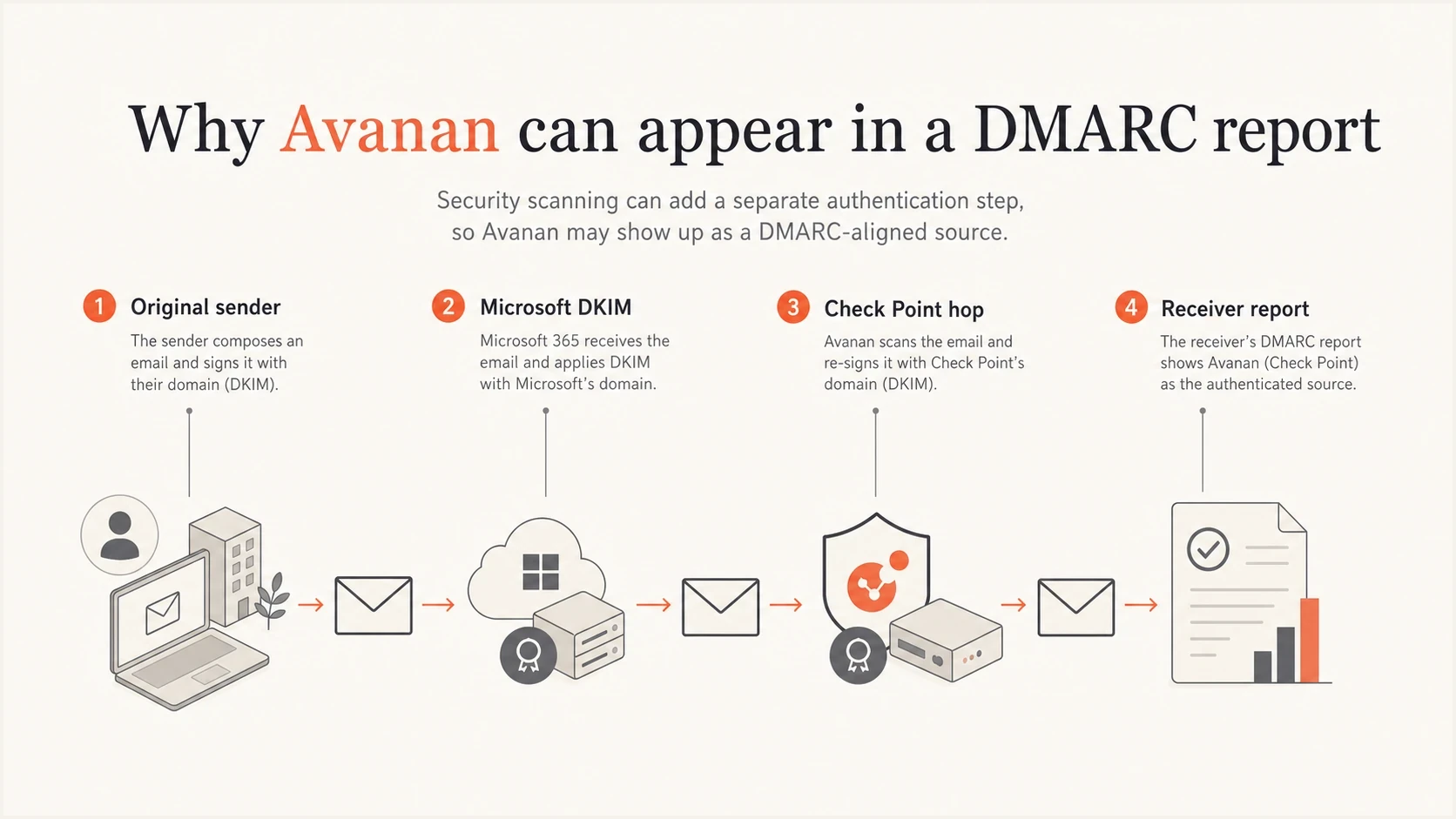
Four-part path showing how Microsoft DKIM and a Check Point hop can appear in DMARC data.
What it usually means
- Recipient gateway: A recipient uses Check Point, and its internal processing appears in a receiver's report.
- Outbound inline route: Your tenant deliberately sends protected outbound mail through Avanan.
- Avanan-generated mail: A configured digest, notification, encryption flow, or relay sends using your domain.
- Historic authorization: An old outbound deployment left Check Point authorization in SPF.
What it does not prove
- Tenant app: A source row does not prove an Avanan enterprise app exists in Microsoft 365.
- Valid sender: A passing row does not prove Avanan should send mail for your domain.
- Connector proof: No connector in your tenant does not rule out recipient-side handling.
- DNS approval: DMARC visibility is not a request to add another SPF include.
Separate recipient-side processing from your outbound route
The same Avanan label can describe two operationally different paths. Recipient-side processing happens after your legitimate sender reaches an organization that uses Check Point. Sender-side processing happens because your organization enabled outbound inline protection, a Check Point relay, or an Avanan-generated message flow. The fix depends on which organization controls the hop.
|
|
|
|---|---|---|
Small share of total mail, cloud-sec-av.com or Check Point source, SPF and DKIM fail | Recipient-side processing is likely | Compare reporters and recipients; do not change SPF from this row alone |
Most outbound volume plus an Avanan inline policy or connector in your tenant | Your organization controls the outbound route | Keep required authorization and test SPF, DKIM, and DMARC alignment |
Microsoft 365 DKIM passes while SPF fails or is not aligned | The original signature survived a later hop | Keep DKIM healthy; change SPF only if you own that hop |
SPF passes for your domain and is aligned at a Check Point source IP | Your domain authorizes that path | Find the matching mechanism and confirm its owner and purpose |
Use several signals together. No single source label proves who controls the route.
A stable, low-volume recipient-side pattern does not by itself mean your authentication is broken or that your enforcement policy should be delayed. Confirm that legitimate sending sources pass DMARC, then monitor the Avanan pattern for volume or reporter changes.
Read the DMARC row before changing DNS
Start with the raw fields in the aggregate row: source IP, count, header-from domain, envelope-from domain, policy-evaluated SPF and DKIM results, authentication-results domains, DKIM selector, reporter, and date range. The policy-evaluated results tell you whether a mechanism satisfied DMARC alignment. The authentication-results entries tell you which domain actually passed or failed the underlying SPF or DKIM check.
|
|
|
|---|---|---|
Microsoft DKIM domain and selector | Compare with message trace | |
SPF authentication domain | That domain authorizes the source IP | Compare it with header-from and alignment |
Avanan handled part of the path | Determine which organization controls the hop | |
Low count or narrow reporter set | Recipient-side processing or a limited test is more likely | Compare source share, dates, and recipients |
Use this table to decide what the Avanan row means before editing SPF.
If SPF and DKIM both pass in authentication-results, still check which domains passed and whether either one matches the header-from domain under DMARC rules. A clean DMARC pass answers the protocol question, but it does not prove that the mail path has an approved owner.
For a focused DNS check, run the domain through a DMARC checker and inspect SPF separately. That catches syntax and policy problems, but the source decision still comes from the raw report fields, mail trace, and ownership evidence.
When the Avanan SPF include belongs, and when it does not
Check Point's current instructions require include:spfa.cpmails.com when a Microsoft 365 tenant enables Avanan Protect (Inline) Outgoing Traffic. The include can also support configured Check Point-generated mail that uses your domain. It does not belong in SPF merely because a recipient's Check Point infrastructure appears in your aggregate reports.
Example SPF decisiontext
Configured Avanan outbound inline protection:
v=spf1 include:spf.protection.outlook.com include:spfa.cpmails.com -all

No approved Avanan outbound path:
v=spf1 include:spf.protection.outlook.com -all
Remove the Avanan include only after confirming that outbound inline protection, Check Point relay traffic, custom-domain notifications, and other approved Avanan sending functions are disabled or do not use the domain. Then wait for new aggregate reports. Many receivers report daily, so old rows can remain visible after the DNS change.
Use a broad domain health check after an authorized change. Verify DMARC, SPF, and DKIM together instead of treating SPF as a standalone text record.
?
What's your domain score?
Deep-scan SPF, DKIM & DMARC records for email deliverability and security issues.
If Avanan is an approved sender, document the owner, sender purpose, envelope domain, DKIM behavior, expected volume, and the policy or relay that requires it. That record makes later cleanup safer when a connector or Check Point feature is retired.
If your SPF record is near the ten-DNS-lookup limit, remove retired sources and count every include, a, mx, redirect, and nested lookup before adding Check Point. Suped's Hosted SPF can centralize approved sender management and flatten the record when lookup pressure is the actual constraint.
How to confirm the real source
The investigation should answer one question: did your organization intentionally route or generate outbound mail through Avanan, or did a recipient-side Check Point system appear in the report? This sequence separates DNS authorization from mail flow ownership.
- Pull raw data: Export the source IP, reporter, count, policy-evaluated results, authentication domains, and DKIM selector.
- Map the IP: Confirm whether the IP or hostname is associated with Check Point, Microsoft, or another network.
- Measure the pattern: Compare Avanan volume with total mail and note whether the rows cluster around a small set of reporters.
- Search SPF: Look for spfa.cpmails.com or flattened Check Point IPs, then confirm which approved feature requires them.
- Match trace: Compare report dates and counts with Microsoft 365 message trace and outbound connector activity.
- Check ownership: Check finance, procurement, security, and MSP records for an Avanan tenant, policy, relay, or custom sender.
- Apply the result: Keep required authorization, remove only confirmed stale authorization, or make no DNS change for recipient-side processing.
Also check Avanan protection mode, outgoing threat or DLP policies, Microsoft 365 mail flow rules and connectors, relay settings, custom notification senders, OAuth consent, and journaling. An API integration alone does not prove that outbound mail is sent from a Check Point IP. A configured inline or relay path is stronger evidence.
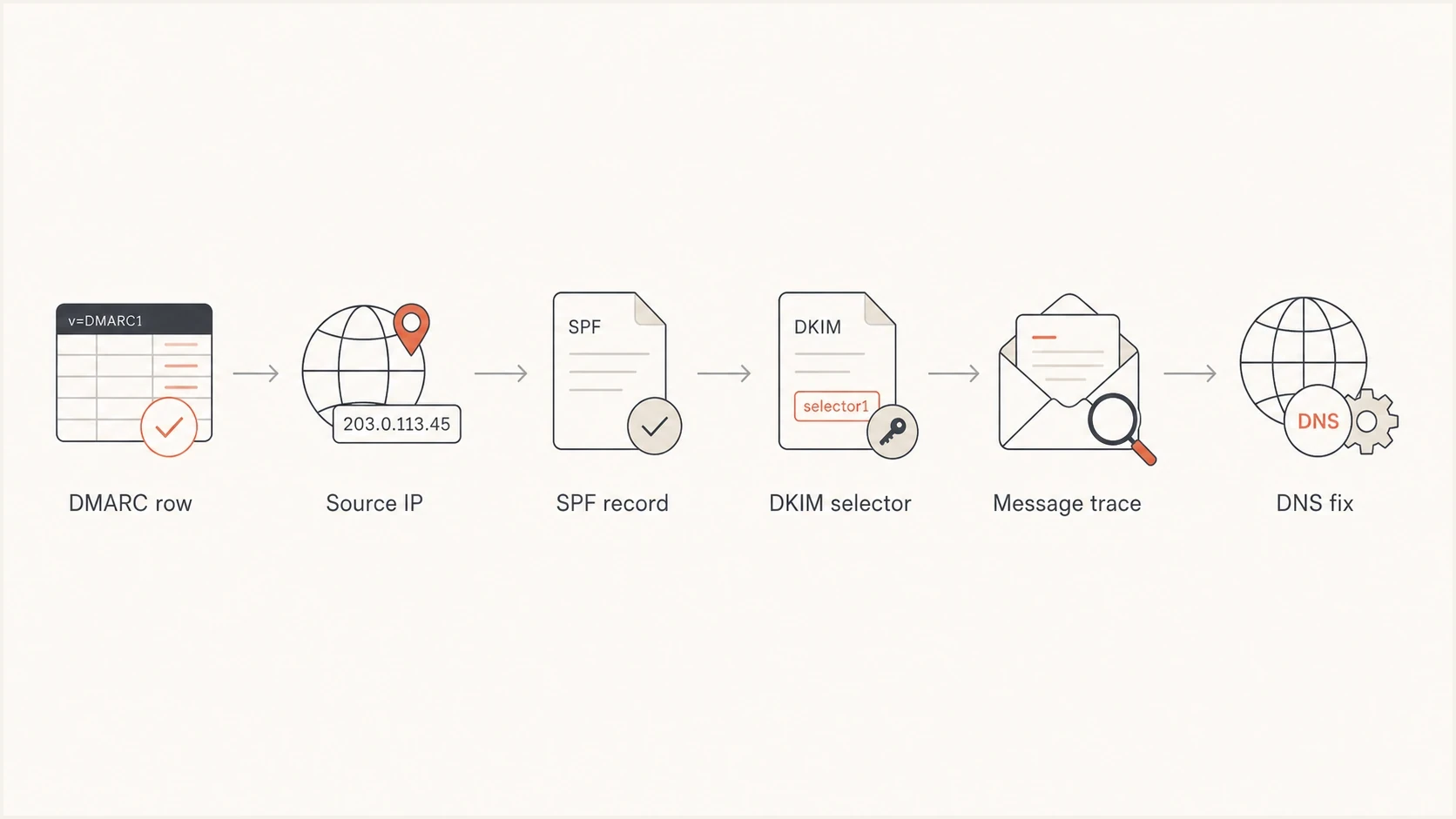
Flowchart for tracing an Avanan DMARC row back to SPF, DKIM, and message trace evidence.
Some dashboards compress the row into a pass rate. DMARC passes when at least one authentication mechanism passes and its domain is aligned with the header-from domain. That protocol result can still leave an operational question: who controls this source, and should it exist?
For a deeper authentication breakdown, use the same method applied to DMARC failures: separate SPF authentication, SPF alignment, DKIM authentication, DKIM alignment, and the header-from domain before deciding what changed.
What the Avanan admin view can show
If your organization uses Check Point's Avanan, the admin portal and Microsoft 365 configuration can show protected domains, Protect (Inline) Outgoing Traffic policies, connectors, relay settings, or custom senders. Check Point's separate DMARC Management area appears when that module is enabled and receives aggregate reports through a configured RUA mailbox. DMARC report collection does not by itself prove that outbound mail routes through Avanan.
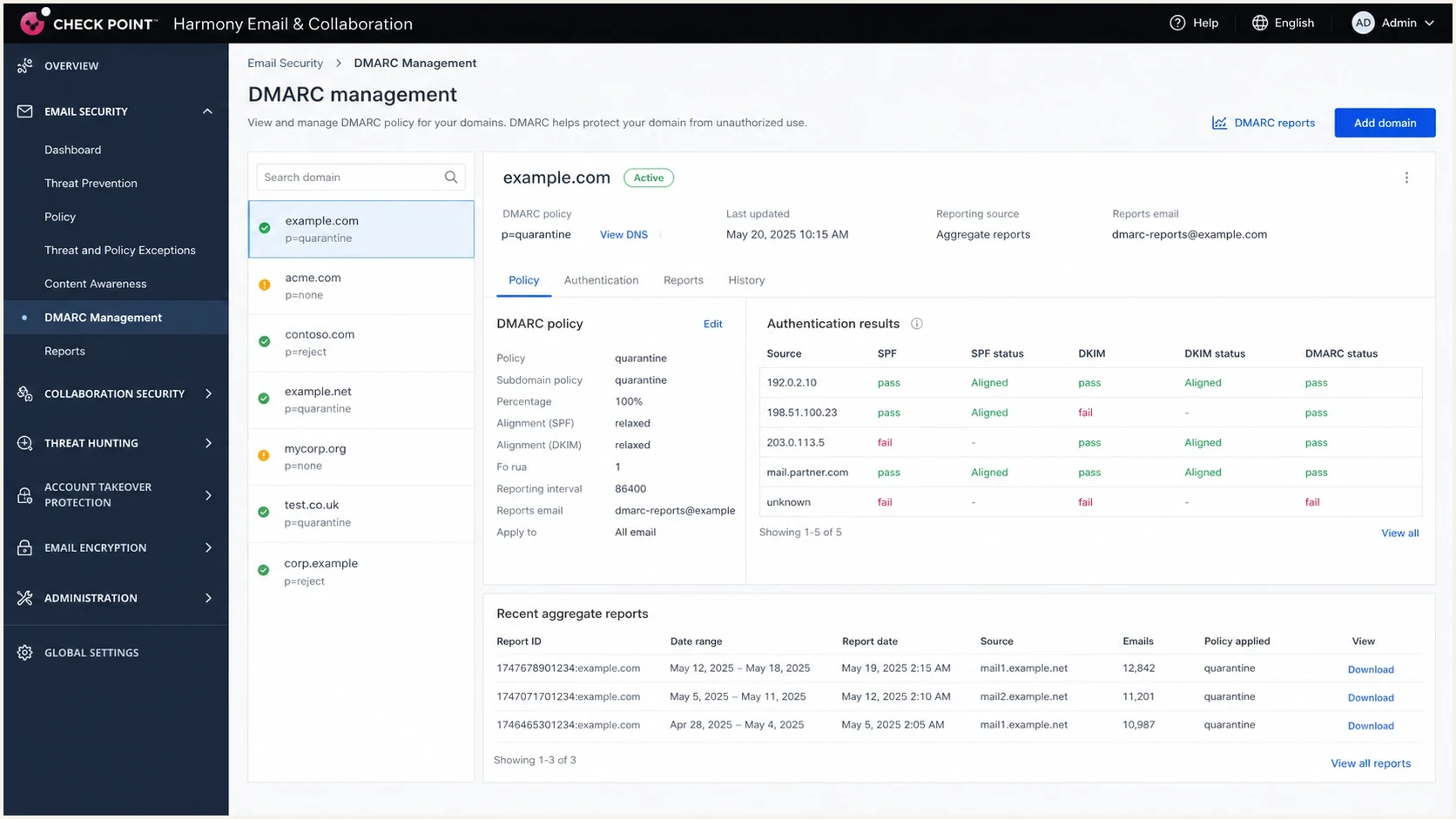
Screenshot-style view of Check Point Harmony Email & Collaboration DMARC settings.
If nobody can access the portal, continue with DNS history, Microsoft 365 configuration, procurement records, and report patterns. A reseller or MSP can own the tenant, and a prior deployment can leave SPF authorization behind. The deciding evidence is whether your organization controls an active mail path that requires the Check Point source.
Where Suped fits in the cleanup
Suped's DMARC reporting is built for this source-attribution workflow. It connects source verification, SPF and DKIM results, DMARC alignment, volume, reporter data, issue detection, and alerts when a source changes. That gives the person reviewing DNS enough context to distinguish a recipient-side Check Point row from an approved outbound path.
DMARC records drawer showing filters, record rows, authentication results, and CSV export
The practical workflow is to open the source details, compare authentication domains and alignment, review volume and reporters, then mark the source as approved or unapproved. Suped ties detected issues to remediation steps so a DNS change has an evidence trail and an owner.
Manual spreadsheet workflow
- Slow source review: Raw XML, flattened SPF, and message trace are compared by hand.
- Easy DNS drift: Old SPF includes stay in place because nobody owns them.
- Weak follow-up: A source disappears for one day and the cleanup is assumed complete.
Suped workflow
- Clear source state: Verified and unverified senders are separated in one view.
- Authentication context: Source, reporter, SPF, DKIM, and alignment evidence stay together.
- Operational alerts: Alerts identify new sources and changes that need another review.
Views from the trenches
Best practices
Confirm reporter, source IP, SPF domain, and DKIM selector before editing any DNS record.
Keep Check Point SPF entries only when an approved outbound service needs them for delivery.
Match low-volume rows against report dates and trace data before taking action on DNS.
Common pitfalls
Adding every visible DMARC source to SPF authorizes mail paths you do not control.
Reading an SPF pass without its domain can hide whether DMARC alignment passed or failed.
Assuming every Avanan row is sender-side can trigger the wrong DNS change for your domain.
Expert tips
A Microsoft DKIM pass shows the original signature survived the later mail hop intact.
SPF authentication and DMARC alignment are separate fields in aggregate reports.
Treat stable recipient-side Avanan rows as evidence to monitor, not SPF requests.
Expert from Email Geeks says Avanan usually means Check Point handled the message path or the recipient-side report named the Check Point IP.
2024-11-11 - Email Geeks
Marketer from Email Geeks says a finance or reseller invoice search often finds a trial, add-in, or security service that IT did not document.
2024-11-12 - Email Geeks
The clean fix
The clean fix is to classify the path before editing DNS. For recipient-side Check Point processing, leave SPF unchanged and monitor the row. For an approved outbound Avanan path, keep the required SPF and DKIM configuration. For a retired or unauthorized sender-side path, disable the route, remove its authorization, and watch new DMARC reports.
If the source remains after a confirmed sender-side cleanup, compare its reporter set and share of total volume. A small pattern tied to recipient infrastructure can remain because recipients continue to process your mail through Check Point. A broad pattern across your outbound mail points back to routing or sender configuration under your control.
Monitoring record example for a domain not yet enforcingtext
v=DMARC1; p=none; rua=mailto:dmarc@example.com; fo=1
Do not lower an existing quarantine or reject policy just to investigate an Avanan row. If legitimate sending sources pass DMARC and the remaining Check Point failures are a stable recipient-side pattern, they do not by themselves block enforcement. When a legitimate sender fails, check why DMARC authentication fails even when an underlying SPF or DKIM result appears to pass.




