Why does Gmail say it cannot verify my authenticated email?

Published 26 Jun 2025
Updated 11 Aug 2026
11 min read
Summarize with
Updated on 11 Aug 2026: We corrected the Gmail verification diagnosis and added practical checks for alignment, forwarding, ARC, and Send mail as.
Gmail says it cannot verify an email when the delivered copy is not authenticated to Gmail's checks. Publishing SPF, DKIM, and DMARC records does not guarantee that every message passes. The actual message can use an unauthorized sending IP, carry a broken DKIM signature, or authenticate a domain that does not match the visible From address. Forwarding can also break SPF or alter DKIM-signed content.
Start with Gmail's Show original view, then compare the visible From domain, Return-Path, DKIM signing domain, the Authentication-Results header added by mx.google.com, and any ARC headers. Google's own Gmail authentication page explains where Gmail exposes those results. For evidence across normal traffic, Suped's DMARC monitoring maps sending sources and alignment failures that one header sample cannot show.
Why the warning appears
Direct answer
A question mark beside the sender means Gmail treated that message as unauthenticated. Check the exact delivered copy. A DNS checker can confirm that records exist, but it cannot prove which server sent the message, whether the DKIM signature survived, or whether a passing domain aligns with the visible From address.
Gmail can authenticate a message with SPF or DKIM, while DMARC adds an alignment test against the visible From domain. A raw spf=pass or dkim=pass result can therefore be misleading when it belongs to another domain. Reputation affects inbox placement, spam filtering, rate limits, and rejection, but it does not turn an otherwise authenticated message into the question-mark warning.
- SPF identity: SPF can pass for the Return-Path domain while the visible From domain remains unaligned.
- DKIM identity: DKIM can pass for a relay's signing domain without authenticating the visible From domain under DMARC.
- Broken signature: A footer, subject change, re-encoding step, or other modification can invalidate DKIM after sending.
- Forwarding: A forwarder changes the connecting IP, which normally breaks SPF for the original envelope sender.
- ARC result: Gmail can treat forwarded mail as unauthenticated when ARC records an earlier authentication failure.
What Show original should say
Open the warned message in Gmail, choose Show original, and read the Authentication-Results block written by mx.google.com before changing DNS. Ignore an identically named header added by an earlier relay. To check the published policy, use the DMARC checker. For a broader DNS scan across SPF, DKIM, and DMARC, run a domain health check after inspecting the real Gmail headers.
Header lines to inspecttext
Authentication-Results: mx.google.com;
       dkim=pass header.i=@example.com header.s=selector1;
       spf=pass smtp.mailfrom=sender@example.com;
       dmarc=pass header.from=example.com
Received: from mail.example.com ([203.0.113.10])
        by mx.google.com with ESMTPS
DKIM-Signature: v=1; d=example.com; s=selector1;
|
|
|
|---|---|---|
spf=pass | Envelope domain passed | Compare domains |
dkim=pass | Signature validated | Check d= domain |
dmarc=pass | An aligned method passed | Confirm exact copy |
arc=fail | Forwarding chain failed | Inspect forwarder |
Use Gmail's headers to separate a protocol result from aligned authentication.
For direct mail, the server handing the message to Gmail should match the source you intended to use. At least SPF or DKIM must pass Gmail's authentication check. For DMARC to pass, the successful SPF domain or DKIM d= domain must match the visible From domain under DMARC rules. If Gmail's own result says dmarc=pass on the exact warned copy, check the message's security details and ARC chain before assuming a DNS failure.
Where Gmail Send mail as fails
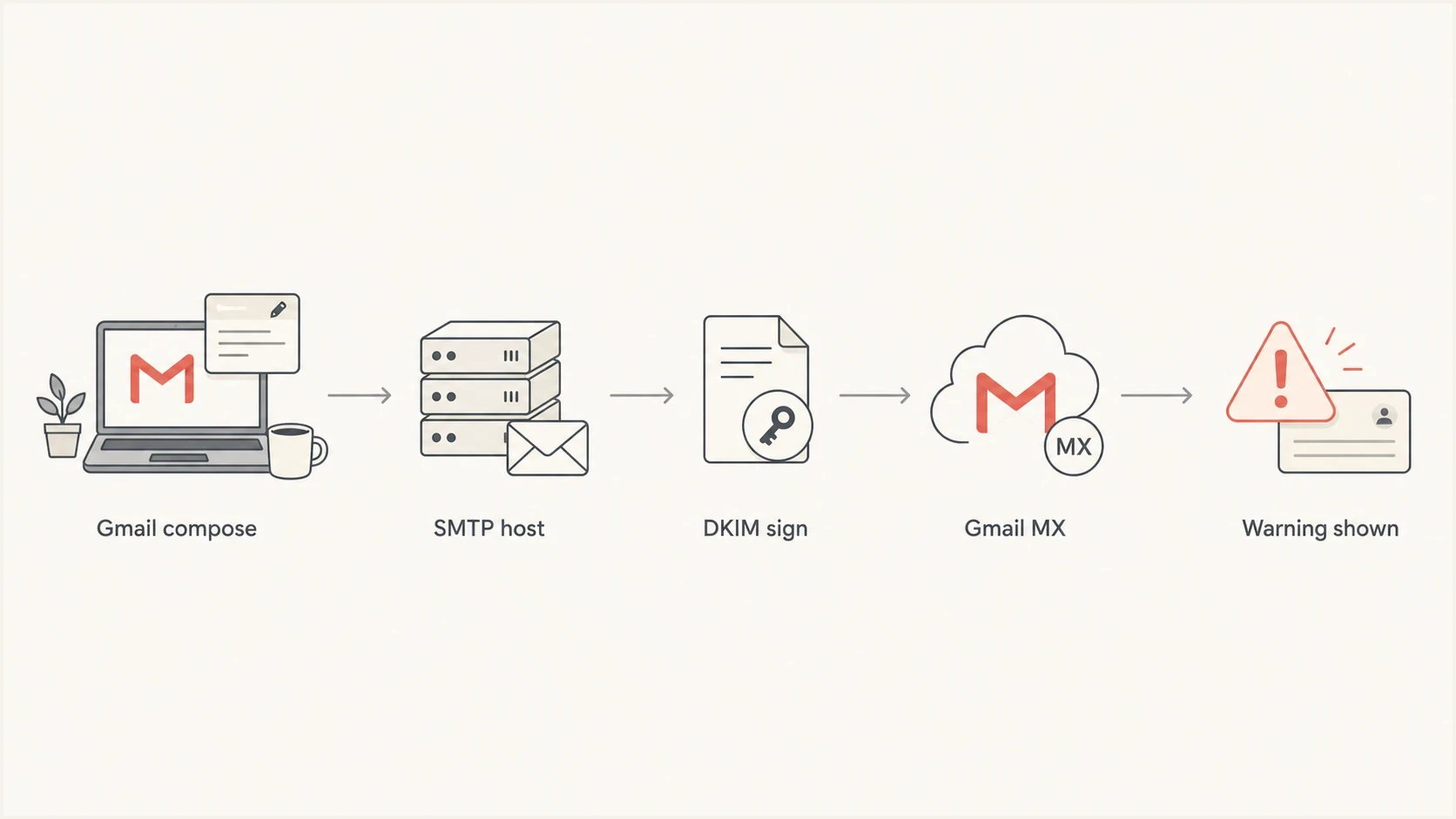
Gmail Send mail as authentication flow through a third-party SMTP relay.
Gmail's Send mail as setting can work for a custom domain when Gmail submits through the address's authenticated SMTP server. The route itself is not the problem. Verification fails when the final relay is absent from SPF, does not add a valid DKIM signature, signs with a non-aligned domain, or changes the message after an earlier DKIM signature was added.
Authenticated path
Gmail submits to the custom address's SMTP server, and that server authenticates the visible sender.
- Submission: Gmail uses the SMTP host and credentials for the custom address.
- SPF: The final sending IP is authorized for the envelope sender domain.
- DKIM: The final server signs with a domain aligned to the visible From address.
Unauthenticated path
Gmail shows the custom From address, but the final SMTP relay does not authenticate that identity.
- Submission: The configured SMTP host is wrong or uses another sending route.
- SPF: The relay IP is unauthorized or authenticates an unaligned Return-Path.
- DKIM: The relay omits DKIM, breaks the signature, or signs for another domain.
The same address can pass through one client and fail through Gmail Send mail as when the two clients submit to different SMTP hosts or trigger different signing rules. Compare the final Received hop, smtp.mailfrom value, and DKIM d= domain on both test messages. The Message-ID showing Gmail as the composer does not decide SPF, DKIM, or DMARC.
How forwarding and ARC affect verification
Forwarding is the main exception to a simple direct-mail diagnosis. The forwarder becomes the server connecting to Gmail, so SPF for the original envelope sender usually fails. DKIM can preserve authentication across the forward only when the forwarder leaves the signed body and protected headers unchanged. Mailing lists often add subject tags or footers that break DKIM.
- Check ARC: Read ARC-Authentication-Results, ARC-Message-Signature, and ARC-Seal together.
- Preserve DKIM: Avoid changing signed headers, MIME boundaries, encoding, subjects, and message bodies.
- Rewrite safely: A forwarder can rewrite the envelope sender so its own SPF check passes at Gmail.
- Retest direct: Send the same message without the forwarder to confirm whether forwarding caused the failure.
ARC records the authentication state seen by intermediaries, but ARC does not make a failed message pass automatically. Google states that if a forwarded message passes SPF or DKIM at Gmail while ARC shows that it failed earlier authentication, Gmail treats the message as unauthenticated. Repair the original sender or forwarding chain instead of adding every forwarder to the original domain's SPF record.
How to fix it
Fix the result shown on the warned message before changing enforcement. Work through these checks in order so each change addresses a measured failure.
- Reproduce it: Send a fresh message through the affected route and inspect that exact delivered copy.
- Trust Gmail's result: Use the Authentication-Results header added by mx.google.com, not an upstream copy.
- Check alignment: Compare the visible From domain with smtp.mailfrom and the DKIM d= signing domain.
- Repair SPF: Authorize the final sending source and keep the evaluation within the ten DNS-lookup limit.
- Repair DKIM: Sign on the final outbound server with an aligned domain and a valid selector.
- Use secure SMTP: Submit with the mailbox's authenticated SMTP settings and TLS.
- Monitor reports: Collect DMARC aggregate reports to find the same failure across normal traffic.
For mail sent to personal Gmail accounts, Google requires all senders to use SPF or DKIM. Senders above 5,000 messages a day must use SPF, DKIM, and DMARC, with the From domain aligned to SPF or DKIM for direct mail. Gmail accepts DKIM keys of at least 1024 bits and recommends 2048-bit keys when supported.
Do not tighten DMARC first
Moving straight to p=reject does not repair SPF, DKIM, alignment, or forwarding. It tells receivers to reject messages that still fail DMARC. Suped's Hosted DMARC can stage policy changes without repeated DNS edits.
Monitoring DMARC recordtext
v=DMARC1; p=none; rua=mailto:dmarc@example.com
That record collects aggregate reports while you identify legitimate sources. It does not fix the warned message by itself. After the affected route passes consistently and reports show stable aligned traffic, move to quarantine or reject in a controlled rollout.
Tests that isolate the cause
A small test matrix separates the composing client, SMTP server, forwarder, and DNS behavior. Keep the subject and body simple, and send each test to the same Gmail recipient so the headers remain comparable.
Send one message through Gmail Send mail as, one through a phone or desktop client using the same SMTP details, and one directly from the domain's webmail. If forwarding is involved, add a direct-to-Gmail test that bypasses it. Compare mx.google.com's Authentication-Results, the last external Received hop, Return-Path, DKIM d= domain, and ARC results.
Email tester
Send a real email to this address. Suped shows a results button when the test is ready.
?/43tests passed
After sending a real message to the tester address, confirm that the final outbound server matches the expected source. If the result shows another IP, a non-aligned DKIM domain, an unexpected envelope sender, or a modified body, fix that sending path before editing the public DMARC policy.
Check reputation only after the exact message authenticates. A shared outbound IP, weak reverse DNS, or a blocklist (blacklist) listing can affect spam placement and delivery, but those signals do not explain Gmail's unauthenticated question mark when SPF or DKIM has not passed.

Email tester sample report showing total score, email preview, issue summary, and per-section results
Suped's email tester ties the diagnosis to one real message. Suped is our DMARC and email authentication platform, and its aggregate reporting workflow then shows whether the same source, alignment failure, or signing change recurs across normal traffic.
Authentication and placement are separate
SPF, DKIM, and DMARC answer identity questions. Reputation, complaint rates, message content, and sending patterns affect whether authenticated mail reaches the inbox, spam, or a rejection. If Gmail's own header shows aligned authentication passing but the message lands in spam, investigate placement. If Gmail shows the question mark, investigate authentication and ARC first.
DMARC policy staging
Move policy only after the real sending sources are known.
Monitor
p=none
Collect reports while all legitimate senders are mapped.
Quarantine
p=quarantine
Send failing mail to spam after fixes are verified.
Reject
p=reject
Block failing mail after normal traffic is passing.
Suped is our DMARC platform. In this workflow, use it to turn aggregate reports into a source map, identify recurring alignment failures, and alert on changes after the single-message test is clean. Server identity and blocklist or blacklist monitoring remain separate delivery checks.
What good looks like
- Authentication: Gmail's own header shows SPF or DKIM passing.
- Alignment: DMARC passes through a domain aligned with the visible From address.
- Route: The final outbound server is the source you intended to use.
- Reports: DMARC aggregate data shows the same source passing across normal mail volume.
What to do with Gmail Send mail as
To keep Gmail as the interface for a custom domain, configure Send mail as with the SMTP server, username, and password for that address. Review the details under Gmail settings, Accounts and Import, then Send mail as.
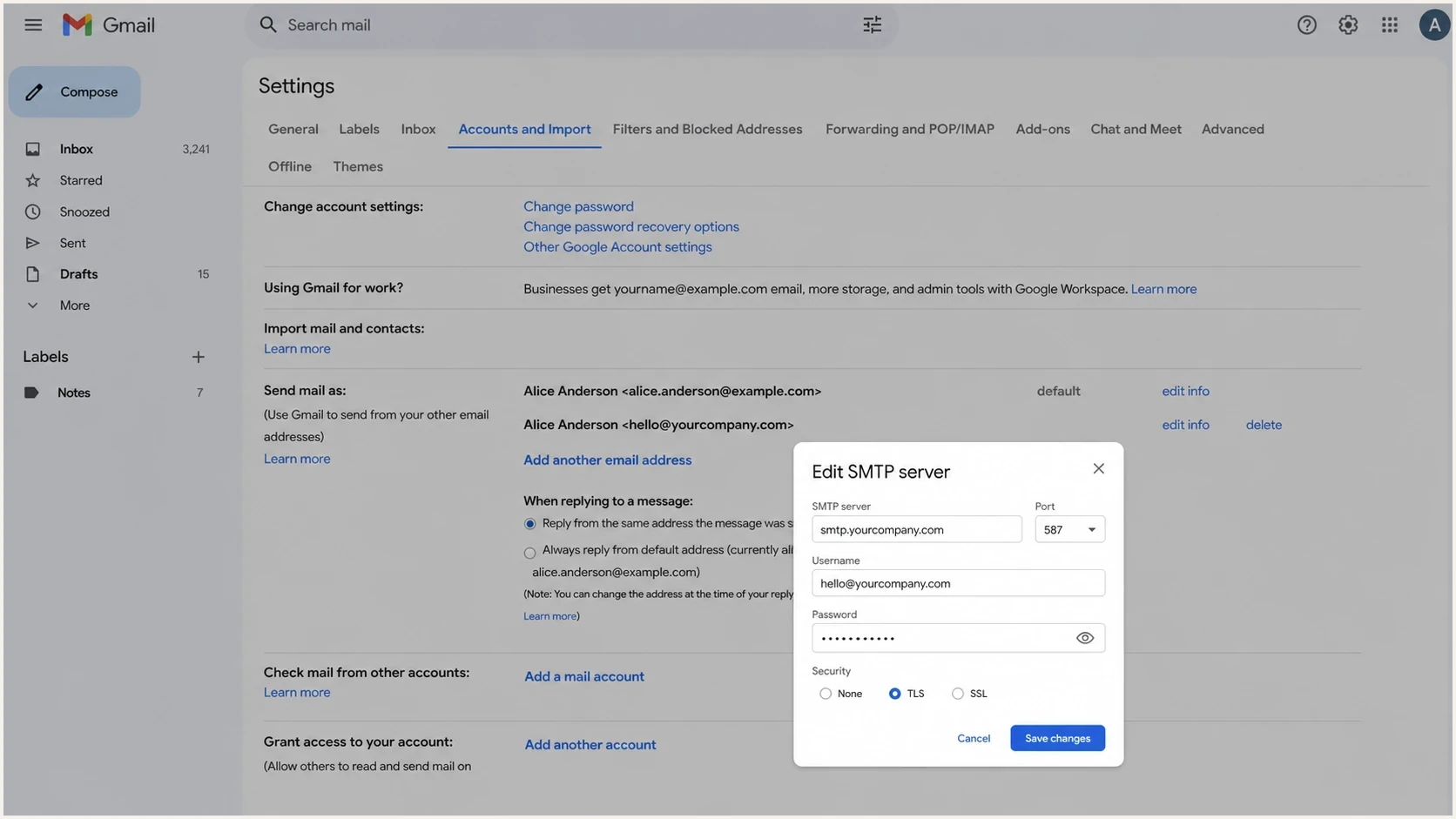
Gmail Send mail as settings for authenticated custom-domain SMTP.
- Open settings: Go to Gmail settings, then Accounts and Import.
- Edit sender: Find the custom address under Send mail as and confirm the SMTP host and username.
- Use TLS: Use the provider's authenticated TLS setting, commonly port 587 or 465.
- Send test: Send to Gmail, open Show original, and compare it with a direct SMTP client test.
If the direct client test passes and the Gmail Send mail as test fails, compare the SMTP host, authenticated username, Return-Path, final sending IP, and DKIM signer. Different credentials can select another outbound route or signing rule. Correct that configuration, use the domain mailbox directly, or move the mailbox to Google Workspace.
Views from the trenches
Best practices
Check Gmail Show original before changing DNS so you know which result actually failed.
Compare the visible From domain with smtp.mailfrom and DKIM d= values for alignment.
Keep an aligned DKIM signature intact when forwarding breaks SPF at the next receiver.
Treat IP reputation as a placement issue after resolving authentication failures.
Common pitfalls
Assuming a DNS checker proves each message passed can hide a failing or unaligned sender.
Reading an upstream Authentication-Results header instead of one added by mx.google.com.
Raising DMARC to reject before mapping all senders can turn warnings into lost mail.
Blaming reputation for the question mark can delay the required SPF or DKIM repair.
Expert tips
Use the mx.google.com Authentication-Results header as the result for the delivered copy.
Test the same SMTP host outside Gmail to expose differences in relay and signing behavior.
Inspect ARC when a mailing list or forwarder changes content and the original DKIM breaks.
Use DMARC aggregate data to find recurring sources, then inspect a real sample message.
Expert from Email Geeks says Gmail Show original is the first place to confirm whether SPF, DKIM, and DMARC passed before changing records.
2022-07-20 - Email Geeks
Marketer from Email Geeks says POP retrieval into Gmail can create verification warnings, so the retrieval path must be tested separately.
2022-07-20 - Email Geeks




