Why do SPF and DKIM failures sometimes occur despite correct setup?

Published 15 May 2025
Updated 12 Aug 2026
13 min read
Summarize with
Updated on 12 Aug 2026: We updated this guide for current DMARC reporting standards, clearer SPF and DKIM error diagnosis, and ARC handling for forwarded mail.
SPF and DKIM failures sometimes occur despite correct setup because each recipient does not always check the same message, the same sending IP, or the same DNS state. A single campaign can go directly to some inboxes, pass through forwarding rules for others, get modified by mailing lists or security gateways, or hit temporary DNS lookup problems at specific receivers. That is why the result is not always 0% or 100%.
The practical answer is simple: a low, stable failure rate often means the setup works, but some delivery paths break authentication after the message leaves the sending platform. A scattered failure pattern needs different treatment than a concentrated pattern against one provider, source, selector, or recipient group.
A small number of SPF or DKIM failures in a large send can be normal. When the same domain sends 77,000 messages and a small fraction fails, check forwarding, message modification, DNS timing, and receiver-side differences before changing SPF or DKIM records.
Why correct setup does not guarantee every pass
Email authentication is checked by the receiving system at the point it receives the message. That point changes. Direct mail has the best chance of passing. Mail that goes through forwarding rules, distribution lists, security filters, or mailing lists gets checked after those hops.
SPF and DKIM fail for different reasons. SPF checks whether the connecting server is authorized for the envelope sender domain. DKIM checks whether the signed headers and body still match the signature added by the sender. DMARC then asks whether SPF or DKIM passed with a domain aligned to the visible From domain. RFC 9989 retains this core rule: one aligned pass is enough. A failure in one layer does not always mean the whole message fails DMARC.
- Forwarding: SPF often fails after forwarding because the final receiver sees the forwarder's IP, not the original sender's IP.
- Message changes: DKIM can fail when a system changes signed headers, footers, subject tags, link wrappers, MIME boundaries, or body content.
- DNS lookup timing: Temporary DNS problems can affect only the receivers that query at the wrong moment.
- Provider behavior: Receivers evaluate authentication with their own infrastructure, cache state, forwarding treatment, and policy handling.
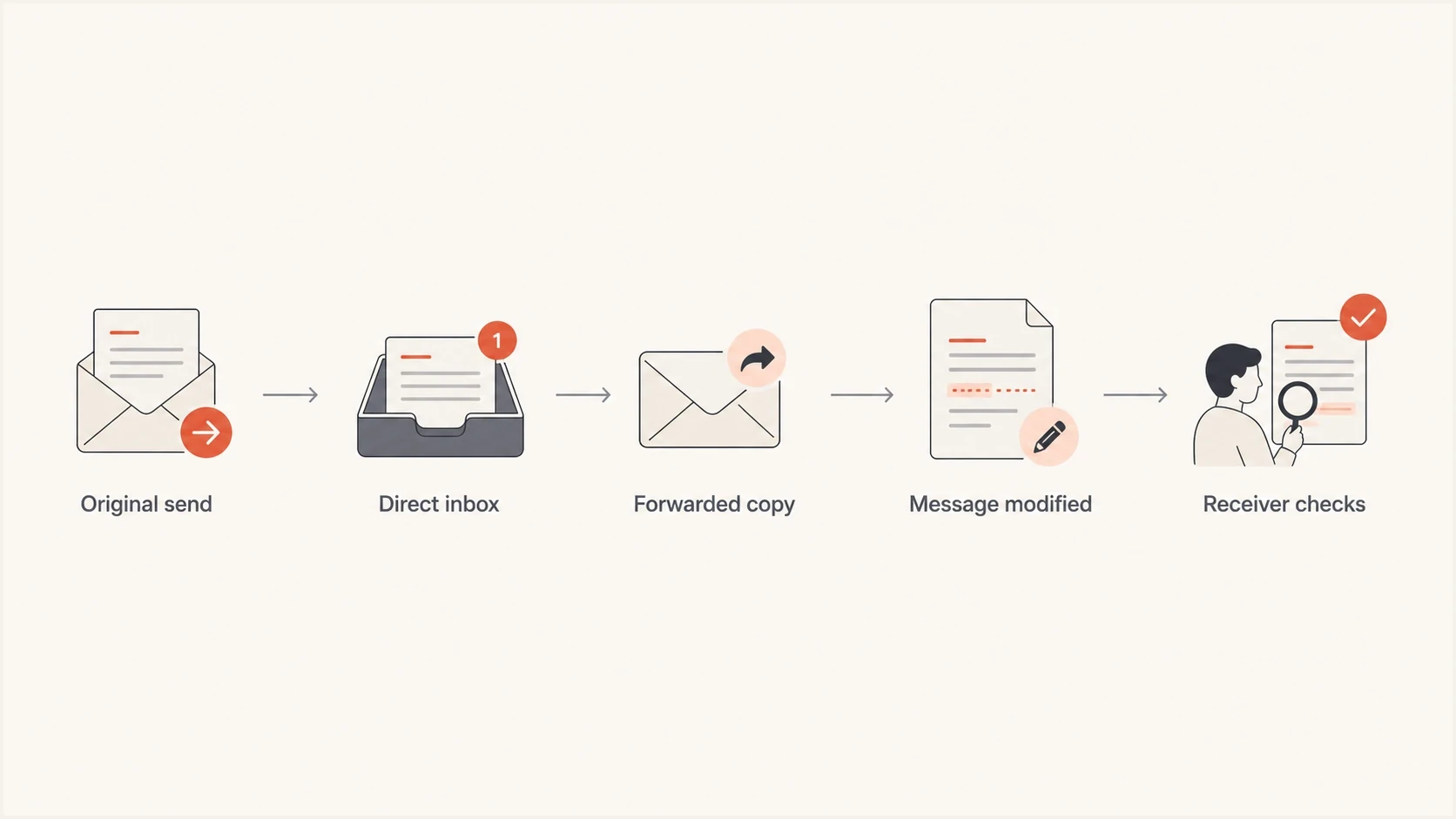
Email authentication flowchart showing direct delivery, forwarding, message changes, and receiver checks.
Do not assume intermittent failures are harmless until you check clustering. Ten random failures across many receivers has a different meaning than ten failures from the same source, selector, or recipient domain.
The most common causes
The usual cause is forwarding. Your platform sends mail using an IP that SPF authorizes, and it adds a valid DKIM signature. Then a recipient forwards the message. The final mailbox sees the forwarder's server, so SPF checks that new IP against your SPF record. Your record normally does not authorize that forwarder, so SPF fails.
DKIM survives forwarding better than SPF, but only when the message stays intact. Some paths add footers, subject tags, rewritten links, tracking, MIME changes, or new encoding. If those changes touch signed content, DKIM fails even though the original signature was correct.
SPF fails or stops helping DMARC when
- Mail is forwarded: The final receiver sees an intermediate sender IP.
- Domains do not match: SPF can pass for the envelope sender but not satisfy DMARC when that domain does not match the visible From domain under the published alignment mode.
- Lookup limits are exceeded: More than 10 DNS-querying terms during one evaluation returns permerror.
- DNS fails temporarily: A timeout or transient resolver problem can return temperror for one receiver.
DKIM fails when
- The body changes: A footer, tracker, or gateway alters signed content.
- A signed header changes: A downstream system rewrites a header named in the signature.
- The key lookup fails: The receiver cannot retrieve the public key from DNS.
- The selector or key is wrong: The signature points to a missing selector or a public key that does not match the active private key.
Another common cause is SPF record sprawl. Teams add marketing platforms, CRMs, billing tools, ticketing systems, and internal mail systems over time. The record can grow until it triggers too many DNS lookups, includes stale senders, or authorizes broad ranges.
|
|
|
|---|---|---|
SPF fail only | Forwarding or authorization | Last-hop IP and SPF result |
DKIM fail only | Content or key problem | Body hash and selector |
Both fail | Relay path | Received chain |
Random temporary errors | DNS timing | Resolver response |
Intermittent authentication failure patterns
How to read mixed pass and fail reports
Mixed pass and fail results are normal in seed tests and DMARC aggregate reports. Where failures group matters more than the overall percentage. A low rate spread across forwarded mail is not the same problem as a higher rate tied to one platform or selector. RFC 9990 defines aggregate reporting, while RFC 9991 defines message-specific failure reporting. Receiver support for failure reports varies, so aggregate data and raw headers remain the main evidence for most investigations.
Start with raw headers when available. Check Authentication-Results, Received headers, DKIM-Signature, Return-Path, and the visible From domain. Separate fail from none, neutral, temperror, and permerror because they do not describe the same condition. The Received chain shows intermediate systems. DKIM comments often indicate a missing key, body hash mismatch, or signature mismatch, but wording varies by receiver.
Header fields to inspecttext
Authentication-Results: mx.receiver.example;
  spf=fail smtp.mailfrom=bounces.example.com;
  dkim=pass header.d=example.com;
  dmarc=pass header.from=example.com
Return-Path: <bounce-id@bounces.example.com>
From: Example Team <news@example.com>
This example shows SPF failing while DKIM passes. Because DKIM passes and aligns with the visible From domain, DMARC can still pass. Fixing SPF alone is not always the right response. The goal is for at least one aligned identifier to survive common delivery paths, and DKIM usually has the better chance after forwarding.
Use the failure rate as a triage signal, not a verdict. A stable rate with no controlled-source cluster usually points to normal forwarding or receiver variance. A rising rate or tight cluster means a sender, DNS record, or message flow needs work.
?
What's your domain score?
Deep-scan SPF, DKIM & DMARC records for email deliverability and security issues.
A broad domain check confirms the foundation before edge cases are investigated. Suped's domain checker checks DMARC, SPF, and DKIM together, which helps when a failure report does not identify which layer caused the problem.
What correct SPF still cannot control
SPF only validates the server that connects to the receiver. It does not travel with the message. Once mail is forwarded, SPF is evaluated against the forwarder unless the forwarding system rewrites the envelope sender. That makes SPF useful, but fragile as the only domain-alignment mechanism.
SPF can also fail because the record has become too complex. RFC 7208 limits one SPF evaluation to 10 DNS-querying mechanisms and modifiers, including nested include and redirect processing. The record can look correct at a glance, but one included sender can expand into several terms. When the limit is exceeded, the SPF result is permerror, not a temporary failure.
SPF record that can become fragiledns
example.com.  TXT  "v=spf1 include:_spf.sender-a.example
 include:_spf.sender-b.example include:_spf.sender-c.example -all"
Do not add every IP seen in a failure report. Forwarder IPs can over-authorize mail outside your control. For a real sending source, document it, confirm the envelope sender domain, and then add only the approved include or IP range.
Failure pattern triage
Use the domain's established baseline and business impact instead of a universal percentage threshold.
Expected variance
At baseline
Scattered forwarding or receiver differences remain at the established baseline.
Investigate
Above baseline
Failures rise or repeat by receiver, source, selector, or campaign.
Act now
Mail affected
A controlled sender is broken or legitimate mail faces filtering or rejection.
What correct DKIM still cannot control
DKIM signs selected headers and a hash of the body. It proves that the signed parts survived verification and that the signer had the private key for the signing domain. It does not promise every downstream system will preserve the message exactly. Relaxed canonicalization tolerates common whitespace changes, while simple canonicalization tolerates less. Neither mode protects a signature from substantive changes such as added text or rewritten signed headers.
Several normal systems modify messages. Mailing lists add unsubscribe text or subject prefixes. Security systems rewrite links. Gateways add confidentiality footers. Other systems recode content or alter MIME structure. Each change can break DKIM depending on what was signed and which canonicalization mode was used.
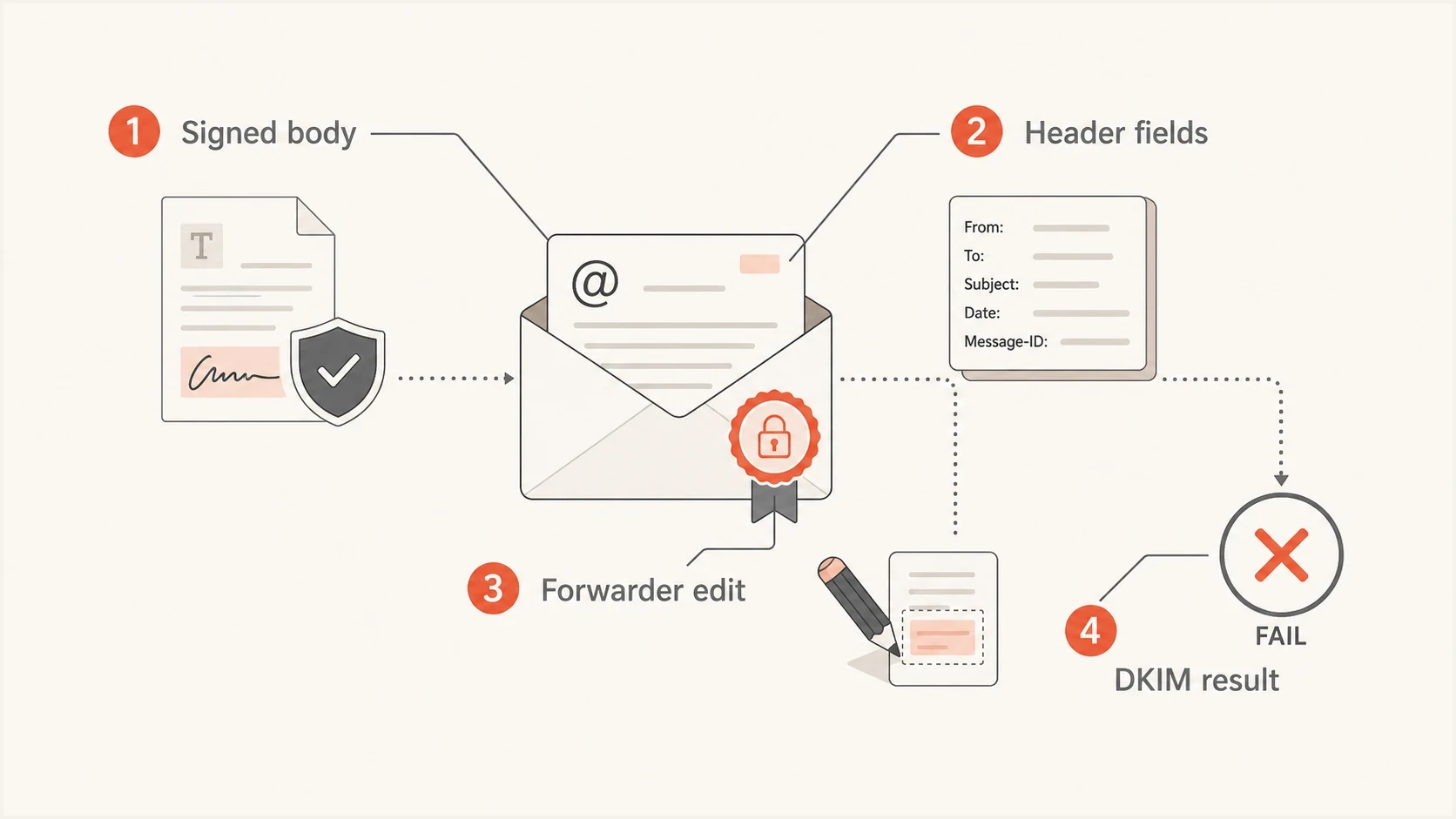
DKIM failure infographic showing how changes to signed email content affect verification.
DKIM can also fail when the public key cannot be retrieved. Receivers query a selector record such as selector._domainkey. If the DNS response times out, returns the wrong key, contains a malformed TXT value, or references a selector removed too early, verification fails. The result can be intermittent because receivers use different resolvers and cache states. During key rotation, keep the old public key available until messages signed with it have left the delivery queue and relevant DNS cache lifetimes have passed.
DKIM selector lookupdns
selector1._domainkey.example.com.  TXT  "v=DKIM1; k=rsa;
 p=MIIBIjANBgkqhkiG9w0BAQEFAAOCAQ8A..."
DKIM has a better chance of surviving forwarding than SPF, but forwarding can still break it. Give each legitimate sender a DKIM signature that aligns with the visible From domain, and apply signing after systems that modify the message whenever the mail flow permits it.
How ARC helps with forwarded mail
Authenticated Received Chain (ARC) lets a participating intermediary record the authentication results it observed before forwarding or modifying a message. A later receiver can validate that chain and use the earlier results as additional evidence when the final SPF or DKIM check no longer passes.
ARC does not repair SPF, make a broken DKIM signature pass, or override DMARC by itself. The final receiver decides whether to trust the ARC sealing domain and whether the validated chain justifies a local policy exception. Senders also cannot force a forwarding service to add ARC.
- Check the earlier result: ARC-Authentication-Results records what the intermediary evaluated on arrival.
- Validate the message signature: ARC-Message-Signature protects the message state handled by that intermediary.
- Validate the chain: ARC-Seal protects the order and integrity of the ARC sets.
- Confirm receiver treatment: A chain result such as cv=pass shows validation, but acceptance still depends on receiver trust and local policy.
ARC is most useful when a known mailing list, forwarder, or security gateway participates correctly. It is evidence about the path, not a replacement for aligned DKIM on mail sent directly by your domain.
A practical troubleshooting workflow
Investigate intermittent SPF and DKIM failures by working backward from evidence. Do not start by editing DNS. A premature DNS change can hide the real cause or authorize more infrastructure than intended.
- Group failures: Sort by source IP, sending service, receiver, DKIM selector, and envelope domain.
- Read headers: Check Authentication-Results, Return-Path, DKIM-Signature, Received fields, and any ARC set.
- Confirm alignment: Make sure the passing SPF or DKIM domain aligns with the visible From domain under the published DMARC mode.
- Check DNS: Validate SPF lookup terms, DKIM selector records, TTLs, and TXT values.
- Retest the path: Send a real message through the same platform and receiver path when possible.

Issue steps to fix dialog showing the issue overview, tailored fix steps, and verification action
Suped's DMARC reporting and email authentication platform groups authenticated and unauthenticated sources, flags changes by source or receiver, sends alerts, and turns report data into fix steps. Its hosted SPF and hosted DMARC workflows support staged DNS changes when the fix requires ongoing record management.
If the domain uses p=none monitoring mode, establish the normal failure baseline before moving to quarantine or reject. Suped's hosted DMARC workflow supports staged policy changes while keeping visibility on sources that still fail.
DMARC checker
Look up a domain's DMARC record and catch policy issues.
?/7tests passed
After reviewing report data, validate the live record with the DMARC checker. This catches syntax mistakes, unavailable reporting destinations, and policy values that do not match the rollout plan.
How third-party tests can mislead
Seed tests and inbox placement tests are useful, but they compress a lot of behavior into a small report. A result can show SPF fail, DKIM fail, or DMARC fail without proving where the break happened. Treat the result as a lead, then confirm it with raw headers and the actual delivery path.
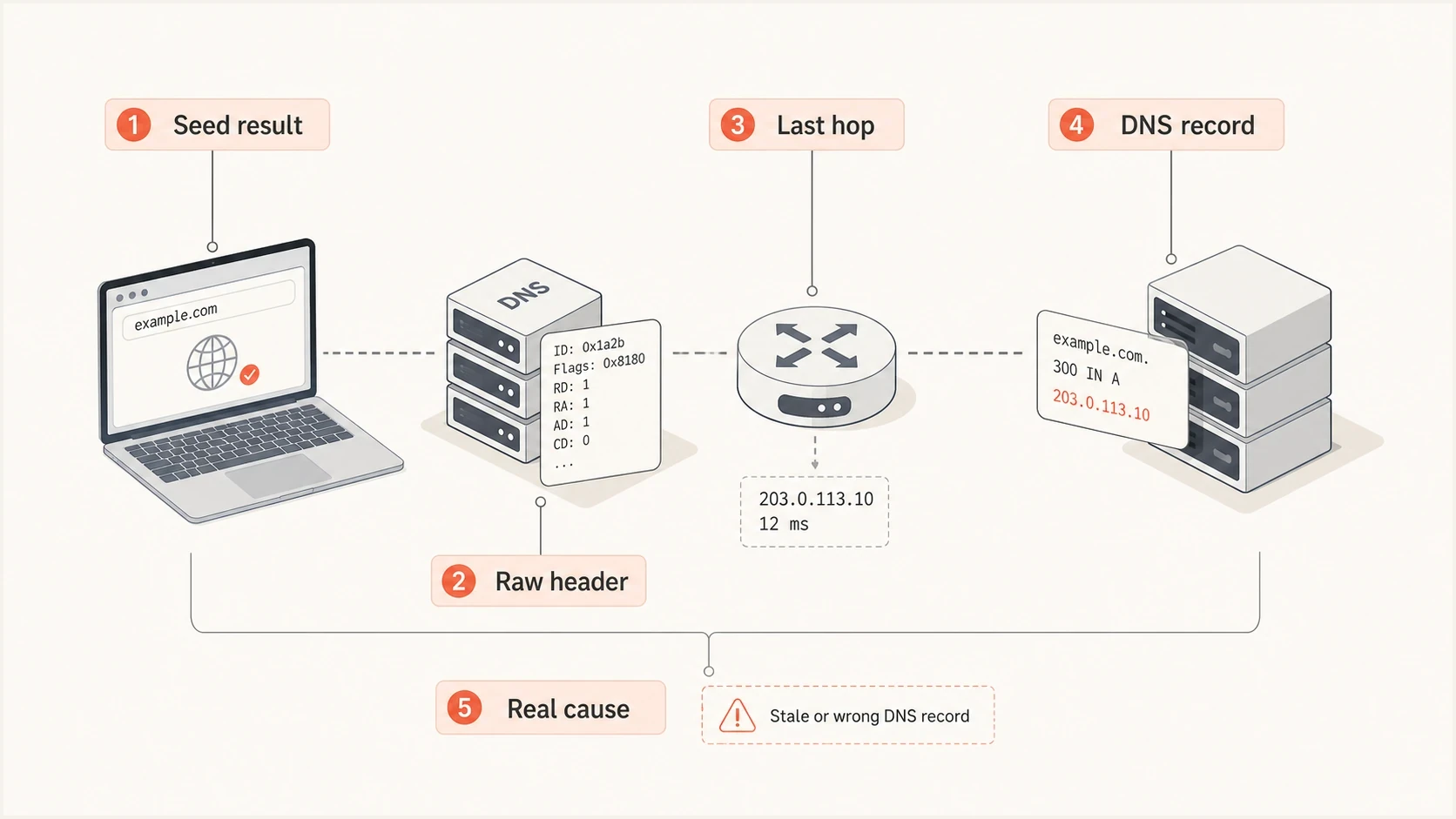
Email authentication test workflow comparing seed results with headers, relay hops, DNS, and root causes.
If a testing report shows a small number of failures, pull the raw headers for the failed seed messages. Different Received chains between passing and failing messages point to a path difference. If the path is the same but DKIM differs, compare signed headers, body hash, selector, and DNS responses. If SPF differs, compare the connecting IP, envelope sender, and exact SPF result.
Do not fix a seed test by relaxing DMARC policy or adding unknown forwarder IPs to SPF. Fix the sender you control, improve DKIM coverage that aligns with the visible From domain, and document the remaining forwarded-mail variance.
A related edge case occurs when DMARC fails even though SPF and DKIM appear correct in a header summary. The missing detail is often domain alignment, not authentication itself. The DMARC failure guide separates technical pass results from aligned pass results.
When to ignore it and when to act
Do not chase every isolated authentication failure. No universal percentage defines a normal rate. At scale, some variance is expected because not every recipient path preserves SPF and DKIM. Establish a baseline for each legitimate source and receiver, then investigate changes and clusters rather than relying on a fixed threshold.
Act when the failure rate rises, failures cluster around a sender you control, DKIM starts failing after a template or gateway change, SPF returns permerror, or legitimate mail faces filtering or rejection under an enforced DMARC policy. These patterns indicate a controlled source or message flow needs correction.
|
|
|
|---|---|---|
SPF fail, aligned DKIM pass | Common with forwarding | Confirm the delivery path |
SPF pass, DKIM fail | Message or signing issue | Check hash, selector, and alignment |
Both fail, scattered | Path or receiver variance | Compare with baseline |
Both fail, clustered | Controlled source is broken | Fix the sender or route |
What to do with each failure type
A durable setup uses aligned DKIM across legitimate senders, a controlled SPF record, and DMARC reporting that makes baseline changes visible. Suped groups those reports by source and receiver so teams can identify a broken sender or selector without treating every forwarded message as a DNS problem.
The practical answer
SPF and DKIM failures can occur despite correct setup because authentication is tested at the receiver after the message has taken its actual path. Forwarding breaks SPF. Message changes break DKIM. DNS timing, selector problems, and receiver behavior add other forms of variance.
A perfect pass rate is not the goal. Know the baseline, group failures by source and receiver, preserve aligned DKIM coverage, control SPF complexity, and use DMARC reports to catch patterns that affect legitimate mail. Suped turns that report data into grouped issues, alerts, and fix steps.




