Why do emails get blocked by Gmail for authentication despite correct SPF and DKIM DNS records?

Published 25 May 2025
Updated 5 Aug 2026
13 min read
Summarize with
Updated on 5 Aug 2026: We updated this guide with Gmail's current authentication errors, bulk-sender rules, and forwarding checks.
Gmail blocks email for authentication when the message it receives does not meet the authentication requirement named in the SMTP response. A DNS record that looks correct later does not prove that Gmail resolved it, used the same domain you checked, or saw a message that was actually signed. The rejection is about the delivered message, the sending path, and live DNS resolution, rather than only the existence of TXT records.
Google documents several 550-5.7.26 responses. The full text can report that SPF and DKIM did not pass, that an SPF record ending in -all rejected the connecting IP, or that unauthenticated mail was rejected under the sender domain's DMARC policy. Google's sender requirements say all senders to personal Gmail accounts need SPF or DKIM. Senders above 5,000 messages per day need SPF, DKIM, DMARC, and alignment between the From domain and at least one authenticated domain. Gmail also requires valid forward and reverse DNS, TLS, RFC 5322 formatting, and a spam rate below 0.3%.
Treat this as an evidence problem. Start with the full bounce, the exact sender domain, the envelope sender, the DKIM selector, and the sending IP. Suped's DMARC monitoring helps by collecting authentication results over time, separating verified senders from unverified ones, and pointing to the specific source that needs work.
The short answer
Correct SPF and DKIM DNS records are necessary, but they are not enough. Gmail must successfully retrieve the records and apply them to the exact message that arrived. If the bounce specifically says SPF and DKIM both failed, Gmail found no passing authentication method for that delivery attempt, so it can reject the message before inbox placement decisions matter.
- Wrong domain: SPF checks the return-path domain, which is not always the visible From domain.
- Wrong IP: The provider can send through an IP range that your SPF record does not include.
- Missing signature: The DKIM key exists in DNS, but the message was not signed with that selector.
- Broken signature: A gateway, footer, or tracking layer changed signed headers or body content after signing.
- DNS failure: Gmail could not resolve the TXT record during the SMTP transaction.
- SPF limit: The SPF evaluation exceeds the 10 DNS lookup limit and returns permerror.
Typical Gmail 5.7.26 rejectiontext
550-5.7.26 Your email has been blocked because the sender is
550-5.7.26 unauthenticated. Gmail requires all senders to
550-5.7.26 authenticate with either SPF or DKIM.
550-5.7.26 Authentication results:
550-5.7.26 DKIM = did not pass
550-5.7.26 SPF [example.com] with ip: [203.0.113.10] = did not pass
Do not debug from screenshots alone
A partial bounce usually hides the fields that matter. Keep the unedited SMTP response, the sending IP, the return-path domain, the DKIM selector, and the message headers from a fresh test. Without those fields, the investigation becomes guessing.
What Gmail checks
When a message reaches Gmail, Gmail does not ask whether your domain has any SPF or DKIM record somewhere in DNS. It asks narrower questions: which domain is in the SMTP envelope, which IP connected to Gmail, which DKIM selector signed the message, whether the public key can be fetched, and whether a passing authentication domain aligns with the visible From domain when alignment is required.
|
|
|
|---|---|---|
SPF | Return path | The connecting IP is absent or DNS lookup fails. |
DKIM | Signature | The key is missing, wrong, or the signed message changed. |
DMARC | From domain | Neither SPF nor DKIM passes with an aligned domain. |
PTR | Sending IP | Forward and reverse DNS do not match correctly. |
TLS | SMTP session | The sending server does not use a secure connection. |
Gmail checks the delivered message, not only the DNS record you inspected.
The Gmail authentication result in the header is the ground truth for a delivered test. For rejected mail, the bounce response is the next best source. If you need a header-level process, the Gmail SPF/DKIM guide gives a step-by-step way to read Authentication-Results.
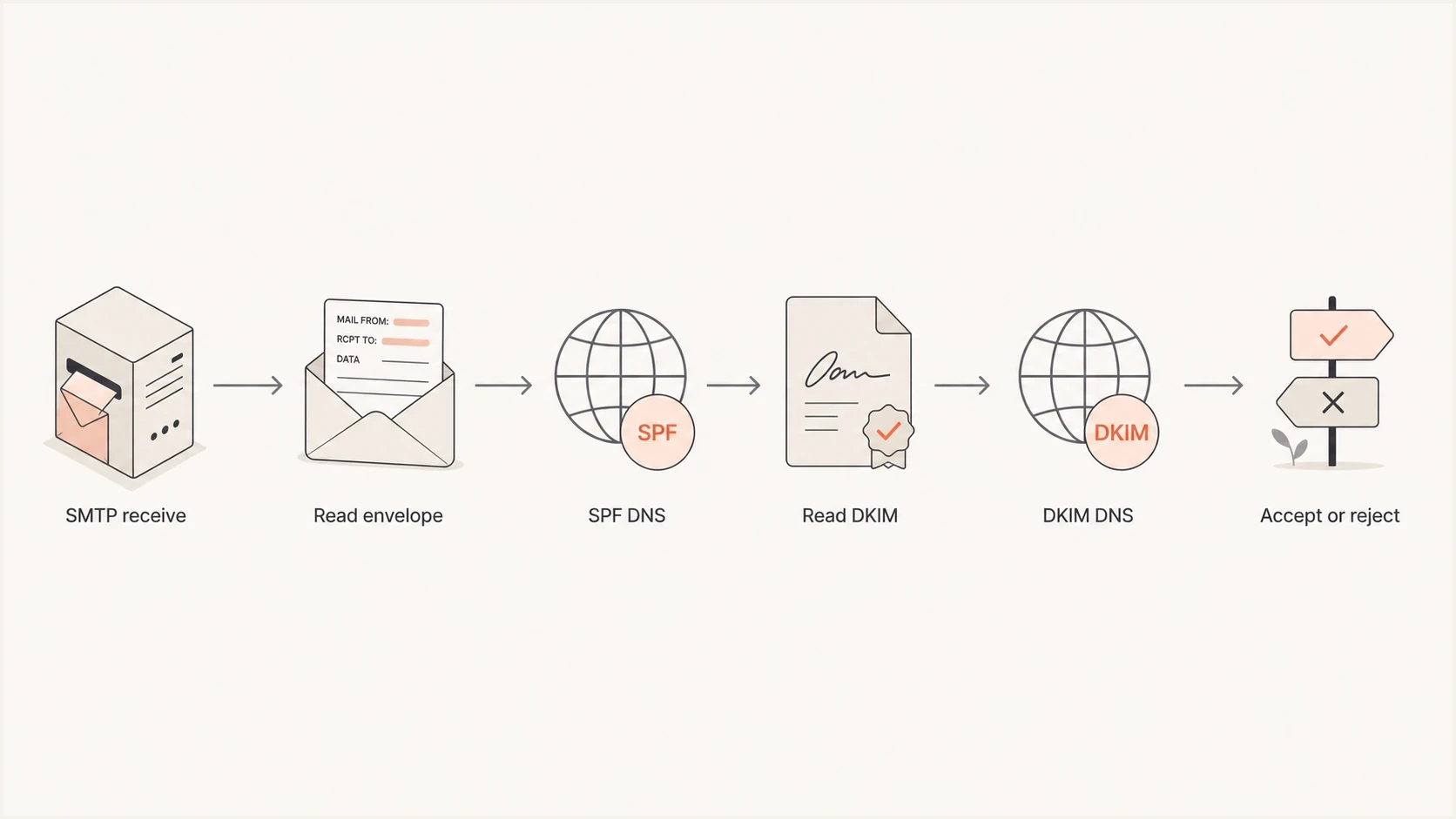
Flowchart showing Gmail reading the SMTP envelope, SPF DNS, DKIM signature, and DKIM DNS before accepting or rejecting mail.
Why SPF can fail when DNS looks right
The biggest SPF misunderstanding is checking the visible From address instead of the envelope sender. SPF authenticates the domain used in the SMTP return path. Many sending platforms use a bounce domain that differs from the From domain, so a correct SPF record on the visible domain does not help if Gmail evaluates a different domain. When the reverse path is empty, as with some bounce messages, SPF evaluates the HELO or EHLO identity instead.
What admins often check
- Visible domain: They inspect the domain shown in the From header.
- Current DNS: They check the TXT record after the rejection happened.
- One IP: They confirm one documented IP is present.
What Gmail actually checks
- Return path: Gmail checks the SPF domain in the SMTP envelope.
- Live lookup: Gmail resolves DNS during the SMTP transaction.
- Exact IP: The connecting IP must be authorized by SPF.
SPF also fails when a record is syntactically valid but operationally broken. Multiple SPF records at the same hostname and an evaluation that exceeds the 10 DNS lookup limit produce permerror. An unavailable DNS server can produce temperror. A missing include or an incomplete provider IP range can produce fail. A fast domain health check is useful before you change anything because it checks SPF, DKIM, and DMARC together.
SPF record with one provider includetext
example.com. TXT "v=spf1 ip4:203.0.113.10 include:_spf.sender.example -all"
?
What's your domain score?
Deep-scan SPF, DKIM & DMARC records for email deliverability and security issues.
The key is checking the same sending path that Gmail rejected. If a provider rotates mail through a different pool, the IP in the bounce can be the missing piece. If the provider changed an include target or had DNS trouble, your record can look correct while Gmail's live SPF check still fails.
Why DKIM can fail when the key exists
DKIM is not a DNS-only check. The message needs a DKIM-Signature header, the signature must name the expected domain and selector, Gmail must fetch the selector's public key, and the cryptographic hash must still match the message when Gmail receives it.
- No signing: The DNS key exists, but the sending stream is not configured to sign.
- Wrong selector: The message uses selector A while DNS only has selector B.
- Wrong domain: The signature uses a provider domain instead of the sender's domain.
- Modified message: A footer, link rewrite, security gateway, or MIME change breaks the signed content.
- Short key: Gmail requires at least 1024 bits and recommends 2048 bits when the DNS provider supports it.
DKIM header fields to inspecttext
DKIM-Signature: v=1; a=rsa-sha256; d=example.com; s=mail1;
 h=from:to:subject:date:mime-version;
 bh=base64-body-hash;
 b=base64-signature;
Treat DKIM as message-specific
A passing DKIM test from one stream does not prove every stream is signed. Transactional, marketing, billing, and support mail often use separate systems. Check the DKIM signature and selector on each stream.
After fixing either DKIM or SPF, validate the published DMARC record with a DMARC checker. DMARC compares the visible From domain with the domain used by a passing authentication method, so it catches cases where SPF passes for a provider bounce domain but uses a different organizational domain.
Why forwarding breaks authentication
Forwarding changes the sending path even when the original sender's DNS is correct. Gmail sees the forwarding server's IP, which the original return-path domain usually does not authorize. SPF therefore fails unless the forwarder rewrites the envelope sender to a domain it controls. Gmail performs a new authentication check on the forwarded message rather than carrying over a pass from the first delivery.
- SPF after forwarding: The forwarding IP is usually absent from the original sender's SPF record.
- DKIM after forwarding: The signature can survive if the forwarder leaves signed headers and body content unchanged.
- Envelope rewriting: A forwarding operator can use a forwarding-domain return path so SPF evaluates its own infrastructure.
- Message modification: Subject tags, footer insertion, MIME changes, and re-encoding can invalidate DKIM.
Confirm whether the path is direct
Compare the Received headers and return path with the route you expected. If a mailing list, alias, gateway, or forwarding mailbox handled the message, troubleshoot that indirect path. Do not add the forwarder's IP to the original sender's SPF record unless the sender actually authorizes and controls that service.
DNS timing and resolver failures
The most confusing case is a send that fails at 09:10 and passes at 09:25 with no DNS edit. That pattern usually points to DNS resolution, provider routing, or a temporary sending platform issue. Gmail's rejection was still real. The TXT record became reachable, the provider moved back to an expected IP range, or a resolver error cleared.
- Authoritative DNS: Nameservers can respond slowly, inconsistently, or with different zone data.
- Recent change: Resolvers can retain the previous SPF or DKIM answer until its TTL expires.
- Provider routing: Mail can leave through a temporary IP range during maintenance or incidents.
- DNSSEC failure: A stale DS record or invalid signature can cause validating resolvers to return SERVFAIL.

Issue steps to fix dialog showing the issue overview, tailored fix steps, and verification action
Suped's product keeps the issue tied to the source that produced it. Instead of relying on a static DNS snapshot, you can see which sender is failing, whether the problem repeats, and the fix steps for that sender.
A clean retest matters
Send a new message after the failure instead of reusing an old result. A fresh test gives you the current sending IP, current DKIM selector, and current DNS behavior. That is the fastest way to separate a fixed transient issue from a persistent configuration problem.
A practical troubleshooting order
Use this order to keep the investigation tied to evidence. It also prevents several DNS changes after one bounce from obscuring which change mattered.
- Capture bounce: Save the full SMTP response, not a shortened screenshot.
- Send sample: Send one new message through the same platform and stream.
- Read headers: Inspect Authentication-Results if the message lands anywhere.
- Check envelope: Confirm the return-path domain that SPF used.
- Query DNS: Check SPF, DKIM, DMARC, and PTR records from outside your network.
- Ask provider: Confirm whether the sending IP range had an incident or routing change.
- Retest slowly: Send a small number of messages before resuming normal volume.
DNS queries to run during investigationbash
dig TXT example.com

dig TXT mail1._domainkey.example.com

dig TXT _dmarc.example.com

dig -x 203.0.113.10
Compare the authoritative answer with public recursive answers. If a resolver still returns the previous record, wait for that cached answer's TTL to expire. If the sending IP is missing from SPF, update the provider include or authorized range. If DKIM is missing, enable signing for that stream, then confirm the selector in the message matches the selector in DNS.
Where DMARC fits
DMARC does not replace SPF or DKIM. It checks whether a domain used by passing SPF or DKIM aligns with the visible From domain, then applies the published policy when DMARC fails. That matters because many SPF passes belong to a provider's bounce domain. Gmail requires DMARC for bulk senders, and DMARC aggregate reports give you a map of the systems claiming to send as your domain.
Suped's product brings DMARC, SPF, DKIM, hosted SPF, hosted DMARC, MTA-STS, alerts, blocklist monitoring, and deliverability signals into one workflow. Teams can connect sender-level evidence with DNS changes and aggregate XML instead of tracking each source by hand.
Manual DNS management
- Slow changes: Every policy edit needs direct DNS access.
- Limited history: One test does not show repeated failures by source.
- Hidden risk: Old senders stay unnoticed until Gmail blocks them.
Suped workflow
- Source view: Verified and unverified senders are separated.
- Fix steps: Issues include tailored actions and verification.
- Policy staging: Hosted controls help move DMARC policy safely.
How urgently to act on Gmail authentication evidence
Use the bounce text and repeat rate to decide whether to change DNS now or monitor.
One old bounce
Monitor
Retest before changing records.
Repeat 5.7.26
Same day
Investigate SPF, DKIM, and DNS resolution for the exact source.
All Gmail mail blocked
Immediate
Pause the affected stream and fix the failing authentication path.
When DNS is correct and Gmail still blocks
If Gmail says DKIM did not pass and SPF did not pass, keep the focus on authentication first. Reputation, content, spam complaints, blocklist or blacklist status, and sending volume matter, but they usually produce different symptoms. A 5.7.26 response that names both failures means Gmail could not authenticate that delivery with SPF or DKIM.
Once authentication is passing, Gmail can still route mail to spam because of reputation, complaints, list quality, message formatting, sudden volume, or confusing sender identity. That is a separate deliverability investigation. The Gmail spam placement guide covers that case in more detail.
Do not mix error classes
Read the exact enhanced status code and response text. Gmail uses 5.7.25 for invalid PTR configuration, 5.7.27 for a bulk-sender SPF failure, 5.7.30 for a bulk-sender DKIM failure, 5.7.32 for alignment, and 5.7.40 for a missing DMARC record or policy. A 4.x response is temporary, while a 5.x response is permanent for that attempt. Each class needs a different fix.
Bulk-sender status also matters after volume drops. Gmail aggregates traffic under the same primary domain when counting the daily threshold, and a sender classified as bulk remains classified as bulk. Marketing and subscribed messages in that category need one-click unsubscribe plus a visible unsubscribe link.
Views from the trenches
Best practices
Keep the full bounce text, headers, sending IP, and From domain together for each case.
Retest through the same sending stream before changing SPF, DKIM, or DMARC records.
Record provider incidents beside authentication failures so short outages do not look permanent.
Common pitfalls
Checking the visible From domain only misses SPF failures on the actual return-path domain.
Redacting the domain, IP, or selector removes the details needed to explain the Gmail error.
Changing several DNS records after one bounce makes the real fix hard to identify later.
Expert tips
Repeat the same test after TTL expiry before changing several DNS records at once.
Ask the sending provider about recent IP range issues when failures start suddenly.
Compare a failed Gmail result with a fresh passing result to isolate the changed field.
Marketer from Email Geeks says a redacted bounce hides the domain, IP, and SPF domain, so diagnosis becomes guesswork.
2025-04-03 - Email Geeks
Expert from Email Geeks says correct-looking TXT records still fail when Gmail cannot resolve them during the SMTP check.
2025-04-03 - Email Geeks
The fix starts with the message Gmail saw
Gmail blocks these messages because authentication failed for the actual delivery attempt named in the response. The DNS records can look correct later, but Gmail only sees what resolves during its check and what the message carries when it arrives. That is why the full bounce, sending IP, return path, DKIM selector, and fresh test matter more than a generic DNS screenshot.
The fastest fix is to identify the failing path, then change only that path: authorize the real sending IP, repair the SPF include, enable DKIM signing for the stream, publish the correct selector, correct alignment, or wait out a confirmed transient DNS failure. Suped's product helps teams do this continuously by turning DMARC reports, authentication failures, and sender inventory into source-level actions.




