Why are some SFMC emails failing DKIM and causing DMARC rejections?

Updated on 6 Aug 2026: We updated this guide for RFC 9989 and current Salesforce Marketing Cloud authentication workflows.
Some SFMC emails fail DKIM and DMARC because they arrive without a DKIM-Signature header, with a signature that does not validate, or with a DKIM signing domain that lacks alignment with the visible From domain. If SPF also lacks alignment, DMARC has no passing aligned identifier. With p=reject, a receiver that honors the policy can reject the message during SMTP or apply other local handling.
When failures form a small percentage or appear at only one recipient domain, do not assume the public DKIM record or an SFMC IP pool is at fault. First separate dkim=none from dkim=fail. A direct control copy with no signature points to the sending path. A failure found only after forwarding or a recipient security gateway points to message modification, a stripped header, or evaluation at a later hop.
- Root cause: The From domain is outside the active SAP or Private Domain setup, a child business unit lacks the authenticated domain, or an intermediary altered the message.
- DMARC trigger: SPF passes for an envelope domain that lacks alignment with the visible From domain, so DKIM is the remaining route to a DMARC pass.
- Receiver pattern: A failure at one destination requires a route trace and a comparison with a direct external control copy.
- Practical fix: Segment DMARC reports by source IP, DKIM domain, SPF domain, receiver, and SFMC job metadata, then correct the affected authentication path.
A domain at p=reject should not rely only on SPF. RFC 9989 recommends both an aligned DKIM identifier and an aligned SPF identifier for full DMARC participation, with DKIM providing essential resilience for forwarded mail.
What is actually failing
DMARC passes when at least one of these is true: DKIM passes and its signing domain aligns with the visible From domain, or SPF passes and the envelope sender domain aligns with the visible From domain. It does not require both for an individual pass. That is why a DKIM gap can stay hidden while SPF aligns, then cause failures when SPF uses an unaligned envelope domain.
Typical receiver resulttext
Authentication-Results: mx.receiver.example;
  dkim=none header.d=example.com;
  spf=pass smtp.mailfrom=bounce.sfmc.example.net;
  dmarc=fail header.from=example.com
In that example, SPF passes, but it does not help DMARC unless the envelope sender domain shares the organizational domain of the visible From address under relaxed alignment, or matches it exactly under strict alignment. DKIM is none, so DMARC fails. A DMARC checker can validate record syntax, but it cannot prove that every SFMC path signs. Use aggregate reports and message samples for that. A DMARC pass confirms authorized domain use, not inbox placement.
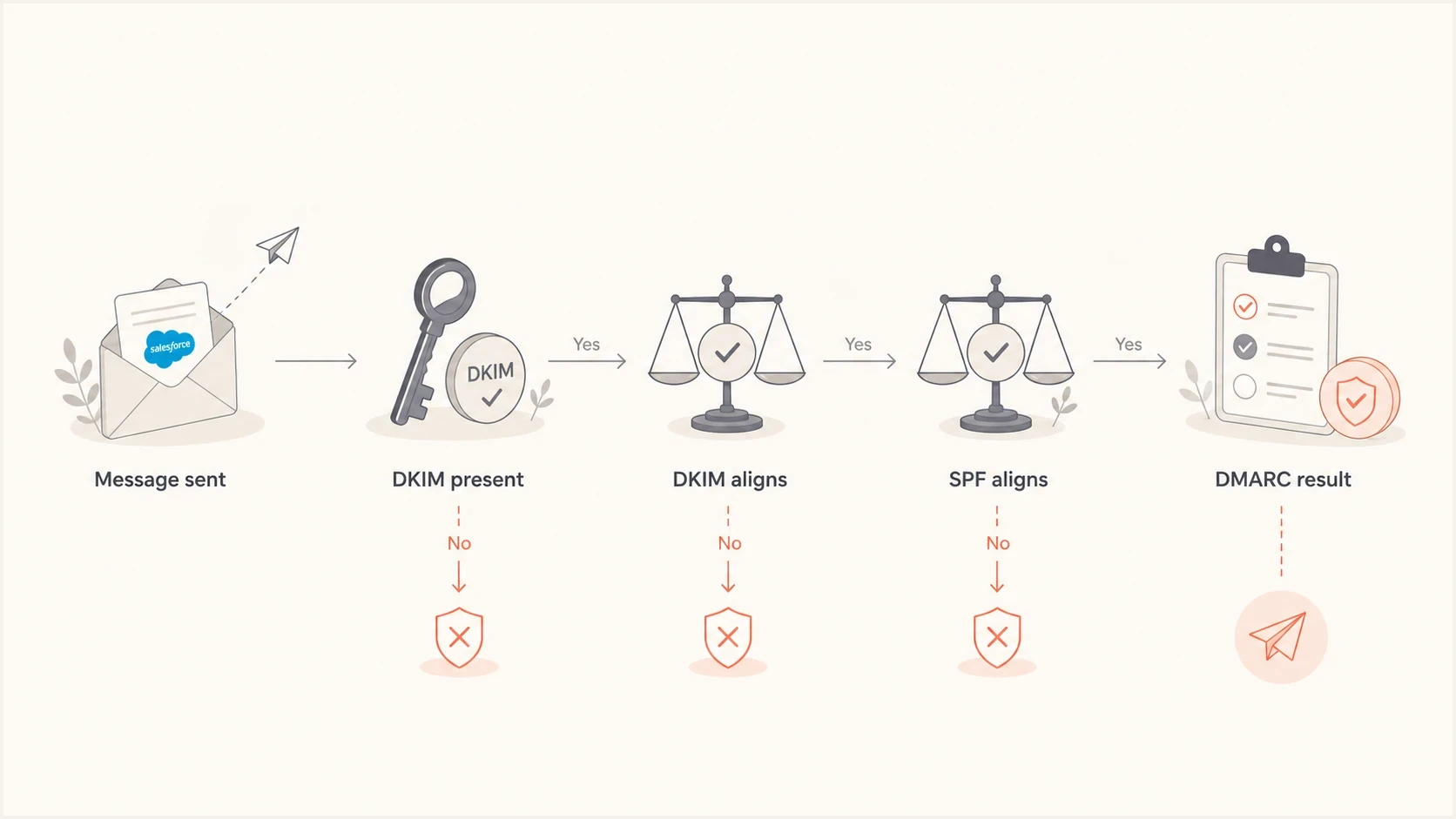
Flowchart showing how DKIM and SPF alignment determine the DMARC result.
Why only some SFMC sends fail
Intermittent DKIM failures in Salesforce Marketing Cloud Engagement require path-level comparison. A missing public key affects every message that uses that selector while the DNS answer is unavailable. A small, repeatable slice instead points to an unauthenticated From domain, child business unit coverage, a distinct MTA route, or an intermediary on the recipient side. Salesforce also rotates DKIM keys, so identify the selector in a recent message instead of relying on an old stack-based selector list.
|
|
|
|---|---|---|
DKIM none everywhere | Unauthenticated path | SAP or Private Domain |
One business unit | Domain scope gap | MID and From domain |
One receiver | Gateway or forwarding | Received headers |
One selector | Stale or missing DNS | Fresh s= value |
One IP pool | MTA route issue | Salesforce Support case |
Use the pattern of failures to narrow the cause.
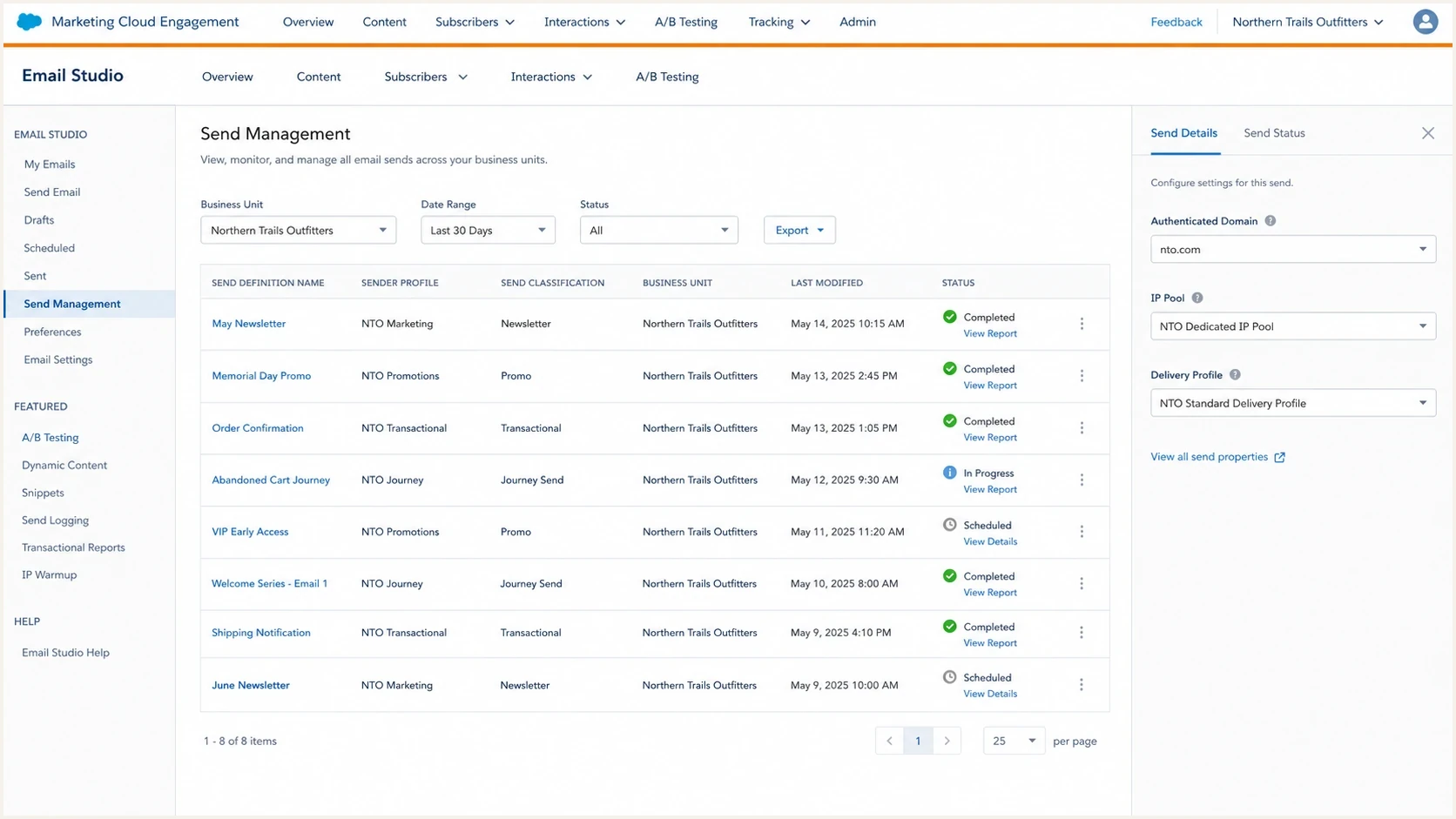
Salesforce Marketing Cloud Engagement screen showing send configuration fields that affect authentication.
DKIM is absent
- Meaning: The message reached the evaluating receiver without a DKIM-Signature header.
- Likely area: An unauthenticated SFMC From domain, business unit scope gap, unexpected source, or intermediary that stripped the header.
- DNS impact: Changing a DKIM TXT record cannot fix a message that was never signed.
DKIM is broken
- Meaning: A signature exists, but validation fails at the receiver.
- Likely area: A stale selector record, DNS resolution problem, body modification, signed-header change, or forwarding path.
- DNS impact: Check the exact d= and s= values from a recent signature before querying the public key.
Verify SAP and Private Domain coverage
Marketing Cloud domain verification and email authentication are different controls. A verified domain lets the account use addresses on that domain in the visible From field. It does not by itself provision DKIM. Authenticated sending requires an active Sender Authentication Package (SAP) or a Private Domain configured for email authentication.
- Confirm the product: Check that the exact visible From domain belongs to SAP or an authentication-enabled Private Domain, not only the verified-domain list.
- Check status: The sending domain must show Active. Pending DNS validation or In progress means provisioning is incomplete.
- Check business unit scope: An SAP domain must be copied to a child business unit when that MID uses it. A Private Domain must be available there as an Authenticated Domain in From Address Management.
- Use a fresh selector: Read s= and d= from a newly received DKIM-Signature header because Salesforce selector names can change during key rotation.
- Validate self-hosted DNS: Compare the current SFMC zone-file instructions with the live record and account for DNS caching after a change.
Check the selector found in a recent headerbash
dig TXT selector._domainkey.sending.example.com
A Private Domain can pass DKIM while SPF remains unaligned because the envelope sender commonly uses the SAP bounce domain. Ask Salesforce Support whether multi-bounce domain is enabled for the affected MID. That setting changes the envelope sender to the Private Domain's bounce subdomain so SPF can gain alignment.
How to prove the root cause
Compare raw message headers with DMARC aggregate data and SFMC send metadata. Run the same test to the affected destination and to direct external consumer mailboxes. If consumer copies pass but mail behind one corporate gateway fails, inspect forwarding and message modification before changing SFMC DNS. If failures share source IPs or an MID across destinations, investigate the Marketing Cloud path.
- Create controls: Send the same SFMC message to the affected domain and direct external mailboxes, then retrieve the original source from each.
- Collect identifiers: Record the source IP, Message-ID, DKIM result, d= domain, s= selector, SPF domain, DMARC result, and visible From domain.
- Trace the route: Read Received headers from the bottom upward and note every relay, forwarder, and recipient security gateway.
- Segment reports: Group DMARC aggregate reports by receiver, source IP, DKIM domain, SPF domain, and visible From domain.
- Compare SFMC data: Map IPs and times to the job ID, send definition, journey or triggered send, business unit, sender profile, and send classification.
- Escalate with evidence: Send Salesforce Support a narrow packet of failing IPs, timestamps, Message-IDs, MIDs, pass and fail headers, and SMTP bounce reasons. Mask recipient addresses and sensitive content.
?
What's your domain score?
Deep-scan SPF, DKIM & DMARC records for email deliverability and security issues.
A domain health check catches obvious DNS issues across DMARC, SPF, and DKIM before escalation. If domain-level records are clean, move to path-level evidence. For a Private Domain with SPF passing on bounce.SAPdomain but not aligning, give Salesforce Support the affected MID and ask about multi-bounce domain.
Avoid a broad support statement such as "DKIM fails sometimes." Give Salesforce a reproducible pattern and both control and failure headers. That evidence separates signing problems from recipient-side changes.
- Headers: Include complete raw headers from passing and failing copies, with personal data masked.
- Timing: Include timestamps with timezone and the job, journey, or triggered send identifier.
- Scope: Name the MID, From domain, selector, failing IPs, and comparable passing IPs.
- Route: Show whether the failure appears before or after a forwarder or recipient gateway.
What to fix first
Make every SFMC path produce aligned DKIM and configure aligned SPF where the account supports it. One aligned passing identifier produces a DMARC pass, but using both provides redundancy. DKIM remains essential for reject-level policy because forwarding commonly breaks SPF.
DMARC staging examples for RFC 9989dns
_dmarc.email.example.com TXT "v=DMARC1; p=none; rua=mailto:d@example.com"
_dmarc.email.example.com TXT "v=DMARC1; p=quarantine; rua=mailto:d@example.com"
_dmarc.email.example.com TXT "v=DMARC1; p=reject; rua=mailto:d@example.com"
RFC 9989 made the pct tag historic because receivers applied percentage sampling inconsistently. Do not use pct=25 as a safety control. Review aggregate reports at each policy level and change the full policy only after known SFMC traffic passes.
Short-term containment
- Policy: Move the SFMC sending subdomain to a lower enforcement level only when legitimate mail is being rejected and the path cannot be stopped immediately.
- Traffic: Pause or reroute the affected business unit, send definition, or IP pool when that option exists.
- Evidence: Keep collecting controlled pass and fail samples until Salesforce confirms the signing path.
Permanent fix
- DKIM: Use an active SAP or authentication-enabled Private Domain for every production From domain and covered business unit.
- SPF: Use the correct aligned bounce domain, including multi-bounce domain for a Private Domain when needed.
- Monitoring: Alert on new sources, selectors, and authentication regressions before enforcement affects production mail.
DMARC reject readiness
Use evidence from known SFMC streams before keeping p=reject on the sending subdomain.
Not ready
Known failures
Authorized SFMC mail still has a repeatable DMARC failure.
Investigate
Unmapped traffic
Most traffic passes, but a source, selector, or business unit remains unexplained.
Ready
Stable alignment
Every known SFMC path has stable aligned DKIM and aligned SPF where supported.
Suped's hosted DMARC workflow can apply policy changes without repeated manual DNS edits. Keep policy ownership and rollback approval documented during an incident.
Where Suped fits
Suped is our DMARC reporting and email authentication platform. For this SFMC workflow, DMARC monitoring groups aggregate data by source IP, receiver, DKIM domain, SPF domain, and result so the affected path can be isolated before policy changes are made.

Issue steps to fix dialog showing the issue overview, tailored fix steps, and verification action
Connect the domain's aggregate reports, filter the failing SFMC source, and compare its DKIM and SPF identifiers with a passing source. Suped's issue view can then hold the evidence, remediation steps, and owner for that source-level problem. Raw headers and SFMC job data still belong in the Salesforce Support case.
Use Suped to monitor the domain-wide pattern, then use SFMC headers and metadata to prove the platform path. The two evidence sets answer different parts of the incident.
- Source isolation: Group failures by source IP and receiver to find concentrated SFMC traffic.
- Identifier comparison: Compare DKIM and SPF domains against the visible From domain.
- Remediation tracking: Record the fix, owner, and verification result for each affected source.
- Regression alerts: Detect a new source or drop in aligned authentication after the fix.
This workflow also helps distinguish legitimate DMARC failures from unknown senders. Authorized SFMC mail can fail when its domain authentication or route does not produce an aligned identifier at the evaluating receiver.
When to change p=reject
If legitimate SFMC mail is being rejected and the failing path cannot be stopped immediately, reduce enforcement on the dedicated sending subdomain while fixing it. Restore reject only after aggregate reports and controlled headers prove stable alignment. For a general-purpose domain used by people and mailing lists, RFC 9989 advises against p=reject because indirect mail can lose alignment. A separate SFMC sending subdomain keeps that risk contained.
Do not keep reject on an SFMC sending subdomain when a production path is known to be unsigned and SPF is unaligned. The published policy tells participating receivers that failed mail is unauthorized, even though receivers retain local discretion over final handling.
Receiver outcomes differ. Gmail, Yahoo, Microsoft, Comcast, and regional providers expose failures in different ways. Some reject during SMTP, some accept and filter, and some make the pattern visible mainly in aggregate reports. A successful delivery at one provider does not clear a repeatable failure at another.
Views from the trenches
Best practices
Keep reject disabled until every known sender has stable aligned SPF or DKIM coverage.
Segment SFMC failures by IP pool, business unit, sender profile, and receiver domain.
Capture raw headers for failed and good samples before asking the platform to investigate.
Use DMARC reports to prove whether the unsigned mail is SFMC or another mail source.
Common pitfalls
Treating a passing SPF result as DMARC coverage when the envelope domain is unaligned.
Assuming a DKIM DNS change fixes messages that left the platform without signatures.
Escalating a vague DKIM complaint without timestamps, source IPs, headers, and job IDs.
Ignoring a small unsigned percentage because total delivery still looks healthy overall.
Expert tips
Compare receiver behavior, but trust source-level report patterns over bounce totals.
Check whether test sends, triggered sends, and journeys use different SFMC identities.
Use a temporary policy reduction only long enough to stop rejection during remediation.
Ask SFMC to confirm the exact authenticated domain and signing path for each IP pool.
Marketer from Email Geeks says DMARC reject is risky when SPF is not aligned and DKIM is the only working identity for a critical stream.
2020-01-28 - Email Geeks
Marketer from Email Geeks says missing DKIM on a small SFMC slice should be checked against DMARC reports before changing unrelated DNS records.
2020-01-28 - Email Geeks
Why SFMC mail fails DMARC
Some SFMC emails are rejected because the evaluating receiver has no valid aligned DKIM signature and SPF authenticates an envelope domain that lacks alignment with the visible From domain. If failures share a business unit, From domain, selector, or source IP across direct recipients, investigate SFMC authentication and routing. If they occur only after one gateway or forwarder, investigate message modification and the route first.
Fix SAP or Private Domain coverage, business unit scope, and the active DKIM selector before changing unrelated DNS. Add SPF alignment through the correct bounce domain where supported. Keep reject on a dedicated SFMC subdomain only when every production stream has stable aligned authentication and monitoring will expose new failures.




