Why are my emails soft bouncing with Bigpond after implementing DMARC changes?

Published 13 Jul 2025
Updated 12 Aug 2026
11 min read
Summarize with

Updated on 12 Aug 2026: We updated this guide for RFC 9989 and clarified how to handle Klaviyo's soft-bounce label for a Bigpond 558 rejection.
Your emails are soft bouncing with Bigpond after DMARC changes because Bigpond is rejecting the message as suspected spam, not because the bounce text proves a DMARC policy failure. The error 558 5.7.1 with IB703 and suspected spam wording points to Bigpond's filtering decision. DMARC still matters because a recent authentication change can expose a Klaviyo alignment problem or coincide with a sending pattern that Bigpond already treats as risky.
Treat this as a delivery incident with an authentication audit attached. Do not turn DMARC off as the first move. Prove whether Klaviyo mail passes DKIM or SPF with an identifier aligned to the visible From domain. Then isolate Bigpond recipients, pause bulk retries, test simpler content, review the sending IPs, and compare bounce rates by campaign.
Fast read
A 95% soft bounce rate to Bigpond addresses is high enough to pause that mailbox group immediately. Keep other domains moving only if their metrics are stable.
- Do this first: Segment Bigpond addresses and stop bulk campaign retries while you investigate.
- Check authentication: Confirm that DKIM or SPF aligns with the visible From domain on a live Klaviyo message.
- Check filtering: Compare rejected content with a plain, low-link version sent to controlled Bigpond test mailboxes.
- Check reputation: Review sending IPs, complaint patterns, and blocklist or blacklist signals.
What the Bigpond bounce means
The bounce string matters. A DMARC rejection usually names DMARC, authentication, or the sender domain's policy. Bigpond's response says the message content was rejected as suspected spam. That wording points to a filtering decision based on the message and its sending context. It does not identify which individual content or reputation signal caused the rejection.
Bigpond bounce example
558 5.7.1 Message content rejected due to suspected spam. IB703
The leading 5 in 558 makes this a permanent negative SMTP completion for that delivery attempt. The enhanced status 5.7.1 means delivery was not authorized and the message was refused for a security or policy reason. An email platform can still categorize the event as a soft bounce based on its internal interpretation of the cause, but the receiving server did not issue a temporary 4xx deferral.
|
|
|
|---|---|---|
558 | Permanent rejection for this attempt | Do not resend unchanged |
5.7.1 | Security or policy refusal | Read the response text |
Suspected spam | Filtering decision | Test content and reputation |
IB703 | Bigpond response code | Save the full sample |
How to read the bounce before changing DNS.
Prove authentication first because DMARC changes are the recent event. Once authentication passes with alignment, investigate content, volume, IP reputation, domain reputation, and recipient engagement without repeatedly changing DNS.
Why Klaviyo can still call this a soft bounce
SMTP status and Klaviyo's bounce type answer different questions. Bigpond's 558 response says the server refused that message attempt. Klaviyo's soft-bounce label groups the event by the reason it inferred, such as content, reputation, or a condition that can change before a later campaign.
- SMTP result: Bigpond did not accept the message, and the sending server should not repeat the exact request without intervention.
- Platform category: Check the bounce type, category, and full reason in Klaviyo rather than relying on the word soft alone.
- Retry decision: Do not manually resend the same campaign. Change a relevant variable and use a small controlled test.
- Suppression decision: Klaviyo suppresses addresses after repeated consecutive soft bounces, but an incident-level Bigpond spike warrants earlier temporary exclusion.
This distinction also explains why waiting for ordinary server retries is the wrong recovery plan. A 4xx deferral invites an automatic retry. A 5xx response requires diagnosis, a meaningful change, and a new send after the change.
How DMARC changes can still be involved
DMARC does not score spam content. DMARC passes when either the SPF-authenticated MailFrom domain or a valid DKIM d= domain aligns with the visible From domain. Under the default relaxed mode, the organizational domains must match. Exact subdomain matching applies only when strict alignment is published. A new policy can expose legitimate mail streams that were never aligned correctly.
DMARC policy failure
- Bounce wording: The response names DMARC, domain policy, or authentication failure.
- Report data: Aggregate reports show Klaviyo failing both SPF and DKIM alignment.
- DNS fix: Correct the branded sending domain records or the aligned identifier.
- Test result: A live message passes DMARC after the authentication fix.
Bigpond spam rejection
- Bounce wording: The response says suspected spam, content rejected, or similar filtering language.
- Report data: DMARC passes, but Bigpond still rejects a campaign or sending path.
- Delivery fix: Reduce content variables, control volume, and review sender reputation.
- Test result: A changed message or sending path changes the bounce pattern.
Suped's DMARC monitoring workflow answers the first authentication question: did receivers see the Klaviyo stream pass DMARC through an aligned identifier? If the answer is no, fix DNS or domain alignment. If the answer is yes, move the investigation toward content, sending reputation, and Bigpond-specific filtering.
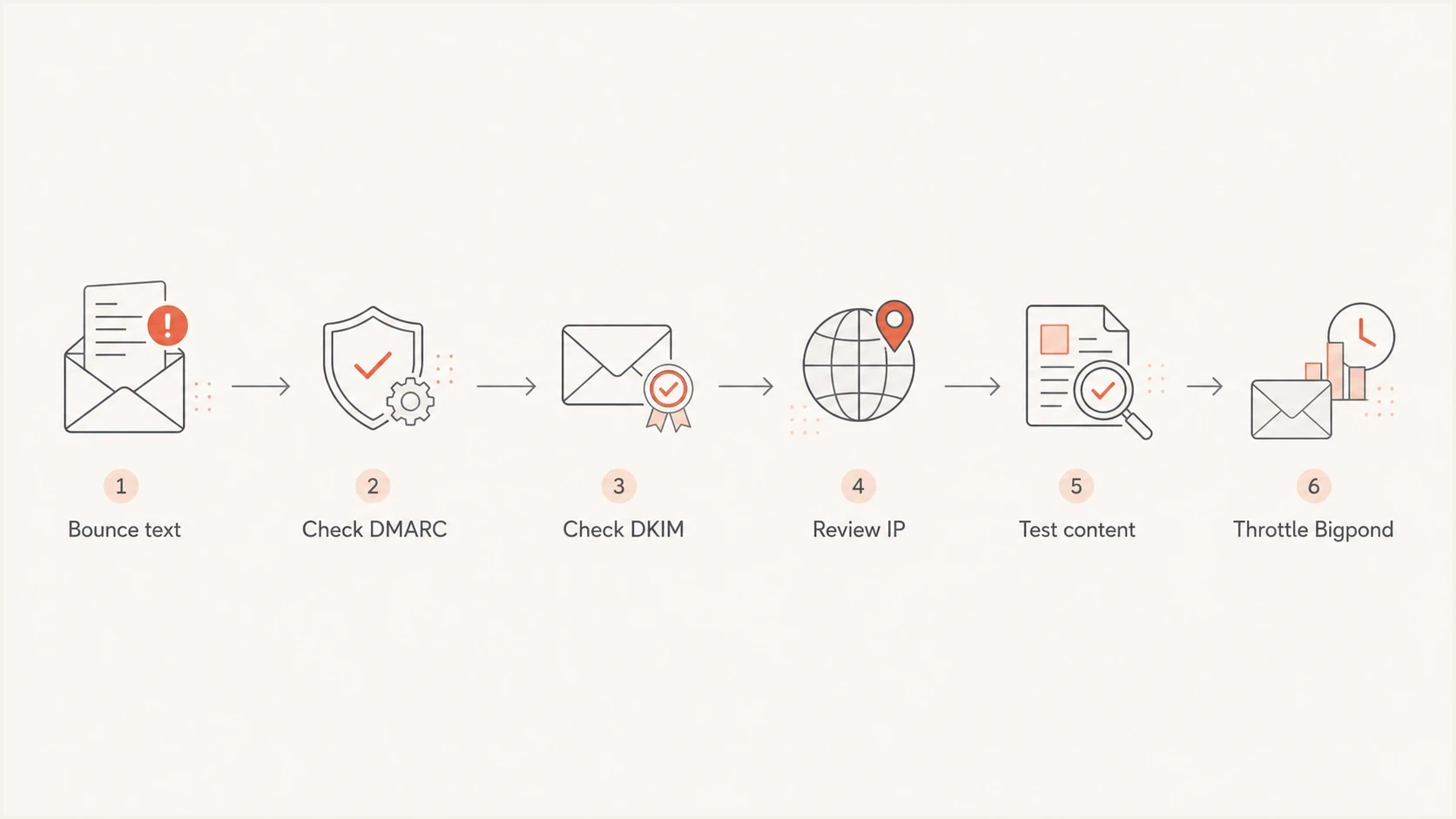
Diagnostic flow for Bigpond IB703 bounces after DMARC changes.
The common mistake is changing the DMARC policy again before checking the identifiers Bigpond evaluated. Inspect Authentication-Results on an accepted Klaviyo test. Confirm that either the DKIM d= domain or SPF MailFrom domain aligns with the visible From domain under the alignment mode in your DMARC record.
Klaviyo checks to run first
Verify the Klaviyo sending setup before editing campaign strategy. Check the active branded sending domain for the correct send type, its DNS verification status, the visible From domain, and the identifiers in a delivered test message. Run the domain through Suped's DMARC checker and then use the domain health checker to review DMARC, SPF, DKIM, and relevant reputation signals in one workflow.
- Check DKIM: Verify the signature and compare its d= domain with the visible From domain under relaxed or strict alignment.
- Check SPF: Verify SPF for the MailFrom domain, then confirm that domain aligns with the visible From domain.
- Check DMARC: Publish one valid record at _dmarc, collect aggregate reports, and confirm the evaluated policy.
- Check the send type: Confirm marketing and transactional mail use the intended active branded sending domains.
- Check evidence: Save an accepted header plus each bounce reason, timestamp, Message-ID, campaign name, and sending IP.
?
What's your domain score?
Deep-scan SPF, DKIM & DMARC records for email deliverability and security issues.
If DMARC recently moved to enforcement, compare Bigpond bounces with aggregate reports for the same period and source. A DMARC break appears as aligned SPF and DKIM both failing. A content or reputation rejection can occur while DMARC passes.
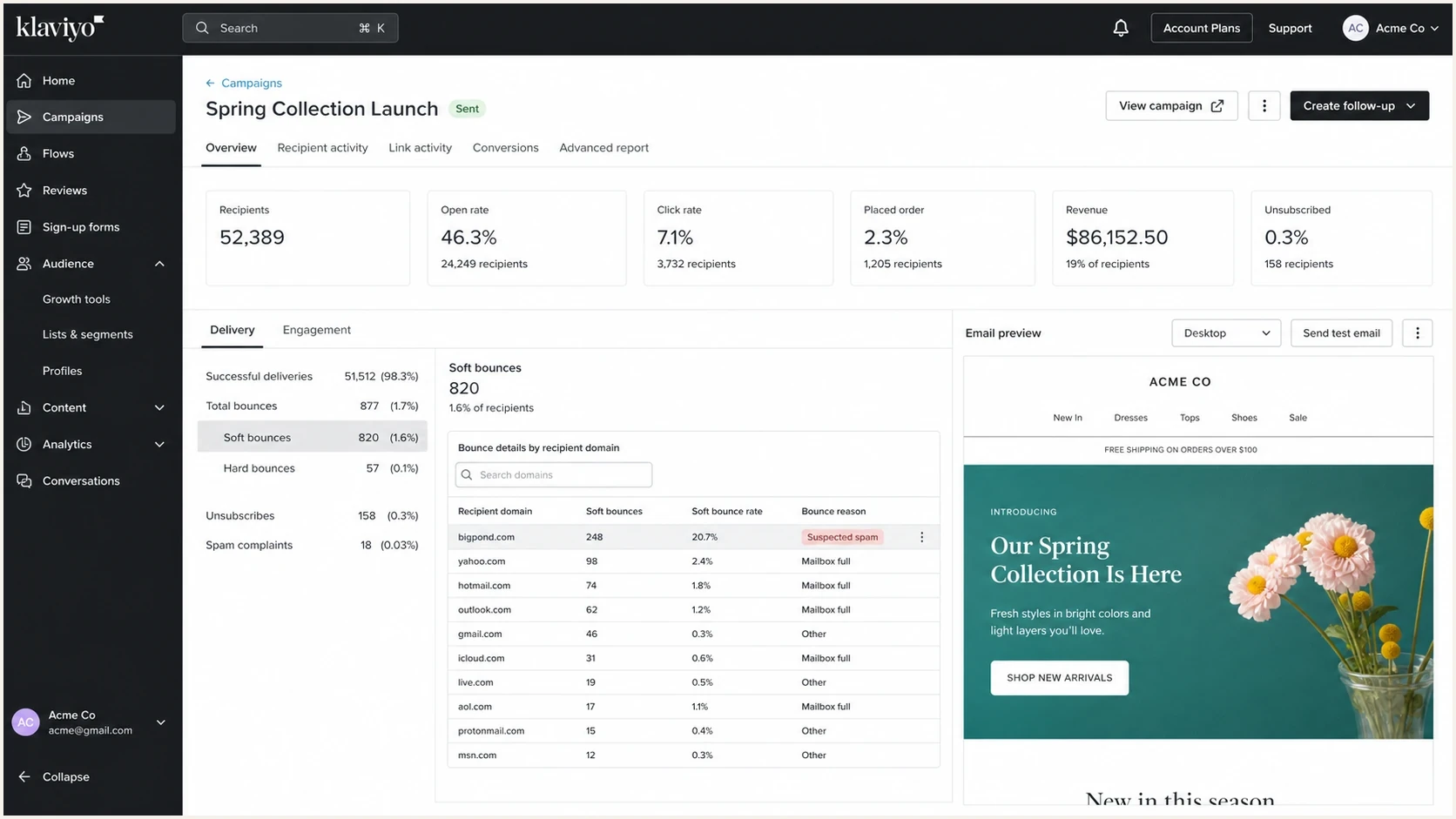
Klaviyo campaign report with Bigpond soft bounces and an IB703 reason.
DMARC monitoring record for a new rollout
v=DMARC1; p=none; rua=mailto:dmarc-reports@example.com
Use this monitoring policy when starting a DMARC rollout or when evidence shows enforcement is blocking legitimate, misaligned mail that cannot be fixed immediately. Do not lower a passing enforcement policy to address IB703. A p=none policy does not repair content or reputation filtering and reduces protection against spoofing.
How to stabilize Bigpond delivery
Once authentication is clean, handle Bigpond as its own mailbox provider segment. Do not keep resending the unchanged campaign to the same addresses. A repeated 5xx response adds failures without testing a new hypothesis.
Use your Bigpond baseline
There is no universal Bigpond soft-bounce percentage that proves one cause. Compare the campaign with your recent Bigpond baseline, other mailbox providers, and the distribution of exact response codes. Pause the segment when a sudden provider-specific spike or repeated 5xx pattern appears.
Create a Bigpond-only segment, temporarily exclude addresses that just bounced, and send a small test after making a relevant change. Keep the authenticated sender stable. Simplify the message, reduce unnecessary redirects, and target recent Bigpond engagers. If the test succeeds, increase volume gradually while measuring that mailbox group separately.
|
|
|
|---|---|---|
Authentication | DMARC result and alignment | Fix identifiers first |
Content | Links, markup, and copy | Send a simple test |
Reputation | IP and domain history | Control volume |
Audience | Consent and recent engagement | Tighten the segment |
Provider | Bigpond response codes | Track separately |
A compact action plan for the first 48 hours.
What to send in the test
Use a small test message that removes variables. Keep the same authenticated sender so the comparison remains useful, but simplify the template enough to test whether message construction contributes to IB703.
- Use focused copy: Remove copied signatures, malformed markup, attachment-like elements, and image-only sections.
- Use clean links: Keep branded tracking consistent and remove unnecessary redirects or broken destinations.
- Use a small cohort: Send to recent, consented Bigpond engagers before returning to broader campaign volume.
- Use one main change: Change content or sending volume in each test window so the result remains interpretable.
Check blocklist and blacklist signals for the sending IPs and domain as supporting evidence. A listing does not explain every Bigpond rejection, but it can help identify an infrastructure or reputation issue when one mailbox provider suddenly refuses a stream.
When to change DMARC and when to leave it alone
Change DMARC only when the evidence says DMARC is the blocker. If aggregate reports show Klaviyo failing both SPF and DKIM alignment, correct the branded sending domain or visible From domain. If the only evidence is a Bigpond suspected spam response and DMARC passes, keep the policy stable and work on filtering signals.
RFC 9989 quarantine example
v=DMARC1; p=quarantine; rua=mailto:dmarc-reports@example.com
RFC 9989 replaced RFC 7489 and removed the pct tag because receiving systems applied partial percentages inconsistently. Do not use pct=25 as a dependable rollout control. Review aggregate data under p=none, fix every legitimate source, publish quarantine when failures are understood, and monitor results before moving to reject.
Suped's Hosted DMARC product supports controlled policy changes without requiring a manual DNS edit for each adjustment. Its reporting workflow keeps source verification and policy history attached to the rollout.

Issue steps to fix dialog showing the issue overview, tailored fix steps, and verification action
For this Bigpond incident, Suped's product can separate Klaviyo authentication results by source, flag unverified senders, show failure spikes, and preserve the change history around the bounce window. That evidence determines whether DNS work belongs in the recovery plan.
The related guide on why legitimate email can fail DMARC covers cases where SPF and DKIM exist but neither identifier aligns with the visible From domain.
Views from the trenches
Best practices
Segment mailbox providers before retrying, so one domain issue does not shape every send.
Keep full bounce strings with message IDs, sending IPs, campaign names, and timestamps.
Use DMARC reports to separate authentication failures from content filtering decisions.
Throttle Bigpond separately after a spike, then rebuild volume with small clean tests.
Common pitfalls
Changing DMARC policy repeatedly can hide the real cause and weaken domain protection.
Engagement tightening alone does not fix content or IP filtering at one mailbox provider.
Treating soft bounces as minor delays can let a provider-specific block keep building.
Assuming Klaviyo aligns with the visible From domain leaves the main risk untested.
Expert tips
Compare accepted and bounced evidence side by side before editing DNS or templates.
Test a plain low-link campaign to Bigpond so content risk is easier to identify.
Check blocklist and blacklist data, but treat listings as clues rather than verdicts.
Use one change per test window so the next bounce pattern points to a clear cause.
Marketer from Email Geeks says Bigpond can react strongly to sudden volume shifts, so isolate that mailbox group before changing the whole send plan.
2024-02-14 - Email Geeks
Marketer from Email Geeks says a 558 5.7.1 suspected spam response points more toward filtering than a DMARC rejection.
2024-02-14 - Email Geeks
What to do next
Pause Bigpond campaign sends, keep transactional mail on its intended sending domain, and collect four pieces of evidence: an accepted Klaviyo header, DMARC aggregate results for the bounce window, the complete Bigpond response, and the sending IPs used for rejected campaigns.
If neither DKIM nor SPF aligns, fix the branded sending domain or From domain and wait for a live DMARC pass before resuming volume. If DMARC passes, move to content and reputation testing. For a 95% Bigpond event, a clean authentication result does not end the investigation. It tells you to stop editing DMARC and focus on the inputs behind Bigpond's spam decision.
Practical order of operations
- Pause Bigpond: Stop repeating the failure while collecting evidence.
- Prove alignment: Check a live header and aggregate reports for the Klaviyo source.
- Classify the bounce: Use the full SMTP response plus Klaviyo's type and category.
- Test one change: Send a simpler version to a small recent-engager group.
- Resume slowly: Increase Bigpond volume only after IB703 stops recurring.




