Why are emails to icloud.com and me.com being blocked after setting up DMARC, SPF, and DKIM?

Published 28 Apr 2025
Updated 12 Aug 2026
14 min read
Summarize with
Updated on 12 Aug 2026: We updated this guide with Apple's current SMTP error triage and the RFC 9989 DMARC rollout rules.
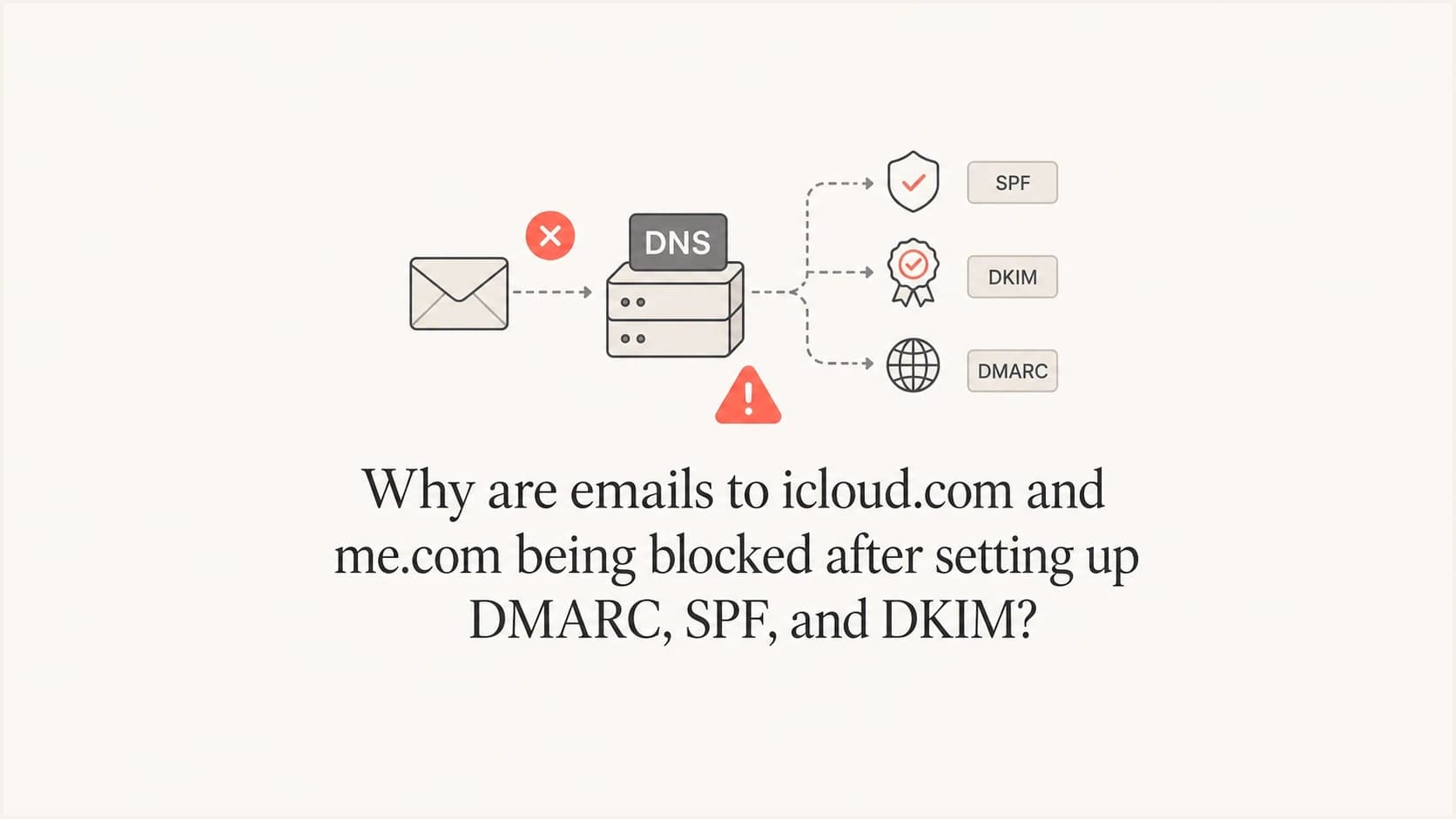
Emails to icloud.com and me.com are usually blocked after a DMARC, SPF, and DKIM setup because Apple is rejecting the envelope sender domain, not because DMARC itself is broken. In the bounce shown here, the important part is bounces+...@em8318.motiveunknown.com. Apple returned 450 4.1.8 Sender address rejected: Domain not found, which points to a missing or unresolvable bounce domain.
The fix is to find the exact domain in the MAIL FROM address, confirm it exists in DNS, and make sure it matches the active sending authentication setup in your email service provider. With provider-managed authenticated domains, that often means a generated subdomain such as em8318.example.com needs a valid CNAME that points to the provider's bounce handling infrastructure. If that old subdomain is still being used for sending but no longer has DNS, Apple has a clear reason to reject the SMTP transaction.
Short answer: fix the DNS for the envelope sender domain first. Do not start by loosening DMARC policy, removing DKIM, or editing your SPF record unless the failed domain in the SMTP error proves those records are involved.
What the Apple error means
The error has two layers. The first part, 503 5.5.1 need MAIL command, is a consequence of the SMTP conversation failing. The actionable part is the nested MAIL FROM error: 450 4.1.8. Apple is saying the sender address used during the SMTP transaction has a domain that cannot be found. Because 450 is a temporary SMTP response, the sending system normally queues the message and retries until delivery succeeds or its retry window closes.
That sender address is not necessarily the visible From address your recipient sees. It is the RFC 5321 MAIL FROM, also called the envelope sender or return-path. Bulk and transactional platforms use it to process bounces. Apple checks that this domain exists before accepting the message. If the domain returns NXDOMAIN, has broken DNSSEC, or lacks the provider CNAME used for bounce handling, Apple can stop the message before content filtering starts.
Typical failing SMTP responsetext
503 5.5.1 Error: need MAIL command
MAIL FROM error: 450 4.1.8
<bounces+32887708-f7df-user=mac.com@em8318.example.com>:
Sender address rejected: Domain not found
- Failed domain: The domain after the @ in the MAIL FROM address is the first thing to inspect.
- Likely failure: The provider is still sending with an old authenticated subdomain that no longer has DNS.
- Apple behavior: Apple is strict about sender domain validity for icloud.com, me.com, and mac.com recipients.
- DMARC role: DMARC can expose the problem, but the bounce domain DNS failure is the immediate block reason.
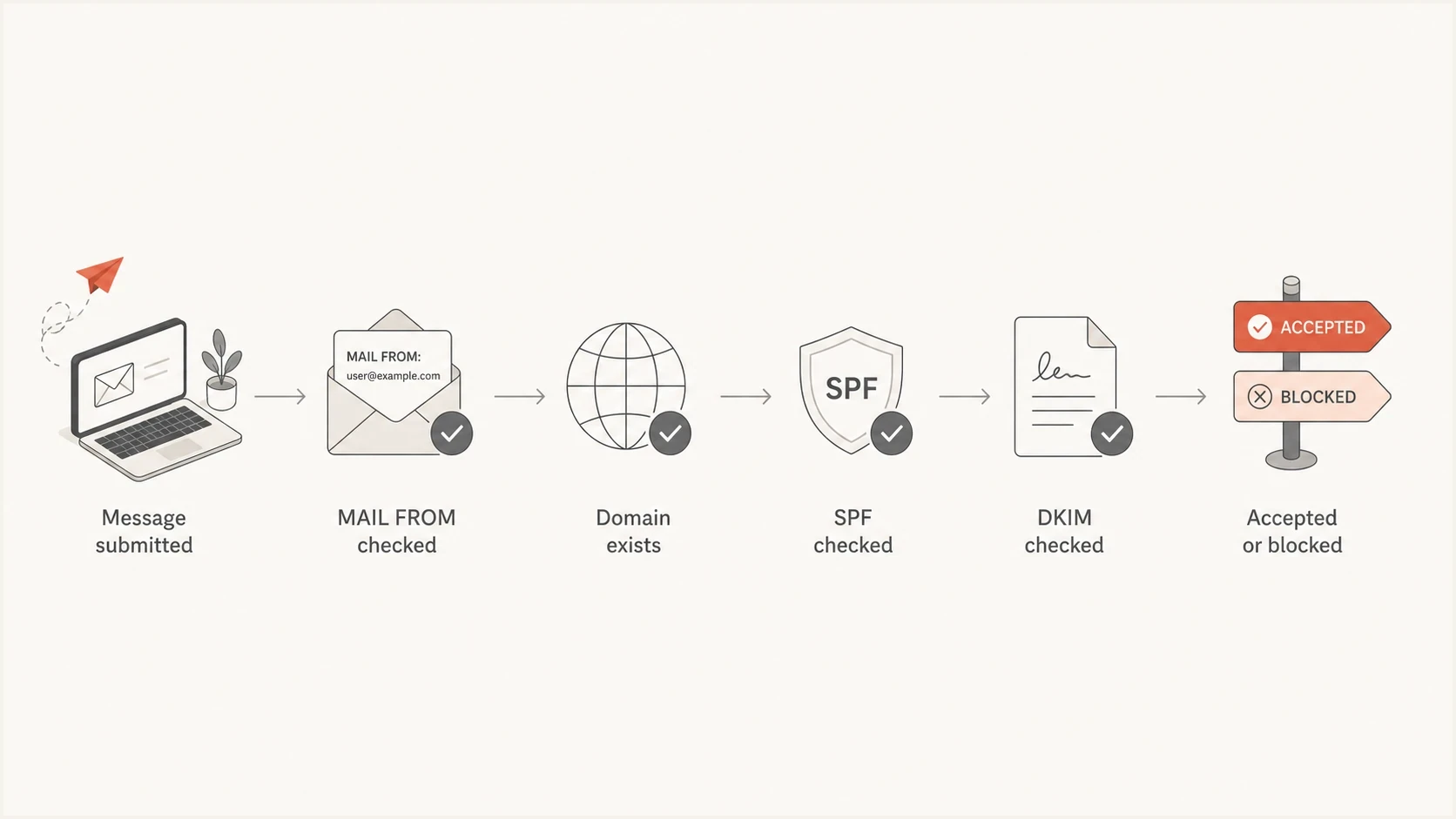
Apple iCloud Mail flowchart checking the MAIL FROM domain before SPF and DKIM results.
Match the fix to Apple's SMTP code
Do not apply the 450 bounce-domain fix to every Apple rejection. A 550 or 554 5.7.1 local-policy response is a different failure class. Read the complete SMTP response, enhanced status code, bracketed Apple code, and any referenced support URL before changing DNS.
- 450 4.1.8 Domain not found: Repair the exact MAIL FROM domain named in the rejection and confirm its required DNS target resolves.
- 550 or 554 5.7.1 local policy: Review SPF, DKIM, DMARC domain matching, reverse DNS, IP and domain reputation, message content, and the sending pattern.
- Intermittent acceptance: Split results by sending IP, domain, mail stream, and recipient. Then compare deferrals, policy codes, and provider routing.
- Bulk mail rejection: Confirm explicit consent, immediate unsubscribe handling, consistent sending identities, suppression of inactive recipients, and ARC headers on forwarded mail.
Apple does not offer an allow list for bulk senders. Recipient-side allowlisting can affect one mailbox, but it does not repair a sender-wide rejection. After meeting Apple's requirements, contact icloudadmin@apple.com with your company name, sending domain, affected sending IP addresses, complete SMTP errors, and the time the problem started.
Why this appears after DMARC, SPF, and DKIM setup
This problem often appears right after an authentication migration because several domains are involved at once. Your visible From domain has a DMARC record. Your sending service has DKIM selectors. Your SPF record authorizes sending hosts. Separately, your provider uses a bounce domain for the envelope sender. When one setup is replaced by another, an old bounce subdomain can stay attached to active traffic.
That explains the confusing timing. It feels like DMARC caused the Apple rejection because the errors start after DMARC work. In practice, the same deployment often changed the provider authentication, link branding, bounce handling, or sending account selection. Apple then sees a MAIL FROM domain that does not exist and rejects it.
What people first suspect
- SPF syntax: The SPF record might be missing the new provider include.
- DKIM keys: The DKIM selector might not match the active sending domain.
- DMARC policy: The policy might have moved too quickly to quarantine or reject.
What the error proves
- MAIL FROM: The failing address is the envelope sender used for bounces.
- DNS failure: The bounce domain cannot be resolved by the recipient system.
- Provider mismatch: The active sending route uses a different subdomain than the verified setup.
Treat the failed domain in the bounce as evidence. If the visible From domain is example.com but the error names em8318.example.com, start the investigation with that subdomain. Changing the root DMARC record will not make the bounce domain resolve.
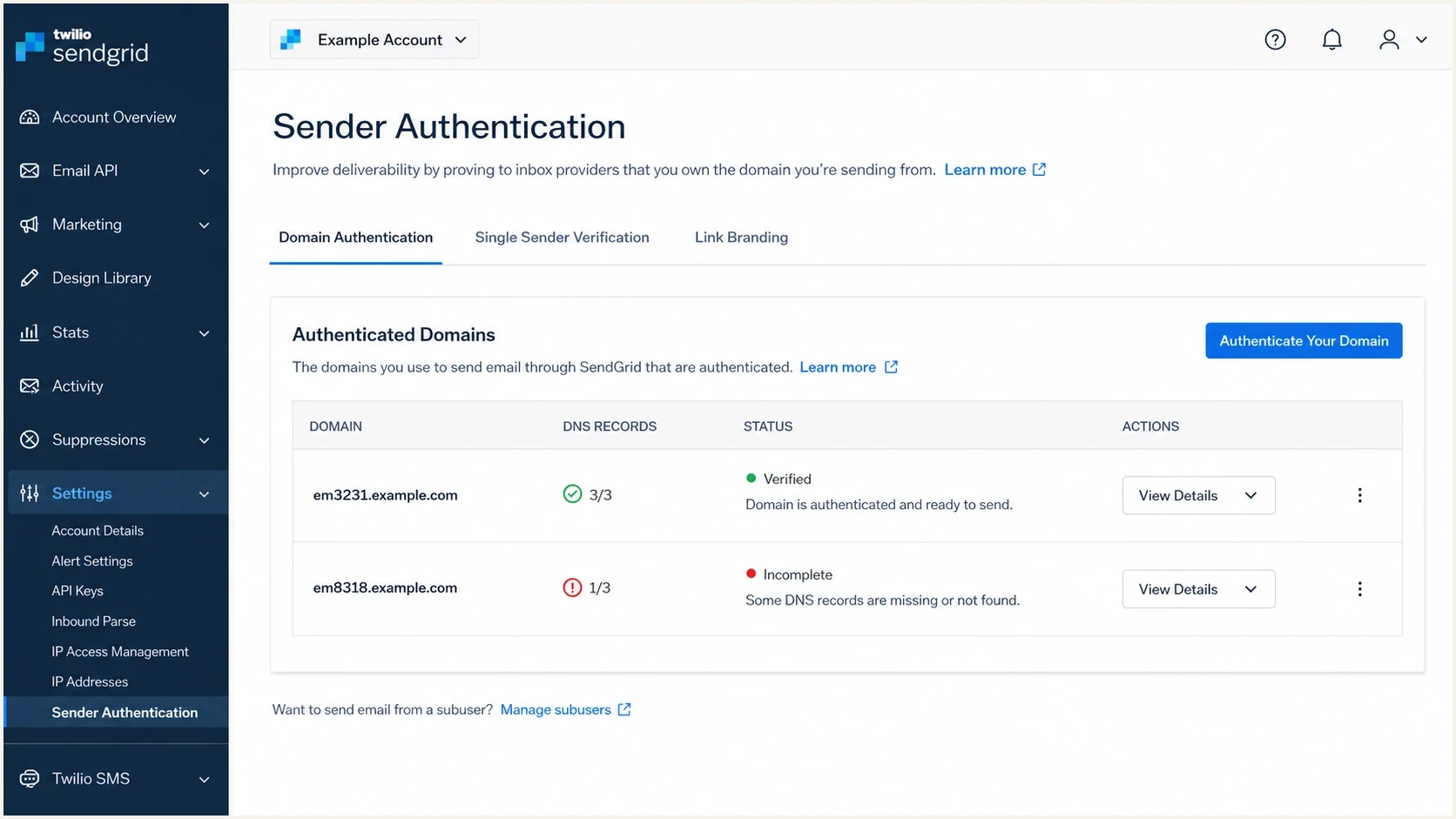
Twilio SendGrid sender authentication screen with verified and incomplete bounce subdomains.
How to confirm the real cause
Start with the exact failed address in the SMTP response. Copy the domain after the @ sign and query it directly. Check whether the domain exists, whether it has a CNAME, whether the CNAME target resolves, and whether DNSSEC validation fails. A normal SPF, DKIM, and DMARC check on the visible From domain does not answer those questions.
DNS checks for the bounce domainbash
dig em8318.example.com CNAME +short
dig em8318.example.com MX +short
dig em8318.example.com A +short
dig em8318.example.com TXT +short
dig +dnssec em8318.example.com CNAME
The expected result depends on the provider, but a provider-managed bounce domain commonly uses a CNAME to provider-controlled infrastructure. If every query returns nothing, or the resolver reports NXDOMAIN, the provider is presenting a bounce address that recipients cannot validate. Apple is then acting on a basic domain existence check.
?
What's your domain score?
Deep-scan SPF, DKIM & DMARC records for email deliverability and security issues.
Use Suped's domain health checker for a quick view of DMARC, SPF, and DKIM on the sending domain. Then check the exact bounce subdomain from the Apple error, because provider-generated return-path domains can sit outside the obvious root-domain checks.
|
|
|
|---|---|---|
NXDOMAIN | Bounce host | Add CNAME |
Old setup | Active route | Purge old domain |
DNSSEC | Validation | Repair DS |
Wrong account | API key | Use correct sender |
Common causes behind Apple 450 4.1.8 sender address rejected errors
Fix the sending setup without breaking DMARC
The clean fix is to make the provider use only the authenticated domain that has valid DNS. If the provider dashboard shows em3231.example.com as verified, but Apple errors name em8318.example.com, the sending route and the authenticated domain are out of sync. That can happen after a duplicate provider setup, a half-finished domain authentication, a reused API key, or a separate sending account that still has access to the application.
- Extract the domain: Copy the domain after the @ in the MAIL FROM address in the bounce.
- Check DNS: Confirm the bounce subdomain resolves and has the provider-required CNAME.
- Compare configurations: Match the failing subdomain to the authenticated domain shown by the provider.
- Remove stale routes: Disable old domain authentications, old API keys, or duplicate accounts that still send traffic.
- Retest Apple: Send fresh messages to icloud.com and me.com after DNS has propagated.
Do not delete DNS for an old provider subdomain until you are certain no production mail still uses it. Leave a temporary valid CNAME in place if traffic is still moving while you migrate routes.
If the old subdomain must be retired, do it in order. First move all streams, templates, API keys, SMTP credentials, and dedicated IP assignments to the new authenticated domain. Then send test messages and inspect the return-path. Once production mail consistently uses the new domain, remove or disable the old provider setup.
Example provider bounce CNAME patterndns
em8318.example.com. 300 IN CNAME bounce.provider.example.
Where SPF, DKIM, and DMARC still matter
Once the bounce domain exists, you still need authentication to pass. Apple and other mailbox providers check SPF, DKIM, DMARC, sender reputation, and sending behavior. The sequence matters: a missing envelope sender domain can fail before DMARC evaluation produces useful reporting.
For DMARC, domain matching matters. The domain authenticated by SPF is normally the MAIL FROM domain, while the domain authenticated by DKIM is the d= domain in a valid signature. DMARC compares either authenticated domain with the visible From domain. A provider bounce domain can pass SPF but still fail DMARC when those domains do not match. DKIM often gives third-party senders a stable matching path because the provider can sign with your domain.
DMARC rollout checkpoints
Change policy only when legitimate traffic is authenticated and passes domain matching.
Monitor
p=none
Collect reports and identify senders.
Quarantine
p=quarantine
Send failed messages to spam or further review.
Reject
p=reject
Request rejection of messages that fail DMARC.
RFC 9989 replaced RFC 7489 in May 2026 and removed the pct tag. Do not use pct to stage enforcement. Move the complete policy between p=none, p=quarantine, and p=reject after reports show legitimate mail streams pass DMARC.
A strict policy can make separate problems look worse. If you moved directly to reject and have unverified provider streams, those messages can fail at receivers that enforce DMARC tightly. If legitimate mail is blocked when policy increases, compare the issue with legitimate DMARC blocks, but keep this Apple error separate when the text says the sender domain was not found.
Suped's DMARC monitoring shows which sources are sending, which ones pass SPF or DKIM, and which ones fail domain matching. It does not replace the DNS fix for a missing bounce domain. Use it to find old senders before changing policy and to confirm that legitimate mail keeps passing afterward.

Issue steps to fix dialog showing the issue overview, tailored fix steps, and verification action
A practical troubleshooting checklist
Work through the problem in the order the receiving server sees it. That keeps the fix narrow and avoids turning one DNS issue into a broader authentication change.
- Bounce domain: Resolve the MAIL FROM domain with multiple public DNS resolvers and check for NXDOMAIN.
- Provider setup: Check every authenticated domain, subuser, API key, SMTP credential, and dedicated IP mapping.
- DNSSEC status: Validate the chain if one resolver fails but another resolver appears to work.
- Return-path test: Send a new message and inspect headers to confirm the current envelope sender.
- Authentication test: Confirm SPF, DKIM, and DMARC pass with proper domain matching after the DNS problem is fixed.
- Apple retest: Test to icloud.com, me.com, and mac.com addresses using fresh messages, not retries.
Email tester
Send a real email to this address. Suped shows a results button when the test is ready.
?/43tests passed
A real email test is useful after the DNS fix because it proves the active path and the records you intended to publish. The headers should show the new return-path, a valid DKIM signature under your domain, and a DMARC result that passes through either SPF domain matching or DKIM domain matching.
When the root cause is a stale provider subdomain, the fix normally does not create a long-term reputation issue. Apple rejected the message because the sender domain did not exist. Once the active route uses valid DNS, fresh mail can be accepted again.
When to ask the provider for help
Ask the provider for help when the dashboard does not show the failing subdomain, but live mail still uses it. That usually means the traffic is tied to a legacy configuration, subaccount, old API key, or second account. The provider can see the internal sender authentication object and routing decision that public DNS cannot reveal.
Send the provider the full SMTP error, the message ID if available, the failing MAIL FROM domain, the verified domain you expect to use, and the time of the failed send. Ask which authenticated domain was used for that message and whether any old domain authentication is still attached to the sending stream.
Provider support request templatetext
We are seeing Apple reject mail with this response:
450 4.1.8 Sender address rejected: Domain not found

The failed MAIL FROM domain is:
em8318.example.com

Our currently verified sending domain is:
em3231.example.com

Please confirm which authenticated domain, subuser, API key,
or sending route produced the failed MAIL FROM domain.
Public examples show that Apple recipients can reject mail inconsistently while sender-side settings change. Separate temporary receiver behavior from repeatable DNS failures. If the error says Domain not found, start with the named domain, even if only Apple is blocking. A related community discussion about iCloud bounces illustrates why the exact SMTP response matters more than the recipient domain alone.
How Suped fits into this workflow
Suped's hosted DMARC controls can keep the DNS record stable while you change policy after legitimate sending routes pass. This reduces repeated DNS edits when a team is also changing provider accounts, subdomains, or authentication records.
Manual approach
- Good for one error: Direct DNS queries are fast when the bounce gives you the exact failed domain.
- Limited history: Manual checks do not show older senders, source changes, or domain-match drift over time.
Suped workflow
Source visibility: Suped shows verified and unverified sources across monitored domains.
- Operational follow-up: Alerts and hosted policy controls help teams catch failures after the immediate DNS repair.
If you use Suped while troubleshooting Apple delivery, Hosted DMARC lets you keep DNS stable, change policy after review, and monitor the effect while provider routing is cleaned up.
Views from the trenches
Best practices
Check the exact MAIL FROM domain in the bounce before changing SPF, DKIM, or DMARC.
Keep old provider DNS live until header tests prove no production stream still uses it.
Record each sender subdomain and owner so duplicate setups are easier to find later.
Common pitfalls
Assuming Apple blocks mean DMARC policy is too strict when the SMTP error names DNS.
Deleting stale CNAMEs too early while a hidden account or API key still sends traffic.
Checking only the visible From domain and missing the return-path subdomain entirely.
Expert tips
Ask the provider to map failed messages to the internal sender authentication object.
Use a fresh test message after each change because old retries can preserve old routing.
Validate DNSSEC when only some resolvers or recipient domains reject the same sender.
Marketer from Email Geeks says the failing envelope sender domain had no DNS records, so Apple had a direct reason to reject the message.
2023-03-31 - Email Geeks
Marketer from Email Geeks says provider-managed bounce subdomains usually point by CNAME to infrastructure that handles returns.
2023-03-31 - Email Geeks
The fix in plain terms
When Apple blocks mail to icloud.com or me.com with 450 4.1.8 and Domain not found, fix the domain in the MAIL FROM address. In most post-migration cases, that means repairing or removing a stale provider bounce subdomain, then making sure the active sending route uses the verified authenticated domain.
After that, validate SPF, DKIM, and DMARC domain matching with fresh mail. Keep DMARC enforcement steady while you confirm the route. If Apple returns a 5.7.1 local-policy rejection instead, investigate authentication, reputation, content, and sender behavior as a separate issue.




