Why am I seeing a 'via' warning on internal emails and how do I fix it?

Published 18 Jul 2025
Updated 1 Aug 2026
11 min read
Summarize with
Updated on 1 Aug 2026: We clarified when Gmail's "via" label points to a sender mismatch, when Google Groups causes it, and which authentication checks fix the underlying route.
You are seeing a "via" label on an internal email because Gmail detected that the domain used to send the message differs from the domain in the visible From address. This often happens when a marketing platform, CRM, help desk, reply mail management system, forwarding service, or another relay handles the message without authenticating as the visible From domain. A separate Google Groups case can also display "via Group-Name" when the original sender's DMARC policy is p=quarantine or p=reject.
For a third-party sender, fix the mismatch by making the visible From domain match a domain authenticated with SPF or DKIM for DMARC purposes. Check the message headers first, then correct DKIM signing, SPF return-path setup, forwarding behavior, or the sender address. If the email is sent through Salesforce Marketing Cloud, ExactTarget infrastructure, an RMM route, or another third party, configure that platform to authenticate with your domain instead of relying only on its domain.
- Direct answer: The label normally appears because the visible internal sender domain differs from the domain that sent or authenticated the message.
- Special case: Google Groups can add "via Group-Name" when it handles mail from a domain with an enforcing DMARC policy.
- Best fix: Configure domain-associated DKIM, publish correct SPF authorization, and make the visible From domain match at least one authenticated domain.
- User safety: Verify an unfamiliar sending route in the headers before trusting an internal-looking message.
A "via" label is sender-source information, not a delivery block and not the same as Gmail's colored security warnings. Recipients cannot manually remove it. An unfamiliar domain beside an internal sender still deserves investigation, especially on finance requests, password resets, HR messages, or automated notices that ask people to act.
Why the via label appears
Gmail shows "via" when the domain used to send an email does not match the domain in the visible From address. The visible From address might be pat@company.com, while the message is authenticated by exacttarget.com, a vendor bounce domain, or a forwarding service. To Gmail, that route differs from an employee message sent directly through the company's approved mail system.
The label is especially noticeable on internal-looking mail because recipients recognize the name and domain. A message that claims a coworker identity but arrives through an unfamiliar domain also resembles common impersonation attempts, so users should confirm the route rather than assume the label is harmless.
Normal internal mail
- Sender: The message comes from the employee mailbox or an approved internal sending route.
- DKIM: The signing domain matches the company domain or its organizational domain.
- DMARC: The visible From domain passes through an aligned SPF or DKIM result.
Mail that shows via
- Sender: The message uses an internal display name or From address through a third party.
- DKIM: The signature belongs to the third party instead of your domain.
- DMARC: Neither the SPF domain nor the DKIM domain matches the visible From domain.
This is where DMARC monitoring helps. Suped's DMARC platform connects aggregate reports with source identification and issue-resolution steps, so teams can trace the label to a specific sending service or route. The inbox label is the symptom. The useful work is confirming which source used the visible From domain and which authenticated domain Gmail received.
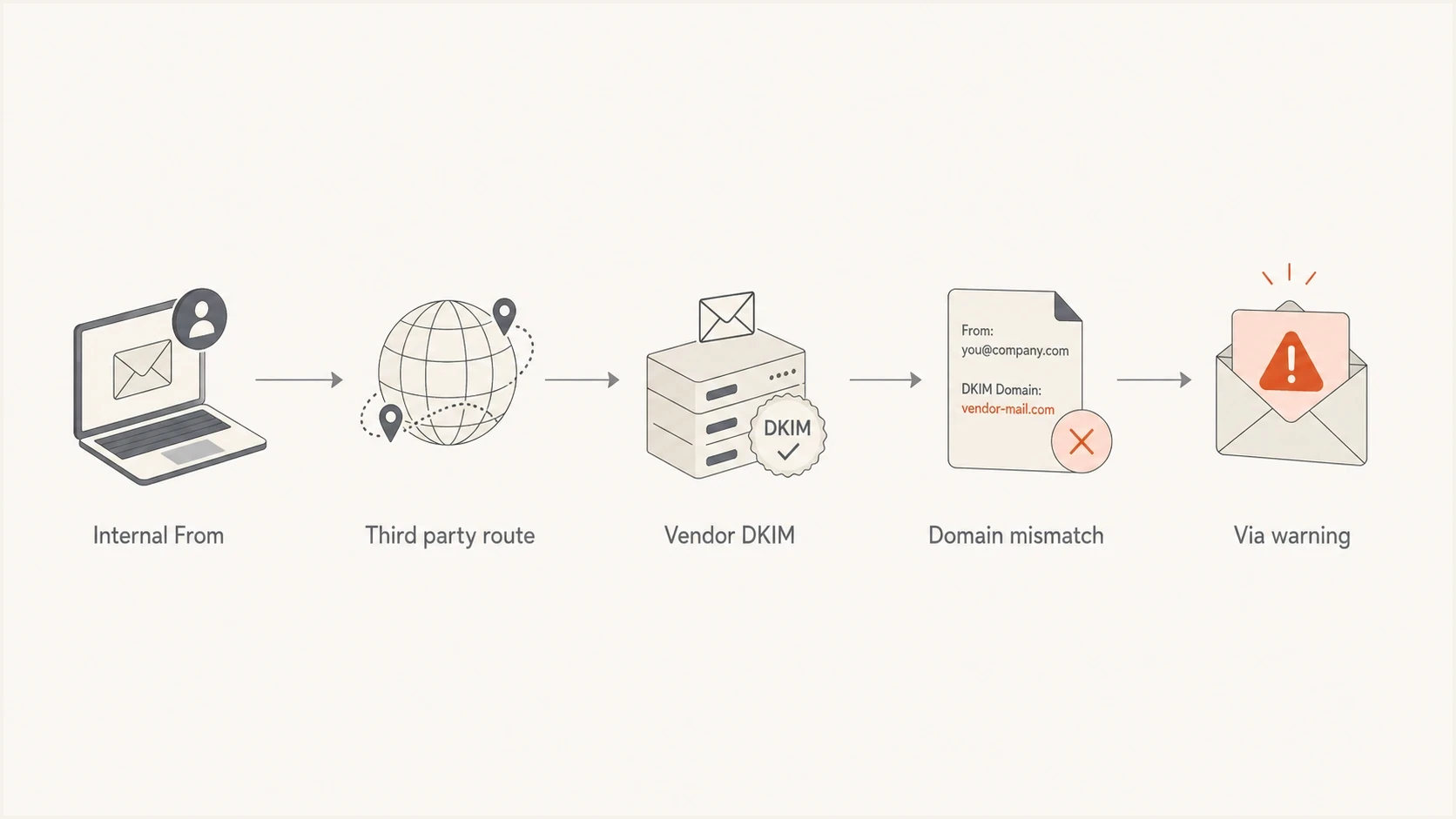
Flowchart showing how an internal From address sent through a third party can create a via warning.
When Google Groups causes via
Google documents a separate case for messages delivered through Google Groups. If the original sender's domain publishes p=quarantine or p=reject, Gmail can display the sender as "Sender Name via Group-Name" with the recipient group's address. The group delivery system uses this presentation so the message can be distributed without conflicting with the original domain's DMARC policy.
- Expected label: The text after "via" is the known Google Group that delivered the message.
- Policy trigger: The original From domain uses an enforcing DMARC policy, either p=quarantine or p=reject.
- Investigation trigger: The named group is unfamiliar, the message bypassed the expected group, or the headers show another unapproved relay.
- Practical check: Compare the group address and Received headers with a known message delivered through the same group.
Do not weaken a domain's DMARC policy merely to hide an expected Google Groups label. Confirm the group route first. If the group is legitimate, the label does not by itself prove that the sender's DNS authentication is broken.
Why it happens for only one person
When only one recipient sees the label, compare the exact copy delivered to that person with a clean copy sent in the same test. A routing difference usually explains the result. One copy might pass through a group, forwarder, compliance gateway, or alternate third-party stream while the other reaches Gmail directly.
Do not assume the person's mailbox is broken or that adding the sender to contacts will remove "via." Check Show original in Gmail for both copies. Focus on Authentication-Results, DKIM-Signature, Return-Path, and the Received chain.
- Route: This recipient's copy passed through a forwarder, compliance system, journaling route, or RMM path that changed the message.
- Sender: The message used a coworker's display name but came through a sender domain that Gmail identifies as external.
- Group delivery: The recipient received the message through a Google Group while another recipient received a direct copy.
- Forwarding: A forwarder preserved the visible From address but changed the SPF context or invalidated DKIM.
- Subdomain: One automated message used a different subdomain, bounce domain, or DKIM selector than the clean copy.
External recipients will not necessarily see the same "via" text as an internal user or Google Group member. They can still receive a Gmail security warning, spam placement, or a rejection if the sending stream fails current authentication requirements. Compare that broader behavior with the related Gmail warning guidance.
How to confirm the cause
Open the original message and inspect the full headers. Do not rely only on the visible sender line. The headers show which domain passed DKIM, which return-path domain passed SPF, what Gmail decided for DMARC, and which systems handled the message before delivery.
Header clues that explain a via warning
From: Pat Example <pat@company.com>
Authentication-Results: mx.google.com;
  dkim=pass header.d=exacttarget.com;
  spf=pass smtp.mailfrom=bounce.vendor.net;
  dmarc=fail header.from=company.com
In that example, the message is authenticated as the vendor, not as company.com. SPF and DKIM can both pass while the visible company From address remains unproven. DMARC passes only when at least one passing mechanism uses a domain that matches the From domain under the domain's alignment mode.
|
|
|
|---|---|---|
From | Visible domain | Identity DMARC must prove |
DKIM | header.d domain | Who signed the content |
SPF | smtp.mailfrom domain | Whose return path authorized the IP |
DMARC | header.from result | Whether SPF or DKIM matched From |
Received | Every relay | Whether a group or forwarder changed the route |
Header fields that explain the warning
After checking headers, validate the domain's published DNS setup. A focused DMARC checker can confirm the current policy, reporting addresses, and syntax before sender settings change.
DMARC checker
Look up a domain's DMARC record and catch policy issues.
?/7tests passed
How to fix the via warning
For direct third-party mail, configure SPF and DKIM for your domain, then make the visible From domain match at least one authenticated domain. An aligned DKIM signature is usually the most durable path because forwarding often changes the SPF evaluation. Keep DMARC reports active so real messages confirm the change.
- Identify: Find the exact platform or group route that sent the message showing "via."
- Separate: Use a dedicated subdomain for automated mail, such as mail.company.com or notify.company.com, instead of impersonating a real employee mailbox.
- Sign: Enable custom DKIM so the signing domain is your domain or an organizationally related subdomain.
- Authorize: Publish the sender's SPF authorization and, where supported, configure a branded return-path for aligned SPF.
- Verify: Send a new message through the affected route and confirm DMARC passes under the visible From domain.
- Monitor: Review DMARC reports until the source passes consistently before tightening policy.
Typical third-party DNS records
selector1._domainkey.m.company.com. CNAME selector1.vendor.net.
selector2._domainkey.m.company.com. CNAME selector2.vendor.net.
bounce.m.company.com. CNAME bounce.vendor.net.
The exact hostnames come from the sender's domain-authentication setup. Do not copy these placeholder values into DNS. The important test is whether a passing DKIM or SPF domain matches the visible From domain closely enough for DMARC. Configure both mechanisms when the platform supports them.
Starter DMARC record while investigating
_dmarc.company.com. TXT "v=DMARC1; p=none; rua=mailto:dmarc@company.com"
If DNS access is slow or split across teams, Hosted DMARC in Suped can centralize policy staging and change management. It does not fix a vendor's signing configuration by itself, so the sender still needs custom authentication and a verified test message.

Issue steps to fix dialog showing the issue overview, tailored fix steps, and verification action
For this issue, Suped's source-by-source workflow shows which sending service is failing DMARC, whether SPF or DKIM supplies the practical fix, and which DNS or platform setting needs attention. That connects a user's screenshot to evidence from aggregate reports and message headers.
The target state is straightforward: the message uses the expected company From domain, DKIM passes with an aligned domain, SPF passes through an authorized route, and DMARC passes. For a Google Group, the expected result can still include "via Group-Name" because that label describes the group delivery path.
What not to change
Do not treat the label as a user-education problem only. The sender or route still needs investigation. Adding more IP addresses to SPF without fixing domain alignment can leave the same label in place and move the SPF record closer to its DNS lookup limit. Recipient allowlists and safe-sender entries also do not change the domains Gmail displays.
Useful fixes
- DKIM: Turn on custom signing for the platform that sent the message.
- Subdomain: Move automated mail to a clear sending subdomain.
- Reports: Watch DMARC data until the source passes consistently.
Weak fixes
- Allowlist: Allowing the sender internally does not prove the visible sender domain.
- SPF only: Adding includes does not establish alignment if the return-path remains a vendor domain.
- Display name: Changing the friendly name can reduce confusion, but it does not fix authentication.
DMARC policy path
Use stricter policy only after approved sources authenticate under the right domain.
Observe
p=none
Collect reports and find sources.
Control
quarantine
Quarantine failing mail after fixes.
Enforce
p=reject
Reject mail that fails DMARC.
Before enforcing policy, run a broader domain health check so authentication and related DNS signals are reviewed together. An internal "via" label often exposes a wider sending-inventory problem: several systems can send as the company, but only some authenticate under an approved domain.
Views from the trenches
Best practices
Compare full headers between warned and clean copies before changing DNS or policy.
Use a clear sending subdomain for automated mail instead of impersonating employee mailboxes.
Keep DMARC reports active during fixes so every approved source proves the visible domain.
Common pitfalls
Assuming inbox delivery means the sender identity is trusted by mailbox filters.
Adding SPF includes without correcting DKIM, the return-path domain, or forwarding behavior.
Treating a one-user label as a mailbox bug instead of comparing the delivered routing data.
Expert tips
Start with the user's screenshot, but make the final decision from full message headers.
If a vendor signs as itself, enable custom DKIM for your domain before tightening DMARC.
For internal names, use stricter checks because users act faster on coworker mail.
Marketer from Email Geeks says internal via warnings appear when mail bounces between several company domains or leaves through a third-party route.
2024-05-06 - Email Geeks
Marketer from Email Geeks says the warning should be read literally: the message claims a coworker identity, but Gmail has not proven that identity.
2024-05-06 - Email Geeks
The fix to prioritize
Fix the sender route before changing mailbox rules or telling users to ignore the label. Find the message source, enable custom DKIM, authorize the sender with SPF, confirm DMARC passes for the visible From domain, and monitor the source until the result is stable.
For direct third-party mail, "via" tells the recipient that the displayed domain differs from the sending domain Gmail detected. Once the platform authenticates under the visible From domain, new messages should stop showing that third-party domain. If the label remains, compare the new headers with the old headers and check for a forwarding hop, group route, vendor signature, or external return-path.




