What tools can analyze DMARC reports into an easy-to-read format?

Updated on 25 Sep 2026: We updated this guide with current DMARC report formats, parser compatibility checks, privacy guidance, and a practical plan comparison.
DMARC XML report analyzer tools turn aggregate XML into human-readable dashboards or summaries that show sending sources, message volume, SPF and DKIM alignment, DMARC results, and receiver disposition. The main options are a managed platform such as Suped, a self-hosted parser, a lightweight digest service, a one-file analyzer for occasional troubleshooting, or a custom dashboard stack.
For ongoing reporting with useful next steps, use a managed DMARC monitoring platform. Raw XML is useful source data but a poor working interface. A capable analyzer should consolidate reports across reporting organizations, identify senders, show authentication trends, flag changes, and connect each failure to a fix.
- Managed workflow: Suped is our DMARC and email authentication product. It combines aggregate report analysis with source-level fixes, alerts, hosted records, and blocklist (blacklist) monitoring.
- Self-hosted control: An open-source XML parser and dashboard stack fit teams that can run the infrastructure, storage, access controls, and upgrades.
- Simple digest: A lightweight email summary fits a small domain when the main need is a recurring overview rather than source-level investigation.
- One-file analysis: A free local or browser-based analyzer can explain one XML, GZIP, or ZIP file, but it does not provide continuous monitoring. Check whether browser processing stays on the device before uploading report data.
Which DMARC report tools make XML readable
DMARC reporting tools do the same core job: receive aggregate reports, parse the XML, normalize the sending sources, and show what passed or failed. The difference is how much work they remove after parsing. A parser tells you what happened. A useful platform also helps determine what to do next.
|
|
|
|
|---|---|---|---|
Suped | Managed platform | Ongoing operations | Uses a managed service |
Self-hosted parser | Open source | DIY control | Needs upkeep |
Digest service | Managed summary | Small domains | Less investigation depth |
One-file analyzer | Local browser or upload | Occasional checks | No continuous monitoring |
Custom dashboard | Self-hosted | Custom views | Engineering and admin work |
Compact comparison of common DMARC report analysis options.
If you want to compare broader options later, a shortlist of best DMARC tools helps, but the first decision is simpler. Decide whether you want a service that turns reports into actions or a parser that produces structured data your team still needs to operate.
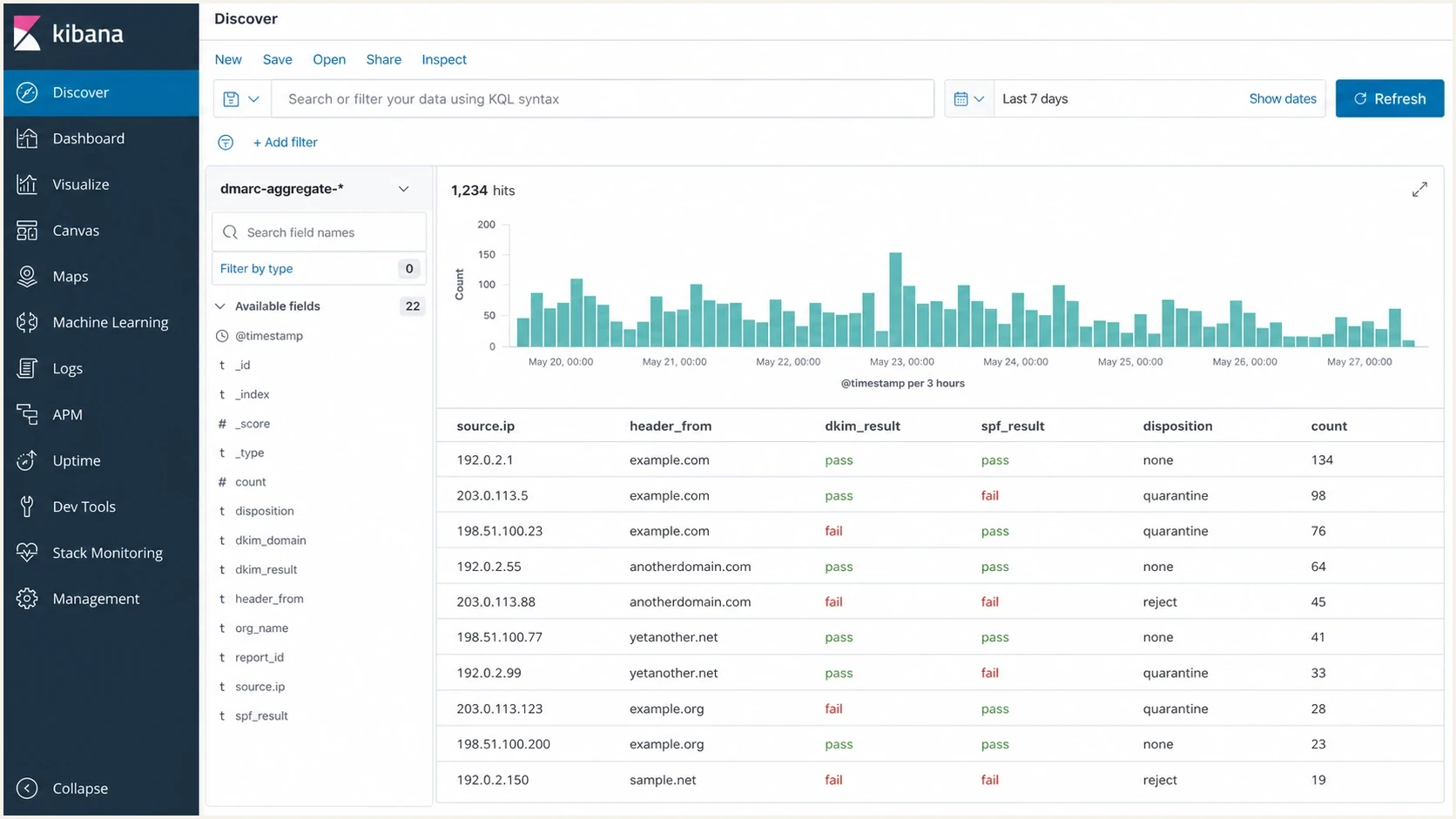
A Kibana Discover screen showing parsed DMARC fields in a table.
A self-hosted dashboard can be useful when the team already operates a search and analytics stack. The readable report is only as good as the dashboards, sender enrichment, parser reliability, and review process built around the data.
How a DMARC report analyzer processes XML
Under RFC 9990, a DMARC aggregate report is an XML document that receivers usually send as a plain or GZIP-compressed email attachment. Many analyzers also accept ZIP files produced under legacy reporting practices. A report contains reporting metadata, the published policy, source IPs, message counts, DMARC dispositions, and SPF and DKIM authentication results. The analyzer must present identifier alignment clearly because an SPF or DKIM pass alone does not guarantee a DMARC pass.
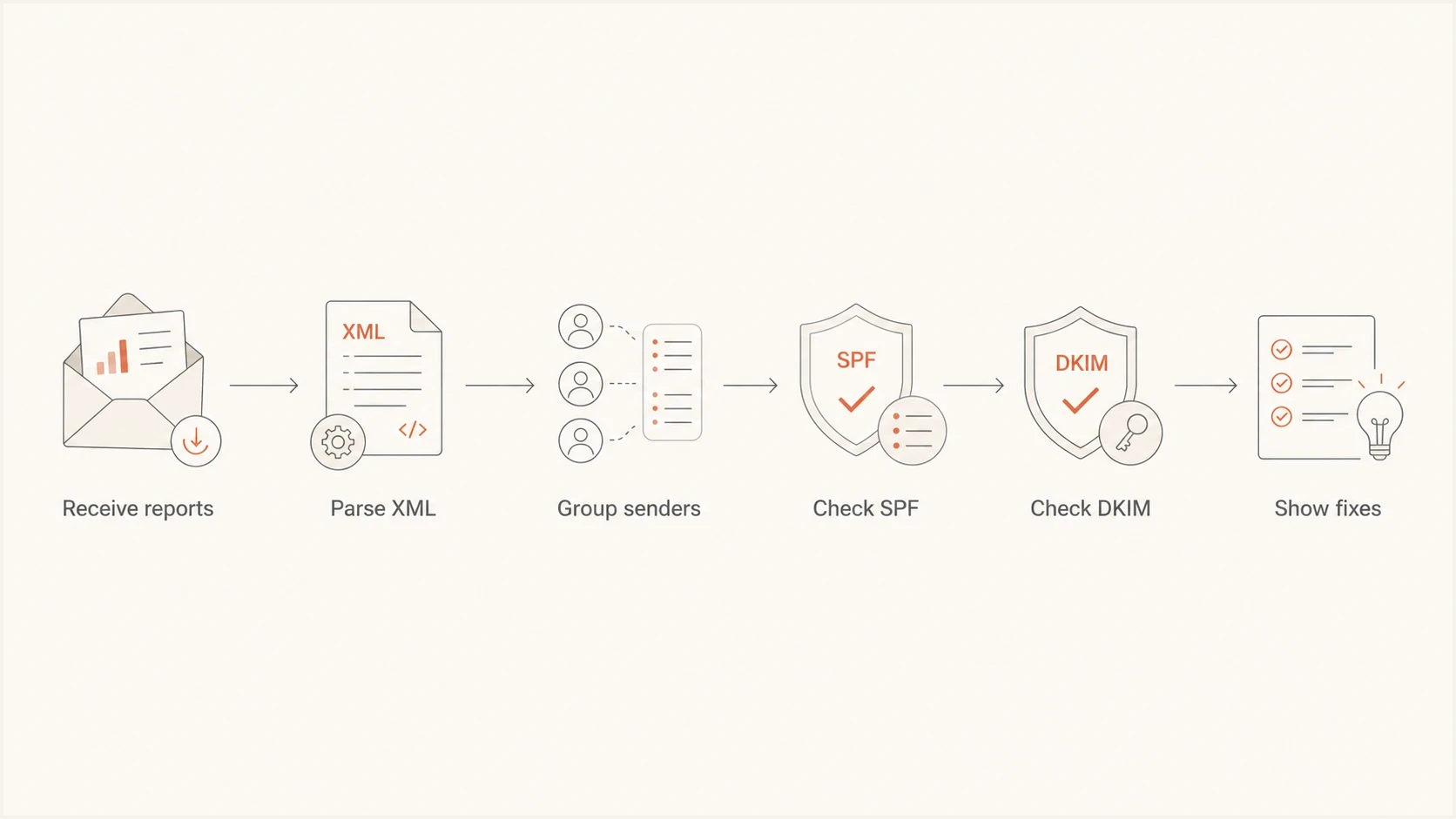
A flowchart showing DMARC reports being parsed, grouped, checked, and turned into fixes.
- Ingestion: The tool receives aggregate reports through the address in the rua tag, normally as XML inside a compressed attachment.
- Parsing: The XML is validated and normalized into records that can be searched, filtered, grouped, and trended.
- Deduplication: Report IDs, reporting organizations, and date ranges are checked so retransmissions do not inflate message counts.
- Source naming: The tool maps source IPs and hostnames to recognizable business senders and mail infrastructure.
- Alignment analysis: SPF and DKIM results are compared with the visible From domain to explain the DMARC result.
- Action routing: The report points to the sender owner, DNS record, or authentication path that needs work.
Example DMARC record that sends aggregate reports to a parserdns
v=DMARC1; p=none; rua=mailto:dmarc@reports.example.com;
RFC 9989 makes pct historic and introduces t=y as the policy test-mode signal that replaces the old pct=0 use. This aggregate-reporting example omits pct, failure-report settings, and strict-alignment tags because none is required for basic RUA collection.
Raw XML is not an operating view
The files are machine-readable, not team-readable. If the report does not group senders, show alignment changes, account for duplicate data, and expose the next fix, the human work simply moves somewhere else.
- Sender grouping: Without grouping, one real sender can appear as many IPs and hostnames.
- Failure context: An SPF authentication failure has a different meaning when aligned DKIM passes and produces a DMARC pass.
- Policy context: A source that fails during monitoring becomes a delivery risk when an enforcement policy applies.
Check standards support and report data handling
RFC 9989 now defines DMARC, and RFC 9990 defines aggregate reporting with the DMARC 2.0 XML namespace. During adoption, a dependable analyzer needs to process current and legacy aggregate-report formats without silently dropping records. It also needs controls for the operational and privacy risks created by report collection.
- Format compatibility: Confirm support for plain XML and GZIP, common legacy ZIP input, and both XML schema generations. A current parser should preserve RFC 9990 testing and discovery fields, accept the pass disposition, ignore valid unknown extensions, and expose rejected files.
- Report integrity: The analyzer should track report IDs, UTC date ranges, reporting organizations, rejected files, and duplicate handling so totals can be trusted.
- External authorization: When the organizational domain in rua differs from the policy domain, the report destination must authorize the relationship in DNS. Verify that reports arrive after any routing change.
- Aggregate-report privacy: RUA reports do not contain message bodies, but source IPs, domains, counts, and timing can expose sending patterns. Review access, encryption, retention, deletion, and data location.
- Failure-report separation: Message-specific RUF reports are defined by RFC 9991, are optional, and are less consistently produced. They can include message content, so handle them under stricter privacy controls than aggregate data.
With Suped's product, route RUA data to the managed reporting endpoint after the domain is configured, then verify that new reports appear for each sending domain. That receipt check catches a bad rua value or an authorization problem before an enforcement decision depends on incomplete data.
How to compare DMARC analyzer plans
Compare plan limits against the way the tool will be used, not only the headline price. DMARC analyzer plans commonly limit domains, aggregate message volume, retention, users, or data access. A free DMARC report analyzer can be enough for one-off XML review, but ongoing monitoring needs enough history and access for the team to investigate changes.
|
|
|
|---|---|---|
Domain coverage | Active domains, parked domains, and subdomain counting | Inherited subdomains can change the real domain total |
Message volume | Monthly allowance, overages, and traffic spikes | Seasonal mail can push a plan over its limit |
Data history | Retention period and historical comparisons | Short windows can hide gradual sender drift |
Team access | User limits, roles, client separation, and audit history | Several owners need safe access without shared accounts |
Data access | API, CSV export, raw XML access, and file upload | Exports support audits and custom internal reporting |
Report types | Aggregate RUA and optional message-specific RUF support | RUF data needs a defined use case and stricter privacy controls |
Operational help | Alerts, onboarding, guided fixes, and implementation support | Parsing alone does not assign or complete remediation work |
Plan checks that affect DMARC reporting operations.
For Suped's product, compare the selected plan with the number of domains, real aggregate message volume, required retention, and people who need access before routing every domain. The useful limit is the one that still leaves enough history and collaboration room to complete the policy rollout.
What an easy-to-read DMARC report should show
An easy-to-read DMARC report has to do more than make XML prettier. It needs to answer the operational questions that determine whether the domain is protected and whether legitimate email will keep getting delivered.
Suped DMARC dashboard showing email volume, authentication health, and source breakdown
Suped's product dashboard is designed to answer four questions quickly: who is sending, what is passing, what is failing, and what changed. Suped connects those results to source-level detail, alerts, and fix steps instead of leaving the team with a chart and no next action.
Practical authentication review states
Use source ownership and consistent alignment as the readiness test. A high traffic-weighted pass rate can hide a broken low-volume sender.
Healthy
Ready to assess
Every identified legitimate source passes DMARC consistently.
Watch
Investigate
A known source changed, a pass rate dipped, or reporting coverage has a gap.
Fix
Remediate
Any legitimate sender still fails or lacks aligned SPF or DKIM.
Unknown
Classify
Unowned sources need classification before trust or blocking decisions.
- Source identity: The report should name real senders, not only IP addresses.
- Authentication and alignment: It should separate SPF and DKIM authentication from identifier alignment, DMARC result, and final disposition.
- Reporting coverage: It should expose reporting organizations, date windows, rejected files, duplicates, and gaps that affect confidence in the totals.
- Volume trend: It should show whether failures are isolated, growing, or tied to a new sender.
- Policy evidence: It should distinguish the requested policy, actual receiver disposition, and any reported override reason.
- Next fix: It should explain which DNS record, signing configuration, or sender owner needs attention.
Before judging a report, check the domain's current authentication state with a domain health check. That gives the report context because a failing sender is harder to evaluate when the domain also has a broken SPF, DKIM, or DMARC record.
?
What's your domain score?
Deep-scan SPF, DKIM & DMARC records for email deliverability and security issues.
Managed platform or self-hosted parser
The main decision is managed versus self-hosted. Self-hosting fits a team with the skill and time to own the data pipeline. A managed platform fits a team focused on authentication progress, shorter review cycles, and fewer policy-rollout mistakes.
Managed platform
- Setup: Point DMARC aggregate reports at the platform and let it normalize the data.
- Maintenance: The provider handles parsing, storage, sender enrichment, report display, and schema updates.
- Best fit: Teams that need readable reports, alerts, and fix guidance without extra infrastructure.
Self-hosted parser
- Setup: Run the parser, storage layer, dashboards, mail intake, and retention controls.
- Maintenance: Someone owns upgrades, parser errors, disk usage, schema changes, duplicate handling, and access control.
- Best fit: Teams that need custom storage or already operate search and dashboard tooling.
Suped's managed product connects source discovery, authentication status, automated issue detection, alerts, hosted DMARC and SPF workflows, MTA-STS management, and blocklist (blacklist) monitoring. Its multi-tenant organization view supports MSPs and internal teams that manage many domains.
A self-hosted route still makes sense for labs, security teams with strict data-residency requirements, and organizations that already operate a reporting stack. If that is your path, compare self-hosted DMARC options before committing to ongoing maintenance.
The cost is mostly human time
The subscription line item is easy to see. The hidden cost is reading, interpreting, assigning, and fixing the reports every week. A tool that only parses XML still leaves that cost with the team.
How to set up DMARC report analysis
A reliable setup starts with visibility. Identify legitimate sources, fix alignment, test policy behavior, and enforce only after the reports support the decision. The reporting tool should make each step easy to verify.
- Confirm reporting: Publish a DMARC record with p=none and a working aggregate-report destination. If the destination uses another organizational domain, confirm external authorization and actual report receipt.
- Check the record: Validate syntax with a DMARC record checker before waiting for reports.
- Name every sender: Map source IPs to real business systems and accountable owners.
- Fix SPF or DKIM alignment: Prefer aligned DKIM for third-party senders where forwarding or shared infrastructure weakens SPF.
- Stage policy: RFC 9989 makes pct historic. Test p=quarantine; t=y, review reports and receiver behavior, remove t=y when ready, and then consider p=reject.
- Keep watching: New business systems and mail gateways appear over time, so aggregate reporting remains useful after enforcement.
DMARC checker
Look up a domain's DMARC record and catch policy issues.
?/7tests passed
Suped's hosted DMARC workflow helps when policy changes need to be managed without repeated manual DNS edits. With hosted DMARC, policy settings are managed in Suped while DNS points to a stable hosted record.
Do not enforce before legitimate sources pass
An enforcement policy is useful only after legitimate sources pass DMARC consistently. If the readable report still shows unverified business senders, classify and fix those senders first.
- Low-volume mail: Password resets, invoices, support updates, and compliance notices can hide in small report counts.
- Forwarded mail: SPF breaks more often with forwarding, so aligned DKIM detail matters.
- New systems: A new helpdesk, billing sender, or form system can change the report overnight.
- Shared domains: Departments often send mail before the central domain owner knows the system exists.
How to choose the right report format
Choose the report format by the decision it supports. A security owner needs source and failure detail. An executive needs risk, policy progress, remaining work, and ownership. A domain owner needs a short list of senders to fix. An MSP needs cross-domain filtering and delegated access. One report rarely satisfies every role unless the tool moves between summary and detail without an export.
Readable but shallow
A short digest works when email volume is low and the domain has only a few senders. It is less useful when failures need ownership, investigation, policy planning, or historical comparison.
- Good use: Weekly status for a small domain.
- Weak spot: Harder to investigate source-level failures.
Readable and actionable
A dashboard works when DMARC is part of ongoing operations. It should support summaries, drilldowns, alerts, ownership, and policy testing in the same workflow.
- Good use: Multiple senders, domains, or business owners.
- Weak spot: Requires someone to own the workflow.
Suped keeps the summary and source-level workflow connected. Teams can review sending sources, inspect authentication status, receive alerts, manage hosted records, and hand a concrete fix to the person who owns the sender.
Views from the trenches
Best practices
Send aggregate reports to a parser before moving from monitoring into enforcement.
Group sources by real sender names so finance, HR, and marketing owners can act quickly.
Review new unverified sources weekly, then close the loop by fixing SPF or DKIM.
Keep report routing stable so mailbox changes do not break DMARC visibility later.
Common pitfalls
Reading raw XML makes teams miss patterns that only appear after sender grouping over days.
Treating every failure as fraud wastes time when forwarding and third-party mail are common.
Ignoring low-volume senders leaves password resets, invoices, and alerts exposed.
Changing policy before fixing known sources creates avoidable delivery failures at rollout.
Expert tips
Track pass rates by source, because each sender needs its own fix, owner, and deadline.
Use alert thresholds so a sudden spike in failed mail gets investigated the same day.
Document ownership for each sender so DNS fixes do not wait for the wrong team again.
Keep a plain executive summary for risk, policy progress, and remaining senders.
Marketer from Email Geeks says self-hosted parsing works well for DIY reporting when the team can run the parser, storage, dashboard, and access layer.
2025-02-14 - Email Geeks
Marketer from Email Geeks says simple digest tools can be accessible for clients that already have DMARC set up but cannot keep up with report volume.
2025-04-03 - Email Geeks
Choosing a DMARC report analyzer
The right tool depends on what easy-to-read needs to mean. A digest can be enough for a small domain. A self-hosted parser plus a dashboard fits a team that wants full control and can maintain the stack. Suped fits teams that want managed aggregate reporting connected to source identification, alerts, policy work, and guided fixes.
DMARC aggregate reports are the evidence used to protect a domain without breaking legitimate mail. The analyzer should turn that evidence into sender ownership, trustworthy trends, authentication fixes, and a defensible policy decision.




