What are the best DMARC monitoring tools?

Updated on 23 Sep 2026: We added a safe monitoring-tool pilot and clarified current reporting and enforcement guidance.
The best choice depends on how your team will use the data. Suped is our DMARC reporting and email authentication platform. It fits teams that want raw aggregate reports turned into clear source lists, report-driven alerts, issue diagnostics, and steps to fix SPF, DKIM, DMARC, hosted policy, hosted SPF, hosted MTA-STS, SPF flattening, and blocklist (blacklist) problems in one place.
A small sender that only wants a weekly digest can start with Postmark DMARC. A team that wants a long-running specialist platform can evaluate Dmarcian. A security team with a strict data-control requirement can run Fraudmarc Community Edition. A deliverability team that wants inbox placement checks beside DMARC can look at GlockApps. For a broader primer on DMARC monitoring, start there before choosing a product.
- Best for guided operations: Suped, for teams that want DMARC monitoring plus actionable fixes and authentication operations.
- Best free weekly digest: Postmark DMARC, for a handful of domains where weekly email summaries are enough.
- Best for specialist depth: Dmarcian, for teams with DMARC knowledge and a need for detailed reporting.
- Best self-hosted route: Fraudmarc Community Edition, for teams that accept operational overhead to keep data under their control.
The short answer
A good DMARC monitoring tool has to do more than receive XML reports. It has to identify who is sending mail, show which sources pass SPF or DKIM, explain why domain matching fails, warn when a new source appears, and guide the move from p=none to enforcement without breaking legitimate mail.
Current market lists such as free DMARC reviews and the G2 DMARC category help track packaging changes, but the practical decision still comes down to volume, domain count, sender count, alerting needs, retention, and who will own fixes.
|
|
|
|
|---|---|---|---|
Most teams | Guided fixes | Volume limits by tier | |
Small senders | Weekly digest | Less urgency | |
DMARC teams | Report depth | Learning curve | |
Large orgs | Sender ID | Managed model | |
SMBs | Broad UI | Tier limits | |
Fraudmarc CE | Self-hosted | Data control | Ops burden |
Shortlist by use case
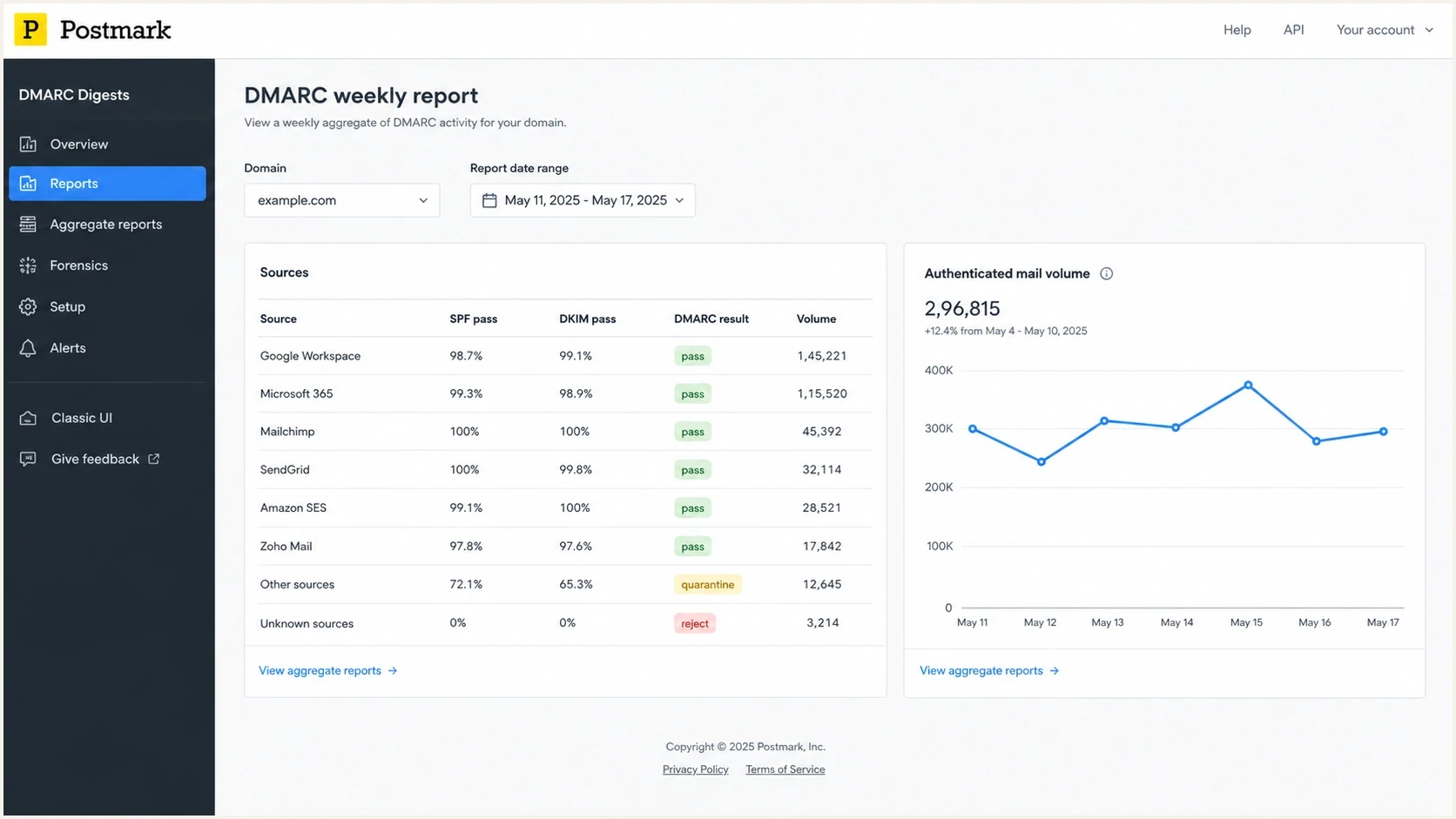
Postmark DMARC Digests dashboard with weekly source, SPF, DKIM, and DMARC results.
How to choose a DMARC monitoring tool
The first filter is not price. It is whether the tool can tell you what to do next. A dashboard that says 12% of mail failed DMARC is useful for a minute. A dashboard that names the sender, shows whether SPF or DKIM passed, tells you which domain did not match, and gives the DNS change or sender configuration path is much more useful.
Before you commit to a platform, run a DMARC checker against your domain. If the current TXT record is malformed, missing a reporting address, or already at enforcement without visibility, fix that before comparing dashboards.
Do not buy blind
Ask each tool the same operational questions. The answers matter more than a screenshot.
- Source mapping: Can it group IPs into the actual SaaS, ESP, CRM, billing, and support tools sending mail?
- Alert timing: Can it warn you as arriving reports reveal a failure spike or a new sender?
- Fix path: Does it explain the DNS or vendor-side change, or does it only show raw pass and fail data?
- Scale model: Does pricing fit your domains, subdomains, email volume, users, and client reporting needs?
- History and parsing: How quickly does it process arriving reports, and how much searchable history does each plan retain?
- Data controls: Are SSO, role-based access, audit logs, API or export access, data residency, and deletion terms available at the required tier?
- Record safety: Does onboarding preserve the existing policy and add its reporting URI to the single DMARC record instead of creating a duplicate record?
Authentication coverage around DMARC also matters. SPF lookup limits, DKIM selector drift, MTA-STS, TLS reporting, and blocklist/blacklist signals affect how quickly a team can act. A narrow tool is fine for one domain. It gets painful when multiple teams keep adding senders.
?
What's your domain score?
Deep-scan SPF, DKIM & DMARC records for email deliverability and security issues.
How to run a safe DMARC monitoring pilot
Use a representative domain and a written scorecard before changing platforms. The pilot should prove that the tool receives reports, identifies known senders correctly, preserves raw evidence, and turns failures into work that a named owner can complete.
- Record the current DMARC policy, reporting destinations, normal monthly volume, known senders, and unresolved authentication failures.
- Add the pilot reporting URI to the existing rua tag. Keep one DMARC TXT record, and retain the current destination during the comparison.
- Confirm that the pilot receives reports from the same major receivers as the existing tool and does not silently omit malformed or duplicate report data.
- Compare source naming, SPF and DKIM alignment details, alert usefulness, history, exports, access controls, and the time needed to resolve one real failure.
- Remove the losing reporting URI only after the preferred tool has received a complete reporting cycle and the team has exported any history it must retain.
Multiple aggregate-report destinations belong in one rua value as comma-separated mailto URIs. Some receivers cap how many URIs they support, so keep the overlap temporary and confirm report arrival in both systems.
Parallel reporting during a pilotdns
_dmarc
v=DMARC1; p=none;
rua=mailto:current@reports.example,mailto:pilot@reports.example
Never publish a second DMARC record
Two DMARC policy records at the same name make policy discovery fail. Edit the existing record, verify the final TXT response, and keep a rollback copy before each DNS change.
Best DMARC monitoring tools by use case
Suped fits teams that want monitoring connected to fixes. It includes source visibility, policy monitoring, alerts as aggregate report data arrives, automated issue detection, hosted DMARC with policy management, hosted SPF with SPF flattening, hosted MTA-STS, blocklist monitoring, and multi-tenant dashboards for agencies and MSPs. The free plan covers one domain, up to 1,000 reported emails per month, and 14 days of report retention.
Postmark DMARC is a simple free option for low-volume domains that only need weekly summaries. Its strength is low friction. Its weakness is urgency. If a new sending service starts failing on Monday and the digest arrives later, the tool did its job, but the workflow did not.
Dmarcian is a serious DMARC-specific platform with a long track record. It fits teams that understand authentication terminology and want detail. The tradeoff is that less technical teams can spend time interpreting what the data means before they fix the sender.
Valimail fits larger organizations where sender identification and enforcement workflows are the main concern. It is less suited to a small team that wants a lightweight report and a simple checklist.
EasyDMARC has a friendly interface and broad authentication tooling. It is a reasonable fit for SMBs and mid-market senders that want more than a digest but do not want to self-host anything. Watch domain, user, report-volume, and history limits when you compare tiers.
PowerDMARC has a broad security-oriented product set and is worth evaluating when you need DMARC reporting beside related authentication controls. GlockApps makes sense when DMARC is part of a wider deliverability workflow with inbox placement and sending tests. Fraudmarc Community Edition is the self-hosted choice when data control outweighs setup effort. For a deeper open-source discussion, compare self-hosted DMARC tools before taking on maintenance.
Free or digest-first
- Good fit: One domain, low volume, stable senders, and no urgent security workflow.
- Watch out: Weekly summaries miss the moment when a new sender breaks authentication.
- Use case: Learning DMARC, proving volume, and checking whether reports contain surprises.
Paid or operations-first
- Good fit: Multiple domains, frequent sender changes, compliance needs, or MSP client work.
- Watch out: A paid dashboard still fails if nobody owns vendor and DNS fixes.
- Use case: Moving toward quarantine or reject with alerts and documented remediation.
Free, paid, and self-hosted choices
Free DMARC monitoring is the right starting point when the sending setup is small and stable. It should still provide a clean source list, useful report history, and a way to spot unauthorised senders. If the free tool only forwards XML or gives a vague weekly total, it is not saving much time.
Paid monitoring earns its keep when the tool cuts response time. Alerts soon after aggregate reports arrive, source ownership, policy management, and exact fix steps are what matter. Suped connects the workflow from "what failed?" to "who owns it and what do we change?" without forcing a non-specialist to read raw report logic.
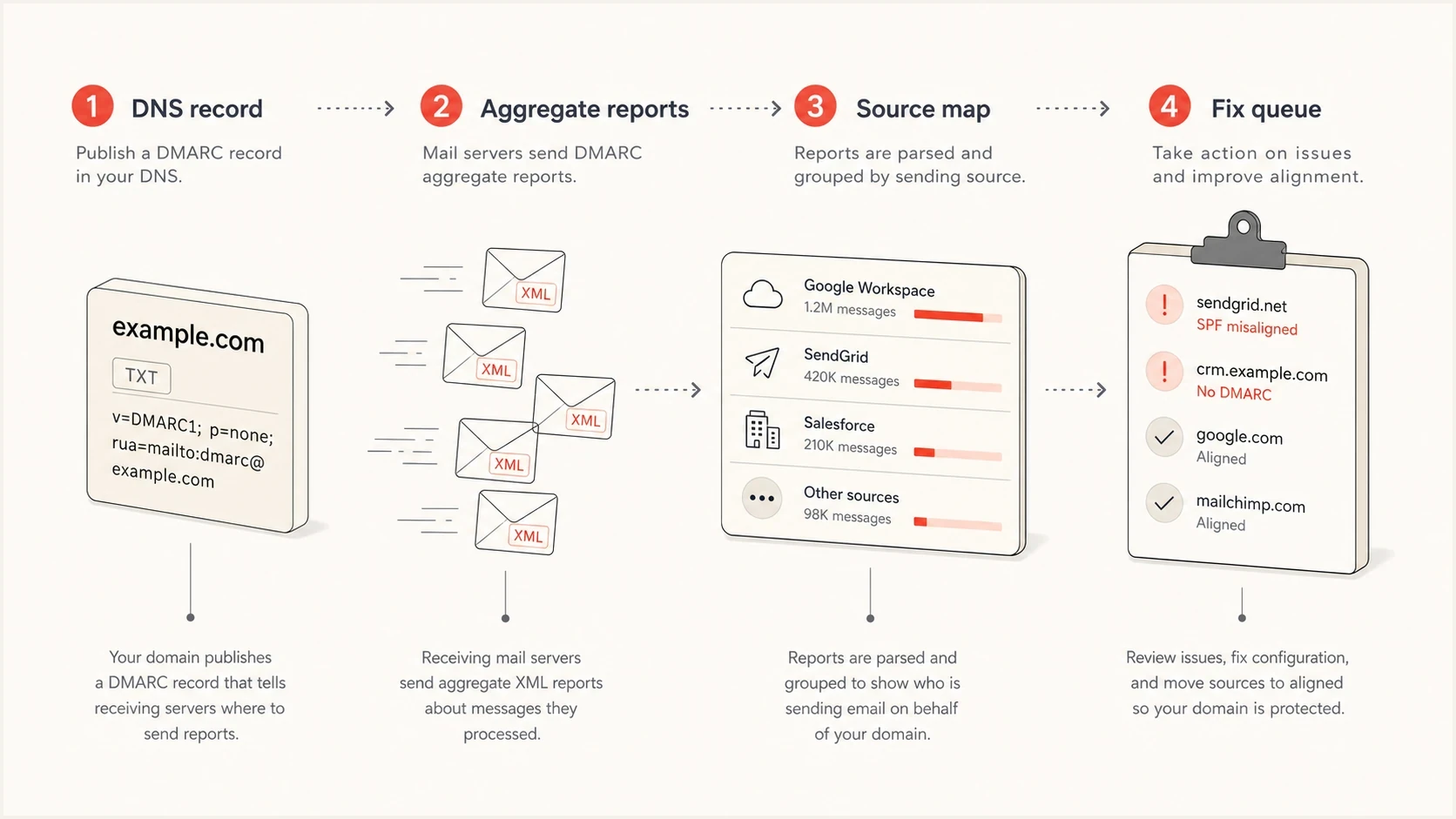
DMARC monitoring workflow showing DNS policy, aggregate reports, source mapping, and fix actions.
Self-hosting is not wrong. It is a trade. You keep more control over report data, but you also own parsing, updates, storage, abuse handling, dashboards, TLS, mail routing, and on-call debugging. For one privacy-sensitive domain, that can be rational. For an MSP or a lean internal team, it usually becomes a side project that steals time from policy enforcement.
The hidden cost test
Before choosing a free or self-hosted tool, write down who will handle these jobs every week.
- Sender review: New IPs and vendors must be approved, explained, or removed.
- DNS changes: SPF, DKIM, and DMARC records still need an owner and a review path.
- Policy moves: None, quarantine, and reject changes need rollout evidence and rollback notes.
- Incident handling: A sudden failure spike needs an alert when report data arrives, not a report found days later.
Set up monitoring without painting yourself into a corner
Start with a reporting-only DMARC record unless you already know every legitimate sender is passing. The reporting address should point at the monitoring tool. If you are comparing products, add each reporting destination to the rua tag in the same DMARC record. Never publish a second DMARC record at the same name.
Starter DMARC TXT recorddns
_dmarc
v=DMARC1; p=none; rua=mailto:dmarc@yourdomain.com
Collect at least 30 days of representative traffic so reports cover monthly billing, account messages, newsletters, support mail, internal systems, and dormant senders. Use a longer window for seasonal systems. General-purpose user-mail domains that intend to progress beyond monitoring should spend at least a month at p=none and another month at p=quarantine while comparing disposition results.
When DNS ownership is slow or split between teams, Hosted DMARC removes friction because policy management happens inside the platform after the initial CNAME setup. That is especially useful when a security team owns policy but IT owns DNS.
Policy rollout checkpoints
Use report evidence and whole-policy changes instead of the historic pct tag.
Observe
p=none
Collect reports and map senders.
Remediate
p=none
Fix legitimate sources and test indirect flows.
Enforce
p=quarantine
Quarantine failures after evidence review.
Case-specific reject
p=reject
Use only when domain purpose and interoperability allow it.
What the current DMARC standards change
RFC 9989, RFC 9990, and RFC 9991 replaced RFC 7489. The DNS version remains v=DMARC1, so existing records do not need a new version tag, but monitoring tools should understand the current tag set, DNS Tree Walk policy discovery, aggregate report format, and failure-report rules.
- Percentage rollout is historic: The pct tag is no longer part of the current specification. Use p=none data, fix legitimate senders, then make deliberate whole-policy changes.
- New policy controls exist: The t=y value requests treatment one policy level below the published policy while testing, and np sets policy for non-existent subdomains. Confirm receiver and monitoring-tool support during the transition.
- Aggregate alerts follow report arrival: RUA data arrives in daily or more frequent aggregate reports. A tool can parse and alert after a report arrives, but it cannot turn aggregate reports into per-message live telemetry.
- Failure reports need privacy controls: RUF data can contain headers or message content, and many receivers limit or omit it. Treat RUF as supplementary and check minimisation, access, retention, and deletion controls.
Ask vendors which specification versions they parse, how they normalize old and current fields, and whether they preserve raw XML for investigation. A polished dashboard is less useful if it silently drops malformed reports, duplicate report IDs, or policy-override reasons.
Where Suped fits in the workflow
Suped is built for the part of DMARC that usually slows teams down: translating report data into ownership and fixes. The dashboard shows authentication health, sources, policy status, and failures. The issues view then turns that into specific remediation steps, so the person responsible for a sender does not need to interpret raw XML or guess which DNS record matters.

Issue steps to fix dialog showing the issue overview, tailored fix steps, and verification action
The same workspace can cover hosted SPF, SPF flattening, hosted MTA-STS, blocklist monitoring, blacklist checks, alerts, and MSP reporting. That matters when email authentication is shared across marketing, security, IT, product, and client-service teams. A tool that only shows DMARC pass rates leaves too much coordination outside the system.
If the domain might have baseline authentication problems, run a domain health check first. That gives you a quick read on DMARC, SPF, and DKIM before you spend time comparing reporting dashboards.
Roll out enforcement after monitoring
Monitoring is not the finish line. The goal is a policy that fits the domain after legitimate senders are configured correctly. Transactional and brand-only domains often work toward p=reject. General-purpose user-mail domains need extra caution because mailing lists, aliases, and other indirect flows can break; RFC 9989 advises those domains against p=reject.
Current enforcement examplesdns
_dmarc
v=DMARC1; p=quarantine;
rua=mailto:dmarc@yourdomain.com

_dmarc
v=DMARC1; p=reject;
rua=mailto:dmarc@yourdomain.com
Do not simulate a percentage rollout with the historic pct tag. Move between full policy states only after report data shows readiness, test forwarding and mailing-list paths, and keep a documented rollback record.
The right monitoring tool makes policy changes safer by showing which failures are real risk and which are broken legitimate senders. Review source volume, domain matching, DKIM stability, SPF status, report history, and policy-override reasons before each move. A published p=reject policy also remains an input to receiver handling, not a guarantee that every receiver will reject every failing message.
A practical rollout rule
Move policy only when the remaining failures are either unauthorised, intentionally unauthenticated, or owned by a team with a dated fix plan.
Views from the trenches
Best practices
Start with p=none, prove every sending source, then move only verified mail to enforcement.
Review new sources weekly until the sender list has stopped changing for several cycles.
Keep marketing, product, finance, and HR senders mapped to owners before changing policy.
Use alerts for sudden failure spikes instead of waiting for a monthly report review queue.
Common pitfalls
Publishing p=reject before DKIM is stable breaks good mail faster than it blocks abuse at scale.
Treating every unknown source as hostile causes confusion when old systems still send mail.
Ignoring subdomains leaves legacy tools outside the policy readers think protects them.
Buying a tool without fixing ownership leaves the same DNS and sender issues unresolved.
Expert tips
Compare SPF pass, DKIM pass, and visible From domain match before trusting a source fully.
Use hosted policy management when many teams need DNS changes but only one team owns updates.
Separate volume noise from risk by prioritising high-volume failures and new sources first.
Keep a rollback path for each policy step so urgent sending incidents stay manageable.
Marketer from Email Geeks says free DMARC reports can suit a handful of domains when weekly visibility is enough, but they are weak for urgent investigation.
2025-10-14 - Email Geeks
Marketer from Email Geeks says paid monitoring makes more sense once the program has many active domains or high monthly volume.
2025-11-03 - Email Geeks
Which DMARC monitoring tool should you choose?
Choose Suped when your team needs to move from reports to fixes and then to an appropriate enforcement policy without scattering work across spreadsheets, DNS tickets, and one-off vendor notes. Suped is our platform, and its practical fit is guided remediation beside hosted authentication controls and ownership workflows.
If your domain count is tiny and the risk is low, start with a free digest tool and prove what is sending. If data must stay in your own environment, self-hosting is valid, but budget time for maintenance. If you have many domains, clients, or changing senders, pay for a platform that has report-driven alerts, ownership workflows, hosted policy controls, sufficient history, and specific steps to fix authentication failures.




